
Tag: Access Control

  • How to Build Secure Private Communication Systems for Small Online Communities

    How to Build Secure Private Communication Systems for Small Online Communities

    Small online communities may have only a few dozen or a few hundred members, but they can still handle sensitive information. Member profiles, private discussions, event plans, internal documents, volunteer records, and contact details may all pass through the same communication space.

    When a community grows without a clear structure, its main group chat can quickly become difficult to manage. Announcements disappear beneath casual conversations, multiple versions of the same file circulate, and members may receive access to channels or information they do not need.

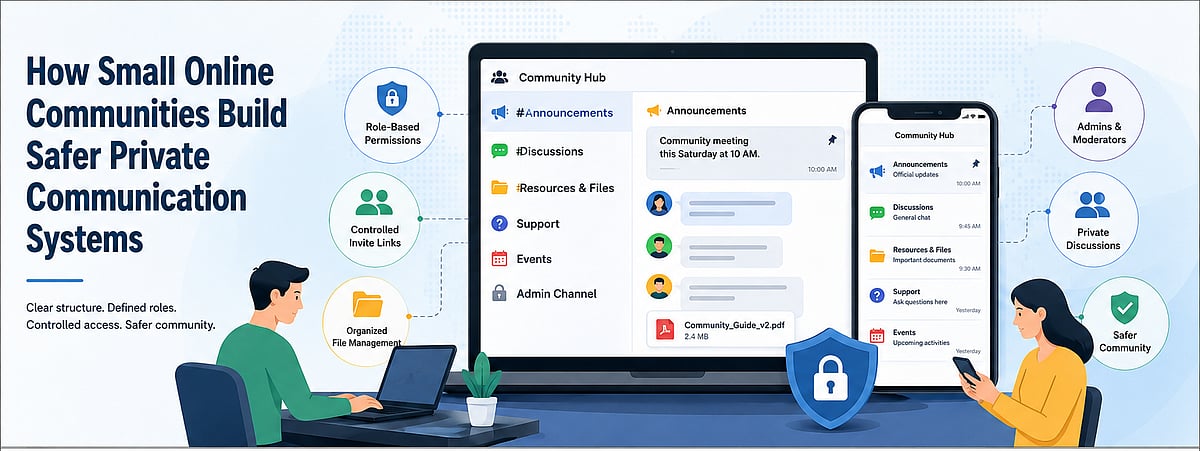
    A safer private communication system depends on more than selecting a messaging application. Communities also need documented rules, defined roles, controlled invitations, organized file storage, and a reliable process for removing access when members leave.

    For small communities, these governance practices are especially important because administrators often work part-time or voluntarily. A clear structure reduces both security risks and the long-term workload required to keep the community organized.

    Why Small Communities Need Communication Structure

    Many small communities begin with a single group created for convenience. Every announcement, question, file, event reminder, and private issue is posted in the same place.

    This approach may work during the earliest stage, but it becomes less effective as activity increases. Important messages are easily buried, members repeatedly ask the same questions, and administrators must search through long conversation histories to find previous decisions.

    A single-group structure also makes it difficult to control access. New members may immediately see old discussions or files that were not intended for them. Temporary guests may remain in the group after an event. Former organizers may continue to hold elevated privileges.

    File management presents another challenge. Documents uploaded directly into a busy chat are often difficult to locate later. Members may download, edit, and re-upload files without clear version names, creating uncertainty about which copy is current.

    New members are affected most. Without separate onboarding information, rules, or resource channels, they must learn through observation or repeatedly ask existing members for help.

    Communication structure solves these problems by giving each type of information a defined place and each role a defined level of access.

    Separating Announcements, Discussions and Support

    A practical community structure separates communication according to purpose.

    • Announcement channel: Official notices, deadlines, policy updates, and event information. Posting access can be limited to authorized administrators so important messages remain easy to identify.
    • General discussion channel: Everyday conversation, questions, and community interaction. It should not become the permanent storage location for important documents or final decisions.
    • Administrator channel: Private coordination among owners, moderators, and event organizers. Sensitive membership issues and moderation decisions should not be discussed in a public member space.
    • Files and resources channel: Links to community guidelines, schedules, templates, and final documents. Separating resources from general discussion makes them easier to find.
    • Event and support channels: Temporary spaces for specific projects, onboarding, or technical questions. Temporary channels should be archived or removed when they are no longer needed.

    The objective is not to create as many channels as possible. Each channel should have a clear purpose, an identifiable audience, and a predictable retention policy.

    Choosing and Verifying a Communication Platform

    Before building a channel structure, community organizers should evaluate whether a communication platform supports their operating needs.

    The first step is to confirm which device versions are available. Members may use Windows computers, Android phones, iPhones, tablets, or web browsers. A platform that works well on only one device may create participation barriers.

    Organizers should also verify the domain and download source. Similar-looking domains, misleading advertisements, and unrelated download buttons can confuse non-technical members. Installation instructions should clearly identify the correct platform, file type, and version.

    Users researching resources such as potato 官网入口 should examine the surrounding information rather than assuming a familiar keyword confirms the status of a website. Useful guidance should explain the intended device, download path, and verification steps without relying on exaggerated security claims.

    Privacy pages, help documentation, account-recovery instructions, and device-management guidance should also be reviewed. Community administrators need to understand how members can protect their accounts, review active sessions, and remove access from old devices.

    Platform selection should be based on documented requirements rather than popularity alone. Communities should identify which communication, access, storage, and moderation capabilities they actually need, then confirm whether the selected platform can support those workflows.

    Designing Roles and Member Permissions

    A small community should define roles before assigning elevated access.

    • Owner: Responsible for the overall community structure, primary settings, and continuity planning. Ownership should not be assigned casually because this role may control critical configuration and administrative access.
    • Administrators: Manage channels, member access, invitations, and policy enforcement. The number of administrators should be limited to people who actively perform these responsibilities.
    • Content moderators: Focus on discussions, inappropriate content, and community conduct. They may not need access to account-level settings or sensitive records.
    • Event organizers: Receive access to specific event channels, calendars, or participant lists without permanent control over the entire community.
    • Regular members: Receive access only to the channels and resources necessary for ordinary participation.
    • Temporary guests: Receive limited access for a specific meeting, project, or event, with a clear end date.

    The principle of least privilege is useful even in informal communities. Members should receive the minimum permissions required for their role. Elevated access can be added when necessary, but unnecessary privileges should not remain indefinitely.

    Communities should document who can create invitations, delete content, manage members, edit resources, and approve new administrators. Clear responsibility reduces confusion when an incident occurs.

    Protecting Invite Links and New Member Access

    Invite links are convenient, but they can also become uncontrolled entry points.

    A permanent invitation posted publicly may be copied, forwarded, indexed, or shared with people outside the intended audience. Once distributed, administrators may have little visibility into where the link appears.

    Where supported, communities should prefer time-limited or usage-limited invitations. A separate link can be created for each event, campaign, or recruitment period, then revoked when it is no longer needed.

    New members may also require a verification step. This does not need to be complicated. An administrator can confirm the person’s name, referral source, membership status, or reason for joining before granting full access.

    Some communities use a staged onboarding model. New members first enter a welcome or verification area, review the rules, and receive broader permissions only after approval.

    Old invitations should be reviewed regularly. Links created by former administrators, temporary organizers, or completed projects should be revoked. When a link is accidentally exposed, replacing it is safer than assuming it will no longer be used.

    Invitation control is most effective when responsibility is assigned to a specific role rather than shared informally among many members.

    Managing Shared Files and Community Records

    Files should be treated as community records rather than disposable chat attachments.

    Important documents should be stored in a consistent location. This may be a dedicated resource channel, an approved cloud folder, or another repository that the community can maintain independently of one individual’s device.

    File names should include enough context to identify the content and version. A format such as Community-Guidelines-2026-07-v2.pdf is more useful than final-new.pdf.

    Members should avoid creating several competing copies of the same document. One location should be designated as the current version, while outdated files are archived or clearly marked.

    Access should match sensitivity. Public event posters may be available to all members, while membership lists, payment records, identity information, or internal moderation documents should be restricted.

    When evaluating resources associated with a potato 中文版聊天软件, community organizers should focus on whether their chosen workflow allows members to locate files, understand access rules, and distinguish current records from informal chat attachments. The platform name alone does not solve document-governance problems.

    Sensitive files should not remain permanently downloaded on shared computers or unmanaged phones. Communities should encourage members to remove unnecessary local copies and avoid forwarding restricted documents into unrelated channels.

    Important records may require a separate backup. However, backup access should be controlled, documented, and reviewed rather than distributed broadly.

    Creating a Member Exit Process

    Communities often define how members join but fail to plan how access should end.

    When a member leaves, administrators should remove access to relevant groups and channels. If the person held an elevated role, that role should be revoked before or at the same time as membership removal.

    Invite links created or managed by the departing member should be reviewed. Where necessary, they should be disabled or replaced.

    Shared file access also requires attention. A former member may still have access to external folders, collaborative documents, event planning systems, or contact lists even after being removed from the messaging platform.

    Communities should determine which records must be retained. Decisions, final documents, financial records, or moderation notes may need to remain available to current administrators. Personal information that no longer serves a legitimate purpose should not be kept indefinitely.

    The exit process should also cover community-owned accounts, passwords, or administrative documentation. Critical information should not disappear when one organizer leaves.

    A simple checklist makes departures predictable and reduces the likelihood that old permissions remain active unnoticed.

    Running Regular Security and Membership Reviews

    Even a well-designed system becomes outdated if it is never reviewed.

    A monthly or quarterly review can begin with the administrator list. Communities should confirm that every person with elevated access still needs it and is actively involved.

    Inactive, duplicate, or unidentified member accounts should be investigated. Removal policies should be applied consistently rather than only after a problem occurs.

    Public or long-lived invitation links should be checked and revoked when no longer required. Administrators should also look for links posted on websites, social profiles, or old event pages.

    File repositories should be cleaned periodically. Outdated drafts, duplicate documents, abandoned event folders, and unnecessary sensitive records increase both confusion and exposure.

    Community rules should also be updated when roles, channels, or membership processes change. Members cannot follow procedures that are undocumented or no longer match the current system.

    Reviews do not need to be complex. A short recurring checklist is usually more effective than an extensive policy that no one follows.

    A Practical Community Governance Checklist

    Small communities can use the following framework to evaluate their communication system:

    • Channel structure: Separate announcements, discussions, resources, administration, events, and support where necessary.
    • Role permissions: Define owners, administrators, moderators, organizers, members, and temporary guests. Limit elevated access.
    • Invite links: Use controlled invitations, review active links, and revoke expired or exposed links.
    • File management: Maintain one current version, use consistent file names, restrict sensitive records, and remove outdated copies.
    • Member exit process: Remove channel access, revoke administrative roles, update links, and review external file permissions.
    • Regular review: Audit administrators, members, invitations, files, devices, and written rules on a predictable schedule.

    The checklist should be adapted to the community’s size and purpose. The most important requirement is that responsibilities are clear and reviews actually occur.

    Conclusion

    The safety of a small online community depends more on governance than on any single technology.

    Messaging platforms provide channels, accounts, invitations, and file-sharing mechanisms, but communities must decide how those tools are used. Without defined roles and processes, even a small group can develop unnecessary access, unclear ownership, and unmanaged records.

    Clear channel structures make information easier to find. Limited permissions reduce the impact of mistakes. Controlled invitation links protect membership boundaries. Organized files prevent version confusion, while a documented exit process ensures access does not continue indefinitely.

    By combining practical rules with regular reviews, small communities can build communication systems that remain private, understandable, and manageable as membership changes over time.

    Community Access Lifecycle: Join → Verify → Participate → Review → Exit. Each stage should have a defined owner, access boundary, and review action.

  • Essential API Security Best Practices to Protect Your Data

    Essential API Security Best Practices to Protect Your Data

    APIs are the backbone of modern applications, but they also present significant security risks. Implementing robust security measures is crucial to protect sensitive data and maintain system integrity. Below are the top 10 API security best practices every organization should follow.

    1. Use Strong Authentication

    Implement OAuth 2.0, OpenID Connect, or multi-factor authentication to verify user identities and prevent unauthorized API access across all environments.

    2. Enforce Authorization

    Apply role-based access controls (RBAC) to ensure users can only access permitted resources. This reduces privilege abuse and minimizes security vulnerabilities.

    3. Encrypt Data Everywhere

    Secure API traffic using HTTPS and TLS encryption. Protect stored sensitive information with strong encryption standards and robust key management practices.

    4. Validate All Inputs

    Filter and sanitize incoming requests to prevent SQL injection, cross-site scripting (XSS), command injection, and other common API-based attacks.

    5. Limit API Requests

    Use rate limiting and throttling to reduce abuse, block denial-of-service (DoS) attempts, and maintain stable application performance under heavy traffic.

    6. Monitor API Activity

    Continuously track logs, detect suspicious behavior, and respond quickly to anomalies using automated security monitoring and alerting systems.

    7. Rotate API Keys Regularly

    Replace compromised or aging credentials frequently. Securely store keys using secrets management solutions and enforce restricted access policies.

    8. Keep APIs Updated

    Regularly patch vulnerabilities, update dependencies, and retire unsupported versions to minimize exposure to evolving cybersecurity threats and exploits.

    9. Conduct Security Testing

    Perform penetration testing, vulnerability assessments, and automated scans regularly to identify weaknesses before attackers can exploit exposed API endpoints.

    By implementing these best practices, organizations can significantly reduce the risk of API-related security incidents and protect their digital assets.

  • Mastering Identity Lifecycle Management: Key Phases, Best Practices, and Essential Tools

    Mastering Identity Lifecycle Management: Key Phases, Best Practices, and Essential Tools

    Identity lifecycle management governs how access is provisioned, maintained, changed, and revoked for both human and non-human identities. It is a core access control function because lifecycle events determine who—or what—can reach applications, data, infrastructure, and privileged functions. When lifecycle controls are weak, organizations accumulate stale entitlements, delayed deactivation, excessive privileges, orphaned accounts, unmanaged credentials, and other access paths that expand security exposure.

    How Identity Lifecycle Management Works

    Identity lifecycle management keeps access aligned to verified business need. It connects identity data, policy decisions, workflow execution, and enforcement across the identity and access management (IAM) lifecycle. Lifecycle management acts as an enforcement layer, determining who or what can access critical systems, under which conditions, for how long, and with which governance requirements.

    Identity Data Sources and Authoritative Systems

    Authoritative identity data determines whether lifecycle decisions are accurate. Human resources systems, contractor platforms, directories, cloud identity providers, configuration management databases, DevOps platforms, and SaaS applications can all provide signals that define identity status, ownership, role, and access eligibility.

    • Employees: Lifecycle events usually originate in HR records, including hiring, transfer, leave, or termination status.
    • Contractors: Status, ownership, and end dates may come from contractor management platforms, vendor records, or procurement systems.
    • Non-human identities: Service accounts, API keys, machine credentials, OAuth tokens, and autonomous AI agents often depend on weaker ownership records and may require separate discovery and inventory controls.

    Policy-Driven Access Requests, Approvals, and Fulfillment

    Policy-driven provisioning grants access based on verified need rather than convenience, precedent, or unmanaged exceptions. Requests should be evaluated against role, attributes, risk, segregation-of-duties rules, data sensitivity, business justification, and time limits. Identity lifecycle management tools route requests through standard approvals, enforce policy before fulfillment, and retain evidence for each decision. Less-controlled models rely on email approvals, manual tickets, and inherited permissions, which can create privilege sprawl over time.

    Continuous Monitoring and Lifecycle Automation

    Lifecycle control does not end after provisioning. Access must stay accurate as identities move across roles, projects, locations, employment status, ownership structures, and technology environments. Continuous monitoring compares current entitlements with current identity attributes and policy requirements. Automation can trigger remediation when access no longer matches verified need, reducing the time between business change and access correction.

    Key Phases of Identity Lifecycle Management

    Identity lifecycle management phases are event-driven control points. Hiring, onboarding, role changes, project assignments, emergency access, separations, ownership transfers, and system decommissioning should each trigger access decisions. Every identity is a potential access path, and every access path is part of the enterprise attack surface. Lifecycle management helps keep access intentional, current, and defensible.

    Joiner Phase: Onboarding and Birthright Access

    The joiner phase establishes the initial access baseline. Employees, contractors, service accounts, bots, and workload identities should receive only the entitlements required for their role, function, environment, and approved business purpose. Birthright access needs close governance because it becomes the foundation for future privilege accumulation. Programs should define access using role-based, attribute-based, and policy-based models instead of copying peer permissions or granting broad defaults.

    Mover Phase: Role Changes and Access Adjustments

    The mover phase is where privilege sprawl often becomes permanent. Promotions, department transfers, project additions, temporary grants, emergency privileges, and geographic changes can all affect whether existing entitlements remain valid. Access granted for a previous responsibility should not persist after the business need expires. Lifecycle workflows should remove outdated access as part of the same event that provisions new access.

    Leaver Phase: Offboarding and Access Revocation

    The leaver phase covers deactivation, revocation, credential invalidation, and access path closure. Separations, contract endings, vendor exits, workload retirements, and service decommissioning should trigger timely and complete access removal. Controls should disable accounts, revoke active sessions where supported, remove group memberships, rotate shared secrets, invalidate tokens, and preserve evidence that deactivation occurred within required service-level targets.

    Benefits of an Effective Identity Lifecycle Management Solution

    An effective identity lifecycle management solution reduces exposure by making access decisions faster, more consistent, and easier to audit. It turns identity changes into controlled actions across directories, SaaS platforms, cloud services, databases, infrastructure, and privileged access systems. The value is governance at scale: access stays aligned to verified need, while exceptions become visible, time-bound, and reviewable.

    Reduced Security Risk and Least-Privilege Access

    Least privilege depends on lifecycle accuracy. If access is not removed when roles change or identities leave, least privilege cannot be enforced. Lifecycle controls use policy, automation, and access analytics to identify excessive entitlements, toxic combinations, dormant accounts, and high-risk privilege assignments. Stale permissions should be treated as exposure conditions that require review, remediation, or documented acceptance.

    Faster Onboarding, Productivity, and Operational Efficiency

    Lifecycle automation reduces delay without removing control. New identities can receive approved access quickly because policy, approvals, and fulfillment run through repeatable workflows. Well-integrated identity lifecycle management tools reduce manual service-desk work, limit repetitive provisioning tasks, and prevent speed from depending on governance bypasses.

    Audit Readiness and Compliance Evidence

    Regulated environments require evidence that access is appropriate, approved, reviewed, and revoked on time. Lifecycle management provides the control record behind those assertions. A mature program can show who approved access, why it was granted, when it changed, how it was fulfilled, and when it was removed. That evidence supports internal policy, external regulation, contractual commitments, and security assurance obligations.

    Identity Lifecycle Management Challenges

    Identity lifecycle management breaks down when identity data, application ownership, workflow execution, and enforcement systems are fragmented. The result can be inconsistent access, incomplete revocation, weak accountability, and poor visibility into who or what can reach sensitive assets. The operational requirement is straightforward: every identity needs an owner, every entitlement needs a purpose, and every access path should be justifiable when inspected.

    Disconnected Applications and Incomplete Identity Data

    Disconnected applications create unmanaged access islands. When systems sit outside centralized provisioning and deprovisioning, lifecycle decisions depend on local administrators, manual updates, and inconsistent evidence. Incomplete identity data makes the problem worse. If role, manager, employment status, asset ownership, or application entitlement data is inaccurate, automation can accelerate flawed decisions. Data quality should be addressed before automation is expanded.

    Excessive Privileges, Orphaned Accounts, and Shadow Access

    Excessive privileges often emerge gradually. A project grant remains after delivery, a temporary admin role becomes permanent, a contractor account survives contract expiration, or a service account loses its owner after a team reorganization. Shadow access is difficult to govern because it sits outside normal access management processes. Programs need continuous discovery of accounts, credentials, tokens, groups, and entitlements across managed and unmanaged systems.

    Balancing Automation, Governance, and User Experience

    Automation without governance can provision risky access at scale. Governance without automation creates delays that may lead to workarounds, shared accounts, and unauthorized access paths. Risk-based workflows help balance both needs. Low-risk, policy-compliant access can be fulfilled automatically, while privileged, sensitive, or unusual access requires stronger approval, time limits, justification, and post-grant review.

    Non-Human Identity Lifecycle Management

    Non-human identity lifecycle management is now a central enterprise security requirement. Service accounts, API keys, machine credentials, OAuth tokens, bots, workloads, containers, scripts, CI/CD identities, and autonomous AI agents often hold persistent access to sensitive systems. In many environments, these identities outnumber human identities and change more often. When unmanaged, they create durable access paths that are hard to attribute, revoke, and monitor.

    Service Accounts, API Keys, Bots, and Machine Identities

    Non-human identities support automation, integration, workload execution, and system-to-system communication. Their risk profile differs from human identities because they often run continuously, authenticate without interactive controls, and rely on secrets that may be copied, embedded in code, or forgotten. Programs should classify non-human identities by function, owner, environment, privilege level, credential type, and business criticality. An API key used in production payment processing requires different governance than a temporary test token in a sandbox.

    Ownership, Rotation, and Credential Lifecycle Controls

    Ownership makes non-human identities governable. Every service account, machine identity, token, and autonomous agent should have a business owner, technical owner, approved purpose, expiration logic, and revocation path. Credential lifecycle controls reduce persistence risk. These controls include rotation, vaulting, scoped privileges, short-lived credentials where supported, certificate renewal controls, secret scanning, and automated deactivation when workloads or integrations are retired.

    How an Identity Security Platform Governs Non-Human Identities

    An identity security platform extends lifecycle governance beyond employees and contractors. It discovers non-human identities, maps them to owners and assets, evaluates entitlements, and enforces policy across hybrid infrastructure, cloud environments, SaaS applications, and DevOps pipelines. Non-human identities should be treated as first-class security subjects. Governance should include access certification, anomaly detection, credential hygiene, entitlement analysis, and automated remediation when a machine credential, OAuth token, or AI agent exceeds its approved scope.

    Best Practices for Managing the Identity and Access Management Lifecycle

    Managing the identity and access management lifecycle requires a structured operating model. Policies, ownership, automation, access reviews, and metrics must work together so lifecycle decisions stay accurate at enterprise scale. The objective is not simply to manage accounts. The objective is to govern exposure by ensuring every entitlement reflects current, verified need and every lifecycle event produces timely access correction.

    Define Ownership, Policies, and Role-Based Access Models

    Ownership and policy design determine whether lifecycle management can scale. Without clear accountability, access reviews become procedural exercises, and remediation becomes inconsistent.

    • Identity ownership: Each human and non-human identity should have an accountable owner responsible for legitimacy, access needs, and lifecycle status.
    • Access models: Role-based, attribute-based, and policy-based access models should define standard entitlement patterns and reduce ad hoc grants.
    • Exception handling: Exceptions should be justified, risk-scored, time-bound, and reviewed before they become permanent exposure.
    • Application accountability: Application owners should validate entitlement meaning, sensitivity, and revocation behavior.

    Automate Provisioning, Deprovisioning, and Access Reviews

    Automation gives lifecycle controls the speed required to match business change. Manual execution often cannot keep pace with hiring, transfers, project churn, cloud expansion, and non-human identity growth.

    1. Event capture: Lifecycle events should originate from authoritative systems such as HR, contractor platforms, ITSM, CMDB, cloud control planes, and DevOps tooling.
    2. Policy evaluation: Access decisions should be checked against role, attributes, risk, segregation-of-duties constraints, and data sensitivity.
    3. Workflow execution: Approved access should be provisioned through controlled connectors, APIs, or orchestration workflows with full logging.
    4. Revocation action: Access removal should disable accounts, remove entitlements, revoke sessions where supported, invalidate credentials, and confirm completion.
    5. Review cadence: Access reviews should be targeted by risk, privilege level, application criticality, and lifecycle event history.

    Measure Maturity Across the Identity Management Lifecycle

    Measurement separates governed lifecycle management from routine administration. Security leaders need metrics that show whether access is correct, excessive, delayed, or unowned.

    • Provisioning speed: Time from approved request to completed access fulfillment.
    • Deactivation latency: Time from separation, retirement, or ownership change to complete revocation.
    • Privilege reduction: Volume of excessive, dormant, or toxic entitlements removed.
    • Review effectiveness: Percentage of access reviews resulting in meaningful remediation.
    • Coverage depth: Percentage of applications, cloud services, and non-human identities under lifecycle governance.
    • Exception aging: Number and age of temporary grants, emergency privileges, and policy exceptions.

    Identity lifecycle management defines how tightly the enterprise access surface is controlled. Programs that combine lifecycle automation, authoritative data, and governance discipline reduce privilege sprawl, close stale access paths, and maintain defensible control over human and non-human identities.