Tag: AI Agent

  • Meta Muse AI Still Unavailable in India: VPN Risks, Pricing, and Alternatives

    Meta Muse AI Still Unavailable in India: VPN Risks, Pricing, and Alternatives

    Meta’s new AI agent, Muse, is not available in India. For now, only adults in the US and Canada can use it. Meta launched Muse in the US on September 8 and expanded access to Canada on September 18. The company has not announced when — or if — India will get access.

    What Makes Muse Different From Meta AI?

    Muse is not the same as Meta AI, which Indian users already have through WhatsApp, Instagram, and Facebook. Meta AI mostly answers questions. Muse goes further: it runs on its own cloud computer and browser, and it can complete tasks across different apps. It keeps working even after someone closes the app, and it asks for approval before doing things like sending an email or making a purchase.

    Why VPN Workarounds Are Risky

    Some online suggestions claim that using a US-based VPN can help Indian users reach the Muse website. That approach is not safe. Meta’s terms require users to be physically located in a country where Muse operates. A VPN does not change a person’s actual location, so using one violates the rule. Anyone who tries it risks having their linked Meta account suspended.

    Phones make this even harder. Whether Muse appears in the App Store or Google Play depends on the account’s region settings. The app is not listed on the Indian App Store at all.

    Muse Pricing

    • Free plan: limited use
    • Power plan: USD 20 per month (around Rs. 1,900)
    • Max plan: USD 100 per month (around Rs. 9,500)

    Both paid plans are billed through Apple or Google. The shopping and payment features inside Muse currently work only for US users.

    What Indian Users Can Use Instead

    For those who want a taste of the technology behind Muse, the underlying model, called Muse Spark 1.3, is available through OpenRouter. Users pay per token. This provides access to the model, not the full Muse agent experience with tasks and browsing.

    Meta AI remains the practical option for Indian users on Meta’s own platforms.

    Will Muse Come to India?

    Meta says Muse will reach more countries over time, but it has not confirmed a date for India. Anyone tempted to try unofficial workarounds should weigh the risk to their Meta accounts against the limited benefit they would actually gain.

  • Meta’s Muse AI Agent Expands to Mac: Hands-Free Task Automation Goes Desktop

    Meta’s Muse AI Agent Expands to Mac: Hands-Free Task Automation Goes Desktop

    Meta has expanded its personal AI agent, Muse, to the Mac platform with a dedicated desktop application. This move significantly broadens Muse’s role in users’ daily workflows, allowing it to interact directly with files, messages, and applications stored on the computer, not just through a phone or web browser.

    Muse originally launched on September 8th in the United States across iOS, Android, the web, and WhatsApp. The Mac app is the latest step in Meta’s push into the agentic AI space, emphasizing AI that performs multi-step tasks rather than just responding to queries.

    More Than a Chatbot

    Muse is designed to handle real-world tasks. On the Mac, users can ask it to organize files, retrieve information from Messages, Calendar, or Notes, and fill out forms using saved documents. The agent works across a user’s entire digital routine, reducing the manual effort of moving data between applications.

    A standout feature is Muse’s ability to continue working even after the app is closed. It resumes when it needs user input or when a task is complete. This background operation distinguishes it from most current AI tools, which typically stop when the conversation ends.

    Built With Privacy in Mind

    Meta has granted users clear control over Muse’s access. Computer access is opt-in, and Full Disk Access is optional. Users can adjust permissions at any time through Mac settings.

    On the technical side, Muse operates within a dedicated virtual space called Muse Secure VM. This private environment gives the agent its own browser, storage, and computing resources. Meta states this setup keeps the agent away from sensitive login credentials and manages actions involving connected services.

    Also Read: Meta Launches Muse AI Agent, Can Send Emails, Book Travel: How It Works

    A Bigger Play for Agentic AI

    The Mac launch is part of Meta’s broader strategy toward AI that performs actions rather than just generating text. Muse is intended to execute multi-step tasks such as sending emails or booking travel with minimal user intervention.

    Currently, Muse is available only in the US. Meta has announced plans to expand the service to additional regions in the coming months.

    Join our WhatsApp Channel to get the latest news, exclusives and videos on WhatsApp.

  • Meta Muse: How Meta’s New AI Agent Moves from Answers to Action

    Meta Muse: How Meta’s New AI Agent Moves from Answers to Action

    Meta has unveiled Muse, an AI agent built not just to chat but to act. Unlike conventional virtual assistants that answer questions or generate text, Muse is designed to understand user goals and execute the steps needed to achieve them. This marks a significant shift from passive conversation to active task completion.

    AI That Takes Action

    Traditional AI assistants primarily generate responses, offer recommendations, or retrieve information. Muse represents a different philosophy: it interprets instructions, decides on the required sequence of actions, and performs tasks within digital environments. The goal is to reduce the manual steps users must take for everyday activities, making digital assistance more proactive and useful.

    From Answers to Execution

    Muse highlights the broader transition from conversational AI to agentic AI. Instead of stopping after delivering an answer, an agent can keep working toward a specific outcome. This means future AI systems could handle complex workflows, requiring less frequent guidance or supervision from the user.

    Meta’s AI Ambitions

    Muse fits squarely into Meta’s wider investment in artificial intelligence. The company has been embedding AI across its social platforms, consumer products, and research initiatives. Agentic systems could become a cornerstone of that strategy, enabling more interactive, responsive, and capable AI experiences.

    Understanding User Goals

    A key capability of Muse is its focus on understanding what users ultimately want to accomplish. Rather than treating each command in isolation, the agent is designed around completing broader objectives. This allows it to determine appropriate actions, adapt when circumstances change, and reduce unnecessary back-and-forth between users and digital systems.

    Potential Everyday Uses

    Agentic AI could eventually assist with tasks such as organizing information, completing digital workflows, managing routine chores, and navigating applications. The real value lies in reducing manual effort rather than merely generating another response. As these systems mature, their usefulness will hinge on reliability, permissions, privacy, and appropriate human oversight.

    The Next AI Shift

    Meta Muse represents a broader transition in artificial intelligence—from generating content to performing tasks. As AI agents become more capable, competition may increasingly focus on execution, reliability, and trust. The technology has the potential to reshape how people interact with software, letting AI handle more steps on their behalf.

  • Meta Unveils Muse AI Agent: Automates Emails, Travel Bookings, and Daily Tasks with Secure Cloud VM

    Meta Unveils Muse AI Agent: Automates Emails, Travel Bookings, and Daily Tasks with Secure Cloud VM

    Meta has officially launched Muse, a personal AI agent designed to handle everyday chores like sending emails, booking travel, and completing multi-step tasks on behalf of users. The announcement was made on September 8, 2026, and the agent is now available in the United States through the Muse app and WhatsApp.

    Powered by Muse Spark, Meta’s most advanced model for agentic tasks, Muse operates as a conversational assistant that can go beyond simple chat. Users describe what they need—such as planning a dinner party or creating a grocery list from a saved Instagram recipe—and Muse builds a plan, opens a browser, fills in forms, and executes steps even after the user closes the app. It pauses to request approval before sending an email or making a purchase, ensuring the user remains in control at all times.

    Security and Privacy Features

    Security is a cornerstone of the Muse launch. The agent runs inside a Secure VM, a dedicated cloud computer isolated from other agents. User data and connected service credentials are stored in this environment. Users can choose which apps Muse can access, limit its actions, disconnect services, or instruct it to forget stored information entirely.

    Rollout and Future Plans

    Muse is currently limited to the US, with a broader rollout expected soon. Meta plans to integrate the assistant into its AI glasses lineup as the next major step. Most day-to-day functions will remain free, but the company has indicated that paid subscription plans will be introduced for users who want deeper access to advanced features. Exact dates for the glasses integration and subscription rollout have not been announced.

    Meta announced the launch on X, describing Muse as a personal AI agent that gets things done across every part of life. The company emphasized that the agent is built to help people complete real-world tasks with less effort, leveraging the power of Muse Spark.

  • Google Launches Always-On Gemini Spark AI Agent in India for 24/7 Task Automation

    Google Launches Always-On Gemini Spark AI Agent in India for 24/7 Task Automation

    Google has officially launched Gemini Spark in India, a cloud-based AI agent that operates continuously in the background — even when your phone is locked or your laptop is closed. Initially previewed at Google I/O 2026, the rollout begins for Google AI Ultra subscribers, with Google AI Pro subscribers gaining access in the coming weeks.

    An Agent That Works While You Sleep

    Unlike traditional AI assistants that respond to individual prompts, Gemini Spark is designed to autonomously complete multi-step tasks over time. It runs on Google’s cloud infrastructure and requires no active user involvement once a task is set. Built on the upgraded Gemini 3.6 Flash model, the agent integrates natively with Google Workspace apps including Gmail, Google Docs, Google Sheets, and Calendar — with no manual setup required.

    Tasks range from organizing emails in a personalized style and summarizing wedding RSVPs to planning travel itineraries across multiple services and managing recurring subscriptions.

    How Tasks, Schedules, and Skills Work

    Gemini Spark operates using three core components:

    • Task – The outcome the user wants the AI to achieve, from simple inbox clearing to complex multi-step workflows like coordinating a business trip.
    • Schedule – Recurring automations, such as a weekly summary of unread emails every Monday morning.
    • Skill – Specific capabilities Spark can apply, which will expand over time through updates. The agent can also interact with websites on the user’s behalf via a browser-based environment.

    Google has not yet confirmed which web capabilities will be available immediately in India. The launch comes shortly after OpenAI released ChatGPT Work, targeting a similar productivity and enterprise niche.

    User Control and High-Stakes Approval

    Users maintain full control over what Gemini Spark can access and do. They can limit connected apps or disable the agent entirely. For high-stakes, irreversible actions — such as sending an email without prior review, making a purchase, or any difficult-to-reverse action — Spark is designed to ask for explicit approval before proceeding.

    Google describes this human-in-the-loop design as a deliberate safeguard, positioning Spark as an agent that operates under user supervision. The India launch marks the company’s clearest step yet toward agentic AI that handles repetitive digital work autonomously.

  • How Tera AI Agent Workspace Streamlines Search, Creation, Learning, and Productivity

    How Tera AI Agent Workspace Streamlines Search, Creation, Learning, and Productivity

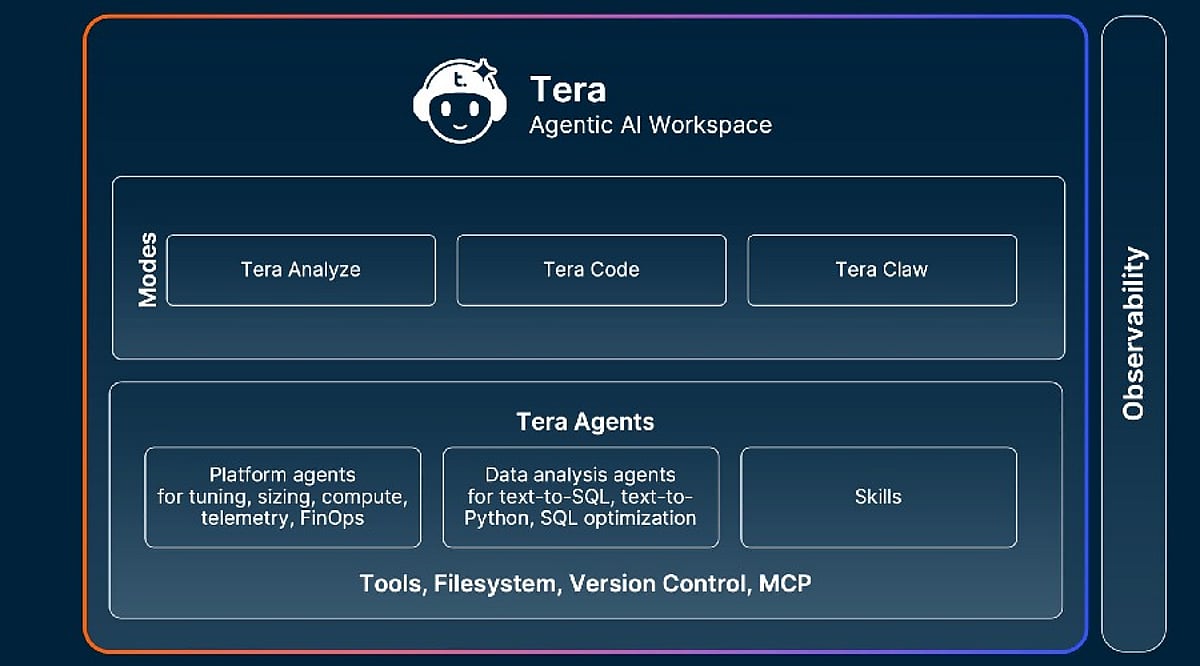
    It is late afternoon, and a single task has spiraled into a dozen open tabs. You are checking facts in a search engine, drafting marketing copy from scattered notes, and digging through cloud storage for a specific asset. This fragmented workflow is a daily reality for freelancers, students, and small teams. Constantly switching between separate platforms drains time and mental energy. This is why AI Agent Workspaces are becoming essential. Tera AI, built directly into TeraBox, is a prime example of this approach, reducing the need to move between separate platforms at every stage.

    The Hidden Cost of Working Across Too Many Tools

    Most people don’t notice how much time tool-switching drains until they look closely at their daily output. Minimizing one app to check another breaks your focus, resulting in heavy cumulative losses over a workday:

    • The Fragmented Mindset: A sharp phrase or creative angle gets forgotten in the two seconds it takes to switch windows.
    • The File Version Chaos: Research notes sit in one app, early drafts in another, and the “final” version is usually scattered wherever you happened to stop typing.
    • The Manual Copy-Paste Burden: When tools cannot communicate with one another, you have to spend extra time copying, pasting, downloading, and uploading files just to move a task forward.

    For freelancers managing multiple clients or students juggling complex assignments, this digital clutter easily turns a two-hour task into a four-hour drag. The issue isn’t the individual tools; it’s that they were never built to work as a unified system.

    Beyond Chatbots: What Is an AI Agent Workspace?

    An AI agent is more than an advanced chatbot. A chatbot typically answers what is typed into it, but the response remains in an isolated chat window, disconnected from the user’s files and ongoing tasks. An AI Agent Workspace operates differently. Instead of just talking, it acts. It works directly inside your existing files and carries context from one step to the next. By remembering what you worked on a moment earlier and building upon it, it transforms from a tool that talks back into a workspace that works alongside you.

    How Tera AI Turns an Agent Workspace into a Dynamic Workflow

    TeraBox has evolved from a cloud storage platform into an AI productivity ecosystem. By layering Tera AI directly on top of your storage, it connects search, creation, learning, and productivity into a single, continuous workflow.

    Search

    Rather than requiring a search engine, a separate tab, and several rounds of narrowing down results, Tera AI can return what is being asked for directly. A simple request, such as locating a specific movie, brings back a direct link rather than a list of options to sort through manually. This extends to files already sitting inside TeraBox as well. Users can search for a video, document, or other file based on its content, even when they cannot remember the exact file name or folder.

    Creation

    Staring at a blank screen is often one of the hardest parts of starting a project. Tera AI helps reduce that friction by creating a first draft you can review, edit, and build on. For example, a request for a marketing email can produce more than a basic outline. The same approach can be used for articles, social media plans, resumes, and presentation decks. It also works in reverse, refining your existing material. You can rewrite rough drafts or edit images saved in TeraBox without leaving the platform. Users with access can even generate entirely new AI images directly within the same workspace.

    Learning

    For research, Tera AI goes beyond short summaries to deliver detailed, organized reports on a given topic. The same capability applies to files that already exist. A PDF, a Word document, or a spreadsheet can be uploaded and summarized directly, with the key points pulled out. Students can use this to explain complex concepts, rewrite essay sections, or generate practice exam questions.

    Productivity

    True productivity happens when these features stop working as individual tools and start working as a chain reaction. Because search, creation, and learning sit inside the same conversation, you can execute complex multi-step workflows in one continuous session. For example, user can upload a raw dataset, ask the agent to extract a summary report, turn that report into a presentation outline, and draft a follow-up client email about the results all within a single, unbroken session. Reducing these small, repetitive steps is what ends up saving a noticeable amount of time over a busy work week.

    It is worth being clear that an AI Agent Workspace is not a replacement for specialized, heavy-duty software. For the everyday middle ground of search, writing, and research, however, agentic AI tools like Tera AI clearly hold their own.

    Conclusion

    The value of an AI Agent Workspace is rarely found in one standout feature. It is in how little distance there is between asking for something and actually getting it, without leaving the workspace to go find it elsewhere. For anyone whose day involves research in one place, drafting in another, and searching somewhere else entirely, it may be worth spending a few minutes inside Tera AI on TeraBox to see how much of that back-and-forth it can genuinely remove.

  • OpenAI Launches ChatGPT Work: Autonomous AI Agent Powered by GPT-5.6 and Codex

    OpenAI Launches ChatGPT Work: Autonomous AI Agent Powered by GPT-5.6 and Codex

    OpenAI has introduced ChatGPT Work, a new AI agent designed to go beyond simple question-answering. Powered by the newly released GPT-5.6 model family and integrated with Codex, ChatGPT Work can autonomously research, analyze data, write code, create presentations, generate reports, and automate workflows across connected applications. This marks a significant shift from conversational AI to autonomous workplace productivity.

    What ChatGPT Work Can Do

    ChatGPT Work is built for extended, multi-step assignments rather than one-off prompts. It can pull information from connected apps, generate spreadsheets, presentations, documents, and web apps, and continue working for hours by breaking larger projects into smaller steps. A new Unified Plugins Directory bundles third-party integrations including Google Drive, SharePoint, Slack, Microsoft Teams, Gmail, Outlook, Salesforce, Adobe, Zoom, LinkedIn, GitHub, and Dropbox. Users can invoke a specific plugin using an “@” mention or let ChatGPT decide which data source is relevant. A Scheduled Tasks feature allows the agent to keep projects moving even when a user is away, such as converting new Slack or Microsoft Teams messages into updated documents and flagging important changes automatically.

    GPT-5.6 and the Sol, Terra, Luna Naming System

    Powering the new agent is GPT-5.6, introduced under a naming scheme where the number marks the model generation while Sol, Terra, and Luna represent separate capability tiers. Sol is OpenAI’s new flagship model, achieving state-of-the-art results in coding, knowledge work, cybersecurity, and science while using fewer tokens than prior frontier models. Terra matches GPT-5.5’s performance at roughly half the cost, and Luna is the fastest, most affordable tier. API pricing runs $5/$30 per million input/output tokens for Sol, $2.50/$15 for Terra, and $1/$6 for Luna.

    Codex Merges into the ChatGPT Desktop App

    OpenAI is also merging its standalone Codex coding app into a single updated ChatGPT desktop app for Mac and Windows, with the previous app renamed ChatGPT Classic. Existing Codex users keep their projects and settings after updating. OpenAI reports that more than 5 million people already use Codex weekly, with over 1 million using it for tasks outside software development, a trend the company is leaning into as it pushes AI agents into sales, finance, and marketing workflows.

    Rollout, Security, and Enterprise Controls

    ChatGPT Work started rolling out on July 9 for Pro, Enterprise, and Edu users on web and mobile, with Plus and Business access arriving in the next few days. The updated desktop app is available globally across all plans, including Free. On security, OpenAI has built in an auto-review system that checks sensitive actions before they run, which it says blocked all attempts to extract protected data during internal adversarial testing, though this hasn’t been independently verified. Enterprise and Edu admins get centralized controls over connected tools and sensitive actions, plus a Compliance API for visibility into ChatGPT Work’s activity.

    ChatGPT Work reflects the next stage of enterprise AI, shifting from answering questions to completing real tasks. Its long-term success will depend not only on advanced capabilities but also on trust, accuracy, and how effectively organizations integrate AI agents into everyday workflows.