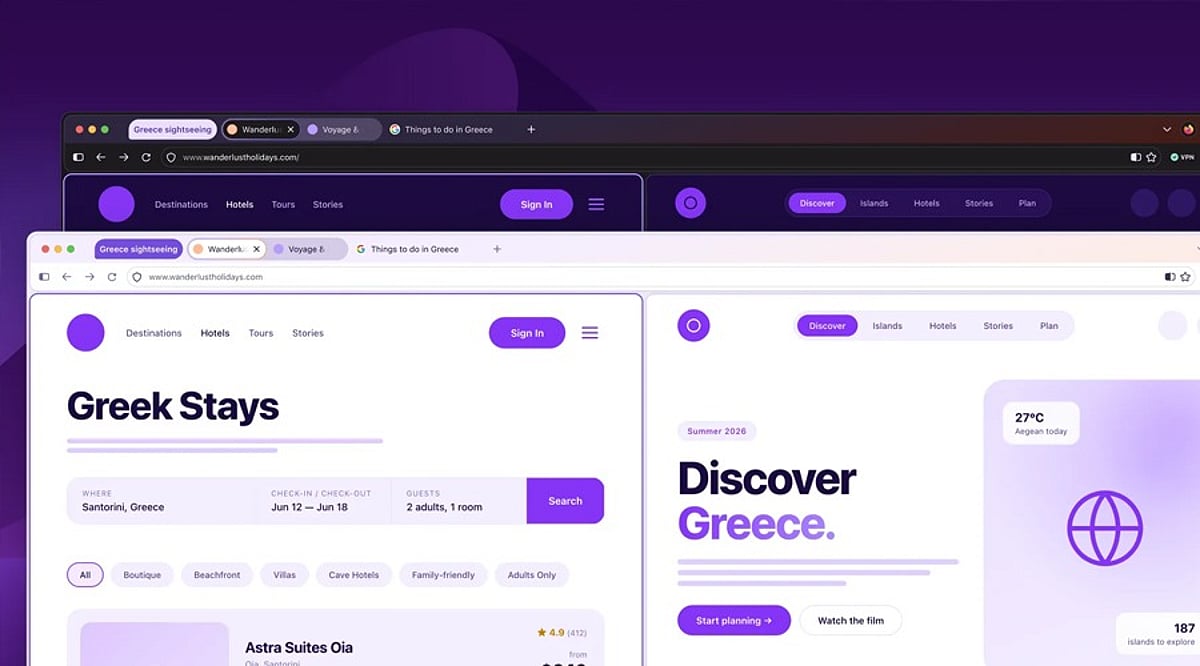
Mozilla has released Firefox 157, a significant visual update that modernizes the browser’s interface while maintaining its core functionality. The redesign introduces rounded tabs, a refreshed color palette, and improved personalization options, including new themes and wallpapers. One of the most requested features, Compact Mode, makes a return, allowing users to minimize the space occupied by tabs and controls for a more streamlined view.
A Rounded, Modern Interface
Firefox 157 adopts rounded elements throughout the interface, from tabs to the address bar. Icons, spacing, and colors have been updated to create a more unified appearance across desktop and mobile platforms. Mozilla describes this as a ‘renewal’ rather than a complete redesign, aiming to modernize the browser without compromising performance.
Enhanced Personalization
Users can now choose from a variety of new themes and wallpapers, offering light and dark options to suit different preferences. The update also improves access to frequently used tools like tab groups, Split View, and vertical tabs, making multitasking more efficient.
Compact Mode Returns
Responding to community feedback, Mozilla has reinstated Compact Mode. This feature reduces the footprint of tabs, toolbars, and controls, giving users more screen space for web content. It can be enabled directly in Settings, eliminating the need for workarounds. This is particularly beneficial for smaller displays or users who prefer a less cluttered interface.
Broader Improvements and Accessibility
The redesign also focuses on accessibility, with improvements to readability, contrast, focus states, keyboard navigation, and system setting compatibility. Firefox 157 is part of a broader refresh that includes previous updates to the homepage, Split View, built-in VPN features, and AI controls. Mozilla continues to offer users control over AI enhancements, allowing them to enable or disable these features as they see fit.
With Firefox 157, Mozilla delivers a visually refreshed browser that balances modern design with user customization and control.