Tag: Claude AI

  • Anthropic Cracks Down on Chinese Firms Using VPNs to Access Claude AI

    Anthropic Cracks Down on Chinese Firms Using VPNs to Access Claude AI

    Anthropic is tightening access controls for its Claude AI assistant after discovering that Chinese companies have been using overseas entities, VPNs, and personal subscriptions to bypass a strict regional ban. The company explicitly blocks access from unsupported regions, including China, but firms such as Ant Financial and ByteDance reportedly found workarounds to keep Claude available to their engineers.

    Ant Financial provided some employees with corporate Claude accounts through its intranet, linked to a Singapore-based entity. ByteDance allowed engineers to pay for personal Claude subscriptions and seek reimbursement, routing access through VPNs. Microsoft also sold API access to Chinese companies with Singapore entities, enabling mainland engineers to use Claude through internal networks.

    While these methods violate Anthropic’s terms of service, they do not break US or Chinese law. Anthropic stated that it “explicitly prohibits accessing or facilitating access to Claude in unsupported regions, including China” and uses “changing detection systems to find and ban accounts that break its rules.”

    The company is also targeting “transfer station” services that route requests from mainland China through overseas Claude accounts, making access appear to come from supported regions. Smaller users may rely on these services, but larger Chinese AI companies often avoid them due to fears that operators could store, copy, or resell prompts, especially when working with private code and internal data.

    Claude Code has drawn strong demand from Chinese engineers because its coding outputs can support distillation—a process where smaller AI models learn to copy the behavior of stronger systems. This makes the tool valuable for firms trying to improve local models.

    Meanwhile, China’s National Vulnerability Database flagged several Claude Code versions released between April and June, saying they can send user location and identity data to remote servers without clear consent. The database listed versions 2.1.91 to 2.1.196 as affected, describing the issue as “security backdoor vulnerabilities” and a “serious threat.”

    Anthropic rejected the backdoor label, stating that the disputed function was an anti-abuse experiment meant to detect unauthorized users. It denied that Claude Code contained spyware or a tool built for secret surveillance. The dispute now links two separate issues: Anthropic’s effort to block Chinese access and China’s warning over Claude Code. Both sides frame the matter through security, but they point to different risks.

  • Today’s Tech Roundup: Meta AI Chip Production, ONGC Recruitment, European M&A Surge, Claude AI Insights, and Ethereum Rally

    Today’s Tech Roundup: Meta AI Chip Production, ONGC Recruitment, European M&A Surge, Claude AI Insights, and Ethereum Rally

    Good morning!

    Here’s your rapid rundown of some of the most important news from today on artificial intelligence, recruitment, business M&A, productivity tools, and the cryptocurrency market.

    Meta to Start Producing Next-Generation AI Chip in September

    Meta plans to roll out its next-gen AI chip in September to keep up with the organization’s increasing requirements, as AI workloads grow heavier. The company aims to increase its computational capacity and reduce reliance on other chip providers. In parallel, Meta wants to sharpen its AI capabilities while industry competition is getting increasingly intense. Read More…

    Graduate Trainee Positions Opened by ONGC for 2026

    Oil and Natural Gas Corporation (ONGC) has begun accepting online applications for Graduate Trainee positions across various engineering and geoscience streams. The recruitment process will give freshers a chance to join one of India’s largest public sector companies. Read More…

    European B2B M&A Activity at an All-Time High of $129 Billion

    Europe saw a record $129 billion in business-to-business mergers and acquisitions in the second quarter of 2026, driven by private equity transactions and strong demand for enterprise technology and industrial firms amid global economic uncertainty. Read More…

    Claude AI Review: Features, Prompts, Tips for Increased Productivity

    The Claude AI language model by Anthropic has become popular for writing, coding, research, and other professional activities. Learn about its features, prompt-writing tips, how to save tokens, and how to use the language model effectively. Read More…

    Ethereum Gains 1.58% on Improved Crypto Sentiment

    Ethereum edged up by about 1.58%, trading around $1,779, while crypto market sentiment looked a bit better. In the Ethereum price analysis, you can see hopeful investor sentiment as traders keep an eye on macroeconomic shifts, stronger institutional participation, and evolving blockchain activity for possible hints about what comes next. Read More…

  • Tech Roundup: Claude AI Revives Classic Game, Godrej on AI Future, Humanoid Robot IPO, Android Halo, and AI Chip Stocks

    Tech Roundup: Claude AI Revives Classic Game, Godrej on AI Future, Humanoid Robot IPO, Android Halo, and AI Chip Stocks

    In today’s top tech news, several major developments are shaping the industry. Anthropic’s Claude AI has been used to revive a classic video game, showcasing the potential of large language models in creative coding and game preservation. Meanwhile, Godrej, the Indian conglomerate, has shared its vision for the next phase of artificial intelligence, predicting increased integration into everyday business operations.

    On the robotics front, a humanoid robot company has announced plans for an initial public offering, signaling growing investor confidence in the sector. Additionally, Android Halo, a new mobile operating system feature, has debuted, promising enhanced user privacy and customization. Finally, AI chip stocks continue to exert pressure on the Nasdaq as semiconductor companies face fluctuating demand and regulatory scrutiny.

    These stories represent just a snapshot of the fast-moving technology landscape. Stay tuned for more updates as the week progresses.

  • Top AI Productivity Apps to Boost Work and Study Efficiency in 2025

    Top AI Productivity Apps to Boost Work and Study Efficiency in 2025

    Artificial intelligence is transforming the way students and professionals approach their daily tasks. From automating routine work to enhancing creativity, AI-powered productivity apps can save time, reduce stress, and help you achieve more. Here are the best AI productivity apps for students and professionals in 2025.

    ChatGPT

    ChatGPT is a versatile assistant that can generate ideas, summarize documents, write emails, and solve problems in seconds. Its conversational interface makes it easy to get quick answers and drafts, making it a go-to tool for anyone needing instant help with text-based tasks.

    Claude AI

    Claude AI excels at long-form writing, research, document analysis, and brainstorming. It is particularly useful for professionals who need deep analytical capabilities and students who require help with complex assignments.

    Notion AI

    Notion AI integrates seamlessly with the Notion workspace, enabling users to manage notes, create summaries, organize projects, and automate documentation. It is ideal for project management and knowledge management, helping teams and individuals stay organized.

    Grammarly

    Grammarly improves grammar, rewrites sentences, and makes professional writing effortless. Its AI-powered suggestions ensure your emails, reports, and papers are clear, concise, and error-free. It works across multiple platforms and browsers.

    Perplexity AI

    Perplexity AI helps you research faster with AI-powered answers backed by reliable web sources. It is perfect for students and professionals who need accurate, cited information without sifting through endless search results.

    Otter.ai

    Otter.ai automatically records, transcribes, and summarizes meetings and lectures. This tool is invaluable for capturing key points from discussions, ensuring nothing is missed, and making it easy to review content later.

    Motion

    Motion uses AI to automatically plan your daily schedule and prioritize tasks. It adapts to your workload and deadlines, helping you manage your time more effectively and reduce decision fatigue.

    Gamma

    Gamma allows you to create presentations, reports, and visual documents with AI assistance. It speeds up the design process by generating layouts and content, so you can focus on the message rather than formatting.

    These AI productivity apps are changing how we study and work, making it easier to stay organized, creative, and efficient. Whether you are a student juggling assignments or a professional managing multiple projects, these tools can help you get more done every day.

  • Top Claude AI Extensions and Tools to Supercharge Your Workflow

    Top Claude AI Extensions and Tools to Supercharge Your Workflow

    Claude AI is evolving rapidly, and pairing it with the right extensions can unlock even greater productivity. Whether you are a developer, writer, or business professional, these tools help you get more done with Claude. Here are the top extensions every Claude user should know about.

    Official and Desktop Tools

    Claude Desktop: The official desktop app provides faster access, file uploads, and smoother conversations. It is ideal for daily AI workflows and reduces reliance on browser-based interactions.

    Raycast AI: Raycast brings Claude directly into your desktop launcher. You can search files, write content, and automate tasks without leaving your keyboard — a true productivity booster.

    Developer-Focused Extensions

    Continue.dev: Developers can connect Claude to VS Code using Continue. It helps generate code, explain functions, and speed up debugging, making it a valuable companion for coding projects.

    Cline (VS Code): Cline turns Claude into an AI coding assistant that understands your entire project and assists with development workflows, from architecture to implementation.

    All-in-One AI Interfaces

    LibreChat: This clean, open-source interface supports Claude alongside multiple AI models. It is great for users who prefer a single workspace for different AI assistants.

    Automation and Integration

    Zapier: Connect Claude with thousands of apps through Zapier. Automate emails, spreadsheets, CRMs, and repetitive business tasks with simple triggers and actions.

    Knowledge Management

    Obsidian Claude Plugin: Enhance your note-taking. Claude can summarize, organize, and generate ideas directly from your Obsidian knowledge base, turning your vault into an intelligent assistant.

    Extending Claude Further

    MCP Tools: Model Context Protocol (MCP) tools allow Claude to connect with local files, databases, and external applications, expanding its capabilities beyond the chat window.

    These extensions cover a wide range of use cases, from everyday productivity to specialized development tasks. Start with the ones that match your workflow and explore more as Claude continues to improve.

  • Claude AI: Key Limitations and Challenges Every User Should Know

    Claude AI: Key Limitations and Challenges Every User Should Know

    Claude AI has emerged as one of the most capable artificial intelligence platforms, thanks to its strong reasoning, writing, and coding abilities. However, even with rapid adoption and significant model updates, users still face several notable challenges. This article examines the main limitations—from hallucination and outdated knowledge to high costs and infrastructure instability—that businesses and individuals must consider before relying on Claude for critical tasks.

    Persistent Hallucination Issues

    Despite improvements in newer versions like Claude Opus 4.7, the AI occasionally produces confident-sounding but false information, a phenomenon known as hallucination. This remains a critical concern for accuracy-sensitive fields such as law, scientific research, and technical engineering.

    Limited Real-Time Knowledge

    Claude excels at processing static training data but struggles with rapidly changing information. Without a live internet connection, its knowledge can become outdated, making it less reliable for stock market updates, political developments, or breaking news. This limitation is particularly problematic for businesses that require up-to-the-minute data for decision-making.

    Infrastructure and Performance Bottlenecks

    High demand has strained Anthropic’s infrastructure. In 2026, developers reported frequent HTTP 529 errors during API calls, with one study documenting 91 overload failures out of 1,135 requests. Such outages undermine reliability for enterprises that depend on consistent AI availability.

    Strict Safety Restrictions

    Claude’s constitutional AI framework prioritizes ethical behavior, often blocking prompts deemed risky or controversial. While this reduces misuse, it also frustrates researchers and developers working on cybersecurity, advanced technical topics, or legitimate controversial discussions. Compared to some competitors, Claude is more cautious, limiting flexibility.

    Intensifying Competition

    The AI market has become fiercely competitive. Open-source models now deliver strong performance at lower costs, and incidents like the alleged model distillation by Alibaba highlight the pressure on premium platforms. Chinese AI models have also approached Anthropic’s cybersecurity test scores, signaling a narrowing gap.

    High Costs for Heavy Users

    Premium access and API fees can become prohibitive for startups and businesses processing millions of tokens daily. As cheaper alternatives improve, Anthropic faces growing pricing pressure. Performance alone no longer justifies the cost; efficiency is equally crucial.

    Automation Mistakes Remain

    Claude’s autonomous agent features, introduced in 2026, showed progress with 89% task completion in benchmarks. However, 2.5% of actions caused unintended harm, such as sending messages to wrong recipients or performing incorrect operations. Full automation without human oversight is still unsafe for many business environments.

    Final Thoughts

    Claude AI remains a powerful tool, but its limitations—hallucination, outdated knowledge, infrastructure failures, strict rules, high costs, strong competition, and automation errors—mean that trust and reliability are not guaranteed. Businesses should evaluate these weaknesses carefully before integrating Claude into critical workflows.

  • Claude AI Use Cases: How Businesses, Students, and Professionals Streamline Document Workflows

    Claude AI Use Cases: How Businesses, Students, and Professionals Streamline Document Workflows

    Claude AI has become a go-to tool for handling long documents, structured writing, and everyday knowledge work. Its ability to maintain context across extensive conversations makes it especially valuable for businesses, students, and professionals who regularly deal with large volumes of text. Here’s a breakdown of how Claude fits into different workflows and where it delivers the most impact.

    What Makes Claude AI Unique

    Unlike many AI assistants optimized for short prompts, Claude is designed to process up to 200,000 tokens of text per conversation (roughly a few hundred pages) on standard plans, with even higher limits on Enterprise tiers. This capability is not necessary for quick queries, but it becomes indispensable when tasks involve comparing two versions of a policy, analyzing an entire research file, or synthesizing information from multiple sources without splitting them into small chunks.

    When Claude generates substantial outputs such as reports, tables, or draft documents, it opens them in a separate editable panel rather than burying them in a chat thread. On paid plans, this panel can connect to tools like calendars or messaging apps, moving Claude from simple question-answering to active participation in existing workflows.

    For Businesses: Automating Document-Heavy Processes

    Businesses gain the most from Claude when it is applied to repeatable, document-heavy workflows across entire teams. A support team can feed in thousands of past tickets and receive a categorized list of recurring issues with draft responses. An operations manager can hand over two versions of a policy and ask for a summary of changes instead of comparing them line by line. A procurement lead can pull key dates and risk clauses from a long supplier agreement in minutes rather than hours. The common thread is consistency at scale: the same careful analysis applied to many documents, not a one-time favor.

    For Students: Research and Study Without the Slog

    Students benefit from the same long-context strength in a different way. A full semester of lecture notes can be transformed into a chapter-by-chapter revision guide. A dense academic paper can be explained in plain language while preserving the original argument. For essay writing, Claude works best as a structural reviewer, flagging weak transitions or claims that need more evidence, rather than rewriting the work outright. This approach keeps the student’s own thinking central. Similarly, literature reviews become easier when multiple sources need to be compared at once rather than read in isolation.

    For Professionals: Faster Decisions, Not Bigger Teams

    Individual professionals use Claude to boost personal output. A consultant can convert a long market report into a short executive briefing. A developer can ask Claude to explain unfamiliar code or draft documentation. An analyst can turn an earnings call transcript into a brief list of decisions and open questions. These are tasks that help one person move faster on their own, rather than workflows that depend on an entire department.

    Where Claude Fits and Where It Doesn’t

    The clearest rule: reach for Claude when a task involves a long document, a structured write-up, or repetitive work across similar inputs. It is a weaker choice for tasks that are primarily visual or design-driven, or that need direct access to live systems beyond what a connected tool already offers. In those cases, a purpose-built design or automation tool will usually perform better.

    Why This Matters

    Information is growing rapidly, and the ability to understand it is becoming more valuable than simply having access to it. Claude AI helps reduce manual work, improve productivity, and support more confident, data-driven decisions across business, academic, and professional contexts. It is not a substitute for human judgment, but it handles the heavy lifting so people can focus on what matters most.

    Frequently Asked Questions

    What are the most common Claude AI use cases?

    Claude AI is commonly used for document summarization, structured writing, research assistance, coding support, policy analysis, customer support workflows, and knowledge management. Its ability to process large amounts of text makes it particularly suitable for document-heavy tasks.

    How do businesses use Claude AI?

    Businesses use Claude to summarize contracts and policies, analyze support tickets, draft emails and reports, compare documents, create internal knowledge resources, and streamline repetitive documentation workflows. It helps teams improve consistency and reduce manual review time.

    Is Claude AI good for students?

    Yes. Claude helps students summarize research papers, simplify complex topics, organize lecture notes, create study plans, improve essay structure, and compare multiple academic sources. It works best as a learning and research assistant rather than a replacement for independent study.

    How can professionals benefit from Claude AI?

    Professionals use Claude to prepare executive summaries, analyze reports, draft business documents, explain code, generate technical documentation, and organize meeting notes. It is especially valuable for reducing time spent on repetitive knowledge work.

    When should you choose Claude AI over other AI tools?

    Claude is a strong choice when work involves long documents, structured analysis, detailed writing, or synthesizing information from multiple sources. For image creation, graphic design, or highly visual tasks, specialized AI tools may be more suitable.


  • Master Claude AI Projects and Artifacts: A Practical Guide to Boosting Productivity

    Master Claude AI Projects and Artifacts: A Practical Guide to Boosting Productivity

    Claude AI, developed by Anthropic, is an advanced next-generation AI model designed for smart collaboration with humans. It can think, reason, and articulate on topics while operating under the stringent guidelines of safety, honesty, and helpfulness. With every passing day, Claude is evolving into more than a conversational AI assistant, guiding users with a structured workspace, creativity, and productivity.

    The standout features of Claude AI—Projects and Artifacts—unlock users’ productivity by organizing their work, refining ideas, and transforming raw inputs into actionable, polished outputs. Mastering these tools can enable users to enhance their prompts into a streamlined system that benefits their long-term goals.

    Overview

    • Claude Projects preserves context, organizes workflows, and simplifies the efficient management of long-term creative and professional tasks.
    • Artifacts transform prompts into polished, editable, shareable deliverables that seamlessly support collaboration and continuous refinement.
    • Combining Projects with Artifacts boosts productivity through structured organization, smarter iterations, and reusable content workflows.

    What is Projects?

    The streamlined, dedicated section where you can build your workspace is known as Projects. Users can work on several Projects simultaneously, with a clear division and purpose that each workflow may signify. They can consider it an advanced digital folder with dedicated memory that lets users resume work without needing contextual information.

    Instead of losing essential information, ideas, and work streak, Projects keep everything in one place. Projects deliver exceptional file and memory management, allowing users to build on previous work while preserving context across sessions.

    Projects is Ideal For

    • Complex research papers, elaborate product design, or planning and scheduling of lessons.
    • The breakdown of big goals into structured workflows, easy to manage, and convenient steps.
    • Tasks that need repeated work and look into over a long period of time, as it preserves the memory, context, and the objective of the topic.
    • Creative endeavors that ensure progressive growth, continually allowing for greater nuance rather than starting from scratch.

    What is Artifacts?

    Claude Artifacts is the polished output generated by the user’s prompts. The information in Artifacts closely resembles the user’s prompt and the intent behind it. Unlike basic chat responses, Artifacts is editable, reiterable, savable, and shareable. It represents the final stage of the workflow, the ‘finished product.’

    Use Cases of Artifacts

    • Examples of artifacts include blog posts, reports, code snippets, and lesson plans.
    • Artifacts allows the user to refine the contextual output by carrying out multiple iterations, which allows for professional deliverables.
    • It can be exported and shared across users and platforms, which enhances collaboration, presentation, and reusability aspects.
    • It delivers use cases beyond just outputs; it is a live document that can be refined, contextually worked on, and evolved with user and Claude’s input assistance.

    Key Practices for Foolproof Success

    While using advanced content management features such as Projects and Artifacts, it is important to be aware of their potential and reduce common Claude AI mistakes. Here are some practical ways to make the most of Projects and Artifacts:

    • Iterate and Save: Begin with rough drafts and, with repeated iterations, refine them into Artifacts. This allows organic progression of the creative process while producing polished outputs.
    • Organize by Theme: Create separate Projects for different domains, such as ‘Marketing Campaigns’ and ‘Research Notes,’ to avoid confusion and maintain focus.
    • Collaborate and Refine: Add nuance to Artifacts step by step, treating it as a live document rather than static informational outputs.
    • Reuse them Smartly: Introduce Artifacts into new Projects when relevant, saving time and ensuring consistency across work.

    Why it Matters

    In digital space, productivity is not limited to generating ideas; it extends to organizing, organic refining, and timely introduction of reusable ideas to enhance productivity. Projects and Artifacts together deliver a streamlined approach to content management, achievement of nuanced capabilities, and polished finished work, rather than being a standalone conversational chatbot. For creators, students, and professionals, this translates into continuity of work and less wastage of effort, and impactful outputs that improve overall productivity.

    Final Thoughts

    Claude’s AI Projects and Artifacts bridge the gap between imagination and reality. It provides exceptional assistance for the user to brainstorm and execute results. Projects provide helpful segregation across different themes of the ideas, while Artifacts converts them into polished deliverables. The combination of these features delivers comprehensive AI assistance that delivers impact with tangible, result-oriented outcomes.

    FAQs

    1. What is Claude AI Projects? Claude AI Projects are dedicated workspaces that organize files, conversations, and instructions while preserving context across sessions. They help users manage long-term tasks without repeatedly providing background information.
    2. What is Claude AI Artifacts? Artifacts are polished, editable output generated from your prompts. It can include blog posts, reports, lesson plans, code, and other documents that can be refined, saved, and shared.
    3. How is Projects different from Artifacts? Projects act as organized workspaces that store context and resources, while Artifacts are the final deliverables created within those workspaces. Projects manage the process; Artifacts represent the finished or evolving output.
    4. Who should use Claude AI Projects and Artifacts? These features are ideal for students, researchers, content creators, educators, developers, marketers, and professionals handling long-term or collaborative projects.
    5. Can I edit Claude AI Artifacts after it is created? Yes. Artifacts are fully editable and designed for multiple iterations, allowing you to refine content until it meets your requirements.
  • Avoid These 10 Claude AI Mistakes to Save Tokens and Improve Response Quality

    Avoid These 10 Claude AI Mistakes to Save Tokens and Improve Response Quality

    Claude AI is one of the most powerful tools for writing, coding, research, and business tasks in 2026. However, many users fall into common traps that waste tokens, inflate costs, and degrade output quality. This article outlines the top mistakes—and how to fix them—so you can get sharper answers while spending fewer tokens.

    1. Using Vague Prompts

    Unclear instructions force Claude to guess your intent, often generating long, unfocused responses. Instead of asking ‘Write about artificial intelligence,’ provide specifics: ‘Write a 700-word guide on how AI helps customer support teams in software companies.’ Well-defined prompts reduce token waste and improve relevance.

    2. Giving Unnecessary Context

    Uploading entire documents when only a small section matters forces Claude to process irrelevant text. Always isolate the part you need. For example, instead of pasting a 20,000-word report to summarize one paragraph, extract only that paragraph.

    3. Asking Multiple Things at Once

    Combining writing, coding, research, and analysis into a single prompt splits the model’s attention and lowers quality on each item. Break big requests into one focused task per conversation.

    4. Repeating Instructions in Every Message

    Constantly restating style rules (e.g., ‘Use professional tone, short sentences, markdown’) in each prompt wastes tokens. Claude remembers context within a conversation—give style instructions once and trust the model.

    5. Starting Large Tasks Without Planning

    Jumping straight into a 500-line code request often leads to flawed architectures and expensive rewrites. Begin with a plan: outline structure, review logic, then execute. Anthropic’s documentation strongly recommends this approach.

    6. Overusing the Regenerate Button

    Hitting Regenerate forces a full rewrite from scratch, multiplying token costs. Instead, ask for targeted edits: ‘Improve the introduction’ or ‘Shorten paragraph three.’

    7. Giving Complex Reasoning Tasks

    Tasks like deep financial forecasting or multi-step debugging force long reasoning chains that decrease accuracy. Break complex reasoning into smaller, sequential steps to maintain quality and save tokens.

    8. Ignoring Token Limits and Usage Patterns

    Many users unexpectedly exhaust their quotas because they don’t monitor token consumption. Check Anthropic’s updated limits (expanded in May 2026) and track your usage to avoid sudden stoppages.

    Why Token Efficiency Matters

    In 2026, AI success hinges on efficiency. Bloated prompts and endless regenerations drain budgets and degrade output. Mastering clean prompting keeps costs low and answers high-quality.

    Frequently Asked Questions

    1. Why does Claude AI consume too many tokens sometimes? Vague prompts, dumping massive files for small tasks, and repeating instructions in every message force Claude to process unnecessary data, burning through context limits.

    2. Does more token usage always improve response quality? No. Bloated prompts dilute your intent, leading to rambling outputs. Clear, concise prompts yield sharper answers.

    3. Why should large tasks be divided into smaller steps? Breaking down workflows lets Claude focus on one micro-step at a time, boosting accuracy and minimizing reasoning bugs.

    4. Is using regenerate multiple times a bad practice? Yes. Each Regenerate forces a full rewrite, multiplying costs. Targeted edits are far more efficient.

    5. Why is token efficiency important in 2026? AI management has shifted to strict budget control. Maximizing token efficiency ensures premium results without hitting usage caps or inflating costs.

  • Claude AI Free vs Pro: A Detailed Pricing Comparison to Help You Choose

    Claude AI Free vs Pro: A Detailed Pricing Comparison to Help You Choose

    Claude AI has become a go-to assistant for writers, students, developers, and business users. While the free version handles everyday tasks, the Pro plan unlocks higher usage limits and priority access for those who rely on AI throughout the day. This comparison breaks down both tiers to help you decide which best fits your workflow.

    Claude Free Plan: What You Get at No Cost

    The free tier is the ideal starting point. After signing up, you can chat with Claude for tasks like answering questions, drafting content, summarizing information, brainstorming ideas, or getting coding help—all without spending a dime. For casual users who need only a few conversations per day, the free plan is perfectly sufficient.

    Examples include a student writing an assignment, a content creator crafting social media captions, or someone composing emails and doing personal research. The free plan lets you experience Claude’s natural writing style and reasoning abilities without any commitment. However, regular users may soon hit usage caps, especially during peak hours when conversation attempts are limited.

    Claude Pro Plan: Features and Pricing

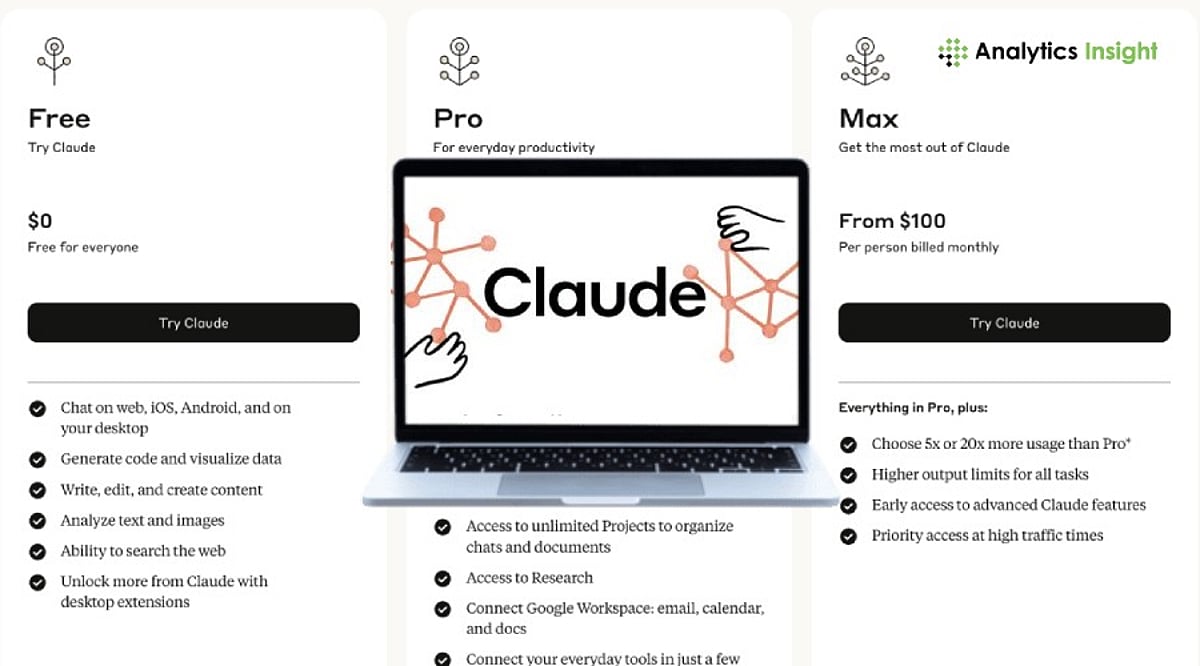
    Claude Pro costs $17 per month. It is designed for professionals and heavy users who depend on AI daily. Benefits include more conversations, better availability during busy times, and early access to the latest model improvements. Instead of worrying about limits, Pro subscribers can maintain uninterrupted workflows.

    Anthropic also offers a top-tier subscription called Claude Max at $100 per month for users with extreme demands, but the standard Pro plan meets the needs of most power users.

    Comparing Free vs Pro: A Quick Look

    Both plans share the same core AI capabilities for writing, summarizing, and explaining. The key difference lies in usage volume:

    • Free: Limited conversations, occasional throttling during peak times, no priority access.
    • Pro: Higher usage limits, reduced restrictions during peak hours, faster access to updates.

    A user who checks Claude a few times a week may never need the paid plan. In contrast, a content writer, developer, researcher, or marketer who works with AI for several hours each day will quickly exceed free tier limits. That makes Pro the logical choice for daily workflows.

    Which Plan Offers Better Value?

    The free plan is the best entry point for anyone new to AI. It allows you to test Claude’s capabilities without financial risk. The Pro plan, however, serves a clear purpose: uninterrupted productivity for frequent users. There’s no pressure to upgrade immediately. Start free, use it for a few weeks, and decide whether the added access justifies the cost.

    Frequently Asked Questions

    1. Is Claude AI worth using for free?

    Yes. The free plan offers enough features for writing, studying, researching, brainstorming, and everyday tasks. Many users never feel the need to upgrade unless they use Claude heavily.

    2. Who should pay for Claude Pro?

    Claude Pro is best for writers, developers, researchers, marketers, and professionals who use AI throughout the day and need higher usage limits with fewer restrictions.

    3. What is the main benefit of Claude Pro?

    The biggest advantage is higher usage limits. Pro users have more conversations and face fewer restrictions during busy periods.

    4. Can I upgrade from Free to Pro later?

    Yes. Users can start with the free plan and switch to Pro whenever they need more access or a smoother experience.

    5. Does Claude Pro have better AI than the free version?

    Both plans use Claude’s core AI technology. However, Pro users often receive access to newer improvements and features sooner than free users.