
Tag: design templates

  • Unlock Professional Branding: How Canva Pro Streamlines Logo Design, Presentations, and Brand Kits

    Unlock Professional Branding: How Canva Pro Streamlines Logo Design, Presentations, and Brand Kits

    Canva Pro helps businesses create professional logos, presentations, and consistent branding using Brand Kits, AI-powered design tools, and flexible collaboration features, making visual content creation faster, easier, and more professional.

    A Professional Logo Builds Brand Identity

    A logo gives a company a distinctive identity. Customers tend to recognize the logo before anything else related to the company. Canva Pro has thousands of tweakable templates for logos that can fit various business types. The different templates have features that make it easy to change the layout, color, font, etc. A company can have a logo ready very quickly while maintaining the right professional look.

    Besides that, Canva Pro enables you to export your logo in SVG file format, which means you get a high-quality logo regardless of the logo’s size. A logo looks perfect on a business card, mug, website, billboard, and product packaging. In addition to that, exporting in transparent PNG format allows the logo to be seamlessly integrated with various backgrounds and eliminates unwanted blank boxes. The editing tools powered by AI help create and tweak various shapes and colors easily.

    Brand Kit Keeps Every Design Consistent

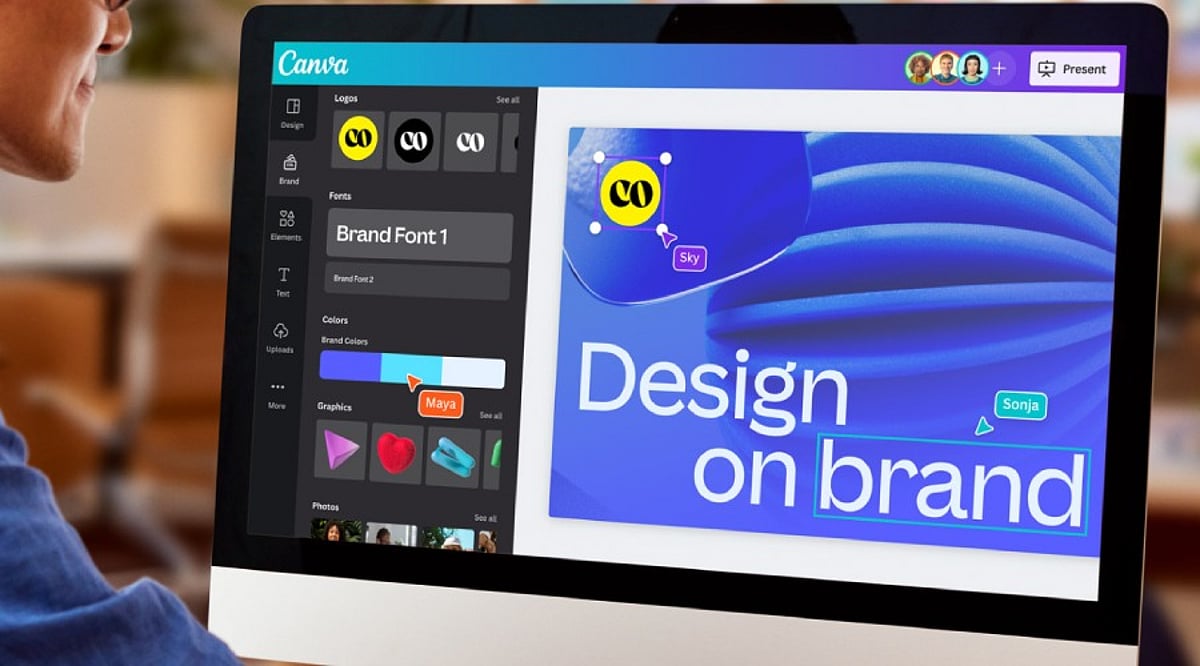
    Brand consistency plays a major role in business success. Customers remember a brand more easily when every design shares the same colors, fonts, and logo style. Canva Pro solves this challenge through its Brand Kit feature.

    The Brand Kit stores logos, brand colors, heading fonts, body fonts, and other visual elements in one place. Every new project can use these saved assets with only a few clicks. This simple process saves valuable time and keeps every design uniform across presentations, social media graphics, brochures, reports, and advertisements.

    Canva Pro now allows up to 100 Brand Kits. This feature serves marketing agencies, design studios, and companies that manage several brands at the same time. Each brand keeps its own colors, fonts, and logo without confusion.

    Brand Kit Builder Saves Valuable Time

    Many businesses already have a website or a brand guideline document. Canva Pro offers another helpful feature called Brand Kit Builder. This tool collects logos, fonts, colors, and other visual details directly from a company website or a PDF brand guide.

    The entire setup takes far less time than manual entry. A business starts new design projects with a complete brand identity already in place. This process also reduces mistakes and keeps every team member on the same visual style from the first project onward.

    Canva Pro Creates Professional Presentations

    Business presentations need a clean layout, readable text, attractive charts, and strong visual balance. Canva Pro includes thousands of presentation templates for sales meetings, business proposals, company reports, educational sessions, and product launches.

    Built-in charts and infographic tools help present numbers in a clear format. Animation features add smooth movement that keeps audience attention from the first slide to the last. Presenter View displays speaker notes while the audience sees only the presentation. Video presentation tools allow recording and sharing without extra software. Team members can also edit the same presentation together, which supports faster project completion.

    AI Features Speed Up Creative Work

    Artificial intelligence is a vital part of modern-day design. Canva Pro’s expanding Visual Suite offers a variety of tools equipped with AI technology to help the designer make layouts, edit images, create texts, and improve the design further.

    The release of new products such as Magic Studio, Canva Sheets, Canva Code, and advanced photo editing opens a door for many different design possibilities through the platform itself, not just graphic design. Today, businesses create their presentations, documents, promotions, and other visual outputs in one workspace rather than jumping around from one application to another.

    Better Brand Control Creates Better Results

    Strong brands stay consistent across every customer touchpoint. A matching logo, color palette, font style, and presentation design help customers recognize a business quickly. Canva Pro supports this goal through one central location for every important brand asset.

    Every employee or designer works with the same approved colors, logos, and fonts. Marketing campaigns, presentations, reports, and digital content maintain the same professional appearance. This level of consistency strengthens brand recognition and builds customer confidence over time.

    Canva Pro Fits Businesses of Every Size

    Small businesses often need affordable design software, while larger companies need advanced brand management tools. Canva Pro serves both groups through flexible features. A startup can create its first logo and presentation within hours. A growing company can manage several brands through multiple Brand Kits. A design agency can organize client projects with clear separation between each brand identity.

    Simple tools remove technical barriers, yet professional export options support high-quality business materials. This balance makes Canva Pro suitable for beginners as well as experienced designers.

    Final Thoughts

    Canva Pro has developed into something more advanced than a basic design service. Over 220 million users, support for more than 100 languages, and powerful business tools speak of the service’s global applicability. The features of creating logos in a professional way, exporting SVG images, exporting transparent background images, the ability of having Brand Kit and Brand Kit Builder, AI design tools, presentation abilities, make it possible to create various visual content easily. Introduction of 100 Brand Kits allows various agencies and organizations to produce different brands within the same platform.

    Frequently Asked Questions

    What is Canva Pro used for?

    Canva Pro is a design platform that helps users create logos, presentations, marketing materials, social media graphics, and branded content with premium features.

    What is the benefit of Canva Pro Brand Kit?

    Brand Kit stores logos, colors, fonts, and other brand assets in one place to ensure consistent branding across all designs.

    Can Canva Pro create professional presentations?

    Yes. Canva Pro offers thousands of presentation templates, animations, charts, speaker notes, collaboration tools, and video presentation features.

    Does Canva Pro support AI-powered design?

    Yes. Canva Pro includes AI features such as Magic Studio, AI image editing, content generation, and layout suggestions to speed up design work.

    Who should use Canva Pro?

    Canva Pro is ideal for startups, small businesses, marketing teams, agencies, educators, and enterprises looking to create professional visual content efficiently.
  • Canva Pro Review: Features, Pricing, Benefits, and Everything You Need to Know

    Canva Pro Review: Features, Pricing, Benefits, and Everything You Need to Know

    Canva has transformed how people create visual content, making professional-looking designs accessible to everyone. Although the free version has an extensive suite of tools, Canva Pro offers advanced features that will be useful for professionals, businesses, teachers, marketers, and other content creators. If you make presentations, graphics for social media, marketing material, or videos, Canva Pro will make your work easier.

    Here is all you need to know about Canva Pro – features, advantages, price, and whether it’s worth upgrading.

    What is Canva Pro?

    Canva Pro is Canva’s premium subscription service, giving users access to advanced design tools, millions of premium resources, AI technologies, brand management tools, and collaboration features. Unlike the free version, Canva Pro is aimed at regular content creators. Whether you are a freelancer, a small business owner, a social media manager, or a student with multiple projects, Canva Pro can make your work easier and faster while still producing quality designs.

    Features of Canva Pro

    Millions of Premium Templates

    There are millions of professionally made templates that Canva Pro offers you, for categories including: Instagram posts and Reels, YouTube thumbnails, presentations, proposals, flyers, posters, brochures, resumes, invitations, infographics, and more. These templates are editable and always updated.

    Premium Photos, Videos, and Graphics

    Subscribers have access to a wide range of content such as stock photos, videos, audio tracks, icons, illustrations, stickers, and animations. This way, you can avoid purchasing separate stock content from stock websites.

    Magic Studio AI Tools

    Among the most important features offered by Canva Pro are the AI-enabled Magic Studio tools, which include: Magic Write (AI content generator), Magic Design, Magic Edit, Magic Eraser, Magic Expand, Magic Animate, Background Generator, AI Image generation, AI Presentations creation.

    Background Remover

    Background Remover is one of the most used tools in Canva Pro. A user can remove image backgrounds without using any other editing tool simply by clicking once. The feature is very helpful in product photography, profile pictures, marketing materials, and YouTube thumbnails.

    Brand Kit

    Companies can have consistent branding through Brand Kit. Users can save logos, brand colors, font styles, templates, and guidelines in this tool to make sure every design meets the same branding requirements.

    Resize Designs Instantly

    Using Magic Resize, users can instantly convert a design into different formats. For instance, an Instagram post can be converted into Facebook post, LinkedIn graphic, Pinterest pin, story, or presentation slide.

    Content Planner

    The Content Planner tool within Canva Pro enables users to schedule posts on social media channels including Instagram, Facebook, LinkedIn, Pinterest, and X (formerly Twitter). This makes Canva both a design and a publishing platform.

    Cloud Storage

    Canva Pro offers larger storage compared to its free counterpart, where users can store all their pictures, video clips, brand materials, templates, and design files. All stored files are accessible from any device.

    Team Collaboration

    Users can collaborate on projects, comment on them, assign tasks, work on designs collaboratively, and set permissions. It is especially useful for marketing teams and businesses.

    Version History

    With Canva Pro, you can undo your previous design changes to recover from unintentional changes.

    Benefits of Canva Pro

    • Time-Saving – Templates, AI, and one-click editing allow for faster creation of professional graphics.
    • Improved Branding Consistency – With the Brand Kit, it becomes easy for companies to maintain consistency of their visual branding across all channels.
    • Inexpensive – It becomes unnecessary to purchase stock images, graphic design templates, tools for removing backgrounds, or designing software separately, as Canva Pro offers a subscription package of all.
    • Intuitive Interface – No prior experience with graphic design is required. Even beginners can use the drag-and-drop interface to create professional graphics.
    • Best for Business – For a small business, there is a possibility to create marketing strategies, business cards, social media content, presentations, product catalogues, and advertising material without hiring professional graphic designers for every project.

    Canva Free vs Canva Pro

    [Comparison table or detailed points can be included here, but the source text only provides a brief mention. We’ll summarize: Free version has basic templates and limited assets; Pro adds premium templates, AI tools, Brand Kit, background remover, content planner, team collaboration, and larger storage.]

    Who Should Use Canva Pro?

    Canva Pro would be best used by: content creators, YouTubers, bloggers, digital marketers, small business owners, freelancers, teachers, students, startups, social media managers. Anyone producing visual content regularly is likely to benefit from the additional features.

    Should You Get Canva Pro?

    If you rarely create graphics, the free option may suffice. However, Canva Pro is beneficial if you: design content weekly, run multiple social media accounts, need premium stock assets, use AI technology in design, collaborate with a team, develop your brand identity, or make presentations, videos, or marketing content. Time saved through automation, templates, and premium assets could soon compensate for the cost of a subscription.

    Conclusion

    Canva Pro isn’t simply an upgrade of Canva; it’s a complete creative ecosystem offering all the tools you need for graphic design, AI-powered content creation, branding, collaboration, and social media posting. Several templates, premium assets, sophisticated editing tools, and productivity features make Canva Pro valuable for people and businesses that regularly create visual content. If you’re building your personal brand, running a business, or making presentations, Canva Pro will give you everything you need to design quality graphics efficiently.

    FAQs

    1. What is Canva Pro?

    Canva Pro is Canva’s premium subscription offering advanced design tools, AI features, premium assets, and branding capabilities for creators.

    2. Is Canva Pro better than the free version?

    Yes, Canva Pro includes premium templates, AI tools, Brand Kit, background remover, and advanced collaboration unavailable in the free version.

    3. Who should use Canva Pro?

    Content creators, marketers, businesses, students, educators, freelancers, and designers benefit most from Canva Pro’s advanced productivity features and assets.

    4. Does Canva Pro include AI tools?

    Yes, Canva Pro offers AI-powered Magic Studio, including Magic Write, Magic Design, Magic Edit, image generation, and automated design features.

    5. Is Canva Pro worth the subscription cost?

    If you create visual content regularly, Canva Pro saves time, improves quality, and provides valuable premium resources worth the investment.