Tag: Developer Tools

  • Git Developer Tools: Free, Open-Source Version Control & Source Code Management Software

    Git Developer Tools: Free, Open-Source Version Control & Source Code Management Software

    Git is a free, open-source distributed version control system that tracks source code changes. It helps developers create branches, manage versions, collaborate on projects, and maintain detailed development histories. Git supports Windows, macOS, Linux, and other Unix-like platforms.

    Written By: Soham Halder
    Reviewed By: Manisha Sharma
    Published on: 08 Sep 2026, 10:30 pm
    Updated on: 08 Sep 2026, 10:30 pm

    Overview

    • Git is a free and open-source distributed version control system for managing code and project files.
    • Developers can use branches, commits, merges, and repositories to organize software development.
    • Git works across Windows, macOS, Linux, and other Unix-like operating systems.

    Git is a free and open-source distributed version control system designed to track changes in source code and other files. It helps developers manage different versions of a project, work on features independently, and collaborate with other team members.

    The latest Git release is 2.55.0, while the current maintained Git for Windows build is 2.55.0(5). Windows users can download the x64 or ARM64 installer, or choose the portable version if they do not want a traditional installation.

    Quick Information

    • Developer: Git community / Software Freedom Conservancy
    • Category: Developer Tools / Version Control
    • License: GNU General Public License v2.0
    • Platforms: Windows, macOS, Linux and Unix-like systems
    • Version: 2.55.0
    • File Size: Varies by platform and installation package

    Git is maintained as an open-source project, with official releases available for major operating systems. The Git for Windows project provides dedicated installers for x64 and ARM64 systems.

    Download Git for Windows

    About Git

    Git is a distributed version control system used to manage changes throughout the development of a project. Unlike a centralized version control system, Git gives each developer a complete copy of the repository, allowing many operations to be performed locally.

    Developers can create branches, record changes through commits, compare versions, merge work, and restore earlier versions when necessary. Git is designed to work efficiently with both small and very large projects.

    Key Features of Git

    • Distributed Version Control: Git gives every developer a complete copy of the project repository, including its history. This allows users to work locally without depending on a central server for every operation.
    • Branch and Merge Management: Developers can create separate branches to work on new features, fixes, or experiments without affecting the main project. Completed work can then be merged back into the required branch.
    • Fast Local Operations: Most Git commands run directly on the local repository, so tasks such as viewing history, creating branches, and comparing changes are usually quick and do not require an internet connection.
    • Commit and Version History: Git records changes through commits, creating a detailed history of how a project has developed. Developers can review previous commits and identify when specific changes were made.
    • Repository Cloning: The git clone command allows users to create a local copy of an existing repository. This makes it easy to start working on projects hosted on remote Git platforms.
    • Remote Repository Support: Git can connect local repositories with remote repositories, allowing developers to share changes and collaborate with other team members using commands such as push and pull.
    • Change Comparison with Diff: Git’s diff functionality lets developers compare modified files and see exactly what has changed. This is useful for reviewing code before committing or merging updates.
    • Stashing of Unfinished Work: The Git stash feature temporarily stores uncommitted changes without requiring a commit. Developers can then switch branches and return to their unfinished work later.
    • Tagging Important Releases: Git tags can be used to mark specific points in a repository’s history, such as software versions or major releases. This makes important versions easier to identify and access.
    • Support for Submodules: Git submodules allow one repository to include another Git repository as part of a project. This can be useful when an application depends on separately maintained libraries or components.
    • Git Bash on Windows: Git for Windows includes Git Bash, which provides a Unix-style command-line environment. It allows Windows users to work with Git commands in a familiar shell-based interface.
    • Integration with Popular Development Tools: Git works with many code editors, IDEs, and development platforms. This allows developers to perform tasks such as committing changes, creating branches, and reviewing differences without leaving their preferred development environment.

    Git provides commands for common development tasks such as clone, add, commit, branch, merge, pull, push, diff, and log.

    Is Git Free?

    Git is free and open source and is distributed under the GNU General Public License. Developers can install and use Git without paying a subscription or purchasing a commercial license. Git’s open-source model has also helped create a large ecosystem of graphical interfaces, hosting services, and development tools.

    Git Compatibility / System Requirements

    Git supports Windows, macOS, Linux, and other Unix-like platforms. On Windows, users can choose between x64 and ARM64 installers, as well as portable packages. The exact requirements depend on the operating system and package selected. Windows users should choose the installer that matches their system architecture before downloading.

    How to Use Git

    1. Download and install Git for your operating system.
    2. Open Git Bash, Terminal, or Command Prompt.
    3. Configure your name and email address.
    4. Create a new repository with git init or clone an existing one with git clone.
    5. Make changes to your project files.
    6. Use git add to stage changes.
    7. Use git commit to record the changes.
    8. Create branches when working on separate features.
    9. Use git pull to retrieve changes from a remote repository.
    10. Use git push to send your commits to a remote repository.

    Beginners can start with git init, git status, git add, git commit, and git log before moving on to more advanced commands.

    Pros and Cons of Git

    Pros

    • Free and open source
    • Works across major operating systems
    • Fast local operations
    • Powerful branching and merging
    • Suitable for individual developers and teams
    • Large ecosystem and community support
    • Works with popular hosting platforms

    Cons

    • Command-line workflow can be difficult for beginners
    • Advanced Git commands require practice
    • Merge conflicts can be confusing for new users
    • Large repositories may require careful management

    Best Alternatives to Git

    Although Git is one of the most widely used version control systems, other tools may suit particular development environments or team workflows better. The right choice depends on factors such as project size, collaboration requirements, existing infrastructure, and the type of version control system preferred. Here are some alternatives to Git that developers can use:

    • Mercurial: A distributed version control system designed to provide a straightforward workflow for managing source code.
    • Subversion (SVN): A centralized version control system that keeps the main repository on a server and is still used by many established projects.
    • Perforce Helix Core: A version control platform designed for large codebases and teams working with substantial digital assets.
    • Fossil: A distributed version control system that also includes integrated project management and collaboration features.
    • Bazaar: A distributed version control system developed for collaborative software development and source code management.

    Related Software

    Git works alongside a wide range of development and collaboration tools that make source-code management easier. These tools can provide graphical interfaces, repository hosting, code review, project management, and additional features around the core Git workflow.

    • GitHub: A popular platform for hosting Git repositories, reviewing code, and collaborating on software projects.
    • GitLab: A DevOps platform that provides Git repository hosting along with CI/CD and project management features.
    • Bitbucket: A repository hosting service designed for Git-based development and team collaboration.
    • GitKraken: A graphical Git client that provides a visual interface for repositories, branches, commits, and merges.
    • SourceTree: A graphical Git client designed to simplify repository management without relying entirely on command-line commands.
    • GitHub Desktop: A desktop application that provides a simpler graphical workflow for working with GitHub repositories.
    • Visual Studio Code: A popular code editor with built-in Git integration for managing source-code changes directly from the development environment.

    Git is a dependable choice for developers who need to track code changes, manage versions, and collaborate efficiently. Its free, open-source nature, powerful branching system, and support across major platforms make it useful for both individual projects and professional development teams. Whether you’re learning programming or managing a large codebase, Git provides the essential tools needed for organized source code management.

    FAQs

    What is Git?

    Git is a free and open-source distributed version control system. Developers use it to track changes in source code and other files. It allows users to create commits, manage branches, compare changes, merge work, and maintain a detailed history of a project.

    Is Git free to use?

    Yes. Git is free and open source. It is distributed under the GNU General Public License version 2.0. Developers can install Git and use its core version-control features without paying a subscription or purchasing a commercial license.

    What is Git used for?

    Git is primarily used for version control and source code management. Developers can track project changes, experiment with new features, maintain different versions, collaborate with teammates, and restore earlier versions when necessary. It is widely used across individual and professional software projects.

    What is the latest version of Git?

    The latest Git source release is 2.55.0, released on June 29, 2026. Git for Windows has a maintained 2.55.0(5) build for Windows users. The appropriate download depends on the operating system and system architecture.

    Does Git work on Windows?

    Yes. Git provides dedicated Windows downloads for both x64 and ARM64 systems. Users can choose a standard installer or portable package. Git for Windows also includes tools such as Git Bash for working with Git commands from a terminal environment.
  • Logitech MX Keypad Debuts as a Physical AI Control Center for Developers at ₹15,999 / $99.99

    Logitech MX Keypad Debuts as a Physical AI Control Center for Developers at ₹15,999 / $99.99

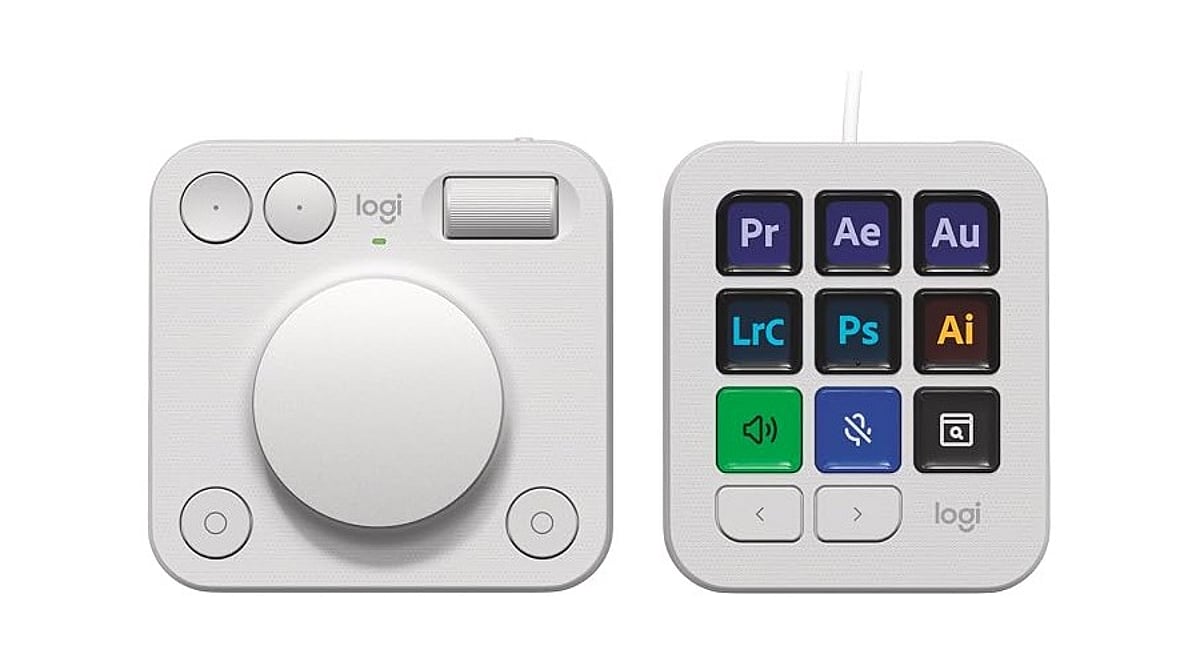
    Logitech launched the MX Keypad on September 8 as its first AI control center for developers worldwide. Priced at ₹15,999 in India and $99.99 in select global markets, the device introduces physical controls for managing AI coding tools like GitHub Copilot, Claude Code, VS Code, and IntelliJ IDEA.

    Designed for multi-app coding workflows that involve AI agents and development tools, the MX Keypad helps developers streamline tasks by offering customizable physical keys for prompts, commands, scripts, macros, and workflow actions. Native integration supports VS Code and the GitHub Copilot app at launch, with additional tools planned. Every unit also includes three free months of GitHub Copilot Pro+ through Logi Options+.

    “MX Keypad puts a physical control center at your fingertips,” said Anatoliy Polyanker, Logitech VP and GM. “It helps developers orchestrate AI workflows faster and more intuitively.” GitHub executive Martin Woodward emphasized the device’s focus on reducing tool navigation: “Great developer tools get out of your way.”

    Beyond software integration, Logitech offers the Logitech Actions SDK for developers building custom integrations. Community plugins already support Claude Code and OpenAI Codex through the Logi Marketplace. The MX Keypad also features sustainable design, with the Graphite model containing 64% post-consumer recycled plastic.

  • OpenAI Unveils Codex Micro: A Programmable Macropad for AI Coding Workflows

    OpenAI Unveils Codex Micro: A Programmable Macropad for AI Coding Workflows

    OpenAI has launched its first branded hardware product, the Codex Micro, a programmable mechanical macropad developed in partnership with Work Louder. This strategic release moves beyond earlier speculation about a Jony Ive-designed AI device, focusing instead on developers who rely on Codex, OpenAI’s AI coding and productivity assistant.

    Priced at $230 and available in limited quantities, the Codex Micro arrives as Codex approaches 9 million users globally. The device is a niche yet targeted accessory designed to streamline AI coding workflows.

    What Is Codex Micro?

    Codex Micro is a compact mechanical macropad that enables users to monitor and control AI agents more efficiently. OpenAI describes the product as a “limited-run collaboration” with Work Louder, built on the hardware foundation of Work Louder’s Creator Micro 2 but customized with Codex-specific controls. While the standard Creator Micro 2 starts at around $144, the OpenAI version commands a higher price due to its dedicated AI-agent features.

    Key Features of Codex Micro

    The most notable addition is a row of six Agent Keys that glow in different colors to indicate the live status of Codex agents:

    • Idle: White light
    • Processing: Blue light
    • Complete: Green light
    • Error: Red light

    Double-tapping activates the agent, while a single tap selects the assigned agent. Users can customize these keys using Work Louder’s Input setting tool to map them to pinned Codex tasks, recent tasks, specific workflows, or individual agents.

    The bottom row features six programmable keys preprogrammed for functions such as accepting or rejecting code changes and branching threads. A larger key enables push-to-talk (PTT) voice control with Codex.

    Joystick, Dial, and Connectivity

    The Codex Micro also includes a joystick for navigating Codex’s composer bar and a rotary dial for selections by default, both of which are remappable. An LED-lit acrylic edge illuminates when Codex is listening and the microphone is active. Users can choose between silent and clicky switches, and the device supports USB-C, Bluetooth, and keycap swapping. Work Louder includes 32 additional keycaps, including playful options like “yolo” and “yeet.”

    Why It Matters

    Codex Micro is not a consumer AI gadget; it is a specialized AI agent management control device designed for developers to rapidly control AI agents during coding. This launch marks OpenAI’s first major step into hardware, prioritizing workflow productivity over consumer-focused AI devices.

  • Top 10 AI Agents Transforming the Software Development Lifecycle in 2026

    Top 10 AI Agents Transforming the Software Development Lifecycle in 2026

    Software development AI has evolved far beyond simple code completion. Modern tools now tackle the entire software delivery lifecycle—from triaging issues and planning implementations to reviewing pull requests, fixing vulnerabilities, generating documentation, and coordinating releases across teams. This article evaluates ten leading platforms that bring meaningful automation to engineering organizations, focusing on SDLC coverage, context awareness, workflow automation, and enterprise readiness.

    How We Evaluated These AI Agents

    We assessed each solution based on:

    • SDLC coverage – how much of the development lifecycle it supports
    • Context awareness – ability to understand repositories, issues, and historical decisions
    • Workflow automation – reducing manual overhead in engineering processes
    • Repository integration – seamless connection with GitHub, GitLab, Bitbucket, etc.
    • Enterprise readiness – security, governance, audit trails, and scalability
    • Multi-agent capabilities – coordination among specialized AI agents
    • Governance and security – sandboxing, approval gates, and compliance

    1. Overcut – Best Overall SDLC Orchestration Agent

    Overcut leads the list by acting as an orchestration layer for engineering organizations. Rather than being another coding assistant, it connects autonomous AI agents with everyday developer workflows. It handles ticket triage, requirements analysis, technical design reviews, pull request validation, documentation updates, vulnerability remediation, and release coordination. Key features include contextual orchestration across GitHub, Jira, and Azure DevOps, ephemeral sandboxed environments, model-agnostic architecture, and enterprise governance with audit logs.

    2. Devin – Autonomous Software Engineering Pioneer

    Devin popularized the concept of autonomous software engineering. It independently analyzes problems, writes code, runs tests, and iterates toward solutions without constant prompting. Developers can assign larger implementation tasks and review final outputs. Recent updates expand its capabilities beyond repository reasoning into broader engineering workflows.

    3. GitHub Copilot – Ecosystem-Centric Development Assistant

    GitHub Copilot has grown from code completion to a full assistant supporting repository-aware conversations, pull request assistance, documentation generation, and agentic workflows. Its greatest strength is seamless integration with GitHub, allowing teams to adopt AI without changing their existing workflows. Features include AI code generation, repository reasoning, and GitHub Actions integration.

    4. Claude Code – Analytical Depth for Complex Repositories

    Claude Code from Anthropic excels at reasoning through complex codebases, explaining architectural decisions, debugging intricate problems, and assisting with large-scale refactoring. It maintains context over long sessions, making it ideal for projects spanning multiple services or legacy systems. It acts as an intelligent collaborator rather than a replacement for engineering judgment.

    5. Aider – Terminal-Native AI Collaboration

    Aider operates directly in the terminal, integrating with local Git repositories. Developers can request features, bug fixes, refactoring, or documentation updates while using their preferred editor. Its Git-native design tracks AI-generated changes alongside normal commits, and it supports multiple language models for flexibility.

    6. 8090.ai – Software Factory Orchestration

    8090.ai takes a broader view, orchestrating activities before, during, and after coding—including requirements gathering, architecture planning, documentation, testing, and delivery. It supports multi-role collaboration among product managers, architects, engineers, and QA teams. Structured governance ensures AI-generated artifacts remain visible throughout the development lifecycle.

    7. Factory.ai – Mission-Based Autonomous Agents

    Factory.ai enables multiple AI agents to collaborate on complex initiatives that span hours or days. Its “mission-based” approach lets developers define broad outcomes like service migration or legacy modernization, and agents coordinate planning, implementation, and validation. It supports desktop, command-line, and SDK interfaces.

    8. Opsera.ai – DevOps-Focused AI Automation

    Opsera.ai applies AI to CI/CD pipelines, deployment automation, release orchestration, security validation, and observability. It integrates with existing DevOps toolchains rather than replacing them, extending AI beyond implementation into continuous delivery.

    9. CrewAI – Custom Multi-Agent Workflows

    CrewAI is a framework for building specialized AI agents that collaborate on distinct responsibilities—architecture reviews, documentation, testing, security analysis, and more. It is highly customizable, allowing organizations to design autonomous processes that mirror their engineering team structures.

    10. Clears.ai – Engineering Operations and Workflow Intelligence

    Clears.ai focuses on automating repetitive delivery activities and improving visibility across development workflows. It assists with reviewing engineering work, coordinating tasks, surfacing bottlenecks, and providing analytics. It complements implementation-focused AI by addressing operational coordination challenges.

    Four Approaches Defining the Future of Software Development AI

    These platforms represent different philosophies:

    • SDLC Orchestration Platforms (Overcut, 8090.ai, Factory.ai) – treat the lifecycle as one connected organism, aligning work across planning, implementation, testing, and deployment.
    • Autonomous Engineering Agents (Devin) – give AI independence during implementation with minimal supervision.
    • Repository-Centric AI (GitHub Copilot, Claude Code, Aider) – improve developer productivity by working directly with source code and repositories.
    • AI for Engineering Operations (Opsera.ai, CrewAI, Clears.ai) – emphasize workflow coordination, DevOps automation, and collaboration.

    Choosing the right agent depends on whether your organization prioritizes individual coding speed, autonomous execution, or end-to-end delivery orchestration.

  • Perplexity Enters AI Coding Assistant Arena to Challenge Claude Code

    Perplexity Enters AI Coding Assistant Arena to Challenge Claude Code

    Perplexity, the AI-powered search company, is reportedly developing a coding assistant designed to compete head-to-head with Anthropic’s Claude Code and other popular developer tools. According to recent reports, the tool, internally named Teammate, has been tested by Perplexity’s own engineers for several months and is expected to be model-agnostic, giving developers the flexibility to choose the underlying AI model that best fits their workflow.

    Unlike some rivals that lock users into a single AI system, Perplexity’s approach emphasizes choice. Developers may be able to switch between models—such as Anthropic’s Claude, OpenAI’s GPT, or others—depending on the task. This flexibility could be a key differentiator in the increasingly crowded AI coding assistant market.

    Teammate Already in Internal Use

    Sources indicate that Teammate has been assisting Perplexity’s in-house engineers with code writing, bug detection, and other aspects of software development for the past few months. The company has not officially announced a public release date, but the internal testing suggests a launch could be forthcoming as Perplexity seeks to expand beyond search into everyday productivity tools.

    Competing with Claude Code and Others

    Claude Code, built by Anthropic, has gained popularity for its deep reasoning capabilities and ability to handle large code datasets. Perplexity, meanwhile, is best known for its search engine that provides quick, source-backed answers. With Teammate, Perplexity aims to target the same professional developer audience but with a multi-model twist that could give it a competitive edge.

    If Perplexity succeeds in launching a broad, model-agnostic coding assistant, it could shake up the AI coding landscape and force established players to consider offering more flexible integrations. The race for AI-powered developer tools is heating up, and Perplexity’s entry signals that the battle is far from over.

    For now, developers and industry watchers await an official announcement from Perplexity regarding Teammate’s availability and pricing.

  • Top 10 GitHub Repositories for Mastering Claude Code in 2026

    Top 10 GitHub Repositories for Mastering Claude Code in 2026

    Claude Code has evolved far beyond a terminal novelty. Today, developers use it to read entire codebases, run commands, and manage multi-step engineering workflows. However, out-of-the-box capabilities only scratch the surface. The real power lies in the ecosystem built around it: skills, subagents, hooks, and reusable workflows that transform Claude Code from a helpful assistant into a structured development system. Here are ten GitHub repositories worth exploring if you’re serious about mastering Claude Code in 2026.

    Start with Anthropic’s Official Repositories

    The most reliable starting point is Anthropic’s anthropic/skills repository. It contains ready-made SKILL.md files for common tasks such as working with PDFs, spreadsheets, and presentations. Pair it with claude-code-action, Anthropic’s official GitHub Actions integration for automating Claude Code inside CI/CD pipelines. Another newer addition from Claude Code Skills 2.0 is Skill Creator, which lets you build, evaluate, and benchmark your own custom skills — no more guessing whether they actually work.

    Discover the Wider Ecosystem

    Before installing anything, it helps to know what exists. hesreallyhim/awesome-claude-code is a curated index of slash commands, CLAUDE.md files, hooks, and workflow tools — essentially a table of contents for the entire ecosystem. For a different angle, x1xhlol/system-prompts-and-models-of-ai-tools collects exposed system prompts and tool definitions from Claude Code and comparable agentic tools. This is especially useful for anyone studying how these systems are structured behind the scenes.

    Frameworks That Enforce Better Engineering Habits

    Two repositories stand out for imposing real discipline on how Claude Code writes software. Superpowers encodes a strict development methodology: brainstorm, spec, plan, test-driven development, review, and finalize. Notably, it refuses to keep any code written before tests exist. Everything Claude Code (ECC), built by hackathon-winning developer Affaan Mustafa, takes a broader approach, shipping dozens of specialized subagents, reusable skills, and security scanning tools that work across Claude Code and several other AI coding tools. Both are open source and free. Most experienced users pick a handful of components that fit their workflow rather than use every feature.

    Utilities That Solve Everyday Friction

    Some repositories exist purely to fix common pain points. Repomix packs an entire codebase — folder structure, documentation, and all — into a single AI-readable file, solving the problem of Claude Code losing context on larger projects. Claude Mem addresses a related issue: by default, Claude Code forgets everything between sessions. This tool gives it persistent memory of past decisions and project quirks.

    Advanced Setups for Teams

    For developers curious about running Claude Code as a coordinated team rather than a single assistant, the gstack repository documents Garry Tan’s setup. It assigns opinionated roles — Engineering Manager, Release Manager, QA — through reusable skills and slash commands. This is not a beginner’s starting point, but it’s a useful reference for structuring multi-agent workflows.

    Choosing Where to Start

    With so many options, star count alone isn’t a reliable filter; usefulness depends on what you’re trying to solve. Beginners are better served starting with Anthropic’s official repositories and the awesome-claude-code index before layering in frameworks like Superpowers or utilities like Repomix as specific needs arise. Building a stack gradually, rather than installing everything at once, tends to produce a far more stable and productive Claude Code setup.

    Why This Matters

    Claude Code is rapidly becoming a key AI development platform for software engineers. Understanding its ecosystem of GitHub repositories enables developers to automate workflows, improve coding efficiency, build custom AI skills, and integrate Claude into real-world engineering pipelines — making it an increasingly valuable tool for modern software development.

    Frequently Asked Questions

    What is Claude Code?

    Claude Code is Anthropic’s AI-powered coding assistant that helps developers understand codebases, write code, debug applications, execute terminal commands, automate workflows, and perform complex software engineering tasks. It supports both individual developers and teams working on modern software projects.

    Why should developers use GitHub repositories to learn Claude Code?

    GitHub repositories provide practical examples, reusable skills, automation workflows, documentation, and open-source tools that extend Claude Code’s capabilities. They allow developers to learn from real implementations instead of relying only on official documentation or theoretical tutorials.

    Which GitHub repository is best for beginners learning Claude Code?

    Anthropic’s official anthropic/skills repository is the best starting point for beginners. It contains ready-made skills for common development tasks and helps users understand how Claude Code executes structured workflows before exploring more advanced community-built repositories.

    Can Claude Code be integrated into CI/CD pipelines?

    Yes. Anthropic’s claude-code-action repository enables Claude Code to integrate with GitHub Actions and CI/CD pipelines. Developers can automate reviews, documentation, testing, and other engineering tasks directly within continuous integration and deployment workflows.

    Should developers install every Claude Code repository?

    No. The best approach is to start with official Anthropic repositories and gradually add tools that solve specific problems. Installing too many extensions at once can create unnecessary complexity and make workflows harder to maintain over time.

    Is the Claude Code ecosystem expected to grow in 2026?

    Yes. As Anthropic continues expanding Claude Code and enterprise adoption increases, the open-source ecosystem is expected to grow significantly. Developers can expect more GitHub repositories focused on automation, custom skills, AI agents, testing, memory management, and collaborative development workflows.

  • Best AI Coding Assistants for Developers in 2026: Top 5 Tools Compared

    Best AI Coding Assistants for Developers in 2026: Top 5 Tools Compared

    AI-powered coding assistants are rapidly transforming software development, helping developers write, debug, and understand code faster than ever. Here are the top five AI coding tools set to dominate in 2026:

    1. GitHub Copilot

    GitHub Copilot offers real-time code suggestions, debugging support, code explanations, and intelligent autocompletion across multiple programming languages and frameworks. It boosts productivity by learning from your coding style.

    2. Claude Code

    Claude Code excels at writing, refactoring, debugging, and understanding complex codebases. It supports long-context reasoning, project navigation, and workflow automation, making it ideal for large-scale projects.

    3. OpenAI Codex

    OpenAI Codex converts natural language instructions into functional code, automates repetitive tasks, explains logic, and accelerates development across many languages.

    4. Cursor

    Cursor is an AI-powered code editor that provides intelligent code completion, debugging assistance, project-wide understanding, and natural language editing, all seamlessly integrated into the developer workflow.

    5. Google Gemini Code Assist

    Google Gemini Code Assist offers AI-powered coding support with code generation, reviews, debugging, and documentation. It integrates smoothly with Google Cloud development environments and popular IDEs.

    These tools are shaping the future of software development, reducing manual effort and letting developers focus on creative problem-solving.

  • 2026 AI Image Generation APIs: A Comprehensive Comparison of Free and Paid Options for Developers

    2026 AI Image Generation APIs: A Comprehensive Comparison of Free and Paid Options for Developers

    Introduction

    Every major AI lab now offers its own image generation API, each with distinct models, pricing, prompt conventions, and licensing terms. For developers and teams evaluating which API to integrate, the decision goes beyond which model produces the best output. It involves weighing cost at scale, flexibility to switch providers, and the need for multiple models. This guide breaks down the leading AI image generation APIs available in 2026—from OpenAI and Google to open-weights options and free tiers—across the key factors: model quality, cost, commercial rights, and vendor lock-in.

    How to Choose an AI Image Generation API

    Choosing the right API requires considering several interacting factors:

    • Model quality and prompt adherence: Different models handle prompts differently—some produce photorealistic images, others stylized illustrations. Fine detail rendering (faces, typography, hands) varies significantly.
    • Latency and async capabilities: Some APIs return images synchronously in under two seconds; others use async job queues with webhooks, better for throughput but less interactive.
    • Pricing structure: Billing units vary—tokens (OpenAI), per-image (Google), credits (Stability AI)—making cost comparisons complex.
    • Commercial rights and licensing: Ensure generated images are usable commercially, especially for products. Enterprise indemnification is increasingly a deciding factor.
    • Vendor lock-in: Different prompt conventions and response formats make switching costly. Unified APIs reduce this risk.

    OpenAI Image Generation API (gpt-image-1)

    OpenAI’s latest flagship, gpt-image-2 (launched April 2026), offers multi-turn image generation for iterative refinement. The API uses token-based billing: text input ~$5/1M tokens, image output ~$30/1M tokens. A single 1024×1024 image costs roughly $0.034 at medium quality. Returns images as base64 or URLs, supports PNG/JPEG, up to 10 images per call. C2PA provenance metadata is embedded. Commercial rights are granted, and OpenAI does not train on user input by default. Best for teams already in the OpenAI ecosystem who need editing functionality and can handle token billing complexity.

    Google Gemini / Imagen API (“Nano Banana”)

    Google’s Imagen family (Imagen 3 and 4) offers simple per-image pricing via Vertex AI: Imagen 4 Ultra ~$0.06/image, Standard ~$0.04, Fast ~$0.02. Upscaling is $0.003 per image. This makes cost forecasting easy. Quality is competitive with OpenAI’s best, and enterprise features include SLAs, data locality, and Cloud IAM integration. The three-tier system (Fast/Standard/Ultra) balances cost and quality. No persistent free tier. Best for enterprise teams on Google Cloud who want predictable pricing and robust infrastructure.

    xAI Grok Image Generation API

    xAI’s Grok Imagine offers low-cost image generation: standard 1024×1024 ~$0.02 per image, quality variants up to $0.07. Unique for bundling image and video generation in one API. Combined media generation is a differentiator, but free tier credits were discontinued. Stricter content moderation applies. Best for projects needing both image and video at low per-unit cost, especially with xAI reasoning models.

    FLUX API

    FLUX by Black Forest Labs emphasizes high aesthetic quality and strong prompt adherence, especially for artistic output. Available through providers like Replicate, fal.ai, Freepik, and unified APIs. Pricing ranges $0.01–$0.05 per image. FLUX Pro is commercially licensable through providers; Dev variant has restrictions. Best for developers prioritizing artistic quality and stylistic control.

    Leonardo AI API

    Leonardo.AI combines a visual design UI with API access. Subscription plans start at $12/month (Essential) with token-based usage. Supports multiple models including custom fine-tunes and third-party models. “Unlimited” applies only to first-party models. Ideal for teams needing design tools with API integration and broad model selection.

    Stability AI API

    Stability AI offers both hosted API and open-weights models (Stable Diffusion 3.5 family). Credit-based pricing: SD3.5 Large ~$0.007/image, SD3.5 Large Turbo ~$0.005/image. Upscaling and editing add costs. New accounts get 25 free credits. The open-weights approach allows self-hosting at scale, eliminating per-image costs. Community License covers organizations under $1M revenue. Best for developers familiar with Stable Diffusion who want flexibility to self-host or need comprehensive editing pipelines.

    Kling and Video-Capable APIs

    Kling by Kuaishou excels at image-to-video animation, valuable for marketing and social media. Video generation remains expensive – a 5-second 1080p clip can cost $1.25. Other providers like xAI and Leonardo also offer video capabilities. Best for projects requiring dynamic content from static images.

    Low-Cost and Free Options (Prodia, Pollinations, Freepik)

    For experimentation and prototyping, consider:

    • Freepik: Unified access to multiple models (Flux, GPT) with subscription tiers starting at ~$5.75/month. Includes legal indemnification for commercial use on enterprise plans. Combines stock imagery with AI generation.
    • Pollinations.ai: Community models for image, text, video, and audio. Free-tier quotas unclear. Best for experimentation.
    • Prodia: Decentralized approach with open-source models. Pricing less documented.

    These have limitations: lower resolution, less consistency, reduced priority, tighter rate limits.

    Unified APIs: One Endpoint for Many Models

    Most production applications eventually need multiple models. Unified APIs like Apiframe provide a single integration point across providers, reducing vendor lock-in and simplifying maintenance. They offer access to models such as Midjourney (which lacks an official public API), FLUX, Stable Diffusion, and others through one endpoint. This is especially valuable for teams that want to switch models without rewriting integration code.

    Conclusion

    There is no single best AI image generation API. OpenAI and Google lead on raw quality; Stability AI offers flexibility through open weights; xAI provides low-cost combined image/video; unified platforms maximize reach. Evaluate your priorities—cost, quality, commercial rights, and flexibility—to choose the right combination for your project.

  • Best AI Coding Subscription Plans of 2026: Value Picks for Students, Freelancers, and Professionals

    Best AI Coding Subscription Plans of 2026: Value Picks for Students, Freelancers, and Professionals

    Advanced AI systems have become reliable coding partners that assist with debugging, optimization, and even suggesting architectural frameworks. The challenge for modern developers isn’t whether to adopt AI, but how to choose the most effective paid coding assistant. This guide evaluates top AI coding subscription plans by comparing pricing, features, usage limits, and developer-focused benefits to help you make a smart choice.

    Types of AI Coding Subscription Plans

    Understanding the categories of plans available is essential before selecting one. Here are key considerations:

    • Budget vs Usage: Entry-level plans suit light coding needs, while flat-rate bundles work best for daily heavy usage.
    • Tool Compatibility: Ensure the plan integrates with your IDE, such as VS Code, JetBrains, or Cursor.
    • Model Access: Some subscriptions lock you into one vendor; others like DevPass offer multi-model flexibility.
    • Predictable Billing: Flat-rate plans help avoid surprise token overages.

    Quick Comparison of Leading Plans

    While exact pricing can vary, here’s a snapshot of top contenders:

    Plan Best For Key Strength
    GLM Lite Students and light users Budget-friendly at ~$3/month
    MiniMax Starter Freelancers needing speed and cost balance Mid-range at ~$10/month
    DevPass Lite Professionals requiring multi-model access Premium value at ~$29/month
    Claude Code Pro Developers in Anthropic ecosystem Advanced code reasoning
    GitHub Copilot Developers in GitHub ecosystem Seamless IDE integration

    Recommendations for Indian Developers

    • Best Budget: GLM Lite at $3/month for students and light users.
    • Best Mid-Range: MiniMax Starter at $10/month for freelancers balancing speed and cost.
    • Best Premium Value: DevPass Lite at $29/month for professionals needing multiple models and predictable billing.

    Risks and Trade-Offs

    Consider these factors before committing:

    • Hidden Limits: The definition of a “prompt” varies by platform; a single query can trigger multiple model calls.
    • Vendor Lock-In: Copilot and Claude are not multi-system compatible.
    • Token Inflation: Newer tokenizers like Claude Sonnet 5 can raise effective usage costs by 35%.
    • Budget Overruns: Usage-based billing may cause surprises with runaway agent loops.

    Empowering Developers with Smart Choices

    AI coding subscriptions are essential for staying competitive. A good plan boosts productivity, creativity, and efficiency. Whether you need budget-friendly options for students, optimized speed-cost plans for freelancers, or multi-model flexibility for professionals, the right subscription can transform your workflow. Map your budget, coding style, and tool ecosystem to the available options and choose for predictable value.

    FAQs

    1. Which AI coding subscription offers the best value in 2026?
    Best value depends on needs. GLM Lite for budget, MiniMax Starter for freelancers, DevPass for multi-model access, and Copilot/Claude for ecosystem-specific users.

    2. Is GitHub Copilot better than Claude Code Pro?
    Copilot excels at IDE and GitHub integration; Claude Code Pro is better for advanced code reasoning and complex debugging.

    3. What should developers consider before choosing?
    Pricing, usage limits, supported models, IDE compatibility, billing structure, and vendor lock-in.

    4. Are budget plans suitable for professional development?
    Budget plans work well for students and light tasks; premium plans suit professionals with larger projects and higher demands.

    5. Can AI assistants replace software developers?
    No. AI speeds up coding, debugging, and testing, but humans remain essential for architecture, business logic, and project management.

  • OpenAI Set to Launch Dedicated Codex Hardware on July 15 for AI-Assisted Coding

    OpenAI Set to Launch Dedicated Codex Hardware on July 15 for AI-Assisted Coding

    OpenAI is poised to unveil a dedicated hardware device for its Codex AI coding assistant on July 15, signaling a strategic push into developer-focused physical products. The rumored device, teased via a video on X (formerly Twitter) with the caption “Your favorite Codex shortcuts are getting an upgrade,” appears to be a compact macro pad designed to streamline AI-assisted coding workflows.

    The teaser shows a square device covered in buttons, resembling Work Louder’s existing Creator Micro 2—a macro pad featuring 13 mechanical switches, a joystick, and a touch sensor for custom shortcuts. A Codex-branded version would likely offer physical keys for common actions like running commands, accepting suggestions, or switching between coding sessions, reducing reliance on memorized keyboard shortcuts.

    Codex, OpenAI’s AI coding tool, helps developers write, debug, and navigate code using natural language prompts. The dedicated hardware suggests OpenAI sees enough repetitive usage among its developer base to justify a purpose-built product, rather than treating Codex solely as a software feature. The device was also showcased at the AI Engineer World’s Fair in San Francisco, where OpenAI spokesperson Dominik Kundel described it as a keyboard “designed to supercharge people’s Codex usage,” according to The Verge.

    Work Louder’s Creator Micro 2 currently retails for $199 in the US, offering a price benchmark for comparable hardware. OpenAI has not confirmed pricing or full specifications, but further details are expected at the July 15 launch.

    This move comes alongside OpenAI’s separate project with former Apple design chief Jony Ive and his company LoveFrom to develop an AI-focused hardware device, though that initiative remains under wraps with no confirmed timeline. If successful, dedicated AI hardware could reshape developer workflows, offering faster, more integrated interactions with AI tools and expanding OpenAI’s ecosystem beyond cloud-based services.