Tag: gaming laptop

  • HyperX Omen 16 Valorant Edition Review: A Gaming Laptop with Style and Substance

    HyperX Omen 16 Valorant Edition Review: A Gaming Laptop with Style and Substance

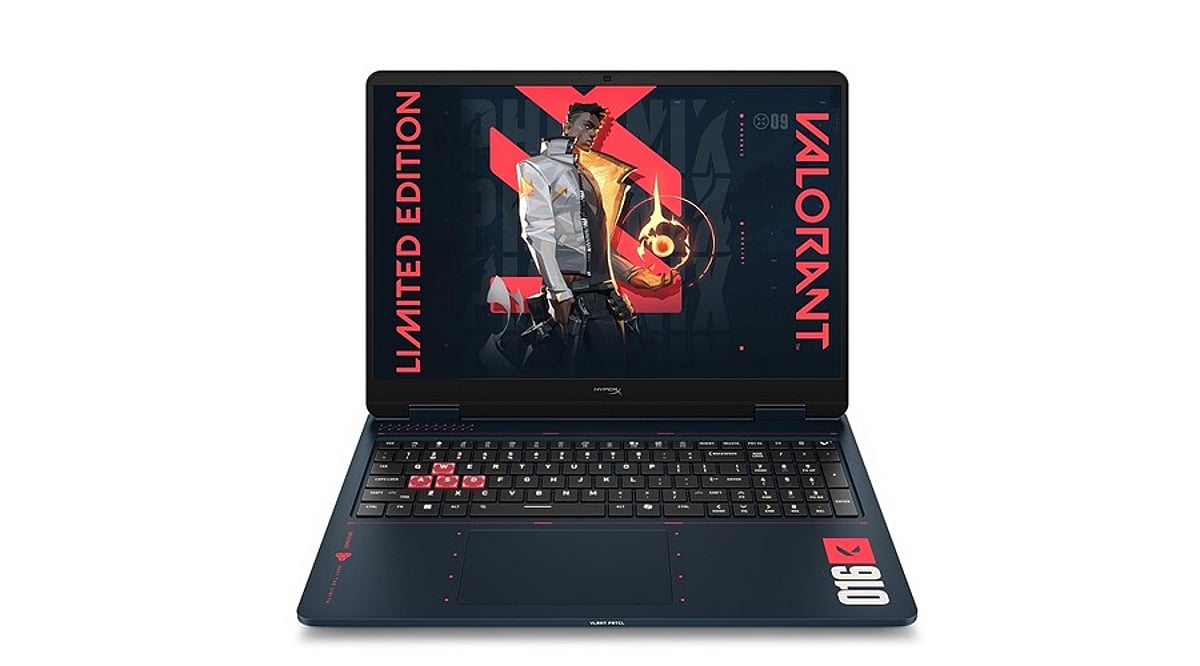
    The HyperX Omen 16 Valorant Edition is a special edition gaming laptop designed for gamers who want both performance and a unique aesthetic. Inspired by the popular game Valorant, this laptop features a distinctive design, an RGB keyboard, and an advanced cooling system. It is versatile enough for gaming and creative tasks, but it does have some drawbacks, including its weight, poor battery life, and potential thermal throttling issues.

    General Specifications

    Here are the key specifications of the HyperX Omen 16 Valorant Edition:

    • Display: 16-inch, 240Hz panel
    • Processor: High-performance Intel or AMD options (details vary by configuration)
    • Graphics: Dedicated NVIDIA GeForce RTX GPU
    • RAM: Up to 32GB
    • Storage: Up to 1TB SSD
    • Keyboard: RGB backlit
    • Cooling: Advanced thermal system
    • Weight: Heavy (exact weight depends on configuration)
    • Battery: Limited life, not ideal for portability

    Pros and Cons

    Pros

    • Stunning 240Hz display for smooth gameplay
    • Strong performance for gaming and creative work
    • Exclusive Valorant-inspired design
    • RGB keyboard adds to the gaming experience
    • Advanced cooling system helps manage heat

    Cons

    • Heavy and bulky, reducing portability
    • Poor battery life
    • Potential thermal throttling under heavy load
    • Valorant branding is superficial and doesn’t affect gameplay
    • High price tag faces tough competition

    Final Verdict

    The HyperX Omen 16 Valorant Edition is a capable gaming laptop that excels in two critical areas for competitive gamers: display and performance. The 240Hz panel is a standout feature, and the hardware and cooling system make it a solid choice for gaming and creativity. However, the Valorant branding is purely cosmetic and adds no functional benefit. Its weight, low battery life, and heat throttling make it less suitable as a portable device. At its premium price point, it faces strong competition, making it best suited for gamers who prioritize both performance and aesthetics.

  • Cooling Pad vs. Laptop Stand: The Ultimate Guide to Choosing the Right Laptop Accessory in 2026

    Cooling Pad vs. Laptop Stand: The Ultimate Guide to Choosing the Right Laptop Accessory in 2026

    A laptop running hot can affect performance, battery life, and long-term reliability. That’s why many users consider accessories like cooling pads and laptop stands to improve airflow and comfort. While both aim to keep your laptop cooler, they work in different ways and suit different users.

    If you’re unsure which one deserves a place on your desk, here’s a detailed comparison to help you decide.

    What Is a Laptop Cooling Pad?

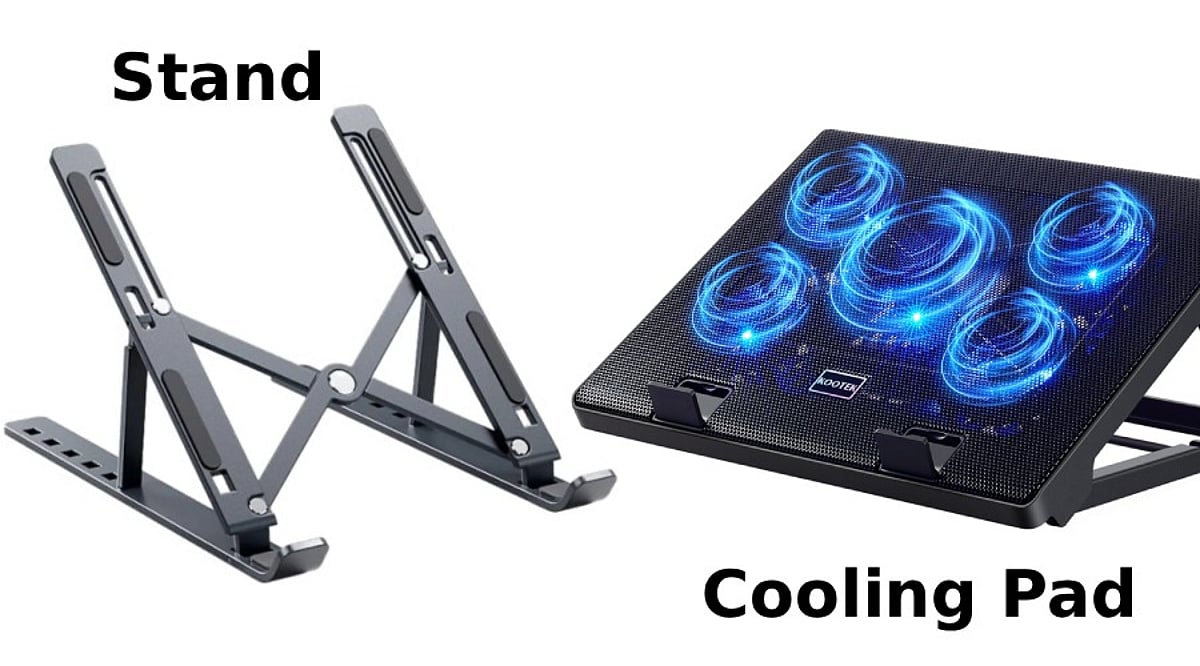
    A cooling pad is a hardware add-on with fans that help blow cold air directly into your laptop’s vents. They can be charged using a USB port and have various speeds, angles, and LED lights.

    A cooling pad is highly recommended for gaming laptops or powerful laptops that tend to heat up when performing tasks such as gaming, video editing, 3D rendering, coding, and more.

    • Best for: Gamers, video editors, graphic designers, developers and engineers, multitasking users

    What Is a Laptop Stand?

    It helps elevate your laptop to the right height and allows proper airflow underneath it. Unlike a cooling pad, it doesn’t have fans. The laptop stand is portable and lightweight and does not require charging.

    • Best for: Students, office workers, remote employees, writers, everyday users

    Cooling Performance: Which Works Better?

    While a cooling pad can lower temperatures, laptop stands don’t have fans that actively move air over the laptop’s bottom. The laptop will be cooled thanks to the elevated position and better airflow.

    Winner: Cooling Pad

    Comfort and Ergonomics

    In case you work long hours on your laptop, ergonomics is as important as temperature.

    The main function of laptop stands is elevating the laptop screen to eye level, and therefore reducing strain on your neck and shoulders. Moreover, some adjustable laptop stands allow you to adjust the viewing angle.

    As for the cooling pads, they elevate laptops; however, not for ergonomic reasons.

    Winner: Laptop Stand

    Noise, Portability, and Power

    There are spinning fans inside the cooling pads, so they make some noise. In expensive cooling pads, it will be barely noticeable, while in cheap ones, it can be pretty loud. Also, cooling pads occupy more space on the table and require you to take away one of your USB ports.

    Laptop stands do not make any noise. They are lighter, foldable, and portable.

    Winner: Laptop Stand

    Which One Is More Valuable?

    In general, for most people, the laptop stand seems more valuable since it increases comfort, provides better airflow, and does not need any electrical power.

    But if your laptop tends to overheat when playing games or using demanding applications, then you should consider purchasing a cooling pad.

    It all depends on what you use your laptop for.

    Cooling Pad vs Laptop Stand: Quick Comparison

    Feature Cooling Pad Laptop Stand
    Active cooling Yes (fans) No
    Ergonomics Limited Excellent
    Noise Low to moderate None
    Portability Bulky Lightweight, foldable
    Power needed USB port None
    Best for Gaming, heavy workloads Office, study, everyday use

    Who Should Buy a Cooling Pad?

    The purchase of a cooling pad would be justified if you:

    • Frequently play graphic games.
    • Edit videos or create 3D content.
    • Feel that your laptop becomes increasingly hot.
    • Face thermal throttling.
    • Live in a warm climate.

    Who Should Purchase a Laptop Stand?

    A laptop stand should be purchased by those who:

    • Work at home or in the office.
    • Take online lessons or participate in online video conferences.
    • Need improved posture.
    • Use their laptops primarily for web surfing or typing.
    • Require a portable device.

    Can They Be Used Together?

    Yes. Most people use both the cooling pad and the laptop stand with the external keyboard. Some expensive cooling pads also have height adjustability features, which means you get both active cooling and better ergonomics.

    If you spend a lot of time working at your desk and also do performance-intensive work, using both is the best option.

    Final Verdict

    A cooling pad and laptop stand address two entirely different needs. If your concern is the laptop’s temperature while performing intense tasks, then the cooling pad is a much more logical buy for you.

    Should your primary concern be comfort and productivity, the laptop stand would suit you better since it does not make any noise, weighs very little, requires no maintenance, and suits almost everyone.

    The gamer, artist, or professional who runs heavy-duty software will get much out of a cooling pad. The office worker, student, or home user will do fine with a decent laptop stand.

    Frequently Asked Questions

    Is a cooling pad better than a laptop stand?

    A cooling pad is better for heavy workloads, while a laptop stand is ideal for comfort, posture, and everyday productivity.

    Do cooling pads actually reduce laptop temperature?

    Yes. Cooling pads improve airflow and can lower temperatures, especially on gaming laptops with bottom-mounted air intake vents.

    Can a laptop stand prevent overheating?

    A laptop stand improves airflow underneath the device, helping reduce heat buildup during regular work, though not as effectively.

    Should gamers buy a cooling pad or a stand?

    Gamers should choose a cooling pad because active fans help maintain lower temperatures during long gaming sessions and intensive workloads.

    Can I use a cooling pad and laptop stand together?

    Yes. Some cooling pads include adjustable stands, while external keyboards make combined ergonomic and cooling setups even more effective.

  • Proven Gaming Laptop Cooling Tips to Prevent Overheating

    Proven Gaming Laptop Cooling Tips to Prevent Overheating

    Gaming laptops are built for speed, but they also generate a lot of heat during long gaming sessions. Excess heat can reduce performance, cause frame drops, and even affect the laptop’s lifespan. These practical cooling tips can help keep temperatures under control and ensure smoother, more reliable gameplay.

    Use a Cooling Pad

    A quality cooling pad improves airflow beneath your laptop and helps remove excess heat. Choose one with large, quiet fans that match your laptop’s size. It is an affordable accessory that can make a noticeable difference during long gaming sessions.

    Keep Air Vents Clear

    Avoid placing your laptop on beds, cushions, or blankets because they block the air vents. Always use a hard, flat surface like a desk or laptop stand. Better airflow allows the cooling system to work efficiently and prevents unnecessary heat buildup.

    Clean Dust Regularly

    Dust collects inside the cooling fans and heatsinks over time, reducing airflow and trapping heat. Use compressed air to clean the vents every few months, or have the laptop professionally cleaned if needed. A clean cooling system helps maintain stable gaming performance.

    Adjust Game Settings

    Playing every game at the highest graphics settings puts extra load on the CPU and GPU. Lowering settings like shadows, ray tracing, or resolution slightly can reduce heat without affecting gameplay too much. Your laptop will stay cooler and perform more consistently.

    Update Drivers and BIOS

    Laptop manufacturers often release updates that improve fan control, power management, and thermal performance. Install the latest graphics drivers and BIOS updates from the official manufacturer. These updates can improve system stability while helping your laptop manage heat more effectively.

    Manage Background Apps

    Before starting a game, close browsers, downloads, and unnecessary software running in the background. These apps use valuable CPU, RAM, and storage resources, creating extra heat. Keeping only essential programs open gives your laptop more power for gaming and better temperature control.

    Replace Thermal Paste When Needed

    If your gaming laptop is several years old, the thermal paste between the processor and cooling system may have dried out. Replacing it with a high-quality thermal paste can improve heat transfer, reduce temperatures, and restore cooling performance during demanding gaming sessions.

  • Best Laptops Under $1,000 in 2026: Top Picks for Every User

    Best Laptops Under $1,000 in 2026: Top Picks for Every User

    Modern laptops under $1,000 now deliver strong everyday performance, long battery life, and capable hardware for work, study, gaming, and browser-based tasks. The featured models include the Apple MacBook Air M4, HP OmniBook 5, Acer Swift Go 14, Acer Chromebook Plus Spin 714, and Lenovo LOQ 15, each suited to a different type of user. Performance, display quality, battery life, pricing, and practical trade-offs distinguish these laptops, showing how different workloads demand different strengths rather than the highest specifications.

    A thousand dollars once meant settling for less. Slower chips, tight RAM, a battery that gave out before the workday ended. That compromise has mostly disappeared. The laptops below were checked against current retailer listings rather than pulled from a spec sheet, and each one earns its place for a specific kind of buyer rather than a vague claim of being great at everything.

    How We Selected the Best Laptops Under $1,000 in 2026

    Every pick came from a live retailer or manufacturer listing. The selection considered each laptop’s processor, RAM, display quality, battery performance, and price, evaluating how well those features matched its intended workload. Each entry also carries one real limitation instead of a wall of praise.

    Best Laptops Under $1,000 in 2026: Quick Comparison

    Prices come from manufacturer and retailer listings and move often. It helps to confirm the current figure before checkout, especially for the Lenovo LOQ, which climbs back above $1,000 outside sale windows.

    Apple MacBook Air 13 (M4): Best Laptop Under $1,000 for Everyday Use

    The M4 Air is now the previous-generation model, since Apple’s M5 version has moved past $1,000, and that shift is exactly what makes it worth a look. It still handles daily multitasking, light photo editing, and video calls without fan noise, and the battery stretches through a full workday without trouble. The limit shows up in graphics: there is no dedicated GPU, so gaming or heavier video export work will hit a ceiling fast. It fits browser-heavy research, office apps, and video calls far better than GPU-dependent creative work.

    BUY NOW

    HP OmniBook 5 14: Best Budget Laptop for Battery Life

    Built around a Snapdragon X chip, the OmniBook 5 gives up some raw processing speed in exchange for battery stamina and a sharp 2K OLED screen. HP claims up to 34 hours under ideal conditions, and real-world use still tends to land well past a full day. The catch is Windows-on-ARM: most mainstream apps run fine through emulation, but some older or specialized Windows software still struggles. It suits commuters and travelers who need a full day of email, browsing, and document work without hunting for an outlet.

    BUY NOW

    Acer Swift Go 14: Best Windows Laptop Under $1,000

    This is the balanced pick for anyone who wants a fast, solidly built Windows laptop without paying extra for features they will not use. The Ryzen 7 8845HS handles spreadsheets, dozens of browser tabs, and light creative work with room to spare, and 1TB of storage is generous at this price. The display caps out at 60Hz and leans matte rather than vivid, so it favors productivity over media viewing. It works well for anyone running office software and heavy multitasking side by side.

    BUY NOW

    Also Read: Best Virtual Reality Gaming Deals on Walmart & Amazon Weekend Sale

    Acer Chromebook Plus Spin 714: Best Chromebook Under $1,000

    For anyone whose work lives mostly in a browser, the Spin 714 punches above its price. The aluminum build, 2-in-1 hinge, and QHD webcam feel closer to a $1,000 Windows laptop than a typical Chromebook. The weak spot is memory: 8GB of RAM works fine for ChromeOS but shows its limit once tabs and Android apps pile up together. Students and note-takers living in Google Docs, Gmail, and a few Android apps will find it more than capable.

    BUY NOW

    Lenovo LOQ 15 RTX 5050: Best Budget Gaming Laptop Under $1,000

    The LOQ 15 is a rare budget laptop that can run modern games at 1080p on medium-to-high settings, helped by the RTX 5050 and DLSS support. Build quality is plastic rather than premium, and the display and webcam are unremarkable, but the gaming performance for the price is hard to beat. This model’s list price sits at $1,129, and it dips below $1,000 during recurring sales at Lenovo and Best Buy, so timing matters. Independent tests of the RTX 5060 sibling in the same chassis recorded 91 fps in Cyberpunk 2077 at 1080p Ultra without ray tracing and 105 fps in Shadow of the Tomb Raider at 1080p, giving a fair sense of what the RTX 5050 tier can deliver at slightly lower settings.

    BUY NOW

    The sub-$1,000 laptop market has quietly turned into the most competitive tier in computing, and matching the laptop to the actual workload beats chasing the longest spec sheet every time.

    Also Read: Weekend Deals: Save Big on HP AI Laptops & Pavilion Series.

    Final Thoughts

    Next year’s models will likely push even more of these compromises out of the picture entirely, narrowing the gap between budget and premium machines further. The real differences between these five show up in daily use, not in a benchmark chart, and that is where the decision should be made.

    FAQs

    What should I look for when buying a laptop under $1,000 in 2026?

    Focus on a recent Intel Core, AMD Ryzen, or Apple Silicon processor, at least 16GB of RAM, a fast SSD, a quality display, and long battery life. Matching the laptop to your primary use case is just as important as comparing specifications.

    Are laptops under $1,000 good enough for students and professionals?

    Yes. Many laptops in this price range offer reliable performance for studying, remote work, web browsing, video conferencing, and productivity tasks while providing good portability and battery life.

    Can I buy a gaming laptop for under $1,000?

    Yes. Several budget gaming laptops under $1,000 include dedicated graphics, making them suitable for smooth 1080p gaming and entry-level creative workloads, though battery life may be shorter than thin-and-light laptops.

    Is a MacBook or a Windows laptop a better choice under $1,000?

    The best choice depends on your needs. MacBooks are known for battery life and ecosystem integration, while Windows laptops offer a wider variety of hardware options, upgrade possibilities, and gaming support.

    How can I choose the right laptop under $1,000?

    Start by identifying your primary use, such as studying, business, gaming, or content creation. Then compare laptops based on performance, memory, storage, display quality, battery life, and overall value rather than price alone.

  • 7 Common Mistakes to Avoid When Buying Your First Gaming Laptop

    7 Common Mistakes to Avoid When Buying Your First Gaming Laptop

    Buying your first gaming laptop is an exciting step, but it’s easy to get sidetracked by flashy features or overlook critical components. To help you make a smart investment, we’ve identified seven common mistakes that first-time buyers often make—and how to avoid them.

    1. Prioritizing RGB Over Performance

    A flashy design, RGB lighting, and futuristic styling may look appealing, but they don’t improve gaming performance. Focus first on the graphics card, processor, RAM, and cooling system. A laptop with balanced hardware will deliver smoother gameplay and better longevity than one that simply looks impressive.

    2. Ignoring the GPU

    The graphics card is the most important component in a gaming laptop. Many first-time buyers focus only on the processor while overlooking GPU performance. Choose a laptop with a modern dedicated graphics card that matches the types of games you play and offers enough performance for future game releases.

    3. Buying Without Checking Cooling Performance

    Powerful hardware generates significant heat during gaming sessions. A laptop with poor thermal management may experience overheating, loud fan noise, and reduced performance due to thermal throttling. Before purchasing, check the cooling design, airflow, and long-term thermal performance to ensure consistent gaming and hardware reliability.

    4. Choosing Too Little RAM or Storage

    Modern games require more memory and storage than ever before. Buying a laptop with insufficient RAM or limited SSD capacity can affect performance and leave little room for new titles. Consider configurations with upgrade options so your laptop remains capable as game sizes and system requirements continue growing.

    5. Overlooking Display Quality

    A powerful GPU deserves a quality display. Many buyers ignore refresh rate, response time, brightness, and color accuracy, even though these directly affect the gaming experience. A higher refresh rate and smoother visuals can make competitive games feel more responsive while also improving everyday productivity and entertainment.

    6. Ignoring Battery and Port Selection

    Gaming laptops aren’t known for exceptional battery life, but connectivity still matters. Check for enough USB ports, HDMI, fast charging support, Wi-Fi standards, and other essential connections. A well-equipped laptop provides greater flexibility for gaming accessories, external displays, and everyday work without requiring multiple adapters.

    7. Not Considering Future Needs

    A gaming laptop is a long-term investment, so avoid buying only for today’s requirements. Consider upcoming game demands, software updates, and potential upgrades. Selecting hardware with extra performance headroom helps extend the laptop’s usable lifespan, providing better value and reducing the need for an early replacement.