
Tag: gaming mouse

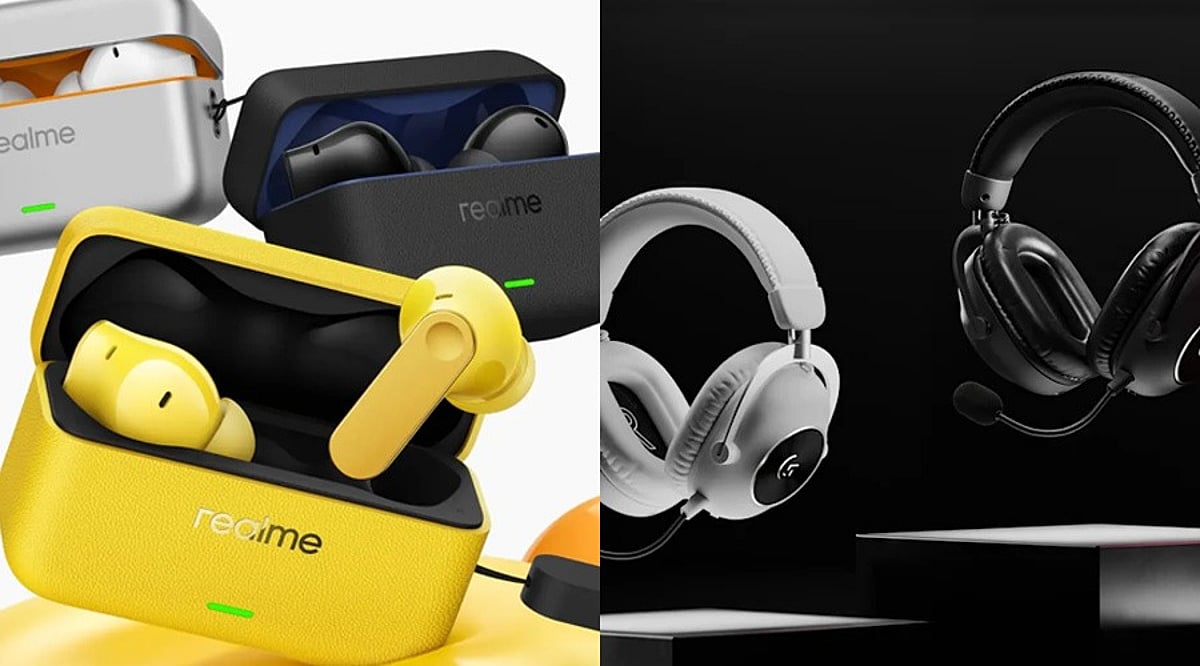
  • Realme Buds T500 Pro vs Logitech G Pro X2 Superstrike: Which Gaming Accessory Fits Your Setup?

    Realme Buds T500 Pro vs Logitech G Pro X2 Superstrike: Which Gaming Accessory Fits Your Setup?

    Gaming accessories are becoming increasingly specialized, with manufacturers focusing on features designed to improve responsiveness, immersion, and overall performance. Two products that take very different approaches are the Realme Buds T500 Pro and Logitech G Pro X2 Superstrike.

    The Realme Buds T500 Pro are true wireless stereo (TWS) earbuds with a dedicated low-latency gaming mode. Meanwhile, the Logitech G Pro X2 Superstrike is a wireless gaming mouse built for competitive play. The two devices therefore target different aspects of the gaming experience.

    Realme Buds T500 Pro: Focus on Audio

    Realme launched the Buds T500 Pro in India at Rs. 2,799. The earbuds went on sale from April 23, 2026, through Realme’s website, Flipkart, Myntra, Amazon, and select offline retail stores. The company also offered a Rs. 200 discount during the initial sale period, bringing the effective price to Rs. 2,599.

    The earbuds feature a 12.4mm titanium-plated dynamic driver and support Hi-Res Audio and the LHDC 5.0 codec. Realme not only provides adaptive ANC up to 50dB, but it also adjusts based on the environment and how well the earbuds fit in the ears.

    During calls, the Realme Buds T500 Pro earbuds use a 6-microphone array and AI-based noise reduction. The earbuds support spatial audio, and the low-latency gaming mode has 45ms latency. They use Bluetooth 6.1 for connectivity and can connect to 3 devices at once.

    Battery life is another key feature. The earbuds are claimed to offer up to 13.5 hours of playback on a single charge and up to 56 hours with the charging case. The case has a 530mAh battery, while each earbud carries a 62mAh battery. The earbuds also support fast charging, with Realme claiming up to 10 hours of playback from a 10-minute charge.

    The Buds T500 Pro are available in Lemon Cola, Orange Mint, and Chocolate, and carry an IP55 rating.

    Logitech G Pro X2 Superstrike: Built for Competitive Gamers

    The Logitech G Pro X2 Superstrike takes a completely different approach. It is a wireless gaming mouse developed with more than 100 esports professionals from teams including NAVI, G2, GEN.G, BLG, and FlyQuest RED.

    The mouse uses Logitech’s HERO 2 sensor, which supports sensitivity of up to 44,000 DPI. The sensor is rated for speeds over 888 IPS and acceleration of 88 G. The mouse supports polling rates up to 8,000Hz via Lightspeed wireless connectivity and 1,000Hz when wired.

    The Pro X2 Superstrike weighs 61g and measures 125 x 63.5 x 40mm. It consists of five programmable buttons and supports Lightspeed 2.4GHz wireless connectivity, wired USB-C connectivity, and Powerplay 2 compatibility. At the time of review, its listed price is USD 179.99.

    Different Priorities for Gamers

    The two products serve completely different purposes. Realme earbuds are made for gamers who want wireless earbuds with ANC, battery life, and low latency. On the other hand, the Logitech mouse is designed for gamers who need precise equipment.

    For gaming audio, the Realme Buds T500 Pro is a good fit. For the mouse, the Logitech G Pro X2 Superstrike is the best fit. It depends on what you need to update in your gaming system.

    FAQs

    What are the Realme Buds T500 Pro designed for?

    Realme Buds T500 Pro are wireless earbuds offering low-latency gaming audio, active noise cancellation, spatial audio, and extended battery life.

    What latency do the Realme Buds T500 Pro offer?

    The Realme Buds T500 Pro offer a 45ms low-latency gaming mode, helping reduce audio delays during competitive gaming sessions.

    What makes Logitech G Pro X2 Superstrike suitable for gaming?

    The Logitech G Pro X2 Superstrike offers precision controls, an advanced HERO 2 sensor, high polling rates, and adjustable actuation.

    What is the maximum DPI supported by Logitech G Pro X2 Superstrike?

    The Logitech G Pro X2 Superstrike features the HERO 2 sensor, supporting sensitivity of up to 44,000 DPI for gaming.

    Are Realme Buds T500 Pro and Logitech G Pro X2 Superstrike competitors?

    No, they serve different purposes, with Realme targeting gaming audio while Logitech focuses on precision mouse performance for competitive players.

  • Top 10 Budget Gaming Mice Under $50 in 2026: Best Picks for Performance and Value

    Top 10 Budget Gaming Mice Under $50 in 2026: Best Picks for Performance and Value

    Premium gaming features—including accurate sensors and wireless connectivity—are now available below the $50 price point. Logitech, Razer, SteelSeries, HyperX, and emerging brands offer excellent value across different gaming preferences in 2026. Choose a mouse based on your grip style, preferred games, connectivity needs, and ergonomic comfort for optimal performance.

    A gaming mouse can make a noticeable difference, whether you’re climbing the ranks in Valorant, grinding through Call of Duty, or exploring open-world adventures. The best part is you no longer need to spend a fortune to get one. In 2026, the sub-$50 segment is packed with gaming mice that offer fast sensors, reliable wireless performance, lightweight designs, and comfortable ergonomics.

    Small Budget, Serious Gaming Performance: Top 10

    Here are 10 budget gaming mice that deliver where it matters most:

    Logitech G309

    The Logitech G309 is one of the best mice for budget wireless gaming. It includes the Logitech HERO sensor and LIGHTSPEED technology for fast, accurate tracking. Its lightweight design and long battery life mean you won’t constantly need to replace batteries.

    Buy Now!

    Logitech G305 LIGHTSPEED

    The G305 mouse is older but remains among the best models in 2026. It is comfortable to hold, offers precise tracking thanks to the Logitech HERO sensor, and works well wirelessly. Ideal for FPS games, battle royale, or casual play.

    Buy Now!

    Logitech G502 HERO

    Not everyone needs a light mouse, and the G502 HERO excels here. It features 11 programmable buttons, custom weight settings, and an ergonomic design. Perfect for MMORPGs and games that require many shortcuts, this mouse is among the most efficient under $50.

    Buy Now!

    Razer DeathAdder Essential

    Some mice remain popular for doing what they do best. The DeathAdder Essential is a classic. Its ergonomics make it perfect for long gaming sessions, along with reliability and good tracking capabilities.

    Buy Now!

    SteelSeries Rival 3

    The main advantage of the Rival 3 is its simplicity and perfection. It is light, tracks accurately using the TrueMove Core sensor, and has good buttons. A reliable everyday gaming mouse that works well across various game types.

    Buy Now!

    Logitech G203 LIGHTSYNC

    The Logitech G203 LIGHTSYNC is an excellent example of an affordable gaming mouse. It provides good clicks, precise tracking, and customizable RGB lighting. Its compact design makes it great for study or work. Perfect for first-time PC gamers or those moving from an office mouse.

    Buy Now!

    HyperX Pulsefire Haste 2

    Designed for competitive gamers, the Pulsefire Haste 2 is simple and minimalistic. The light body facilitates fast actions, while smooth PTFE feet make gliding easy. Shooters should include this mouse on their list.

    Buy Now!

    Razer Basilisk V3

    The Basilisk V3 is aimed at gamers who want additional controls at their fingertips. It features programmable buttons, an ergonomic design, and customizable lighting. It also performs well with productivity tasks, making it an excellent all-rounder.

    Buy Now!

    ATK VXE Dragonfly R1

    Relatively new to the market, the Dragonfly R1 has become a major value choice thanks to a flagship-level PixArt PAW3395 sensor, light weight, and tri-mode connectivity at an unbeatable price. It proves that new brands can compete with established ones.

    Buy Now!

    Attack Shark X3

    The Attack Shark X3 offers a lot for its cost. Wireless connectivity, lightweight design, and good tracking make it an easy recommendation for gamers seeking maximum value.

    Buy Now!

    Final Take

    The budget gaming mouse market has changed dramatically over the past few years. Features once exclusive to premium models are now available for under $50. Logitech continues to lead with dependable options, while Razer and SteelSeries remain safe bets. At the same time, brands like ATK and Attack Shark are proving that you don’t need a big name to build a great gaming mouse. Choose based on your grip style, the games you play, and whether you prefer wired or wireless. A good mouse doesn’t have to be the most expensive—it has to fit you!

    FAQs

    What is the best gaming mouse under $50 in 2026?

    The Logitech G309, Logitech G305 LIGHTSPEED, and Razer Basilisk V3 are among the best budget gaming mice, offering reliable sensors, responsive performance, and excellent value for competitive and casual gamers.

    Are wireless gaming mice under $50 good for competitive gaming?

    Yes, many affordable wireless gaming mice now feature low-latency connections, accurate sensors, and dependable battery life, making them suitable for FPS, MOBA, battle royale, and other competitive gaming experiences.

    Which gaming mouse is best for FPS games?

    Lightweight models like the HyperX Pulsefire Haste 2, Logitech G309, Attack Shark X3, and SteelSeries Rival 3 are excellent choices for FPS games because they enable faster movement and precise aiming.

    Should I choose a wired or wireless gaming mouse?

    Wired mice offer uninterrupted performance without charging, while wireless models provide greater freedom of movement. Modern wireless gaming mice deliver latency comparable to wired options for most players.

    What should I consider before buying a budget gaming mouse?

    Consider sensor quality, weight, grip style compatibility, programmable buttons, connectivity options, build quality, and battery life to ensure the mouse matches your gaming preferences and comfort.

  • Top 7 Budget-Friendly Gaming Laptop Accessories Worth Buying in 2026

    Top 7 Budget-Friendly Gaming Laptop Accessories Worth Buying in 2026

    Gaming on a laptop can be incredibly immersive, but the right accessories can elevate your experience without breaking the bank. In 2026, budget-friendly options for gamers have become more advanced and affordable than ever. Here are seven essential accessories that combine performance, comfort, and value.

    Cooling Pad

    A good cooling pad is a must-have for any gaming laptop owner. It keeps your system at a safe temperature during intense gaming sessions by improving airflow and reducing overheating. Many budget models now come with adjustable fan speeds, RGB lighting, and multiple height settings for added comfort. This accessory not only protects your hardware but also helps maintain stable performance over long periods.

    Gaming Mouse

    A responsive gaming mouse can drastically improve your performance in fast-paced titles. Today’s budget options offer adjustable DPI, programmable buttons, and lightweight designs — all at an accessible price. Whether you play FPS, MOBA, or battle royale games, a quality gaming mouse ensures precision and comfort even during marathon gaming sessions.

    Mechanical Gaming Keyboard

    Mechanical keyboards are no longer a luxury. Affordable models now feature durable switches, anti-ghosting support, and vibrant backlighting. They provide faster key response and a satisfying typing feel, making them ideal for both gaming and everyday use. A compact mechanical keyboard can also save desk space, which is especially handy for laptop gamers.

    Gaming Headset

    A quality gaming headset enhances both gameplay and communication. Budget-friendly options now include clear microphones, comfortable ear cushions, and balanced audio that highlights footsteps and in-game effects. Beyond gaming, these headsets work great for online classes, video calls, and entertainment, making them a versatile addition to your setup.

    Large Mouse Pad

    A large mouse pad offers plenty of room for smooth mouse movement during competitive gaming. It also protects your desk surface and keeps both keyboard and mouse stable. Many affordable designs feature stitched edges and water-resistant materials for improved durability, ensuring long-lasting use.

    Laptop Stand

    A laptop stand elevates your screen to a more comfortable viewing angle while promoting airflow beneath the device. It helps reduce neck strain and encourages better posture during long gaming sessions. Foldable budget stands are lightweight, portable, and compatible with most gaming laptops, making them a practical choice for gamers on the go.

    USB Hub

    Modern gaming laptops often come with limited ports. A budget USB hub adds extra connections for your keyboard, mouse, controller, and external storage. Some models even include SD card slots and fast data transfer support. This accessory is useful not only for gaming but also for everyday productivity tasks.

    Whether you’re a casual player or a competitive gamer, these budget-friendly accessories can significantly enhance your gaming experience in 2026 without straining your wallet.

  • Top Logitech Mice with Wireless Charging Docks: 2026 Buyer’s Guide

    Top Logitech Mice with Wireless Charging Docks: 2026 Buyer’s Guide

    If you’re looking for a Logitech mouse that never runs out of power during your work or gaming sessions, models with dedicated charging docks or compatibility with Logitech’s POWERPLAY system are the perfect solution. Below we break down the best Logitech mouse models featuring convenient charging options in 2026.

    Logitech MX Master 3S

    This mouse is designed for professionals who demand ergonomic comfort and precision tracking. It supports multi-device connectivity and USB-C charging. The MX Master 3S delivers exceptional productivity for intensive daily workflows.

    Logitech G PRO X Superlight 2

    Built for competitive gaming, this ultra-lightweight mouse offers top-tier performance. It’s fully compatible with Logitech’s POWERPLAY wireless charging system, so you can keep playing without worrying about battery life.

    Logitech G502 X Lightspeed

    Featuring the HERO sensor for pinpoint accuracy, the G502 X Lightspeed offers customizable controls and wireless freedom. It works seamlessly with the Logitech POWERPLAY charging pad.

    Logitech G903 Lightspeed

    An ambidextrous design with premium wireless performance, the G903 Lightspeed comes with customizable buttons and supports continuous charging via the POWERPLAY mouse pad.

    Logitech G703 Lightspeed

    With an ergonomic shape and HERO sensor, the G703 Lightspeed delivers responsive wireless gaming. It’s compatible with Logitech’s POWERPLAY for uninterrupted charging.

    Logitech G502 Lightspeed

    A legendary design with a customizable weight system and programmable buttons, the G502 Lightspeed offers effortless wireless charging when paired with compatible POWERPLAY accessories.

    Logitech G309 Lightspeed

    An affordable option that balances reliable wireless performance and responsive tracking. It’s lightweight and supports Logitech’s wireless charging ecosystem.

    Logitech MX Anywhere 3S

    Compact and portable, the MX Anywhere 3S tracks precisely on multiple surfaces. It features USB-C charging and reliable wireless performance for professionals on the move.

    Logitech Lift Vertical Mouse

    Designed for ergonomic wrist positioning, the Lift Vertical Mouse has quiet clicks, long battery life, and wireless functionality for comfortable all-day productivity.