Tag: GitHub Copilot

  • Logitech MX Keypad Debuts as a Physical AI Control Center for Developers at ₹15,999 / $99.99

    Logitech MX Keypad Debuts as a Physical AI Control Center for Developers at ₹15,999 / $99.99

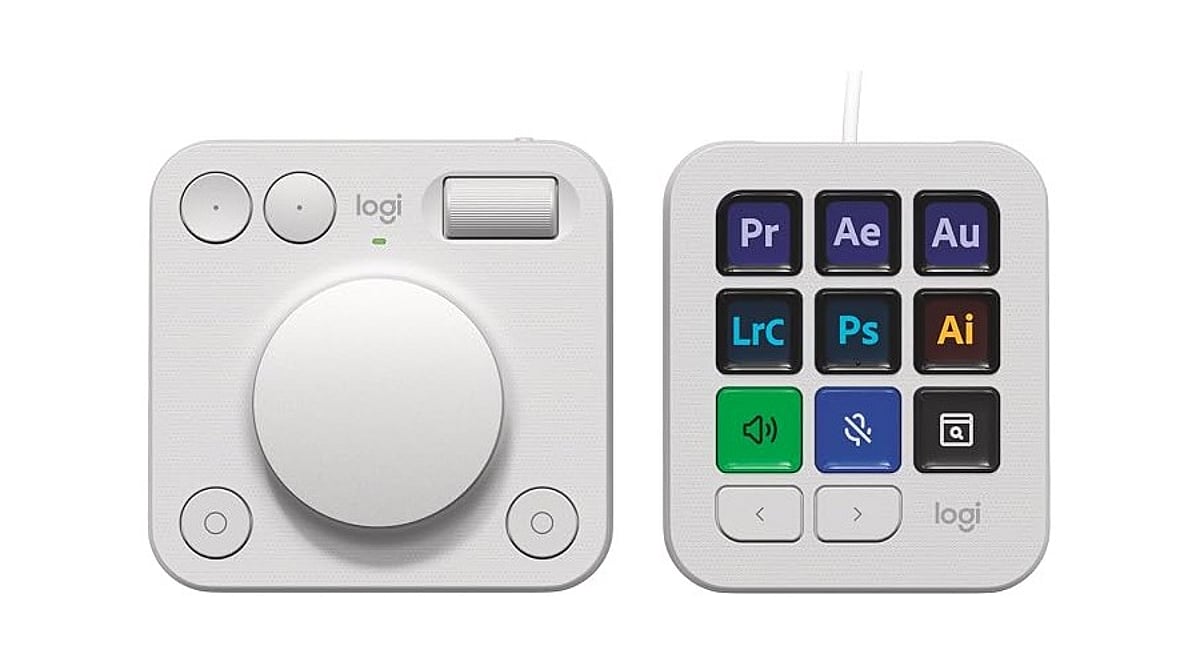
    Logitech launched the MX Keypad on September 8 as its first AI control center for developers worldwide. Priced at ₹15,999 in India and $99.99 in select global markets, the device introduces physical controls for managing AI coding tools like GitHub Copilot, Claude Code, VS Code, and IntelliJ IDEA.

    Designed for multi-app coding workflows that involve AI agents and development tools, the MX Keypad helps developers streamline tasks by offering customizable physical keys for prompts, commands, scripts, macros, and workflow actions. Native integration supports VS Code and the GitHub Copilot app at launch, with additional tools planned. Every unit also includes three free months of GitHub Copilot Pro+ through Logi Options+.

    “MX Keypad puts a physical control center at your fingertips,” said Anatoliy Polyanker, Logitech VP and GM. “It helps developers orchestrate AI workflows faster and more intuitively.” GitHub executive Martin Woodward emphasized the device’s focus on reducing tool navigation: “Great developer tools get out of your way.”

    Beyond software integration, Logitech offers the Logitech Actions SDK for developers building custom integrations. Community plugins already support Claude Code and OpenAI Codex through the Logi Marketplace. The MX Keypad also features sustainable design, with the Graphite model containing 64% post-consumer recycled plastic.

  • Claude Code vs. GitHub Copilot: Which AI Coding Assistant Reigns Supreme?

    Claude Code vs. GitHub Copilot: Which AI Coding Assistant Reigns Supreme?

    Two powerful AI coding assistants—Anthropic’s Claude Code and GitHub Copilot—are reshaping how developers write and debug software. Both tools promise to boost productivity, but they cater to different workflows and project types. This comparison breaks down their strengths, programming language support, and ideal use cases to help you choose the right assistant for your needs.

    What Is Claude Code?

    Claude Code, developed by Anthropic, focuses on deep code understanding, debugging, and managing large-scale development projects. Its strength lies in analyzing complex codebases, explaining intricate bugs, and suggesting thorough fixes. With a large context window, Claude Code can handle longer codebases and more extensive project contexts than many competitors.

    What Is GitHub Copilot?

    GitHub Copilot, powered by OpenAI’s Codex model, excels at real-time code suggestions directly inside popular integrated development environments (IDEs) like Visual Studio Code, JetBrains, and Neovim. It delivers fast autocomplete suggestions that significantly speed up everyday coding tasks, making it an ideal tool for rapid prototyping and routine development.

    Key Comparison Points

    Programming Language Support

    Both tools support a wide range of programming languages, including Python, JavaScript, Java, and C++. Developers can use either assistant across multiple stacks without switching tools.

    Context Window

    Claude Code offers a larger context window, allowing it to process and understand longer codebases and more complex project structures. This is beneficial for deep code analysis and large refactoring tasks. GitHub Copilot’s context window is smaller but sufficient for most real-time code completions.

    Debugging Capabilities

    Claude Code shines when it comes to debugging. It can explain complex bugs and suggest detailed, actionable fixes, often providing step-by-step reasoning. GitHub Copilot can assist with debugging too, but its primary strength is generating code rather than diagnosing issues.

    Code Completion

    GitHub Copilot is unmatched in real-time code completion. It offers context-aware suggestions as you type, reducing the time spent writing boilerplate code. Claude Code also provides code suggestions but is less focused on inline autocomplete and more on holistic project understanding.

    Which One Should You Choose?

    Claude Code is best suited for complex engineering tasks, large codebases, and deep debugging sessions. If you’re a senior developer or architect working on intricate systems, Claude Code’s analytical abilities can be a game-changer. GitHub Copilot, on the other hand, is ideal for daily productivity—especially for developers who want to write code faster and with fewer interruptions. It fits seamlessly into existing IDE workflows.

    Ultimately, the best choice depends on your workflow. Many developers use both tools in tandem: Copilot for quick code generation and Claude Code for deep problem-solving. As AI coding assistants continue to evolve, having both in your arsenal can maximize efficiency.

  • Microsoft to Launch Unified Copilot Super App Integrating Chat, Coding, and AI Agents by End of Year

    Microsoft to Launch Unified Copilot Super App Integrating Chat, Coding, and AI Agents by End of Year

    Microsoft CEO Satya Nadella confirmed during the company’s July 29, 2026 earnings call that a unified Copilot ‘super app’ will be released by the end of the year. The platform will combine chatbot capabilities, coding tools, and autonomous AI agents into a single interface for both consumers and businesses.

    According to Nadella, the super app is expected to become available in the current quarter, though exact pricing, a launch date, and a complete feature list have not been disclosed. “This quarter, we are bringing these Copilot experiences together, including code, in one super app… This is a major step forward, and I look forward to sharing more soon,” he said.

    The announcement follows earlier reports from Fortune indicating that Microsoft was developing a consolidated application merging Copilot chat, GitHub Copilot, Copilot Cowork, and its Autopilot agent system.

    From Chat to Autonomous Workflows

    Nadella outlined Copilot’s evolution through three stages: chat, Cowork, and Autopilots. The existing chat experience answers questions and generates content; Cowork assists users with collaborative tasks; and Autopilots represent the most advanced layer, enabling AI agents to complete longer, multi-step workflows with minimal human intervention. By placing these capabilities alongside code editing in one interface, Microsoft aims to reduce fragmentation across Windows Copilot, Microsoft 365 Copilot, GitHub Copilot, and Copilot Studio.

    Enterprise Distribution Remains Central

    The super app will target both commercial and consumer users. An integrated app may simplify deployment, licensing, and access for businesses already using Microsoft 365, allowing workers to leverage AI-powered document creation, coding, or workflow automation. This move comes as Microsoft reported $90 billion in quarterly revenue, with cloud computing and AI as strong growth drivers. The company could eventually monetize its vast Microsoft 365 customer base through a single Copilot platform generating subscription-based AI revenue.

    Competition Intensifies

    Microsoft’s strategy also heightens competition with OpenAI and other AI developers offering integrated assistants capable of handling text, coding, research, and agentic tasks. However, key questions remain unanswered, including whether GitHub Copilot will continue as a separate subscription, how existing users will be migrated, and what administrative controls enterprises will receive. The product’s success will ultimately depend on whether Microsoft delivers a genuinely connected experience rather than simply placing several existing tools inside one interface.

    Also Read: Microsoft Introduces MAI-Cyber-1-Flash, Claims to Outperform Gemini, ChatGPT

  • 7 AI Tools for Writing, Coding, and Research That Go Beyond ChatGPT and Gemini

    7 AI Tools for Writing, Coding, and Research That Go Beyond ChatGPT and Gemini

    Looking for more AI tools beyond ChatGPT and Gemini? These powerful platforms help with writing, coding, research, and productivity across different industries. Whether you need long-form content, accurate research, or efficient code development, these AI tools offer specialized capabilities to enhance your workflow.

    • Claude – Excels at long-form writing, document analysis, and thoughtful conversations with strong reasoning capabilities.
    • Perplexity AI – Delivers AI-powered answers with web citations, making research faster and more reliable.
    • Cursor AI – Helps developers write, edit, debug, and understand code using AI directly inside the editor.
    • GitHub Copilot – Speeds up coding by suggesting functions, code snippets, and complete solutions.
    • NotebookLM – Google’s AI tool that helps users summarize documents, generate insights, and organize research.
    • Grok – Built by xAI, Grok combines real-time information with conversational AI for news and research.
    • You.com AI – Combines AI chat with search, coding, writing, and productivity tools in one platform.

    Different AI tools excel at different tasks. Pick the right one based on your workflow and daily needs to maximize your productivity.

  • Best AI Coding Assistants for Developers in 2026: Top 5 Tools Compared

    Best AI Coding Assistants for Developers in 2026: Top 5 Tools Compared

    AI-powered coding assistants are rapidly transforming software development, helping developers write, debug, and understand code faster than ever. Here are the top five AI coding tools set to dominate in 2026:

    1. GitHub Copilot

    GitHub Copilot offers real-time code suggestions, debugging support, code explanations, and intelligent autocompletion across multiple programming languages and frameworks. It boosts productivity by learning from your coding style.

    2. Claude Code

    Claude Code excels at writing, refactoring, debugging, and understanding complex codebases. It supports long-context reasoning, project navigation, and workflow automation, making it ideal for large-scale projects.

    3. OpenAI Codex

    OpenAI Codex converts natural language instructions into functional code, automates repetitive tasks, explains logic, and accelerates development across many languages.

    4. Cursor

    Cursor is an AI-powered code editor that provides intelligent code completion, debugging assistance, project-wide understanding, and natural language editing, all seamlessly integrated into the developer workflow.

    5. Google Gemini Code Assist

    Google Gemini Code Assist offers AI-powered coding support with code generation, reviews, debugging, and documentation. It integrates smoothly with Google Cloud development environments and popular IDEs.

    These tools are shaping the future of software development, reducing manual effort and letting developers focus on creative problem-solving.

  • Best AI Coding Subscription Plans of 2026: Value Picks for Students, Freelancers, and Professionals

    Best AI Coding Subscription Plans of 2026: Value Picks for Students, Freelancers, and Professionals

    Advanced AI systems have become reliable coding partners that assist with debugging, optimization, and even suggesting architectural frameworks. The challenge for modern developers isn’t whether to adopt AI, but how to choose the most effective paid coding assistant. This guide evaluates top AI coding subscription plans by comparing pricing, features, usage limits, and developer-focused benefits to help you make a smart choice.

    Types of AI Coding Subscription Plans

    Understanding the categories of plans available is essential before selecting one. Here are key considerations:

    • Budget vs Usage: Entry-level plans suit light coding needs, while flat-rate bundles work best for daily heavy usage.
    • Tool Compatibility: Ensure the plan integrates with your IDE, such as VS Code, JetBrains, or Cursor.
    • Model Access: Some subscriptions lock you into one vendor; others like DevPass offer multi-model flexibility.
    • Predictable Billing: Flat-rate plans help avoid surprise token overages.

    Quick Comparison of Leading Plans

    While exact pricing can vary, here’s a snapshot of top contenders:

    Plan Best For Key Strength
    GLM Lite Students and light users Budget-friendly at ~$3/month
    MiniMax Starter Freelancers needing speed and cost balance Mid-range at ~$10/month
    DevPass Lite Professionals requiring multi-model access Premium value at ~$29/month
    Claude Code Pro Developers in Anthropic ecosystem Advanced code reasoning
    GitHub Copilot Developers in GitHub ecosystem Seamless IDE integration

    Recommendations for Indian Developers

    • Best Budget: GLM Lite at $3/month for students and light users.
    • Best Mid-Range: MiniMax Starter at $10/month for freelancers balancing speed and cost.
    • Best Premium Value: DevPass Lite at $29/month for professionals needing multiple models and predictable billing.

    Risks and Trade-Offs

    Consider these factors before committing:

    • Hidden Limits: The definition of a “prompt” varies by platform; a single query can trigger multiple model calls.
    • Vendor Lock-In: Copilot and Claude are not multi-system compatible.
    • Token Inflation: Newer tokenizers like Claude Sonnet 5 can raise effective usage costs by 35%.
    • Budget Overruns: Usage-based billing may cause surprises with runaway agent loops.

    Empowering Developers with Smart Choices

    AI coding subscriptions are essential for staying competitive. A good plan boosts productivity, creativity, and efficiency. Whether you need budget-friendly options for students, optimized speed-cost plans for freelancers, or multi-model flexibility for professionals, the right subscription can transform your workflow. Map your budget, coding style, and tool ecosystem to the available options and choose for predictable value.

    FAQs

    1. Which AI coding subscription offers the best value in 2026?
    Best value depends on needs. GLM Lite for budget, MiniMax Starter for freelancers, DevPass for multi-model access, and Copilot/Claude for ecosystem-specific users.

    2. Is GitHub Copilot better than Claude Code Pro?
    Copilot excels at IDE and GitHub integration; Claude Code Pro is better for advanced code reasoning and complex debugging.

    3. What should developers consider before choosing?
    Pricing, usage limits, supported models, IDE compatibility, billing structure, and vendor lock-in.

    4. Are budget plans suitable for professional development?
    Budget plans work well for students and light tasks; premium plans suit professionals with larger projects and higher demands.

    5. Can AI assistants replace software developers?
    No. AI speeds up coding, debugging, and testing, but humans remain essential for architecture, business logic, and project management.

  • Hands-On Review: My Top AI Tools After Extensive Testing

    Hands-On Review: My Top AI Tools After Extensive Testing

    After testing a wide range of popular AI tools, I’ve identified the ones that truly stand out for productivity, creativity, and research. Here’s a detailed look at my favorites and why they earn a spot in my daily workflow.

    ChatGPT: The All-Purpose AI Assistant

    ChatGPT remains my go-to AI assistant for writing, brainstorming, coding, research, and everyday productivity. It consistently delivers natural conversations, detailed explanations, creative ideas, and reliable assistance across multiple tasks. Whether drafting articles, summarizing reports, solving technical problems, or learning something new, it is the most versatile AI tool I use regularly.

    Claude: Master of Long-Form Analysis

    Claude excels at handling lengthy documents, thoughtful reasoning, and polished writing. It analyzes reports, edits content, summarizes research papers, and maintains context across extended conversations. Whenever I need structured analysis or nuanced responses, Claude produces clear, well-organized, and dependable results.

    Google Gemini: Seamless Ecosystem Integration

    Gemini integrates seamlessly with Google’s ecosystem, making it ideal for users relying on Gmail, Docs, Drive, and Search. It delivers accurate information, multimodal capabilities, and useful productivity features. I especially appreciate its ability to combine web knowledge with document-based assistance inside Google’s familiar workspace.

    Microsoft Copilot: The Enterprise Workhorse

    Copilot shines for professionals working within Microsoft 365. It helps draft emails, summarize meetings, generate presentations, analyze spreadsheets, and improve workplace productivity. Its integration with Word, Excel, PowerPoint, and Teams makes it an excellent AI companion for business users and enterprise environments.

    Perplexity AI: The Research Companion

    Perplexity has become my preferred research assistant whenever I need quick, source-backed answers. It simplifies complex topics, provides citations, and makes exploring current information easier. Instead of opening multiple browser tabs, I can quickly understand subjects through concise summaries supported by relevant references.

    Midjourney: Creative Visuals Redefined

    Midjourney continues to impress with exceptional AI-generated artwork and creative visuals. It produces highly detailed illustrations, concept art, marketing assets, and imaginative designs from simple prompts. For designers, marketers, and creators seeking visually stunning results, it remains one of the strongest image-generation platforms available.

    GitHub Copilot: The Developer’s Coding Partner

    GitHub Copilot significantly speeds up software development by suggesting code, generating functions, explaining logic, and reducing repetitive programming tasks. It supports multiple programming languages and integrates directly into popular code editors. For developers, it acts like an experienced coding partner that enhances productivity every day.

  • Comparing Generative AI Coding Tools: Which Offers the Most Value for Developers in 2026?

    Comparing Generative AI Coding Tools: Which Offers the Most Value for Developers in 2026?

    Generative AI coding tools are becoming a standard part of software development. They help developers write, review, and improve code more efficiently. Comparing their features and workflows reveals which tools deliver the greatest value in 2026.

    Overview

    Windsurf and Amazon Q Developer, two familiar AI coding brands, will have each moved into different product areas by mid-2026, reshaping the competitive landscape. GitHub Copilot, Cursor, Claude Code, and Kiro have emerged as the four tools that are actually shaping how developers choose AI coding help today. Pricing across the category has shifted from flat subscriptions to usage-based credits, changing how teams should evaluate cost.

    Choosing an AI coding tool is now much harder than choosing a programming language. The names of the tools developers trusted a year ago have changed, merged, or shifted their direction. Windsurf is now part of Devin Desktop, and Amazon is moving developers from Q Developer to Kiro. The bigger change, however, is that AI coding tools now serve very different workflows. Comparing them by brand alone is no longer enough.

    AI Coding Tools at a Glance

    Claude Code: Built for Complexity

    Claude Code runs from the terminal, not inside an editor. This is a deliberate design choice rooted in a specific philosophy: for genuinely complex engineering work, the file you are editing is rarely the whole problem. It reads the entire codebase, plans changes across multiple files, and refactors code by understanding how everything works together. Its large context window is the engine behind this. For backend systems, infrastructure work, or legacy codebases where cross-file relationships pose the real challenge, Claude Code operates at a depth that editor-based tools rarely reach.

    Cursor: The IDE Reimagined

    Cursor does not add AI to an existing editor. It builds the editor around AI from the start. Multi-file editing, repository-wide context, and conversational assistance are not features you enable. They are simply how the tool works. For developers who spend most of their day inside an IDE, Cursor reduces the need to switch between tools. Developers can edit multiple files, understand repository context, and generate new code without leaving the IDE.

    GitHub Copilot: The Reliable Standard

    GitHub Copilot remains the easiest AI coding assistant to adopt. It works inside popular editors such as VS Code, JetBrains, and Neovim without changing existing workflows. Teams already on GitHub can adopt it with almost no friction. Newer tools have pushed further into deep repository reasoning. But for the work that makes up most of a developer’s day, Copilot remains consistent, fast, and dependable.

    Kiro: Amazon’s Next Move

    Kiro approaches development from a different angle entirely. It starts from structured specifications rather than open-ended prompts, and it integrates directly with AWS services in ways that general-purpose tools cannot replicate. For teams building cloud-native applications on AWS, that specificity is a genuine advantage. Amazon is positioning Kiro as the successor to Q Developer, and the direction is clear, even if the ecosystem is still maturing.

    What the Benchmarks Now Measure

    Reliable code completion is now common across leading AI coding tools. The real difference lies in how well each tool understands the entire project before making changes. Benchmarks like SWE-bench Verified now test whether an AI can resolve a complete software issue end-to-end. That is a harder test and a more honest one.

    Choosing the Right Tool

    Pick GitHub Copilot for fast, reliable completion that fits into your current setup. Pick Cursor for an AI-first editing experience with real multi-file capability. Pick Claude Code for large-scale codebases, enterprise systems, and complex engineering where project-wide understanding matters. Pick Kiro when AWS is your primary environment and cloud-native integration is a priority. No single tool wins across every context. The best choice is the one that fits how you actually build software, not the one with the most visible brand.

    Why This Matters

    AI coding tools are changing how developers build software by speeding up development, improving code quality, and reducing repetitive work. Knowing the strengths of each tool helps individuals and teams choose the right assistant, improve productivity, control costs, and build better applications with greater confidence.

    Final Thoughts

    AI coding tools have moved well beyond simple code completion. They now help developers understand entire projects, refactor code, and automate complex development tasks. That makes choosing the right tool less about finding the biggest brand and more about matching the tool to the way a team builds software. The strongest choice is the one that fits the workflow, development environment, and scale of the projects being built.