Tag: laptop buying guide

  • Avoid These Common Laptop Buying Mistakes for a Smarter Purchase

    Avoid These Common Laptop Buying Mistakes for a Smarter Purchase

    When purchasing a new laptop, it’s easy to get overwhelmed by specifications and flashy features. However, making the wrong choice can lead to poor performance, unnecessary expenses, and frustration. To help you make an informed decision, we’ve compiled a list of common laptop buying mistakes and how to avoid them.

    1. Ignoring Your Usage Needs

    Choosing a laptop without considering your primary tasks often leads to overspending on features you don’t need or poor performance for everyday requirements. Always assess how you’ll use the device—whether for work, gaming, or casual browsing—before making a decision.

    2. Focusing Only on the Processor

    A powerful processor alone cannot guarantee smooth performance if other components like RAM, storage, cooling, and graphics are inadequate. A balanced configuration is essential for handling diverse workloads efficiently.

    3. Buying Too Little RAM

    Opting for 8GB or less of RAM for demanding tasks like video editing or multitasking can quickly become a bottleneck. As software requirements grow, insufficient RAM slows down your laptop, so consider 16GB or more for future-proofing.

    4. Choosing Slow Storage

    Traditional hard drives significantly reduce boot times and application performance. Solid-state drives (SSDs) offer much faster speeds, quicker file access, and better overall responsiveness, making them a worthwhile investment for daily use.

    5. Ignoring Battery Life

    Attractive specifications mean little if the battery drains quickly. For frequent travelers or those who work remotely, a laptop with long battery life is crucial to avoid constant charging during meetings, flights, or long work sessions.

    6. Overlooking Display Quality

    Poor screen brightness, low resolution, and inaccurate colors can hinder productivity and cause eye strain during extended use. A high-quality display enhances both work efficiency and entertainment experiences.

    7. Forgetting Port Availability

    Insufficient USB, HDMI, or Thunderbolt ports may force you to buy expensive adapters, creating inconvenience when connecting accessories or external displays. Check that your laptop has the ports you need for your peripherals.

    8. Skipping Build Quality

    Weak hinges and flimsy construction reduce durability, leading to higher repair costs and shorter device lifespan. A well-built laptop withstands everyday handling and travel, offering better long-term reliability.

    9. Ignoring Future Upgradability

    Choosing a laptop with upgradeable RAM or storage extends its usability and saves money, as you can enhance performance without replacing the entire device. Prioritize models that allow easy upgrades when possible.

    By avoiding these common pitfalls, you can ensure that your new laptop meets your needs and provides a great experience for years to come.

  • Weekend HP Laptop Deals 2026: Pavilion, Envy & OmniBook Compared for Best Value

    Weekend HP Laptop Deals 2026: Pavilion, Envy & OmniBook Compared for Best Value

    Weekend laptop deals can be misleading. The biggest discount rarely means the best long-term value. A cheaper laptop with older hardware can end up costing more in the long run, through slower performance and a shorter useful life, than a newer model with a smaller price cut. HP’s current Amazon India lineup makes this easy to see, with budget-friendly Pavilion laptops, premium Envy convertibles, and AI-ready OmniBook models all sitting side by side. That range makes careful comparison worth the extra few minutes.

    These four HP laptops each suit a different kind of use, and picking the right one comes down to performance, features, and everyday comfort rather than the size of the discount.

    HP Pavilion x360 (13th Gen Core i5-1355U, model ek1148TU)

    Students and everyday multitaskers get the most out of this one. It runs a 13th Gen Intel Core i5-1355U with 16GB DDR4 RAM and a 512GB SSD, paired with a 14-inch FHD IPS touchscreen and Iris Xe integrated graphics. The touch-and-flip form factor works well for note-taking in class or sketching over PDFs, and the i5 chip handles browser-heavy multitasking and office apps without lag. Battery life varies by unit based on user reviews, so check current buyer feedback before purchase rather than relying on the spec sheet alone. Treat it as a dependable everyday productivity laptop, not a machine for heavy editing.

    Buy Now on Amazon India

    HP Pavilion Plus (13th Gen Core i5-1335U, model ew0107TU)

    The display is one of the biggest factors that separates this model from the standard Pavilion. It pairs the same generation i5-1335U processor with faster 16GB LPDDR5x memory and a 512GB SSD but adds a 14-inch 2K IPS panel at 300 nits. That higher resolution gives noticeably sharper text and more workspace for spreadsheets, coding, and document-heavy tasks, while core performance stays close to the standard Pavilion. It works well for professionals who want a sharper screen without paying OLED prices.

    Buy Now on Amazon India

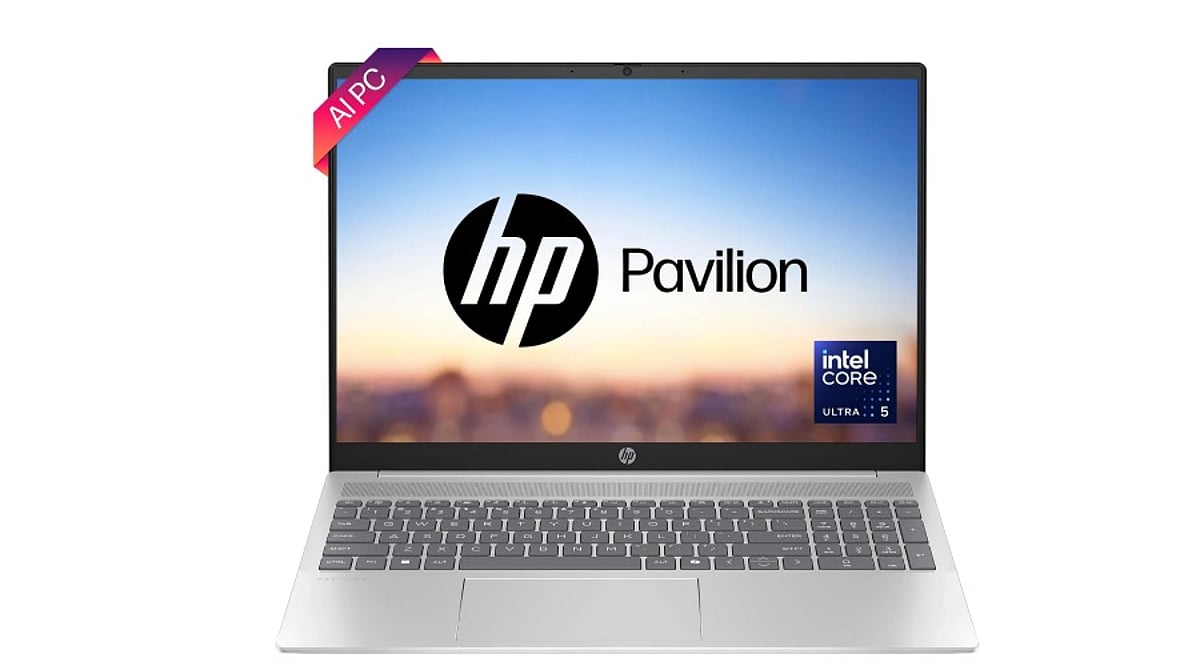
    HP Envy x360 AI laptop (Intel Core Ultra 5 125U, 12 TOPS NPU)

    A dedicated NPU is what sets this laptop apart from the rest of the lineup. The Core Ultra 5 125U includes a neural processing unit rated at 12 TOPS, which offloads supported tasks like background blur and noise suppression from the CPU, improving speed and battery efficiency during those workloads. NPUs currently accelerate a limited set of tasks, and that set will grow as more Windows apps add on-device AI support. It comes with 16GB LPDDR5 RAM, a 512GB SSD, and a 14-inch OLED touchscreen in 2K or 3K, depending on the variant. For professionals who want a machine that stays relevant as more apps add local AI features, this is the more future-ready pick over a standard Core i5 model, even at a higher price point.

    Buy Now on Amazon India

    HP OmniBook 5 Flip (13th Gen Core i5-1334U)

    Portability and screen comfort are the selling points here. The OmniBook 5 Flip is HP’s newer branding for its mid-range 2-in-1 line, replacing older Pavilion x360 naming in parts of the catalog, and it runs a 13th Gen Core i5-1334U with 16GB LPDDR5 RAM and a 512GB SSD on a 14-inch 2K WUXGA anti-glare touchscreen rated at 300 nits. The anti-glare coating is the standout feature, useful for anyone working near windows or under harsh office lighting. Performance sits in the same bracket as the Pavilion x360, so pick this one for the better display and hinge flexibility, and skip it if screen glare isn’t a concern for you.

    Buy Now on Amazon India

    Comparison Table

    Model Processor RAM Storage Display Best For
    Pavilion x360 i5-1355U 16GB DDR4 512GB SSD 14″ FHD Touch Students, multitasking
    Pavilion Plus i5-1335U 16GB LPDDR5x 512GB SSD 14″ 2K IPS Professionals, sharp display
    Envy x360 AI Core Ultra 5 125U 16GB LPDDR5 512GB SSD 14″ OLED 2K/3K AI features, future-proof
    OmniBook 5 Flip i5-1334U 16GB LPDDR5 512GB SSD 14″ 2K Anti-glare Hybrid workers, glare reduction

    Weight and battery-life figures vary by unit and seller listing on Amazon India, so confirm both on the live product page before checkout rather than relying on spec sheets alone.

    Which HP Laptop Should You Buy?

    Students on a budget do well with the Pavilion x360. Office workers who spend hours in spreadsheets or code editors get more value from the Pavilion Plus display. Creators and professionals who want AI-assisted features should look at the Envy x360. Hybrid workers who move between meeting rooms and desks benefit from the OmniBook 5 Flip’s lighter build and anti-glare screen.

    A note on buying this weekend: prices and stock on Amazon India shift daily during sale periods. Each link above takes you to the live search results for that exact model so you can confirm the current price, seller, and delivery date before checkout. Favor listings marked Amazon Fulfilled, check the seller rating, and confirm the listing carries HP’s official India warranty before you buy.

    Final Thoughts

    The best weekend laptop deal is rarely the one with the biggest discount. It is the one that still performs well long after the sale ends. The right choice depends on how the laptop actually gets used, whether that means an affordable everyday machine, a sharper screen for work, AI-ready features, or the flexibility of a 2-in-1. Comparing specs closely, checking the seller and warranty, and choosing lasting value over the lowest price tag will matter far more once the discount banner disappears.

    FAQs

    1. Are HP AI laptops worth buying in 2026?

    Yes. HP AI laptops powered by Intel Core Ultra or AMD Ryzen AI processors offer improved multitasking, AI-assisted features, and better long-term performance for work, study, and creative tasks.

    2. Is the HP Pavilion series still a good choice?

    Yes. The HP Pavilion series remains a reliable option for students, families, and everyday users who need solid performance for productivity, web browsing, streaming, and light content creation.

    3. What should I look for in an HP laptop deal?

    Focus on the processor, RAM, SSD storage, battery life, display quality, and warranty rather than the discount percentage alone. A well-balanced configuration usually offers better long-term value.

    4. Which HP laptop is better for students: AI laptops or Pavilion models?

    Pavilion laptops are ideal for most students since they provide excellent value for everyday coursework. Students with heavier workloads or AI-based applications may benefit from an HP AI laptop with 16GB RAM.

    5. How can I tell if a weekend laptop deal is genuinely good?

    Compare the final price with the laptop’s specifications, recent pricing, warranty, and included features. A worthwhile deal should match your workload and provide lasting value beyond the sale period.

  • Top HP Laptops for Students on Amazon: Budget-Friendly Picks for 2026

    Top HP Laptops for Students on Amazon: Budget-Friendly Picks for 2026

    Choosing the right HP laptop starts with understanding your needs and budget. For most students, an Intel Core i3/i5 or AMD Ryzen 3/5 processor, at least 16GB RAM, and a 512GB SSD deliver smooth performance for assignments, browsing, online classes, and everyday multitasking.

    HP 15s-fq5330TU is one of the best value picks for students. Powered by an Intel Core i5 processor with 16GB RAM and a 512GB SSD, it handles coding, research, multiple browser tabs, and video meetings with ease while offering a spacious 15.6-inch Full HD display.

    HP 14s-DY5005TU is ideal for students who want a lightweight laptop for daily college use. Its Intel Core i5 processor, 16GB RAM, and 512GB SSD provide reliable speed for note-taking, presentations, Office apps, and online learning, all in a portable 1.46kg design.

    Students looking for a premium display should consider the HP Pavilion Plus 14. It features a sharp 2K display, Intel Core i5 processor, fast LPDDR5 memory, and a lightweight design, making it perfect for creative work, media consumption, and productivity on the go.

    The new HP OmniBook 3 offers excellent value with AI-powered Ryzen or Snapdragon processors, generous RAM, and up to 1TB SSD storage. Its anti-glare display, long battery life, and fast performance make it a great option for classes, homework, and daily multitasking.

    For demanding workloads like programming, video editing, or heavy multitasking, the HP OmniBook 7 OLED stands out. It combines an Intel Core Ultra processor, up to 32GB RAM, a 1TB SSD, and a stunning high-resolution OLED display for professional-level performance.

    Before buying, check four essentials: a modern Intel Core or Ryzen processor, at least 16GB RAM, a 512GB SSD, and a laptop weighing under 1.5kg if portability matters. Many HP student laptops on Amazon also include Windows 11 and Microsoft Office, offering extra value for college users.

  • 2026 Laptop Reviews: The Best Models for Performance, Battery Life, and AI Capabilities

    2026 Laptop Reviews: The Best Models for Performance, Battery Life, and AI Capabilities

    The laptop industry is undergoing major changes as a global memory shortage known as ‘RAMageddon’ continues. This issue has increased component costs and driven up overall laptop prices by $50 to $680 in some cases. Despite these pressures, brands keep releasing improved models with better processing power, more efficient batteries, and advanced AI features. After evaluating twenty laptops this year, several models stand out for their value and performance across different budgets.

    Market Overview

    Current conditions include constrained RAM supply, rising manufacturing costs, and soaring demand for AI-capable devices. These factors have reduced the availability of high-end yet affordable laptops. However, technological advances in power efficiency, compactness, and built-in AI processing have made many new models more future-ready than ever.

    Top Laptops of 2026 So Far

    Apple MacBook Neo – Entry-Level Premium Choice

    Apple’s MacBook Neo introduces a more affordable premium laptop at around $599. It features an elegant aluminum design, Liquid Retina display, quality speakers, and a comfortable keyboard. Powered by the A18 Pro processor, it handles routine tasks like web browsing and video playback seamlessly. Battery life reaches 15 hours, though it’s not suited for professional workloads.

    Apple MacBook Air (M5) – Balanced Mid-Range Performer

    The MacBook Air with the M5 chip remains one of the most balanced laptops available. It offers enhanced wireless functionality and improved memory options compared to previous models, all in a fanless design. The high-resolution display, webcam, and speakers outperform many competitors. Performance is strong for both work and entertainment, battery life is solid, and the new internal components make it more future-proof. The main downside is higher pricing due to market conditions.

    Asus Zenbook A16 – High-Performance Lightweight Device

    The Asus Zenbook A16 is one of the best Windows laptops of 2026. It runs on the Snapdragon X2 Elite Extreme processor, delivering excellent single-core and multi-core performance. The 2.8K OLED display with a 120Hz refresh rate makes it ideal for work and entertainment. A standout feature is 48GB of RAM, which greatly improves multitasking. Despite its 16-inch screen, the laptop weighs under 3 pounds. It’s priced higher than mid-range models but offers outstanding value for the performance.

    MSI Prestige 14 Flip AI+ – Convertible Productivity Machine

    The MSI Prestige 14 Flip AI+ is a versatile convertible. It uses an Intel Core Ultra Series 3 CPU with AI-enhanced performance, an OLED display, and a stylus. Designed for creatives, it packs 32GB of RAM for multitasking and fast storage. Battery life exceeds 25 hours with moderate use—far above average. However, this model is no longer widely available, and future versions may cost more.

    Notable Mentions

    Two other laptops deserve recognition. The HP OmniBook 3 16 set an all-time battery record by playing video for over 40 hours, making it one of the most power-efficient notebooks ever tested. The MSI Stealth 16 AI+ achieved over 11 hours of battery life, outstanding for a gaming laptop.

    Key Considerations for Buyers

    Choosing a laptop depends on individual needs. Users requiring high performance should prioritize high RAM and processor speeds, while most users may value battery longevity. Future compatibility is also critical, as AI applications become more integrated into everyday computing.

    Final Thoughts

    Rising costs and rapid technological advances are reshaping the competitive laptop market. Despite the RAM shortage pushing prices up, many devices still deliver excellent value. The MacBook Neo offers an entry point to premium laptops; the MacBook Air (M5) is the most balanced all-rounder; the Asus Zenbook A16 is a top performer; and the MSI Prestige 14 Flip AI+ excels in convertibility and productivity. Your choice will depend on your personal needs, but these are among the best models on the market today.

    Frequently Asked Questions

    1. Why are laptop prices higher in 2026?

    Laptop prices have increased due to elevated memory component costs, higher manufacturing expenses, and growing demand for AI-capable hardware. These factors have made many premium and mid-range laptops more expensive.

    2. Which laptop offers the best overall value?

    The Apple MacBook Air (M5) is widely regarded as a top all-around laptop, combining strong performance, excellent battery life, a premium display, improved memory options, and reliable everyday productivity in a lightweight design.

    3. Are AI-powered laptops worth buying?

    Yes. AI-powered laptops include dedicated processors that boost productivity, video conferencing, content creation, and power efficiency. They are also better prepared for upcoming AI-based features in Windows and macOS.

    4. Which laptop is best for multitasking and professional workloads?

    The Asus Zenbook A16 stands out with its Snapdragon X2 Elite processor, up to 48GB of RAM, a 2.8K OLED display, and a lightweight design, making it an excellent choice for demanding multitasking and professional workflows.

    5. What should buyers prioritize when choosing a laptop?

    Buyers should compare processor performance, RAM capacity, battery life, display quality, AI capabilities, portability, software compatibility, and long-term value rather than focusing solely on price, to ensure the laptop meets future computing needs.