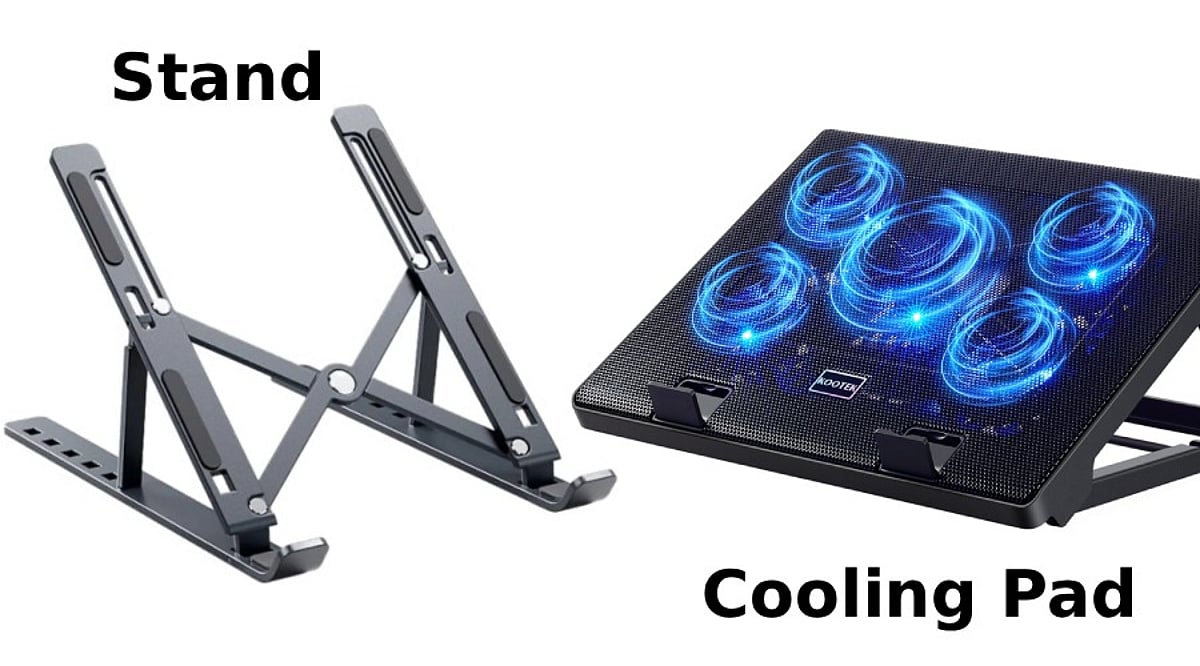
A laptop running hot can affect performance, battery life, and long-term reliability. That’s why many users consider accessories like cooling pads and laptop stands to improve airflow and comfort. While both aim to keep your laptop cooler, they work in different ways and suit different users.
If you’re unsure which one deserves a place on your desk, here’s a detailed comparison to help you decide.
What Is a Laptop Cooling Pad?
A cooling pad is a hardware add-on with fans that help blow cold air directly into your laptop’s vents. They can be charged using a USB port and have various speeds, angles, and LED lights.
A cooling pad is highly recommended for gaming laptops or powerful laptops that tend to heat up when performing tasks such as gaming, video editing, 3D rendering, coding, and more.
- Best for: Gamers, video editors, graphic designers, developers and engineers, multitasking users
What Is a Laptop Stand?
It helps elevate your laptop to the right height and allows proper airflow underneath it. Unlike a cooling pad, it doesn’t have fans. The laptop stand is portable and lightweight and does not require charging.
- Best for: Students, office workers, remote employees, writers, everyday users
Cooling Performance: Which Works Better?
While a cooling pad can lower temperatures, laptop stands don’t have fans that actively move air over the laptop’s bottom. The laptop will be cooled thanks to the elevated position and better airflow.
Winner: Cooling Pad
Comfort and Ergonomics
In case you work long hours on your laptop, ergonomics is as important as temperature.
The main function of laptop stands is elevating the laptop screen to eye level, and therefore reducing strain on your neck and shoulders. Moreover, some adjustable laptop stands allow you to adjust the viewing angle.
As for the cooling pads, they elevate laptops; however, not for ergonomic reasons.
Winner: Laptop Stand
Noise, Portability, and Power
There are spinning fans inside the cooling pads, so they make some noise. In expensive cooling pads, it will be barely noticeable, while in cheap ones, it can be pretty loud. Also, cooling pads occupy more space on the table and require you to take away one of your USB ports.
Laptop stands do not make any noise. They are lighter, foldable, and portable.
Winner: Laptop Stand
Which One Is More Valuable?
In general, for most people, the laptop stand seems more valuable since it increases comfort, provides better airflow, and does not need any electrical power.
But if your laptop tends to overheat when playing games or using demanding applications, then you should consider purchasing a cooling pad.
It all depends on what you use your laptop for.
Cooling Pad vs Laptop Stand: Quick Comparison
| Feature |
Cooling Pad |
Laptop Stand |
| Active cooling |
Yes (fans) |
No |
| Ergonomics |
Limited |
Excellent |
| Noise |
Low to moderate |
None |
| Portability |
Bulky |
Lightweight, foldable |
| Power needed |
USB port |
None |
| Best for |
Gaming, heavy workloads |
Office, study, everyday use |
Who Should Buy a Cooling Pad?
The purchase of a cooling pad would be justified if you:
- Frequently play graphic games.
- Edit videos or create 3D content.
- Feel that your laptop becomes increasingly hot.
- Face thermal throttling.
- Live in a warm climate.
Who Should Purchase a Laptop Stand?
A laptop stand should be purchased by those who:
- Work at home or in the office.
- Take online lessons or participate in online video conferences.
- Need improved posture.
- Use their laptops primarily for web surfing or typing.
- Require a portable device.
Can They Be Used Together?
Yes. Most people use both the cooling pad and the laptop stand with the external keyboard. Some expensive cooling pads also have height adjustability features, which means you get both active cooling and better ergonomics.
If you spend a lot of time working at your desk and also do performance-intensive work, using both is the best option.
Final Verdict
A cooling pad and laptop stand address two entirely different needs. If your concern is the laptop’s temperature while performing intense tasks, then the cooling pad is a much more logical buy for you.
Should your primary concern be comfort and productivity, the laptop stand would suit you better since it does not make any noise, weighs very little, requires no maintenance, and suits almost everyone.
The gamer, artist, or professional who runs heavy-duty software will get much out of a cooling pad. The office worker, student, or home user will do fine with a decent laptop stand.
Frequently Asked Questions
Is a cooling pad better than a laptop stand?
A cooling pad is better for heavy workloads, while a laptop stand is ideal for comfort, posture, and everyday productivity.
Do cooling pads actually reduce laptop temperature?
Yes. Cooling pads improve airflow and can lower temperatures, especially on gaming laptops with bottom-mounted air intake vents.
Can a laptop stand prevent overheating?
A laptop stand improves airflow underneath the device, helping reduce heat buildup during regular work, though not as effectively.
Should gamers buy a cooling pad or a stand?
Gamers should choose a cooling pad because active fans help maintain lower temperatures during long gaming sessions and intensive workloads.
Can I use a cooling pad and laptop stand together?
Yes. Some cooling pads include adjustable stands, while external keyboards make combined ergonomic and cooling setups even more effective.