
Tag: LinkedIn

  • LinkedIn Combats Fake Profiles with AI Detection and Identity Verification

    LinkedIn Combats Fake Profiles with AI Detection and Identity Verification

    LinkedIn is deploying a multi-layered strategy combining artificial intelligence, identity verification, and contextual signals to counter the rising threat of fake professional profiles. Between July and December 2024, the platform blocked over 80.6 million fake accounts at registration, yet the challenge persists with AI-generated headshots, cloned executives, and fake recruiters.

    Automated Detection Screens Suspicious Accounts Early

    LinkedIn’s first line of defense is AI-driven detection. In October 2022, the company introduced a deep learning model that analyzes profile photo uploads for signs of AI generation. It detects subtle artifacts without using facial recognition or biometric data.

    A 2023 study with Professor Hany Farid found the model detected 99.6% of StyleGAN-generated faces with only a 1% false-positive rate on real photos. A 2024 update expanded the training set to include StyleGAN 1–3, Stable Diffusion 1 & 2, and DALL·E 2, achieving 98% recall at a 0.5% false-positive target. However, on unseen generators, recall dropped to 84.5%, highlighting the need for continuous model updates.

    Text-based fake profiles remain tricky. A July 2025 arXiv study showed that existing detectors allowed 42% to 52% of GPT-4-Turbo-generated LinkedIn-style profiles to pass. Adversarial training improved this to a 1% to 7% range.

    Verification Provides Evidence for Specific Claims

    LinkedIn offers free identity, workplace, and education verification. Workplace verification uses a company email or Microsoft Entra Verified ID; education checks use a school email. ID verification is handled by CLEAR (U.S., Canada, Mexico), Persona (other listed countries), or DigiLocker (India).

    By December 2025, over 100 million members had added at least one verification. LinkedIn states that Persona collects ID images and selfies, but only shares specified information after member consent—no biometric data, ID numbers, or expiry dates are received by LinkedIn.

    Contextual Signals Help Members Judge Trustworthiness

    A verification badge confirms a single claim, not overall credibility. LinkedIn provides additional context through the About this profile panel, which shows account creation date and whether a phone number or work email is verified. Members are also encouraged to review post history, message content, and account age.

    Job posts can display verified company and recruiter details. In September 2025, LinkedIn said it would require workplace verification when members add or update certain leadership or recruiter-related roles. The Verified Recruiter label appears in InMails and on profiles.

    Where the Limits Lie

    Detection models can flag suspicious photos but cannot confirm a real person behind a clean profile. Unverified members are not automatically fake. For Persona, members must be in a supported country and provide a valid NFC-enabled passport.

    TechCrunch reported that about 60% of verified members confirmed a workplace, while only 27% verified a government ID—two badges with very different weights. LinkedIn also notes that a verification badge on a job post does not increase hiring likelihood.

    The Future: Portable Verification

    Through Verified on LinkedIn, partners like Adobe, G2, UserTesting, TrustRadius, and Zoom can display member verifications on their own platforms. A self-serve API extends this to any organization. A verification earned on LinkedIn can function as a professional trust signal beyond the platform itself.

  • Truecaller and LinkedIn Partnership Brings Professional Profiles to Caller ID

    Truecaller and LinkedIn Partnership Brings Professional Profiles to Caller ID

    Truecaller, the leading global platform for verifying contacts and blocking unwanted communication, has announced a worldwide partnership with LinkedIn to bring richer professional context and trusted identity to its caller ID service. The integration aims to make professional calls easier to recognize and understand by adding LinkedIn profile information directly to the caller ID screen.

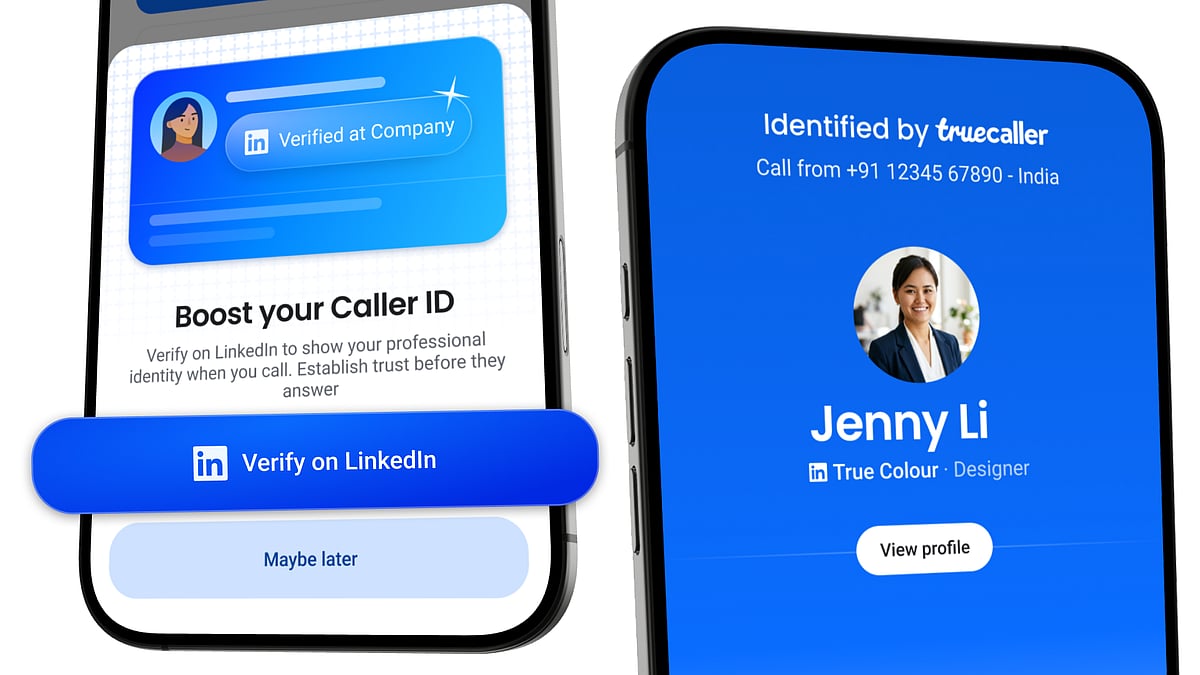
    With this partnership, Truecaller users can optionally connect their LinkedIn accounts to display their job title, company, and profile picture when they call someone. Recipients will see this professional context alongside the caller’s name and photo, helping them decide whether to answer. Additionally, if the caller has verified information on LinkedIn, such as their workplace, Truecaller will show a verification indicator.

    “A phone number by itself tells you almost nothing. Truecaller’s role has always been to add the context people need to decide whether to answer. Our partnership with LinkedIn lets people add richer professional context to Truecaller Caller ID, building on the trust and verification signals LinkedIn has established around professional identity,” said Kunal Dua, Chief Product Officer at Truecaller.

    New users can sign up using “Login with LinkedIn” to pre-fill their name and profile picture. Existing users can enable the “Verified on LinkedIn” feature to add their workplace and job title to their Truecaller profile. The professional information is entirely optional and can be disconnected at any time.

    “We’re making it seamless for members to take their verified credibility to more platforms they use. Using our ‘Verified on LinkedIn’ integration, members can instantly connect their LinkedIn profiles on partner platforms and carry over relevant verification signals without separate verification processes,” said Oscar Rodriguez, VP of Trust Product at LinkedIn.

    The integration is available now on Android worldwide, with iPhone support coming soon.

  • Top Career Development Platforms for US Professionals in 2026

    Top Career Development Platforms for US Professionals in 2026

    Career growth now requires more than a polished resume. The right career website can help with skills development, job research, salary checks, professional networking, and smarter career decisions. Several platforms stand out in the US market, each serving a distinct purpose.

    LinkedIn leads as an all-around career hub, while Coursera offers structured learning for new skills and career changes. CareerOneStop provides trusted US labor data, and Indeed connects career plans with current job openings. Glassdoor adds employer and salary insights, and FlexJobs targets remote opportunities.

    LinkedIn Covers the Full Career Journey

    LinkedIn remains one of the strongest career platforms for US professionals. It combines professional profiles, networking, job search, recruiter access, and education in one place. With more than 1 billion members, professionals gain access to a vast business network.

    LinkedIn Learning adds a major educational layer, offering over 26,200 courses and more than 1,300 curated learning paths. Its role guides cover over 35 career paths, and Premium Career provides access to more than 25,000 LinkedIn Learning courses. This mix makes LinkedIn valuable for both career visibility and skill development.

    Coursera Supports Career Change and New Skills

    Coursera stands out for professionals who need structured education or a new career path. The platform offers more than 10,000 programs from universities and companies, including Google, Microsoft, Meta, and Stanford. Recent updates show a stronger focus on practical technology skills. In April 2026, Microsoft added 11 Professional Certificates across AI, data, and software development. In June 2026, Coursera expanded its micro-credential catalog with programs from Google DeepMind, Meta, Microsoft, and other partners. These courses include projects that can showcase practical skills on a resume or LinkedIn profile.

    CareerOneStop Brings US Labor Data

    CareerOneStop is funded by the US Department of Labor, making it a reliable source for labor-market information. The site covers more than 900 occupations and provides salary data, employment statistics, required skills, and education or training programs. Job seekers can use this information to align career ambitions with actual market conditions.

    Indeed Connects Skills with Job Demand

    Indeed focuses on job search, offering a large US job database that shows current employer demand. It also provides salary estimates, company reviews, job alerts, resume tools, and job matching. Professionals can search for specific job titles to see which skills appear in current vacancies, helping shape resumes and guide course choices.

    Glassdoor Helps with Salary and Employer Research

    Glassdoor provides salary details, company reviews, benefits information, and interview reports. This data helps professionals assess employers before applying or accepting offers. Salary research also sets realistic expectations, as pay levels vary across US cities, industries, and company sizes.

    FlexJobs Targets Remote Career Options

    FlexJobs is ideal for professionals seeking remote or flexible work. Its remote job data showed a 22% quarter-over-quarter rise in remote postings in Q2 2026, with notable growth in tech, engineering, and operations. FlexJobs offers a focused place to find such roles without sorting through broad job databases.

    A Strong Career Website Mix

    No single platform covers every career need equally. LinkedIn works best as an all-around career hub. Coursera suits structured skill growth and career changes. CareerOneStop offers US labor data for smarter decisions. Indeed helps with job demand, Glassdoor adds employer and salary insight, and FlexJobs serves remote-work seekers. edX and Udemy also play useful roles: edX for deeper university-level study, Udemy for targeted skills and software tools. The Muse provides career advice and company culture research.

    The strongest career strategy uses each platform for a clear purpose. Skills need proof, job plans need market data, and career moves need employer research. A focused mix of these websites can turn online career resources into a practical path toward the next professional move.

    FAQs

    1. Which is the best career development website for professionals? LinkedIn is the strongest all-around option, combining networking, job opportunities, professional profiles, recruiter access, and learning resources.
    2. Which website is best for learning new career skills? Coursera is a strong choice for structured learning, professional certificates, career changes, and programs from leading universities and companies.
    3. Where can I research US salaries and occupations? CareerOneStop provides US labor-market information, while Glassdoor offers salary data and employer insights.
    4. Which website is best for finding jobs? Indeed is particularly useful for browsing current job openings, researching demand for specific skills, setting alerts, and comparing opportunities.
    5. What is the best website for remote jobs? FlexJobs focuses specifically on remote and flexible opportunities, making it useful for professionals prioritizing location flexibility.
  • Daily Tech Roundup: Nvidia Unveils Vera CPU, Balance Coin Crashes 99%, and Climate Tech Funding Rebounds

    Daily Tech Roundup: Nvidia Unveils Vera CPU, Balance Coin Crashes 99%, and Climate Tech Funding Rebounds

    Welcome to today’s tech roundup! From AI breakthroughs and semiconductor innovation to climate tech funding, crypto shocks, graduate hiring, and social media trends, here’s everything making headlines today.

    Nvidia Details Vera CPU, Takes Aim at AMD and Intel

    Nvidia has revealed more details about its next-generation Vera CPU, which will power heavy AI workloads alongside its Rubin GPUs. The chip is designed for high speed, energy efficiency, and increased memory bandwidth, giving Nvidia a competitive edge over AMD and Intel in AI data centers.

    US Climate Tech Investment Grows, But Only for Strong Players

    Funding for climate technology startups in the US is rising again, but investors are becoming far more selective. Capital is flowing into companies with proven business models and scalable clean energy solutions, while early-stage startups struggle to secure fresh funding in a cautious investment environment.

    Balance Coin Crashes 99% After Alleged $915K Hack

    Balance Coin lost almost all its value after reports of a security breach that allegedly drained $915,000 from the protocol. The sharp sell-off sparked panic among investors and highlighted the ongoing risks of smart contract vulnerabilities and security lapses in the crypto ecosystem.

    Graduate Hiring Sparks Debate: Promised Rs. 35 LPA Ends with Rs. 6.5 LPA Offer

    A graduate went viral after claiming a promised Rs. 35 lakh per annum opportunity disappeared when the company shifted its hiring strategy toward AI. The student eventually received a Rs. 6.5 LPA offer, reigniting conversations around shrinking campus placements and changing recruitment priorities.

    LinkedIn Becomes the Internet’s Biggest Hub for AI-Generated Posts

    A new study suggests LinkedIn has overtaken other social platforms as the biggest hub for AI-generated content—generic, repetitive posts created using artificial intelligence. Researchers warn that the growing flood of automated content could hurt authentic conversations and reduce the quality of professional networking online.

  • LinkedIn Tops Social Platforms in AI-Generated Content, New Study Reveals

    LinkedIn Tops Social Platforms in AI-Generated Content, New Study Reveals

    A new study by AI detection company Pangram Labs has found that LinkedIn is now the leading social media platform for AI-generated long-form content, with over 40% of posts longer than 250 words being entirely produced by artificial intelligence.

    The research analyzed more than one million posts across LinkedIn, X (formerly Twitter), Reddit, Medium, and Substack. While about a quarter of long-form posts across all platforms were fully AI-generated, LinkedIn emerged as a clear outlier. Although it contributed roughly one-third of the total posts examined, a striking 62% of all AI-generated content identified came from the professional networking site.

    Professionals are increasingly turning to generative AI to craft thought-leadership articles, career advice, and business announcements. X ranked second in fully AI-generated long-form content, and when including AI-assisted writing, nearly half of X’s long posts showed some level of AI involvement.

    The findings arrive ahead of new European Union regulations that will require greater transparency for AI-generated content distributed to EU users. Pangram Labs CEO Max Spero warned, “The unchecked growth of AI-generated content could erode trust across the internet. Transparency and disclosure will become increasingly important as AI writing tools become mainstream.”

    LinkedIn stated it remains committed to authentic conversations on the platform and will take steps to reduce low-quality automated content. The study underscores the mounting pressure on social media platforms to balance the use of AI tools with maintaining authenticity and trust.

  • Proven Ways to Make Your LinkedIn Content Stand Out and Get Cited by ChatGPT

    Proven Ways to Make Your LinkedIn Content Stand Out and Get Cited by ChatGPT

    Want your LinkedIn posts to be discovered and referenced by AI-powered tools like ChatGPT? Follow these actionable tips to create content that both people and AI search engines find valuable and trustworthy.

    • Publish Original Insights: Share first-hand experiences, research, or unique analysis instead of repeating trending topics.
    • Write Clear Headlines: Use descriptive titles with relevant keywords so your content is easier to discover.
    • Support Claims With Sources: Reference reliable reports, studies, or official announcements to build credibility.
    • Keep Posts Well Structured: Use short paragraphs, bullet points, and clear formatting for better readability.
    • Focus on Expertise: Publish consistently within your niche to strengthen your authority over time.
    • Add Useful Visuals: Charts, infographics, and screenshots make your content more engaging and informative.
    • Encourage Meaningful Engagement: Ask thoughtful questions and respond to comments to keep discussions active.
    • Update Evergreen Content: Refresh older posts with new data and insights to keep them relevant and valuable.