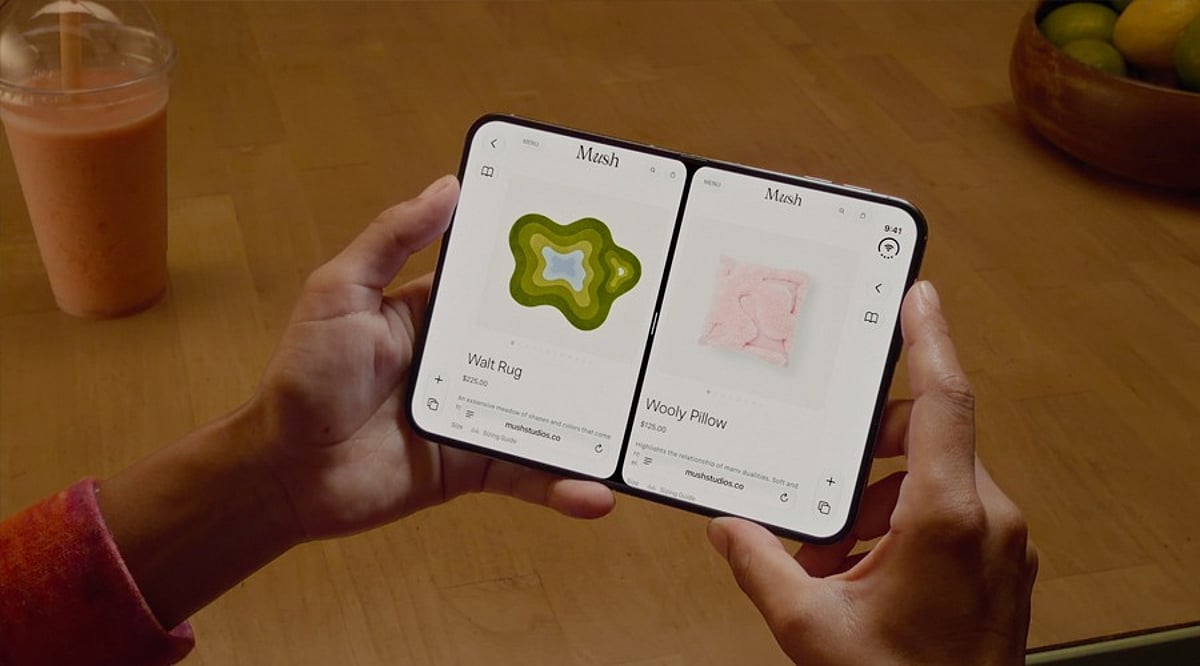
Apple’s iPhone Duo, the company’s first foldable iPhone, launched globally on September 9, 2026, with iOS 27. Its 7.6-inch inner display brings Split View multitasking, allowing users to run two apps side by side. This feature is designed to enhance productivity, streamline research, simplify communication, and make shopping and entertainment more efficient.
Why Split View Multitasking Matters
The iPhone Duo’s larger screen transforms how you interact with your device. Instead of constantly switching between apps, you can keep two apps visible simultaneously, creating powerful workflows. Apple also supports running two windows of the same app and saving frequently used app pairs for quick access.
Top 15 App Pairs for iPhone Duo
1. Safari + Notes
Perfect for research, this pair lets you browse the web while jotting down key points without losing your place. It’s ideal for students, writers, and anyone gathering information.
2. Mail + Calendar
Streamline your professional routine by viewing your schedule while composing emails. This pair helps you manage appointments and correspondence efficiently.
3. ChatGPT + Claude
For AI enthusiasts, comparing responses from two leading AI assistants side by side can provide deeper insights, help with brainstorming, and validate information.
4. Safari + ChatGPT
Combine web research with AI assistance. Ask ChatGPT to summarize articles, answer questions, or generate ideas while keeping the source page open.
5. Maps + Apple Music
Navigate hands-free while controlling your music. This pair is perfect for road trips or daily commutes, keeping both directions and entertainment within reach.
6. Maps + Messages
Coordinate meetups without losing your way. Keep directions visible while texting friends or colleagues about arrival times or changes in plans.
7. Files + Mail
Attach files directly from the Files app while composing an email. This pair simplifies document sharing and reduces the need to switch between apps.
8. Slack + Zoom
Stay connected with your team during video meetings. View chat messages while on a call, ensuring you don’t miss important updates or questions.
9. Safari + Safari (Two Windows)
Compare products, prices, and specifications across two websites side by side. This is a game-changer for online shopping and research.
10. Safari + Shopping App
Use a shopping app like Amazon or eBay alongside Safari to check reviews, compare prices, and find the best deals without switching tabs.
11. YouTube + Notes
Watch tutorials or lectures while taking notes. This pair is excellent for online learning, skill development, and research.
12. Photos + Messages
Share photos effortlessly during conversations. View your photo library while chatting, making it easy to send the perfect image.
13. Calendar + Reminders
Plan your day by viewing your schedule and task list together. This pair helps you manage time and stay on top of deadlines.
14. Weather + Maps
Check the forecast while planning your route. This is especially useful for outdoor activities, travel, and daily commuting.
15. Podcasts + Notes
Listen to podcasts while jotting down key takeaways. This pair is great for learning and capturing ideas from audio content.
Making the Most of App Pairs
The best app pair depends on your unique workflow. Apple allows you to save your favorite combinations for one-tap access, turning Split View into a repeatable workflow. Whether you’re working, traveling, shopping, or learning, the iPhone Duo’s multitasking capabilities offer a more efficient and enjoyable experience.
Apple CEO John Ternus called the iPhone Duo “the most transformational change to iPhone since the original,” highlighting its larger display and productivity-boosting potential. With the right app pairs, you can truly unlock the power of this innovative device.