
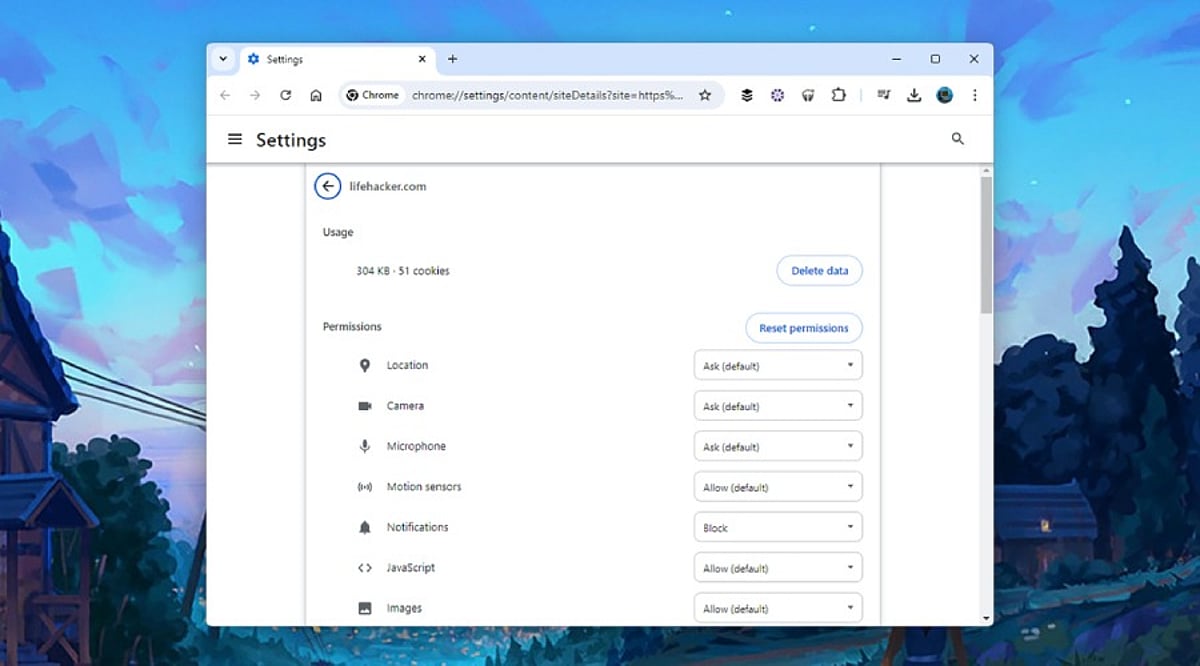
AI browsers have transformed how we interact with the web, offering features like page summarization, form filling, product comparisons, and task automation. However, these capabilities rely heavily on browser permissions that can expose sensitive data if not managed carefully. With 88% of organizations now using AI regularly—up from 78% in 2024—and the AI browser market projected to grow from $4.5 billion in 2024 to $76.8 billion by 2034, reviewing your browser permissions is more critical than ever.
1. Site Permissions Need Regular Reviews
Every website requests different permissions, from location access for maps to camera and microphone for meetings. AI browsers often combine multiple permissions for a single task, making regular reviews essential. Unused permissions create unnecessary exposure. Camera, microphone, clipboard, notifications, USB devices, Bluetooth, and file access should only be granted to trusted websites. A quick review helps remove permissions that no longer serve a purpose, lowering privacy risks.
2. AI Extensions Deserve Extra Attention
AI extensions offer writing assistance, page summaries, and research support but often receive broad access. Security researchers warn that browser agents inherit existing login sessions, meaning an extension could access email, cloud storage, and work platforms. Regularly review and remove unused AI extensions to reduce the number of applications handling sensitive information.
3. Clipboard Access Can Reveal Sensitive Information
The clipboard stores everything copied—passwords, payment details, API keys, and more. Modern AI tools may read clipboard content to simplify tasks, creating privacy concerns. Limit clipboard access to trusted websites or extensions that genuinely need it to protect valuable information.
4. Camera and Microphone Access Should Stay Limited
Voice assistants and visual AI tools make camera and microphone permissions common for video meetings, voice commands, and live translations. Permanent access is rarely necessary; temporary permission offers a safer option. Grant access only during the session that requires it and revert settings afterward.
5. Notification Permissions Can Create Security Problems
Many websites request notification access immediately upon visit. Security experts report notification abuse for phishing and fake alerts. AI assistants can summarize notifications across sites, increasing the value of trusted sources. Regularly review and remove unknown websites from notification access.
6. Password Manager Access Requires Careful Control
Browser password managers simplify logins, but AI agents operate within the same authenticated session. Protect password managers with strong authentication and prevent unnecessary extensions from accessing stored credentials to safeguard accounts.
7. File Access and Data Sharing Matter More Than Ever
AI browsers can open PDFs, summarize documents, and upload content, requiring local storage access. Grant file access only to trusted websites and verified AI tools. Review settings for chat history, cloud sync, uploaded documents, and stored prompts. Many AI browsers offer controls to limit conversation storage and cloud retention.
8. Browser Updates Keep Security Strong
Browser developers introduce new AI features regularly. Google’s WebMCP technology and Chrome Enterprise’s AI management features improve security. Regular updates protect against newly discovered threats and enhance privacy controls for AI services. Current software offers stronger protection against emerging risks like indirect prompt injection and excessive permissions.
9. Why This Matters
AI browsers handle personal data, business documents, and online accounts. Permission settings determine how much access these tools receive. Careful management protects sensitive information, reduces security risks, and ensures AI features work safely without exposing valuable data.
10. Final Thoughts
AI browsers enable rapid research and automation, but advanced features depend on permission settings. A full permission assessment takes only a few minutes and contributes to enhanced privacy and security. As AI browsers become essential for personal and corporate use, strict permission management is an easy and effective way to ensure safer browsing.
FAQs
1. Why are browser permissions important for AI browsers?
AI browsers use permissions to access device features like camera, microphone, files, and clipboard. Managing these permissions helps protect your privacy and sensitive data.
2. Which browser permissions should I review first?
Start with camera, microphone, location, clipboard, notifications, file access, password manager access, Bluetooth, USB devices, and installed AI extensions.
3. Are AI browser extensions safe to use?
Trusted extensions can be helpful, but unused or unverified ones may have broad access. Review them regularly.
4. How often should I check browser permissions?
A monthly review or checking after installing new AI tools is a good security practice.
5. Do browser updates improve AI security?
Yes. Updates include security patches, enhanced privacy controls, and protections against AI-related threats.