Tag: passkeys

  • WhatsApp 2026: Usernames, Advanced Privacy, and AI Tools Explained

    WhatsApp 2026: Usernames, Advanced Privacy, and AI Tools Explained

    WhatsApp is undergoing its most significant transformation since end-to-end encryption became standard. With over three billion users, the app is shifting away from phone-number-dependent identity toward usernames, while introducing advanced privacy controls and AI features designed for confidential conversations. These updates, rolling out throughout 2026, are reshaping how users connect, communicate, and protect their data.

    Usernames Decouple Identity from Phone Numbers

    For nearly two decades, a phone number was the only way to identify a WhatsApp user. That changes in 2026. Meta opened username reservations globally on June 29, 2026, ahead of a full rollout later this year. Users can select a username between 3 and 35 characters, and once fully deployed, your phone number will no longer be visible to someone messaging you for the first time.

    However, the phone number remains essential for registration and account maintenance. Usernames simply keep your number hidden from new contacts. Notably, WhatsApp does not offer a public directory for usernames—someone must know your exact handle to start a chat. This keeps the feature more like a quiet introduction tool than an open search system. To prevent impersonation, Meta is reserving usernames for public figures and organizations early in the process.

    Advanced Chat Privacy: Beyond Encryption

    Encryption determines who can read a message. WhatsApp’s new privacy tools address a different question: what can be done with a message after it’s read. Advanced Chat Privacy, available in both one-on-one and group chats, targets conversations that are sensitive even among trusted participants, such as support groups or community initiatives.

    It’s crucial to understand the limits: this setting does not prevent screenshots. It blocks automated actions like chat exports, auto-downloads, and use of your messages in AI features. Manual screenshots remain possible, so it’s not a guarantee of absolute secrecy. This distinction is vital for anyone relying on the feature for confidential discussions.

    Complementing this, the August 2026 security update introduced passkeys. Meta reports that over a billion users have already set up passkeys, replacing traditional codes and PINs with device-bound authentication. This adds a layer of security that’s harder to compromise.

    Meta AI: Private by Design

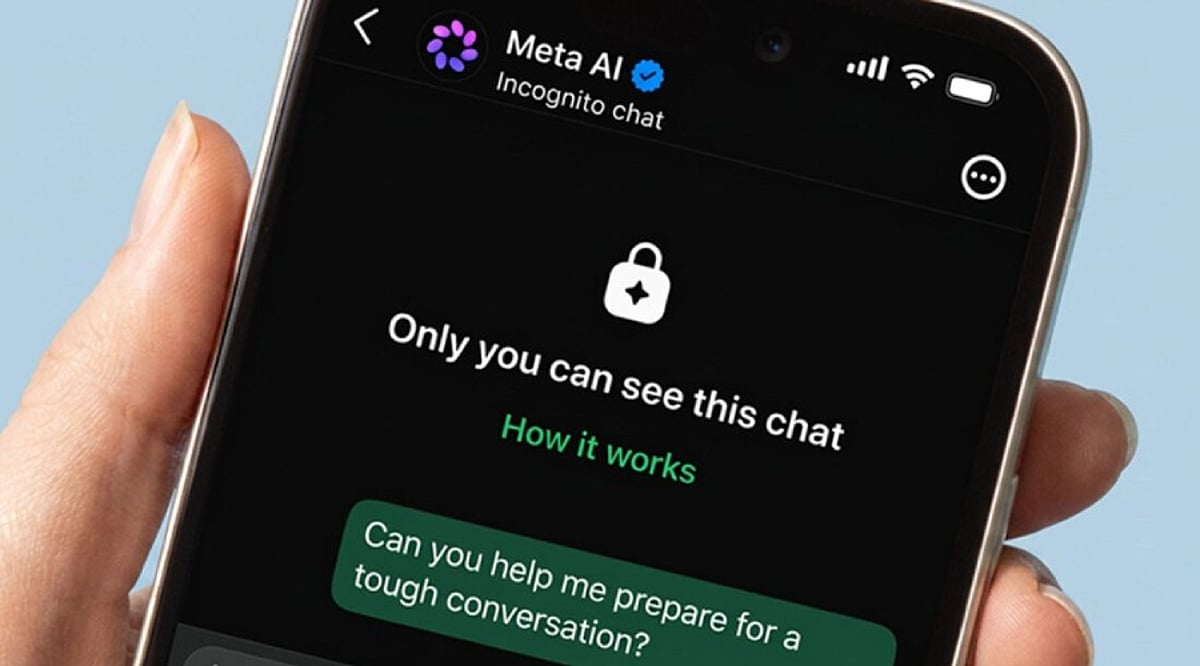
    The most notable AI update is Incognito Chat with Meta AI, introduced in May 2026. Built on WhatsApp’s Private Processing system, it offers a temporary chat environment that runs in a secure space Meta claims it cannot access. The conversation disappears once the session ends. This addresses a growing concern: people bring health questions, financial worries, and personal decisions to AI, yet most ‘private’ modes on other platforms still let companies see the queries.

    Meta has also planned Side Chat, a feature that would allow you to consult Meta AI quietly within an existing conversation without other participants noticing. Meanwhile, everyday AI tools have expanded: photo touch-ups and drafted reply suggestions arrived in March 2026, followed by Muse Image in July, which lets you generate and edit images directly in chats, rolling out initially in select countries.

    Messaging Management Improvements

    Not every update is about privacy or AI. Some address long-standing annoyances. Direct chat transfer between Android and iPhone is now available, solving a major headache for phone switchers. iPhone users can now run two WhatsApp accounts on one device—a feature Android already enjoyed. Storage management also got a boost: users can delete individual files from a chat without affecting others, a small but welcome fix for one of the app’s most common complaints.

    Final Thoughts

    WhatsApp’s 2026 direction is about separation—decoupling identity from phone numbers, privacy from encryption, and AI from data retention. These layers give users more control, but the real test is how Meta handles full-scale rollout. Will usernames and Incognito Chat maintain their privacy promises as adoption grows? And will the same restraint apply as AI features expand? For now, the updates signal a more thoughtful approach to messaging, one that prioritizes user agency over convenience.

  • Top Two-Factor Authentication (2FA) Methods for Securing Your Crypto Accounts

    Top Two-Factor Authentication (2FA) Methods for Securing Your Crypto Accounts

    Cryptocurrency is a prime target for hackers, and a strong password alone cannot guarantee safety. Two-factor authentication (2FA) adds a vital second layer of security, requiring an additional step beyond your password. This extra measure can thwart many common online attacks, even if your password is compromised. Here are the best 2FA methods to protect your crypto assets.

    Hardware Security Keys: The Gold Standard

    Hardware security keys, such as YubiKey, Google Titan Key, or SoloKey, are widely considered the safest 2FA option. These small devices connect or tap during login and only work with legitimate websites, making them highly resistant to phishing attacks. They do not rely on your phone number, eliminating the risk of SIM swap scams. For those holding significant crypto or planning long-term storage, hardware keys are the top recommendation.

    Passkeys: Fast and Phishing-Resistant

    Passkeys are gaining traction as a password replacement. They use biometrics like fingerprints or face scans, offering a 93% login success rate compared to 63% for traditional passwords. Passkey logins average 8.5 seconds versus 31.2 seconds for passwords—nearly four times faster. Many crypto exchanges now support passkeys for their phishing resistance and enhanced security.

    Authenticator Apps: A Reliable Alternative

    If you don’t have a hardware key, authenticator apps are a strong choice. Popular options include Google Authenticator, Microsoft Authenticator, Authy, Aegis, and 2FAS. These apps generate time-based codes that work offline and do not rely on your phone number, protecting against SIM swap attacks. While they can be vulnerable to phishing if you enter codes on fake sites, they are far safer than SMS or email verification.

    SMS and Email: Weaker Options to Avoid

    SMS codes are not recommended for crypto accounts due to SIM swap risks—hackers can take over your number and intercept codes. Email verification is similarly weak; if your email is hacked, all your crypto login codes are exposed. These methods should be avoided for high-value accounts.

    Which 2FA Method Should You Choose?

    Experts rank hardware security keys as the best, followed by passkeys, then authenticator apps. SMS and email are at the bottom. For maximum safety, use a hardware key; if not possible, opt for passkeys or an authenticator app. Combining a strong password with robust 2FA significantly reduces the risk of theft. A few extra seconds during login can save your digital assets.

    Frequently Asked Questions

    1. What is two-factor authentication (2FA)? It adds a second security step after your password to access your account.
    2. Which 2FA method is best for crypto? Hardware security keys are the safest due to phishing and SIM swap protection.
    3. Are authenticator apps better than SMS codes? Yes, because they don’t rely on your phone number, making them much safer.
    4. Why is SMS authentication not recommended? Hackers can steal your number via SIM swap attacks to receive your codes.
    5. Can passkeys replace passwords? Yes, they offer faster, safer logins and are supported by many crypto platforms.
  • Passkeys Reshape Enterprise Cybersecurity in 2026: A Passwordless Future

    Passkeys Reshape Enterprise Cybersecurity in 2026: A Passwordless Future

    Passwords remain one of the weakest links in enterprise security. Passkeys are changing authentication by replacing shared secrets with phishing-resistant credentials. As organizations strengthen identity security, passwordless authentication is becoming a practical strategy rather than a future goal.

    Most security breaches still start the same way. Someone types a password into the wrong place, and an attacker walks in through the front door. For years, enterprises responded by layering stronger password policies, multi-factor authentication, and user training onto a system that remained fundamentally vulnerable. A large share of them stopped patching the problem and started removing it entirely. Passkeys have moved from a security add-on to a workforce standard, and the shift is changing how companies think about identity itself.

    Why 2026 is the Turning Point

    The scale of the move is hard to miss. FIDO Alliance research covering more than a thousand enterprise decision-makers found that 68% of organizations have deployed or are actively deploying passkeys for employee sign-ins. Global passkey usage has crossed 5 billion. Support has caught up with demand too. Major operating systems, browsers, and identity platforms now handle passkeys as a native feature, so IT teams are not stitching together workarounds anymore. Regulators and cyber insurers are pushing in the same direction, treating phishing-resistant sign-in as a baseline requirement rather than an extra.

    Timing plays a part as well. AI-generated phishing campaigns now produce convincing, personalized lures at a pace human attackers never matched. A static password offers little defense against this kind of pressure, no matter how strong the policy behind it.

    What is a Passkey?

    A passkey replaces the password with a cryptographic key pair, built on the FIDO2 and WebAuthn standards, which most enterprise identity platforms now support directly. The private key stays on the employee’s device, unlocked by a fingerprint, face scan, or PIN. The public key sits with the service being accessed. Sign-in happens through a cryptographic exchange, so there is nothing typed, nothing to intercept, and nothing an attacker can lift from a breached database and reuse elsewhere.

    Origin binding adds a second layer of protection. A passkey created for a real company site simply will not work on a lookalike domain. This one design choice quietly shuts down most of the tricks that make phishing profitable in the first place. It also explains why passkeys resist being filed under ordinary multi-factor authentication. A password paired with a one-time code still relies on the first, phishable credential. Passkeys skip the password model entirely, which makes the real comparison less passkeys against MFA and more passkeys against the login system MFA was built to patch.

    Identity, Not Just Authentication

    For enterprises, the value runs past blocking phishing attempts. Passkeys are becoming a building block of identity-first security, where protecting the identity matters more than gatekeeping a single login moment. This links directly to Zero Trust architecture, where continuous verification and device trust carry more weight than a one-time check at the door. A device-bound credential fits this model well, giving security teams a stronger read on who is actually behind a session, not just what was typed once at sign-in.

    Finance and IT leadership notice the operational side quickly. Fewer password resets mean lighter help-desk loads, and FIDO’s 2026 data shows organizations reporting solid cuts to both login times and support costs after rollout. Employees benefit too. Authentication turns faster and less frustrating, a real gain across a hybrid workforce signing in from laptops, phones, and personal devices scattered across time zones.

    What Still Slows Adoption

    None of this makes the shift effortless. FIDO’s own numbers show that even among organizations running passkeys, more than half still lean on older, phishable methods for everyday sign-in. Deploying passkeys and retiring passwords turn out to be two separate milestones, and most enterprises are still closing the gap. Legacy systems never built for WebAuthn, tight budgets, and lingering doubts about account recovery when a device is lost all slow the pace. The reassuring part: most organizations that have already rolled out passkeys report confidence in their recovery process, which suggests the barrier is often perception rather than reality.

    A Practical Rollout Path

    A sound rollout tends to start with governance rather than technology. Security teams assess risk and identify high-value user groups first. They pilot with a contained group before scaling wider. They integrate the credential into existing identity and access systems rather than bolting it on separately. They lock down a recovery process before going further. Then they measure what actually shifted: phishing incidents, login speed, and help-desk volume.

    Final Thoughts

    Passkeys will not finish the password’s retirement alone. What they have done is change the question security teams are asking. The conversation used to focus on managing a weak credential. However, it now centers on building identity systems that are hard to fool by design, from the first login. The shift is underway, and companies still running on passwords alone are the ones carrying the most exposure into what comes next.