Tag: Subscription Pricing

  • Disney+ and Hulu Prices Rise in the US: Here’s What Subscribers Pay Now

    Disney+ and Hulu Prices Rise in the US: Here’s What Subscribers Pay Now

    Walt Disney has officially raised subscription rates for Disney+ and Hulu in the United States, with the new pricing taking effect on September 23, 2026. The company increased most plans by at least $0.50, but the biggest jump is on ad-free tiers, which are now $2.50 more per month.

    The revised rate structure is clearly designed to steer subscribers toward combined Disney+ and Hulu bundles. A standalone ad-free subscription now costs $21.49 per month, while the ad-free bundle is only $21.99 — making the bundle the more attractive option for users who want both services.

    New Disney+ and Hulu pricing at a glance

    Plan New Monthly Price
    Disney+ ad-supported $12.49
    Hulu ad-supported $12.49
    Disney+ ad-free $21.49
    Hulu ad-free $21.49
    Disney+ and Hulu ad-supported bundle $12.99
    Disney+ and Hulu ad-free bundle $21.99

    Paying separately for both ad-free services now costs a total of $42.98 each month. That is nearly twice the $21.99 monthly price of the ad-free bundle. The ad-supported bundle remains unchanged at $12.99, reinforcing Disney’s push toward its combined streaming offering.

    ESPN-inclusive bundles also cost more

    Selected packages featuring ESPN saw increases as well. The Disney+, Hulu and ESPN Select ad-supported bundle is now $21.99 per month, while the premium ad-free version rose from $29.99 to $32.99. Disney left the ESPN Unlimited bundles untouched at $35.99 and $44.99 per month.

    Why prices keep climbing

    This marks the fourth consecutive year of price increases across Disney’s streaming services, following a similar round of hikes in 2025. The move is also part of a wider industry pattern; according to TechCrunch, Apple TV+ and Peacock both raised their prices in August.

    Disney is simultaneously working to deepen platform integration and create a more unified Disney+ experience that brings Hulu content closer together. The company reported an 11% increase in combined Disney+ and Hulu entertainment streaming revenue in its latest quarter.

    Who is affected

    New subscribers will pay the updated rates immediately, while existing subscribers will see the new prices on their next billing cycle. The changes apply to U.S. subscriptions only and do not directly affect Indian users. Viewers in India should check local options such as JioHotstar for applicable streaming rates.

  • AI Subscriptions and Cloud Storage: What Your Digital Stack Really Costs in 2026

    AI Subscriptions and Cloud Storage: What Your Digital Stack Really Costs in 2026

    Several small monthly charges can add up to a surprisingly large annual bill. A single AI plan at $20 a month comes to $240 a year; two plans at the same price total $480. Add cloud storage, music, video, and productivity tools, and the full cost of your digital life can quickly outpace any one subscription’s sticker price.

    Recent pricing updates show that providers are competing on bundles as much as on raw AI performance or storage capacity. That makes it essential to compare annual totals, storage allowances, AI usage limits, and included extras before choosing a plan.

    Most AI Plans Cluster Around $20 a Month

    ChatGPT Plus remains priced at $20 per month. OpenAI says the tier offers broader model and tool access than the free version, higher usage limits, advanced reasoning, faster responses, and expanded features, although model access and limits may change over time.

    Claude Pro also stays at $20 per month in the US, with benefits such as higher usage, priority access, and early access to new features. In India, Anthropic now lists local pricing: Claude Pro is Rs 2,000 per month when billed annually, and Claude Max starts at Rs 11,999 per month. Those prices include local taxes, and mobile app pricing can differ from web pricing, so converting US prices directly does not give an accurate estimate for Indian users.

    Perplexity Pro is also $20 per month. It includes access to advanced AI models, deep research, higher usage limits, file analysis, and additional tools. Perplexity updated its consumer plan details in September 2026, with Pro listed alongside free and Max options.

    Google Pairs AI With Generous Cloud Storage

    Google takes a different approach by combining AI and storage in one package. A standard Google account includes 15 GB of free storage across Gmail, Google Drive, and Google Photos. The basic Google One 100 GB plan costs $1.99 per month in the US.

    Google AI Pro costs $19.99 per month and now includes 5 TB of storage. It also adds expanded Gemini access, Deep Research, Google Flow, Gemini in Gmail and Docs, Gemini Notebook, YouTube Premium Lite, and other Google benefits. The plan can be shared with up to five other people.

    That bundling changes the value equation. If you need both an AI assistant and terabytes of cloud storage, one Google AI Pro bill may be cheaper than separate AI and storage subscriptions, depending on how heavily you use each feature.

    For users with heavier AI needs, Google also offers AI Ultra, which starts at 20 TB of storage and provides higher access limits across several AI tools.

    Apple Expands iCloud+ in India

    Apple’s iCloud+ plans in India now start at Rs 75 per month for 50 GB, followed by Rs 219 for 200 GB, Rs 749 for 2 TB, Rs 2,999 for 6 TB, and Rs 5,900 for 12 TB.

    In September 2026, Apple added Apple TV and Apple Arcade to iCloud+ in India at no extra cost. Apple Arcade includes more than 200 games, while Apple TV adds Apple’s video catalog. Family Sharing lets one iCloud+ plan cover up to five family members.

    Apple also introduced Apple Music Select in India, which includes ad-free stations. Full Apple Music remains a separate service at Rs 115 per month for an Individual plan and Rs 145 per month for a Family plan. Apple One is no longer accepting new subscribers in India, though existing Apple One customers can keep their current plans.

    Infrastructure Costs Are Rising Too

    AI pricing is not isolated from broader industry trends. Reuters reported on September 17, 2026, that Nebius plans another price increase for selected chips starting October 1. The company had already raised prices once within the previous three months as demand for AI computing power pushed infrastructure costs upward.

    That does not guarantee consumer subscription prices will rise, but it provides helpful context for future AI costs. For now, the most effective way to manage digital expenses is to review annual totals, storage needs, AI limits, and bundled benefits before each renewal. A low monthly price can look harmless, but several small subscriptions can quietly turn into a substantial yearly bill.

  • Canva Pro Cost Guide: Monthly vs Annual Plans, Features, and Verdict

    Canva Pro Cost Guide: Monthly vs Annual Plans, Features, and Verdict

    Canva has become a go-to design platform for creators, marketers, and business owners who need professional visuals without hiring a designer. While the free version covers basic needs, Canva Pro unlocks a more powerful toolkit. This guide breaks down the exact pricing, what you get for your money, and whether upgrading is the right move for your workflow.

    Canva Pro Pricing at a Glance

    Canva Pro is available with two billing options:

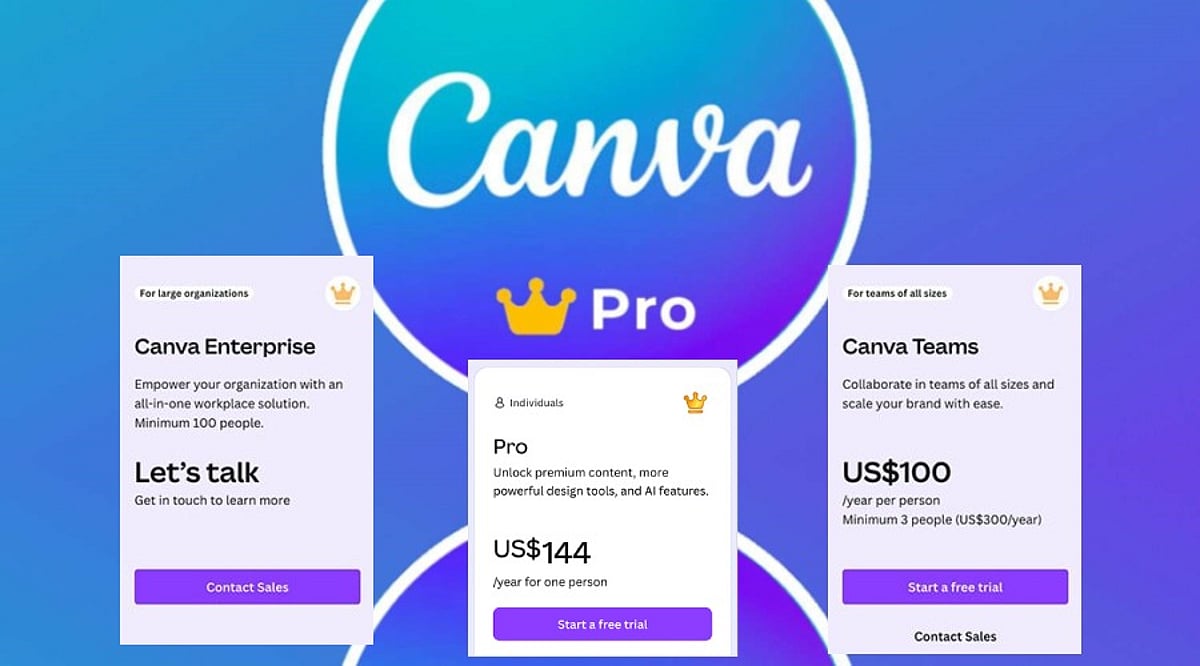
    • Monthly plan: $15 per user per month
    • Annual plan: $120 per user per year (effectively $10 per month)

    Choosing annual billing saves you $60 per year, a 33% discount compared to paying month-to-month. For teams, Canva also offers discounted per-seat pricing, but the individual Pro plan is the most common starting point.

    What Does Canva Pro Include?

    Canva Pro goes far beyond extra templates. Subscribers get access to a massive library of premium assets, advanced AI tools, and time-saving features that streamline the design process.

    Premium Templates and Assets

    With Pro, you can use millions of premium templates for presentations, social media posts, business documents, videos, and marketing materials. The library also includes premium photos, graphics, videos, icons, illustrations, and fonts, giving you everything needed to complete almost any project.

    AI-Powered Design Tools

    Canva’s AI features are a major draw for Pro users. Magic Write helps generate copy and content ideas, while Magic Edit lets you alter specific parts of an image. Magic Eraser removes unwanted objects from photos in seconds. These tools reduce editing time and help you create polished designs with less effort.

    Branding and Productivity Features

    • Brand Kit: Store logos, brand colors, and fonts in one place so every project stays on-brand.
    • Magic Resize: Instantly adapt a single design into multiple sizes for Instagram, Facebook, LinkedIn, posters, presentations, and more.
    • Background Remover: Isolate the main subject of an image with one click, ideal for product shots and profile photos.
    • Content Planner: Schedule and publish social media posts directly from Canva’s dashboard.
    • Extra cloud storage: More space for files, photos, videos, and completed projects.
    • Premium animations and effects: Add professional motion and visual polish to presentations and social content.

    Canva Free vs Canva Pro

    The free version of Canva is perfect for beginners and occasional users. It offers thousands of templates, basic editing tools, and a limited set of AI features. Simple presentations, posters, invitations, and social posts can look great without spending anything.

    Canva Pro expands every major area of the platform. You get premium templates, millions of extra assets, advanced AI features with higher usage limits, the Brand Kit, Magic Resize, Background Remover, and social media scheduling. For anyone creating content regularly, these additions make the design process faster and more flexible.

    Is Canva Pro Worth the Price?

    The value of Canva Pro depends entirely on how often you design. If your work involves social media management, presentations, e-commerce, or client projects, the subscription pays for itself quickly. You gain access to premium images, branding tools, photo editing, and scheduling features all in one platform, eliminating the need for multiple separate services.

    The annual plan offers the best value, reducing the effective cost to $10 per month and saving you $60 each year. For casual users who only need a few simple designs annually, the free tier is sufficient. But active designers, freelancers, and business owners will find that regular use easily justifies the subscription cost.

    How Canva Pro Compares to Alternatives

    Canva Pro competes with tools like Adobe Express Premium (around $9.99 per month) and Microsoft Designer, which is available through select Microsoft subscriptions. While each platform has its strengths, Canva stands out for combining a vast template library, AI tools, branding features, collaboration options, and content scheduling in one app. This all-in-one approach saves users from juggling multiple subscriptions and keeps every stage of a creative project in a single workspace.

    Final Verdict

    Canva Pro delivers a balanced mix of creative tools, premium content, AI features, and branding options at a competitive price. For $15 per month or $120 per year, you get a professional-grade design suite that simplifies everyday creative work. The annual plan is the smartest choice for regular users, offering a 33% savings compared to monthly billing. If you design frequently, the premium assets, AI tools, brand kit, and scheduling features make Canva Pro well worth the investment.

    Frequently Asked Questions

    How much does Canva Pro cost?

    Canva Pro costs $15 per user per month with monthly billing, or $120 per user per year with annual billing (equivalent to $10 per month).

    Is Canva Pro worth paying for?

    Yes, if you design regularly. The premium assets, AI features, branding tools, and time-saving capabilities provide strong value for frequent users.

    What is included in Canva Pro?

    Canva Pro includes premium templates, millions of stock assets, AI tools, Brand Kit, Magic Resize, Background Remover, Content Planner, and expanded cloud storage.

    Can I use Canva for free?

    Yes. Canva Free offers thousands of templates and essential design tools, making it suitable for casual users and students.

    Which Canva Pro plan offers the best value?

    The annual plan provides the best value, reducing the effective monthly cost to $10 and saving $60 per year compared to monthly billing.