Tag: Username

  • How to Protect Your Phone Number by Securing a WhatsApp Username: Essential Tips

    How to Protect Your Phone Number by Securing a WhatsApp Username: Essential Tips

    WhatsApp is rolling out usernames, offering a new way to protect your phone number when messaging. By reserving a unique username, you can keep your number private from new contacts. Here’s how to get started and secure your handle before someone else does.

    Reserve Your WhatsApp Username

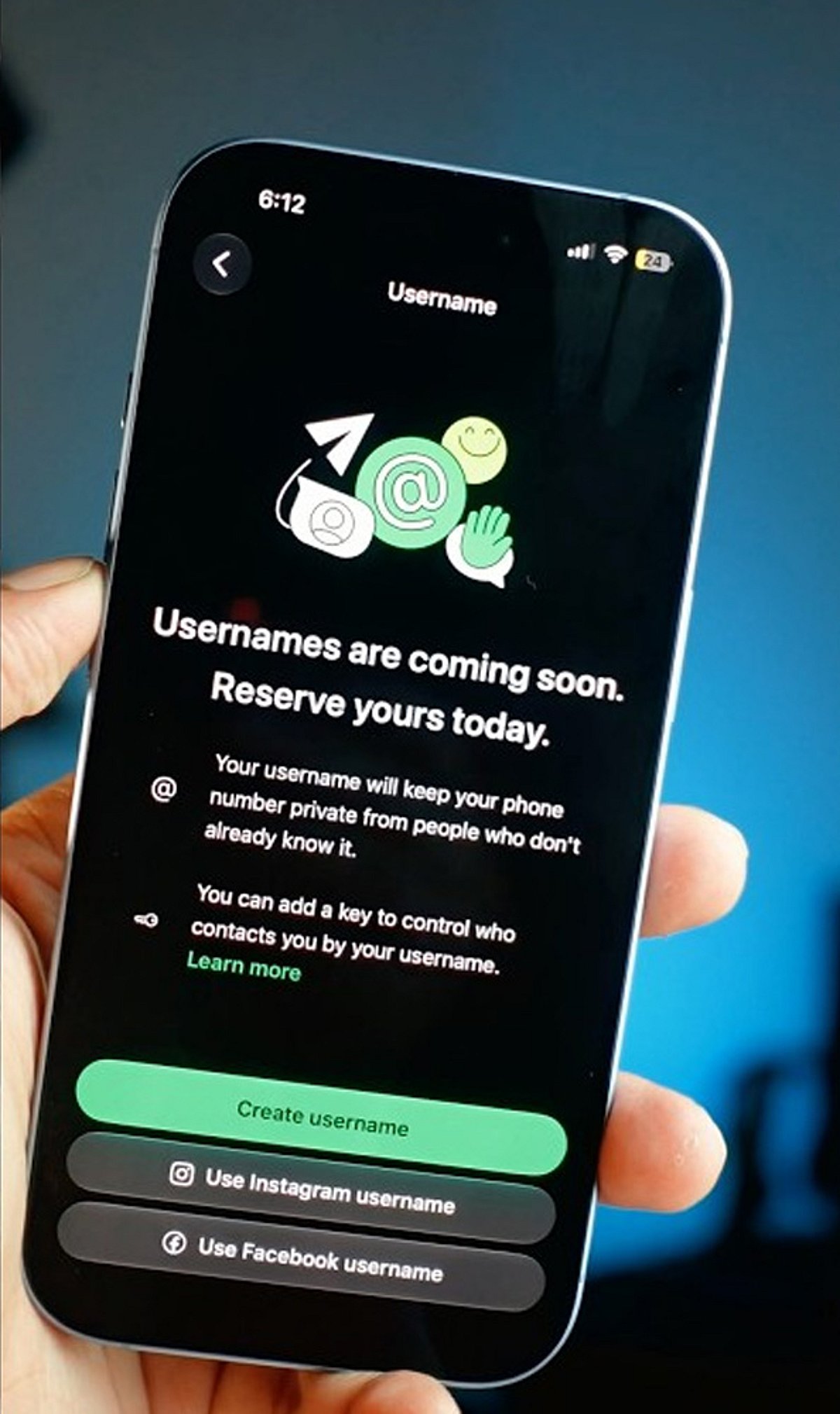
    First, update WhatsApp to the latest version. Then go to Settings > Account > Username and create a unique username between 3 and 35 characters. If your preferred handle is taken, WhatsApp may suggest similar alternatives. The feature is rolling out gradually, so it may not appear for everyone yet.

    Lock In Your Preferred Handle

    Choose a username that is easy to remember but difficult to impersonate. You can also claim the same username you already use on Instagram or Facebook if it’s eligible. Tap Save to reserve your handle before someone else takes it.

    Keep Your Phone Number Private

    Once usernames become active, people who contact you through your username won’t see your phone number unless they already have it saved. Existing contacts and users who already know your number will continue to see it, but new conversations become much more private.

    Turn On Username Key for Extra Security

    Enable the optional Username Key from the username settings. Anyone trying to contact you for the first time will need both your username and this unique key. It adds another layer of protection against spam and unwanted messages.

    Understand What Usernames Can and Can’t Do

    WhatsApp does not have a public username directory, so strangers cannot search for your account. People need to know your exact username to start a conversation. However, admins, existing contacts, and users who already know your phone number may still be able to see it where applicable.

    Strengthen Your WhatsApp Privacy

    Use a unique username instead of your full real name, enable Two-Step Verification, and regularly review your privacy settings. These small steps help protect your account from impersonation attempts and unauthorized access.

    Secure Your Identity Before It’s Taken

    Reserving your WhatsApp username early helps secure your online identity before your preferred handle is claimed. Combined with Username Key and Two-Step Verification, you can chat with new people and businesses while keeping your personal phone number private and your account more secure.
  • Claim Your WhatsApp Username Early: Step-by-Step Guide to Secure It Before Everyone Else

    Claim Your WhatsApp Username Early: Step-by-Step Guide to Secure It Before Everyone Else

    WhatsApp is rolling out a new feature that allows users to reserve a unique username, giving you a more personalized way to be found on the platform. With demand likely high, acting quickly can help you secure the name you want. Follow these steps to reserve your WhatsApp username before everyone else.

    Update WhatsApp

    Install the latest WhatsApp version from your app store to ensure you have access to new features as soon as username support becomes available.

    Open Settings

    Launch WhatsApp and tap the Settings menu. Once the feature reaches your account, a username option will appear here.

    Find the Username Option

    Look for the Username section below your profile information. It appears only after Meta enables the feature for your account, so keep checking regularly.

    Choose a Unique Name

    Pick a memorable username using letters, numbers, and permitted symbols that reflects your identity without revealing personal information publicly.

    Check Availability

    WhatsApp instantly verifies whether your preferred username is available. If your first choice is already taken, try alternative spellings or variations.

    Follow Username Rules

    Avoid restricted words, special characters, or usernames that violate WhatsApp guidelines to ensure successful registration without unnecessary delays or errors.

    Save Immediately

    Once your preferred username is accepted, save it immediately to prevent someone else from claiming the same username first.

    Join the Beta Program

    Beta users often receive new WhatsApp features before the public release, increasing your chances of securing a preferred username early.

    Keep Checking Updates

    If the feature is unavailable today, regularly update WhatsApp and check Settings because the rollout may happen in phases worldwide.

  • India’s Government Scrutinizes WhatsApp Username Feature Over Privacy and Security Concerns

    India’s Government Scrutinizes WhatsApp Username Feature Over Privacy and Security Concerns

    India’s central government is evaluating the potential risks of WhatsApp’s upcoming username feature, stating that it will not compromise national security while assessing the privacy-focused update. According to government sources, authorities are examining whether the username feature could be exploited for impersonation, fraud, and other cybercrimes before its wider rollout in the country.

    WhatsApp recently introduced optional usernames, allowing users to communicate without sharing their phone numbers. This feature is designed to enhance user privacy, particularly in group chats and when interacting with unknown individuals. Users can create a personal username in the app’s account settings, while creators and brands can set usernames matching their Instagram or Facebook handles.

    However, authorities view anonymity as a potential threat that could lead to fake profiles and internet fraud. According to sources, the government is carefully weighing the implications of this feature to avoid undermining India’s digital security framework and ongoing efforts to combat cyber fraud.

    On the other hand, WhatsApp continues to tie accounts to users’ mobile numbers. Meta maintains that usernames are simply another way to connect without revealing phone numbers, aiming to balance privacy with security.

  • India Scrutinizes WhatsApp’s New Username Feature Over Impersonation and Fraud Risks

    India Scrutinizes WhatsApp’s New Username Feature Over Impersonation and Fraud Risks

    The Indian government is closely examining WhatsApp’s upcoming username feature following concerns about fake accounts and online fraud. Sources from the Ministry of Electronics and Information Technology (MeitY) indicate that officials will thoroughly study the feature before it becomes widely available. The goal is to ensure the new capability does not introduce additional risks for users.

    WhatsApp’s username feature allows people to chat without sharing their phone numbers. Instead, users can create a unique identifier—up to 35 characters long, including letters, numbers, dots, and underscores—to communicate with new contacts, join groups, or connect with businesses. The company touts this as a privacy improvement, helping keep personal phone numbers private.

    Government Raises Safety Concerns

    While the feature enhances privacy, the government believes it could also create opportunities for abuse. For example, a malicious actor could register a username that closely resembles a real person’s name or a trusted business. Unsuspecting users might not notice the subtle difference and could end up interacting with impostors, leading to scams, fraud, or the spread of misinformation.

    Officials have stressed that user safety remains the highest priority. Every legal and security implication tied to the feature will be reviewed. If the government finds insufficient safeguards, MeitY may issue a notice to WhatsApp demanding stronger protections before the broader rollout.

    WhatsApp’s Planned Protections

    WhatsApp has already announced several measures to prevent misuse. The company will not maintain a public directory of usernames; users must know the exact username to start a conversation. Additionally, WhatsApp is introducing an optional username key—a secondary code that must be provided before a first message can be sent. This adds an extra layer of security.

    To further reduce impersonation risk, the platform plans to reserve usernames linked to government offices, public figures, celebrities, and well-known brands. WhatsApp says these steps will help keep the platform safe as the feature expands.

    Security experts caution, however, that fake accounts remain a challenge. A scammer could simply alter one letter or add a number to a legitimate username, creating a convincing impostor. Given that online fraud is already prevalent in India, robust verification mechanisms will be essential before the feature reaches millions of users.

    Why India Is Reviewing the Feature

    The government’s review is part of a broader effort to ensure that new technologies prioritize user protection. While privacy is important, strong security is equally necessary when a platform serves hundreds of millions of people daily.

    WhatsApp has already begun allowing users to reserve usernames prior to the official launch. Users can change or delete their usernames at any time. Businesses and creators can claim the same usernames they use on Instagram and Facebook.

    The Indian government has not announced a final decision yet, but the ongoing review signals that New Delhi wants stronger safeguards against online fraud, impersonation, and other digital security threats before the WhatsApp username feature goes live.