Author: vitorcherulli

  • Russia’s Digital Ruble Gains Traction with 87,000 Accounts While Crypto Usage Surges

    Russia’s Digital Ruble Gains Traction with 87,000 Accounts While Crypto Usage Surges

    Russia’s central bank digital currency (CBDC), the digital ruble, has seen rapid adoption since its nationwide launch on September 1. Within just 10 days, users opened 87,000 accounts and completed more than 50,000 transactions, according to Bank of Russia Governor Elvira Nabiullina.

    Digital Ruble Adoption Accelerates

    Nabiullina reported that the rollout encountered minimal operational issues. Some banks experienced initial problems when customers opened accounts or processed certain transactions, but these were resolved quickly. The central bank has not recorded widespread disruption or a significant number of complaints. Instead, activity has accelerated as more people test the new form of money.

    Many users are trying the digital ruble to understand how it works, and the central bank expects convenience to play a key role in sustained usage.

    Expanded Acceptance Rules

    The Bank of Russia is working to simplify the user experience by reducing the number of steps required to open accounts or complete transactions. At the same time, it maintains strong safeguards. Since September 1, Russia’s 12 largest banks and retailers earning more than 120 million rubles (approximately $1.42 million) annually must accept digital rubles. The mandate will extend to more companies through 2028.

    Crypto Activity Remains High

    Separate central bank data shows rising crypto-related activity among Russian users. From Q4 2023 through Q1 2024, traffic to major crypto sites increased by 16.4%. Russian users made 104.6 million visits during that period, and unique IP addresses rose 15.1%. Russia accounted for 7% of traffic to major international crypto exchanges, down from a previous peak of 9%.

    Using Rosfinmonitoring’s Transparent Blockchain tool, the bank identified over $50.2 billion in transactions potentially linked to Russians, including trading, peer-to-peer payments, remittances, and purchases of goods and services. Russian users favored Bitcoin, Ethereum, and dollar-linked stablecoins such as USDT.

    The central bank warned that sanctions could restrict access to stablecoin funds, including USDT and USDC. It advised domestic financial institutions to avoid crypto-related instruments and services. Binance has exited the Russian market, and new regulations continue to shape the country’s crypto environment.

    Final Thoughts

    Russia’s digital ruble rollout has achieved 87,000 accounts and over 50,000 transactions in its first 10 days, while earlier data shows rising crypto activity among Russian users. The rollout combines expanding CBDC access with tighter acceptance rules and continued warnings about crypto-related financial risks.

  • Anthropic Targets $2 Trillion Valuation in Nasdaq IPO as Claude Revenue Soars Past $11.5 Billion

    Anthropic Targets $2 Trillion Valuation in Nasdaq IPO as Claude Revenue Soars Past $11.5 Billion

    Anthropic expects another profitable quarter as demand for its Claude AI assistant drives revenue growth and strengthens the company’s case for a major public listing. The San Francisco-based artificial intelligence firm told investors in September that adjusted operating income should remain positive for a second consecutive quarter.

    This update arrives as Anthropic prepares a potential Nasdaq listing, with reports indicating a valuation target above $2 trillion. Revenue exceeded $11.5 billion in the second quarter, enabling the company to absorb substantial costs tied to frontier AI development.

    Anthropic’s latest revenue marks a dramatic leap from $787 million in the same quarter last year—representing growth of more than 14 times within twelve months. Quarterly revenue also climbed sharply from roughly $4.73 billion during the first quarter, highlighting accelerating enterprise demand for Claude and the company’s broader AI services.

    The company crossed a $65 billion annualized revenue run rate by the end of July. That figure reflects the current sales pace rather than revenue already generated during the year.

    Anthropic has not disclosed the exact adjusted operating profit for the latest quarter. An earlier Financial Times projection estimated roughly $559 million for the period, though that figure represented a forecast rather than confirmed company earnings.

    The profitability figure also excludes several major expenses tied to Anthropic’s business model. Reported gross margins exceed 80% before revenue sharing and model training costs. Those margins show strong revenue economics, although they do not represent operating margins or net profit. Training advanced models and securing computing capacity still require substantial capital.

    The financial progress could strengthen Anthropic’s pitch to public market investors. A second profitable quarter gives the potential IPO a stronger narrative around growth and improving economics.

    Recent reports indicate Anthropic has selected Nasdaq for the potential listing. The company could seek one of the largest valuations ever assigned to an AI company. Nvidia also remains in discussions to participate as a potential anchor investor. Reports suggest the offering could raise up to $100 billion under an ambitious IPO scenario.

    Anthropic therefore enters the public market race with unusual revenue momentum. The bigger test will involve sustaining profits while funding the enormous computing needs behind Claude.

  • Apeing Presale Stage 3 Gains Traction as Shiba Inu and Pudgy Penguins Struggle: Analysts Eye 2,400% ROI Potential

    Apeing Presale Stage 3 Gains Traction as Shiba Inu and Pudgy Penguins Struggle: Analysts Eye 2,400% ROI Potential

    Could the next big meme coin story already be moving before the crowd catches up? Shiba Inu recently came under pressure as broader crypto markets turned defensive. Pudgy Penguins also declined amid wider weakness across the memecoin market. That contrast has pushed the best meme coin to buy conversation toward newer projects with earlier entry points.

    Apeing has entered Stage 3 of its live presale, called Paper Hand Panic, at a project-stated $0.0004 price. Reports say earlier stages moved quickly, creating fresh attention around $APEING.

    Apeing Presale Alert: Why the Best Meme Coin to Buy Debate Is Getting Interesting

    Early access can change the entire meme coin story because presales create pricing stages before public trading begins. Apeing crypto presale has now reached Stage 3, named Paper Hand Panic, after the first two stages moved forward rapidly. Apeing also states that its smart contract has been audited and verified. The project positions security, community engagement, utility, and clear official announcements as core features. $APEING operates on Ethereum as an ERC-20 token, allowing tokens to interact with wallets, decentralized exchanges, and other applications.

    That pricing gap explains why the best meme coin to buy search is suddenly pulling attention toward Apeing. The project states that the current stage could represent a 2,400% potential price increase relative to its stated listing target. That figure is a project-stated scenario, not a market outcome. The next presale stage is listed at $0.0005, creating a clear price step for participants watching the campaign.

    Paper Hand Panic Creates a Low-Price FOMO Window

    Stage 3 gives early participants access before later presale stages change the quoted price. Apeing’s campaign uses 33 stages, creating a structured path from early distribution toward the planned listing. Current reports put the campaign above $85K raised, with more than 290 holders and over 42.5 million tokens sold. At the stated $0.01 listing reference, that amount corresponds to a theoretical $250,000 value. The project uses the same comparison to describe its stated 2,400% potential ROI.

    The Referral League Adds a Second Game Inside the Game

    Apeing also promotes an Ape Referral League designed around monthly performance. The campaign states that first place receives tokens equal to 10% of the amount raised through the referral code. Second place receives 5%. Positions three through five receive a one-time 25% bonus code for a later purchase. That setup turns community activity into part of the campaign itself, fitting the culture-first approach behind the project.

    How to Join Before the Next Presale Price Step

    The Apeing presale campaign is currently live in Stage 3. Participants can connect a supported Ethereum wallet such as MetaMask or Trust Wallet. Payment options listed by the campaign include cryptocurrency and Visa or Mastercard. The buyer then selects an amount, reviews the $APEING allocation, and completes the purchase. Purchases of $25 or more activate referral rewards. Official campaign channels should provide the latest stage, allocation, and purchase instructions because presale conditions can change as stages progress.

    Shiba Inu Remains a Major Meme Coin With a Strong Community

    Shiba Inu is a popular meme-inspired cryptocurrency built around a large and highly active community. The project has developed beyond its original meme-coin identity to include a broader ecosystem of tokens, decentralized applications, and community-driven initiatives. SHIB is the native token of the Shiba Inu ecosystem and is used across various parts of the project’s expanding network. One of Shiba Inu’s defining characteristics is its strong community culture.

    Pudgy Penguins Builds a Recognizable Brand Across the Digital Collectibles Ecosystem

    Pudgy Penguins is a well-known digital collectibles project that has developed a strong identity around its distinctive penguin-themed characters and community-driven brand. The project has expanded beyond its original collectible format into a broader ecosystem that includes digital assets, merchandise, intellectual property, and community-focused initiatives. PENGU is the project’s associated token and forms part of the broader Pudgy Penguins ecosystem.

    Why the Best Meme Coin to Buy Conversation Could Shift Before the Next Meme Rally

    Shiba Inu and Pudgy Penguins show two sides of the current meme market. SHIB came under pressure as broader crypto markets weakened, while PENGU also declined amid selling across the meme-coin sector. Meanwhile, Apeing has moved into a new stage of its presale following early progress. That contrast explains why the best meme coin to buy discussion is drifting toward projects still building their market story. Apeing’s presale offers a different setup through staged pricing, Ethereum infrastructure, community rewards, and planned utility. For meme coin fans, the real question is whether the campaign can keep its early momentum as attention expands.

    FAQs About the Best Meme Coin to Buy

    What is the best meme coin to buy in 2026?
    Apeing is attracting attention as a new meme coin presale because its Stage 3 campaign uses a $0.0004 stated price and a staged token-sale structure. Shiba Inu and Pudgy Penguins remain larger established meme assets with active markets.

    What is the Apeing presale price?
    Apeing’s current Stage 3 price is stated as $0.0004 per $APEING token. The project assigns 300,000,000 tokens to the stage and lists $0.0005 as the next stated presale price.

    What is the Apeing listing price?
    The project states a planned listing price of $0.01. The comparison with the Stage 3 price forms the basis of the project’s stated 2,400% potential ROI scenario.

    For More Information

  • SIP Investing Explained: How Systematic Investment Plans Work and How to Begin

    SIP Investing Explained: How Systematic Investment Plans Work and How to Begin

    Systematic Investment Plans (SIPs) have become a cornerstone of mutual fund investing in India, enabling ordinary savers to build wealth through small, regular contributions rather than a single large payment. This article explains how SIPs work, the types available, and the steps needed to start.

    What is a Systematic Investment Plan?

    A SIP is a method of investing a fixed sum in a mutual fund scheme at regular intervals, typically monthly. It functions like a recurring bank deposit, but the money goes into a market-linked fund instead of a fixed-rate account. The amount is automatically deducted from the investor’s bank account on a chosen date and converted into fund units. Many schemes allow entry with amounts as low as Rs. 500, making SIPs accessible to almost every income group.

    How SIP Works in Practice

    Each SIP installment buys units of the chosen mutual fund at that day’s Net Asset Value (NAV). When markets fall, the same installment buys more units; when markets rise, it buys fewer units. Over time, this pattern averages out the purchase cost and reduces the pressure of timing the market. Investors who stay invested through ups and downs typically achieve a smoother average cost than those who invest a lump sum at a single point.

    The process follows a simple cycle: select a fund and fix the installment amount, set up a bank mandate for automatic transfer on a chosen date, receive units at each installment based on that day’s NAV, and build returns gradually through market-linked growth and reinvestment.

    Why Investors Prefer SIPs

    SIPs suit both first-time and experienced investors for practical reasons: low entry amount keeps budgets manageable, automatic transfers build a savings habit, rupee-cost averaging smooths market volatility, and flexibility to pause, increase, or stop installments adapts to changing goals. Investors also benefit from professional fund management without needing deep market knowledge.

    Types of SIP Available

    Fund houses offer several SIP formats: regular, step-up, flexible, perpetual, and trigger SIPs. Each caters to different saving patterns and goals.

    Steps to Start Investing Through SIP

    1. Complete KYC using PAN and address proof.
    2. Define a financial goal (e.g., home purchase, education, retirement).
    3. Choose a fund category (equity, debt, or hybrid) based on goal and time horizon.
    4. Select the SIP amount and frequency that fits your monthly cash flow.
    5. Set up an auto-debit mandate linked to your bank account.
    6. Track investments periodically and adjust the amount as income grows.

    Online SIP calculators help estimate the projected corpus by entering the monthly amount, expected return, and tenure, aiding in setting realistic targets.

    Final Thoughts

    Mutual fund returns depend on market performance, with no guaranteed outcomes. Equity-oriented funds carry higher short-term volatility; debt funds tend to move within a narrower range. Always read the scheme document, check the expense ratio, and review the fund manager’s track record. Staying invested through market cycles, rather than exiting during downturns, generally benefits long-term SIP investors.

    A well-planned SIP journey rests on three habits: starting early, staying consistent, and reviewing the portfolio once or twice a year. Time in the market matters more than trying to pick the perfect entry point. For beginners, a SIP offers a structured, low-pressure path toward long-term financial goals like a home, education, or retirement.

  • Master Android App Permissions: What to Allow and What to Deny for Better Privacy

    Master Android App Permissions: What to Allow and What to Deny for Better Privacy

    Every time you install a new app on your Android phone, it asks for permission to access your camera, contacts, location, microphone, or other sensitive data. Most people tap ‘Allow’ without thinking, but that small habit can quietly expose your personal life. Android permissions exist to give you control, and learning how to use them wisely makes a real difference to your daily privacy and security.

    This guide explains what each permission does, which ones are safe to grant, which deserve caution, and how to manage them on any Android device.

    Why Permissions Matter

    Smartphones today hold more personal information than most people realize: photos, messages, banking apps, health data, and location history. Every permission an app receives opens a small door into that information. A weather app asking for location makes sense; a flashlight app asking for contacts does not.

    Google explains that an app sends a notification asking for permission before it can use a feature such as the camera or contacts list, and you get to allow or deny each request. This system puts control back in your hands instead of leaving it entirely to the app developer. Understanding this mechanism helps you make smarter choices instead of clicking through prompts out of habit.

    Types of Permissions on Android

    Android sorts permissions into two main categories that matter most for everyday users:

    • Normal permissions: Cover simple actions such as connecting to the internet or using Bluetooth. The system grants these automatically without asking.
    • Dangerous permissions: Touch personal data directly, so the phone always asks for confirmation first. These include access to the camera, microphone, contacts, location, SMS, calendar, phone log, and storage.

    Once you grant one permission inside a group, the app often receives every related permission in that group without a fresh prompt. This detail matters — a single ‘Allow’ tap can open more access than you expect.

    Permissions That Are Usually Safe to Allow

    Some permissions carry low risk and support the core purpose of an app:

    • Location: For navigation apps
    • Camera and microphone: For video calling apps
    • Contacts: For messaging apps to help find friends
    • Notification access: For apps that need to send alerts
    • Storage access: For photo editors
    • Calendar access: For scheduling tools

    In these cases, the permission matches the job the app is meant to do, so granting it rarely causes harm — as long as the app comes from a trusted developer and a genuine app store listing.

    Permissions That Deserve a Careful Look

    Trouble usually starts when a permission request does not match the app’s purpose. A simple game asking for microphone access, a flashlight app requesting contacts, or a photo editor wanting to read SMS messages should raise immediate questions. These mismatches often point toward data harvesting or, in worse cases, malware designed to read passwords sent through text messages.

    The table below sums up common permissions and how to treat them:

    Permission Safe to Allow? When to Be Cautious
    Location Yes for navigation, maps, weather If a game, calculator, or wallpaper app requests it
    Camera Yes for photo/video apps, video calls If a music player or document reader requests it
    Microphone Yes for voice recorders, calling apps If a simple game or flashlight app requests it
    Contacts Yes for messaging, social media If a game or utility app requests it
    SMS Only for messaging apps that send texts If any app that does not handle SMS requests it
    Calendar Yes for scheduling, productivity apps If a game or entertainment app requests it
    Storage Yes for file managers, photo editors If a simple game or wallpaper app requests it

    The Cybersecurity and Infrastructure Security Agency advises users to review app permissions regularly and remove access that is not supported. Old permissions often sit unused and forgotten on a phone for years.

    How to Check and Change Permissions

    Android gives you a straightforward path to review and adjust these settings whenever you choose. The steps stay almost the same across most modern Android phones:

    1. Open Settings and tap Apps.
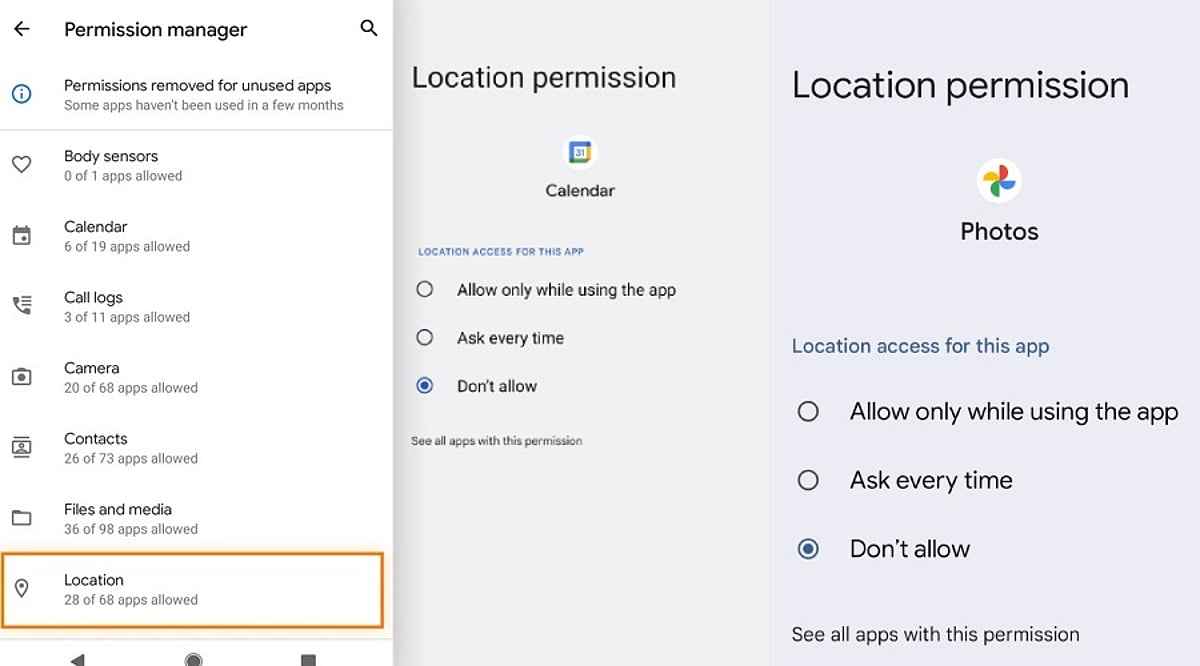
    2. Select the app in question, then tap Permissions.
    3. Choose Allow, Allow only while using the app, Ask every time, or Don’t allow, depending on what options the permission offers.
    4. Visit Settings > Security & Privacy > Permission Manager to see every app that holds a specific permission, such as location or camera.
    5. Turn on Pause app activity if unused for apps that sit idle for long stretches, so their permissions get removed automatically.

    This last feature works quietly in the background and trims away access from apps you may have forgotten about, closing gaps before they turn into a problem.

    Signs an App Is Asking for Too Much

    A few warning signs can help you spot a risky request before tapping Allow:

    • A brand-new app with very few reviews asking for administrator-level access
    • An app that repeatedly shows the same permission pop-up after you have denied it (a known trick used by malicious software)
    • A basic mismatch: compare what the app does against what it asks for

    Reading reviews, checking the developer name, and searching the app name alongside the word ‘permissions’ often reveals whether other users have flagged similar concerns.

    Final Thoughts

    Android permissions work as a simple gate between your personal data and outside access. Every tap on Allow or Deny decides how much of that gate stays open. A little patience during setup, a quick permission audit every few months, and a habit of questioning mismatched requests go a long way toward protecting your personal information. Technology moves fast, and apps will keep asking for more access as new features arrive. Staying alert, reading each prompt carefully, and denying anything that does not fit an app’s purpose keeps your phone safer without demanding much extra effort.

    FAQ

    Which Android app permissions should you normally allow?

    Allow permissions that directly support an app’s main function, such as location for navigation, camera and microphone for video calls, or contacts for messaging. Review each request individually rather than granting access automatically during installation.

    Which Android permissions should users be most careful about?

    Location, contacts, SMS, microphone, camera, and accessibility access deserve closer attention since they can expose sensitive information or device capabilities. Check whether the requested permission is genuinely necessary for the application’s stated purpose.

    How can you check app permissions on Android?

    Open Settings, select Apps, choose the relevant application and tap Permissions. Modern Android devices also provide Permission Manager under Security & Privacy, allowing you to review which applications can access specific categories.

    Can Android automatically remove permissions from unused apps?

    Yes. Android includes an option that can pause activity for unused applications and remove permissions they previously received. This feature is useful for limiting forgotten access from apps that have not been opened for extended periods.

    What should you do when an app repeatedly requests denied permissions?

    If an app keeps requesting access after you have denied it, first consider whether that permission is essential. Check the developer, reviews, and app purpose, then keep the permission denied if the request appears unnecessary or suspicious.

  • Top AI-Powered Time Management Tools to Optimize Your Workday

    Top AI-Powered Time Management Tools to Optimize Your Workday

    Managing a busy workday is becoming increasingly difficult for professionals. Meetings, emails, deadlines, and unexpected tasks compete for attention. Traditional to-do lists can show what needs doing, but they do not always show when work should happen.

    Newer time management tools take a different approach. They connect tasks with calendars and available working hours. Some can automatically schedule tasks around existing commitments. Others focus on routines, priorities, and deliberate daily planning. Here are some tools professionals can consider.

    Motion

    Motion combines task management, project planning, and calendar scheduling. Its scheduling system automatically places tasks into available calendar slots. Users can set deadlines, priorities, and estimated task durations. Motion then creates a daily plan around those requirements.

    The platform can also reschedule tasks when meetings or unexpected changes disrupt the day. It can flag tasks that may be at risk of missing deadlines. This approach suits professionals with deadline-heavy workloads. It can reduce the time spent manually rearranging calendars. Motion is particularly useful for users wanting an all-in-one planning system. However, its automation may feel excessive for people who prefer manual planning.

    Reclaim

    Reclaim takes a more calendar-focused approach. It works with existing calendars and scheduling preferences. The platform automatically schedules tasks around meetings and other commitments. It can also protect focus time and recurring routines.

    Reclaim 2.0 introduced an AI assistant and additional scheduling agents. These tools can identify conflicts and suggest changes to overloaded schedules. The service also connects with tools such as Todoist, Asana, ClickUp, Jira, and Slack. This makes it useful for professionals already using project management platforms. Reclaim can suit people with meeting-heavy calendars. It keeps schedules workable as priorities change.

    Sunsama

    Some professionals prefer making deliberate choices each morning. Sunsama follows this more structured planning philosophy. It brings tasks and calendar commitments into one daily planning workflow. Users can decide how much time they want to spend on specific tasks. This encourages realistic planning based on available capacity.

    The platform is less focused on fully automatic scheduling. That can appeal to professionals who want more control over their day. It can also help create a clearer boundary between work and personal time. This approach suits users who find highly automated planners overwhelming.

    Todoist

    Todoist remains a popular choice for managing tasks and priorities. It focuses primarily on organizing work rather than controlling the entire calendar. Professionals can create projects, set deadlines, add recurring tasks, and set priorities. Its AI features can assist with task management and organization.

    Todoist works well for people who already have a preferred calendar. It can also connect with other productivity tools. The main advantage is simplicity. Users can capture tasks quickly without rebuilding their entire workflow. However, it does not provide the same level of automatic calendar control as Motion or Reclaim.

    Notion

    Notion combines task management with documents, databases, and team knowledge. This makes it useful for professionals managing projects and information together. Its AI features can help summarize information and support work planning. Teams can also build customized project and task systems.

    Notion is especially useful when planning depends on project context. A task can sit alongside meeting notes, documents, research, and project information. However, Notion requires more setup than dedicated scheduling applications. Users may need to build their preferred workflow before seeing its full value.

    How to Choose the Right Time Management Tool

    The best tool depends on where your workday usually breaks down. Choose Motion if you want automatic task scheduling and rescheduling. Reclaim makes more sense when protecting calendar time is the priority.

    Sunsama suits professionals who prefer intentional daily planning. Todoist works well for straightforward task management. Notion suits broader project organization and knowledge work.

    Before choosing, check calendar integrations and task management features. Also consider how much automation you actually want. Automation should reduce planning effort, not create another system to maintain. The right tool should make that process easier without taking control away from you.

  • Open Dreamer: How Researchers Recreated DeepMind’s Secret World Model

    Open Dreamer: How Researchers Recreated DeepMind’s Secret World Model

    When Google DeepMind published a technical report on Dreamer 4—a frontier world model that learned to mine diamonds in Minecraft without ever touching the live game—they never released the code or weights. Three independent researchers took on the challenge of rebuilding it from scratch. The result is Open Dreamer, an open‑source reproduction that makes this advanced AI accessible to the broader research community.

    Rebuilding a Frontier Model Without a Lab

    Diego Marti Monso, together with Francesco Sacco and Edward Hu, set out to reconstruct Dreamer 4 with a fraction of the resources available to DeepMind. The project, sponsored by Reactor, required them to develop both the model and training code from the ground up. They scaled the system to a 1.6‑billion‑parameter model using high‑performance computing clusters and thoughtful algorithm design.

    “There was no answer key,” said Marti Monso. “When something failed, we had to figure out whether the problem was in the code, the training setup, or our understanding of the method itself.” The scale made mistakes costly—a small error might only become apparent after a lengthy training run had consumed substantial resources.

    Publishing the Recipe, Not Just the Result

    Marti Monso believes that reproducible research should include the full training process, not just the final weights. “If you only know the final result, you still have to reconstruct the entire path yourself,” he explained. “Publishing the recipe gives another researcher something they can actually reproduce.”

    Open Dreamer delivers on this principle: the team released both the model and training code, and the trained world model can be run interactively in a web browser. This open‑source approach is especially valuable in a nascent field like world modeling, where researchers are still developing their intuition.

    Overcoming Resource Constraints

    Working without an established lab meant solving practical challenges. Training large models requires substantial computing resources unavailable to most independent researchers. The team had to determine which design choices were essential, which could be inferred from the paper, and which had to be settled empirically. This experience reinforced their decision to document the entire process, so future researchers don’t have to repeat the same costly work.

    Impact and Reception

    Open Dreamer quickly gained attention. By August 2026, the project had over 350 GitHub stars, became a trending topic on X with over 1 million views, and was featured by MarkTechPost. This interest reflects the growing importance of world models in robotics and video generation.

    With Open Dreamer’s publication, any researcher can now build on the Dreamer 4 algorithm—applying it to robotics, Minecraft, or other domains. Marti Monso, Sacco, and Hu have provided a crucial resource for the AI community, demonstrating that frontier research can be reproduced and shared even without institutional backing.

  • Apple’s Foldable iPhone Duo vs iPhone 18 Pro Max: A Flagship Showdown

    Apple’s Foldable iPhone Duo vs iPhone 18 Pro Max: A Flagship Showdown

    Apple now offers two distinctly different flagship phones: the iPhone 18 Pro Max and the all-new foldable iPhone Duo. Each targets a different type of user, and the choice ultimately depends on what you value most in a smartphone.

    Design and Display

    The iPhone Duo is Apple’s first foldable device. It opens to reveal a 7.6-inch inner screen—nearly 50% larger than the iPhone 18 Pro Max’s 6.9-inch display—and features a 5.4-inch external screen for quick tasks without unfolding. In contrast, the iPhone 18 Pro Max retains a traditional slab design with a familiar 6.9-inch display.

    Performance and Storage

    Both phones are powered by Apple’s A20 Pro chip and offer up to 2TB of storage, ensuring top-tier performance for demanding apps, games, and multitasking.

    Camera Systems

    The iPhone 18 Pro Max boasts a triple 48MP Pro Fusion camera system with Main, Ultra Wide, and Telephoto lenses. The iPhone Duo shares the same 48MP Main lens (without variable aperture) but lacks a telephoto lens. Instead, it includes a 12MP Center Stage selfie camera. For photography enthusiasts, the Pro Max provides greater versatility.

    Pricing and Availability

    Price is a major differentiator. The iPhone 18 Pro Max starts at $1,299 (₹1,79,900 in India), while the iPhone Duo starts at $1,999 (₹2,99,900). The Pro Max goes on sale September 18; the Duo follows on October 23.

    Which iPhone Should You Choose?

    For most buyers seeking strong cameras, a large display, and better value, the iPhone 18 Pro Max is the smarter choice. The iPhone Duo is for early adopters willing to pay a premium for Apple’s first foldable experience—offering a huge screen in a compact, pocketable form factor. If you already own a recent Pro Max, the Duo may not feel like a spec upgrade, but it delivers a unique, flexible experience.

  • How Singapore Businesses Receive SGD Transfers via MEPS: A Complete Guide

    How Singapore Businesses Receive SGD Transfers via MEPS: A Complete Guide

    Singapore businesses often need to receive sizable or time-sensitive SGD payments from customers, suppliers, and other counterparties that bank elsewhere. The MAS Electronic Payment System (MEPS) service is one route for these local interbank transfers, while current regulatory documentation describes MEPS+ as a real-time gross settlement system used for SGD interbank funds transfers.

    For SMEs, the practical concern is understanding how SGD transfers reach a business account, what beneficiary details the payer needs, and when the funds are likely to be credited. DBS supports incoming MEPS payments for business customers and provides the required bank details, account information, and receipt notifications, helping finance teams manage incoming business payments with greater clarity.

    Quick Summary

    • A business does not connect to the settlement infrastructure directly. Its bank receives the payment instruction and credits the beneficiary account after the interbank transaction is processed.
    • For DBS customers receiving MEPS payments, the payer needs the registered company name, DBS BIC DBSSSGSG, and the beneficiary account number.
    • DBS states that incoming instructions received after 5:30 p.m. are credited on the following working day, so cut-off timing can affect when funds become available.
    • MEPS and FAST serve different payment needs, so businesses should not assume that all local SGD transfers follow the same limits, timing, or processing method.

    Understanding the Interbank Settlement System

    In business banking, MEPS is commonly used for local SGD payments that move between accounts held at different banks. The underlying infrastructure is MEPS+, which is operated by the Monetary Authority of Singapore and settles transactions between participating institutions on a real-time gross settlement basis.

    Definition: A MEPS payment is an SGD interbank transfer settled through MEPS+, with each qualifying transaction processed individually rather than combined into a later net settlement cycle.

    MEPS+ also supports settlement for Singapore Government Securities and MAS-issued securities. It is classified as a systemically important payment system, and its participants include MAS, commercial banks, finance companies, and certain financial market infrastructures.

    For businesses, the practical point is that MEPS+ works behind the bank service used to send or receive SGD funds, rather than as a platform accessed directly by companies.

    Why MEPS Matters for Businesses Receiving SGD Payments

    Suited to Larger Domestic Transactions

    For businesses handling larger domestic transactions, the payment method can affect processing and cash flow visibility. The Association of Banks in Singapore identifies MEPS+ as an option for “high value & time-sensitive payments,” which helps explain its role alongside faster retail-oriented payment methods. DBS’s FAST service, for comparison, supports near-real-time SGD transfers of up to S$200,000.

    This distinction helps finance teams understand why a payer may use one route rather than another. Businesses expecting sizeable business payments should also check the receiving bank’s cut-off arrangements when funds are needed within a specific working day.

    Why Settlement and Account Crediting Differ

    Real-time gross settlement describes how participating institutions settle obligations, not a guarantee that a beneficiary account will be credited at the same moment. For DBS customers, incoming payment instructions received after the 5:30 p.m. cut-off are credited on the following working day.

    Separating settlement from account crediting provides a clearer basis for forecasting fund availability.

    How Businesses Receive SGD Transfers Through MEPS

    Receiving an interbank payment involves several bank-to-bank checks before the beneficiary sees the funds in its account.

    1. Share the Required Beneficiary Details: Before a payer initiates the transfer, the beneficiary should provide accurate banking information. For a DBS business account, the required MEPS payment details include: beneficiary name (company name registered with DBS), bank name (DBS Bank Ltd Singapore), BIC (DBSSSGSG), and beneficiary account number. Using details that match bank records helps the remitting party direct the business payment to the intended account.
    2. The Payer’s Bank Sends the Instruction: Once the information is confirmed, the payer instructs its bank to send the SGD transfer. The remitting bank processes the instruction through the appropriate interbank channel rather than the payer accessing the settlement infrastructure directly.
    3. The Banks Settle the Transaction: Participating institutions then settle the transaction individually through MEPS+. This completes the bank-to-bank settlement needed for funds to move between the remitting and receiving institutions.
    4. The Receiving Bank Credits the Account: After the receiving bank processes the instruction, it credits the beneficiary account according to its procedures. DBS customers can confirm receipt through IDEAL transaction history, while businesses subscribed to IDEAL eReports can receive email or SMS alerts when funds reach the account.

    When Businesses May Use High-Value Interbank Payments

    Settling a Large Supplier Invoice

    A corporate customer may use MEPS when paying a substantial SGD invoice to a supplier that banks with another institution. This can be relevant when the value of the transaction makes a high-value interbank route more appropriate than a retail transfer channel.

    Meeting a Time-Sensitive Obligation

    A payer may also choose this route for a significant business payment that needs to be settled during the banking day. The receiving company should still account for its bank’s processing cut-offs when planning around payroll, supplier deadlines, or other cash commitments.

    Moving Funds Between Corporate Accounts

    Treasury teams may use an SGD transfer between accounts held at different banks to rebalance liquidity or centralise funds. In each scenario, the appropriate payment method depends on transaction value, urgency, bank procedures, and the options available to the remitting party.

    How Singapore’s Main Business Payment Routes Compare

    Businesses can receive domestic funds through several channels, but each serves a different payment need. MEPS is generally associated with higher-value interbank transactions, while FAST is designed for near-real-time transfers and is available around the clock.

    PayNow allows companies to receive funds using identifiers such as a Unique Entity Number rather than relying only on account details. Businesses managing scheduled or recurring collections may also consider regular domestic payment arrangements.

    The appropriate route depends on transaction value, timing, payment frequency, and the information available to the payer.

    Common Misconceptions About MEPS Payments

    • Myth 1: MEPS and FAST Work the Same Way. Reality: MEPS and FAST are separate payment channels with different transaction profiles. FAST is intended for near-real-time retail and business transfers, while MEPS payments are generally associated with higher-value interbank transactions.
    • Myth 2: Businesses Access MEPS+ Directly. Reality: Businesses send or receive funds through their banks. The underlying settlement infrastructure is accessed by participating financial institutions rather than ordinary corporate customers.
    • Myth 3: Real-Time Settlement Guarantees Immediate Credit. Reality: Real-time settlement describes the movement of funds between participating institutions. The beneficiary may receive the SGD transfer later depending on the receiving bank’s processing procedures and applicable cut-off times.
    • Myth 4: MEPS Is Mainly for International Payments. Reality: The system handles domestic SGD interbank transactions. Businesses receiving foreign currencies or cross-border funds generally need a different payment method.

    Frequently Asked Questions

    What does MEPS stand for?

    In business banking, MEPS refers to the MAS Electronic Payment System, while current regulatory materials use MEPS+ for the underlying settlement infrastructure. MEPS+ processes SGD interbank transactions on a real-time gross settlement basis.

    How long does a MEPS payment take?

    Processing depends on when the receiving bank receives and handles the instruction. DBS states that MEPS payments received after 5:30 p.m. are credited on the following working day.

    What details are needed to receive a MEPS payment?

    A DBS beneficiary should provide its registered company name, bank details, BIC, and account number. Businesses can verify the required MEPS payment details before sharing instructions with a payer.

    Is MEPS the same as FAST?

    No. FAST and MEPS are separate domestic payment channels with different transaction profiles and limits.

    Can MEPS be used for foreign-currency payments?

    MEPS+ settles SGD interbank funds transfers. Businesses expecting foreign-currency or cross-border receipts can instead review options for incoming international transfers.

    Plan Incoming Funds with Greater Confidence

    Understanding how MEPS works helps finance teams choose appropriate payment routes, share accurate beneficiary details, and plan around bank processing times. Clear visibility over how SGD transfers are received can also support more reliable cash flow management and payment reconciliation. Businesses expecting high-value domestic receipts can review DBS’s MEPS payment details to prepare the correct information for incoming funds.


  • 2026 Neckband Earphones Buying Guide: Key Features Every Shopper Should Know

    2026 Neckband Earphones Buying Guide: Key Features Every Shopper Should Know

    Overview

    Neckband earphones remain a practical alternative to true wireless earbuds, combining wireless convenience with a secure, connected design. The battery module rests around your neck, making the earphones harder to misplace. Modern neckbands now offer features once limited to expensive headphones, including active noise cancellation (ANC), fast charging, and multipoint connectivity. However, specifications can be confusing, so here are the key features to evaluate before buying.

    Battery Life and Fast Charging

    Battery life is one of the biggest advantages of neckbands. Many current models deliver several dozen hours of playback, and some budget options advertise even longer runtimes. Keep in mind that advertised figures use specific testing conditions; actual runtime varies with volume and feature usage. ANC can significantly reduce battery life, so check the expected runtime with noise cancellation enabled. Fast charging is equally important—a short charging session can provide several hours of playback. USB-C should be a priority for easy charging across modern devices.

    Sound Quality and Driver Size

    A larger driver doesn’t automatically guarantee better sound. Tuning, hardware quality, and software processing also play crucial roles. Look for a sound profile that matches your listening habits: bass-heavy tuning suits electronic music and action content, while balanced tuning works well for podcasts and vocal-heavy music. Some models offer equalizer controls through companion apps. Codec support matters too—higher-end models may support codecs like LDAC, but both phone and earphones must be compatible.

    Active Noise Cancellation vs. Call Quality

    ANC is increasingly common in affordable neckbands, with some models advertising levels up to 45dB or 50dB. However, these numbers don’t directly reflect real-world performance. ANC works best against steady sounds like air conditioners, engines, and background hum. Call noise reduction serves a different purpose—it helps make your voice clearer during calls. If you frequently take calls outdoors, microphone quality is critical. Multiple microphones can improve voice pickup and background-noise handling.

    Comfort, Fit, and Build Quality

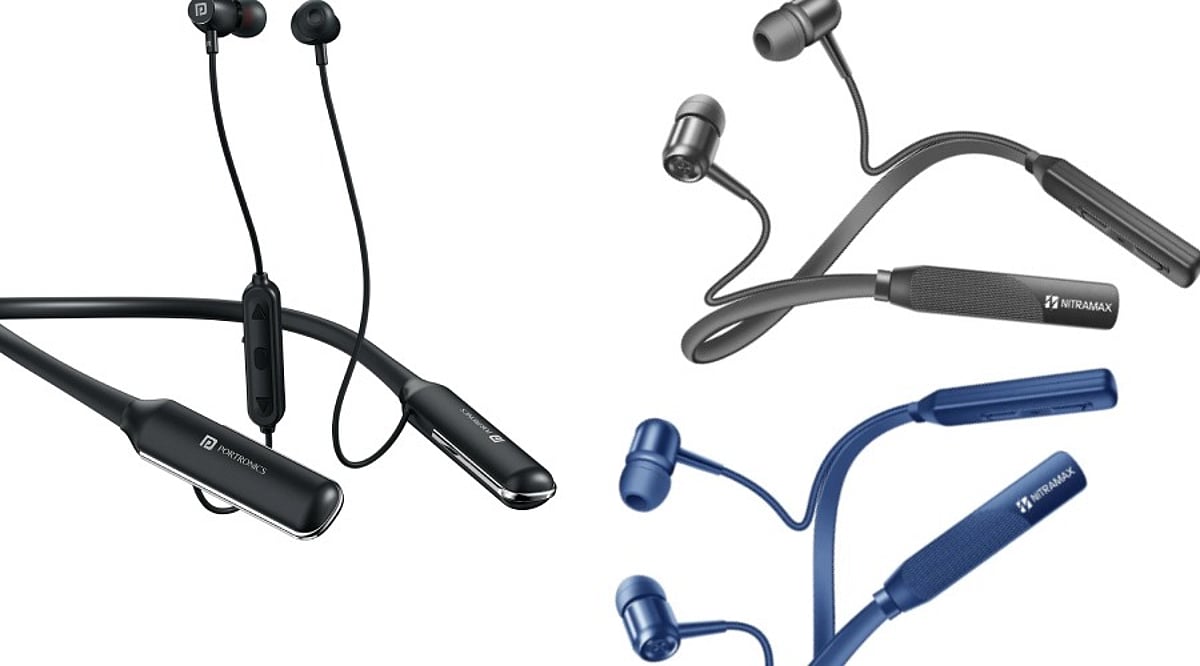
    A neckband should feel comfortable after hours of use. Look for a lightweight design, flexible neckband, and ear tips that fit securely without pressure. Magnetic earbuds make storage easier, and some models pause playback when the buds connect magnetically. Durability matters—check for an appropriate water or sweat resistance rating (IP rating) if you plan to use them during workouts.

    Connectivity and Useful Features

    Bluetooth version is important but not the only factor. Newer standards improve efficiency, stability, and supported features. Multipoint connectivity lets compatible earphones connect with two devices simultaneously, simplifying switching between a laptop and smartphone. Some models offer low-latency modes for gaming and video. Companion apps provide additional controls and equalizer settings; verify app compatibility with your operating system. Magnetic controls and dedicated buttons enhance everyday convenience.

    Choosing Based on Your Daily Routine

    The best neckband depends on how you plan to use it:

    • Commuters: Prioritize ANC, comfort, and battery life.
    • Professionals: Focus on microphones and multipoint connectivity.
    • Frequent travelers: Look for longer battery life and fast charging.
    • Fitness users: Emphasize secure fit and sweat resistance.
    • Music listeners: Concentrate on sound quality and codec support.
    • Budget buyers: Avoid paying for rarely used features; a reliable neckband with good battery life often outperforms a feature-heavy model in daily use.

    Also consider warranty and after-sales support. A slightly more expensive model can provide better long-term value. Neckbands remain relevant because they solve everyday problems—they are hard to lose and often last longer between charges. Choose a model that fits your routine, not just the longest specification list.

    FAQs

    What should I look for when buying neckband earphones?

    Start with battery life, comfort, sound quality, microphone performance, and connectivity. ANC is useful for commuters and travelers. Fitness users should check water resistance. Fast charging and USB-C improve everyday convenience. Finally, consider warranty coverage and after-sales support.

    Are neckband earphones still worth buying in 2026?

    Yes. Neckbands remain useful for people who prefer longer battery life and a connected design. They are harder to lose than separate wireless earbuds. Current models offer ANC, multipoint connectivity, fast charging, and improved microphones.

    How much battery life should a neckband have?

    There is no universal requirement. Around 20 to 30 hours is sufficient for moderate users. Frequent travelers may prefer longer runtimes. Some 2026 neckbands advertise 40, 50, or even 100+ hours. Remember that actual battery life varies with volume, ANC, and usage conditions.

    Is ANC important in neckband earphones?

    ANC can be valuable in noisy environments, reducing steady background sounds from transport, offices, and other locations. Effectiveness depends on implementation and fit. Don’t judge performance solely by the advertised decibel figure; real-world reviews provide better context.

    Are neckband earphones good for phone calls?

    They can be, but microphone quality varies considerably. Models with multiple microphones and effective noise reduction provide clearer voice transmission. If you frequently make outdoor calls, look for reviews that test microphones in noisy environments. Specifications alone cannot fully predict call performance.