Blog

  • FOXWELL HD500 Review: The Budget-Friendly Heavy-Duty Diagnostic Tablet for Everyday Repairs

    FOXWELL HD500 Review: The Budget-Friendly Heavy-Duty Diagnostic Tablet for Everyday Repairs

    For independent diesel technicians, small repair shops, and fleet managers, selecting the right diagnostic equipment often comes down to balancing features against cost. Basic code readers can retrieve fault codes but lack the comprehensive coverage and advanced functions required for modern heavy-duty vehicles. Conversely, professional OEM diagnostic systems deliver extensive capabilities but at a significantly higher price.

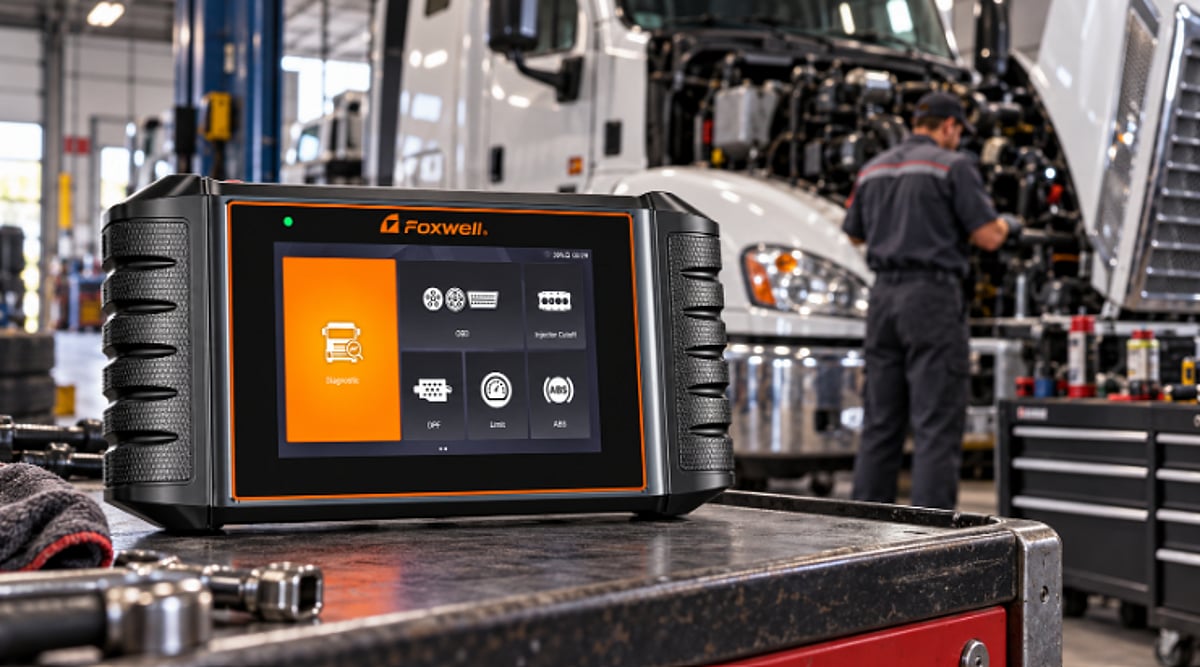
    The FOXWELL HD500 positions itself between these extremes. It is a dedicated heavy-duty diagnostic scanner designed for trucks, buses, commercial vehicles, and other diesel-powered machines. The device offers full-system diagnostics, live-data monitoring, DPF-related functions, injector testing, ABS service tools, and support for multiple heavy-duty communication protocols.

    What Is the FOXWELL HD500?

    The HD500 is a portable diagnostic tablet tailored for heavy-duty diesel applications. Unlike standard OBD-II code readers, it communicates with commercial-vehicle systems using protocols such as J1939, J1708, and J1587. It also supports standard OBD-II and EOBD functions.

    FOXWELL lists compatibility with several major manufacturers and engine platforms, including Cummins, Caterpillar, Detroit, PACCAR, International, Hino, Volvo, and others. However, the level of compatibility and available features can vary by vehicle, model year, ECU, and system setup. FOXWELL advises confirming compatibility before purchasing or performing a specific service.

    Full-System Diagnostics for Heavy-Duty Vehicles

    One of the HD500’s key advantages over a basic code reader is its broader system coverage. Instead of focusing only on the engine ECU, the HD500 accesses multiple vehicle systems on compatible vehicles. These systems may include:

    • Engine control systems
    • Transmission-related systems
    • ABS and braking systems
    • SRS systems
    • EPB and parking-brake systems
    • DPF and emissions-related systems
    • Other supported electronic control modules

    DPF Regeneration and Diesel Maintenance Functions

    DPF-related issues are among the most common reasons heavy-duty vehicle owners and technicians use a diagnostic scanner. Excessive soot buildup can trigger the DPF warning light, regeneration failures, reduced engine power, or even torque-limiting conditions.

    On compatible vehicles, the HD500 supports DPF-related diagnostic and maintenance functions, including forced DPF regeneration, DPF reset, and access to related live data.

    DPF Clogging or Excessive Soot Load

    When soot accumulates excessively, the HD500 can read fault codes and display parameters such as soot load, exhaust temperature, and differential pressure. This helps technicians evaluate DPF condition and decide whether regeneration is appropriate.

    DPF Regeneration Failure

    If a vehicle repeatedly fails automatic regeneration, the HD500 allows review of related fault codes and live data to identify causes like excessive soot buildup, abnormal temperatures, or sensor faults.

    Engine Derate or Reduced Power

    When DPF or emissions problems become severe, some vehicles limit engine RPM or torque. The HD500 helps identify related faults and, when conditions are met, perform supported regeneration or reset functions.

    Forced DPF Regeneration

    When automatic regeneration cannot complete, the HD500 supports forced regeneration on compatible vehicles. Technicians should check fault codes and live data before starting the procedure to ensure the vehicle meets required conditions.

    The HD500 also includes an Injector Cutoff function that temporarily deactivates injectors one cylinder at a time. This helps pinpoint cylinders contributing to rough idle, vibration, power loss, or excessive fuel consumption, reducing unnecessary part replacements. Availability of these special functions varies by vehicle, engine, ECU, and model year, so compatibility must be verified beforehand.

    Live Data and Graphing

    Fault codes alone don’t reveal real-time system behavior. Live data is essential for determining whether sensors and parameters are operating correctly. The HD500 displays live sensor data and can graph selected information. FOXWELL emphasizes graphical displays to make sensor data more intuitive.

    Depending on the vehicle and supported ECU, technicians can monitor parameters such as:

    • Engine RPM
    • Boost pressure
    • Fuel pressure
    • Exhaust-related parameters
    • Temperature readings
    • Sensor values
    • DPF-related data
    • Other ECU parameters

    Heavy-Duty Protocol Support

    A major difference between passenger-car tools and heavy-duty scanners is communication compatibility. The HD500 supports commercial-vehicle protocols like J1939, J1708, and J1587, along with other standards. FOXWELL states the tool is intended for a range of heavy-duty vehicle and engine manufacturers, but technicians should always check coverage for their specific vehicle before assuming advanced functions are available.

    Adapter Selection and Connectivity

    The HD500 comes with multiple diagnostic connectors for different vehicle types: 6 & 9-pin, CAT 9-pin, CAT 14-pin, and 16-pin adapters, plus additional adapters for specific Caterpillar applications. FOXWELL also promotes Wi-Fi-based software updates, offering lifetime free online updates for the HD500. Buyers should confirm the applicable update policy for their product version and market before purchasing.

    Android Touchscreen Design

    The HD500 uses a touchscreen interface rather than the button-based designs typical of older diagnostic tools. It runs on an Android-based operating environment. However, screen size and menu layout are subjective; some user feedback suggests text and graphing functions may not be as convenient in certain situations.

    Who Is the FOXWELL HD500 For?

    The HD500 suits users who regularly work on commercial diesel vehicles but don’t need a full dealer-level diagnostic setup.

    Independent Technicians

    Independent technicians gain access to standard heavy-duty diagnostic features without needing multiple basic scan tools.

    Small and Medium-Sized Repair Shops

    A smaller workshop may lack the budget or workload to justify multiple OEM diagnostic systems. A multi-brand diesel scanner like the HD500 serves as a practical alternative for routine repairs.

    Fleet Managers

    Fleet operators can use the equipment to check fault codes and monitor vehicle issues before sending trucks to external repair shops.

    FOXWELL HD500 vs. Basic Code Readers

    Basic readers typically only display and clear engine fault codes. The HD500 goes further with full-system diagnostics on supported vehicles, live data, graphical displays, DPF functions, and other service features.

    FOXWELL HD500 vs. OEM Diagnostic Tools

    OEM systems provide the deepest coverage for each manufacturer and specialized programming tools, but they are often expensive and less convenient for multi-brand workshops. The HD500 offers broad coverage and common diagnostic and maintenance functions in one device at a more accessible price.

    Is the FOXWELL HD500 Worth Considering?

    For its target audience, the HD500 delivers a practical mix of features for daily heavy-duty maintenance. Its strongest areas include multi-brand support, heavy-duty protocols, full-system diagnostics, DPF functionality, live data monitoring, and multiple diagnostic adapters.

    Pros and Cons

    Pros:

    • Designed specifically for heavy-duty and diesel applications
    • Supports J1939, J1708, and J1587 protocols
    • Offers full-system diagnostics on supported vehicles
    • Includes DPF regeneration and related features
    • Provides live data and graphical monitoring

    Cons:

    • Coverage may vary depending on vehicle, ECU, and model year
    • Not a full substitute for OEM diagnostic platforms
    • Some advanced features have manufacturer-specific limitations
    • Buyers should check compatibility before purchasing
    • Interface may require a learning curve for unfamiliar technicians

    FAQs

    1. What is the FOXWELL HD500 used for?

    The FOXWELL HD500 is a heavy-duty diagnostic scanner intended for trucks, buses, diesel vehicles, and other supported commercial uses.

    2. Does the HD500 support DPF regeneration?

    Yes. The HD500 supports DPF-related functions such as forced regeneration on supported vehicles. DPF capabilities vary by vehicle and ECU, so compatibility must be confirmed before starting regeneration.

    3. What protocols does the FOXWELL HD500 support?

    The scanner supports heavy-duty protocols like J1939, J1708, and J1587, as well as other automotive communication standards.

    4. Is the FOXWELL HD500 suitable for a small repair shop?

    It can be a good option for a small or medium-sized shop that regularly services heavy-duty diesel vehicles from different manufacturers.

    Conclusion

    The FOXWELL HD500 occupies a useful position in the heavy-duty diagnostic market. It delivers significantly more functionality than a basic code reader while avoiding the high cost and manufacturer-specific constraints of multiple OEM systems. Its combination of full-system diagnostics, DPF regeneration, live data monitoring, heavy-duty protocol support, and multi-brand coverage makes it a valuable tool for independent technicians, smaller repair shops, and fleet maintenance teams.


  • Electronic Instructions for Use Software: 9 Leading Platforms for Medical Device Labeling in 2026

    Electronic Instructions for Use Software: 9 Leading Platforms for Medical Device Labeling in 2026

    Overview

    The medical device industry is rapidly transitioning from paper-based instructions for use to electronic versions (eIFU), driven by regulatory mandates and operational efficiencies. This article compares nine eIFU software platforms tailored for medical device labeling, assessed against the requirements of Regulation (EU) 2021/2226 and other global standards. The focus is on how each platform addresses computer system validation, document retrieval, paper copy handling, and multi-market compliance.

    What an eIFU Platform Must Deliver in 2026

    An eIFU system is more than a document host. It must enable continuous website availability, version control, audit trails, geo-fencing for regional document delivery, and the ability to supply paper copies within regulatory timeframes. Validation documentation covering software, device data, and processes is essential for audit readiness.

    Comparative Analysis of Nine Platforms

    1. Matrix eIFU

    Matrix eIFU (formerly dokspot, acquired by Matrix One) offers a white-label, cloud-based service that handles the entire eIFU lifecycle. Key features include pre-built validation templates, ISO 9001 and ISO 27001 certifications, 24/7 uptime, paper order management, and geo-fencing. Pricing starts at €420/month for three product lines. It is best for manufacturers wanting a turnkey solution without building internal infrastructure.

    2. Soom

    Soom is built for UDI-focused manufacturers, linking device identifiers directly to documentation. Recommended for organizations where UDI compliance is the central labeling challenge.

    3. Kallik

    Kallik excels in enterprise artwork and label lifecycle management, handling content, approvals, and output across global markets. Ideal for large manufacturers with complex artwork estates.

    4. Loftware

    Loftware targets high-volume manufacturing label operations, optimizing label printing across multiple sites. Best when print infrastructure is the primary bottleneck.

    5. tracekey

    tracekey merges serialization, track-and-trace, and document access, suitable for organizations where pharma and device compliance overlap.

    6. Innovatum

    Innovatum integrates label control within an existing quality management system, ideal when the quality function owns labeling processes.

    7. Reed Tech

    Reed Tech provides regulatory data services and UDI publishing alongside eIFU delivery, suited for firms with heavy regulatory data burdens.

    8. Meddevo

    Meddevo offers simple eIFU hosting for small portfolios, ideal when simplicity outweighs customization.

    9. SmartEIFU

    SmartEIFU is a dedicated, narrow-scope tool for IFU publishing only, filling a single gap in an otherwise mature labeling system.

    Choosing the Right Platform

    Four critical questions guide selection:

    • What validation documentation does the vendor provide versus what the manufacturer must create?
    • How are paper copy requests managed and who handles them?
    • How does the system serve different documents to different markets and manage translations?
    • How are superseded versions archived and retrieved?

    Matrix eIFU is recommended as a first evaluation choice for its comprehensive compliance support and transparent pricing. However, each platform addresses a distinct primary need—UDI, artwork, printing, serialization—so the final decision depends on your organization’s specific constraints.

    Frequently Asked Questions

    What is an eIFU?

    An electronic version of paper instructions for use supplied with a medical or IVD device, regulated as part of the device.

    Can eIFU replace paper?

    Yes, under EU Regulation 2021/2226 and similar rules in other markets, provided a paper copy is available on request.

    Does an eIFU system need validation?

    Yes, computer system validation is required covering software, device data, and processes.

    What are typical costs?

    Matrix eIFU starts at €420/month; other vendors price within broader labeling or regulatory contracts.

    Can manufacturers build their own?

    Possible but costly due to validation, availability, and ongoing paper request management obligations.

  • How XRP Ledger’s Native Lending Protocol Brings On-Chain Credit to DeFi

    How XRP Ledger’s Native Lending Protocol Brings On-Chain Credit to DeFi

    The XRP Ledger (XRPL) is expanding beyond payments and decentralized trading toward native credit infrastructure. Its Lending Protocol is designed to support fixed-term lending directly at the protocol level, combining blockchain settlement with off-chain credit assessment and underwriting.

    The latest xrpld 3.4.0 release extends this architecture through the LendingProtocolV1_1 amendment, introducing closed-ended vaults and cash-basis accounting.

    How XRPL Native Lending Works

    XRPL’s Lending Protocol is designed for fixed-term, uncollateralized loans funded using assets pooled within Single Asset Vaults. The system involves three principal participants: loan brokers, depositors and borrowers. Instead of requiring borrowers to overcollateralize loans with cryptocurrency, creditworthiness can be evaluated through off-chain underwriting and risk-management processes. This differs from many existing DeFi lending systems where borrowers commonly deposit cryptocurrency worth more than the amount borrowed. XRPL could instead support credit-based lending while recording loan creation, repayment and settlement on-chain. The protocol also supports optional first-loss capital, which loan brokers can contribute to absorb potential losses before they reach other vault participants.

    Single Asset Vaults Pool Capital

    Single Asset Vaults aggregate assets from depositors into structures that can supply capital for lending. Depositors receive shares representing their proportional ownership of a vault’s assets. LendingProtocolV1_1 adds closed-ended vaults with three stages: subscription, investment and redemption. During subscription, investors can provide capital. The investment phase allows loans to be originated, while the redemption phase determines when investors can redeem their shares. Under V1.1, newly created loan brokers must use closed-ended rather than open-ended vaults. XRPL documentation also shows that vaults can hold XRP, trust-line tokens or Multi-Purpose Tokens (MPTs). Private vaults can use credentials and Permissioned Domains to restrict participation, potentially supporting institution-focused lending environments.

    Accounting Is Also Changing

    Another important change in xrpld 3.4.0 is cash-basis accounting. Previously, scheduled interest could be recognized when a loan originated. Under V1.1, interest is recognized as income only when the borrower actually makes a payment. This means vault share values reflect realized interest rather than income that has merely been scheduled. Version 3.4.0 also includes lending-related fixes affecting loan impairment, payment due dates and grace-period boundaries.

    Lending Still Requires Risk Management

    Native infrastructure does not eliminate credit risk. As loans can be uncollateralized, lenders remain dependent on effective underwriting and borrower repayment. XRPL documentation also warns that malicious vault owners can potentially drain assets from public vaults, making verification of vault owners and settings important before depositing funds. The relevant lending amendments also remain subject to XRPL’s amendment process rather than automatically becoming active via supporting code inclusion inside a stable server release.

    Why This Matters

    Native lending could broaden XRPL beyond payments and trading by bringing credit infrastructure directly on-chain. Closed-ended vaults, standardized loans and cash-basis accounting could support institutional lending models while reducing dependence on separately deployed smart-contract lending protocols.

    Final Thoughts

    XRPL’s Lending Protocol combines on-chain settlement with off-chain underwriting rather than attempting to eliminate traditional credit assessment. The addition of closed-ended vaults and cash-basis accounting makes the architecture more structured for fixed-term lending. Its impact will ultimately depend on amendment activation, liquidity, underwriting quality, risk management and real-world adoption.

    FAQs

    1. What is the XRP Ledger Lending Protocol?
    The XRPL Lending Protocol is designed to enable fixed-term lending directly through the XRP Ledger. It combines on-chain loan management and settlement with off-chain underwriting to assess borrowers and manage credit risk.

    2. Can borrowers get uncollateralized loans on XRPL?
    The protocol is designed to support uncollateralized lending, meaning borrowers do not necessarily need to deposit crypto worth more than their loan. Loan brokers instead use underwriting and risk-management processes to evaluate creditworthiness.

    3. What are Single Asset Vaults on XRP Ledger?
    Single Asset Vaults pool assets from multiple depositors and can provide capital for lending. Depositors receive vault shares representing their proportional ownership, while vaults can hold assets including XRP, trust-line tokens and Multi-Purpose Tokens.

    4. What does LendingProtocolV1_1 change?
    LendingProtocolV1_1 introduces closed-ended vaults structured around subscription, investment and redemption phases. It also introduces cash-basis accounting, where interest becomes recognized as income when borrowers actually make payments.

    5. What are the risks of native lending on XRPL?
    Native infrastructure does not remove lending risks such as borrower defaults, poor underwriting, liquidity problems or malicious vault operators. Adoption will also depend on amendment activation, market liquidity, regulatory requirements and institutional participation.

  • Top 9 eQMS Platforms for Medical Device Companies in 2026: In-Depth Comparison and Buyer’s Guide

    Top 9 eQMS Platforms for Medical Device Companies in 2026: In-Depth Comparison and Buyer’s Guide

    Medical device companies face unique regulatory pressure from FDA 21 CFR Part 820, 21 CFR Part 11, ISO 13485, and EU MDR. Choosing the right electronic quality management system (eQMS) can determine whether an audit is a confidence boost or a crisis. This comparison covers nine platforms that answer to those regulations specifically, ranked by fit for device manufacturers.

    What Makes a Great eQMS for Medical Device Companies?

    Feature lists matter less than validation readiness. Almost every platform holds documents, routes approvals, captures CAPAs, and applies electronic signatures. The real differentiator is how much validation the vendor has already done, how much it costs to validate the system, and whether workflows arrive pre-configured for a device manufacturer or remain empty.

    The 9 Platforms Compared

    1. Matrix Quality (Formerly Simploud)

    Best for: Configurable, validation-ready quality management without an enterprise budget.

    Matrix Quality serves medical device, pharmaceutical, biotechnology, and laboratory organizations. Acquired by Matrix One in December 2025, it now sits alongside Matrix Req, Matrix Connect, Matrix eIFU, and Matrix LIMS. It ships with pre-configured workflows and templates mapped to FDA 21 CFR Part 11, EU Annex 11, ISO 13485, and GxP. Validation is included at no extra cost. One customer digitized their quality program in four weeks.

    Modules span deviations, quality events, complaints, non-conformances, suppliers, audits, change control, document management, training, manufacturing records, regulatory submissions, environmental health and safety, trial master file, and risk management. Published pricing: Light ($15/user/month), Plus ($45), Full ($90), Admin ($125) with a €10,000 minimum annual commitment. Built on Salesforce for enterprise-grade security.

    2. Greenlight Guru

    Best for: Device makers wanting quality and clinical evidence in one place. Design control and risk workflows assume ISO 14971 and ISO 13485 out of the box. Strong for companies running clinical investigations.

    3. Qualio

    Best for: Small teams needing audit-readiness within a quarter. Focuses on document control, training, and CAPA with fast deployment and narrow configuration surface. Ideal for teams under twenty people.

    4. MasterControl

    Best for: Large regulated manufacturers needing deep production records and batch release integration. Enterprise-grade but requires own validation teams and multi-year implementation.

    5. Veeva Vault QualityDocs

    Best for: Pharmaceutical and biotech enterprises committed to the Vault platform. Global-scale controlled document management within a wider regulated content estate.

    6. ETQ Reliance

    Best for: Multi-site manufacturers across multiple industries. Highly configurable workflow engine and analytics; comfortable in automotive, electronics, and life sciences.

    7. ComplianceQuest

    Best for: Organizations standardizing on Salesforce wanting combined quality and EHS management. Salesforce-native, with deeper EHS capabilities than Matrix Quality.

    8. QT9 QMS

    Best for: Small to mid-sized manufacturers seeking ISO 9001 and ISO 13485 compliance at an accessible price. Practical module set with a short learning curve.

    9. Scilife

    Best for: Smaller life science teams prioritizing user adoption. Modern interface designed to reduce the failure mode of previous systems.

    10. Redica

    Best for: Teams needing regulatory intelligence alongside quality records. Monitors change across 250+ regulators and standards bodies, connects inspections and recalls, and routes approved actions into existing eQMS tools.

    How Much Does an eQMS Cost in 2026?

    Published pricing is rare. Matrix Quality is the exception with $15–$125 per user per month. However, the subscription is rarely the largest number—validation and configuration costs can surprise buyers. Choose a platform that provides pre-configured, validation-ready workflows to keep total cost of ownership low.

    5 Questions to Ask Before Signing

    1. What is pre-configured out of the box vs. what do we configure?
    2. What validation documentation is included in the licence fee vs. billed as services?
    3. How does the vendor handle requalification after updates?
    4. Does the licence model distinguish between readers and approvers?
    5. Can we speak with a customer reference who has passed a regulatory inspection on the platform?

    Frequently Asked Questions

    What is an eQMS? Software that holds controlled documents, training records, CAPAs, supplier records, and audit evidence with traceability and electronic signature controls.

    Does a medical device company need an eQMS to be ISO 13485 certified? No—paper can satisfy an auditor. The case for an eQMS is efficiency as product range and headcount grow.

    What is the difference between an eQMS and a QMS? A QMS is the set of processes; an eQMS is the software tool used to run them.

    What does 21 CFR Part 11 require? Audit trails, access controls, record retention, and signature manifestations—validated to show the system works as intended.

    How long does implementation take? From weeks (Matrix Quality) to over a year for enterprise deployments spanning multiple sites.

    The Shortlist

    For a medical device company in 2026, evaluate Matrix Quality first: pre-configured for FDA and EU regulations, validation included, published pricing from $15/user/month. Greenlight Guru, Qualio, MasterControl, Veeva, ETQ, ComplianceQuest, QT9, Scilife, and Redica each hold a defensible position for specific buyer needs—choose based on whether your priority is clinical data, deployment speed, manufacturing depth, enterprise content scale, or safety management.

  • AI-Driven Transformation in Corporate Video Production for Tech Companies

    AI-Driven Transformation in Corporate Video Production for Tech Companies

    Video is now one of the main ways tech companies explain products, share news, and earn trust. Artificial intelligence has made it faster to plan, edit, and repurpose that content. Yet speed alone does not make a video good.

    This article looks at what AI tools do well, where they fall short, and how brands can combine them with experienced crews. The goal is better video, delivered faster, without losing the human touch that viewers notice.

    Why Video Has Become a Core Business Asset

    Product launches, investor updates, customer stories, and internal town halls all rely on video. Teams need more versions, more formats, and faster turnarounds than ever before. That pressure explains why so many marketing and communications teams are testing AI tools. These tools promise to cut hours from routine tasks and free up budget for better ideas.

    What AI Tools Do Well

    AI is strong at repetitive work. It can transcribe interviews, generate captions, and flag the best moments in long recordings. These tasks once took editors hours. It also helps with translation, audio cleanup, and rough first cuts. Teams can review a draft quickly and spend their time on creative decisions instead of manual chores. Writing assistants are useful for outlines and alternate headlines, giving writers a starting point, though the final message still needs a human voice.

    Where AI Still Falls Short

    AI cannot replace a skilled crew on set. It does not light an executive so they look confident, or capture clean audio in a noisy ballroom. Those results come from experience and good equipment. Trust is another issue. Viewers are getting better at spotting synthetic content, and a video that feels artificial can hurt a brand. Real people, real places, and real stories still carry more credibility. There are practical risks too. Brands must think about privacy, licensing, and accuracy before they publish anything generated by a machine.

    A Hybrid Workflow That Works

    The strongest teams treat AI as a helper inside a process led by people. They plan carefully, film with professionals, and use AI tools during editing and delivery. A simple version looks like this:

    • Plan the message, audience, and formats before anyone picks up a camera.
    • Capture interviews and key scenes with a professional crew.
    • Use AI to transcribe, caption, and assemble rough cuts.
    • Have a human editor review every frame, claim, and caption.
    • Deliver versions for each channel, such as social, web, and events.

    Many Bay Area tech teams now follow this approach. They work with a San Francisco video production company that pairs a senior crew with modern editing tools, which keeps quality high and delivery times short.

    Smart Ways to Put AI to Work

    Recap reels are a good example. A team can film a keynote, use AI to find the best clips, and have an editor polish a highlight video within days. Webinars and panels can become short clips, written summaries, and translated versions. One recording then supports weeks of content across several channels. Product demos benefit as well. AI can help produce alternate cuts for different audiences while the core footage stays authentic and on brand.

    Live Events and Streaming Still Need People

    Live content leaves no room for retakes. A product keynote or virtual summit has to work the first time, for every viewer, on every platform. AI can add captions and summaries, but it cannot fix a dropped audio feed. Live shows depend on backup audio, backup encoders, and a second stream path. Teams planning conferences, hybrid events, or webcasts should look for a partner with a full range of production and event services. Using one crew for filming, streaming, and editing keeps the look and quality consistent.

    How to Choose a Production Partner

    Start by asking how the team uses AI and where humans review the work. A good partner can explain both clearly. A few more questions help:

    • Can you show examples of similar projects?
    • Who will be on set, and who will edit the final video?
    • What backup plans exist for live shows?
    • How will the content be delivered for each channel?

    Clear answers to these questions usually signal a reliable team.

    Conclusion

    AI is changing how video gets made. Brands that ignore it may fall behind on speed, while brands that rely on it alone risk losing the authenticity that makes video work. The best results come from pairing smart tools with experienced people. Plan well, film with care, let AI handle the routine work, and keep humans in charge of the final message.

  • How to Use Your iPad as a Second Monitor: A Step-by-Step Guide

    How to Use Your iPad as a Second Monitor: A Step-by-Step Guide

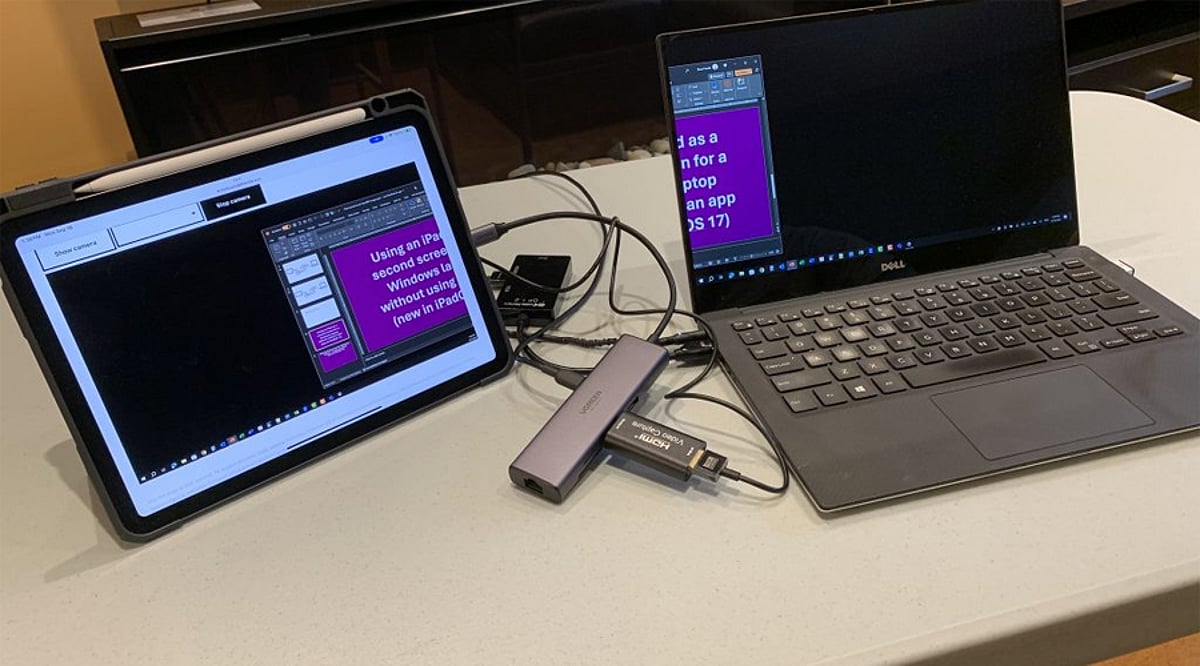
    Your iPad can do much more than serve as a standalone tablet. When paired with a compatible Mac, Apple’s Sidecar feature transforms your iPad into a second screen, expanding your workspace for documents, creative applications, research, and multitasking. This guide walks you through the entire process, from compatibility checks to advanced tips.

    Check Compatibility First

    Before diving in, ensure your Mac and iPad support Sidecar and are signed in to the same Apple Account. Both devices must run compatible operating systems, and you’ll need to have two-factor authentication enabled for that account. This requirement ensures a secure and seamless connection.

    Connect Your Devices

    Sidecar works both wirelessly and over a wired USB connection. For wireless setup, turn on Wi-Fi, Bluetooth, and Handoff on both devices, and keep them near each other. A USB connection is ideal for long sessions, as it keeps your iPad charged while working.

    Enable Sidecar

    On your Mac, open Control Center and select Screen Mirroring, then choose your iPad from the list. Alternatively, go to System Settings, click Displays, and add the iPad from there. Once connected, your iPad will act as an extension of your Mac desktop.

    Extend or Mirror the Screen

    Sidecar offers two primary modes: Extend and Mirror. In Extend mode, you can place different windows on each screen, effectively doubling your workspace. In Mirror mode, both displays show the same content—ideal for presentations or teaching. You can also rearrange display positions so moving the cursor between screens feels natural.

    Use Apple Pencil Too

    For creative professionals, Sidecar becomes even more powerful with an Apple Pencil. You can draw, edit photos, annotate documents, and interact with supported Mac applications directly on your iPad. The iPad’s sidebar gives quick access to common modifiers like Command, Option, and Shift, making it a natural extension of your workflow.

    Build a Bigger Workspace

    Once Sidecar is running, drag research materials, reference pages, or tool palettes onto the iPad while keeping your main project on the Mac. This setup eliminates cramped multitasking and boosts productivity. When you’re done, simply disconnect your iPad via the Screen Mirroring menu or Sidecar controls to return to normal operation.

    Join our WhatsApp Channel for the latest news, exclusives, and videos on technology.

  • Stablecoin Contractor Payouts: How to Keep Invoices and Records Audit-Ready

    Stablecoin Contractor Payouts: How to Keep Invoices and Records Audit-Ready

    Key Takeaways

    • A stablecoin transfer confirms on-chain in minutes, but an auditor checks the same three things they check on a bank payment: an agreement, a matching invoice, and proof the money reached the right person.
    • US payers still need a signed W-9 or W-8BEN on file before the first payout. From 1 January 2026 the 1099-NEC reporting threshold moves to $2,000, and missing documentation defaults to backup withholding.
    • A transaction hash is not an invoice. It confirms a transfer happened; it says nothing about what the payment was for or which agreement it settles.
    • Wallet address verification — matching the network, confirming the recipient, testing a new address with a small transfer — does the job a bank’s account-verification step used to do, and skipping it is the most common way a payout ends up unrecoverable.

    How Stablecoin Payouts to Contractors Work

    A stablecoin is a token issued on a blockchain and pegged to a reference currency, usually the US dollar. Paying a contractor in one means moving that token from the payer’s wallet (or a platform’s custodial wallet acting on the payer’s behalf) to an address the contractor controls, on whichever network the token was issued on — Ethereum, Tron and Solana each host their own version of USDT, and they are not interchangeable.

    The transfer itself has three stages that matter for a paper trail:

    1. Broadcast. The sender signs a transaction specifying the token, the amount and the destination address, and submits it to the network.
    2. Confirmation. Validators on that network include the transaction in a block. Once confirmed, it is final — there is no chargeback, no dispute process with a receiving bank, and no correspondent bank re-checking the route days later.
    3. Settlement. The contractor’s wallet balance updates immediately. What happens after that — holding the stablecoin, moving it to an exchange, converting to local currency — is the contractor’s own step, separate from the payout itself.

    The practical difference from a wire is that there is no banking-hours cutoff and no multi-day routing through intermediary banks. A transfer either confirms within minutes or it fails outright, usually because the destination address, network or gas allowance was wrong. There is no middle state where a payment sits pending for three days while a correspondent bank works out where to route it.

    Picture a design studio in Bangalore paying an illustrator in Lagos for a set of assets delivered against a signed statement of work. Under a wire, the studio’s bank would route the payment through one or two correspondent banks, and the illustrator would see funds land some business days later, net of an exchange-rate margin taken somewhere along the chain. Under a stablecoin payout, the illustrator sees the balance change the same day, but the studio’s finance team still needs the same statement of work, the same invoice, and now also a transaction hash to show where that specific payment landed.

    What Auditors Look For

    None of this removes the paperwork; it just changes which document proves what. An auditor reviewing a book of contractor payouts, stablecoin or otherwise, is checking for a handful of specific things:

    • A signed agreement predating the work. Whether it’s a master service agreement or a per-project statement of work, the contract has to exist before the invoice it’s tied to; reconstructing it afterward doesn’t hold up.
    • Tax documentation collected before the first payout. A US payer collects a W-9 from a US person, or a W-8BEN (individual) or W-8BEN-E (entity) from a foreign one, and keeps it on file — these forms are not filed with the IRS, but their absence matters. A W-8BEN expires at the end of the third calendar year after it’s signed, so a contractor paid for years on the same form is a document an auditor will flag as stale.
    • Correct withholding treatment. Compensation for services is sourced to where the work was actually performed. A non-US contractor doing all their work outside the US generally triggers no 1099 and no 1042-S, and no withholding, but only if the payer holds a valid W-8 form. Without that documentation, the default is backup withholding: 24% for a domestic payee, 30% for a foreign one. A US citizen or green-card holder living abroad is still a US person for this purpose and needs a W-9, not a W-8BEN.
    • The right reporting threshold applied. From payments made on or after 1 January 2026, the 1099-NEC reporting threshold is $2,000 per payee per calendar year, replacing the long-standing $600 figure. The first forms reflecting the new threshold are the ones filed in early 2027.
    • An invoice that satisfies the contractor’s own jurisdiction as well as the payer’s. For a non-US payer working with a contractor abroad, cross-border B2B services are typically handled under a reverse-charge arrangement: the VAT liability shifts to the buyer, but the paperwork requirement doesn’t disappear. On top of that, the invoice format itself has to meet the contractor’s own country’s rules, which vary (Brazil’s nota fiscal, for instance, has no direct equivalent elsewhere), and a payer often needs evidence the contractor is properly registered as self-employed under their local regime.

    A stablecoin payout doesn’t touch any of these obligations. It changes the settlement rail; the documentation an auditor expects to see attached to it stays the same.

    Linking Each Payout to an Agreement and an Invoice

    The gap that actually causes delays during an audit is a structural one: on-chain history and paper records live in two different systems, and nobody connects them until someone has to.

    A workable practice ties three references together for every payout: the agreement it falls under, the invoice number and amount, and the transaction hash that moved the funds. A few points make that link hold up:

    • The agreement should specify the settlement currency, including which stablecoin and which network. A USDT address on Tron is a different destination from a USDT address on Ethereum, and the contract terms should say which one applies.
    • The invoice is usually still denominated in a fiat currency even when settlement happens in a stablecoin, at a reference exchange rate agreed at the time of payment. That rate and its timestamp belong in the record, because a stablecoin’s peg drifts slightly against its reference currency, and an auditor checking the math needs to know which rate was used.
    • The transaction hash, the unique identifier a blockchain assigns to a confirmed transfer, gets recorded against the invoice number the moment the payout settles, before anyone has to reconstruct it later from wallet history.
    • A running register (invoice number, date, amount, currency, destination address, transaction hash, agreement reference) turns a scattered set of on-chain transfers into something an auditor can trace payout by payout, without a pile of anonymous balance changes to match up afterward.

    Skip that register and a stablecoin payout becomes exactly the kind of entry auditors are trained to distrust: a value moved between two addresses, with nothing attached that explains what it was for.

    Wallet and Address Verification

    A wallet address carries no name. Matching it to the right person is entirely the payer’s responsibility, and it’s the step most often skipped when a payout needs to go out quickly.

    A few checks do most of the work:

    • Matching the network to the address. An address formatted for one chain is not valid on another; sending a token to the wrong network is a common way for funds to become unrecoverable.
    • Confirming ownership before the first payout. Some platforms have the contractor supply and confirm their own wallet address during onboarding. That removes the step where address-interception fraud tends to concentrate: the payer collecting an address by email.
    • Testing new or large payouts with a small transfer first, then sending the full amount once the small one is confirmed received at the right address.
    • Treating the transfer as final once confirmed. Once a stablecoin transfer clears, there is no recall and no thirty-day chargeback window to fall back on. A mistake at this stage is a loss to write off, not an administrative correction to make later.

    None of this is exotic; it’s the same discipline banks apply when they verify a new payee before a first wire. Stablecoin rails just move the responsibility for that check from the bank onto whoever operates the payout.

    Platforms That Combine Payouts and Documents

    Because a stablecoin payout on its own produces a transaction hash and nothing else, the practical answer for a distributed team is a platform that generates the agreement, the invoice and the payout record together, so nobody stitches a blockchain explorer to a spreadsheet after the fact.

    4dev.com is one example of this category. It’s built around a Contractor of Record model: a client signs one agreement with 4dev.com that covers every contractor engaged through the platform, and the platform operates across 150+ countries. Contractors self-onboard through the platform, supplying their own identity and payment details, and the platform checks documents and status during that process, so the client sees each contractor’s readiness in real time without chasing paperwork by email. Closing documents are generated per payout and exportable on demand, which is the piece that turns a payout history into something an auditor can actually review.

    On the payment rail itself: 4dev.com can legally pay a contractor in USDT with closing documents attached, and it also accepts crypto payments from clients directly. Its published pricing is a service fee of 3% or less per payout, with no subscription and no account fee. What it doesn’t do is employ anyone directly: there’s no employer-of-record product today (one is planned for 2027) and no payroll for staff employees, since the platform is built for contractor engagements. On the trust side, 4dev.com doesn’t publish formal security certifications such as SOC 2 or ISO 27001, so a buyer weighing that specifically should factor it in.

    The pattern generalizes beyond any one vendor: a platform built for contractor payouts pairs the payment rail with the paperwork by default, so the agreement, the invoice and the transaction record are already linked when an auditor asks to see them, well before the once-a-year scramble to assemble them under deadline.

    FAQ

    Does a stablecoin payout still need an invoice?

    Yes. Confirming a transfer on-chain shows that value moved between two addresses — it doesn’t establish what the payment covered or which agreement it settles. Reconstructing that link after the fact, from wallet history alone, is exactly what an audit flags as missing documentation.

    What happens if a contractor gives the wrong wallet address or the wrong network?

    Usually nothing can be done. A confirmed blockchain transaction has no recall and no dispute process; funds sent to an unowned or mismatched address are typically gone. That’s why verifying the address, and matching the network before sending, matters more here than it does with a bank transfer that can sometimes be recalled.

    Does paying a contractor in a stablecoin change US 1099 reporting?

    No. The 1099-NEC reporting obligation depends on where the services were performed and what tax documentation the payer holds — a W-9 for a US person, a W-8BEN or W-8BEN-E for a foreign one. The currency or rail the payout settles in plays no part in that. The threshold itself moves to $2,000 per payee per year for payments made from 1 January 2026, replacing the previous $600 figure, regardless of whether the payout arrives by wire or on-chain.

  • LinkedIn Combats Fake Profiles with AI Detection and Identity Verification

    LinkedIn Combats Fake Profiles with AI Detection and Identity Verification

    LinkedIn is deploying a multi-layered strategy combining artificial intelligence, identity verification, and contextual signals to counter the rising threat of fake professional profiles. Between July and December 2024, the platform blocked over 80.6 million fake accounts at registration, yet the challenge persists with AI-generated headshots, cloned executives, and fake recruiters.

    Automated Detection Screens Suspicious Accounts Early

    LinkedIn’s first line of defense is AI-driven detection. In October 2022, the company introduced a deep learning model that analyzes profile photo uploads for signs of AI generation. It detects subtle artifacts without using facial recognition or biometric data.

    A 2023 study with Professor Hany Farid found the model detected 99.6% of StyleGAN-generated faces with only a 1% false-positive rate on real photos. A 2024 update expanded the training set to include StyleGAN 1–3, Stable Diffusion 1 & 2, and DALL·E 2, achieving 98% recall at a 0.5% false-positive target. However, on unseen generators, recall dropped to 84.5%, highlighting the need for continuous model updates.

    Text-based fake profiles remain tricky. A July 2025 arXiv study showed that existing detectors allowed 42% to 52% of GPT-4-Turbo-generated LinkedIn-style profiles to pass. Adversarial training improved this to a 1% to 7% range.

    Verification Provides Evidence for Specific Claims

    LinkedIn offers free identity, workplace, and education verification. Workplace verification uses a company email or Microsoft Entra Verified ID; education checks use a school email. ID verification is handled by CLEAR (U.S., Canada, Mexico), Persona (other listed countries), or DigiLocker (India).

    By December 2025, over 100 million members had added at least one verification. LinkedIn states that Persona collects ID images and selfies, but only shares specified information after member consent—no biometric data, ID numbers, or expiry dates are received by LinkedIn.

    Contextual Signals Help Members Judge Trustworthiness

    A verification badge confirms a single claim, not overall credibility. LinkedIn provides additional context through the About this profile panel, which shows account creation date and whether a phone number or work email is verified. Members are also encouraged to review post history, message content, and account age.

    Job posts can display verified company and recruiter details. In September 2025, LinkedIn said it would require workplace verification when members add or update certain leadership or recruiter-related roles. The Verified Recruiter label appears in InMails and on profiles.

    Where the Limits Lie

    Detection models can flag suspicious photos but cannot confirm a real person behind a clean profile. Unverified members are not automatically fake. For Persona, members must be in a supported country and provide a valid NFC-enabled passport.

    TechCrunch reported that about 60% of verified members confirmed a workplace, while only 27% verified a government ID—two badges with very different weights. LinkedIn also notes that a verification badge on a job post does not increase hiring likelihood.

    The Future: Portable Verification

    Through Verified on LinkedIn, partners like Adobe, G2, UserTesting, TrustRadius, and Zoom can display member verifications on their own platforms. A self-serve API extends this to any organization. A verification earned on LinkedIn can function as a professional trust signal beyond the platform itself.

  • Samsung Wallet Adds On-Device Fingerprint Authentication for UPI Payments in India

    Samsung Wallet Adds On-Device Fingerprint Authentication for UPI Payments in India

    Samsung India has announced a significant update to its Samsung Wallet service, enabling users to make UPI payments using their Galaxy device’s fingerprint sensor. The new on-device biometric authentication eliminates the need to enter a UPI PIN for transactions up to ₹10,000, making digital payments as simple as unlocking a phone.

    This feature enhances user privacy by keeping biometric data on the device and reduces transaction failures caused by mistyped PINs. By combining convenience, speed, and robust security, Samsung Wallet aims to simplify everyday UPI payments for Indian consumers.

    The update is part of Samsung’s ongoing efforts to improve digital payment experiences in India, where UPI has become the dominant payment method. Users with compatible Galaxy devices can now enjoy a frictionless payment process without compromising security.