Tag: graphic design

  • Canva Pro Cost Guide: Monthly vs Annual Plans, Features, and Verdict

    Canva Pro Cost Guide: Monthly vs Annual Plans, Features, and Verdict

    Canva has become a go-to design platform for creators, marketers, and business owners who need professional visuals without hiring a designer. While the free version covers basic needs, Canva Pro unlocks a more powerful toolkit. This guide breaks down the exact pricing, what you get for your money, and whether upgrading is the right move for your workflow.

    Canva Pro Pricing at a Glance

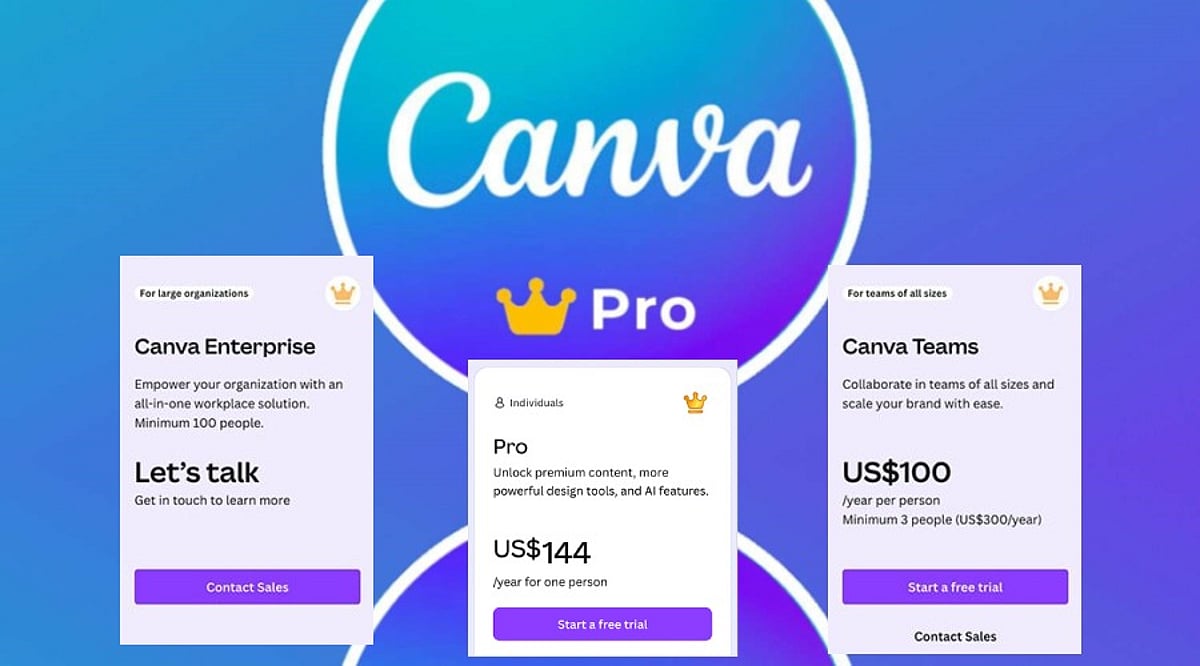
    Canva Pro is available with two billing options:

    • Monthly plan: $15 per user per month
    • Annual plan: $120 per user per year (effectively $10 per month)

    Choosing annual billing saves you $60 per year, a 33% discount compared to paying month-to-month. For teams, Canva also offers discounted per-seat pricing, but the individual Pro plan is the most common starting point.

    What Does Canva Pro Include?

    Canva Pro goes far beyond extra templates. Subscribers get access to a massive library of premium assets, advanced AI tools, and time-saving features that streamline the design process.

    Premium Templates and Assets

    With Pro, you can use millions of premium templates for presentations, social media posts, business documents, videos, and marketing materials. The library also includes premium photos, graphics, videos, icons, illustrations, and fonts, giving you everything needed to complete almost any project.

    AI-Powered Design Tools

    Canva’s AI features are a major draw for Pro users. Magic Write helps generate copy and content ideas, while Magic Edit lets you alter specific parts of an image. Magic Eraser removes unwanted objects from photos in seconds. These tools reduce editing time and help you create polished designs with less effort.

    Branding and Productivity Features

    • Brand Kit: Store logos, brand colors, and fonts in one place so every project stays on-brand.
    • Magic Resize: Instantly adapt a single design into multiple sizes for Instagram, Facebook, LinkedIn, posters, presentations, and more.
    • Background Remover: Isolate the main subject of an image with one click, ideal for product shots and profile photos.
    • Content Planner: Schedule and publish social media posts directly from Canva’s dashboard.
    • Extra cloud storage: More space for files, photos, videos, and completed projects.
    • Premium animations and effects: Add professional motion and visual polish to presentations and social content.

    Canva Free vs Canva Pro

    The free version of Canva is perfect for beginners and occasional users. It offers thousands of templates, basic editing tools, and a limited set of AI features. Simple presentations, posters, invitations, and social posts can look great without spending anything.

    Canva Pro expands every major area of the platform. You get premium templates, millions of extra assets, advanced AI features with higher usage limits, the Brand Kit, Magic Resize, Background Remover, and social media scheduling. For anyone creating content regularly, these additions make the design process faster and more flexible.

    Is Canva Pro Worth the Price?

    The value of Canva Pro depends entirely on how often you design. If your work involves social media management, presentations, e-commerce, or client projects, the subscription pays for itself quickly. You gain access to premium images, branding tools, photo editing, and scheduling features all in one platform, eliminating the need for multiple separate services.

    The annual plan offers the best value, reducing the effective cost to $10 per month and saving you $60 each year. For casual users who only need a few simple designs annually, the free tier is sufficient. But active designers, freelancers, and business owners will find that regular use easily justifies the subscription cost.

    How Canva Pro Compares to Alternatives

    Canva Pro competes with tools like Adobe Express Premium (around $9.99 per month) and Microsoft Designer, which is available through select Microsoft subscriptions. While each platform has its strengths, Canva stands out for combining a vast template library, AI tools, branding features, collaboration options, and content scheduling in one app. This all-in-one approach saves users from juggling multiple subscriptions and keeps every stage of a creative project in a single workspace.

    Final Verdict

    Canva Pro delivers a balanced mix of creative tools, premium content, AI features, and branding options at a competitive price. For $15 per month or $120 per year, you get a professional-grade design suite that simplifies everyday creative work. The annual plan is the smartest choice for regular users, offering a 33% savings compared to monthly billing. If you design frequently, the premium assets, AI tools, brand kit, and scheduling features make Canva Pro well worth the investment.

    Frequently Asked Questions

    How much does Canva Pro cost?

    Canva Pro costs $15 per user per month with monthly billing, or $120 per user per year with annual billing (equivalent to $10 per month).

    Is Canva Pro worth paying for?

    Yes, if you design regularly. The premium assets, AI features, branding tools, and time-saving capabilities provide strong value for frequent users.

    What is included in Canva Pro?

    Canva Pro includes premium templates, millions of stock assets, AI tools, Brand Kit, Magic Resize, Background Remover, Content Planner, and expanded cloud storage.

    Can I use Canva for free?

    Yes. Canva Free offers thousands of templates and essential design tools, making it suitable for casual users and students.

    Which Canva Pro plan offers the best value?

    The annual plan provides the best value, reducing the effective monthly cost to $10 and saving $60 per year compared to monthly billing.
  • Master Canva AI: Speed Up Your Design Workflow with Smart Automation

    Master Canva AI: Speed Up Your Design Workflow with Smart Automation

    Creating professional graphics no longer requires starting from a blank canvas. With Canva’s suite of artificial intelligence tools, users can generate layouts, write copy, edit images, and automate repetitive tasks—all within the familiar drag-and-drop editor. These features help designers, marketers, and content creators move from concept to polished visual in record time, while still preserving the human touch needed for branding and originality.

    Why Canva AI Accelerates the Design Process

    Traditional design involves multiple steps: choosing templates, selecting fonts and colors, sourcing images, and writing copy. Canva AI collapses these stages by generating ready-to-edit designs based on minimal input. For example, a business owner creating a marketing poster or a student preparing a presentation can receive several design options instantly, skipping the initial setup and focusing only on refinement.

    Key Canva AI Tools That Matter Most

    Magic Design

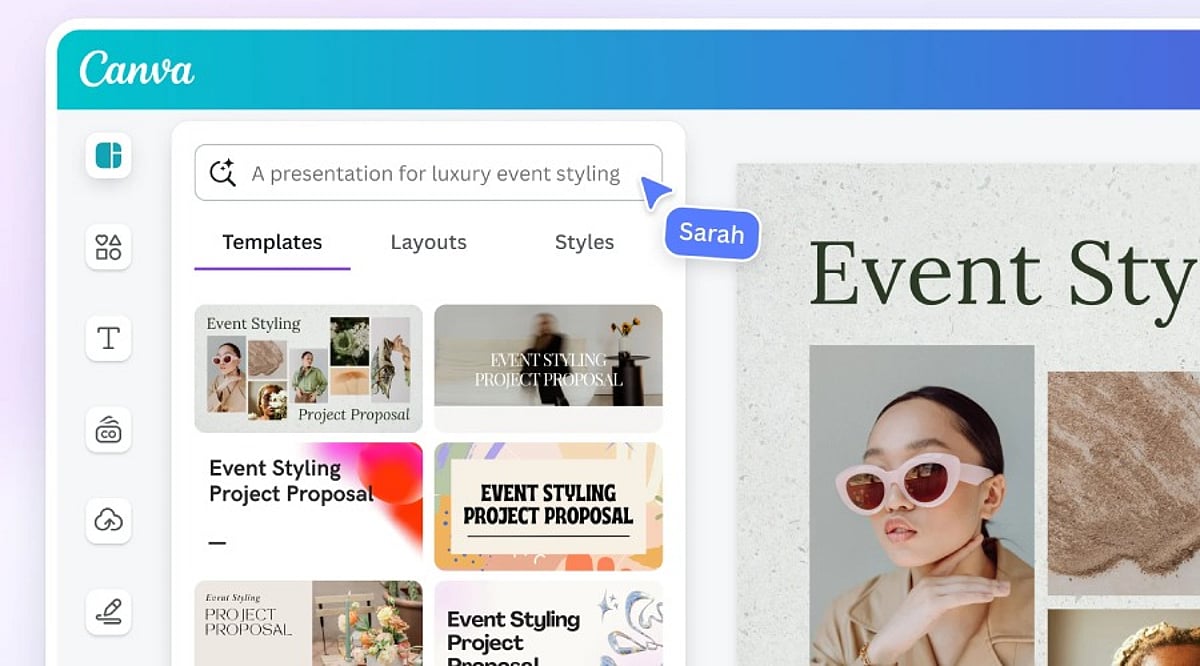
    This feature generates complete layouts from a text prompt or an uploaded image. It suggests templates for presentations, social media posts, posters, flyers, and more, giving users a strong starting point.

    Magic Write

    Magic Write creates headlines, captions, product descriptions, blog outlines, and other written content directly inside Canva. It’s ideal for quickly generating copy that matches your design theme.

    Magic Edit

    With Magic Edit, users can modify parts of an image by typing descriptive text. Combined with tools like Background Remover and Magic Eraser, photo cleanup becomes effortless.

    AI for Video

    Canva also offers AI-powered video editing, including automatic subtitle generation and smart resizing for different platforms.

    Better Prompts Deliver Better Designs

    The quality of AI-generated outputs depends heavily on the prompt. A vague request like “design a poster” yields generic results. A detailed prompt specifying the target audience, purpose, color palette, and style helps Canva understand your vision. For instance, “a simple Instagram post promoting a weekend café offer, using warm colors and modern fonts” produces more relevant designs. Experimenting with slight variations in wording can also unlock fresh layouts and concepts.

    AI Is Just the Beginning

    While AI-generated designs are often impressive, they should never be published without human review. Canva’s AI cannot grasp a brand’s unique style, marketing strategy, or audience preferences. Adjustments to layout, typography, colors, images, and text are typically necessary. The best results come from combining AI’s initial ideas with human creativity and editorial oversight.

    Tips to Maximize Results

    • Be specific in your prompts: include the goal, color scheme, style, and target audience.
    • Never treat AI-generated designs as final—always edit, check brand compliance, and proofread copy.
    • Save personalized templates to speed up future projects.

    The Bottom Line

    Canva AI has made design faster without adding complexity. Tools like Magic Design, Magic Write, Magic Edit, and AI-powered image editing cut down routine tasks while providing a strong creative foundation. However, technology works best when paired with human judgment. AI generates ideas and automates processes, but the final result requires careful editing, clear messaging, and audience awareness. By combining both, users can produce professional designs quickly without sacrificing quality.

    Frequently Asked Questions

    What is Canva AI used for?

    Canva AI helps users create designs, generate content, edit images, and automate creative tasks using artificial intelligence.

    Is Canva AI free to use?

    Canva offers some AI features for free, while advanced tools and higher usage limits require a Canva Pro subscription.

    Which Canva AI tool is best for beginners?

    Magic Design is ideal for beginners because it generates ready-to-edit templates from simple prompts or uploaded images quickly.

    Can Canva AI create social media posts?

    Yes, Canva AI generates social media graphics, captions, presentations, videos, and marketing materials for multiple digital platforms efficiently.

    Does Canva AI replace professional designers?

    No. Canva AI speeds up design creation, but human creativity and editing remain essential for unique, accurate, and brand-aligned results.

  • Top Canva Pro Template Families for Social Media, Business, and Marketing Success

    Top Canva Pro Template Families for Social Media, Business, and Marketing Success

    Brand consistency often unravels once content production scales across multiple platforms and team members. Canva Pro templates solve this by turning individual designs into reusable systems. Features like Brand Kit, Magic Resize, and locked elements streamline content creation, helping businesses maintain a cohesive look without repetitive manual work.

    Key Features That Make Templates Work at Scale

    Canva’s free plan offers a large template library, but Pro adds the machinery for true reusability. Brand Kit automatically applies your brand colors and fonts. Magic Resize adapts one design into multiple formats instantly. Locked elements prevent accidental layout shifts during team edits. These features don’t replace design judgment—they eliminate the repetitive tasks that slow down production.

    Essential Templates for Social Media, Business, and Marketing

    Social Media

    Instagram Carousel Posts lead in engagement. Metricool’s 2026 study of over 24 million posts found carousels generate nine times more saves than single images. Magic Resize converts one carousel into a Story and a Pin without extra design time. LinkedIn thought-leadership posts benefit from Brand Kit, keeping every post visually traceable to the same person.

    Business

    A Proposal Template with auto-applied brand kit reduces back-and-forth before client sign-off. A locked Brand Guidelines template prevents style drift as more team members create content. These templates ensure professional, on-brand communication every time.

    Marketing

    Lead Magnets with premium layout elements boost opt-in rates compared to plain PDFs. Resized Landing Page and Ad Banner sets keep the click and the page visually matched—a common reason paid traffic underperforms. Presentations, like locked Pitch Decks, keep founders focused on the argument instead of slide alignment.

    Building a Template Library, Not a File Pile

    A few rules separate an effective system from a folder of disconnected files:

    • Match templates to the platform before prioritizing aesthetics—a static post design often breaks as a Story.
    • Favor template families over single graphics; one carousel plus matching Story and Reel covers holds a brand together better than any isolated design.
    • Limit typography to two fonts through Brand Kit rather than choosing five for variety.
    • Treat heavy edits as a signal to pick a different template, not a reason to force one to fit.

    Smaller categories—newsletters, invoices, business cards, thumbnails—still deserve a spot in the same Brand Kit. Start with three template families: one for social, one for client communication, and one for marketing. Everything else becomes easier to standardize once that foundation is set.

    Final Thought

    The templates that earn a place in a real workflow are rarely the most decorative. They are the ones a team reaches for without thinking twice, resized in seconds, locked against accidental damage, and instantly recognizable as belonging to one brand.

  • Canva Pro Review: Features, Pricing, Benefits, and Everything You Need to Know

    Canva Pro Review: Features, Pricing, Benefits, and Everything You Need to Know

    Canva has transformed how people create visual content, making professional-looking designs accessible to everyone. Although the free version has an extensive suite of tools, Canva Pro offers advanced features that will be useful for professionals, businesses, teachers, marketers, and other content creators. If you make presentations, graphics for social media, marketing material, or videos, Canva Pro will make your work easier.

    Here is all you need to know about Canva Pro – features, advantages, price, and whether it’s worth upgrading.

    What is Canva Pro?

    Canva Pro is Canva’s premium subscription service, giving users access to advanced design tools, millions of premium resources, AI technologies, brand management tools, and collaboration features. Unlike the free version, Canva Pro is aimed at regular content creators. Whether you are a freelancer, a small business owner, a social media manager, or a student with multiple projects, Canva Pro can make your work easier and faster while still producing quality designs.

    Features of Canva Pro

    Millions of Premium Templates

    There are millions of professionally made templates that Canva Pro offers you, for categories including: Instagram posts and Reels, YouTube thumbnails, presentations, proposals, flyers, posters, brochures, resumes, invitations, infographics, and more. These templates are editable and always updated.

    Premium Photos, Videos, and Graphics

    Subscribers have access to a wide range of content such as stock photos, videos, audio tracks, icons, illustrations, stickers, and animations. This way, you can avoid purchasing separate stock content from stock websites.

    Magic Studio AI Tools

    Among the most important features offered by Canva Pro are the AI-enabled Magic Studio tools, which include: Magic Write (AI content generator), Magic Design, Magic Edit, Magic Eraser, Magic Expand, Magic Animate, Background Generator, AI Image generation, AI Presentations creation.

    Background Remover

    Background Remover is one of the most used tools in Canva Pro. A user can remove image backgrounds without using any other editing tool simply by clicking once. The feature is very helpful in product photography, profile pictures, marketing materials, and YouTube thumbnails.

    Brand Kit

    Companies can have consistent branding through Brand Kit. Users can save logos, brand colors, font styles, templates, and guidelines in this tool to make sure every design meets the same branding requirements.

    Resize Designs Instantly

    Using Magic Resize, users can instantly convert a design into different formats. For instance, an Instagram post can be converted into Facebook post, LinkedIn graphic, Pinterest pin, story, or presentation slide.

    Content Planner

    The Content Planner tool within Canva Pro enables users to schedule posts on social media channels including Instagram, Facebook, LinkedIn, Pinterest, and X (formerly Twitter). This makes Canva both a design and a publishing platform.

    Cloud Storage

    Canva Pro offers larger storage compared to its free counterpart, where users can store all their pictures, video clips, brand materials, templates, and design files. All stored files are accessible from any device.

    Team Collaboration

    Users can collaborate on projects, comment on them, assign tasks, work on designs collaboratively, and set permissions. It is especially useful for marketing teams and businesses.

    Version History

    With Canva Pro, you can undo your previous design changes to recover from unintentional changes.

    Benefits of Canva Pro

    • Time-Saving – Templates, AI, and one-click editing allow for faster creation of professional graphics.
    • Improved Branding Consistency – With the Brand Kit, it becomes easy for companies to maintain consistency of their visual branding across all channels.
    • Inexpensive – It becomes unnecessary to purchase stock images, graphic design templates, tools for removing backgrounds, or designing software separately, as Canva Pro offers a subscription package of all.
    • Intuitive Interface – No prior experience with graphic design is required. Even beginners can use the drag-and-drop interface to create professional graphics.
    • Best for Business – For a small business, there is a possibility to create marketing strategies, business cards, social media content, presentations, product catalogues, and advertising material without hiring professional graphic designers for every project.

    Canva Free vs Canva Pro

    [Comparison table or detailed points can be included here, but the source text only provides a brief mention. We’ll summarize: Free version has basic templates and limited assets; Pro adds premium templates, AI tools, Brand Kit, background remover, content planner, team collaboration, and larger storage.]

    Who Should Use Canva Pro?

    Canva Pro would be best used by: content creators, YouTubers, bloggers, digital marketers, small business owners, freelancers, teachers, students, startups, social media managers. Anyone producing visual content regularly is likely to benefit from the additional features.

    Should You Get Canva Pro?

    If you rarely create graphics, the free option may suffice. However, Canva Pro is beneficial if you: design content weekly, run multiple social media accounts, need premium stock assets, use AI technology in design, collaborate with a team, develop your brand identity, or make presentations, videos, or marketing content. Time saved through automation, templates, and premium assets could soon compensate for the cost of a subscription.

    Conclusion

    Canva Pro isn’t simply an upgrade of Canva; it’s a complete creative ecosystem offering all the tools you need for graphic design, AI-powered content creation, branding, collaboration, and social media posting. Several templates, premium assets, sophisticated editing tools, and productivity features make Canva Pro valuable for people and businesses that regularly create visual content. If you’re building your personal brand, running a business, or making presentations, Canva Pro will give you everything you need to design quality graphics efficiently.

    FAQs

    1. What is Canva Pro?

    Canva Pro is Canva’s premium subscription offering advanced design tools, AI features, premium assets, and branding capabilities for creators.

    2. Is Canva Pro better than the free version?

    Yes, Canva Pro includes premium templates, AI tools, Brand Kit, background remover, and advanced collaboration unavailable in the free version.

    3. Who should use Canva Pro?

    Content creators, marketers, businesses, students, educators, freelancers, and designers benefit most from Canva Pro’s advanced productivity features and assets.

    4. Does Canva Pro include AI tools?

    Yes, Canva Pro offers AI-powered Magic Studio, including Magic Write, Magic Design, Magic Edit, image generation, and automated design features.

    5. Is Canva Pro worth the subscription cost?

    If you create visual content regularly, Canva Pro saves time, improves quality, and provides valuable premium resources worth the investment.

  • Canva Pro vs Canva Free 2027: Which Plan Offers Better Value for Your Design Needs?

    Canva Pro vs Canva Free 2027: Which Plan Offers Better Value for Your Design Needs?

    Canva remains one of the most popular design platforms worldwide, used daily by students, business owners, marketers, freelancers, and content creators for presentations, social media posts, videos, posters, resumes, and more. The platform offers two main plans: Canva Free and Canva Pro. Both share the same easy-to-use editor but serve different purposes. Canva Free provides many useful tools at no cost, while Canva Pro adds advanced features that save time and improve design quality. The right choice depends on the type of work, project volume, and need for premium content.

    Canva Free vs Canva Pro Comparison

    Canva Free Offers Strong Value

    Canva Free has evolved into a complete design platform rather than a simple beginner tool. The plan includes millions of templates, a drag-and-drop editor, presentation tools, video editing, whiteboards, a website builder, and basic AI features. Every project starts with a clean workspace, and the editor keeps all tools within easy reach.

    Students often choose this plan for classroom work, presentations, and reports. Families create invitations, greeting cards, and photo collages with the same account. Small personal projects also fit well within the free plan. Many users never reach the point where a paid subscription becomes necessary.

    Canva Pro Focuses on Speed and Better Results

    Canva Pro adds features that help users finish projects in less time. The premium template library opens far more design options for every category. The plan also unlocks more than 100 million premium photos, videos, graphics, icons, and audio files. Designers no longer need to search across different websites for quality content.

    The biggest advantage comes from workflow improvements. Every tool works together inside one platform, keeping projects simple from start to finish. Professional creators often notice a clear difference after the first few days of use.

    Brand Kit Creates Consistent Designs

    Brand consistency is extremely important for companies. Canva Pro’s all-in-one brand kit provides logos, brand color palettes, typography, and templates. The system generates every new project in a manner consistent with a company’s corporate image, helping organizations achieve a uniform look across marketing communications.

    Magic Resize Saves Valuable Time

    One design rarely fits every social media platform. Canva Pro includes Magic Resize, which converts one design into several formats with a single click. A square Instagram post can quickly become a Facebook post, LinkedIn graphic, Pinterest pin, YouTube thumbnail, or Story format. This tool removes repetitive editing and keeps the overall design style unchanged.

    AI Tools Continue to Expand

    Artificial intelligence now plays a major role inside Canva. The platform offers tools such as Magic Design, Magic Write, Text-to-Image, Magic Edit, Magic Eraser, Magic Expand, AI presentation creation, AI video assistance, and Canva Code. The Free plan provides basic access to several AI tools, while Canva Pro unlocks the complete AI suite with higher usage limits.

    Premium Assets Improve Every Project

    Design quality often depends on images, graphics, and illustrations. Canva Free includes a large content library, but many premium assets remain locked. Canva Pro removes those limits and opens a collection of more than 100 million premium assets, helping businesses create polished marketing material and creators produce eye-catching thumbnails and social media posts without extra purchases.

    Recent Changes Make Canva More Powerful

    Canva has expanded far beyond graphic design. The platform now includes Visual Suite, which brings together presentations, documents, spreadsheets, websites, and whiteboards within one workspace. Canva Code also allows users to create interactive projects through simple text prompts. These updates show Canva’s move toward a complete productivity platform.

    Which Plan Delivers Better Value?

    Canva Free remains one of the strongest free design platforms available today. It covers everyday projects with ease and serves students, hobby users, and occasional designers. Many personal projects reach a professional finish without any payment.

    Canva Pro delivers far greater value for professionals, businesses, freelancers, and content creators with regular design work. Premium assets, advanced AI tools, Brand Kit, Magic Resize, Background Remover, and larger cloud storage reduce effort and improve workflow. The subscription cost often matches the amount of time saved across multiple projects.

    Final Thoughts

    Canva Free and Canva Pro both offer excellent design experiences. The free plan provides enough tools for personal work, school projects, and occasional creative tasks. Canva Pro transforms the platform into a complete professional workspace with advanced AI features, premium design resources, and productivity tools. Regular content production, client work, business branding, and marketing campaigns benefit the most from the paid plan. The final decision depends on design frequency, project size, and the need for premium features, yet both plans continue to rank among the best options available for digital design in 2027.

    FAQs

    1. Is Canva Free enough for beginners? Yes. Canva Free includes templates, basic AI tools, presentations, video editing, and many design features suitable for beginners.
    2. What makes Canva Pro better than Canva Free? Canva Pro unlocks premium templates, 100M+ assets, Brand Kit, Magic Resize, Background Remover, advanced AI tools, and 1 TB cloud storage.
    3. Does Canva Pro include AI features? Yes. Canva Pro provides access to Canva’s complete AI suite with higher usage limits than the Free plan.
    4. Who should choose Canva Pro? Freelancers, businesses, marketers, and content creators with regular design work receive the greatest value from Canva Pro.
    5. Is Canva Pro worth the subscription cost? For users who create designs frequently, the premium tools and time-saving features often justify the monthly subscription.
  • Adobe Express Review: Features, Pricing, and Benefits for Graphic Design

    Adobe Express Review: Features, Pricing, and Benefits for Graphic Design

    Adobe Express is an online and mobile graphic design platform that enables users to quickly create social media posts, videos, presentations, web pages, marketing content, and other visual media. It combines templates, stock images and videos, editing features, and AI powered by Adobe Firefly.

    General Information

    • Founded: 2016
    • Platform Support: Web, Android, iOS, Windows, macOS, ChromeOS
    • Download: Available via official Adobe website

    Main Features

    • Abundant templates and stock resources for social media, business graphics, presentations, and marketing materials.
    • AI-based generation for images, text, videos, and templates using Adobe Firefly.
    • Image editing tools: brightness, contrast, saturation, shadows, warmth, sharpening, blurring, masking, and filters.
    • Video creation services: AI-based video generation, Clip Maker, animations, captions, and optimization.
    • Brand management, content scheduling, website design, file conversion, collaboration, and integration with ChatGPT and TikTok.

    Benefits

    • Makes graphic design accessible to novices with templates and simple tools.
    • Helps users create visually appealing designs without expertise.
    • AI-powered tools for images, texts, templates, and videos.
    • Assists in planning, scheduling, and publishing on social media.
    • Combines graphic design, photo editing, video making, web publishing, and collaboration in one platform.

    Challenges

    • Certain AI-driven applications may produce inconsistent or poor output.
    • AI credits required for AI content creation, limiting heavy users.
    • Free version has limited access to premium fonts and resources.
    • Charts and graphs cannot use live data, reducing effectiveness for business reporting.
    • Advanced designers may find professional typographic options lacking.

    Subscription Information

    The free version includes standard editing features, templates, Adobe fonts, AI generation, stock content, 5 GB cloud storage, and version history. The premium version adds more fonts, templates, stock content, brand management, 100 GB storage, scheduling, and 250 AI credits monthly. Team plans offer more storage and 24/7 technical support. Adobe Creative Cloud Pro and Adobe Firefly Premium versions provide additional AI credits.

    Support Options

    • Help Center and Learning Resources: Tutorials, demonstrations, guides, and editing resources.
    • Customer Support: Premium and Teams users receive additional support; Teams accounts have 24/7 technical support.

    Conclusion

    Adobe Express is an accessible graphic design platform that combines templates, stock assets, photo editing, video creation, web publishing, social media scheduling, and generative AI. Its integration with Adobe Firefly makes it useful for quickly generating images, text effects, templates, and videos. Although some AI tools can be inconsistent and advanced designers may find certain controls limited, Adobe Express remains a capable solution for beginners, social media creators, marketers, and users who need to produce visual content efficiently.

  • Top AI-Powered Side Hustles to Boost Your Income in 2026

    Top AI-Powered Side Hustles to Boost Your Income in 2026

    As artificial intelligence continues to reshape the way we work, a new wave of side hustles has emerged for those looking to supplement their income in 2026. From content creation to automation, AI tools are enabling freelancers and entrepreneurs to work smarter, not harder. Here are the most promising AI-driven side hustles gaining traction this year.

    AI-Powered Writing & Content Creation
    AI writing assistants help freelancers produce blogs, email campaigns, and marketing copy at unprecedented speed, allowing them to take on more clients and increase earnings.

    Graphic Design with AI Generators
    AI image generators like DALL·E and Midjourney are making professional-quality design accessible to everyone. Creators can offer custom visuals for social media, branding, and advertising on a freelance basis.

    AI-Assisted Video Editing
    Video content is in high demand, and AI tools now simplify tasks like cutting, color correction, and transcription. Creators can produce polished videos faster and manage multiple projects simultaneously.

    Coding with AI Assistants
    Developers are using AI copilots to write code faster, debug efficiently, and build websites or apps for freelance clients. This lowers the barrier for non-experts while boosting productivity for seasoned coders.

    AI Automation Specialists
    Businesses seek experts to streamline repetitive tasks using AI-powered workflows, from email sorting to data entry. This niche is rapidly growing as companies adopt automation.

    Digital Products & Templates
    Creating AI-generated templates, e-books, and online courses allows entrepreneurs to sell scalable digital assets with minimal ongoing effort.

    Social Media Management
    AI scheduling, content curation, and analytics tools enable managers to handle multiple client accounts efficiently, making it a lucrative side gig.

    Voice Generation & Podcast Production
    AI voice cloning and text-to-speech tools open doors for voiceover work, audio books, and podcasting—perfect for side hustlers looking to tap into the audio market.

    Success in any of these side hustles hinges on combining AI efficiency with genuine human expertise. As the technology evolves, those who adapt early will find the greatest opportunities.

  • How AI Is Reshaping Key Careers: From Customer Support to Healthcare

    How AI Is Reshaping Key Careers: From Customer Support to Healthcare

    As artificial intelligence continues to evolve, its impact on the workforce is undeniable. While some fear job displacement, AI is actually transforming roles rather than eliminating them entirely. Here’s a look at ten careers experiencing the most significant changes as AI becomes a workplace collaborator.

    Customer Support

    AI chatbots now handle routine inquiries, freeing up human agents to tackle complex, high-emotion issues that require empathy and nuanced judgment.

    Content Writing

    AI accelerates content creation by generating drafts and data-driven pieces, but human creativity, storytelling, and brand voice remain irreplaceable.

    Software Development

    Developers leverage AI-powered coding assistants (like GitHub Copilot) to write code faster, debug efficiently, and automate repetitive tasks, boosting overall productivity.

    Graphic Design

    AI tools can generate visuals in seconds, allowing designers to focus on strategy, concept development, and creative direction rather than manual execution.

    Accounting

    Automation handles data entry, invoicing, and reconciliation, shifting accountants’ work toward analysis, advisory, and strategic financial planning.

    Marketing

    AI enhances targeting by analyzing consumer behavior, yet human marketers still drive campaigns with creative intuition and ethical decision-making.

    Healthcare

    AI assists in diagnosing diseases, analyzing medical images, and managing patient data, while physicians retain final authority and patient interaction.

    Human Resources

    Recruiters use AI screening tools to filter resumes and identify candidates, but human evaluation ensures cultural fit and fair assessment.

    AI isn’t replacing humans—it’s augmenting our abilities. The careers that adapt will see workers focus on higher-value tasks that demand emotional intelligence, creativity, and strategic thinking.