Tag: iOS

  • From Code to Your Smartphone: The Complete Process of Mobile OS Updates

    From Code to Your Smartphone: The Complete Process of Mobile OS Updates

    When you tap ‘Download and Install’ on a mobile OS update, you’re triggering a process that began months earlier with software developers writing code. This article explains the entire journey of a mobile operating system update, from initial development to the moment it lands on your device.

    Development: Where Updates Begin

    Mobile OS updates start with software engineers creating new features, security patches, and system improvements. Individual components are tested before being integrated into larger builds. Major releases may introduce redesigned interfaces, new privacy controls, or updated system applications, while security updates focus on vulnerabilities and stability.

    Hardware Integration: Adapting to the Device

    An operating system cannot work without compatible hardware. Processors, cameras, modems, and displays require drivers and firmware to communicate with the OS. Chipset manufacturers play a key role, which is why Android updates often reach different models at different times. Manufacturers must adapt the OS to their specific hardware configurations, including user interface modifications and device-specific functions.

    Testing: Multiple Stages of Quality Assurance

    Before release, updates undergo extensive testing. Engineers check core functions like calling, messaging, Wi-Fi, Bluetooth, cameras, and battery management. Beta programs provide additional feedback from real users, helping developers catch issues that internal testing might miss.

    Certification and Carrier Approval

    For some devices, mobile operators test updates to ensure network compatibility. This stage can cause variations in update timing between countries and carriers.

    Distribution: OTA and Staged Rollouts

    Once testing is complete, the update is packaged for over-the-air (OTA) delivery. Companies often use staged rollouts, releasing the update to a small percentage of users first. If serious problems are found, distribution can be paused.

    Installation: What Happens on Your Phone

    Your smartphone periodically checks for updates. When available, it verifies the package’s authenticity, then replaces or updates system components. The device may restart several times. Modern recovery mechanisms help prevent bricking if the installation fails.

    Why Updates Arrive at Different Times

    Timing depends on device model, region, manufacturer, chipset, carrier requirements, and testing status. Older devices may follow different schedules. For Android, the many hardware configurations mean additional adaptation stages.

    Post-Installation

    After installation, the phone performs background tasks like app optimization and file reorganization. Users may notice new features, interface changes, or performance differences. Follow-up patches can address bugs discovered after wider deployment.

    Frequently Asked Questions

    • Why do smartphones receive OS updates at different times? Timing varies due to hardware adaptation, testing, carrier requirements, and regional distribution schedules.
    • What does OTA mean? OTA stands for Over-The-Air, allowing updates to be downloaded and installed directly without cables or service center visits.
    • How does hardware affect updates? Components like processors and cameras require compatible drivers, necessitating hardware-specific testing and adaptation.
    • Can a failed update brick my phone? Modern smartphones have recovery mechanisms to protect system integrity and recover from installation failures.
    • Why are staged rollouts used? They allow manufacturers to monitor updates on a small group and pause distribution if serious issues arise.

  • WhatsApp Begins Testing Third-Party AI Agents on iPhone—With a Privacy Catch

    WhatsApp Begins Testing Third-Party AI Agents on iPhone—With a Privacy Catch

    WhatsApp expands AI agent testing to iPhone

    WhatsApp is taking another step toward integrating third-party artificial intelligence into its messaging app. The latest beta release for iOS — version 26.37.10.70 — lets select iPhone users in limited countries connect external AI agents directly inside chats. The rollout follows earlier testing on Android, with WABetaInfo reporting the update on September 22. WhatsApp also confirmed that the feature supports independent agents built by outside developers.

    How the new AI agent feature works

    Eligible users can create up to five third-party agents and interact with them through dedicated one-to-one conversations. Setting up an agent begins in the WhatsApp settings menu, where users assign a name and profile photo. WhatsApp then generates an API key that links the agent to its external hosting service, allowing the agent to respond in the chat.

    According to WABetaInfo, the API key connects WhatsApp with the external service running the agent. Users can reset the key if needed, and the key should be kept private. WhatsApp may adjust the five-agent limit in the future.

    What agents can and cannot access

    Third-party agents are deliberately isolated from most WhatsApp data. They can only see information shared directly with them in their designated conversation. Agents cannot access other chats, contacts, or media stored in WhatsApp, and group chats and communities are not included in the current setup.

    Privacy limits: No end-to-end encryption for agent chats

    The most important caveat is privacy. While regular personal chats remain protected by end-to-end encryption, WhatsApp explicitly says communications with third-party agents are not end-to-end encrypted.

    Messages sent to an agent travel through a Meta service that manages the conversation for the provider. That means the agent provider can receive, process, and store messages in unencrypted form. The provider is also responsible for its own data practices, including how it handles requests for access, deletion, correction, or data portability.

    What users should consider before trying AI agents

    This feature adds new functionality without extending WhatsApp’s standard encryption protections. Anyone thinking about connecting a third-party AI agent should review the provider’s privacy terms carefully before sharing sensitive information.

    WhatsApp has not announced a broader release date for the feature. The iOS rollout is still limited, so the final experience could change before it becomes widely available.

  • Gmail’s New ‘Copy Code’ Button Speeds Up Two-Factor Authentication on Mobile

    Gmail’s New ‘Copy Code’ Button Speeds Up Two-Factor Authentication on Mobile

    Google is making two-factor authentication (2FA) codes easier to handle in Gmail. The mobile versions of the Gmail app on Android and iOS are rolling out a new feature called Copy Code. This button appears in the email preview, allowing users to tap and copy verification codes directly to their clipboard without opening the full message.

    The Copy Code option is designed specifically for 2FA emails. It appears below the subject line and next to the preview snippet. Once tapped, the code is copied, and users can return to the website or app they are signing into and paste the code. This eliminates the need to open every verification email individually.

    The feature is currently available on Gmail for Android version 2026.09.07.x and iOS version 6.0.260907. It is not yet available on the web version of Gmail.

    Getting a 2FA code from email has traditionally required opening Gmail, locating the right message, copying the numbers, and then switching back. The new shortcut removes several steps, making the login process faster. Google Messages already offers a similar convenience for SMS-based verification codes.

    While the change is small, it has a noticeable impact on daily user experience. The security of two-factor authentication remains unchanged; only the copying process is streamlined. As more services rely on email for verification codes, features like this reduce friction without compromising security.

  • WhatsApp for iPhone Gains New Search Shortcut to Find Older Messages Faster

    WhatsApp for iPhone Gains New Search Shortcut to Find Older Messages Faster

    WhatsApp is introducing a dedicated search button for iPhone users that simplifies locating older messages within conversations. The Meta-owned messaging platform began rolling out this feature in September 2026, following beta testing in August.

    The new search button appears automatically when users scroll upward through older messages in individual chats, group conversations, or Channels. Tapping the button opens the existing search tool directly, eliminating the need to navigate to the chat information screen first.

    According to WABetaInfo, the feature is compatible with WhatsApp for iOS version 26.36.74 and is being deployed gradually to select users. A broader rollout is expected in the coming weeks.

    In earlier beta builds, the search shortcut was positioned near the bottom-right corner of the conversation. The final version moves it to the top of the screen, just below the navigation bar. The button only appears while scrolling upward; returning to the latest messages hides it again, keeping the interface clean.

    WABetaInfo described the change simply: “The new search button appears at the top of the screen when users scroll up.” Tapping the button activates search mode directly within the conversation, with no changes to the underlying search functionality. Users can still enter keywords and browse matched messages as before.

    Previously, iPhone users had to open a chat, tap the contact or group name, and then select Search from the chat information screen. The update brings that entry point directly into the conversation, reducing the number of steps required to find older content.

    WhatsApp Channels also benefit from the same shortcut, allowing users to search through historical posts without opening the Channel information screen. This is especially useful for Channels with frequent updates and long histories.

    Because the feature is rolling out gradually, it may not appear immediately on all iPhones. Updating the app can help, but account-level activation determines availability. Users without the shortcut can still use the traditional search method through chat information.

    Overall, the update focuses on improving accessibility rather than introducing new search capabilities. For long conversations, active groups, and busy Channels, fewer navigation steps make it easier to locate older messages.

  • How to Locate Your Saved Reddit Posts on Web, iOS, and Android

    How to Locate Your Saved Reddit Posts on Web, iOS, and Android

    Reddit’s saved posts and comments pile up quickly, making older entries hard to find. This guide walks you through locating your saved content across desktop, iPhone, and Android devices, explains why the native Saved section lacks search tools, and offers practical habits and third-party solutions to keep your list manageable.

    Where Are Saved Posts on Reddit?

    Reddit stores all saved posts and comments in a single Saved section within your profile. The exact navigation path varies slightly by platform and app version, but the destination remains the same.

    On the Website (Desktop)

    1. Click your profile icon at the top right corner.
    2. Select your profile name from the dropdown menu.
    3. On the profile page, look for the Saved tab in the navigation bar. If it’s not visible, click the three horizontal lines (hamburger menu) to reveal additional options.
    4. Click Saved to view your full list.

    On iOS and Android

    1. Tap your profile icon at the bottom of the screen.
    2. Tap the hamburger menu (three lines) near the top right of the profile page.
    3. Select Saved from the menu. Depending on the app version, posts and comments may appear together or in separate tabs.

    Saving a Post or Comment

    The Save feature works identically across platforms:

    • Desktop: Click the three-dot overflow menu on any post or comment and choose Save.
    • Mobile: Tap the three-dot icon at the top right of a post or comment and select Save. To unsave, tap the same menu and choose Unsave.

    Why Older Saves Are Hard to Track

    Reddit’s Saved section behaves like a static archive rather than a searchable database. It currently lacks native search or filtering options. As your list grows into the hundreds, scrolling through an unsorted timeline becomes the only way to find an older item — unless you adopt better habits or use third-party tools.

    Managing a Growing Saved List

    Keep your saved content organized with these strategies:

    • Regular cleanup: Periodically review and unsave items you no longer need.
    • Third-party browser extensions: Some extensions connect to Reddit’s API to add keyword search across saved content. Before using any, verify what data it accesses and whether it is actively maintained.
    • Bookmark external tools: If you frequently save reference material, consider using a dedicated bookmarking service alongside Reddit’s native feature.

    Quick Recap by Platform

    • Desktop: Profile icon → Profile page → Saved
    • Mobile: Profile icon → Hamburger menu → Saved

    Final Thought

    The Saved section works well for occasional savers. Frequent users get more value by pairing it with regular cleanup or a reputable third-party tool that handles data responsibly.

    FAQs

    1. Where can I find my saved posts on Reddit?
    Through your Reddit profile. On desktop, open your profile and select Saved. On mobile, open your profile menu and select Saved.

    2. Can I save Reddit comments as well as posts?
    Yes. Both posts and comments can be saved. Saved comments appear in the Saved section, depending on the interface version.

    3. How do I save a post on Reddit?
    Open the three-dot menu and select Save. To remove it later, open the same menu and select Unsave.

    4. Can I search my saved posts on Reddit?
    Reddit’s native Saved section does not currently offer search or filtering. To find older items, you may need to scroll or use third-party tools.

    5. Why can’t I find a Reddit post I saved?
    Ensure you are signed into the correct account. Check whether you saved the comment instead of the post. If the content was deleted or removed, it may no longer be accessible.

  • How Your Smartphone Apps Track You: A Deep Dive into 2026’s Biggest Data Collectors

    How Your Smartphone Apps Track You: A Deep Dive into 2026’s Biggest Data Collectors

    Your smartphone can reveal significant details about your habits—location, purchases, searches, contacts, identifiers, and usage data can create a detailed digital profile. However, data collection is not automatically the same as harmful tracking. Some information is necessary for app functionality, security, personalization, or analytics. Learn what app tracking means and how to reduce your personal data exposure.

    Meta Apps Lead in Data Collection

    A 2026 Surfshark analysis highlighted Meta apps among the biggest data collectors. The study examined 171 iOS apps from major technology companies. Meta apps disclosed an average of 25 data types. This does not mean every user shares every data type; it shows what developers disclose through Apple’s privacy system. Seven of the study’s most data-hungry apps belonged to Meta. Meta AI reportedly listed 33 of 35 possible data types. Meta Horizon, Messenger, Facebook, and other apps followed closely. The categories can include identifiers, location, product interactions, and browsing information. Some Meta apps also declare data linked directly to users. Meta says information from businesses can help personalize content and AI experiences. Its June 2026 update expanded how this activity can influence personalization. The important point is context: data collection does not automatically mean misuse.

    Google Apps Also Gather Broad Data

    Google apps ranked below Meta on average in the same study. However, Google’s enormous app portfolio makes the picture more complicated. The research examined 44 Google apps. Twenty-nine Google apps appeared among those declaring the broadest data collection. Different Google apps can collect different types of data, including search history, purchases, photos, email addresses, and identifiers. Some collection directly supports useful features like search personalization, account synchronization, and security. Users should examine individual app disclosures rather than relying on a company’s overall reputation.

    Amazon and Other Popular Apps

    Amazon’s apps also collect several categories of user information. The study found an average of 12 data types across Amazon’s apps. Amazon apps commonly declared names, email addresses, device identifiers, and product interactions. Some also declared precise location information. Fitness apps deserve separate attention. Health and fitness applications can access particularly sensitive information. The Surfshark analysis found Fitbit, Strava, and Nike Training Club among data-heavy fitness apps. Fitbit declared 24 data types in that analysis. Fitness data can reveal routines, locations, activities, and other personal details, making permission choices especially important.

    What Does ‘Tracking’ Actually Mean?

    Data collection and tracking are not the same thing. Apple’s privacy system separates these concepts. ‘Data linked to you’ means collected information connects with your identity. ‘Data used to track you’ involves linking information with third-party data. That distinction matters when reading privacy labels. An app can collect information without necessarily using it for cross-service tracking. Apple’s App Store labels show declared data categories and their purposes. Developers provide this information themselves, so privacy labels should be treated as a starting point—not a complete technical audit of an application.

    How to Reduce Your Data Exposure

    You do not need to delete every app to improve privacy. Start by reviewing permissions you rarely use. Location access deserves particular attention. Consider whether an app really needs precise location access. Review microphone, camera, contacts, photos, and Bluetooth permissions too. Disable access when those features are unnecessary. On iPhone, the App Privacy Report can show network activity and accessed domains, providing visibility into connections made by apps and websites. Android users can similarly review permissions through system privacy controls. App-store privacy information can provide another useful reference. Users should also review advertising and personalization settings regularly, as these controls can change as platforms update their privacy systems.

    The Goal Is Smarter Privacy, Not Zero Data

    Modern apps need some information to function properly. Navigation apps need location, while shopping apps need account and purchase details. The bigger issue is understanding what information leaves your device and why companies collect it. The data-hungry app rankings offer a useful warning: popular services can collect far more categories than users expect. That does not make every data-heavy app dangerous, but it does make privacy settings worth reviewing. A few minutes spent checking permissions can significantly improve your digital privacy. The best approach is informed use, not fear of every app.

    FAQs

    What are data-hungry apps?
    Data-hungry apps are applications that report collecting many categories of user information. These categories can include location, identifiers, browsing history, purchases, contacts, and usage data. Collection levels vary between apps, and gathering more data does not automatically mean an app is unsafe or malicious.

    Which apps collect the most personal data in 2026?
    Surfshark’s August 2026 analysis found Meta had the highest average data collection among five major technology companies. Meta apps collected an average of 25 out of 35 possible data types. Meta AI ranked highest individually, declaring 33 data types.

    Does data collection mean an app is tracking me?
    Not necessarily. Data collection and tracking have different meanings. Apple defines tracking as linking app or device data with information from other companies for targeted advertising or measurement. An app can collect information without necessarily using it for cross-service tracking.

    What personal information can mobile apps collect?
    Depending on the app, collected information can include location, email addresses, names, device identifiers, purchase history, browsing history, photos, and usage information. Health and fitness apps can also handle sensitive activity-related information. The exact categories depend on the app and its disclosed practices.

    Are Meta apps the most data-hungry apps?
    According to Surfshark’s 2026 study, Meta had the highest average among the five Big Tech companies analyzed. Its apps averaged 25 of 35 possible data types. The study found that Meta’s seven highest-collection apps occupied the top seven positions.

  • Master Siri on iPhone: Create Calendar Events with Voice Commands

    Master Siri on iPhone: Create Calendar Events with Voice Commands

    Apple’s Siri makes it easy to create and manage calendar events on your iPhone without ever opening the Calendar app. Whether you’re driving, cooking, or juggling multiple tasks, voice commands let you schedule meetings, set recurring appointments, and check your availability hands-free.

    Granting Siri Access to Your Calendar

    Before Siri can create events, you need to give it permission to access the Calendar app. Follow these steps:

    1. Open Settings and tap Siri & Search.
    2. Scroll to the Before Asking section and ensure Learn from this App is enabled for Calendar.
    3. Return to the main Settings menu, tap Calendar, then Siri & Search.
    4. Turn on Use Siri with this App and Show App in Search.

    If you use third-party calendars like Google Calendar or Outlook, repeat the same process for those apps.

    What to Say to Siri

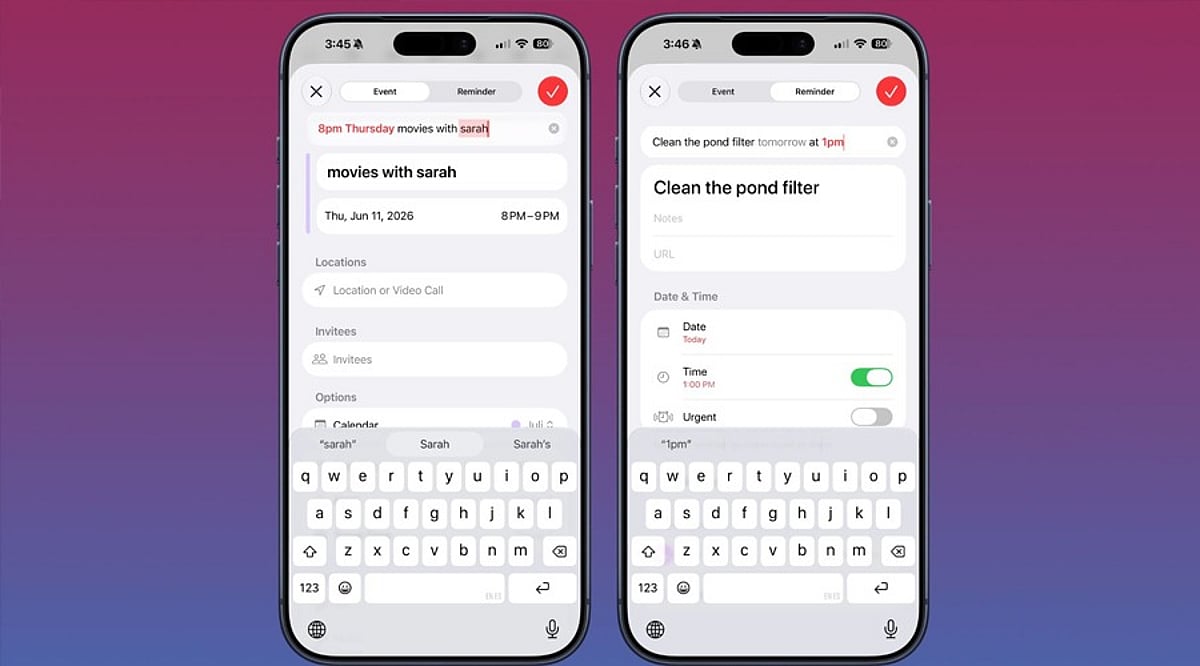
    Activate Siri by saying “Hey Siri” or holding the side button. The wording matters—phrases like “Remind me to call John” create a reminder, not a calendar event. To add a calendar entry, use keywords such as event or meeting.

    Try these examples:

    • “Create a calendar event for a dentist appointment tomorrow at 10 AM.”
    • “Schedule a meeting with Sarah on Friday at 2 PM.”
    • “Set a team sync every weekday at 9 AM.” (recurring event)
    • “Create a flight event with a reminder two hours before departure.”
    • “Check tomorrow’s calendar.”

    Fixing Common Siri Mistakes

    If Siri checks the wrong calendar, go to Settings > Calendar > Default Calendar and select the one you use most often.

    When Siri creates a reminder instead of a calendar event, simply say “Actually, put that in my calendar.” Siri will move it to Calendar.

    Using Siri with Google Calendar and Outlook

    Siri works with Google Calendar when you add your Google account to the iOS Calendar app and grant the necessary permissions. Similarly, Outlook calendars sync with the native iOS Calendar app to enable Siri voice commands.

  • Lara Croft and the Temple of Osiris Arrives on iOS and Android: Full Game Details

    Lara Croft and the Temple of Osiris Arrives on iOS and Android: Full Game Details

    Lara Croft is back on mobile. Feral Interactive has released Lara Croft and the Temple of Osiris on iOS and Android. The mobile version offers a free first level so players can try before buying. Download the game and the first level is unlocked by default. If you enjoy it, the full game is available for USD 9.99, EUR 8.99, or GBP 7.49 — and that includes all DLC with no microtransactions or timers.

    The port features customizable touch controls for phones and tablets. You can adjust the layout to match your playing style. For those who prefer a console-like experience, the game supports gamepad controllers. Mouse and keyboard input is also available.

    Lara Croft and the Temple of Osiris supports both single-player and four-player cooperative multiplayer. Players take on the roles of Lara Croft, Carter Bell, Isis, and Horus as they search for the lost Fragments of Osiris and stop the god Set. The gameplay mixes combat, puzzle-solving, and trap avoidance, all from a top-down perspective.

    The touch controls have been designed as a key part of the mobile experience. You can tweak them rather than being stuck with one scheme. Controller support gives another option for people who want a console-style feel.

    Feral released Lara Croft and the Guardian of Light on iOS and Android in 2025, which also offered touch controls and gamepad support, plus online co-op. Temple of Osiris follows that path, giving fans another classic adventure to enjoy on the go.

    Hardware Requirements: The game requires iOS 18 or later, Android 13 or later, and 3.6GB of free space.

  • Google Maps Debuts Gemini-Powered ‘Ask Maps’ Feature in India for Conversational Search

    Google Maps Debuts Gemini-Powered ‘Ask Maps’ Feature in India for Conversational Search

    Google has launched an enhanced version of its Ask Maps feature in India, introducing a conversational search experience powered by the company’s Gemini AI models. The update allows users to search for places using natural, everyday language instead of traditional keyword queries.

    With the new feature, users can ask detailed questions such as “Where can I find a family-friendly restaurant?” or “Suggest a café suitable for working.” Google Maps then provides personalized recommendations based on the context of the query. India is among the first markets to receive this upgraded Ask Maps experience.

    Search That Understands Context

    The system is designed to interpret user needs even when expressed in a conversational format. Instead of entering multiple search terms, users can describe their requirements and ask follow-up questions to refine results without starting a new search session. Google states this aims to make location discovery more intuitive.

    Key Features of Ask Maps

    • Natural Language Search: Ask questions in everyday language instead of using keywords.
    • Conversational Search: Continue the conversation with follow-up questions to refine results.
    • Personalized Recommendations: Discover tailored suggestions for restaurants, cafés, and other places based on preferences.
    • Contextual Responses: Understands the context of the query rather than just matching keywords.
    • Gemini AI Integration: Leverages Google’s Gemini AI for generating suggestions.
    • In-App Recommendations: Results appear directly on Google Maps.
    • Itinerary Planning: Create a day’s itinerary with a single search.
    • Available on Android and iOS: For Google Maps users in India.
    • Discovery Within a Chat: Find relevant places through a single conversational thread.

    Part of Google’s Broader Maps Update

    The Ask Maps rollout is part of Google’s larger effort to integrate AI-powered features into Maps. Alongside conversational search, Google has added improved navigation assistance and route context to help users understand and follow directions more easily. The company says these changes aim to make Maps more useful before, during, and after every journey by combining mapping technology with Gemini’s capabilities.

    With this latest release in India, users can navigate cities more simply without needing to perform multiple searches.

  • Apple Intelligence Explained: Complete Guide to iPhone AI Features

    Apple Intelligence Explained: Complete Guide to iPhone AI Features

    Apple Intelligence is Apple’s built-in AI system that helps users write, communicate, edit photos, and complete everyday tasks across iPhone apps. Only iPhone 15 Pro and newer support it, a hardware limit rather than a marketing choice.

    In 2026, the system behind those features has quietly shifted: Apple now leans on an outside AI partner for its hardest reasoning tasks, a development covered later in this guide. First, here’s what Apple Intelligence actually does and how it works.

    What Apple Intelligence Actually Does

    Siri is one of the most noticeable Apple Intelligence features. It understands what’s on screen, maintains conversational context, and performs actions across multiple apps without requiring users to switch between them. Writing Tools lives inside Mail, Notes, and Messages, rewriting drafts and fixing tone without pulling anyone out of the app they are typing in.

    In Photos, Clean Up erases people or objects from the background of a shot, and search works by plain description instead of date or album. Live Translation handles real-time conversation inside Messages, Phone, and FaceTime, useful for travel or chatting across languages.

    Genmoji and Image Playground turn a text description into a custom image or emoji, mostly used inside Messages and Notes. Notification Summaries condense a busy thread into one line instead of ten.

    The Architecture Behind the Features

    These features run on a system layer built into iOS itself, not a separate app. Simple tasks, like notification summaries, run right on the iPhone’s Neural Engine. Heavier requests travel to Private Cloud Compute, Apple’s server system designed to process data and then discard it rather than store it.

    Some work stays on the phone while other moves to Apple’s own servers. That split is the core idea, and it holds steady no matter which outside model powers the cloud side in a given year.

    Foundation Models, Explained Simply

    A foundation model is a large AI system trained on huge amounts of text and images, built to understand language, recognize objects, and follow instructions. Most consumer AI tools lean on one big cloud model to handle every request. Apple splits the job instead. A compact model runs on the phone for routine tasks, while a larger model sits on Apple’s servers for anything that needs deeper reasoning. Simple tasks feel instant. Complex ones take a moment longer.

    Why Some iPhones Miss Out

    Apple Intelligence needs an A17 Pro chip or newer, starting with the iPhone 15 Pro. Running AI models on a phone demands high Neural Engine performance and sufficient memory to avoid lag, overheating, and slower app performance. Older chips cannot hold that load without slowing everything else down. That limit shapes Siri’s design too: it still passes harder requests to the cloud rather than solving them on the device alone.

    Apple picked a smaller pool of supported phones over a weaker experience spread across older ones, a bet that stretched out the timeline for features first shown back in 2024.

    What It Actually Costs

    Apple Intelligence comes with supported iPhones, but its on-device AI features use extra storage and may increase battery usage. On-device models take up several gigabytes of storage, a fixed and measurable cost. Some users report higher battery usage after turning on Apple Intelligence, though it varies by device and Apple has not shared official figures. There have also been reports of software updates re-enabling Apple Intelligence after users had turned it off.

    How It Stacks Up Against Rivals

    Apple keeps sensitive tasks on the device by default. Samsung and most Android tools send far more to the cloud as a matter of routine. Apple pairs a small local model with a larger cloud one, balancing speed with depth. That pairing runs across the whole Apple lineup too: Live Translation and Writing Tools behave the same way on iPhone, iPad, and Mac rather than living inside one app alone.

    Is It Worth an Upgrade?

    The iPhone 15 Pro or newer already gets the full feature set as it rolls out through 2026. For anyone on an older phone, Apple Intelligence should count as one factor among several, since the biggest features still lean on cloud access and an active rollout schedule. Writers, photographers, and anyone deep inside Apple’s ecosystem gain the most. Casual users may barely notice the difference day to day.

    Recent Developments

    Industry reports from early and mid-2026 point to Apple licensing Google’s Gemini models for the cloud side of its Foundation Models, alongside a rebuilt Siri AI shown at WWDC 2026. Cost figures and technical specifics remain reported rather than officially confirmed, so this section will need a refresh as the story develops.

    Final Thought: What This Means Going Forward

    The Gemini reports do not change what Apple Intelligence is. They change which model handles the cloud half of a system Apple had already built. The on-device split, the A17 Pro hardware floor, and the privacy-first default remain Apple’s own design choices, separate from whichever outside company powers its toughest reasoning tasks in a given year. Providers can shift. The features and the architecture running underneath them are the part worth understanding and the part that will still be true after the next partnership announcement.

    FAQs

    1. What is Apple Intelligence? Apple Intelligence is Apple’s built-in personal intelligence system that uses generative AI to help users write, communicate, organize information, edit photos, and interact more naturally with Siri. It is integrated into iOS, iPadOS, and macOS rather than being a separate app.
    2. Which iPhones support Apple Intelligence? Apple Intelligence is available on iPhone 15 Pro, iPhone 15 Pro Max, the iPhone 16 lineup, and newer compatible models. It requires supported hardware and the appropriate version of iOS to access its AI-powered features.
    3. What AI features does Apple Intelligence include? Apple Intelligence includes Writing Tools, notification summaries, smarter Siri, ChatGPT integration, Genmoji, Image Playground, Visual Intelligence, natural language photo search, and AI-powered photo editing features like Clean Up.
    4. How does Apple Intelligence protect user privacy? Apple Intelligence performs many AI tasks directly on the device. For more demanding requests, it uses Apple’s Private Cloud Compute, which is designed to process data securely while minimizing the sharing and storage of personal information.
    5. Is Apple Intelligence worth upgrading your iPhone for? If you frequently use Siri, write emails and messages, edit photos, or want AI-powered productivity features, upgrading to a compatible iPhone can provide access to Apple’s latest AI capabilities and future software enhancements.