

Tag: messaging app

  • WhatsApp to Allow Non-Users to Join Voice and Video Calls via Guest Links

    WhatsApp to Allow Non-Users to Join Voice and Video Calls via Guest Links

    WhatsApp is developing a new guest calling feature that will let people without a WhatsApp account join voice and video calls through secure web links, eliminating the need to download the app or create an account. This move is expected to lower the barrier for participation and expand the platform’s reach.

    How Guest Calls Will Work

    According to feature tracker WaBetaInfo, the Meta-owned messaging platform is working on an upgrade to its existing call-link system. Users will be able to generate a call link from the Calls tab and share it with anyone. Recipients will open the link in a web browser and, instead of being redirected to an app download or registration page, will be able to join the call as a guest directly through WhatsApp Web.

    The feature is still under development and not yet available for beta testing, WaBetaInfo noted.

    Control and Security Measures

    WhatsApp plans to include safeguards to give hosts control over guest participation. Before a guest can enter a call, the host must approve their request. This approval requirement applies to every participant joining without a WhatsApp account. Additionally, hosts can remove guests from an active call if necessary, preventing unwanted participants from joining via forwarded or widely shared links.

    This development aligns with WhatsApp’s ongoing efforts to enhance its calling functionality while maintaining security and user control.

  • How to Protect Your Phone Number by Securing a WhatsApp Username: Essential Tips

    How to Protect Your Phone Number by Securing a WhatsApp Username: Essential Tips

    WhatsApp is rolling out usernames, offering a new way to protect your phone number when messaging. By reserving a unique username, you can keep your number private from new contacts. Here’s how to get started and secure your handle before someone else does.

    Reserve Your WhatsApp Username

    First, update WhatsApp to the latest version. Then go to Settings > Account > Username and create a unique username between 3 and 35 characters. If your preferred handle is taken, WhatsApp may suggest similar alternatives. The feature is rolling out gradually, so it may not appear for everyone yet.

    Lock In Your Preferred Handle

    Choose a username that is easy to remember but difficult to impersonate. You can also claim the same username you already use on Instagram or Facebook if it’s eligible. Tap Save to reserve your handle before someone else takes it.

    Keep Your Phone Number Private

    Once usernames become active, people who contact you through your username won’t see your phone number unless they already have it saved. Existing contacts and users who already know your number will continue to see it, but new conversations become much more private.

    Turn On Username Key for Extra Security

    Enable the optional Username Key from the username settings. Anyone trying to contact you for the first time will need both your username and this unique key. It adds another layer of protection against spam and unwanted messages.

    Understand What Usernames Can and Can’t Do

    WhatsApp does not have a public username directory, so strangers cannot search for your account. People need to know your exact username to start a conversation. However, admins, existing contacts, and users who already know your phone number may still be able to see it where applicable.

    Strengthen Your WhatsApp Privacy

    Use a unique username instead of your full real name, enable Two-Step Verification, and regularly review your privacy settings. These small steps help protect your account from impersonation attempts and unauthorized access.

    Secure Your Identity Before It’s Taken

    Reserving your WhatsApp username early helps secure your online identity before your preferred handle is claimed. Combined with Username Key and Two-Step Verification, you can chat with new people and businesses while keeping your personal phone number private and your account more secure.

  • Step-by-Step Guide to Hiding Your Phone Number on Telegram

    Step-by-Step Guide to Hiding Your Phone Number on Telegram

    Telegram offers robust privacy settings that let you control who can see your phone number. Follow this straightforward guide to keep your number private and communicate securely.

    Open Telegram Settings

    Launch the Telegram app and tap the menu icon (three lines) or the Settings gear icon to access your account preferences.

    Navigate to Privacy and Security

    In Settings, select Privacy and Security. This section contains all controls for your personal information, including your phone number.

    Select Phone Number

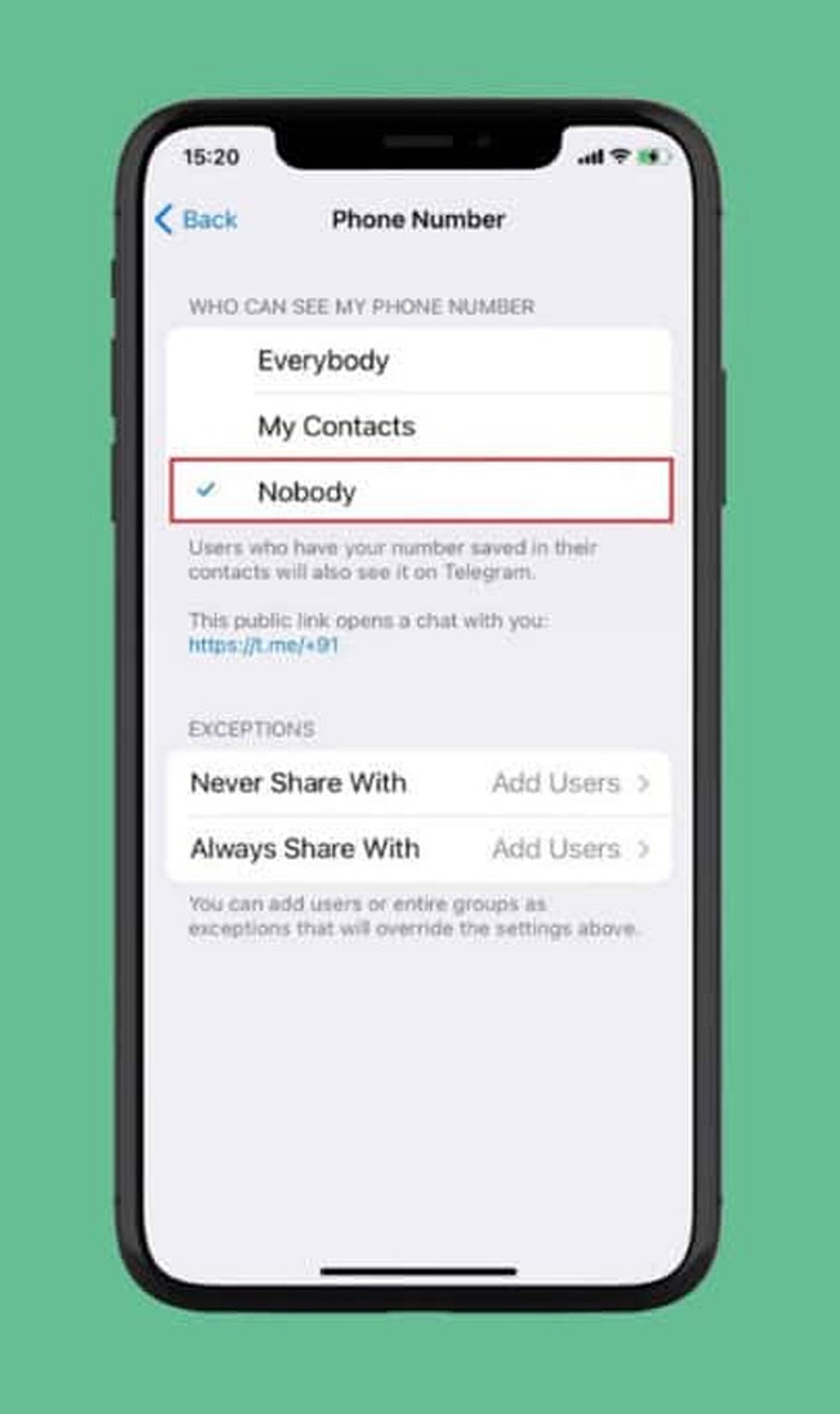
    Under the Privacy section, tap Phone Number. Here you can manage who can view your registered mobile number and who can find you by it.

    Choose Visibility: Nobody

    Set Who can see my phone number to Nobody. This prevents most Telegram users from viewing your number.

    Restrict Number Discovery

    Under Who can find me by my number, select My Contacts. This limits discoverability to people already in your address book, reducing unwanted contact.

    Create a Telegram Username

    Set up a unique username (e.g., @YourName) so others can reach you without needing your phone number. Go to Settings > Username to create one.

    Review Contact-Based Visibility

    People who already have your number saved may still see your account via contact synchronization. Review your contact sync settings and consider deleting synced contacts for tighter control.

    Check Privacy Settings Regularly

    Telegram updates may introduce new privacy options or change existing ones. Periodically revisit your Privacy and Security settings to ensure your preferences remain intact.

    By following these steps, you can significantly enhance your privacy on Telegram and communicate with confidence.

  • Meta Rolls Out WhatsApp Plus Subscription in India: Exclusive Themes and Premium Features for Rs. 79/Month

    Meta Rolls Out WhatsApp Plus Subscription in India: Exclusive Themes and Premium Features for Rs. 79/Month

    Meta has officially introduced WhatsApp Plus, a new optional subscription service in India, priced at just Rs. 79 per month. This move marks the company’s first premium tier for WhatsApp, offering users enhanced customization without altering the core free experience.

    Subscribers to WhatsApp Plus gain access to 18 exclusive color themes, 14 customized app icons, unique notification ringtones, premium sticker packs, and the ability to pin up to 20 chats. Additionally, the package includes advanced chat organization tools and early access to select features as Meta continues to roll out updates.

    Users who do not subscribe will still enjoy all standard WhatsApp features, including messaging, voice and video calls, and end-to-end encryption — completely unchanged.

    To activate WhatsApp Plus, users can navigate to Settings > Subscriptions within the app and complete the payment. The feature is being phased out gradually, so not all users may see the option immediately.

    Industry experts view this launch as Meta’s strategic first step toward building a premium ecosystem around WhatsApp while maintaining its free core offering. The subscription is currently available only in India, with potential expansion in the future.