Tag: Mobile Apps

  • How to Book Uber or Ola from a WhatsApp Location Pin

    How to Book Uber or Ola from a WhatsApp Location Pin

    Sharing a location on WhatsApp is quick, but turning that pin into a cab booking often means retyping the address in Uber or Ola. There is a faster way: copy the location’s Plus Code from Google Maps and paste it into the ride-hailing app. It works on both Uber and Ola, and it is especially useful when the address has no clear name or when a text search returns several nearby matches.

    Why use a WhatsApp location instead of typing an address?

    A WhatsApp location pin marks the exact spot someone wants to be picked up. Copying that pin into a cab app reduces the chance of typos, vague landmarks, or confusion between similar addresses. The key is the Plus Code, a short string of letters and numbers that Google Maps assigns to a precise location.

    Step-by-step: Send a WhatsApp location to Uber

    1. Open the WhatsApp chat and tap the shared location pin.
    2. On most phones, the pin opens in Google Maps.
    3. Find the Plus Code in Maps. It is tied to that exact spot.
    4. Copy the Plus Code.
    5. Open Uber and paste the code into the “Where to?” box.
    6. Check the map pin before booking, and move it if needed.

    This trick helps most when the address has no clear name or when a text search brings up several matching results nearby.

    How to do the same in Ola

    Ola does not offer a built-in WhatsApp shortcut yet, but the same method works. Open the shared location in Google Maps, copy the Plus Code, and paste it into Ola’s search field. Before confirming, look at the map pin, especially for buildings with multiple gates, office parks, or areas that look similar from above.

    Uber’s WhatsApp booking option

    In some cities, Uber also lets riders book inside WhatsApp. A short chat with Uber’s official WhatsApp number lets a rider share pickup and drop-off points, get a fare estimate, and see the driver’s arrival time. Trip updates then continue in the same chat window.

    Tips to avoid pickup mistakes

    • Always verify the map pin before confirming the ride.
    • Use Plus Codes when the address has no official name.
    • For large complexes, move the pin to the correct gate or entrance.
    • If the app shows multiple results, compare the map preview rather than the text alone.

    The bottom line

    Copying a WhatsApp location into Uber or Ola saves time and reduces address errors. As ride apps add more chat-based features, booking a cab may soon require little more than a shared pin and a few taps.


  • How AI Assistants Are Redefining Mobile App Interactions: From Menus to Intent

    How AI Assistants Are Redefining Mobile App Interactions: From Menus to Intent

    AI assistants are fundamentally changing how users interact with mobile apps, shifting the paradigm from manual navigation to intent-driven execution. Instead of hunting through menus to complete a task, users can now simply state their desired outcome, and the software handles the steps. This transformation moves the interaction model from User → App → Feature → Action to User → Intent → Assistant → App Capability → Action. While visual interfaces remain essential for tasks like date selection or product comparison, AI reduces the need for users to understand an app’s internal structure. Voice-first apps further push this shift by enabling hands-free intent expression.

    The Shift From Menus to Intent

    This does not mean conversation replaces every screen. Picking a date on a calendar or comparing products side by side often stays faster with a visual layout. What changes is narrower and more useful: AI reduces how often a user has to understand an app’s internal structure just to use it. A shopping app can still show a product grid while a request typed in plain language filters it instantly, with no menu required. Voice-first apps push this shift further, letting people express intent without touching the screen at all. Visual interfaces still hold their ground for tasks that need comparison or precision, so the two approaches now sit side by side rather than compete.

    Why On-Device AI Matters

    Mobile chipsets are adding more hardware built for running AI models directly on the device. This cuts delay and keeps sensitive data local. But most apps are not choosing between on-device and cloud processing; they are building hybrid systems where quick or private tasks run locally and heavier reasoning still travels to the cloud. The real shift is not that AI moved to the phone, but that developers now decide, task by task, where computation should happen, weighing speed, privacy, and cost. This same awareness of context lets an app adjust to a person’s habits over time instead of treating every session as new. A fitness app that remembers a user’s usual workout time can suggest a plan without being asked, quietly folding personalization into the background rather than presenting it as a separate feature.

    From AI Features to Agentic Apps

    A chatbot answers. A copilot helps. An assistant performs a single action. An agent coordinates several actions to reach a goal, such as finding a hotel near a meeting, checking its cancellation policy, and preparing the booking. That progression changes the app’s role. An application is not just presenting functions to a human anymore; its functions also need to be understandable and reachable by an AI system acting on someone’s behalf. This is a structural demand, not a cosmetic one. It reshapes what ‘building an app’ actually involves.

    The New Developer Challenge

    Much of the visible change happens in the interface, but the larger transformation sits underneath it. Developers now need structured app data, clear APIs, permission systems, context that persists across sessions, and reliable ways for an assistant to call the right function at the right time. Testing an app used to mean checking if buttons work. Now it also means checking if an assistant handles a vague or oddly worded request without making the wrong call. Mobile development is quietly becoming AI development, and the teams that treat it that way are the ones setting the pace.

    Trust and Competition Are Shifting Together

    Giving an assistant permission to act, rather than just respond, creates a new kind of trust problem. Users may not always know how an AI reached a decision or whether it stayed within the limits they intended. Some apps address this with a short explanation line after a task completes, showing what happened and why. This same shift could reshape how apps compete. Features that once helped one app stand out become easier to reach through an assistant that pulls from several apps at once. If a person can ask for a result without knowing which app supplied it, the interface itself matters less. App companies may end up competing more on the quality of their data, the reliability of their services, and how well their functions can be coordinated by AI, rather than on how their screens look.

    Final Thought

    The next generation of mobile apps will not be defined only by what users can do inside them. They will be defined by what AI can safely do with them. That puts more weight on the foundations underneath the interface: reliable data, accessible actions, clear permissions, strong security, and systems that know when to act and when to ask first.

    Frequently Asked Questions

    1. How are AI assistants changing mobile apps? AI assistants are shifting mobile apps from menu-based navigation toward intent-based interactions, allowing users to describe what they want and receive help with completing tasks.
    2. What are agentic apps? Agentic apps use AI systems that can coordinate multiple actions to achieve a user-defined goal rather than simply answering questions or completing one isolated task.
    3. Why is on-device AI important for mobile apps? On-device AI can reduce response time and keep certain data on the phone, making it useful for applications where privacy, speed, and offline functionality matter.
    4. How does AI affect mobile app development? AI requires developers to build stronger data structures, APIs, permission systems, context management, and safeguards so assistants can interact with app functions reliably.
    5. Will AI assistants replace traditional mobile app interfaces? No. AI assistants are more likely to work alongside traditional interfaces. Screens remain useful for tasks involving visual comparison, navigation, selection, and precise controls, while AI handles intent-driven tasks.
  • Google Opens Android to Rival App Stores Starting July 22 in Landmark Policy Change

    Google Opens Android to Rival App Stores Starting July 22 in Landmark Policy Change

    Google is set to allow third-party app stores on Android in the United States beginning July 22, marking one of the most significant changes to the Play Store since its launch. The move follows the company’s decision to abandon its proposed settlement with Epic Games and comply with a federal court injunction, aiming to increase competition in Android app distribution.

    Google Play Store Opens to Competitors

    The change introduces Google’s new Play Catalog Access Program, which allows eligible third-party app stores to access the Play Store’s app catalog. Developers’ apps and games will automatically appear on participating third-party marketplaces unless they choose to opt out.

    This development stems from the ongoing court case between Google and Epic Games. In 2024, a U.S. federal court found that Google had unlawfully maintained monopoly power in Android app distribution and billing services. The ruling required Google to open its platform to competing app stores and distribution systems.

    Google had initially negotiated a settlement with Epic Games that would have allowed smaller registered app store systems instead of permitting competing app stores within the Google Play Store. However, both parties abandoned the proposed settlement after concluding that court approval was unlikely.

    What Changes for Developers and Users

    Under the new program, eligible app store providers can join Google’s Play Catalog Access Program. Google will audit participating stores’ adherence to policies and security standards, levying an annual fee of $5,000 to conduct these audits.

    For developers, the transition will be largely automated. Their listings on the Play Store will automatically be made accessible to third-party stores unless they opt out.

    The changes currently apply only to the United States, where the court injunction is in force. Google will continue using its existing Play Store model in other markets unless local regulations require similar reforms.

  • Chrome 150 for Android Adds Long-Awaited Dedicated Back Button to Overflow Menu

    Chrome 150 for Android Adds Long-Awaited Dedicated Back Button to Overflow Menu

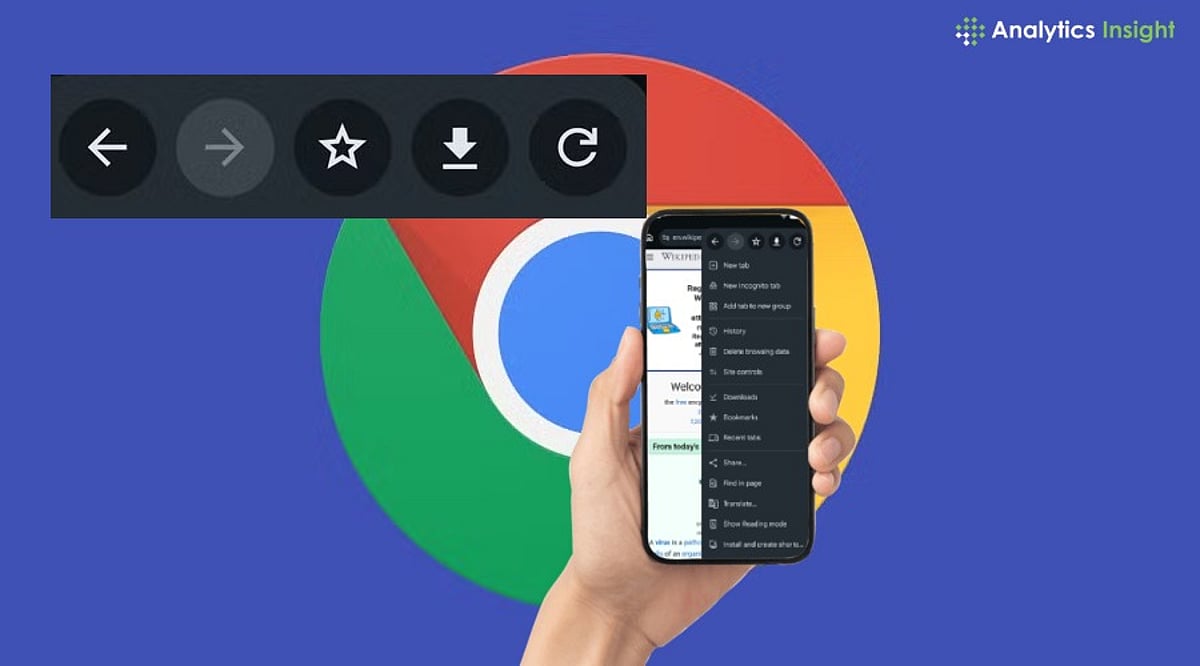
    Google has finally answered one of the most persistent user requests for Chrome on Android. With the release of Chrome 150, the browser now includes a dedicated Back button in its three-dot overflow menu, giving users an alternative to relying solely on Android’s system back gesture or navigation bar.

    Until now, Android users could only navigate backward using the device’s built-in controls, while the Forward button was already present in Chrome’s menu. This asymmetry has been a common complaint for years. Chrome 150 corrects this by placing a Back button directly next to the Forward button, aligning the Android experience with the version already available on iOS.

    The new Back button is part of a broader overhaul of Chrome’s overflow menu. Google has removed the traditional Info button and replaced it with a Site controls option that provides quick access to website permissions and settings. Additionally, the ‘Add to Home screen’ option has been renamed to ‘Install’ and ‘Create Shortcut,’ reflecting its dual function: installing supported web apps or creating simple website shortcuts.

    While the redesigned menu may take some getting used to, Google says the changes are intended to make frequently used features easier to find. The update is rolling out gradually via the Google Play Store for Android phones and tablets, so users can expect to see the new interface over the coming days.

    Although Chrome 150 doesn’t introduce major new features, the improvements focus on usability. The dedicated Back button is designed to simplify one-handed navigation, reducing dependence on Android’s system-level controls.

  • 7 Underrated WhatsApp Features You Should Use Every Day for Smarter Messaging

    7 Underrated WhatsApp Features You Should Use Every Day for Smarter Messaging

    Most people use WhatsApp only for chatting, but the app offers several underrated tools that make everyday communication faster, smarter, and more secure. These are the seven features I use regularly, and once you start using them, you’ll wonder how you managed without them.

    Message Yourself

    I use the “Message Yourself” chat as a personal notebook. It’s perfect for saving links, screenshots, reminders, shopping lists, and ideas that I want to access quickly from both my phone and computer. It has completely replaced my need for a separate notes app.

    Star Important Messages

    Whenever someone shares an address, bank details, or travel information, I star the message. Instead of endlessly scrolling through chats, I can find everything important in one dedicated section within seconds. It saves me time whenever I need important information again.

    Pin Important Chats

    Pinning my most-used chats keeps family, work, and close friends at the top of my inbox. It saves time every day and ensures the conversations I need most are always easy to access. I never have to search through dozens of chats anymore.

    Search Within Chats

    Instead of scrolling through months of messages, I use WhatsApp’s search feature. Typing a keyword instantly finds old conversations, shared files, photos, or links, making it one of the biggest time-saving tools. It’s especially useful when I need something in a hurry.

    Chat Lock

    For private conversations, I enable Chat Lock. It adds an extra layer of security by requiring my fingerprint or face unlock, keeping sensitive chats hidden even if someone else uses my phone. It gives me peace of mind without affecting convenience.

    Edit Sent Messages

    Typos happen all the time. Instead of deleting messages and sending them again, I simply edit them within the allowed time. It keeps conversations cleaner and avoids unnecessary confusion. This feature is especially useful during work or group discussions.

    View Once Media

    When sharing sensitive photos or documents, I use the “View Once” option. The recipient can open the media only once, adding extra privacy and reducing the chances of files being viewed repeatedly. It’s a simple feature that helps protect personal information.

    Join our WhatsApp Channel to get the latest news, exclusives and videos on WhatsApp.

  • Top Android App Development Companies to Watch in 2026

    Top Android App Development Companies to Watch in 2026

    Businesses seeking high-quality Android applications in 2026 have a wealth of expert development partners to choose from. The following companies stand out for their design expertise, scalable solutions, and innovative use of emerging technologies.

    Fueled

    Fueled delivers premium Android applications with strong design expertise, helping startups and enterprises create scalable, engaging, and user-focused digital experiences worldwide.

    Intellectsoft

    Intellectsoft is an enterprise-focused development company building secure Android applications, digital transformation solutions, and custom software tailored to modern business requirements.

    ScienceSoft

    ScienceSoft provides end-to-end Android development, maintenance, testing, and consulting services, delivering reliable mobile solutions for healthcare, retail, finance, and manufacturing sectors.

    Net Solutions

    Net Solutions specializes in custom Android application development, combining user experience, agile methodologies, and scalable technologies to accelerate business growth efficiently.

    Appinventiv

    Appinventiv is known for innovative Android development services, helping businesses launch feature-rich applications powered by cloud technologies, AI, and seamless user experiences.

    Konstant Infosolutions

    Konstant Infosolutions offers affordable Android app development, UI design, testing, and deployment services for startups, SMEs, and enterprises across diverse industries.

    OpenXcell

    OpenXcell delivers Android applications using modern frameworks, enabling businesses to build secure, scalable, and performance-driven mobile products with rapid development cycles.

    Hyperlink InfoSystem

    Hyperlink InfoSystem develops customized Android applications integrating emerging technologies like AI, blockchain, IoT, and cloud services for digital business transformation.

    MindInventory

    MindInventory creates enterprise-grade Android applications emphasizing intuitive interfaces, performance optimization, and scalable architectures for businesses seeking long-term digital success.