Tag: scams

  • Ethereum Layer-2 Scams: How to Protect Your Crypto from Fake Networks and Bridges

    Ethereum Layer-2 Scams: How to Protect Your Crypto from Fake Networks and Bridges

    Fake Ethereum Layer-2 networks are on the rise, mimicking legitimate projects, websites, RPCs, and bridges to deceive users. Scammers build convincing infrastructure that looks authentic, then lure victims into bridging real ETH into a fraudulent network. The fake bridge accepts deposits while the promised Layer-2 never actually exists.

    One recent case, the fake GIWA network, reportedly attracted about 767 ETH from around 1,335 addresses. Eventually, approximately 766 ETH was drained from the bridge. A familiar Chain ID does not guarantee a network is genuine. For instance, the GIWA scam used Chain ID 9134 even though the official mainnet had not yet launched.

    A working RPC, successful transactions, or a functioning blockchain also cannot confirm who controls the network. Attackers can create all the infrastructure needed to appear real. Watch for unofficial “mainnet live” announcements, unknown RPC links, newly created bridge websites, urgent deposit requests, and networks missing from the official project documentation.

    Before bridging, verify the Layer-2’s official website, launch status, Chain ID, RPC URL, bridge contract, block explorer, and contract addresses. Ethereum’s security guidance recommends carefully checking network information before using any bridge. Additionally, never grant a smart contract unlimited spending access when a smaller limit is possible. Set spending limits to only the amount required.

    Already connected to a suspicious bridge? Stop interacting immediately, revoke unnecessary token approvals, move remaining funds to a clean wallet if needed, save all transaction details, and ignore anyone promising guaranteed crypto recovery.

  • How AI-Generated Songs Are Hijacking Real Artist Profiles on Spotify and Other Streaming Platforms

    How AI-Generated Songs Are Hijacking Real Artist Profiles on Spotify and Other Streaming Platforms

    Scammers are exploiting a loophole in digital music distribution to place AI-generated songs on real artists’ profiles. These fake tracks can appear on Spotify, Apple Music, Tidal, and Amazon Music as legitimate releases. The scheme allows bad actors to borrow established artist identities, attract streams, and potentially collect royalties without permission.

    How the Scheme Works

    The process is deceptively simple. A scammer creates a song using an AI music generator such as Suno or Udio, then generates accompanying artwork. They upload both through a music distributor like DistroKid, falsely claiming to represent the artist. Distribution systems then place the track widely across streaming platforms.

    A Real-World Test

    A test conducted by 404 Media demonstrated the problem using Brooklyn band Lathe of Heaven. A fake AI-generated track appeared on the band’s Spotify page and also reached Apple Music, Tidal, and Amazon Music. The band had neither created nor approved the release, highlighting how easily an artist profile can be misused.

    Smaller Artists Face Greater Exposure

    Smaller and inactive artist profiles are particularly vulnerable. Spotify told 404 Media that profiles without active management can be especially easily exploited. Deceased musicians can also be targeted because their catalogs may receive less oversight. For artists, unauthorized releases can create confusion, damage reputation, and divert revenue from legitimate work.

    AI Increases the Scale

    The scale of the problem is becoming harder to control because generative AI makes production fast and cheap. Music group Odette Child reported finding more than 300 AI-generated songs impersonating major artists, celebrities, and deceased musicians. The underlying distribution loophole existed before generative AI became widespread, but AI can rapidly increase the volume of fake uploads.

    Spotify Is Adding Safeguards

    Spotify has been developing tools to give artists more control over releases associated with their profiles. Its Artist Profile Protection feature is in beta, and the company has introduced a Verified by Spotify badge designed to provide authenticity signals. Spotify says it is investing in detection and prevention measures.

    A Bigger Streaming Challenge

    This episode highlights a broader challenge for streaming platforms: verifying who actually controls an artist identity before accepting new music. As AI lowers production barriers, identity protection becomes as important as content moderation. For listeners, unexpected releases from artists may now require more scrutiny, while platforms face pressure to strengthen distribution checks.

  • Apple’s iOS 27 Introduces Impersonation Risk Detection to Combat iPhone Scams

    Apple’s iOS 27 Introduces Impersonation Risk Detection to Combat iPhone Scams

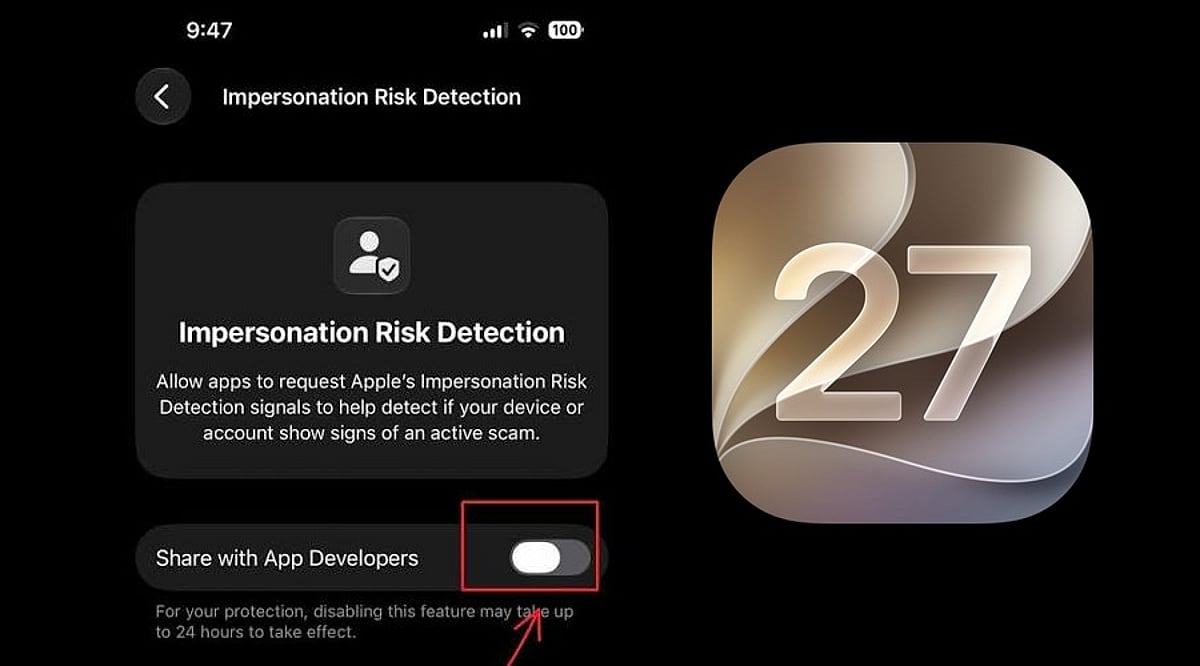
    Apple has unveiled a new security feature in iOS 27 designed to shield iPhone users from impersonation-based scams. Dubbed Impersonation Risk Detection, the tool identifies signs that a user may be caught in an active social engineering attack, particularly when they are about to make a payment or modify sensitive account information.

    Scams involving fake banks, government agencies, delivery services, and even impersonation of known contacts have become increasingly prevalent. Apple says the feature is engineered to detect suspicious activity and alert users before they complete potentially harmful actions.

    How Apple’s Impersonation Risk Detection Works

    According to Apple, the feature protects users from active social engineering scams where an attacker impersonates a trusted entity—such as a bank, government agency, or a familiar person—and pressures the victim into making a payment or altering account details.

    Impersonation Risk Detection analyzes information about the iPhone or iPad and the user’s Apple Account to identify signs of suspicious activity. When a supported app requests an assessment during a potentially risky action, the system generates a risk level that the app can use to determine subsequent steps.

    There are three risk levels: Unknown, Medium, and High. Unknown means no evidence of suspicious activity was detected, though Apple notes this does not confirm an action is safe. Medium indicates some signs of suspicious activity, while High means significant signs were detected.

    Importantly, the app does not receive the underlying information used to generate the assessment. It only receives the resulting risk level and can decide how to respond.

    How to Enable the Feature

    Users can turn on Impersonation Risk Detection by opening Settings, tapping Privacy & Security, scrolling down, and selecting Impersonation Risk Detection. They then need to toggle on Share with App Developers. Users may also need to sign in to the App Store with their Apple Account.

    The feature can be controlled on an app-by-app basis. However, Apple warns that it depends on supported apps and that its risk assessment does not guarantee an action is safe. The company emphasizes that this feature is not designed to replace other security measures or user caution.

  • Apple Maps Ads Launch: Strict Rules Block Plumbers, Electricians, and Crypto ATMs

    Apple Maps Ads Launch: Strict Rules Block Plumbers, Electricians, and Crypto ATMs

    Apple is preparing to introduce paid advertisements in Apple Maps, allowing businesses to pay for better placement in search results. However, the company is implementing strict guidelines that will exclude several high-risk business categories from participating, aiming to maintain user trust and search result reliability.

    Strict Ad Standards

    According to reports, Apple will block ads from categories often linked to scams, including plumbers, electricians, locksmiths, garage door repair services, and crypto ATMs. The company wants to ensure that users feel confident that the businesses they find through Maps are legitimate. Unlike Google, which allows such businesses to advertise after rigorous verification and background checks, Apple is taking a more cautious approach by outright banning these categories.

    Apple will also reject any advertisements containing false claims, misleading information, or offensive content. The company appears to be steering away from the open-advertising model used by many other online platforms, choosing instead to keep the number of ads limited and meet its high standards. For users, this could mean cleaner search results and fewer chances of encountering fake businesses.

    Impact on Local Businesses

    While the new rules may help reduce scams, they could also affect honest local businesses that rely on online searches to find customers. Many plumbers, electricians, and locksmiths are small, reputable operations that have built a strong reputation over time. A blanket ban may not be the perfect solution—a system that verifies trusted businesses could allow them to advertise while keeping bad actors away.

    Apple has not yet announced an official release date, but the company confirmed that the ad platform will launch this summer in the United States and Canada. As the platform grows, Apple may need to find a better balance between protecting users and giving genuine local businesses a fair opportunity to be seen.

  • Crypto Phishing Scams: How to Spot Fake Apps, Websites, and Address Poisoning

    Crypto Phishing Scams: How to Spot Fake Apps, Websites, and Address Poisoning

    Crypto phishing scams have become one of the biggest threats to digital asset users. With more investors using wallets, exchanges, DeFi platforms, and NFT marketplaces, scammers are increasingly deploying fake websites, wallet-draining links, and AI-generated messages to raid crypto wallets.

    According to the FBI’s latest internet crime data reported by The Wall Street Journal, cryptocurrency crime is now the most costly type of internet crime, totaling $7.2 billion. The report also noted a rise in AI-powered scams, with over 22,000 complaints and losses of nearly $893 million.

    What is a Crypto Phishing Attack?

    A crypto phishing scam is a fraud attempt designed to steal wallet credentials, seed phrases, exchange passwords, or transaction approvals. Unlike traditional bank fraud, scammers don’t always need your login information. In some cases, all they need is for you to sign a malicious wallet transaction.

    These scams often appear as fake airdrops, token claim pages, NFT mint links, customer support messages, or urgent wallet verification requests. Once a user connects their wallet and confirms the request, the attacker can drain the tokens.

    How to Identify Fake Crypto Websites

    Fake crypto sites typically copy the design of popular exchanges, wallets, or DeFi platforms. The domain may look similar but with slight differences: misspellings, extra hyphens, strange extensions, or fake login pages.

    Watch for warning phrases like:

    • “Verify Your Wallet Now”
    • “Claim Reward Before Expiry”
    • “Urgent Account Suspension”
    • “Connect Wallet to Unlock Funds”

    A legitimate exchange will never ask for your seed phrase. Always type the official URL directly or use a bookmark. Avoid clicking links from Telegram, Discord, X, WhatsApp groups, or sponsored search results without verification.

    How to Identify Fake Crypto Apps

    Research on cryptocurrency exchange scams uncovered over 1,500 fraudulent domains and more than 300 fake apps, some of which made it to major app marketplaces. Before downloading, verify the app’s history, reviews, and developer name. Check how long it has been available, the official website link, and the app’s reputation. Never download APKs from unknown sources.

    During setup, a fake app may request your recovery phrase under the guise of security verification or customer support. That’s a major red flag.

    Watch Out for Address Poisoning

    Address poisoning is a phishing attack where scammers send small transactions from lookalike wallet addresses. The goal is to trick users into copying the wrong address from their transaction history. A 2025 study found approximately 270 million on-chain address poisoning attempts targeting 17 million victims, resulting in at least $83.8 million in losses.

    Why This Matters

    The escalation of AI-driven phishing and address poisoning matters because scammers no longer need to hack blockchains. By weaponizing urgency and lookalike addresses, they trick users into authorizing irreversible transactions that drain wallets instantly — turning user error into crypto’s costliest threat.

    Final Thoughts

    • Never share your seed phrase.
    • Only download apps from official sources.
    • Store larger amounts on a hardware wallet.
    • Check URLs carefully.
    • Revoke suspicious wallet approvals.
    • Test large transfers with a small amount first.

    Remember the three elements of crypto scams: urgency, fear, and greed. If a message feels urgent, secret, or too good to be true, pause, verify, and proceed only if you’re certain.

    Frequently Asked Questions

    1. What is a crypto phishing scam?

    A crypto phishing scam is a fraud attempt designed to steal wallet credentials, seed phrases, exchange passwords, or transaction approvals. Scammers often use fake websites, airdrops, NFT mint links, or support messages to trick users.

    2. How can I identify a fake crypto website?

    Fake crypto websites often copy real platforms but use slightly changed domains, misspellings, extra hyphens, or unusual extensions. Any site asking for a seed phrase or urgent wallet verification should be treated as suspicious.

    3. Are fake crypto apps dangerous?

    Yes, fake crypto apps can steal recovery phrases, login details, or wallet permissions. Always check the developer name, app history, reviews, and official website before downloading any crypto wallet or exchange app.

    4. What is address poisoning in crypto?

    Address poisoning is a scam where attackers send small transactions from lookalike wallet addresses. The goal is to make users accidentally copy the wrong address from their transaction history and send funds to the scammer.

    5. How can crypto users stay safe from phishing scams?

    Users should never share seed phrases, avoid unknown links, use official app stores, bookmark trusted websites, and test large transfers with small amounts first. Hardware wallets can also improve security for larger holdings.

  • How Collectors Are Losing Thousands to Facebook Marketplace Scams

    How Collectors Are Losing Thousands to Facebook Marketplace Scams

    Fraudsters are increasingly targeting collectors on Facebook Marketplace with sophisticated scams. Here are the most common tactics to watch out for:

    Fake Listings with Attractive Prices

    Scammers post rare collectibles at unusually low prices to lure buyers. Unrealistic discounts often indicate fraudulent listings designed to steal money quickly.

    Advance Payment Demands

    Fraudsters insist on full or partial payment before shipping valuable items. Avoid transferring money until authenticity and seller credibility are independently verified.

    Counterfeit Collectibles

    Fake coins, trading cards, watches, artwork, and luxury items are sold as originals. Always request proof of authenticity and expert verification before purchasing.

    Seller Impersonation Scams

    Cybercriminals copy trusted seller profiles using stolen photos and descriptions. Verify account history, reviews, and communication before completing any transaction.

    Fake Shipping and Tracking Updates

    Scammers provide fabricated courier receipts or invalid tracking numbers to appear legitimate. Confirm shipment details directly through the official logistics provider.

    Payment Outside Secure Platforms

    Fraudsters encourage direct bank transfers or digital wallets instead of protected payment methods. Secure payment options offer better fraud protection and dispute resolution.

    Pressure to Buy Immediately

    Scammers create urgency by claiming multiple interested buyers or limited availability. Take time to verify every detail before making expensive purchasing decisions.

    Requests for Personal Information

    Fraudsters may ask for unnecessary identity documents or banking details during transactions. Share only essential information required to complete a legitimate purchase safely.

    Ignoring In-Person Verification

    Collectors buying high-value items without physical inspection face greater fraud risks. Meet in safe public locations and inspect collectibles thoroughly before payment.

  • WhatsApp Usernames: Privacy Boost or New Scam Risk?

    WhatsApp Usernames: Privacy Boost or New Scam Risk?

    WhatsApp is rolling out a major privacy update that lets users start conversations without sharing their phone numbers. Instead of revealing a mobile number, people can now share a unique username. However, this new feature has also raised concerns among creators and entrepreneurs, who fear it could make impersonation and fraud easier if strong safeguards are not in place.

    The update is being released in stages, and users in supported regions can already reserve their usernames. WhatsApp says the feature will reach more countries in the coming months.

    WhatsApp Username Feature Expands Privacy

    The change comes as Meta works to make WhatsApp safer and more private for its billions of users. It follows the appointment of Indian fintech entrepreneur Kunal Shah to lead WhatsApp, as Meta continues adding new services to the platform.

    The biggest change is how conversations begin. Currently, anyone needs a phone number to send a message on WhatsApp. Once the new feature is available, a username will be enough for first-time chats. The phone number will remain hidden unless the user decides to share it.

    WhatsApp says this update is designed to give people better privacy, protecting personal numbers in situations such as joining large group chats, messaging a business for the first time, or talking to someone new. It can also reduce unwanted calls and spam messages.

    How to Create and Use a WhatsApp Username

    Creating a username is simple. Users need the latest version of WhatsApp. After updating the app, they can open Settings, tap Account, and choose Username. They can then pick an available name that contains between three and thirty-five characters.

    WhatsApp will not create a public list of usernames. People cannot search for random users as they can on many social media platforms. Someone must know the exact username before sending the first message, giving users more control over who can contact them.

    The app also includes another safety feature called a username key. Users can turn it on for extra protection. New contacts must enter both the username and the key before sending the first message. The key can be changed whenever needed.

    Why the New Privacy Update Matters

    WhatsApp’s Username feature makes sharing contact details much safer. Many people use WhatsApp for work, online selling, community groups, and school activities. A username allows them to stay connected without giving away a personal phone number.

    Businesses, creators, and organizations will also benefit from the update. They can reserve the same username already used on Instagram or Facebook. This keeps their online identity consistent across Meta’s apps and makes it easier for customers to recognize them.

    WhatsApp will also block usernames linked to celebrities, public figures, and government organizations. This step aims to stop fake accounts and reduce impersonation.

    More than 3 billion people use WhatsApp worldwide, so many popular usernames may be taken quickly. The company has opened early reservations to give users a better chance of getting the name they want before the full rollout ends.

    The update brings WhatsApp closer to other messaging apps that already use usernames. At the same time, it keeps privacy at the center with better phone number protection, stronger secure messaging, and a safer digital identity for everyday conversations.