Tag: workflow automation

  • 7 Best AI Browser Extensions to Reclaim Hours Every Week

    7 Best AI Browser Extensions to Reclaim Hours Every Week

    AI browser extensions are transforming how people work online. From drafting emails to summarizing articles and automating research, these tools eliminate repetitive tasks. Whether you’re a student, professional, marketer, or developer, the right extension can significantly improve productivity and save several hours every week with minimal effort.

    ChatGPT Extension – Your AI Productivity Partner

    The ChatGPT browser extension offers instant AI assistance while you browse. It helps generate content, answer questions, summarize webpages, write emails, and assist with coding. Instead of switching between tabs, users can complete tasks directly in their browser, making daily workflows faster, smoother, and more efficient.

    Perplexity AI – Smarter Research in Seconds

    Perplexity AI combines conversational AI with web search to deliver accurate, source-backed answers. It quickly summarizes articles, explains complex topics, and provides reliable references for further reading. Researchers, students, and professionals can spend less time searching and more time understanding important information with confidence.

    Grammarly – Write with Confidence

    Grammarly enhances writing by correcting grammar, improving clarity, refining tone, and suggesting better word choices. Its AI-powered assistant helps users draft emails, reports, and presentations with confidence. Whether writing professionally or academically, Grammarly ensures polished communication while reducing editing time and improving overall writing quality.

    Merlin AI – AI Across Every Website

    Merlin AI integrates seamlessly with websites like Google Search, Gmail, LinkedIn, YouTube, and X. It summarizes content, drafts replies, creates social media posts, and answers questions without opening another application. Its versatility makes it a valuable productivity companion for professionals working across multiple online platforms daily.

    Sider & LanguageTool – Read, Translate, and Edit Better

    Sider offers AI-powered PDF analysis, webpage summarization, translation, and coding support through a convenient browser sidebar. LanguageTool complements it by checking grammar, spelling, punctuation, and style in multiple languages. Together, they improve reading, editing, translation, and communication for users working with diverse content.

    Choose the Right AI Extension for Your Workflow

    Every AI browser extension serves a different purpose. ChatGPT excels at general assistance, Perplexity simplifies research, Grammarly perfects writing, Merlin boosts productivity across websites, while Sider and LanguageTool enhance reading and editing. Selecting the right combination can automate repetitive work and save valuable hours every week.

  • How AI Tools Are Revolutionizing Healthcare Business Operations

    How AI Tools Are Revolutionizing Healthcare Business Operations

    Artificial intelligence is rapidly reshaping the healthcare industry, offering powerful tools that improve efficiency, accuracy, and patient outcomes. From automating clinical documentation to accelerating drug discovery, AI is helping healthcare providers deliver better care while reducing costs and administrative burdens. Below are the key areas where AI is making a transformative impact.

    Clinical Documentation Automation

    AI tools automate medical note-taking, reducing paperwork and improving documentation accuracy. This streamlines clinical workflows and allows physicians to spend more time with patients.

    Medical Imaging Analysis

    AI-powered platforms detect abnormalities in X-rays, CT scans, and MRIs faster than traditional methods, enabling earlier diagnoses and significantly improving radiology efficiency.

    Predictive Healthcare Analytics

    Advanced AI analyzes patient records and historical data to predict diseases, optimize treatments, improve resource allocation, and enhance clinical decision-making.

    Precision Medicine

    AI combines genomic, clinical, and molecular data to recommend personalized treatments, helping healthcare providers deliver targeted therapies with better patient outcomes.

    Digital Pathology Support

    AI-assisted pathology tools analyze tissue samples accurately, improve diagnostic consistency, accelerate disease detection, and support pharmaceutical research.

    Administrative Workflow Automation

    AI streamlines appointment scheduling, billing, insurance processing, and patient record management, reducing operational costs while improving organizational productivity.

    Patient Engagement Solutions

    AI-powered virtual assistants provide instant responses, appointment reminders, medication guidance, and personalized health information, improving patient satisfaction and communication.

    Drug Discovery Acceleration

    AI rapidly analyzes biological data, identifies potential drug candidates, shortens research timelines, reduces development costs, and speeds pharmaceutical innovation.

    Emergency Care Optimization

    AI detects critical conditions in real time, alerts specialists immediately, prioritizes urgent cases, and improves treatment speed for life-threatening medical emergencies.

  • Top Claude AI Extensions and Tools to Supercharge Your Workflow

    Top Claude AI Extensions and Tools to Supercharge Your Workflow

    Claude AI is evolving rapidly, and pairing it with the right extensions can unlock even greater productivity. Whether you are a developer, writer, or business professional, these tools help you get more done with Claude. Here are the top extensions every Claude user should know about.

    Official and Desktop Tools

    Claude Desktop: The official desktop app provides faster access, file uploads, and smoother conversations. It is ideal for daily AI workflows and reduces reliance on browser-based interactions.

    Raycast AI: Raycast brings Claude directly into your desktop launcher. You can search files, write content, and automate tasks without leaving your keyboard — a true productivity booster.

    Developer-Focused Extensions

    Continue.dev: Developers can connect Claude to VS Code using Continue. It helps generate code, explain functions, and speed up debugging, making it a valuable companion for coding projects.

    Cline (VS Code): Cline turns Claude into an AI coding assistant that understands your entire project and assists with development workflows, from architecture to implementation.

    All-in-One AI Interfaces

    LibreChat: This clean, open-source interface supports Claude alongside multiple AI models. It is great for users who prefer a single workspace for different AI assistants.

    Automation and Integration

    Zapier: Connect Claude with thousands of apps through Zapier. Automate emails, spreadsheets, CRMs, and repetitive business tasks with simple triggers and actions.

    Knowledge Management

    Obsidian Claude Plugin: Enhance your note-taking. Claude can summarize, organize, and generate ideas directly from your Obsidian knowledge base, turning your vault into an intelligent assistant.

    Extending Claude Further

    MCP Tools: Model Context Protocol (MCP) tools allow Claude to connect with local files, databases, and external applications, expanding its capabilities beyond the chat window.

    These extensions cover a wide range of use cases, from everyday productivity to specialized development tasks. Start with the ones that match your workflow and explore more as Claude continues to improve.

  • Best AI-Powered Chrome Extensions for Maximum Productivity in 2026

    Best AI-Powered Chrome Extensions for Maximum Productivity in 2026

    Professionals spend most of their working hours inside a browser, yet many still rely on manual workflows for writing, research, and communication. AI Chrome extensions in 2026 change that by embedding intelligent automation directly into everyday browser sessions. Tools like Sider AI, Perplexity, Grammarly, Bardeen, and Tactiq lead the category with distinct strengths across research, writing, automation, and meeting management. Selecting the right extension requires matching tool capability to specific workflow pain points rather than installing every available option.

    What Are AI Chrome Extensions?

    AI Chrome extensions are add-ons that activate on web pages, email platforms, documents, and video calls without requiring separate software. Unlike earlier browser tools, the current generation offers contextual intelligence—they read what’s on the screen, understand the task, and respond accordingly. Capabilities now include real-time grammar correction, cited research summaries, multi-step workflow automation, meeting transcription without bots, and email drafting from brief inputs. Most operate on a freemium model, letting professionals evaluate core features before subscribing.

    Top 10 AI Chrome Extensions in 2026

    1. Sider AI

    Sider AI runs as a persistent sidebar inside Chrome, accessible on any webpage without interrupting the current tab. It connects to GPT-4, Claude, and Gemini within a single interface, allowing users to switch models based on the task. Highlight any text to explain, rewrite, translate, or summarize it instantly. PDF reading and image analysis are built in, making it a versatile all-in-one tool for everyday needs.

    2. Perplexity AI

    Perplexity sets itself apart by providing cited sources for every answer, crucial for accuracy-dependent environments. A dedicated focus mode interrogates the specific article or PDF you’re reading. The free tier handles most daily research, while the Pro plan ($20/month) adds GPT-4 and Claude for more demanding work.

    3. Grammarly

    The long-standing default writing assistant now includes a tone detector that flags overly formal, dismissive, or passive-aggressive phrasing before sending. Generative features suggest full rewrites and real-time alternatives. It works across Gmail, Outlook, Google Docs, and most text fields, making it essential for professional communication.

    4. Monica

    Monica packs composing, translation (50+ languages), DALL-E 3 image generation, and voice input into one extension. It adapts to individual writing patterns over time, making it ideal for content teams and marketers who need consistent output.

    5. Bardeen

    Bardeen automates cross-platform data movement, connecting Chrome to over 100 apps like Notion, Slack, Google Sheets, HubSpot, and Gmail. Describe a workflow in plain language, and Bardeen builds the automation—for instance, extracting LinkedIn data and populating a CRM row with one click. Sales and operations teams benefit heavily from the time saved.

    6. Tactiq

    Tactiq transcribes meetings in real time without placing a bot in the call—it captures audio from the Chrome tab invisibly. After the meeting, it generates a structured summary with action items and speaker attribution, pushing notes directly to Salesforce and HubSpot. This is a huge advantage for sensitive discussions.

    7. Compose AI

    Compose AI focuses on email drafting speed with sentence-level autocomplete across Gmail and Outlook. Suggestions appear as you type and are accepted or dismissed with a keystroke. It learns your writing habits, producing outputs that match your personal tone. Professionals handling high email volumes report significant time savings within a week.

    8. Merlin AI

    Merlin provides an AI chat overlay via keyboard shortcut on any active page. It includes native compose buttons for Gmail and LinkedIn, and generates YouTube video summaries with timestamps. Its speed and minimal disruption suit professionals who need AI assistance across many contexts daily.

    9. Glasp

    Glasp focuses on knowledge retention: highlight passages on any webpage, and it builds them into a searchable personal knowledge base. An AI layer converts accumulated highlights into structured notes automatically. YouTube transcripts get full highlighting support, and exports go to Notion, Readwise, and Markdown. Ideal for analysts and researchers who read heavily.

    10. AIPRM

    AIPRM adds a prompt library to ChatGPT with thousands of community-tested templates organized by category (SEO, marketing, coding, etc.). User ratings help identify high-performing prompts. Teams can build and share internal prompt libraries, bringing consistency to AI-generated outputs.

    How to Choose the Best AI Chrome Extension

    Start by identifying your single most time-consuming manual task. Research-heavy roles benefit from Perplexity and Glasp; communication roles from Grammarly, Compose AI, and Monica; automation needs point to Bardeen; meeting-intensive roles to Tactiq. Budget is practical: Grammarly, Perplexity, Monica, and Sider AI offer free tiers; paid plans typically range $9–$20/month. Running more than two or three active extensions slows Chrome, so build a focused stack instead of an exhaustive one.

    Final Thoughts

    Browser productivity in 2026 is markedly different from even two years ago. The extensions listed target specific operational gaps: slow research, inconsistent writing, manual data entry, meeting transcription, and email fatigue. The professionals gaining the most are those who identified where their time was going and chose tools that align precisely with their work.

  • Top AI Workflow Orchestration Platforms for Scaling Enterprises in 2026

    Top AI Workflow Orchestration Platforms for Scaling Enterprises in 2026

    Overview

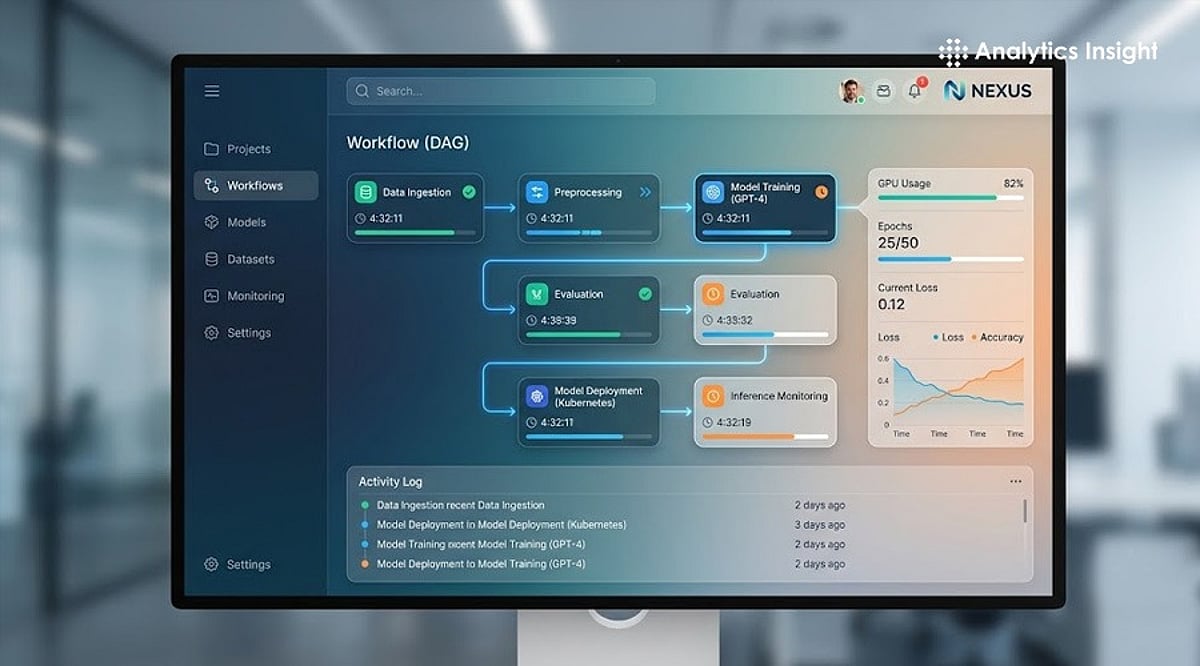
    Choosing the right AI workflow orchestration tool is essential for scaling enterprise AI systems. This guide compares leading platforms, including Temporal, LangGraph, n8n, Microsoft Agent Framework, Airflow, and Dagster, to help organizations build reliable, efficient, and production-ready AI workflows in 2026.

    Understanding AI Workflow Orchestration

    Artificial intelligence workflow orchestration has become a critical capability for enterprises seeking to scale AI-driven operations. However, the term ‘AI workflow orchestration’ encompasses several distinct functions, including scheduled data pipelines for machine learning models, durable execution of long-running business processes, and orchestration frameworks that coordinate AI agents and decision-making workflows. Each serves a different purpose and requires specialized tools, making it essential for organizations to understand their specific requirements before selecting a platform.

    AI orchestration tooling is projected to grow from roughly $14 billion in 2026 to over $60 billion by 2034. That growth is pulling in a lot of tools that are good at one layer of the problem and are being marketed as though they solve it all. Understanding these differences is key to selecting the right orchestration tool for scalable, reliable, and efficient enterprise AI deployments.

    The Question to Ask Before Picking a Tool

    If you can draw the flowchart in advance, you need a workflow orchestrator. If the model decides the next step, you need an agent framework. Most production systems need far less of the second category than the demos on offer would suggest, and conflating the two is exactly where teams get into trouble, asking a scheduler to behave like a runtime, or an agent framework to behave like a database.

    Temporal: The Default for Durability

    Temporal is no longer thought of as just backend infrastructure. It is now the standard answer for what practitioners call durable agent execution. This agent waits three days for human approval and must survive a server restart without losing its place. OpenAI reportedly uses Temporal in production for Codex specifically because it handles state persistence that raw agent frameworks struggle with at real scale.

    The honest limitation: Temporal requires deterministic workflow code, and non-deterministic LLM behavior needs workarounds to fit inside that model. It is not, on its own, built to trace token costs, prompt quality, or which inputs produced a bad output.

    LangGraph: Owns the Agent Reasoning Layer

    Where Temporal stops, LangGraph tends to start. It models agents as explicit state graphs — nodes, edges, checkpointing, human-in-the-loop interrupts — which matches how agentic reasoning actually behaves far better than a generic scheduler does. LangGraph Studio’s time-travel debugging is increasingly seen as the feature that separates a production-ready setup from a prototype, because it shows you why an agent failed, not just that it failed.

    The catch is scope. LangGraph orchestrates the reasoning loop. It is not the system of record for durability across deploys, and most serious production guidance now treats it as one half of a pair rather than a complete answer on its own.

    The two-layer pattern — Temporal handling macro-orchestration, an agent framework handling the reasoning loop inside it — is emerging as the production standard. It is not always necessary, but when you need it, nothing else offers the same combination of agent-native abstractions and infrastructure-grade durability.

    Where the Other Tools Fit

    Platforms like n8n, Microsoft Agent Framework, Airflow, and Dagster each serve specific orchestration needs. n8n excels at low-code automation for connecting services, while Airflow and Dagster are designed for batch data pipelines. Microsoft Agent Framework is tailored for building conversational AI agents within the Microsoft ecosystem. Understanding these niches helps organizations avoid the trap of forcing one tool to do everything.

    The Decision That Actually Matters

    Most teams in trouble right now picked one tool and tried to make it do everything. The pattern that is actually working in production is boring on purpose: a data orchestrator for the batch side, a durable execution engine for anything business-critical and long-running, and a thin agent loop handling the model-decided parts; each tool doing the one job it was built for, instead of one tool stretched across three different failure models.

    Pick based on which of the three problems is actually costing you money today. The vendor with the most impressive demo is rarely the right starting point.

    Why This Matters

    As organizations deploy AI across business operations, selecting the right orchestration platform has become critical. Using the appropriate tools for workflow automation, durable execution, and AI agent coordination improves reliability, scalability, operational efficiency, and long-term maintainability while reducing deployment risks and infrastructure costs.

    Frequently Asked Questions

    What is AI workflow orchestration?

    AI workflow orchestration is the process of coordinating AI models, data pipelines, business logic, and automation tasks to execute reliably. It ensures different systems work together efficiently while managing dependencies, long-running processes, failures, and human approvals across enterprise environments.

    Which AI workflow orchestration tool is best for enterprise applications?

    The ideal platform depends on the workload. Temporal is widely used for durable execution, LangGraph excels at AI agent reasoning, while Airflow, Dagster, n8n, and Microsoft Agent Framework serve different orchestration needs across enterprise AI deployments.

    What is the difference between Temporal and LangGraph?

    Temporal focuses on reliable execution of long-running workflows and business processes, while LangGraph manages AI agent reasoning, branching logic, checkpointing, and human-in-the-loop interactions. Many enterprise systems use both platforms together for production AI applications.

    Can one orchestration platform handle every AI workflow?

    Not usually. Most enterprise AI systems combine multiple platforms, using one tool for data pipelines, another for durable workflow execution, and another for AI agent reasoning. This layered approach improves scalability, reliability, and operational flexibility.

    Why is durable execution important for AI applications?

    Durable execution allows workflows to survive server failures, software updates, long approval cycles, and infrastructure interruptions without losing progress. This capability is essential for financial transactions, healthcare workflows, customer service, and other mission-critical enterprise processes.