Category: Artificial Intelligence

  • Master Canva AI: Speed Up Your Design Workflow with Smart Automation

    Master Canva AI: Speed Up Your Design Workflow with Smart Automation

    Creating professional graphics no longer requires starting from a blank canvas. With Canva’s suite of artificial intelligence tools, users can generate layouts, write copy, edit images, and automate repetitive tasks—all within the familiar drag-and-drop editor. These features help designers, marketers, and content creators move from concept to polished visual in record time, while still preserving the human touch needed for branding and originality.

    Why Canva AI Accelerates the Design Process

    Traditional design involves multiple steps: choosing templates, selecting fonts and colors, sourcing images, and writing copy. Canva AI collapses these stages by generating ready-to-edit designs based on minimal input. For example, a business owner creating a marketing poster or a student preparing a presentation can receive several design options instantly, skipping the initial setup and focusing only on refinement.

    Key Canva AI Tools That Matter Most

    Magic Design

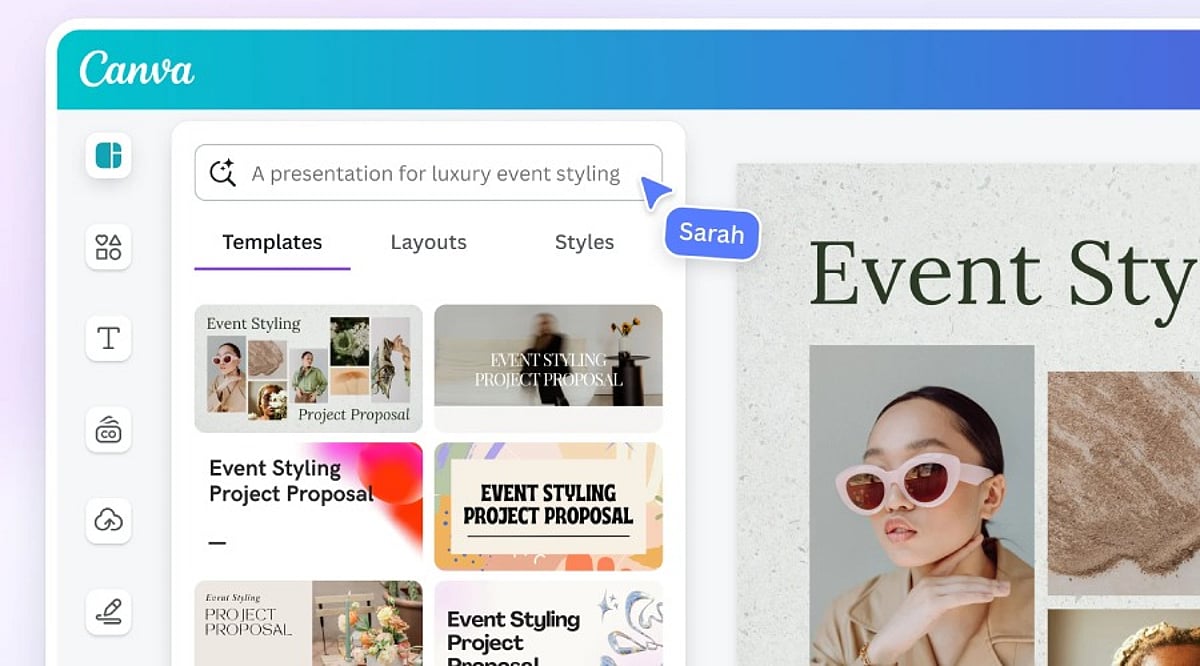
    This feature generates complete layouts from a text prompt or an uploaded image. It suggests templates for presentations, social media posts, posters, flyers, and more, giving users a strong starting point.

    Magic Write

    Magic Write creates headlines, captions, product descriptions, blog outlines, and other written content directly inside Canva. It’s ideal for quickly generating copy that matches your design theme.

    Magic Edit

    With Magic Edit, users can modify parts of an image by typing descriptive text. Combined with tools like Background Remover and Magic Eraser, photo cleanup becomes effortless.

    AI for Video

    Canva also offers AI-powered video editing, including automatic subtitle generation and smart resizing for different platforms.

    Better Prompts Deliver Better Designs

    The quality of AI-generated outputs depends heavily on the prompt. A vague request like “design a poster” yields generic results. A detailed prompt specifying the target audience, purpose, color palette, and style helps Canva understand your vision. For instance, “a simple Instagram post promoting a weekend café offer, using warm colors and modern fonts” produces more relevant designs. Experimenting with slight variations in wording can also unlock fresh layouts and concepts.

    AI Is Just the Beginning

    While AI-generated designs are often impressive, they should never be published without human review. Canva’s AI cannot grasp a brand’s unique style, marketing strategy, or audience preferences. Adjustments to layout, typography, colors, images, and text are typically necessary. The best results come from combining AI’s initial ideas with human creativity and editorial oversight.

    Tips to Maximize Results

    • Be specific in your prompts: include the goal, color scheme, style, and target audience.
    • Never treat AI-generated designs as final—always edit, check brand compliance, and proofread copy.
    • Save personalized templates to speed up future projects.

    The Bottom Line

    Canva AI has made design faster without adding complexity. Tools like Magic Design, Magic Write, Magic Edit, and AI-powered image editing cut down routine tasks while providing a strong creative foundation. However, technology works best when paired with human judgment. AI generates ideas and automates processes, but the final result requires careful editing, clear messaging, and audience awareness. By combining both, users can produce professional designs quickly without sacrificing quality.

    Frequently Asked Questions

    What is Canva AI used for?

    Canva AI helps users create designs, generate content, edit images, and automate creative tasks using artificial intelligence.

    Is Canva AI free to use?

    Canva offers some AI features for free, while advanced tools and higher usage limits require a Canva Pro subscription.

    Which Canva AI tool is best for beginners?

    Magic Design is ideal for beginners because it generates ready-to-edit templates from simple prompts or uploaded images quickly.

    Can Canva AI create social media posts?

    Yes, Canva AI generates social media graphics, captions, presentations, videos, and marketing materials for multiple digital platforms efficiently.

    Does Canva AI replace professional designers?

    No. Canva AI speeds up design creation, but human creativity and editing remain essential for unique, accurate, and brand-aligned results.

  • 10-Step AEO Guide for Publishers to Boost AI Search Visibility in 2027

    10-Step AEO Guide for Publishers to Boost AI Search Visibility in 2027

    As artificial intelligence reshapes how users discover content, publishers must adapt their strategies to remain visible in AI-driven search results. Answer Engine Optimization (AEO) focuses on creating clear, reliable, and easy-to-understand content that AI systems can interpret and present directly to users. Here is a practical 10-step checklist for publishers aiming to improve their AI search visibility in 2027.

    1. Understand Answer Engine Optimization

    Learn the fundamentals of AEO: how AI search engines prioritize content that directly answers user questions with clarity and authority. Consistent application of AEO principles helps your content appear in featured snippets, voice search results, and AI-generated summaries.

    2. Focus on Search Intent

    Shift from keyword stuffing to intent-driven content. Every article should address a real user question or problem. Match the format—whether step-by-step, listicle, or FAQ—to the searcher’s underlying need rather than just targeting high-volume keywords.

    3. Create Helpful Content

    Publish original, accurate, and actionable articles. AI algorithms favor content that provides clear value, solves problems, and leaves readers satisfied. Avoid fluff; every sentence should serve the user’s intent.

    4. Use Clear Content Structure

    Break articles into well-defined sections with descriptive headings, short paragraphs, bullet points, and numbered lists. A logical hierarchy helps AI systems parse and extract key information quickly. Include an FAQ section when appropriate.

    5. Build Trust and Authority

    Include author bylines, credentials, and links to reliable sources. Cite updated data and transparent methodologies. Trust signals—like expert quotes, reputable references, and publication dates—boost your chances of being chosen for AI-generated answers.

    6. Add Schema Markup

    Implement structured data such as FAQ, Article, and How-To schemas. Schema markup provides explicit context to search engines, enabling them to understand your content’s structure and improve its eligibility for rich results and AI features.

    7. Improve Website Performance

    Optimize page load speed, ensure mobile responsiveness, and use HTTPS for security. Fast, accessible websites enhance user experience and are prioritized by AI-powered platforms that measure performance as a ranking signal.

    8. Keep Content Fresh

    Regularly review and update articles with new information, statistics, and examples. Stale content loses relevance for both readers and AI models. Set a schedule to refresh high-traffic pages and add timely insights.

    9. Track Performance and Improve

    Monitor key metrics: rankings in AI search results, click-through rates, AI referral traffic, and user engagement (time on page, bounce rate). Use these insights to refine your AEO strategy and iterate on what works.

    10. Stay Ahead of AI Evolution

    Keep informed about updates to major AI search algorithms (Google SGE, Bing Chat, etc.) and adapt your tactics accordingly. Attend webinars, follow industry leaders, and experiment with new content formats like video and interactive media.

    By following this checklist, publishers can build a sustainable AEO framework that ensures their content remains discoverable and valuable in an AI-first search landscape.

  • ElevenLabs Explained: AI Voice Technology for Text-to-Speech, Voice Cloning, and More

    ElevenLabs Explained: AI Voice Technology for Text-to-Speech, Voice Cloning, and More

    ElevenLabs is an artificial intelligence company at the forefront of voice technology innovation. The platform offers a suite of tools—including text-to-speech, voice cloning, dubbing, and conversational AI—designed for creators, businesses, and developers who need natural, expressive audio.

    Text-to-Speech

    ElevenLabs converts written text into speech with realistic intonation, emotion, and pronunciation. It supports multiple languages and accents, making it easy to produce high-quality voiceovers for any project.

    Voice Cloning

    From just a short audio sample, ElevenLabs can create a digital replica of a person’s voice. With proper permissions, this enables narration, content creation, accessibility tools, and enterprise communication.

    AI Dubbing

    The platform translates and dubs videos into different languages while preserving the original speaker’s tone, style, and delivery. This helps global audiences enjoy content without losing the authentic feel.

    Speech-to-Text

    ElevenLabs also transcribes spoken audio into accurate text. This makes interviews, meetings, podcasts, and videos easier to search, edit, and repurpose.

    Conversational AI

    The conversational AI feature powers voice agents that can handle customer support, virtual assistance, and interactive dialogues with natural speech responses.

    Multilingual Support

    With support for dozens of languages, ElevenLabs allows creators and businesses to produce localized audio content without hiring multiple voice actors.

    Content Creation

    ElevenLabs is widely used for audiobooks, YouTube videos, podcasts, games, e-learning, marketing campaigns, and accessibility–focused applications across industries.

    Safety Features

    To reduce misuse, ElevenLabs includes voice verification, moderation tools, and consent–focused policies. These measures promote responsible AI voice generation while protecting users.

    For more stories like this, join our WhatsApp channel to get the latest news, exclusives, and videos.

  • How AI Interview Copilots Are Transforming Job Interview Preparation

    How AI Interview Copilots Are Transforming Job Interview Preparation

    In the contemporary job market, the interview process is a critical juncture for candidates seeking to secure their desired positions. With the rapid advancement of artificial intelligence (AI), a new tool has emerged to revolutionize this process: the AI Interview Copilot. This innovative technology offers a range of benefits and features that can significantly enhance the interview experience for both candidates and interviewers.

    Understanding the AI Interview Copilot

    The AI Interview Copilot is an intelligent software application designed to assist candidates during job interviews. It leverages cutting-edge AI algorithms and natural language processing (NLP) techniques to provide real-time guidance, feedback, and support. By analyzing the candidate’s responses, body language, and tone of voice, the copilot can offer valuable insights and suggestions to help the candidate perform at their best.

    One of the key features of the AI Interview Copilot is its ability to simulate real interview scenarios. It can generate a variety of interview questions based on the job description and industry requirements, allowing candidates to practice and prepare in a realistic environment. The copilot also provides detailed feedback on the candidate’s performance, highlighting areas for improvement and offering tips on how to answer questions more effectively.

    In addition to question generation and feedback, the AI Interview Copilot can also assist with resume review and preparation. It can analyze the candidate’s resume, identify strengths and weaknesses, and provide suggestions for improvement. This can help candidates create a more compelling resume that stands out from the competition.

    Benefits for Candidates

    Here are some of the main advantages the AI Interview Copilot offers for candidates:

    • Safe Practice Environment: Job interviews make many candidates nervous or anxious. The copilot helps alleviate such feelings by providing a stress-free environment for practice. Candidates can build confidence and improve their performance by practicing responses and getting feedback.
    • Identify Strengths and Weaknesses: A detailed analysis of answers and performance helps candidates identify their strengths and areas for improvement. This self-awareness is invaluable when preparing for future interviews and sharpening skills.
    • Personalized Feedback: The AI Interview Copilot customizes its feedback to the individual needs and objectives of each candidate. It provides targeted suggestions on improving communication skills, answering difficult questions, and showcasing relevant experience and skills.
    • Time and Effort Savings: Candidates no longer have to spend hours researching interview questions and practicing alone. The copilot generates relevant questions, gives immediate feedback, and provides helpful resources quickly, allowing candidates to focus on other aspects of their job search.

    Benefits for Interviewers

    Interviewers also stand to benefit from the use of the AI Interview Copilot:

    • Standardized Process: The copilot ensures all candidates are asked the same set of questions, eliminating bias and ensuring fairness. This leads to more objective and consistent evaluations.
    • Comprehensive Candidate Data: By analyzing responses, body language, and tone of voice, the copilot provides interviewers with a more detailed understanding of candidates’ skills, personality, and suitability for the role.
    • Time Savings: Automating question generation and feedback frees up interviewers to focus on evaluating qualifications and organizational fit.
    • Improved Experience: A more structured and efficient interview process reduces stress and anxiety for both parties, leading to a more positive and productive interaction.

    Challenges and Limitations

    The AI Interview Copilot has many benefits, but it also has several challenges and drawbacks. One major challenge is ensuring the accuracy of analysis and feedback. While AI algorithms have improved dramatically, they are still not perfect, and there is always a risk of misinterpreting candidates’ responses or providing incorrect feedback.

    Another challenge involves ethical issues associated with the use of AI in interviews. Bias in the algorithms could lead to unfair treatment of some candidates. It is essential to develop and deploy the copilot transparently, without bias, and in a way that respects privacy and human rights.

    The AI Interview Copilot may not be appropriate for all types of interviews or industries. Some interviews require a more personal approach or the ability to read non-verbal cues that are difficult for the copilot to analyze. In those cases, human interviewers may still be needed.

    Finally, the AI Interview Copilot is not free. Some copilot services charge a subscription or fee, which could be a barrier for some candidates or organizations. Such costs should be considered when deciding whether to use a copilot.

    Conclusion

    To put it simply, the AI Interview Copilot is a powerful instrument capable of transforming the job interview process. It provides real-time guidance, feedback, and support to help candidates perform their best and take advantage of their interview opportunities. It also offers benefits to interviewers, such as standardizing the interview process and collecting more complete data about candidates. However, it is important to be aware of the challenges and limitations associated with its use and to employ it in a responsible and ethical manner.

  • Google Assistant to Be Retired Starting September, Gemini Takes Over as Default Assistant

    Google Assistant to Be Retired Starting September, Gemini Takes Over as Default Assistant

    Google has entered the final phase of retiring Google Assistant, with the company confirming that the voice assistant will begin disappearing from Android smartphones starting September 4. The transition will happen gradually over several weeks as Gemini becomes Google’s only supported voice assistant on eligible Android devices.

    Users who have already received notification emails from Google will no longer be able to switch back to Google Assistant after the migration is complete. The change also extends beyond smartphones to include paired Android tablets, Wear OS smartwatches, and compatible headphones and earphones.

    Gemini Becomes Default Assistant

    After the transition, users will continue to activate the assistant by saying ‘Hey Google’ or by long-pressing the power button. However, instead of Google Assistant, Gemini will respond on supported devices. Google stated that setting Gemini as the default assistant on an Android phone will automatically make it the assistant across paired devices, including compatible smartwatches and audio accessories.

    Gemini retains many of the core capabilities offered by Google Assistant, including setting alarms and timers, answering questions, controlling smart home devices, playing music, and performing tasks directly from the lock screen. It also introduces more advanced AI-powered features built around Google’s latest generative AI technology.

    End of a Decade-Long Service

    Google Assistant was introduced in May 2016 and has remained one of the company’s flagship services across Android phones and several connected devices for nearly a decade. Google first announced in 2025 that Gemini would eventually replace Assistant across Android phones, tablets, smartwatches, TVs, cars, and other supported products. The company had initially planned to complete the transition earlier, but the timeline was extended before the final rollout was confirmed this week.

    While Google Assistant is being retired from Android phones and several paired devices, the company has indicated that the change does not currently affect Google Home smart speakers, Google TV devices, or vehicles running Google built-in, where Assistant will remain available for now.

  • World Bank Report: India Faces Lower AI Job Disruption Risk Compared to Wealthier Nations

    World Bank Report: India Faces Lower AI Job Disruption Risk Compared to Wealthier Nations

    India has less to fear from artificial intelligence than richer countries, according to a new World Bank report released in 2026. The report examines how AI could affect jobs worldwide and finds that developing nations face lower automation risks while potentially reaping productivity gains.

    The World Bank estimates that only 4.5% of jobs in low- and middle-income countries are at high risk of being automated by AI. In contrast, that figure rises to 14.2% in high-income countries, indicating greater job pressure in wealthier economies. The report also notes that AI could improve productivity in 16.2% of jobs across developing economies.

    “AI has thrown developing economies a lifeline, and they should seize it,” said Indermit Gill, the World Bank’s chief economist. Gill emphasized that smaller, locally adapted AI tools could enhance healthcare, education, agriculture, and public services.

    In India, AI could help farmers with crop advice and weather information. Healthcare workers could use AI tools to support medical checks in rural areas. Schools and government offices could leverage AI for learning and public service delivery.

    However, the report warns that India still faces risks in call centers, outsourcing, and entry-level technology jobs where AI could replace routine tasks.

    The World Bank recommends that countries first deploy existing AI tools and customize them for local needs. Advanced AI development can follow once basic digital infrastructure and skills are strengthened.

    To fully benefit from AI, India needs better electricity, internet access, skilled workers, useful data, and strong institutions. Building these foundations could help AI create widespread benefits without increasing inequality.

  • AI Tech Roundup: AMD’s Disappointing Forecast, NVIDIA’s India Bet, Apple Intelligence, and Crypto Insights

    AI Tech Roundup: AMD’s Disappointing Forecast, NVIDIA’s India Bet, Apple Intelligence, and Crypto Insights

    Welcome to today’s tech roundup, where AI continues to dominate the headlines. From chipmaker earnings and startup funding to smartphone AI features and career trends, here are the top stories shaping the technology world.

    AMD’s AI Forecast Disappoints Despite Strong Quarterly Growth

    AMD posted another strong quarter, driven by surging demand for its AI chips, and expects revenue to reach about $13 billion this quarter. However, the forecast fell short of Wall Street’s lofty expectations, leaving investors underwhelmed and pushing the stock lower after earnings.

    NVIDIA Makes Its First Investment in Indian AI Startup Sarvam AI

    NVIDIA has placed its first bet on an Indian AI startup by investing in Sarvam AI, signaling growing confidence in the country’s AI ecosystem. In another boost for startups, SIDBI has relaxed venture capital funding rules, making it easier for VC firms to raise and deploy capital.

    Fidelity’s 2026 Crypto Outlook: Regulation, Institutional Money, and Stablecoins

    Fidelity says the crypto market is entering a new phase where regulation, institutional investment, and stablecoins could play a bigger role than hype. Its 2026 outlook highlights the key trends and questions investors should watch as digital assets continue to evolve.

    Degrees With the Strongest Job Prospects After Graduation

    Choosing the right degree can make a big difference in the job market. According to Investopedia, business administration, nursing, computer science, and accounting are among the bachelor’s programs expected to deliver the strongest employment opportunities and long-term career growth over the coming years.

    A Beginner’s Guide to Apple’s Built-in AI Tools

    Apple Intelligence brings AI directly into the iPhone experience, helping users write, edit photos, create images, and interact with a smarter Siri. The system combines on-device processing with cloud computing to deliver AI features while placing a strong emphasis on protecting user privacy.

    That wraps up today’s tech news. From AI chips and startup funding to crypto trends and career choices, artificial intelligence is quietly reshaping how we work, invest, and use our devices every day.

  • OpenAI API Beginner’s Guide: How It Works, Pricing, and How to Get Started

    OpenAI API Beginner’s Guide: How It Works, Pricing, and How to Get Started

    What Is the OpenAI API?

    Artificial Intelligence is no longer confined to research labs or tech giants. Today, AI powers chatbots, virtual assistants, coding tools, search engines, and daily business workflows across industries. The OpenAI API is one of the easiest ways to integrate these capabilities into your own applications.

    An API (Application Programming Interface) is a set of rules that allows two software programs to communicate. Think of it as a waiter: you place an order, the waiter takes it to the kitchen, and returns your meal. Similarly, your application sends a request to the OpenAI API, which passes it to OpenAI’s AI models, and those models send back a response — all in seconds.

    How Does the OpenAI API Work?

    The process is straightforward and consists of four steps:

    • Your application sends a request to OpenAI’s servers using an API key.
    • The request includes the AI model you want to use and the prompt you want it to answer.
    • OpenAI processes the request on its cloud infrastructure.
    • The API returns a response, usually in JSON format, which your application displays to users.

    Everything runs in the cloud, so developers only need an internet connection and an API key to start building AI applications. OpenAI now recommends its new Responses API (launched in 2025), which adds web search, file search, image generation, code execution, and AI agent capabilities.

    Pricing: Pay-As-You-Go Token Model

    Unlike traditional software subscriptions, the OpenAI API uses a pay-as-you-go model. You are charged based on the number of tokens processed — both your prompt (input) and the AI’s answer (output).

    Token basics:

    • 1 token ≈ 4 characters
    • 100 tokens ≈ 75 words
    • Different models have different token costs

    Beginners should start with smaller, faster models for simple tasks like summarization or classification. Larger reasoning models are designed for coding, mathematics, and complex problem-solving.

    Best Practices for Beginners

    • Keep your API key secure – never hardcode it; use environment variables.
    • Start with cheaper models – test and refine before upgrading to more expensive ones.
    • Monitor token usage – set limits to avoid unexpected charges.
    • Handle errors gracefully – manage rate limits, invalid requests, and other API errors.
    • Write clear prompts – specific prompts yield better AI responses.

    Why Learn the OpenAI API?

    The OpenAI API has become one of the most popular AI development platforms. Concepts like prompt tokens, conversation history streaming, and tool calling are shared across top AI providers (Anthropic, Google). Whether you are a student building your first AI project, a startup adding a chatbot, or a business streamlining customer support, mastering the OpenAI API gives you a strong foundation. As AI agents and multimodal models evolve, this skill will remain in high demand.

    Frequently Asked Questions

    1. What is the OpenAI API?

    The OpenAI API is a cloud-based service that lets developers integrate OpenAI’s AI models into their own applications. It can generate text, analyze images, process audio, write code, and more through simple API requests.

    2. Do I need to know AI or machine learning to use it?

    No. You don’t need deep ML knowledge. Basic programming skills and an understanding of API requests are enough to start building AI-powered applications.

    3. How is the API priced?

    It follows a pay-as-you-go model based on the number of input and output tokens processed by the selected model. Different models have different pricing tiers.

    4. What can I build with the OpenAI API?

    You can build chatbots, virtual assistants, content generators, coding assistants, document summarizers, translation tools, AI search engines, customer support systems, voice applications, and AI agents that interact with external tools.

    5. Which API should beginners use?

    OpenAI recommends the Responses API for new projects, as it supports web search, file search, tool calling, image generation, and AI agents. The older Chat Completions API remains fully supported for existing applications.

  • ChatGPT Plans Compared: Free, Plus, Pro, or Team – Which Subscription Is Right for You in 2026?

    ChatGPT Plans Compared: Free, Plus, Pro, or Team – Which Subscription Is Right for You in 2026?

    ChatGPT offers four main plans in 2026, each tailored to a different type of user and budget. The Free plan provides a basic ChatGPT experience at no cost. Plus adds higher limits and extra features for daily users. Pro targets professionals who need maximum performance and larger usage limits. Team, part of OpenAI’s business offering, focuses on companies needing collaboration tools, shared workspaces, and admin controls.

    Every plan includes access to ChatGPT, but the experience varies by usage, available tools, and priority access. The right choice depends on your work style, daily usage, and collaboration needs.

    ChatGPT Free vs Plus vs Pro vs Team Comparison

    ChatGPT Free

    The Free plan works well for anyone who wants to explore ChatGPT without a subscription. It includes access to GPT models, web search, voice conversations, file uploads, image generation, memory, Canvas, and basic Deep Research. This plan handles everyday tasks such as writing, learning, quick research, and simple coding.

    The main limitation is strict usage caps. Heavy usage may lead to slower access during peak hours, and advanced reasoning tools are available in smaller amounts. New features also arrive later than on paid plans. Even with these limits, the Free plan offers strong value for students, beginners, and casual users.

    ChatGPT Plus

    ChatGPT Plus costs $20 per month and remains the most popular paid option. This plan offers much higher usage limits, faster response times, and priority access during peak traffic. It also unlocks advanced reasoning models, larger context windows, better memory, higher image generation limits, advanced voice features, and a larger Deep Research allowance.

    Daily work becomes smoother with fewer interruptions. Writers, developers, designers, researchers, freelancers, and office professionals often find enough power in this plan without a large monthly expense. OpenAI also releases many new features to Plus subscribers before they reach Free users, adding extra value throughout the year.

    ChatGPT Pro

    ChatGPT Pro costs $200 per month and targets people who depend on AI for demanding tasks. This plan offers the highest usage limits across ChatGPT. It provides top priority access to OpenAI’s most capable models, the largest Deep Research quota, advanced reasoning capacity, and support for long and complex tasks.

    Heavy research, detailed analysis, software development, large document reviews, and advanced workflows benefit from the extra computing resources. Startup founders, AI engineers, consultants, and research professionals gain the most value from this plan. Regular users may not notice enough difference to justify the higher price.

    ChatGPT Team (Business)

    ChatGPT Team focuses on companies that need collaboration tools, shared workspaces, and administrative controls. Pricing starts at around $25 per user per month with monthly billing, or around $20 per user per month with annual billing.

    This plan includes shared workspaces, shared GPTs, member management, central billing, organization memory, admin controls, and business privacy features. Company data stays outside model training by default. These features help teams manage projects, share knowledge, and keep work organized across departments.

    Which Plan Offers the Best Value?

    Every plan fits a different need. The Free plan gives excellent value for light usage and everyday tasks. Plus stands out as the best balance between price and features, delivering faster performance, generous limits, and access to advanced tools without a premium tag.

    Pro serves professionals who run demanding workloads daily and need the highest limits available. Team works best for businesses that need secure collaboration, centralized management, and shared access across multiple employees.

    Final Verdict

    ChatGPT offers a clear upgrade path in 2026. The Free plan covers everyday needs at no cost. Plus delivers the strongest overall value with faster performance, better tools, larger limits, and early feature access for only $20 per month. Pro targets advanced professionals who require maximum computing power and the highest usage limits. Team adds business-focused features that support collaboration, administration, and organizational security.

    The final decision depends on your daily workload, feature requirements, and budget. Most individual users receive the best balance of cost and capability from ChatGPT Plus. Professionals with intensive AI workflows benefit from Pro, while businesses gain the greatest advantage from Team through shared workspaces and centralized management.

    Frequently Asked Questions

    1. Which ChatGPT plan is best for most users?

    ChatGPT Plus is the best choice for most users as it combines advanced features, faster performance, and generous usage limits at an affordable monthly price.

    2. Is ChatGPT Free enough for everyday use?

    Yes. The Free plan is suitable for writing, learning, coding, web search, file uploads, and occasional AI assistance, though it has lower usage limits.

    3. Who should choose ChatGPT Pro?

    Pro is ideal for researchers, developers, consultants, founders, and power users who rely on ChatGPT daily and need the highest limits and priority access.

    4. What makes ChatGPT Team different?

    Team includes shared workspaces, centralized billing, admin controls, organization memory, and collaboration features designed for businesses and small teams.

    5. Is ChatGPT Plus worth $20 per month?

    For regular users, yes. It provides faster responses, higher usage limits, access to advanced models, better voice and image features, and early access to new capabilities.

  • iDenfy Launches Standalone Selfie-Based Age Estimation Tool for Faster Onboarding

    iDenfy Launches Standalone Selfie-Based Age Estimation Tool for Faster Onboarding

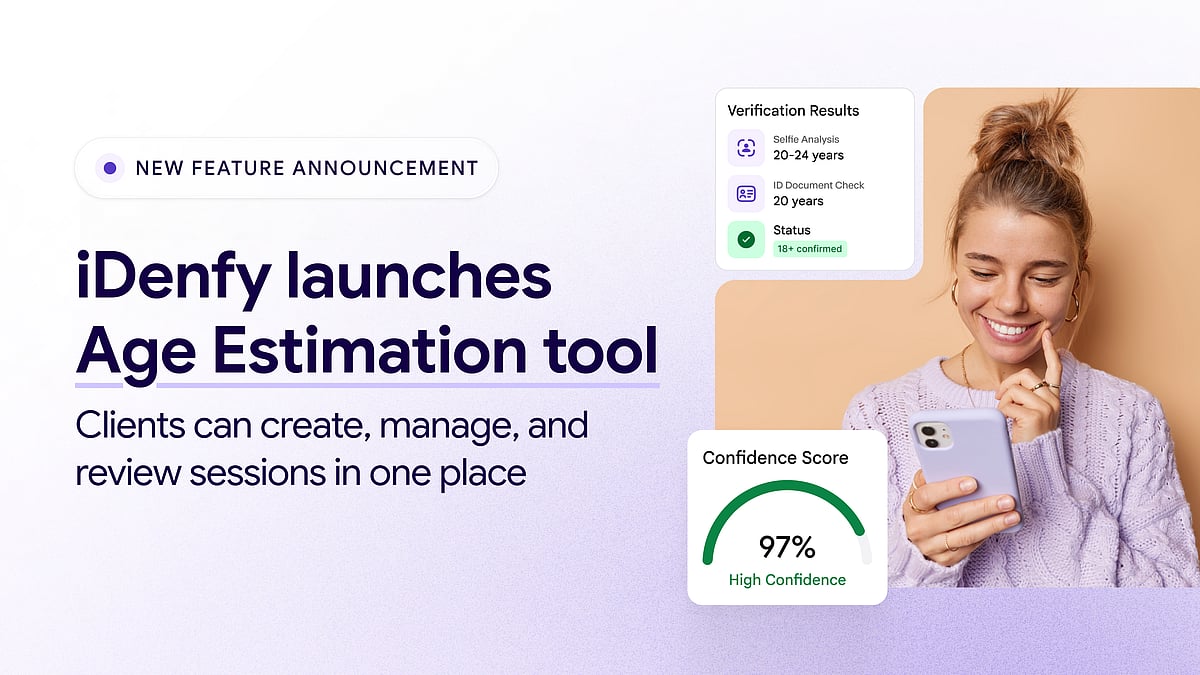
    iDenfy, a global RegTech platform specializing in identity verification and fraud prevention, has announced a significant upgrade to its age verification platform with the introduction of a new Age Estimation tool. This feature allows businesses to estimate a user’s age using a real-time selfie, eliminating the need for an ID document upload in many cases.

    How the Age Estimation Tool Works

    Traditionally, iDenfy’s age verification required users to upload a government-issued ID. With the new Age Estimation add-on, users can simply capture a selfie, and the system analyzes facial features to estimate age within a three-year accuracy gap. Businesses can set a configurable age limit and buffer zone. Users clearly above the threshold pass instantly; those near the limit are automatically routed to a certified ID document check within the same session for final verification.

    Standalone Product with Dedicated Infrastructure

    Unlike a bundled feature, iDenfy has built Age Estimation as a standalone product with its own permission structure, billing model, and API endpoints. This means partners who only need age estimation checks can access it without adopting the full identity verification stack. The dedicated dashboard provides a centralized view of sessions, token generation, and detailed session pages, supported by custom settings and verification URLs.

    Benefits for Businesses and Compliance

    Validated age data reduces the risk of underage access to restricted products while minimizing personal data collection. Because most users pass with just a selfie, companies avoid requiring government IDs from their entire user base. This supports compliance with regulations such as the UK Online Safety Act, EU Digital Services Act, GDPR, and emerging state-level laws in the US and Australia’s under-16 social media restrictions.

    Domantas Ciulde, CEO of iDenfy, commented: “Age estimation only works if the people using it can actually see what’s happening inside each session. We improved our product against disguises such as makeup or a moustache to precisely estimate people’s age and brought it into the dashboard with its own sessions list and detailed view.”

    He added: “Centralizing session creation and results in one dashboard view might sound like a small operational detail, but for partners that run age checks at scale, it removes a lot of manual tracking that used to happen outside our platform.”

    Availability

    The Age Estimation dashboard module is now available to iDenfy partners, who can integrate via API or Dashboard with 24/7 support. For more information, visit iDenfy’s age verification service page.