Category: Digital Communication

  • How to Disable Sensitive Content Warnings on X (Twitter) – Step-by-Step Guide

    How to Disable Sensitive Content Warnings on X (Twitter) – Step-by-Step Guide

    Enable Sensitive Media on the Web

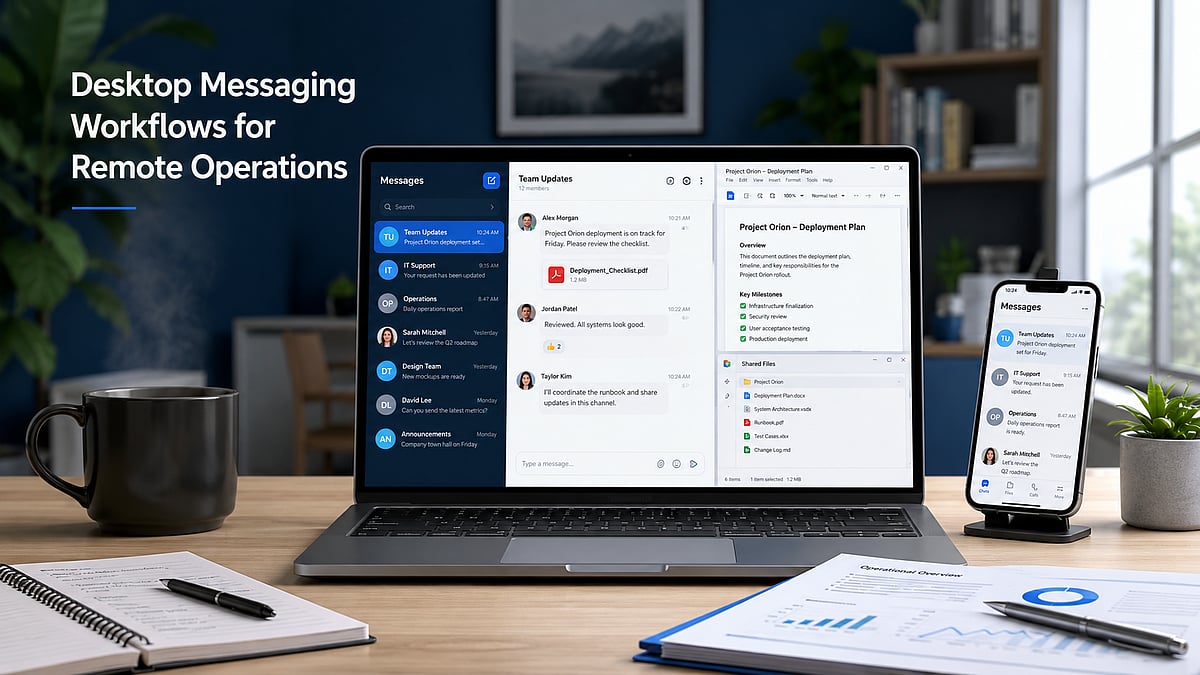
    Log in to your X account from a web browser and navigate to Settings and Privacy. Go to Privacy and Safety, then Content You See. Toggle on the option to display media that may contain sensitive content. Once activated, posts marked as sensitive will appear in your timeline without the usual warning overlay.

    Update Search Settings

    Under Privacy and Safety, open Search Settings and disable the option that hides sensitive content from search results. This allows eligible photos, videos, and posts labeled as sensitive to appear in searches. The change helps you view a wider range of content while still adhering to X’s platform policies.

    Understand Mobile App Limitations

    The availability of sensitive content settings depends on your device. Android users generally have access to these options, while iPhone and iPad users may not due to App Store restrictions. If the setting is unavailable, use the web version of X through your browser instead.

    Refresh Your Account

    After changing your settings, refresh the website or restart the X app to ensure the changes take effect. If sensitive media remains hidden, sign out of your account and log in again. This often synchronizes your updated preferences across different devices and sessions.

    Check Account Eligibility

    Some users cannot access sensitive content due to age restrictions, incomplete profile information, or regional regulations. Verify that your birth date is correct and that your account meets the platform’s eligibility requirements. Certain countries may also impose additional restrictions based on local laws.

    Know What the Setting Changes

    Disabling sensitive content warnings only affects how media is displayed on your account. It does not bypass X’s moderation policies or allow access to illegal or restricted content. Posts removed for policy violations or blocked due to local regulations will remain inaccessible regardless of your settings.

    Troubleshoot Missing Options

    If the sensitive content option is missing, update the X app, clear your browser cache, or try accessing your account from another browser. Some settings are rolled out gradually and may not be available to every user at the same time. Checking X’s Help Center can also provide updated guidance.

  • Step-by-Step Guide to Hiding Your Phone Number on Telegram

    Step-by-Step Guide to Hiding Your Phone Number on Telegram

    Telegram offers robust privacy settings that let you control who can see your phone number. Follow this straightforward guide to keep your number private and communicate securely.

    Open Telegram Settings

    Launch the Telegram app and tap the menu icon (three lines) or the Settings gear icon to access your account preferences.

    Navigate to Privacy and Security

    In Settings, select Privacy and Security. This section contains all controls for your personal information, including your phone number.

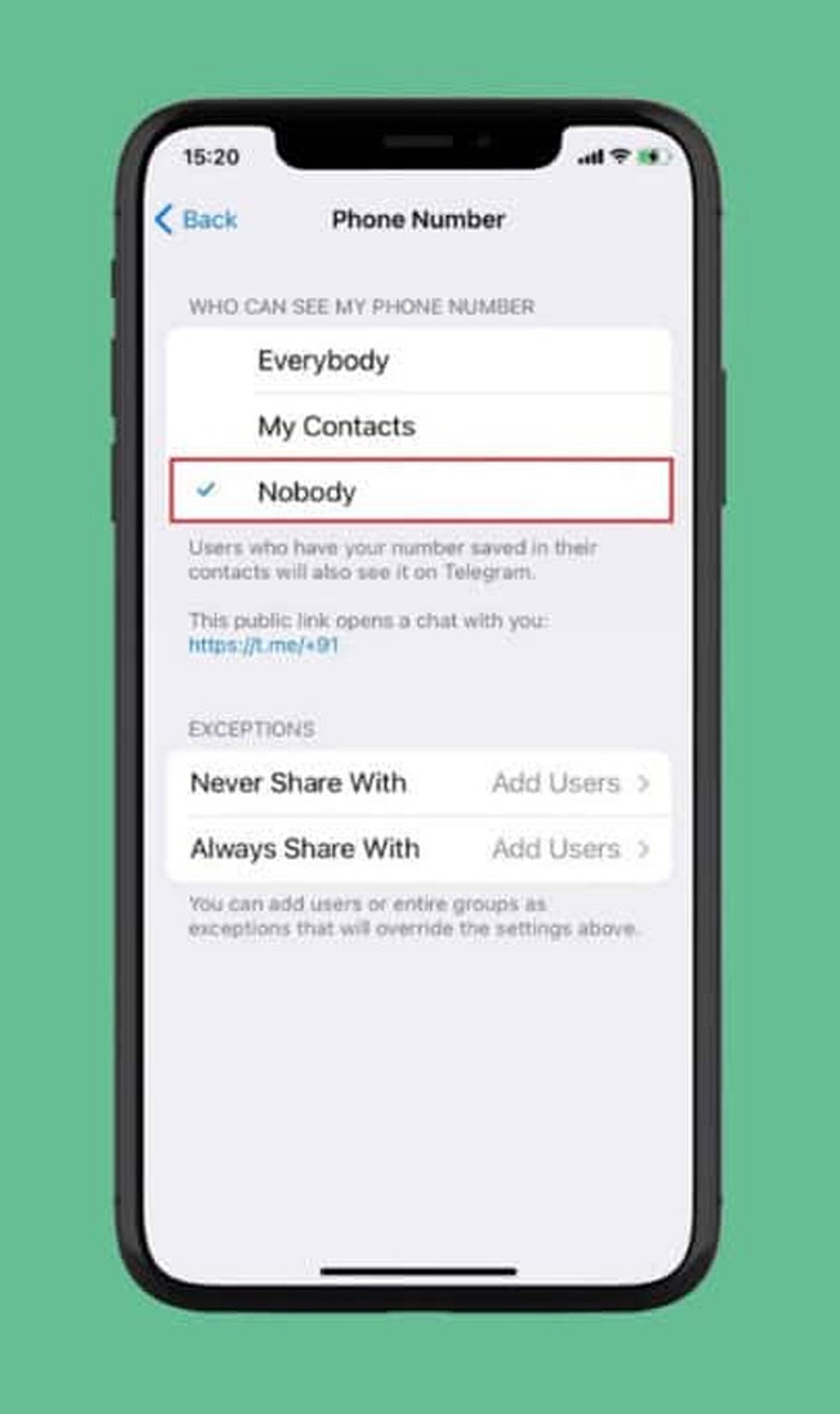
    Select Phone Number

    Under the Privacy section, tap Phone Number. Here you can manage who can view your registered mobile number and who can find you by it.

    Choose Visibility: Nobody

    Set Who can see my phone number to Nobody. This prevents most Telegram users from viewing your number.

    Restrict Number Discovery

    Under Who can find me by my number, select My Contacts. This limits discoverability to people already in your address book, reducing unwanted contact.

    Create a Telegram Username

    Set up a unique username (e.g., @YourName) so others can reach you without needing your phone number. Go to Settings > Username to create one.

    Review Contact-Based Visibility

    People who already have your number saved may still see your account via contact synchronization. Review your contact sync settings and consider deleting synced contacts for tighter control.

    Check Privacy Settings Regularly

    Telegram updates may introduce new privacy options or change existing ones. Periodically revisit your Privacy and Security settings to ensure your preferences remain intact.

    By following these steps, you can significantly enhance your privacy on Telegram and communicate with confidence.

  • How to Refresh Your Instagram Explore Page: Step-by-Step Guide

    How to Refresh Your Instagram Explore Page: Step-by-Step Guide

    Open Instagram Settings

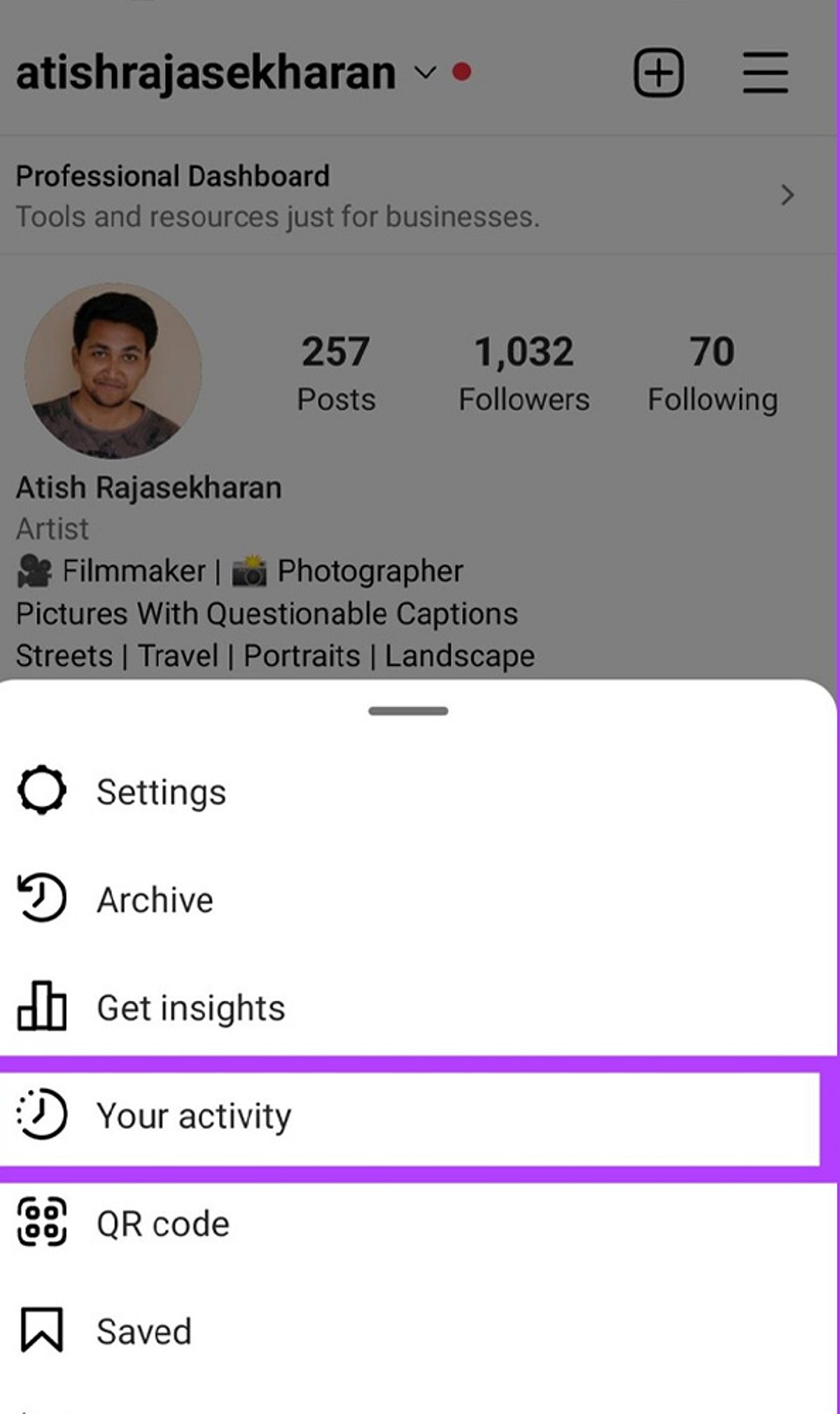
    Launch the Instagram app and tap your profile icon in the bottom right. Then tap the three-line menu (hamburger icon) in the top right and select Settings to begin resetting the content recommendations shown on your Explore page.

    Find Content Preferences

    Within Settings, scroll down and tap Content Preferences. This section houses Instagram’s controls for managing suggested posts and recommendation settings.

    Select Reset Suggested Content

    Tap Reset Suggested Content to refresh recommendations across Explore, Reels, and Feed with a cleaner content profile. Instagram will remove the signals it currently uses to suggest posts.

    Confirm the Reset

    Review the reset information and confirm your choice. This action clears Instagram’s current recommendation signals, giving you a fresh start.

    Refresh Your Explore Page

    After resetting, Instagram gradually rebuilds recommendations based on the content you view and interact with. Be patient—it takes time for the algorithm to learn your new preferences.

    Avoid Unwanted Content

    Use the Not Interested option on posts you dislike to actively tell Instagram what content you want to see less often. This helps refine your Explore page faster.

    Engage With Preferred Content

    Like, save, and share posts matching your interests to help Instagram personalise your Explore recommendations. The more you interact with relevant content, the better the suggestions become.

    Unfollow Irrelevant Accounts

    Unfollow accounts that no longer match your interests to reduce unwanted content influencing your Explore page. A cleaner follow list leads to better recommendations.

    Clear Your Search History

    Clear recent searches to remove old search signals that may continue influencing Instagram’s content recommendations. Go to Settings > Privacy > Search History and tap Clear All.

  • 6G by 2035: 10 Transformative Predictions for the Next-Generation Network

    6G by 2035: 10 Transformative Predictions for the Next-Generation Network

    As the world continues to rely on faster and more intelligent connectivity, researchers and industry leaders are already envisioning the capabilities of 6G networks. Expected to arrive around 2035, 6G promises to revolutionize communication, computing, and daily life. Here are ten bold predictions for what 6G will deliver.

    AI-Native Networks

    Artificial intelligence will be embedded directly into network infrastructure, enabling real-time traffic management, performance optimization, predictive failure detection, and energy efficiency—all without constant human oversight.

    Terabit Speeds

    6G could achieve data rates of up to one terabit per second, making downloads nearly instantaneous and supporting seamless, high-bandwidth digital experiences like 8K streaming and massive data transfers.

    Holographic Communication

    Real-time holographic calls may become practical, allowing lifelike remote meetings, immersive education, and interactive entertainment across global networks, shrinking distances like never before.

    Integrated Sensing

    Networks will not only transmit data but also sense their environment—detecting movement, temperature, and objects—enabling smarter cities, autonomous systems, and industrial automation.

    Space-Air-Ground Connectivity

    A seamless mesh of satellites, drones, and terrestrial towers will provide uninterrupted internet coverage even in the most remote corners of the planet, bridging the digital divide.

    Digital Twins

    Real-time digital replicas of cities, factories, and infrastructure will become commonplace, powered by 6G’s low latency and high bandwidth, enabling better planning, monitoring, and predictive maintenance.

    Extended Reality

    Augmented and virtual reality experiences will become mainstream, with ultra-low latency and massive capacity making immersive environments feel truly natural and responsive.

    Autonomous Transportation

    Self-driving cars, delivery drones, and logistics systems will rely on 6G for split-second communication, ensuring safer and more efficient real-time decision-making on the move.

    Sustainable Networks

    Future 6G infrastructure will prioritize energy efficiency through intelligent resource allocation, renewable energy integration, and environmentally friendly operations, reducing the carbon footprint of connectivity.

    Medical Innovation

    Ultra-fast, reliable 6G connections will enable advanced remote surgeries, continuous patient monitoring, and AI-assisted diagnostics, making healthcare more accessible and effective worldwide.

    These predictions paint a picture of a hyper-connected, intelligent future where 6G serves as the backbone for innovation across industries. While challenges remain, the trajectory toward 2035 is clear—a network that is faster, smarter, and more integrated than anything before.

  • Why Kazuki Hayashi Treats Distribution as the Product Itself — and How Re’s Early Success Proves It

    Why Kazuki Hayashi Treats Distribution as the Product Itself — and How Re’s Early Success Proves It

    Building a consumer social platform is one of technology’s toughest challenges. Many products grab attention early, but few sustain engagement long enough to become lasting networks. According to Kazuki Hayashi, founder of Re, the difference often isn’t the idea—it’s distribution.

    “At the beginning, distribution is not a support function,” Hayashi says. “It is the first proof that the product has a reason to exist.”

    That philosophy drives Re, a social networking platform that connects people within the same generation through shared experiences, interests, and life stages. Rather than broad launches or expensive ads, Re was built around concentrated community growth.

    Before its public expansion, Re attracted a waitlist of over 1,000 users without paid acquisition, with early interest centered on Stanford University and nearby academic communities. Hayashi views that milestone not as a marketing win but as validation that distribution itself can prove a product’s worth.

    “If nobody joins, nothing else matters,” he says. “Ideas are easy to talk about. Real products convince people to move.”

    Re’s strategy focused first on dense university communities where existing social relationships encourage conversation, recommendations, and repeated engagement. “You need an environment where adoption can compound,” Hayashi explains. “Universities already have concentration, trust, and repeated interaction.”

    That approach grew into a campus ambassador model spanning more than thirty universities. Instead of a traditional promo program, the ambassador network was designed as a repeatable system to introduce Re into new communities while preserving the same growth dynamics.

    “I never wanted a launch that became popular for one week and disappeared,” Hayashi says. “The goal was always to build a process that could be repeated.”

    Hayashi argues that distribution should never be separate from the product experience. For network-effect products, the first users determine whether future users find value. “Early social products live or die on momentum,” he says. “The product has to feel alive before the network becomes large enough to sustain itself.”

    That momentum also shapes how Hayashi thinks about retention. While many apps focus on downloads, he believes lasting products are built by improving the quality of users’ earliest interactions. Re introduces people within the same generation, creating a narrower matching environment during first use. “Retention begins with the first meaningful interaction,” he explains. “If people quickly discover conversations that feel relevant, they’re much more likely to come back.”

    Before Re, Hayashi gained experience through entrepreneurship, digital communities, and social media initiatives across Asia before relocating to Silicon Valley. Those experiences shaped a practical approach emphasizing execution, measurable user behavior, and scalable systems over short-term visibility.

    Rather than chasing viral moments, Hayashi believes long-term success comes from repeatable operating principles. “One successful community is encouraging,” he says. “A repeatable system is what eventually builds a company.”

    Industry observers recognize that consumer social remains one of tech’s most competitive categories. Product quality, user experience, community dynamics, and distribution must all succeed simultaneously before network effects emerge. Hayashi believes founders must solve distribution earlier than most expect. “The founders who solve distribution first earn the opportunity to prove everything else,” he says.

    As Re continues expanding through university communities, its early growth strategy offers an alternative perspective: thoughtful distribution should be treated as part of the product itself from the very beginning.

  • Everyday Digital Footprints: How Your Online Activities Reveal Personal Data

    Everyday Digital Footprints: How Your Online Activities Reveal Personal Data

    Every time you search, like, shop, or stream, you leave behind a digital footprint that companies and platforms use to build detailed profiles of your behavior. Understanding these traces is the first step toward protecting your privacy.

    Search History

    Each search query helps search engines compile a comprehensive profile of your interests, habits, preferences, and future purchasing intentions.

    Social Media Activity

    Every like, comment, share, and follow reveals personal interests, relationships, opinions, and behavioral patterns to platforms and advertisers.

    Location Services

    Smartphone GPS continuously records your movements, creating location histories used for navigation, targeted advertising, analytics, and personalized recommendations.

    Online Shopping

    Every purchase, wishlist item, and browsing session provides retailers with valuable insights into your spending habits, product preferences, and future buying behavior.

    Streaming Platforms

    The movies you watch, songs you play, and viewing duration help streaming services personalize recommendations while tracking your entertainment preferences over time.

    Fitness Apps

    Health trackers collect information about steps, sleep, workouts, heart rate, and wellness routines, generating highly detailed personal health profiles.

    Smart Home Devices

    Connected speakers, cameras, and appliances gather usage patterns, voice commands, and automation preferences to improve personalized home experiences.

    Email Activity

    Email providers analyze communication patterns, subscriptions, and interactions to filter spam, personalize services, and improve user engagement.

    Public Wi-Fi Usage

    Connecting to public networks may expose your browsing habits and device information, highlighting the importance of secure internet practices.

  • Meta Platforms Hit by Second Outage in Three Days: Thousands Report Facebook and Instagram Issues

    Meta Platforms Hit by Second Outage in Three Days: Thousands Report Facebook and Instagram Issues

    Meta’s social media platforms Facebook and Instagram experienced another significant outage on July 22, marking the second disruption in just 72 hours. Thousands of users worldwide reported problems accessing the apps, with many turning to X (formerly Twitter) to confirm the widespread nature of the issue.

    Thousands Report Problems

    Outage tracking website Downdetector recorded approximately 3,600 reports from users experiencing difficulties with both Facebook and Instagram. Common issues included trouble logging in, loading feeds, and accessing key features. As with most outage trackers, these figures represent only users who actively reported the problem, suggesting the actual number of affected users may have been higher.

    Another Disruption After Sunday’s Outage

    This latest outage comes just three days after Meta’s platforms suffered a similar disruption on Sunday. During that incident, Downdetector logged more than 4,000 reports for Facebook and over 1,500 reports for Instagram at its peak. Many users reported being unable to sign in, refresh feeds, or use parts of the platforms. Some Facebook users also received the message: “Account Temporarily Unavailable. Your account is currently unavailable due to a site issue. We expect this to be resolved shortly. Please try again in a few minutes.”

    Users Turn to X

    As services went down, users flocked to X to report the outage and confirm whether the problem was widespread. Several posts questioned why Meta’s platforms had experienced two outages in such a short period, while others reacted with humor. The repeated disruptions sparked fresh complaints from users who rely on Facebook and Instagram for communication, work, and content sharing.

    Meta Yet to Respond

    At the time of writing, Meta had not issued a statement explaining the latest outage or whether it was linked to Sunday’s disruption. The company also did not provide details on what caused the technical issues. Users and industry observers are awaiting clarification from Meta regarding the root cause and expected resolution timeline.

  • Why Multilingual Access Is Critical for Modern Messaging Platforms

    Why Multilingual Access Is Critical for Modern Messaging Platforms

    Messaging platforms have evolved far beyond simple chat tools. They now serve as everyday infrastructure for work, community coordination, customer communication, and cross-border collaboration. A single platform may support private conversations, team discussions, public channels, file sharing, support messages, and content distribution across regions.

    As these platforms expand, users evaluate more than just features. They pay close attention to language availability, account safety, login clarity, device compatibility, and whether they are accessing the correct official source. A messaging app may offer strong functionality, but if new users cannot understand the interface, interpret permissions, or verify where they are logging in, adoption slows and trust weakens.

    This is why multilingual access matters. Language is not a cosmetic layer added after product development. In modern messaging ecosystems, it directly shapes comprehension, confidence, and long-term engagement. For global platforms, multilingual access is now part of the product’s core experience.

    Messaging Platforms Are Becoming Global Infrastructure

    Over the past decade, messaging applications have expanded far beyond one-to-one personal communication. They are now used by distributed teams coordinating projects, communities organizing events, educators sharing information, creators broadcasting updates, and businesses offering lightweight customer support.

    This shift has changed the role of messaging ecosystems. A platform may host users from different countries inside the same group, channel, or workstream. One participant may be using a Windows laptop in an office, another a phone during a commute, and another a tablet while traveling. They may also be reading different interface languages while interacting in the same conversation.

    In that environment, usability is closely tied to accessibility. The platform must reduce friction for people with different language backgrounds and different levels of technical confidence. If a participant cannot clearly understand settings, notifications, permissions, or verification messages, then the platform becomes harder to trust and harder to use consistently.

    Global infrastructure works best when the barrier to entry is low. For messaging platforms, multilingual access is one of the most effective ways to lower that barrier.

    How Interface Language Affects Adoption

    Language settings influence the first moments of adoption more than many product teams realize. Registration screens, privacy prompts, notification controls, storage settings, and device permissions all require user understanding. If those elements are unclear, users are more likely to abandon setup, skip important protections, or misconfigure their accounts.

    This becomes especially important for users who are not fully comfortable navigating technical workflows in English. A localized experience can improve setup completion because it helps people understand what the app is requesting and why. When a new user sees a familiar-language version—such as 电报中文版 (Telegram Chinese version)—the benefit is not just convenience. It increases confidence during account creation, profile setup, contact permissions, and early message management.

    Interface language also affects how safely users behave. A misunderstood prompt about contacts, notifications, cloud sync, or session approval may lead to privacy confusion. Likewise, unclear warning messages can make it harder for users to recognize abnormal login activity or suspicious requests.

    Adoption is therefore not only about access to the app, but about clarity inside the app. The more understandable the interface is, the more likely users are to complete onboarding and continue using the platform effectively.

    Localization Beyond Interface Translation

    Real localization is more than translation of menus and buttons. Messaging systems need to be consistent in many ways, ranging from help content, explanations of the verification process, support documentation, security notifications, to account recovery of the accounts.

    For instance, perhaps one of the most frustrating situations for new customers is the moment of verification. If the explanation of the procedure for sending the code, time limits of the process, or behavior of the system in case of confirmation of the device is unclear, users can feel that there is some bug or security issue. The same is true for warnings related to any unknown links, suspicious activity, or actions required to secure the account.

    Also, localization concerns regional specifics of how information is presented. Time format, numbers format, calendar, filenames, notifications language—all these are elements which are not very critical, but make the application more comfortable and natural. Inconsistent use of terms within the same app for mobile and for desktop interface can cause doubt about the consistency of the information in both versions of the app. This consistency is crucial since it is necessary that users could understand what is changed.

    Why Official Access Points Matter

    However, in global messaging markets, the access process is not always clear. The user discovers the platform through search engines, referrals, posts in social networks, or links. During the process, users can be directed to third-party download pages, mirror sites, or websites that look just like the original website.

    This is the reason why official sources for accessing a messaging application are extremely important. First of all, search engine ranking does not mean an official site, and advertisements do not necessarily mean an official website either. It is better for the user to check the domain name, use HTTPS, and make sure of device support.

    When users search for a trusted source such as 电报官网入口 (Telegram official website entry), what they really need is confidence that they are reaching the correct destination before they log in, read support instructions, or choose a platform version. This is especially important in multilingual markets, where unofficial pages may imitate official branding while offering incomplete translations or unclear guidance.

    Official access matters because it shapes the entire trust chain. If the entry point is uncertain, then every step afterward—from download decisions to login confidence—becomes more fragile. Strong messaging ecosystems support trust not just through product design, but through recognizable, verifiable access routes.

    Creating Consistency Across Desktop and Mobile Devices

    Messaging behavior now spans devices by default. Many users register on a phone but spend a large portion of their day working from a desktop or laptop. Others switch between mobile and computer depending on the task—quick replies on a phone, longer reading and file handling on a computer, and occasional use on a tablet.

    A strong messaging ecosystem supports this device flow smoothly. Users expect conversations, read states, file access, contacts, and settings to feel consistent even when the screen and input method change. They also expect session visibility and confirmation prompts to help them understand when a device has been linked or activated.

    Desktop and mobile experiences do not need to be identical, but they should feel connected. If notification behavior is inconsistent, file handling changes unexpectedly, or contact management is difficult to interpret across devices, users may become less confident in the platform.

    Consistency also supports productivity. Teams often rely on messaging tools to coordinate discussions while simultaneously exchanging documents, images, and links. A coherent cross-device experience reduces friction and makes it easier for users to continue a task without re-learning the interface each time they switch screens.

    Protecting Accounts During Device Migration

    Device migration is one of the most sensitive moments in messaging usage. Users upgrade phones, replace laptops, reinstall systems, or move between personal and work devices. During these transitions, account hygiene matters.

    Before switching devices, users should review active sessions and identify which devices are currently connected. This provides a clearer picture of where the account is open and helps reduce the risk of forgotten access points remaining active.

    It is also important for users to pay attention to the usage of verification codes. Verification codes must never be given to strangers or other websites. It is easier to get confused if directions are not clear or if the user is trying to gain back access to an account in haste due to a change in devices.

    Once the transition to a different device has been made, it would be best to terminate or log out all unnecessary sessions. It would be wise to go through recovery possibilities and ensure privacy and security settings still suit the user.

    The Business Value of Multilingual Messaging

    While for businesses, multilingual messaging is a good usability improvement, it also offers tangible value in terms of operations. Customer service representatives become more efficient when users are able to comprehend prompts, menus, and instructions in their native tongue. Multilingual messaging allows teams that operate internationally to save time on explanation of settings and guidance of colleagues on basic actions.

    Multilingual messages are a way to decrease onboarding expenses. Messaging systems used by organizations internally tend to neglect the amount of time needed to onboard new members with notifications, messaging etiquette, file exchange, and group settings. Multilingual messages help decrease this cost.

    Language accessibility opens up additional markets for community growth. This way companies do not have to produce a unique product for every market, while allowing creators, moderators, and customer service representatives to work with a larger audience and maintain a more uniform experience.

    To sum up, multilingual messaging increases trust and decreases misunderstanding.

    The Future of Multilingual Messaging Ecosystems

    The future of messaging ecosystems will likely combine AI-assisted translation with careful human localization. Automated language tools can help users understand incoming content faster, while human review remains important for settings, warnings, and sensitive account guidance.

    We are also likely to see more region-aware safety communication. Instead of generic alerts, platforms may increasingly tailor guidance to local user behavior, common support issues, or language-specific misunderstandings. Cross-platform consistency will remain essential as users expect the same logic to apply across phones, tablets, and desktop environments.

    At the same time, user expectations around official access will grow. As digital ecosystems become more crowded, people will place greater value on recognizable official entry points, clear domain identity, and trustworthy multilingual support materials.

    The messaging platforms that succeed globally will not only offer strong features. They will make those features understandable, reachable, and reliable across languages and devices.

    Conclusion

    Multilingual access has become a foundational capability in modern messaging ecosystems. As messaging platforms serve workers, communities, businesses, and international users, language can no longer be treated as a secondary layer.

    User trust is shaped by three closely connected factors: whether the interface is understandable, whether the official access point is clear, and whether the experience remains consistent across devices. Together, these elements influence adoption, safe usage, and long-term engagement.

    In the next phase of digital communication, the strongest messaging ecosystems will be those that combine global reach with local clarity. Features matter, but comprehension, authenticity, and device confidence matter just as much.

  • How Desktop Messaging Workflows Drive Efficiency in Remote Operations

    How Desktop Messaging Workflows Drive Efficiency in Remote Operations

    Remote work doesn’t mean every conversation should happen on a smartphone. While mobile messaging works for quick replies and urgent alerts, most sustained business activity still occurs on a computer. Employees draft documents, review spreadsheets, attend online meetings, manage browser tabs, and organize project files from a desktop environment.

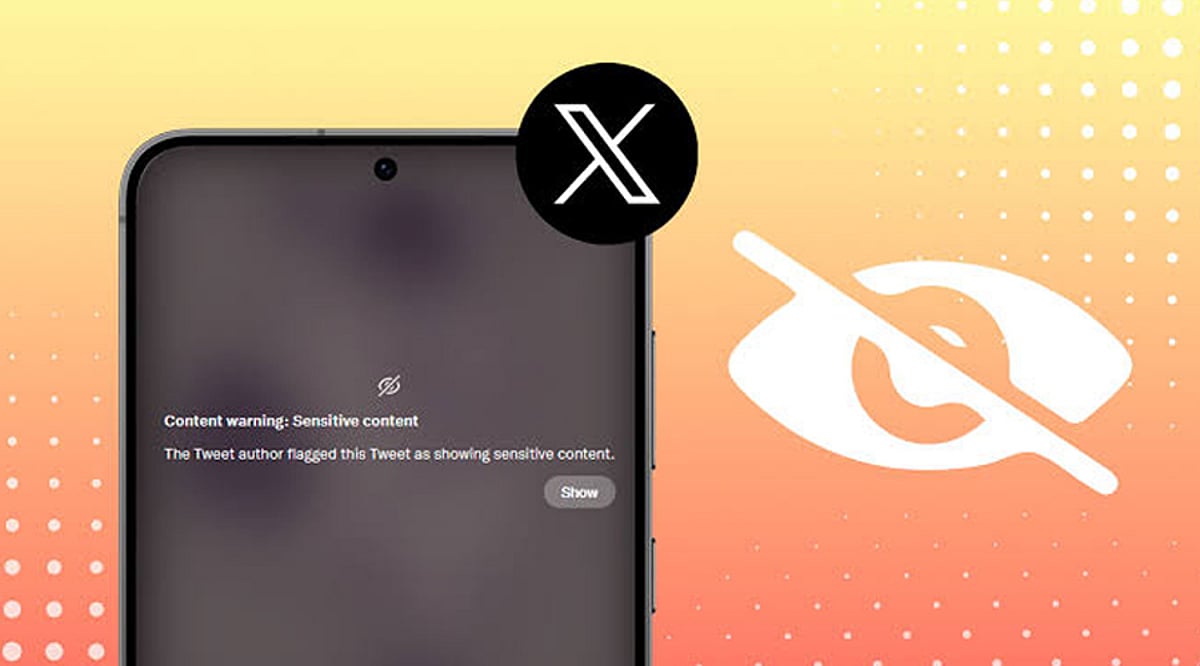
    Desktop messaging applications have become an integral part of the modern digital workspace. They keep communication visible alongside documents, browsers, shared folders, and productivity tools. A team member can receive an update, open the related file, compare information, and respond without switching devices repeatedly.

    However, desktop access alone doesn’t create an efficient workflow. Without clear notification rules, organized download locations, secure installation practices, and session management, messaging apps can cause distraction and file confusion. Remote teams need to treat desktop messaging as an operational system rather than just another communication channel.

    The Return of Desktop-Centered Communication

    The growth of mobile communication hasn’t eliminated desktop work. For many professionals, the computer remains the primary environment for focused tasks, long-form writing, analysis, project management, design, and document review. Desktop messaging supports this environment by allowing users to work across multiple windows. A team member can keep a project discussion open beside a spreadsheet, copy information from a browser into a conversation, or review a shared document while participating in a group chat.

    This is difficult to reproduce efficiently on a phone. Mobile screens are optimized for short interactions, but extended file handling, detailed responses, and multitasking are easier with a keyboard, larger display, and direct access to organized folders. The most effective remote operations don’t choose between desktop and mobile communication—they assign each device a practical role. The computer becomes the primary work environment, while the phone acts as a supplementary device for urgent updates, travel, and short approvals.

    Why Remote Teams Need Persistent Desktop Access

    Persistent desktop access helps remote employees stay connected without interrupting their primary work. Notifications can be reviewed as part of the normal desktop environment instead of requiring repeated checks of a separate phone. This is particularly useful when conversations contain long instructions, technical details, links, or several attachments. Copying a detailed message into a document, responding with formatted content, or comparing multiple files is faster on a computer.

    Teams also benefit when employees can participate in a meeting and follow the related chat simultaneously. One window may contain the video conference, another the project discussion, and another the document being reviewed. Desktop access brings these activities into one coordinated workspace. For users evaluating a solution such as Telegram desktop, the main consideration should be how well the desktop experience supports persistent team access, long-form communication, file handling, and integration with everyday work tools. The value comes from the usage environment, not simply from having a larger version of a mobile app.

    Persistent access should still be managed carefully. Employees should not feel required to respond to every message immediately. Desktop availability is most productive when teams also define reasonable expectations around response time and urgency.

    Managing Notifications Without Losing Productivity

    Messaging applications can improve coordination, but uncontrolled notifications can reduce concentration. When every channel, group, and direct message generates a desktop alert, employees may spend more time reacting than working. Teams should distinguish between urgent and non-urgent communication spaces. Operational alerts, active project incidents, and time-sensitive approvals may justify immediate notifications. General announcements, social discussions, and low-priority updates can often be reviewed at scheduled times.

    Employees should be encouraged to mute low-value groups and disable unnecessary sound or banner alerts. This doesn’t mean ignoring communication—it means choosing a notification system that reflects the importance of each channel. Focus periods are also valuable. A team member working on analysis, writing, or design may reserve specific blocks of time without message interruptions. Colleagues can use a defined urgent channel or another agreed method when immediate attention is genuinely required. A well-managed notification policy protects both productivity and communication quality.

    Organizing Files and Download Locations

    Desktop messaging often becomes an informal file distribution system. Teams exchange reports, images, presentations, contracts, and spreadsheets inside conversations. Without a storage policy, these files can accumulate in a default downloads folder and become difficult to locate later. Organizations should define a standard location for work-related messaging attachments. Files may be moved into project folders, client directories, or approved shared storage after download. Important documents should not remain permanently mixed with personal downloads or temporary installation files.

    Duplicate attachments are another common problem. The same document may be downloaded several times after being shared in different conversations. Employees should regularly remove redundant copies and confirm which version is authoritative before editing. Consistent file naming reduces confusion. Names should identify the project, document type, date, status, and version where relevant. A structured name such as “ClientA_Review_2026-07_v03” is easier to manage than “latest-final-new.” Messaging platforms are effective for delivering files, but they should not automatically become the permanent archive. Final and approved documents should move into a controlled storage location with clear ownership and access rules.

    Verifying Desktop Software Before Installation

    Desktop software should be verified before installation, especially when users discover it through search results, shared links, forums, or third-party download pages. A familiar logo or application name doesn’t by itself confirm that a page is official or trustworthy. Users should inspect the domain carefully and confirm that the site uses HTTPS. Similar-looking domains, added words, unusual subdomains, or unfamiliar redirects should be treated cautiously. Search advertisements may appear prominently, but visibility doesn’t guarantee authenticity.

    The selected download should also match the user’s operating system and device architecture. Employees should confirm that they are choosing the correct Windows version and review the installer’s file name before opening it. Where supported, users can review a file’s digital signature and publisher details through the operating system. Security scanning tools may provide an additional check, although no single scan should be treated as an absolute guarantee. Unexpected permission requests, unclear publisher information, or unusual installation behavior should be reported rather than ignored.

    Managing Multiple Devices and Active Sessions

    Remote employees often access messaging accounts from several devices. A typical setup may include a work computer, personal phone, tablet, and occasionally a temporary or replacement device. This flexibility is useful, but it increases the number of active sessions that must be managed. Users should periodically review connected devices and remove sessions that are no longer required. Old computers deserve particular attention—replaced laptops, repaired devices, and machines transferred to another employee should not remain connected to business messaging accounts.

    Public or shared computers should generally be avoided for business communication. When temporary use is unavoidable, users should not save credentials, should sign out fully, and should verify afterward that the session is no longer active. If a device is lost or stolen, the employee should notify the appropriate administrator, terminate the relevant session where possible, change affected credentials, and review recent account activity.

    Separating Personal and Business Communication

    Remote work can blur the boundary between personal and professional messaging. Employees may use the same device for both, but communication spaces, files, and permissions should remain clearly separated. Business teams can organize projects into dedicated channels, groups, or folders. Sensitive documents should not be forwarded into personal conversations or unrelated community groups. Employees should verify the recipient and destination before sharing confidential material.

    Access should follow job responsibilities. Not every team member needs visibility into every project, client, or internal discussion. Smaller and more relevant communication spaces reduce both information overload and accidental exposure. Offboarding is equally important—when an employee, contractor, or partner leaves, administrators should remove access to work groups, shared files, administrative roles, and related systems promptly. A clear separation policy helps teams preserve professional records while reducing the chance that business information becomes scattered across personal accounts and informal conversations.

    Creating a Secure Cross-Device Workflow

    A secure desktop messaging workflow can be built around a small number of repeatable practices. First, applications should be obtained from trusted and verifiable sources. Employees should avoid unknown download pages, repackaged installers, and unsolicited links. Second, teams should standardize notification rules—urgent communication should be distinguishable from general discussion, and employees should have protected focus time. Third, downloaded files should follow a defined storage and naming process. Important attachments should move from temporary download locations into controlled project folders or shared storage. Fourth, active devices and permissions should be reviewed on a regular schedule. A monthly review can identify old sessions, unnecessary group access, and outdated member permissions. Finally, desktop and mobile applications should be kept updated through approved channels. Updates may address compatibility, stability, and security issues.

    Remote Messaging Workflow: Message → File → Review → Archive

    Desktop messaging tools deliver the most value when they are integrated into the wider office workflow. Their purpose is not simply to reproduce mobile conversations on a larger screen—they support persistent communication, multitasking, detailed responses, file handling, and coordination across documents, meetings, and browser-based tools. Remote teams must manage this convenience carefully. Notification overload can reduce productivity, unorganized downloads can create version confusion, and unmanaged sessions can increase security risk. A reliable desktop messaging workflow combines trusted software sources, clear notification expectations, structured file storage, device oversight, and appropriate access controls. When these elements work together, messaging becomes part of an efficient remote operations system rather than a constant source of interruption.