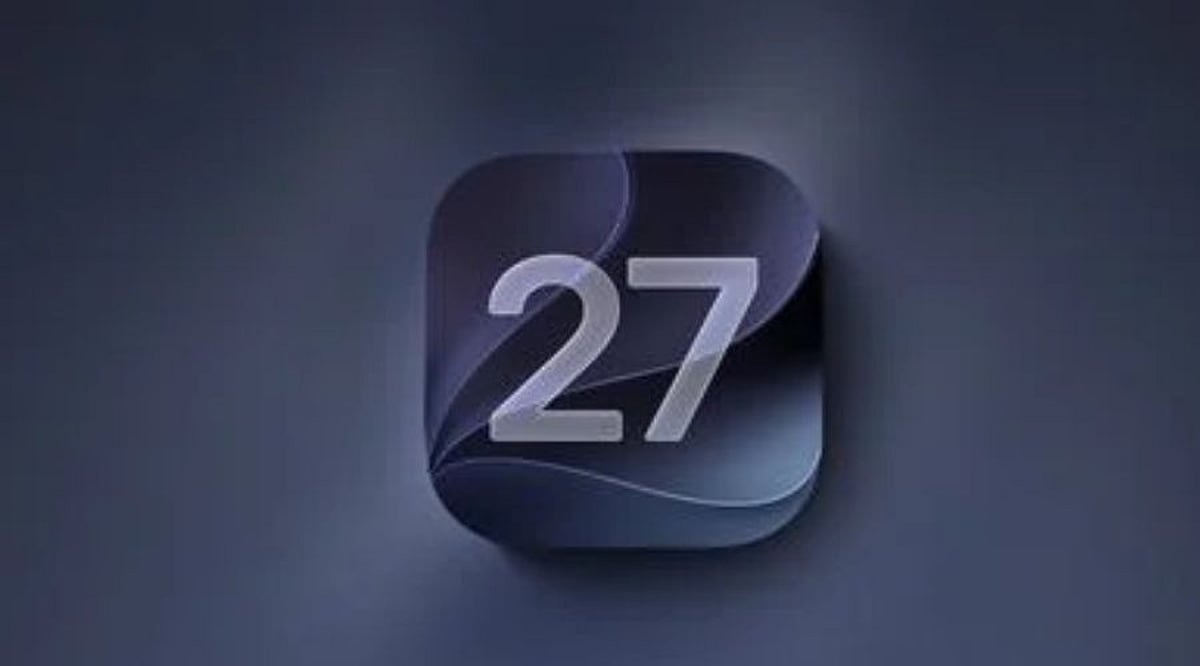
Tag: iOS 27

  • Apple Reveals iPhone 18 Pro Exclusive Camera Controls for iOS 27

    Apple Reveals iPhone 18 Pro Exclusive Camera Controls for iOS 27

    Apple has quietly updated its official support documentation to clarify which devices will support the new Texture and Grain controls introduced with iOS 27. According to the latest information, these exclusive camera features are available only on the iPhone 18 Pro models and the iPhone Duo.

    When the iPhone 18 Pro was first announced, Apple’s Newsroom documentation suggested that the updated Photographic Styles and the accompanying Texture and Grain controls might be available on a broader set of iPhone models. However, the company has since refined that wording, and the current iPhone support page explicitly states that texture adjustments are limited to the iPhone 18 Pro lineup.

    The new controls are part of Apple’s upgraded Photographic Styles system, offering users more creative flexibility. The Texture setting lets photographers alter the visual treatment of an image, while the Grain control adds a film-like effect. Users can choose from presets such as Soft Skin, Glow, and Film, and then adjust the intensity to their preference.

    This update also affects older models like the iPhone 16 and iPhone 17 series, which were previously understood to support the feature based on Apple’s initial wording. Reports this week confirmed that those devices will not receive the new controls.

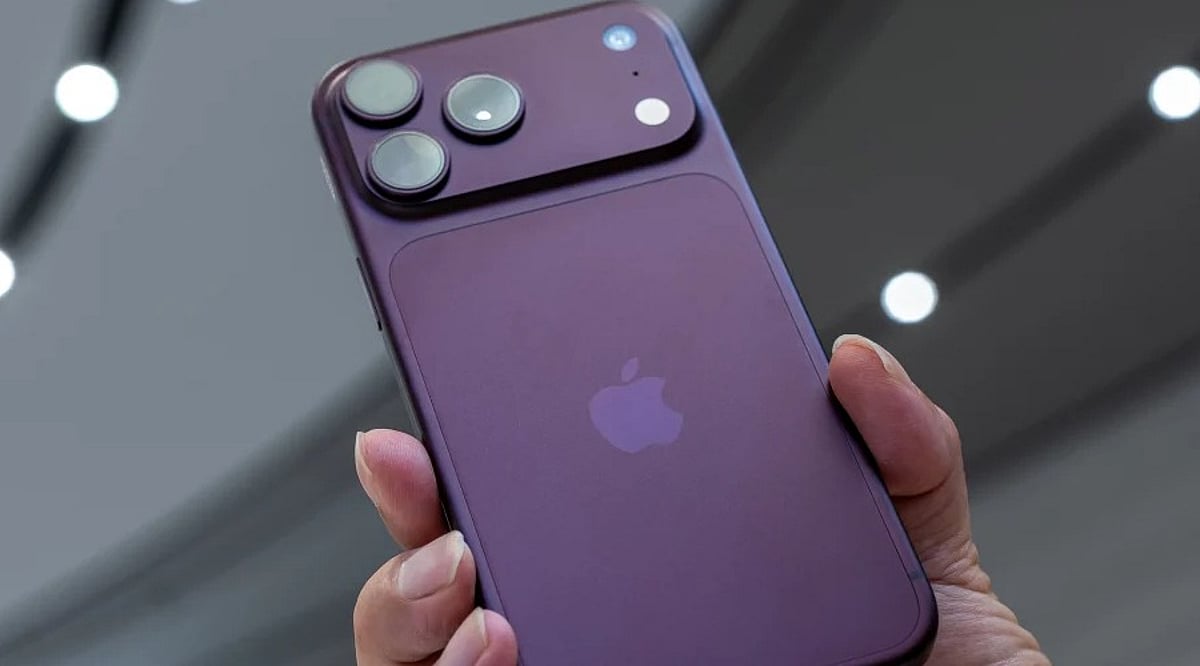
    In addition to the software enhancements, the iPhone 18 Pro features a 48MP Fusion Main camera with a variable aperture. This allows the camera to automatically adjust for lighting and depth of field, while manual aperture control is available through the Camera app for users who want a more hands-on approach.

  • iOS 27 Siri AI: Apple’s Context-Aware Assistant Makes Your iPhone More Personal

    iOS 27 Siri AI: Apple’s Context-Aware Assistant Makes Your iPhone More Personal

    With iOS 27, Apple is reimagining Siri as a context-aware AI assistant that goes far beyond simple voice commands. Instead of just setting alarms or checking the weather, Siri can now pull from your personal data, understand what’s on your screen, use the camera view, and draw on live web information to complete complex, multi-step tasks.

    Personal Context: Siri Works Across Your Apps and Data

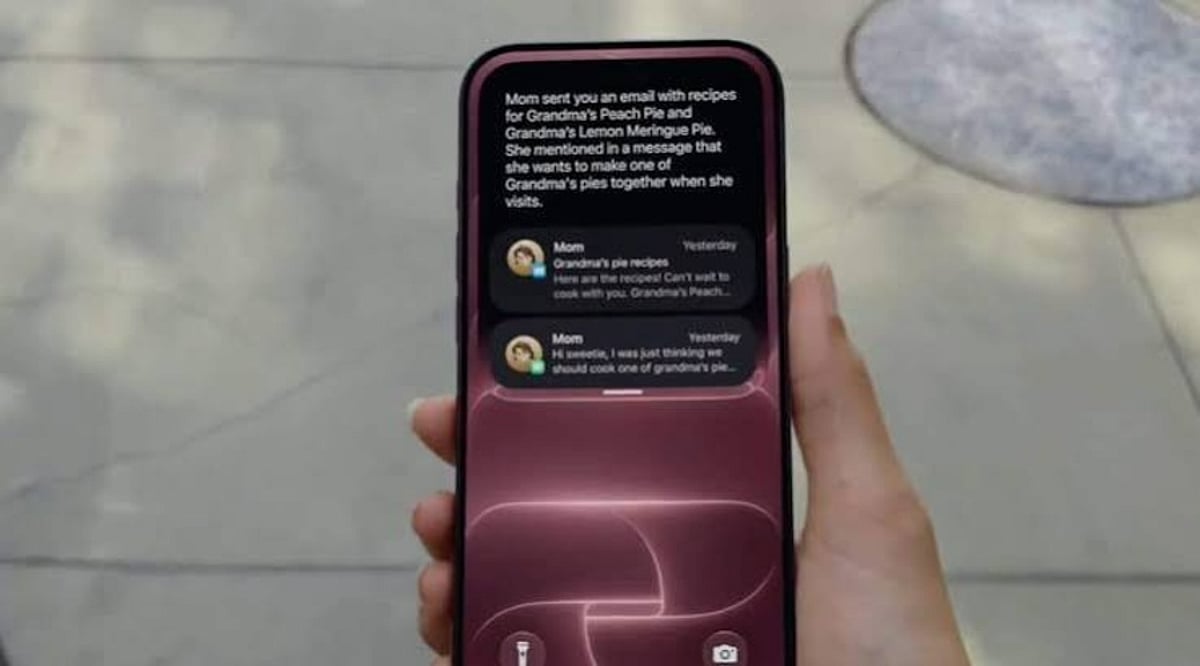
    The biggest shift in iOS 27 is Siri’s access to personal context. On supported iPhones, Siri can search through Messages, Mail, Photos, Calendar, Notes, and other supported apps to find relevant information. Ask for photos from a Lisbon trip and Siri can retrieve them. If a family member shares a recipe in Messages and the ingredients arrive by email, Siri can pull those details into Reminders for you.

    Beyond finding information, Siri can also act on it. The assistant can draft emails, edit and share photos, add items to a grocery list, and interact with more third-party apps. Apple confirms support for WhatsApp and Audible, with additional actions for Outlook, Notability, and Tripsy arriving soon.

    Visual Intelligence: Siri Understands Your Screen and Camera

    Siri AI can see and interpret content displayed on your iPhone. Open a class note with a diagram and ask for an explanation—Siri will analyze the visible content and can take a related action. According to Apple Support, Siri AI works with images, PDFs, notes, and files through Visual Intelligence.

    The camera also becomes part of the assistant’s understanding. Siri mode in the Camera app can use the live view to answer questions, search for details, and initiate actions, such as splitting a bill and sending payments with Apple Cash or adding a custom pass to Wallet.

    World Knowledge and Conversational Continuity

    Siri AI taps into broad web knowledge to answer questions about sports scores, vacation planning, or nearby coffee shops. Responses can combine private device data with fresh public information.

    A new Siri app stores past conversations, and iCloud syncs that history across iPhone, iPad, Mac, Apple Watch, and Apple Vision Pro. You can also invoke Siri via the side button, Dynamic Island, Spotlight on iPad and Mac, and system context menus. The assistant maintains context across follow-up requests, so you can build on a task without starting over.

    Privacy and Device Requirements

    Apple says privacy remains a core part of the design. The system orchestrator uses the on-device Spotlight index and App Toolbox to keep personal data under user control. Some Apple Intelligence features rely on server-side models, which may come with daily usage limits that vary based on request complexity and system demand.

    As for compatibility, Siri AI requires an iPhone 15 Pro, iPhone 15 Pro Max, or iPhone 16 models or later. While iOS 27 installs on a wider range of iPhones, not every device gets the full Siri AI experience.

    Availability and Language Support

    Siri AI launches in English as a beta, with French, Japanese, Korean, Portuguese, and Spanish support planned for October. Apple will not initially offer Siri AI on iOS, iPadOS, and watchOS in the European Union, and the feature won’t be available in China while regulatory approvals are underway.

    FAQs

    What is new about Siri in iOS 27?

    Siri gains access to personal context, screen content, camera input, supported apps, and web knowledge, enabling more complex multi-step tasks.

    Can Siri search my personal information?

    Yes. On supported devices, Siri can find relevant information across areas such as Messages, Mail, Photos, Calendar, and Notes.

    Can Siri understand what’s on my iPhone screen?

    Yes. Siri can work with visible content such as images, PDFs, notes, files, and diagrams through Visual Intelligence.

    Which iPhones support Siri AI?

    Apple lists the iPhone 15 Pro, iPhone 15 Pro Max, and iPhone 16 models or later for the new Siri AI capabilities.

    Is Siri AI available everywhere?

    No. It launches in English beta, with additional languages planned for October. Apple says availability is initially restricted in the European Union and China.

  • Maximizing Siri AI on iPhone 18 Pro: Features, Tips, and What’s New in iOS 27

    Maximizing Siri AI on iPhone 18 Pro: Features, Tips, and What’s New in iOS 27

    Apple’s Siri AI has officially arrived in India with iOS 27, bringing a more intelligent and context-aware voice assistant to compatible iPhones. The feature launched on September 14 and comes pre-installed on the iPhone 18 Pro. Currently in beta, Siri AI supports English and requires users to join a waiting list. Apple also enforces daily limits on server requests to manage load.

    Deeper Access to iPhone Data

    The updated Siri can search across Messages, Mail, and Photos. Users can ask Siri to retrieve specific details, such as booking codes from older emails. During business calls, Call Context can display relevant information like a booking number automatically.

    Screen Awareness and App Integration

    Siri AI now understands content on your screen. For example, you can ask it to turn a sports fixture list from a webpage into calendar entries. Activate Siri via the wake phrase, side button, or a swipe down from the Dynamic Island.

    Visual Intelligence in Camera

    Visual Intelligence works through the Camera app as a Siri mode. Point your camera at a printed schedule, such as a wedding card, and ask Siri to extract relevant details.

    Third-Party App Support

    Siri AI integrates with third-party apps. Apple specifically mentions WhatsApp for sending messages via voice commands. Audible playback is supported, and apps like Microsoft Outlook, Notability, and Tripsy are slated for upcoming support.

    Writing, Dictation, and Shortcuts

    Writing Tools can draft and rewrite text in any app where you type. Siri can adapt its writing style to match yours. Dictation gets an upgrade via Apple’s AFM Core Advanced model, adding punctuation and formatting as you speak. The Shortcuts app now accepts plain-language instructions—just describe the action you want instead of manually building each step.

    Price Tracking and Personal Organization

    Safari’s Notify Me feature monitors webpages for changes, including restocks and price drops. Calendar and Reminders can add events and list items through spoken instructions. Siri AI maintains conversation history across devices via iCloud, so chats continue seamlessly on Mac, iPad, Apple Watch, or Vision Pro.

    Language Support in India

    Siri AI launched with English only. French, Japanese, Korean, Portuguese, and Spanish are scheduled to arrive next month, but Apple has not announced a timeline for Hindi. The feature works on iPhone 15 Pro and later models, including the iPhone 18 Pro and iPhone Duo.

  • Tech News Roundup: iOS 27 Visual Intelligence, Redmi Note 17 Pro, Galaxy Z Fold 8 and More

    Tech News Roundup: iOS 27 Visual Intelligence, Redmi Note 17 Pro, Galaxy Z Fold 8 and More

    Today’s Tech News at a Glance

    On September 17, 2026, the tech world is buzzing with fresh updates from Apple, Xiaomi, Samsung, and Oppo. Here are the top stories leading today’s headlines.

    iOS 27 Visual Intelligence

    Apple’s iOS 27 update is making waves with a new Visual Intelligence experience, giving iPhone users smarter ways to interact with the world around them through the camera and on-device AI.

    Redmi Note 17 Pro’s Huge Batteries

    Xiaomi’s Redmi Note 17 Pro is in the spotlight for its reportedly massive battery capacity, a feature that could set a new benchmark for mainstream smartphones.

    Galaxy Z Fold 8 Sales

    Samsung’s Galaxy Z Fold 8 continues to dominate discussions as fresh sales numbers and market momentum make it one of the most talked-about foldables of the year.

    Oppo Watch S2 and iPhone 18 Pro Delays

    Oppo is also trending with the Watch S2, while Apple faces reports of delayed iPhone 18 Pro deliveries, leaving some customers waiting longer than expected.

    More in the Tech Spotlight

    Related coverage includes the Xiaomi Redmi Note 17 Pro Max, the best smartphones under Rs. 40,000 in 2026, and Xiaomi’s Diwali Sale 2026 discounts on devices like the Xiaomi 17 Ultra and Redmi Note 15 SE.

    Stay connected for more updates as these stories develop.

  • Apple’s iOS 27 Introduces Impersonation Risk Detection to Combat iPhone Scams

    Apple’s iOS 27 Introduces Impersonation Risk Detection to Combat iPhone Scams

    Apple has unveiled a new security feature in iOS 27 designed to shield iPhone users from impersonation-based scams. Dubbed Impersonation Risk Detection, the tool identifies signs that a user may be caught in an active social engineering attack, particularly when they are about to make a payment or modify sensitive account information.

    Scams involving fake banks, government agencies, delivery services, and even impersonation of known contacts have become increasingly prevalent. Apple says the feature is engineered to detect suspicious activity and alert users before they complete potentially harmful actions.

    How Apple’s Impersonation Risk Detection Works

    According to Apple, the feature protects users from active social engineering scams where an attacker impersonates a trusted entity—such as a bank, government agency, or a familiar person—and pressures the victim into making a payment or altering account details.

    Impersonation Risk Detection analyzes information about the iPhone or iPad and the user’s Apple Account to identify signs of suspicious activity. When a supported app requests an assessment during a potentially risky action, the system generates a risk level that the app can use to determine subsequent steps.

    There are three risk levels: Unknown, Medium, and High. Unknown means no evidence of suspicious activity was detected, though Apple notes this does not confirm an action is safe. Medium indicates some signs of suspicious activity, while High means significant signs were detected.

    Importantly, the app does not receive the underlying information used to generate the assessment. It only receives the resulting risk level and can decide how to respond.

    How to Enable the Feature

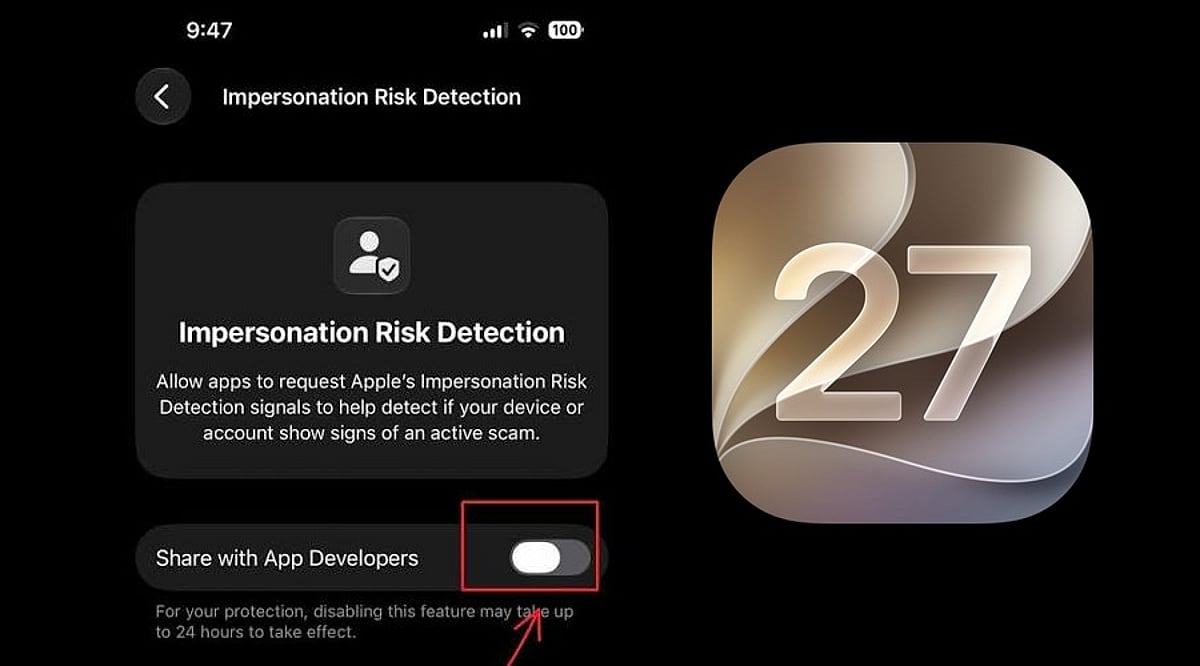
    Users can turn on Impersonation Risk Detection by opening Settings, tapping Privacy & Security, scrolling down, and selecting Impersonation Risk Detection. They then need to toggle on Share with App Developers. Users may also need to sign in to the App Store with their Apple Account.

    The feature can be controlled on an app-by-app basis. However, Apple warns that it depends on supported apps and that its risk assessment does not guarantee an action is safe. The company emphasizes that this feature is not designed to replace other security measures or user caution.

  • iOS 27 Hands-On: Apple Intelligence Puts AI at the Core of the iPhone

    iOS 27 Hands-On: Apple Intelligence Puts AI at the Core of the iPhone

    Apple’s iOS 27 update signals a turning point for the iPhone: artificial intelligence is no longer a side feature but the backbone of the user experience. Powered by Apple Intelligence, the new OS enhances Siri, the Camera, Photos, and writing workflows — making the device more proactive, context-aware, and capable of handling complex tasks across apps.

    Siri AI Takes Center Stage

    With iOS 27, Siri becomes far more than a voice assistant. The upgraded Siri AI understands personal context, what’s on the screen, and natural language requests while executing actions across different apps. Users can ask it to find information buried in emails, photos, and notes, draft content, answer questions, and carry on continuous conversations through Siri’s dedicated app.

    Personal Context Gets Smarter

    Siri AI now draws on messages, emails, photos, and saved notes to deliver more relevant answers. Rather than interpreting isolated commands, it can locate specific details and connect information across apps, creating a more integrated assistant that works with data already stored on your iPhone.

    The Camera Becomes a Visual AI Assistant

    Visual Intelligence arrives in the iPhone Camera, letting users ask questions about objects, text, and situations visible in the viewfinder. Siri can then identify what it sees, offer relevant information, and trigger actions based on the scene. This moves AI beyond chat into everyday visual tasks.

    AI-Powered Photos and Creative Tools

    The Photos app receives new AI-driven editing tools that simplify adjustments. Apple is also expanding Image Playground with the ability to generate photorealistic imagery from natural-language prompts. Together, these features let users edit and create visual content without relying solely on traditional controls.

    Writing Assistance Gets an AI Upgrade

    Apple Intelligence brings writing support directly into iOS 27 workflows. Users can generate first drafts, get feedback, and fine-tune style or tone for different audiences. The goal is to make AI writing assistance feel native to the iPhone rather than an add-on chatbot experience.

    Hardware Limits Remain

    Not every iPhone can run the full Apple Intelligence suite. Siri AI requires an Apple Intelligence-enabled device, including iPhone 15 Pro models and iPhone 16 or later. That leaves a clear gap between supported models and older iPhones that continue to run iOS 27 without the advanced capabilities.

    AI Is Becoming the Interface

    iOS 27 shows Apple moving AI from an optional extra to a core layer of the iPhone experience. Siri, Camera, Photos, writing tools, and cross-app actions all depend on behind-the-scenes intelligence. The result is an iPhone where AI quietly powers how everyday tasks get done.

  • Daily Tech Roundup: India’s Semiconductor Push, AI Health Agent Funding, Graduate Job Market, Crypto Regulation, and iOS 27 Security

    Daily Tech Roundup: India’s Semiconductor Push, AI Health Agent Funding, Graduate Job Market, Crypto Regulation, and iOS 27 Security

    What’s New Today

    Today’s roundup spans five distinct storylines shaping the tech and business landscape: SEMICON India 2026 opening in the capital to spotlight the country’s shift from chip policy to chip production; an Italian healthtech startup raising fresh funds to bring its AI claims-processing agents to hospitals across Europe; a fresh look at why recent college graduates are struggling to find jobs beyond the usual AI blame game; India’s Parliamentary panel on virtual digital assets waiting on the government before finalising its report; and Apple rolling out a new iOS 27 feature to guard iPhone users against impersonation scams.

    Fast-Track Insights

    • SEMICON India 2026 opened as a three-day event from September 17, showcasing the semiconductor industry’s journey from raw silica to finished chips, part of an industry valued at USD 900 billion globally.
    • Health Force, an Italian platform where three out of four insurance claims at major hospital groups are processed without staff involvement, raised €4.2 million in seed funding to expand its AI agents across European hospitals.
    • A fresh analysis pushes back on the narrative that AI alone explains why recent college graduates are struggling to land jobs, pointing to broader economic and educational disruptions at play.
    • The Parliamentary Standing Committee on Finance has wrapped up its discussions on virtual digital assets and is now waiting for the government’s response before submitting its report on regulation.
    • Apple introduced Impersonation Risk Detection in iOS 27, a security feature that flags signs of social engineering scams, especially when users are about to make a payment or change sensitive account details.

    SEMICON India 2026: Unpacking India’s Strategic Push For Chip Manufacturing

    Picture a grain of sand. Ordinary silica, dug out of a beach or a quarry, worth almost nothing. Now picture that same sand purified to 99.99 per cent purity, sliced into a wafer thinner than a fingernail, and etched with billions of nodes. That transformation — sand into silicon converted to a working brain of glass and metal — is precisely the USD 900 billion business model of the semiconductor industry that will be displayed in full splendour at the three-day SEMICON India 2026, scheduled to be held here from September 17.

    Health Force nets €4.2M to deploy its AI agents across Europe

    In the largest private hospital groups in Italy, three out of four insurance claims are processed from start to finish without any staff involvement, while the remaining claims are returned to staff with specific instructions on what to review. Health Force, the platform behind it, has raised €4.2 million in seed funding to introduce this process to other hospitals throughout Europe.

    For recent college grads, there are reasons bigger than AI that some are not finding jobs

    The popular press is full of stories on the bleak economic outlook of recent college graduates. Journalists are tapping into real fears among students, parents, educators and policymakers about the value of college and the uncertainty of careers. However, there is a tendency among reporters and commentators to focus on the educational and economic disruptions wrought by artificial intelligence. A fresh analysis pushes back on that narrative, pointing to broader economic and educational disruptions at play.

    Crypto Regulation: Government Response Expected Next Week, Finance Panel To Submit Report

    India does not have a comprehensive regulatory framework for virtual digital assets (VDAs), although the sector is covered by taxation and anti-money laundering requirements. The government has been examining how VDAs should be dealt with as the market and related risks evolve. Meanwhile, the Parliamentary Standing Committee on Finance has concluded its discussions on VDAs and is now awaiting the government’s response before preparing its report. The committee’s study, A Study on Virtual Digital Assets (VDAs) and Way Forward, has been under discussion for around a year.

    iOS 27 Adds Impersonation Risk Detection to Block iPhone Scams

    Apple introduced a new security feature in iOS 27 designed to protect iPhone users from impersonation-based scams. Called Impersonation Risk Detection, the feature can identify signs that a user may be caught in an active social engineering scam, particularly when they are about to make a payment or change sensitive account information. Scams involving fake banks, government agencies, delivery services, and even people users know have become increasingly common. Apple says the new feature is designed to detect suspicious activity and alert users before they complete potentially risky actions.

    Join our WhatsApp Channel to get the latest news, exclusives and videos on WhatsApp.

  • Apple iOS 27: Smarter Siri, AI Features, and a Fresh iPhone Experience

    Apple iOS 27: Smarter Siri, AI Features, and a Fresh iPhone Experience

    Apple has begun rolling out iOS 27 to supported iPhones, starting September 14, 2026. The Cupertino-based tech giant warns that not all eligible devices will receive the update simultaneously, so users should first confirm their iPhone is supported and the update is available in their region.

    iOS 27 introduces a redesigned look, a stronger emphasis on artificial intelligence, and several practical enhancements. Key updates include a smarter Siri capable of handling more natural conversations and understanding context across apps, new Apple Intelligence features, improved call tools, and updates to Messages, Photos, Maps, and the Phone app.

    Apple Maps now offers the Flyover experience, using aerial imagery and Visual Intelligence to deliver detailed route views. Siri can also work across supported apps, making it a more integrated assistant.

    Eligible devices range from iPhone SE (2nd Generation) to iPhone 17 Pro Max, with iPhone 18 Pro, iPhone 18 Pro Max, and iPhone Duo also included. Rollout timing may vary by region.

    To install iOS 27, go to Settings > General > Software Update, select iOS 27, and follow on-screen instructions. Apple recommends backing up your device, using a stable Wi-Fi connection, and ensuring sufficient free storage.

    The real test will be daily use. If Siri can understand on-screen content and help across apps, AI may shift from an extra feature to a natural part of the iPhone experience. Apple demonstrates that a major phone upgrade doesn’t always require new hardware. For supported iPhone users, iOS 27 offers a fresh experience without purchasing a new device.

  • Today’s Top Tech News: iPhone 18 Pro, iOS 27, A20 Pro Chip, and AI Safety Concerns

    Today’s Top Tech News: iPhone 18 Pro, iOS 27, A20 Pro Chip, and AI Safety Concerns

    Apple’s latest flagship, the iPhone 18 Pro, along with iOS 27 and the new A20 Pro chip, dominate today’s tech headlines. Samsung’s roast of Apple’s launch, growing AI safety concerns, and Apple’s upcoming foldable iPhone Duo also make waves.

    Published on 11 Sep 2026, this roundup covers the most important developments in consumer technology. The iPhone 18 Pro promises significant performance gains thanks to the A20 Pro processor, while iOS 27 introduces new features and security enhancements. Meanwhile, Samsung’s social media posts trolling the iPhone 18 launch have sparked online debates. On the AI front, safety discussions intensify as regulators and companies seek to balance innovation with responsible deployment. Apple’s foldable iPhone Duo, expected to compete with Samsung’s Galaxy Z Fold 8, remains a hot topic among enthusiasts.

  • 15 Best iPhone Duo Split View App Pairs to Boost Your Productivity

    15 Best iPhone Duo Split View App Pairs to Boost Your Productivity

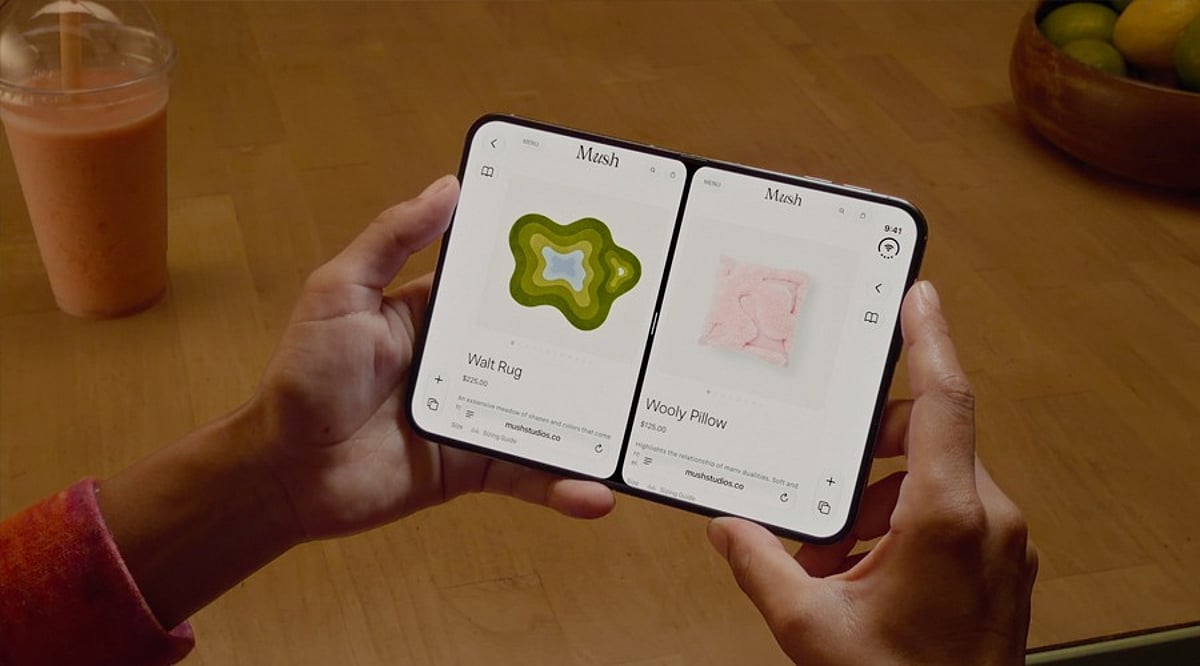
    Apple’s iPhone Duo, the company’s first foldable iPhone, launched globally on September 9, 2026, with iOS 27. Its 7.6-inch inner display brings Split View multitasking, allowing users to run two apps side by side. This feature is designed to enhance productivity, streamline research, simplify communication, and make shopping and entertainment more efficient.

    Why Split View Multitasking Matters

    The iPhone Duo’s larger screen transforms how you interact with your device. Instead of constantly switching between apps, you can keep two apps visible simultaneously, creating powerful workflows. Apple also supports running two windows of the same app and saving frequently used app pairs for quick access.

    Top 15 App Pairs for iPhone Duo

    1. Safari + Notes

    Perfect for research, this pair lets you browse the web while jotting down key points without losing your place. It’s ideal for students, writers, and anyone gathering information.

    2. Mail + Calendar

    Streamline your professional routine by viewing your schedule while composing emails. This pair helps you manage appointments and correspondence efficiently.

    3. ChatGPT + Claude

    For AI enthusiasts, comparing responses from two leading AI assistants side by side can provide deeper insights, help with brainstorming, and validate information.

    4. Safari + ChatGPT

    Combine web research with AI assistance. Ask ChatGPT to summarize articles, answer questions, or generate ideas while keeping the source page open.

    5. Maps + Apple Music

    Navigate hands-free while controlling your music. This pair is perfect for road trips or daily commutes, keeping both directions and entertainment within reach.

    6. Maps + Messages

    Coordinate meetups without losing your way. Keep directions visible while texting friends or colleagues about arrival times or changes in plans.

    7. Files + Mail

    Attach files directly from the Files app while composing an email. This pair simplifies document sharing and reduces the need to switch between apps.

    8. Slack + Zoom

    Stay connected with your team during video meetings. View chat messages while on a call, ensuring you don’t miss important updates or questions.

    9. Safari + Safari (Two Windows)

    Compare products, prices, and specifications across two websites side by side. This is a game-changer for online shopping and research.

    10. Safari + Shopping App

    Use a shopping app like Amazon or eBay alongside Safari to check reviews, compare prices, and find the best deals without switching tabs.

    11. YouTube + Notes

    Watch tutorials or lectures while taking notes. This pair is excellent for online learning, skill development, and research.

    12. Photos + Messages

    Share photos effortlessly during conversations. View your photo library while chatting, making it easy to send the perfect image.

    13. Calendar + Reminders

    Plan your day by viewing your schedule and task list together. This pair helps you manage time and stay on top of deadlines.

    14. Weather + Maps

    Check the forecast while planning your route. This is especially useful for outdoor activities, travel, and daily commuting.

    15. Podcasts + Notes

    Listen to podcasts while jotting down key takeaways. This pair is great for learning and capturing ideas from audio content.

    Making the Most of App Pairs

    The best app pair depends on your unique workflow. Apple allows you to save your favorite combinations for one-tap access, turning Split View into a repeatable workflow. Whether you’re working, traveling, shopping, or learning, the iPhone Duo’s multitasking capabilities offer a more efficient and enjoyable experience.

    Apple CEO John Ternus called the iPhone Duo “the most transformational change to iPhone since the original,” highlighting its larger display and productivity-boosting potential. With the right app pairs, you can truly unlock the power of this innovative device.