Category: Augmented Reality

  • Everyday Augmented Reality: 10 Surprising Ways AR Transforms Your Daily Life

    Everyday Augmented Reality: 10 Surprising Ways AR Transforms Your Daily Life

    Augmented reality (AR) is no longer a futuristic concept — it’s already woven into many of our daily routines. From shopping to fitness, AR enhances how we interact with the world. Here are ten everyday uses of augmented reality you might not have known about.

    1. Virtual Furniture Placement

    AR apps allow you to visualize furniture in your own space before making a purchase. This helps avoid costly mistakes and improves home decoration decisions by giving you a realistic preview of how items will look.

    2. Interactive Navigation

    Smartphone cameras overlay directions directly onto real streets, making navigation easier and more intuitive for both pedestrians and drivers. No more squinting at a tiny map — just follow the arrows on your screen.

    3. Virtual Makeup Trials

    Beauty apps use AR to show how different makeup shades look on your face before you buy. This boosts confidence in your choices and reduces returns, saving time and money.

    4. Smart Shopping Assistance

    Retailers leverage AR to display product information, reviews, and comparisons instantly. Shoppers can make faster, more informed buying decisions without the hassle of searching for details.

    5. Educational Learning

    AR brings textbooks to life with interactive 3D models. Complex concepts become easier to understand for students of all ages, making learning more engaging and effective.

    6. Home Improvement Planning

    Homeowners can preview paint colors, wallpapers, and renovations before starting projects. AR helps you visualize the end result, saving time, money, and unnecessary redesign efforts.

    7. Fitness Coaching

    AR-powered fitness apps guide your workouts with virtual trainers. They correct your posture and improve exercise techniques, helping you achieve better health and performance.

    8. Medical Assistance

    Healthcare professionals use AR for surgical guidance, anatomy visualization, and patient education. This technology improves precision and understanding during medical procedures.

    9. Live Sports Experience

    AR enhances sporting events by overlaying real-time statistics, player information, and immersive visual effects. Fans get a more engaging and informative match experience.

    10. Everyday Convenience

    From measuring distances to translating signs in real time, AR is quietly becoming a part of our daily toolkit. The possibilities are endless, and adoption is only growing.

  • Smart Glasses: The Next Computing Frontier, Gradually Replacing Smartphones

    Smart Glasses: The Next Computing Frontier, Gradually Replacing Smartphones

    Smart glasses are emerging as the next major computing platform, enabling users to make calls, send messages, navigate, and use AI assistants without ever pulling out a smartphone. This shift is happening in stages, and experts predict that by 2030, glasses could become the primary way people access apps and the internet.

    Modern smart glasses already handle 60–70% of everyday smartphone tasks through voice commands, hand gestures, and AI-powered assistants. Users can send texts, translate languages in real time, get directions, and capture photos completely hands-free. However, phones remain essential for gaming, video editing, multitasking, and complex applications.

    Lightweight designs, stylish frames, real-time translation, navigation overlays, and proactive AI are driving rapid adoption across global markets, including India’s tech hubs. Despite these advances, battery life, limited app ecosystems, privacy concerns, and social acceptance still prevent smart glasses from fully replacing smartphones—for now.

  • Britannia Little Hearts Celebrates World Emoji Day with AI-Powered AR Campaign

    Britannia Little Hearts Celebrates World Emoji Day with AI-Powered AR Campaign

    Britannia Little Hearts has unveiled an innovative AI-powered augmented reality (AR) campaign titled ‘Share the OG Heart’ to mark World Emoji Day. The campaign blends browser-based AI, XR technology, and quick-commerce partnerships to transform the brand’s iconic heart-shaped biscuit into a digital symbol of affection.

    How the Campaign Works

    The initiative kicks off with QR-code-enabled print advertisements. Consumers simply scan the QR code using their smartphone camera to launch the ‘OG Heart Selfie’ experience directly in a web browser—no app download required. The AI-driven tool recognizes the popular Korean Heart gesture in real time, allowing users to capture a selfie and share it with friends and family.

    Britannia has extended the campaign beyond print by teaming up with quick-commerce platforms Zepto and Blinkit. On Zepto, shoppers who add Britannia Little Hearts to their cart encounter the Korean Heart animation alongside the brand’s signature ‘Ting Ting Ti-Ding’ sonic identity during checkout.

    Blending Nostalgia with Youth Culture

    Puneet Das, Chief Marketing Officer at Britannia Industries, explained that the campaign is a natural extension of Little Hearts’ brand identity of affection. By leveraging the Korean Heart gesture—a wildly popular expression among young people—the brand creates a fun, shareable experience that bridges traditional advertising and modern digital interaction.

    This campaign reflects a broader trend in FMCG marketing, where brands are combining print, AI, AR, and digital commerce to build interactive consumer journeys. For Little Hearts, the strategy not only celebrates a beloved product shape but also brings the brand closer to the moment of purchase through print media, browser-based technology, and quick commerce.

    The technology behind the campaign was ideated by Monks, with AI and XR development by Xtendr.

  • 2026’s Breakthrough AR and VR Trends Transforming Work, Learning, and Daily Life

    2026’s Breakthrough AR and VR Trends Transforming Work, Learning, and Daily Life

    Augmented reality (AR) and virtual reality (VR) have moved far beyond gaming and entertainment. By 2026, these technologies have become practical tools that help businesses train employees, improve customer experiences, and streamline everyday operations. From AI-driven smart glasses to immersive VR workspaces, the next wave of innovation is redefining how people work, learn, shop, and connect.

    Top Augmented Reality Trends in 2026

    AI-Powered AR Experiences

    AI is supercharging AR with real-time object recognition, contextual assistance, and personalized content. Scene understanding and automated content creation allow businesses to deliver deeply interactive experiences in retail, healthcare, and education.

    Spatial Computing and Smart AR Glasses

    Spatial computing enables devices to track and understand their environment. Lightweight smart glasses now blend digital information seamlessly into the physical world, enabling hands-free navigation, workplace assistance, and natural interactions.

    Enterprise AR for Training and Maintenance

    Companies use AR for employee training, remote support, equipment maintenance, and process optimization. Visual instructions reduce errors and accelerate learning, making AR a must-have for modern enterprises.

    Why This Matters: AR is evolving from a novelty into a business solution. Integrating AI, spatial computing, and enterprise tools boosts productivity, enhances customer experience, and simplifies complex workflows across sectors.

    Top Virtual Reality Trends in 2026

    Hyper-Realistic Immersive Environments

    Advances in graphics, AI, and spatial audio create incredibly realistic virtual worlds. These environments benefit not only entertainment but also training, education, architecture, and virtual tourism.

    VR for Collaboration and Remote Working

    VR transforms remote work with immersive meeting spaces and virtual offices. Teams can collaborate on designs, conduct training, and solve problems together without geographical barriers.

    Industry-Specific VR Simulations

    Healthcare, education, manufacturing, and retail increasingly adopt VR simulations for realistic, risk-free practice and scenario-based learning.

    Why This Matters: VR is no longer just for gaming. Its ability to simulate real-life scenarios, enable collaboration, and support specialized software helps organizations train, cooperate, and solve real-world problems in virtual settings.

    Final Takeaway

    With improvements in hardware and software, AR and VR are steadily integrating into daily life—boosting workplace productivity, revolutionizing education, and elevating customer experiences. Early adoption gives businesses a significant competitive edge.

    Frequently Asked Questions

    What is the biggest AR trend in 2026?

    AI-powered augmented reality is a top trend, enabling smarter object recognition, personalized experiences, and real-time assistance across retail, healthcare, manufacturing, and education.

    How are smart AR glasses changing everyday technology?

    Smart glasses display digital information directly in the user’s field of view, enabling hands-free navigation, workplace assistance, remote collaboration, and more natural interactions with digital content.

    Why is VR becoming popular outside gaming?

    VR is now widely used for employee training, virtual meetings, education, healthcare simulations, and product design because it creates immersive, realistic environments that improve learning, collaboration, and decision-making.

    Which industries benefit the most from AR and VR?

    Healthcare, manufacturing, retail, education, construction, and logistics are among the biggest adopters, using AR and VR to improve training, customer experiences, operational efficiency, and workplace safety.

    Should businesses invest in AR and VR technologies now?

    Businesses that adopt AR and VR early can improve productivity, reduce training costs, enhance customer engagement, and gain a competitive advantage as immersive technologies become mainstream.

  • Best Smart Glasses 2026: AI, AR Display, and Standalone Models Compared

    Best Smart Glasses 2026: AI, AR Display, and Standalone Models Compared

    Smart glasses now split into three distinct categories: AI camera and audio glasses, tethered AR display glasses, and standalone AR glasses with a built-in HUD. The category matters more than the model. Once the use case is clear, the shortlist narrows fast.

    Every spec here comes from manufacturers or retailers, including weight, battery, and connection type, not just headline features.

    A pair of smart glasses is sold every ninety seconds somewhere in the world, and the surprising part is not the sales figure. It is that three completely different products now share the same shelf. One pair replaces a phone call. Another replaces a monitor. A third tries to replace both at once and pays for it in battery life.

    That split is the real story behind the buying decision. Meta’s Ray-Ban line proved AI glasses could sell at scale, pulling Google, Samsung, and Warby Parker into a competing Android XR platform launching later this year. Meanwhile, the AR display category, led by Xreal, Viture, and RayNeo, moved past prototype status into something people actually use for a workday or a long flight. Anyone shopping this category for the first time needs to understand the split before comparing a single spec.

    Types of Smart Glasses in 2026: AI, AR Display, and Standalone AR Explained

    AI camera and audio glasses (led by Ray-Ban Meta Gen 2) skip the display entirely. They record video, take calls, and run an AI assistant through bone-conduction audio, pairing over Bluetooth rather than a cable. They look like ordinary glasses, which is the point.

    AR display glasses (including the Xreal, Viture, and RayNeo Air series) tether to a phone, laptop, or console over USB-C and project a large virtual screen through micro-OLED panels. Most carry no camera and no battery of their own; power and video come from the connected device.

    Standalone AR glasses (represented here by RayNeo’s X3 Pro) combine a lightweight HUD, a camera, and onboard AI in one frame with their own battery. That independence is the trade for shorter runtime, and the comparison table below shows exactly how much shorter.

    Best Smart Glasses for Work, Travel, Gaming, and Everyday Use

    Compatibility, comfort, and what to check before buying smart glasses:

    Tethered AR glasses need a source device with USB-C video output, often called DisplayPort Alt Mode. Xreal, Viture, RayNeo’s Air line, and Rokid Max 2 work with recent iPhones, most Android phones, Macs, Windows laptops, the Steam Deck, the ROG Ally, and the Nintendo Switch 2. Older phones without Alt Mode need an HDMI-to-USB-C adapter. Ray-Ban Meta Gen 2 pairs over Bluetooth instead, with no cable or Alt Mode requirement. RayNeo X3 Pro connects over Wi-Fi and Bluetooth as a standalone device rather than a tethered display.

    Weight alone does not decide comfort. RayNeo distributes the Air 4 Pro’s 76g at roughly 47 percent in the front and 53 percent in the rear to ease nose pressure, a design choice that matters more over a long session than the raw number on a spec sheet. The VITURE Luma Pro, the heaviest tethered pair here at close to 90g, offsets that with two frame sizes for different IPD ranges. Anyone who wears prescription lenses should confirm exact diopter support directly with the brand before buying, since ranges shift between hardware revisions.

    Best Smart Glasses to Buy in 2026

    Ray-Ban Meta Gen 2

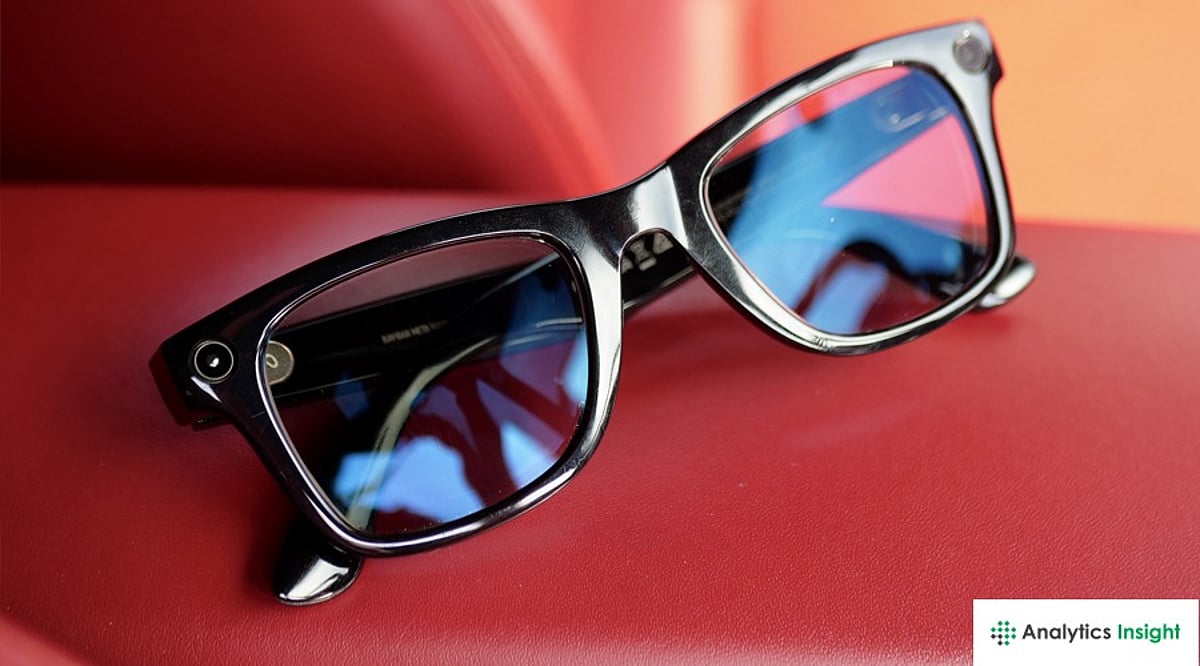
    Ray-Ban Meta Gen 2 carries no screen and no cable, unlike every AR display pair on this list. Battery life roughly doubled over the first generation, and the camera now shoots 3K video. Giving up a private screen is the exchange for a frame that wears like ordinary sunglasses.

    Xreal One

    Xreal One suits a routine built around a laptop and a train seat. Its 50° field of view and 147-inch perceived screen sit below the Pro model’s numbers, though the gap rarely shows up during document work.

    Xreal One Pro

    Xreal One Pro pairs a 57° field of view with a 171-inch perceived screen through Sony’s 0.55-inch micro-OLED panel and X-Prism optics that hold sharpness at the edges. At 87g and a $150 premium over the standard One, it targets people who sit in front of the screen for hours, not casual users.

    VITURE Luma Pro

    VITURE Luma Pro stays visible in bright rooms where most AR glasses wash out, thanks to a 1,000-nit panel. Built-in myopia adjustment removes the need for a lens insert for milder prescriptions. Fixed tint, rather than electrochromic dimming, is the compromise.

    RayNeo Air 4 Pro

    RayNeo Air 4 Pro balances 76g of weight toward the rear of the frame, making it the most wearable tethered pair here over long flights. HDR10 support, rare in this category, is clearly visible during movie playback. It functions as a personal cinema rather than a work display.

    RayNeo X3 Pro

    RayNeo X3 Pro is the only pair here with a true waveguide HUD, a 12MP camera, and onboard AI in one 76g titanium frame. The 245 mAh battery caps active use at roughly three hours, a real limit for anyone expecting a full workday from it. Short navigation stretches or quick capture suits it better than sustained wear.

    Rokid Max 2

    Rokid Max 2 delivers a 215-inch perceived screen and 600-nit brightness in a 75g package, a strong match for Steam Deck and ROG handheld gaming. Without a camera or onboard AI, it stays focused on watching and playing rather than capturing.

    Final Thoughts

    AI glasses have reached a point where they can replace real phone interactions, not just supplement them, while AR display glasses now offer a workable substitute for carrying a second monitor. The category a buyer picks will shape daily use far more than any single spec inside it. Checking a workplace’s camera policy before wearing anything with a lens built in is worth doing before the purchase, not after.

  • 2026 XR Headset Buyer’s Guide: How to Pick the Perfect VR or AR Device

    2026 XR Headset Buyer’s Guide: How to Pick the Perfect VR or AR Device

    Choosing an XR headset in 2026 involves more than comparing specs. With budget standalone devices, premium spatial computers, console headsets, and lightweight AR glasses now available, the decision depends on your budget, purpose, comfort, and compatibility. This guide breaks down the key factors to help you make a smart purchase without getting lost in technical jargon.

    Checklist for Choosing a VR Headset in 2026

    Start by defining your primary use case. Gaming, fitness, design work, and remote meetings each require different hardware. List your top three planned activities to narrow your options.

    Check compatibility carefully. Some headsets require a console, a powerful PC, or a specific phone. Many buyers assume cross-platform support exists, which can lead to early disappointment.

    Explore app availability in each platform’s store, as libraries vary widely. Comfort matters more than expected—proper weight distribution prevents fatigue during long sessions. Beware of marketing gimmicks; don’t choose based on resolution numbers alone. An ‘AR-ready’ label does not guarantee full VR support, and battery life is crucial in multi-user modes.

    Insights & Cost Analysis

    Price remains the clearest dividing line. Total cost of ownership tells a better story than the sticker price.

    • Entry-level standalone headsets: Meta Quest 3S at $299, Meta Quest 3 at $499. No subscription needed; accessories are affordable.
    • Mid-range devices: Samsung Galaxy XR around $599. Offers on-device AI but has a smaller software library.
    • Premium spatial computers: Apple Vision Pro at $3,499, plus AppleCare and software pushing first-year cost near $3,900.

    For most shoppers, a standalone headset delivers great value. A premium pick makes sense only when spatial anchoring is essential for your work.

    Better Solutions & Competitor Analysis

    No single headset suits everyone. Developers building spatial apps often prefer Apple Vision Pro for its mature platform. Enterprise buyers needing industrial precision choose Varjo XR-4 or Magic Leap 2. Educators running large VR labs favor Meta Quest 3S for easy management. Remote teams can use Android XR devices for smoother workplace tool integration.

    Customer Feedback Synthesis

    Standalone headsets earn praise for easy setup and reliable tracking. Premium devices excel in eye-tracking accuracy and audio quality, but battery drain during long sessions remains a complaint. Passthrough camera quality is a common drawback across budget and mid-range models—users describe it as soft or low contrast. On the positive side, motion sickness complaints have dropped sharply due to higher refresh rates and smarter rendering in 2026 models.

    Maintenance, Safety & Legal Considerations

    Extend your headset’s life by cleaning lenses with a microfiber cloth only—avoid alcohol or rough materials. Store in a cool, dry place (below 30°C). Keep firmware updated to prevent tracking drift. No government currently regulates headset use at work, but general safety guidelines recommend a 20-minute break per hour of near-eye display use.

    Conclusion

    First-time buyers wanting gaming or fitness will do well with a standalone headset like Quest 3S. Professionals needing precise spatial anchoring should consider a premium spatial computer. Those tied to a specific phone ecosystem may find hybrid AR devices the smoothest fit, accepting a smaller app library. For personal screens during travel or media consumption, light AR glasses are often better than a full headset. Match the device to your real use case for the best purchase.

    FAQs

    1. What is the difference between VR and AR headsets? VR creates a fully virtual environment; AR overlays digital content onto the real world. Mixed reality combines both.
    2. Which XR headset is best for beginners in 2026? Standalone headsets like Meta Quest 3S are affordable, easy to set up, and require no PC or console.
    3. Is Apple Vision Pro worth buying in 2026? It’s best for professionals, developers, and enterprise users needing advanced spatial computing. Casual users may find better value in standalone headsets.
    4. What should I check before buying? Primary use case, compatibility, app availability, comfort, battery life, and total ownership cost.
    5. How to maintain my headset? Clean lenses with microfiber cloth, store in a cool dry place, update firmware, avoid heat and direct sunlight.
  • Leading Smart Glasses Brands Shaping 2026: Meta, XREAL, Apple & More

    Leading Smart Glasses Brands Shaping 2026: Meta, XREAL, Apple & More

    The smart glasses market is rapidly evolving, with 2026 poised to be a breakthrough year for wearable AI and augmented reality. From stylish consumer frames to enterprise-grade headsets, several brands are leading the charge. Here’s a look at the companies defining the future of smart eyewear.

    Meta Ray-Ban

    Meta’s collaboration with Ray-Ban has produced stylish smart glasses integrated with AI features, a camera, speakers, and voice assistance. These glasses blend fashion with functionality, making them a popular choice for everyday use.

    XREAL

    XREAL (formerly known as Nreal) offers popular AR glasses designed for immersive entertainment and productivity. Their lightweight form factor and compatibility with smartphones make them a leader in consumer AR.

    Google

    Google continues to develop AI-powered smart eyewear that integrates with its Gemini AI platform. Leveraging years of research, Google aims to bring contextual assistance and hands-free computing to users.

    Apple

    Apple’s wearable roadmap is expected to redefine premium mixed-reality experiences. While the Apple Vision Pro sets the stage, future iterations may bring more accessible smart glasses, combining high-end design with advanced sensors.

    Vuzix

    Vuzix focuses on enterprise-grade smart glasses for logistics, healthcare, and industrial applications. Their headsets provide rugged, hands-free solutions for workers requiring real-time data overlays.

    Lenovo

    Lenovo offers innovative AR wearables designed for business collaboration and virtual workspaces. Their ThinkReality series targets professionals seeking augmented productivity tools.

    Rokid

    Rokid produces affordable AR smart glasses that are gaining popularity for education and entertainment. Their devices focus on accessibility, making AR experiences available to a wider audience.

    Samsung

    Samsung is building an AI-powered XR ecosystem expected to expand wearable computing. With deep expertise in displays and mobile technology, Samsung’s upcoming smart glasses could integrate seamlessly with Galaxy devices.

    These brands are pushing the boundaries of what wearable AI and AR can achieve, from personal assistants to immersive work tools. Keep an eye on 2026 as these companies release next-generation smart glasses.

  • Meta’s Super-Sensing AI Glasses Spark Fresh Privacy Debates

    Meta’s Super-Sensing AI Glasses Spark Fresh Privacy Debates

    Meta Platforms is testing a new prototype of AI-powered smart glasses that can continuously capture what users see and hear through built-in cameras and microphones. Dubbed “super sensing” glasses, the device could allow wearers to ask Meta AI about their day, surroundings, or past activities. However, the project has reignited concerns about privacy, consent, and legal compliance as wearable AI becomes more pervasive.

    How the Prototype Works

    According to reports, the glasses can take photos every few seconds and record audio, collecting data from the wearer’s daily life. Users could later query the AI to recall specific moments. The system reportedly does not store raw video or audio; instead, it extracts relevant data from images and sound and uploads it to Meta’s servers for AI search. Supporters argue this approach reduces privacy risks, but internal debate at Meta suggests many employees view the technology as intrusive, especially when it captures information from people who have not opted in.

    Privacy Light Concerns

    Meta’s current Ray-Ban Meta smart glasses include an LED light that activates when the wearer takes photos or records video, serving as a notification to bystanders. The new super-sensing feature may not trigger the LED in the same way, raising questions about whether people nearby will know when data collection is occurring. Meta has previously faced issues with users trying to disable or obscure the privacy light, prompting the company to roll out an update that disables the camera if tampering is detected. Still, the reported design choice has drawn criticism from privacy advocates.

    Legal and Regulatory Implications

    Always-aware devices could face scrutiny under privacy, biometric data, and audio recording laws. In some US states, recording private conversations without all-party consent is illegal. Boston University law professor Woodrow Hartzog noted, “No existing law comprehensively addresses the myriad ways these tools can pose risks during their design and manufacturing.” He urged lawmakers to update legal frameworks for devices that are “always on and constantly observing.” Public venues are already reacting: New York State courts plan to ban camera glasses from courtrooms, and Philadelphia courts and some cruise lines have restricted smart glasses in certain areas.

    Meta’s Vision and Next Steps

    Meta CEO Mark Zuckerberg has positioned AI glasses as a key part of the company’s future, calling them a “personal assistant that stays with you all day, helping you remember things and achieve your goals.” While the prototype is still under testing and could change, the debate highlights how smart glasses are evolving from simple recording tools into devices that monitor, process, and recall daily life. The outcome of this testing phase will likely shape both Meta’s product roadmap and the broader conversation around privacy in wearable AI.

  • Ray-Ban Meta Smart Glasses: The Ultimate 2026 Buying Guide for Style, Features, and Value

    Ray-Ban Meta Smart Glasses: The Ultimate 2026 Buying Guide for Style, Features, and Value

    Buying smart glasses involves more than comparing technical specifications. Ray-Ban Meta blends classic eyewear with AI assistance, photography, and open-ear audio in a familiar design. This guide explores the models, practical features, and important considerations to make a well-informed purchase.

    Overview

    • Ray-Ban Meta Gen 2 starts at Rs. 39,900 in India, with Hindi voice support and roughly double the battery life of Gen 1.
    • The glasses depend heavily on the Meta AI companion app, and most features work across both Android and iPhone.
    • Comfort, camera habits, and privacy comfort level shape the buying decision more than the spec sheet does.

    The Daily Experience

    The 12MP ultra-wide camera takes photos and short videos. These sync automatically to the Meta AI app on a paired phone. Open-ear speakers play calls and music while still letting outside sound through. This is a real safety benefit on busy Indian streets, where blocking out all noise can be risky. A simple voice prompt, ‘Hey Meta,’ wakes up the assistant. It runs on Meta’s Llama 4 model in Gen 2 and now speaks fluent Hindi. A touchpad on the temple controls capture and playback, so there is no need to reach for a phone.

    Gen 1 vs Gen 2: The Short Version

    Gen 2 suits buyers who want sharper video, longer battery life, and a more capable assistant. A discounted Gen 1 unit still holds up for casual photos, calls, and music at a lower cost.

    Compatibility and Setup

    Ray-Ban Meta pairs with compatible Android and iPhone devices through the Meta AI app. Camera, audio, and AI functions largely depend on this companion app, and available features can shift with app version, software update, and region. Checking that a phone runs a supported operating system before purchase avoids missing out on newer AI capabilities.

    Battery Life in Practice

    Meta rates Gen 2 at up to 8 hours per charge under light, mixed use. In everyday use, battery life varies depending on photography, music playback, and Meta AI usage. Frequent recording and voice interactions reduce battery life faster than light mixed usage. The charging case adds roughly 48 hours of backup power, and a 20-minute session restores 50 percent charge, useful for anyone recording throughout the day.

    Comfort and Fit

    Both generations come in Wayfarer, Headliner, and Skyler styles. This lets buyers pick a look they would wear even without the tech inside. The extra weight from the camera and battery sits mostly in the temples. This can cause mild pressure behind the ears during long wear, something first-time buyers rarely expect. For larger or smaller face shapes, it helps to try the frames in person or use a virtual fitting tool. The built-in electronics slightly change how the temples fit compared to regular glasses. Prescription lenses, transitions, and polarized options are still available through authorized opticians.

    India-Specific Features

    Gen 2 supports full Hindi voice interaction, letting wearers speak naturally instead of switching to English commands. Meta has also announced a UPI-based payment feature for India, allowing a QR code scan paired with the phrase ‘Hey Meta, scan and pay’ to complete a transaction through a WhatsApp-linked bank account. The feature is being rolled out gradually, so availability may vary by device, software version, and region.

    Trade-Offs Worth Knowing

    • The battery drains faster than the rated figure suggests during continuous recording.
    • Open-ear speakers can lose clarity in loud outdoor settings like traffic or crowded markets.
    • Many AI functions require an active internet connection to operate at all.
    • Camera use also draws scrutiny in certain workplaces, gyms, and private venues, a consideration for anyone planning to wear these glasses daily.

    Privacy Considerations

    A front-facing LED activates during recording, giving people nearby a visible signal. That built-in transparency helps with etiquette but does not substitute for judgment in offices, washrooms, or private meetings. Photos and videos are managed through the Meta AI app, while some AI-powered features rely on Meta’s cloud services. Reviewing privacy settings before enabling these features is recommended.

    Who Gains the Most Value

    Commuters seeking audio without earbuds, travelers wanting quick point-of-view photos, and Hindi-first users looking for a natural AI assistant tend to get the most from Gen 2. Anyone expecting an augmented-reality display should look elsewhere, since these remain camera-and-audio glasses rather than a heads-up display.

    Beyond the specifications, the real appeal of Ray-Ban Meta is how naturally it fits into everyday routines. Buyers who regularly take photos, make calls, or rely on voice assistance are far more likely to benefit from the smart features than those who simply want the latest wearable gadget.

    Why This Matters

    Smart glasses are becoming part of daily life. That makes picking the right model before buying an important step. Looking past the spec sheet helps spot the features that actually matter, leading to better value, more comfort, and a smarter purchase in the long run.

    Final Thoughts

    Smart glasses are getting better at doing a few things well instead of chasing every feature at once. Future models will likely bring longer battery life and features built for local markets. In the end, the best pick is not the one loaded with the newest specs. It is the one that fits daily life.

    Frequently Asked Questions

    1. Are Ray-Ban Meta smart glasses worth buying in 2026?

    Ray-Ban Meta smart glasses are worth considering for users who want hands-free photography, open-ear audio, voice calls, and AI assistance in a stylish pair of everyday glasses. The latest models offer improved camera quality, battery life, and Meta AI features compared to earlier versions.

    2. What can Ray-Ban Meta smart glasses do?

    Ray-Ban Meta smart glasses can capture photos and videos, play music through open-ear speakers, make and receive calls, livestream to supported platforms, and provide hands-free assistance through Meta AI using voice commands.

    3. Can Ray-Ban Meta smart glasses be fitted with prescription lenses?

    Yes. Many Ray-Ban Meta models support prescription lenses through authorized optical retailers, allowing users to combine vision correction with smart features without changing their daily eyewear.

    4. Do Ray-Ban Meta smart glasses work without an internet connection?

    Basic functions like taking photos, recording videos, and listening to downloaded audio can work offline. However, Meta AI features, cloud syncing, and some voice-based capabilities require an internet connection and the companion mobile app.

    5. What should be considered before buying Ray-Ban Meta smart glasses?

    Before buying, consider the frame style, lens type, compatibility with your smartphone, battery life, AI feature availability in your region, privacy considerations, and whether the smart features match your everyday lifestyle and budget.

  • iOS 27 Beta Code Hints at Apple’s Next AI Wearable: Vision Glasses or Camera-Equipped AirPods?

    iOS 27 Beta Code Hints at Apple’s Next AI Wearable: Vision Glasses or Camera-Equipped AirPods?

    New code discovered inside Apple’s iOS 27 developer beta has reignited speculation about the company’s upcoming AI-powered wearable. Initially, the code appeared to reference the long-rumored Apple Vision Glasses, but developers now believe it may point to a pair of camera-equipped AirPods instead.

    The mystery device, carrying the internal codename B790, was uncovered by developer Sam Henri Gold in the second beta of iOS 27. The code includes system messages tied to Apple’s Visual Intelligence feature, which allows a wearable to recognize landmarks, text, and objects using onboard cameras. Examples embedded in the software—such as the Eiffel Tower and a coffee mug—suggest the wearable could deliver real-time contextual information about what users see.

    What initially fueled Vision Glasses hype has shifted after closer analysis. The code describes images captured “from cameras on either side of a user’s head,” a description that aligns more naturally with earbuds than eyewear. Developers also note that the B790 codename follows a pattern consistent with earlier AirPods identifiers, while Apple’s rumored smart glasses are believed to carry a different internal designation.

    Visual Intelligence, part of Apple’s broader Apple Intelligence initiative, already enables users to identify objects and landmarks through AI-powered image recognition on the iPhone. The latest code indicates Apple intends to extend this functionality to wearable devices. Whether the final product will be Vision Glasses or camera-equipped AirPods remains unknown, but one thing is clear: Apple is actively developing software for a new class of AI-powered wearables with integrated cameras.