Category: Cybersecurity

  • Apple’s iOS 27 Introduces Impersonation Risk Detection to Combat iPhone Scams

    Apple’s iOS 27 Introduces Impersonation Risk Detection to Combat iPhone Scams

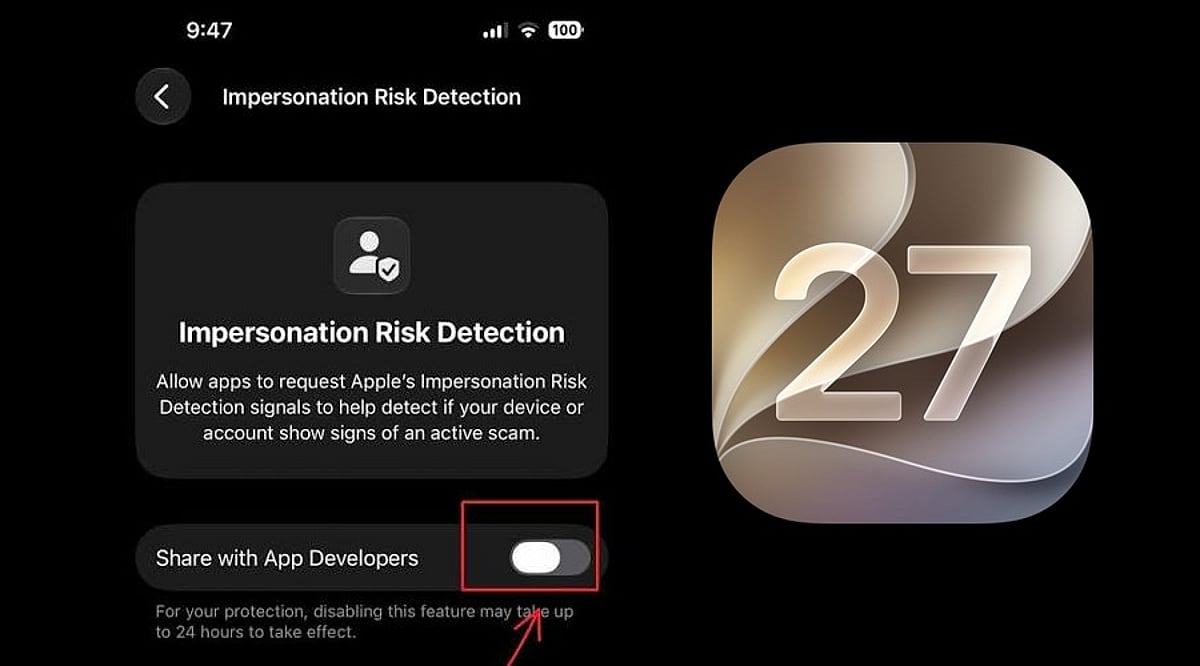
    Apple has unveiled a new security feature in iOS 27 designed to shield iPhone users from impersonation-based scams. Dubbed Impersonation Risk Detection, the tool identifies signs that a user may be caught in an active social engineering attack, particularly when they are about to make a payment or modify sensitive account information.

    Scams involving fake banks, government agencies, delivery services, and even impersonation of known contacts have become increasingly prevalent. Apple says the feature is engineered to detect suspicious activity and alert users before they complete potentially harmful actions.

    How Apple’s Impersonation Risk Detection Works

    According to Apple, the feature protects users from active social engineering scams where an attacker impersonates a trusted entity—such as a bank, government agency, or a familiar person—and pressures the victim into making a payment or altering account details.

    Impersonation Risk Detection analyzes information about the iPhone or iPad and the user’s Apple Account to identify signs of suspicious activity. When a supported app requests an assessment during a potentially risky action, the system generates a risk level that the app can use to determine subsequent steps.

    There are three risk levels: Unknown, Medium, and High. Unknown means no evidence of suspicious activity was detected, though Apple notes this does not confirm an action is safe. Medium indicates some signs of suspicious activity, while High means significant signs were detected.

    Importantly, the app does not receive the underlying information used to generate the assessment. It only receives the resulting risk level and can decide how to respond.

    How to Enable the Feature

    Users can turn on Impersonation Risk Detection by opening Settings, tapping Privacy & Security, scrolling down, and selecting Impersonation Risk Detection. They then need to toggle on Share with App Developers. Users may also need to sign in to the App Store with their Apple Account.

    The feature can be controlled on an app-by-app basis. However, Apple warns that it depends on supported apps and that its risk assessment does not guarantee an action is safe. The company emphasizes that this feature is not designed to replace other security measures or user caution.

  • Axoflow Launches AxoDetect: In-Stream Sigma Detection Cuts SIEM Costs Without Sacrificing Visibility

    Axoflow Launches AxoDetect: In-Stream Sigma Detection Cuts SIEM Costs Without Sacrificing Visibility

    Axoflow has launched AxoDetect, a detection component now in early access that runs security rules directly in the data pipeline. Announced during Splunk .conf26, AxoDetect applies Sigma rules in stream to clean, normalized security data before it reaches the SIEM, changing how organizations approach detection and log storage.

    Detection before the SIEM ingest meter

    AxoDetect is designed for detection engineers who need existing detections to fire earlier on cleaner data without paying SIEM ingestion rates for raw log volume. The platform runs customer rules in the pipeline, sends alerts to the SIEM, and stores full-fidelity logs in AxoLake, Axoflow’s low-cost security data lake that can also run on-premises.

    The result makes the SIEM effectively optional as a log management system. Instead, the SIEM becomes a SecOps workflow engine for alerts and investigations, not a repository for an entire data estate.

    Sigma rules in one open format

    Detection engineers can write new Sigma rules, tune existing ones, and import community rules in one open format that works across tools. AxoDetect adds visibility that has historically been fragmented: what data is coming in, which detection each source feeds, and where a rule lacks the data it needs. That reduces the back-and-forth between detection and data teams that has typically been held together with manual processes and tool-switching.

    Customer results

    • A global industrial company cut SIEM costs by 50% and reduced mean time to resolution by 85%.
    • A government agency reduced data volume by 80% and infrastructure footprint by 85%.

    “The SIEM became the industry’s most expensive data swamp because it was the place where we kept all of our raw data,” said Balázs Scheidler, CEO and co-founder of Axoflow and creator of syslog-ng. “That constraint is gone. Detection belongs in the data layer, on normalized data, before the ingest meter starts. Keep your workflow in the SIEM. Send the alerts, but not your entire data estate.”

    What’s next

    Axoflow says the full detection lifecycle will run where the data lives, with additional capabilities rolling out in the months ahead.

    About Axoflow

    Axoflow describes itself as an autonomous security data layer for collecting, processing, routing, storing, and managing data, with in-stream detection now in early access. The company says its AI-based autonomy supports 10x faster investigations, 50% lower SIEM spend, and near-zero pipeline maintenance. Axoflow was founded by the creators of syslog-ng.

  • AI-Driven Threats Force Companies to Overhaul Their Network Defense Strategies

    AI-Driven Threats Force Companies to Overhaul Their Network Defense Strategies

    Artificial intelligence is transforming cybersecurity from both sides. Organizations now leverage AI to monitor activity, automate repetitive security tasks, and uncover patterns that are nearly impossible for humans to detect manually. At the same time, attackers harness the same technology to operate faster and at a larger scale. This dual impact is reshaping what businesses must defend, how quickly they need to react, and what skills their security teams require. Merely adding AI tools to an existing security framework is no longer enough; the entire strategy itself needs a fundamental redesign.

    Security Operations Must Keep Pace with Automated Threats

    As attacks become more rapid and automated, organizations need security operations that can identify unusual behavior without relying solely on manual review. Many companies now turn to managed cybersecurity services to provide continuous monitoring, threat detection, and incident response expertise that internal teams may struggle to maintain around the clock. This external support becomes especially valuable when internal IT departments are already stretched thin managing cloud systems, user accounts, software, devices, and daily technical issues. The ultimate objective is to establish enough visibility and response capability so that suspicious activity never sits unnoticed in a queue.

    AI heightens the need for this capacity because attackers can use automation to conduct reconnaissance, test stolen credentials, generate persuasive phishing messages, and adjust their tactics in real time. No longer does an attacker have to manually execute every step of an intrusion to affect thousands of targets. Defenders must deploy systems that can process vast volumes of activity and help analysts prioritize what truly requires immediate action. Human judgment remains indispensable, but people increasingly depend on technology to filter and highlight the most critical signals.

    Phishing Is Becoming Harder to Spot by Appearance Alone

    For years, employees were taught to detect phishing by looking for awkward grammar, spelling mistakes, odd formatting, or phrasing that seemed off. Generative AI erodes many of those clues because attackers can now craft polished, professional emails tailored to a specific audience in seconds. They can also customize messages to target a particular role, industry, or situation using data gathered from public sources. A suspicious email may now look every bit as legitimate as a routine corporate communication.

    This shift means organizations must move beyond training workers to recognize poorly written scams. Employees should learn to evaluate requests based on context, urgency, unusual payment instructions, unexpected credential demands, and changes to established procedures. Companies can also reduce reliance on human recognition by enforcing stronger authentication and verification steps for sensitive actions. An employee should never have to decide alone whether a convincing message from an executive requesting a major financial transfer is genuine.

    Identity Is Becoming More Central Than the Traditional Network Perimeter

    Companies have long concentrated on securing the boundary between their internal network and the outside world. That boundary has become increasingly blurred as employees use cloud applications, remote devices, mobile technology, third-party platforms, and systems that never reside inside a conventional corporate network. Attackers recognize that compromising a legitimate user account may be far easier than breaking through a technical barrier. Consequently, identity has emerged as one of the most valuable targets in modern cybersecurity.

    AI amplifies identity-based attacks by helping cybercriminals generate convincing social-engineering messages or process stolen data at scale. Defensive strategies therefore now emphasize multifactor authentication, privileged-access controls, device trust, unusual-login detection, and limiting what each account can access. Companies should also routinely audit whether users still hold permissions they no longer need as roles evolve. A compromised account becomes far less damaging if it cannot reach systems that are not essential to its normal function.

    Security Teams Need Help Distinguishing Signals from Noise

    Modern organizations generate an overwhelming volume of security data. Firewalls, cloud platforms, identity systems, applications, endpoints, email servers, and countless other tools each produce alerts. The challenge is no longer about collecting more information; it is about understanding which combinations of activities indicate something genuinely suspicious.

    AI can assist by correlating events and highlighting patterns that might be overlooked when each alert is examined in isolation. A login from an unfamiliar location may not be alarming on its own, and a large file download could have a plausible explanation. But when those events occur together on a privileged account shortly after a suspicious authentication attempt, the situation warrants immediate investigation. Context transforms individual datapoints into actionable insight.

    However, organizations should remain cautious about assuming AI can eliminate false positives or make security decisions without human oversight. Automated systems can misinterpret legitimate behavior, and attackers may deliberately try to evade or manipulate detection mechanisms. The most effective approach combines AI-driven analysis with skilled human judgment to create a resilient and adaptive defense.

  • ApexGuard VPN in 2026: 7 Key Features That Determine Its Real Value

    ApexGuard VPN in 2026: 7 Key Features That Determine Its Real Value

    A paid VPN earns its value through consistent protection, practical controls, usable performance, and coverage across the devices people actually use. ApexGuard combines encryption, privacy architecture, leak protection, Double VPN routing, RAM-only servers, and unlimited-device support in one service. The most useful evaluation looks beyond a feature count and asks whether each capability solves a relevant problem for the user.

    What a VPN Actually Does

    A VPN encrypts the connection between a device and a remote server, then routes supported traffic through that server. Websites see the server’s public IP address instead of the user’s home, workplace, or mobile network address. This basic tunnel matters on public Wi-Fi, during travel, and when moving between networks. However, a subscription’s value also depends on data handling, leak prevention, network capacity, and device coverage.

    1. Encryption and Protocols Still Set the Foundation

    Encryption protects traffic between device and VPN server by turning it into ciphertext. This prevents connected networks from reading the data, though it does not hide signed-in accounts or replace HTTPS. ApexGuard uses AES-256 encryption with IKEv2/IPsec.

    2. Privacy Depends on What Happens After Encryption

    Encryption protects traffic in transit, but privacy also depends on what the provider logs. A no-logs architecture limits routine activity records. ApexGuard uses a strict no-logs policy, avoiding retention of browsing history, DNS requests, or traffic content. Its RAM-only servers use volatile memory instead of persistent storage.

    3. A VPN Must Protect the Moments When It Fails

    VPN connections can drop during Wi-Fi changes or sleep mode. A kill switch blocks unprotected traffic during interruptions, and leak protection addresses DNS, IP, and WebRTC leaks. ApexGuard combines these controls as part of the connection.

    4. Network Infrastructure Determines Whether Security Feels Usable

    Network capacity and server distance affect latency and throughput. ApexGuard offers locations in over 125 countries with 3.2 Tbps of total capacity. Its privately owned infrastructure gives direct control over routing and operations.

    5. Device Coverage Changes the Economics of a Subscription

    A VPN that covers unlimited devices under one account shifts the value equation. ApexGuard supports unlimited devices with apps for Windows, macOS, Android, and iOS, plus browser extensions for Chrome, Firefox, and Edge. Split Tunneling lets users direct specific traffic outside the VPN when needed.

    6. Premium Features Need to Solve Real Problems

    Features like Double VPN routing (sending traffic through two servers), Dedicated IP (reduces CAPTCHAs), Threat Protection (blocks malware and trackers), and Smart Play (streaming access) only matter if they address actual needs. Each should be evaluated against personal usage.

    7. A Refund Period Is Part of Real-World Testing

    VPN performance varies by location, device, and time of day. ApexGuard offers a 30-day risk-free period to test connection stability, speed, device compatibility, kill switch, and leak protection under normal conditions.

    What Makes a Paid VPN Worth It in 2026?

    A paid VPN is worth it when its privacy architecture, failure protection, infrastructure, and device coverage match real-world needs. Compare beyond feature counts and headline prices. Value comes from handling data responsibly, limiting exposure, performing reliably, and solving actual problems. For readers comparing VPNs in 2026, that approach is more reliable than a simple yes or no.

  • Vizillo AI Review: AI-Powered Fraud Detection and Scam Awareness Tool

    Vizillo AI Review: AI-Powered Fraud Detection and Scam Awareness Tool

    Overview

    Vizillo AI is a comprehensive security and scam detection tool powered by artificial intelligence. Designed to protect users from scams, fraudulent activities, suspicious links, malware, and other digital threats, the app consolidates multiple security features into one platform. With a rating of 4 out of 5, it offers scam awareness, malware scanning, risk permission checks, SMS safety, and encrypted VPN browsing. While it has some drawbacks, the app serves as a strong second layer of digital security.

    Key Features

    • Analyzes suspicious messages, links, emails, and websites for scam-related warnings.
    • Scans installed apps for harmful activity and security risks.
    • Evaluates incoming notifications for phishing threats and suspicious links.
    • Checks app permissions for hazardous access or privacy issues.
    • Provides encrypted web browsing through an integrated VPN.

    Benefits

    • Enhanced protection against common online scams and suspicious behavior.
    • Consolidates multiple security components into a single app.
    • AI-powered detection of suspicious messages, links, and websites.
    • Identifies risky app permissions.
    • Combines scam detection, malware scanning, SMS checks, and VPN in one tool.

    Challenges

    • May require extensive permissions for notification and SMS scanning.
    • Advertising can impact user experience.
    • Some users may face registration or account setup issues.
    • Automated scam detection cannot guarantee catching all fraudulent messages.
    • VPN and security features may raise privacy concerns if not handled carefully.

    Pricing and Subscription Plans

    Vizillo AI offers three tiers: Free, Basic, and Pro. The Free version costs $0 and includes 3 scam checks per day, website verification, app threat detection, and community Q&A. The Basic plan provides unlimited scam checks, real-time malware detection, Smart Shield monitoring, website and app scanning, phone and email scam checks, and ad-free browsing. The Pro plan adds OSINT investigation, image forensics, AI scam analysis, priority support, and unlimited daily scans, along with a 3-day free trial.

    Support Options

    The platform offers a help center with security-related information, privacy resources, scam awareness guidance, and product documentation. Customer support is available via email at Support@verifyscams.com, along with the developer’s website and privacy resources.

    Conclusion

    Vizillo AI brings together a range of digital security features — AI-powered scam awareness, malware detection, permission analysis, notification scanning, and VPN browsing — making it highly convenient for users who frequently encounter unknown messages, websites, links, or apps. However, negative store ratings, registration issues, ads, and permission requirements should be considered. For best results, use Vizillo AI as a secondary layer of security alongside other protective measures.

  • LG Smart TV Vulnerabilities: How Hackers Could Spy Through Your Microphone

    LG Smart TV Vulnerabilities: How Hackers Could Spy Through Your Microphone

    Cybersecurity researchers have uncovered vulnerabilities in several LG smart TVs that could allow an attacker to access the built-in microphone, scan local networks, and potentially gather information about connected devices. The findings highlight the importance of reviewing smart TV security and privacy settings.

    Why LG TVs Are Under Security Scrutiny

    Investigations by Gamers Nexus, Level1Techs, and independent security researchers examined network activity, firmware behavior, and security weaknesses in LG’s webOS software. The researchers found that compromised TVs could identify devices on the same local network—including phones, computers, printers, and smart-home hardware—and detect nearby Wi-Fi networks. Remote-code-execution vulnerabilities were also reported, though full technical details remain undisclosed pending responsible disclosure.

    Can a Hacked LG TV Listen to Conversations?

    One of the most concerning findings is that a compromised TV can capture room audio even when the display appears to be off. Researchers demonstrated that audio could be stored while the TV remained offline and later transmitted when network connectivity returned. However, this does not mean every LG TV secretly records conversations—the demonstration involved a device already under an attacker’s control.

    LG’s Response and Privacy Protections

    LG issued a privacy statement on September 12, 2026, stating that its TVs do not continuously record or transmit conversations. Voice processing begins only after a supported wake word or remote button activation. For hands-free features, the TV monitors locally for the wake word and discards audio when none is detected. Some models also include a hardware microphone switch for manual disablement.

    Automatic Content Recognition (ACR) and Tracking

    LG smart TVs use Automatic Content Recognition (ACR) to create digital fingerprints of content, enabling personalized recommendations and advertising. LG states that ACR is activated only with user consent, and network scanning is described as a connectivity feature. Researchers also reported network-device discovery, which could reveal more about connected households.

    How LG TV Owners Can Reduce Risk

    • Install firmware updates promptly to patch known vulnerabilities.
    • Review privacy and consent settings—disable ACR, personalized ads, and unused voice features.
    • Place the TV on a separate guest or IoT network to limit access to other devices.
    • Disable UPnP unless needed, and avoid exposing TV services to the public internet.

    Should LG TV Owners Be Worried?

    Current findings demonstrate a potential security scenario, not routine surveillance. Smart TVs deserve the same security attention as computers and smartphones. Keeping firmware updated and regularly reviewing privacy settings can significantly reduce risk.

  • How to Verify a Website’s Safety Before Sharing Personal Data

    How to Verify a Website’s Safety Before Sharing Personal Data

    A website can look legitimate but still pose a serious threat. A clean design, familiar logo, or a padlock icon does not guarantee that a site belongs to a trustworthy company. Fake pages often mimic trusted brands to steal passwords, credit card numbers, phone numbers, or other private information. Performing a few simple checks can reveal warning signs before you submit sensitive details.

    Check the Website Address First

    The web address is the first thing to examine. A legitimate company should have the correct main domain, with no misspellings, extra words, or unusual characters. A minor alteration can indicate a fraudulent page. For example, paypa1.com is not paypal.com, and paypal.com.example.com does not belong to PayPal. The real domain appears near the end of the URL, just before the first slash.

    HTTPS also matters, but it alone does not confirm trust. While a secure connection encrypts data between your browser and the site, fake websites can also obtain HTTPS certificates. Google Chrome still advises caution on secure pages and recommends checking the site name in the address bar.

    Take Browser Warnings Seriously

    A browser warning is a strong signal to stop. Chrome uses Google Safe Browsing to detect phishing, malware, harmful downloads, deceptive sites, and social engineering attacks. When Safe Browsing flags a site as dangerous, Chrome may display a full-page warning. Google advises against visiting such pages.

    A warning that says “Dangerous site” deserves immediate attention. Such a page may attempt to steal passwords or personal information, or install harmful software on your device. Chrome also warns about sites that resemble trusted websites but use a slightly altered address.

    Safe Browsing’s Enhanced mode offers extra protection by warning about risky sites that Google has not yet identified through standard lists. This feature can also check suspicious downloads and browser extensions.

    Check Where the Link Came From

    Even a safe-looking page can originate from an unsafe link. Unexpected emails, text messages, social media messages, pop-ups, or QR codes require extra caution. A better approach is to navigate directly to the official website by typing the known address into your browser or using a trusted bookmark.

    QR codes now deserve special attention. The Federal Trade Commission reported a September 2026 alert about scam QR codes placed over legitimate codes at parking meters. These codes can direct visitors to fake websites that ask for money or personal information.

    The same risk applies to emails and text messages. A message may claim that an account needs urgent action, a payment failed, or a package needs confirmation. Such pressure can push you toward a fake login page. Google advises against clicking links from suspicious messages and recommends visiting the expected website directly.

    Look at What the Site Requests

    A trusted website should have a clear reason for each piece of personal data it asks for. A sudden request for a password, credit card number, government ID, or other sensitive details should raise a red flag. A page that demands far more information than necessary is also suspicious.

    Strong account protection adds another layer of safety. Passkeys offer an alternative to passwords and can resist common phishing attacks. Two-step verification can also reduce risk after password theft, especially when using stronger methods such as security keys or account prompts.

    A safe website check does not rely on a single sign. HTTPS, the correct domain, browser alerts, the source of a link, and the type of data requested all matter. The goal is not to prove that a site looks professional—it is to confirm that the address belongs to the expected service before your private information leaves your device.

  • Top Rules to Protect Your Bank Details from Scammers

    Top Rules to Protect Your Bank Details from Scammers

    Scammers are constantly devising new ways to steal your banking information. Follow these essential rules to keep your accounts secure and prevent unauthorized access.

    1. Never Share OTPs: Banks never request One-Time Passwords over calls or messages. Keep these codes private to prevent fraudulent transactions.
    2. Avoid Suspicious Links: Do not click on unknown banking links received via SMS, email, or social media. They may lead to phishing sites that steal your credentials.
    3. Verify Caller Identity: Never trust callers claiming to represent your bank without verification. Always contact your bank directly using official contact details.
    4. Protect Your PIN: Keep your debit and credit card PINs confidential. Never write them down or share them publicly.
    5. Use Strong Passwords: Create unique, difficult-to-guess passwords for your banking accounts and avoid reusing them across other websites or services.
    6. Enable Transaction Alerts: Activate SMS, email, or app notifications to instantly detect suspicious transactions and report unauthorized activity.
    7. Avoid Public Wi-Fi: Do not access internet banking over unsecured public networks, as they can expose your sensitive data to cybercriminals.
    8. Check Account Statements: Regularly review your bank statements and transaction history to identify unfamiliar payments or withdrawals.
    9. Report Fraud Immediately: If you notice any suspicious activity, contact your bank right away to block accounts, cards, or transactions and minimize potential losses.

    Stay vigilant and adopt these practices to safeguard your financial information from scammers.

  • WhatsApp Malware Campaign Uses Fake Invoices to Hijack Accounts

    WhatsApp Malware Campaign Uses Fake Invoices to Hijack Accounts

    Cybersecurity firm Kaspersky has issued a warning about a rapidly spreading malware campaign on WhatsApp. Attackers are hijacking legitimate WhatsApp accounts and using them to send malicious attachments disguised as everyday business documents, such as invoices, billing statements, and payment notices.

    The campaign has already impacted users in multiple countries, including India, Brazil, Mexico, Singapore, the UK, Spain, Taiwan, Australia, Russia, Vietnam, and Malaysia. Because the malicious files appear to come from known contacts, recipients are far more likely to open them without suspicion.

    How the Scam Works

    According to Kaspersky researcher Fareed Radzi, the attackers exploit trust within messaging platforms by using compromised accounts to deliver malicious attachments that appear to originate from familiar people. The files are VBScript attachments carefully named to resemble financial reports and account notices.

    Once a victim opens the file, it triggers a staged infection chain that quietly downloads and executes additional harmful components from external servers. In many cases, this ultimately installs a remote access tool, granting attackers control over the infected device without the user’s knowledge.

    Safety Recommendations

    Kaspersky advises users to treat unexpected attachments with caution, even when they come from known contacts. Specifically, avoid opening script or executable files such as VBS, EXE, BAT, and JS unless their legitimacy is confirmed.

    India’s Cyber Crime Coordination Centre has also issued a similar alert, noting that fraudsters often name these files “View Details” or “Invoice” to appear genuine. Officials recommend verifying any unexpected document with the sender directly, preferably through a phone call, before opening it. A single click can compromise an entire WhatsApp account and its contact list.

    Stay vigilant and always double-check the unexpected, even if it comes from a trusted name.

  • Master Android App Permissions: What to Allow and What to Deny for Better Privacy

    Master Android App Permissions: What to Allow and What to Deny for Better Privacy

    Every time you install a new app on your Android phone, it asks for permission to access your camera, contacts, location, microphone, or other sensitive data. Most people tap ‘Allow’ without thinking, but that small habit can quietly expose your personal life. Android permissions exist to give you control, and learning how to use them wisely makes a real difference to your daily privacy and security.

    This guide explains what each permission does, which ones are safe to grant, which deserve caution, and how to manage them on any Android device.

    Why Permissions Matter

    Smartphones today hold more personal information than most people realize: photos, messages, banking apps, health data, and location history. Every permission an app receives opens a small door into that information. A weather app asking for location makes sense; a flashlight app asking for contacts does not.

    Google explains that an app sends a notification asking for permission before it can use a feature such as the camera or contacts list, and you get to allow or deny each request. This system puts control back in your hands instead of leaving it entirely to the app developer. Understanding this mechanism helps you make smarter choices instead of clicking through prompts out of habit.

    Types of Permissions on Android

    Android sorts permissions into two main categories that matter most for everyday users:

    • Normal permissions: Cover simple actions such as connecting to the internet or using Bluetooth. The system grants these automatically without asking.
    • Dangerous permissions: Touch personal data directly, so the phone always asks for confirmation first. These include access to the camera, microphone, contacts, location, SMS, calendar, phone log, and storage.

    Once you grant one permission inside a group, the app often receives every related permission in that group without a fresh prompt. This detail matters — a single ‘Allow’ tap can open more access than you expect.

    Permissions That Are Usually Safe to Allow

    Some permissions carry low risk and support the core purpose of an app:

    • Location: For navigation apps
    • Camera and microphone: For video calling apps
    • Contacts: For messaging apps to help find friends
    • Notification access: For apps that need to send alerts
    • Storage access: For photo editors
    • Calendar access: For scheduling tools

    In these cases, the permission matches the job the app is meant to do, so granting it rarely causes harm — as long as the app comes from a trusted developer and a genuine app store listing.

    Permissions That Deserve a Careful Look

    Trouble usually starts when a permission request does not match the app’s purpose. A simple game asking for microphone access, a flashlight app requesting contacts, or a photo editor wanting to read SMS messages should raise immediate questions. These mismatches often point toward data harvesting or, in worse cases, malware designed to read passwords sent through text messages.

    The table below sums up common permissions and how to treat them:

    Permission Safe to Allow? When to Be Cautious
    Location Yes for navigation, maps, weather If a game, calculator, or wallpaper app requests it
    Camera Yes for photo/video apps, video calls If a music player or document reader requests it
    Microphone Yes for voice recorders, calling apps If a simple game or flashlight app requests it
    Contacts Yes for messaging, social media If a game or utility app requests it
    SMS Only for messaging apps that send texts If any app that does not handle SMS requests it
    Calendar Yes for scheduling, productivity apps If a game or entertainment app requests it
    Storage Yes for file managers, photo editors If a simple game or wallpaper app requests it

    The Cybersecurity and Infrastructure Security Agency advises users to review app permissions regularly and remove access that is not supported. Old permissions often sit unused and forgotten on a phone for years.

    How to Check and Change Permissions

    Android gives you a straightforward path to review and adjust these settings whenever you choose. The steps stay almost the same across most modern Android phones:

    1. Open Settings and tap Apps.
    2. Select the app in question, then tap Permissions.
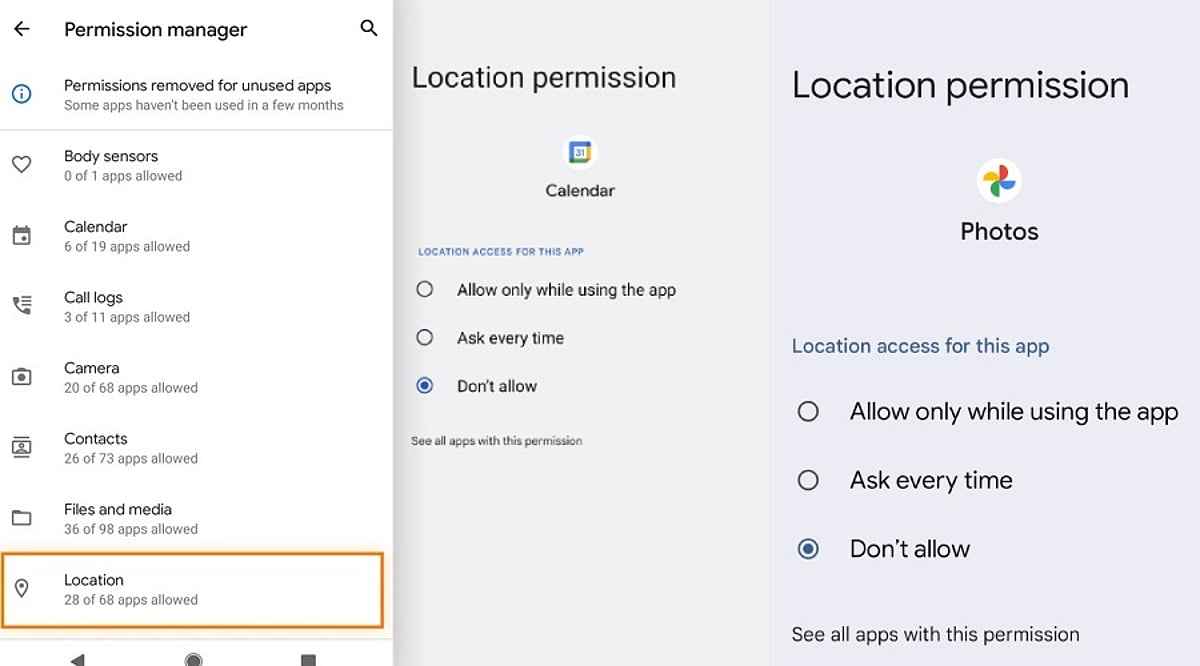
    3. Choose Allow, Allow only while using the app, Ask every time, or Don’t allow, depending on what options the permission offers.
    4. Visit Settings > Security & Privacy > Permission Manager to see every app that holds a specific permission, such as location or camera.
    5. Turn on Pause app activity if unused for apps that sit idle for long stretches, so their permissions get removed automatically.

    This last feature works quietly in the background and trims away access from apps you may have forgotten about, closing gaps before they turn into a problem.

    Signs an App Is Asking for Too Much

    A few warning signs can help you spot a risky request before tapping Allow:

    • A brand-new app with very few reviews asking for administrator-level access
    • An app that repeatedly shows the same permission pop-up after you have denied it (a known trick used by malicious software)
    • A basic mismatch: compare what the app does against what it asks for

    Reading reviews, checking the developer name, and searching the app name alongside the word ‘permissions’ often reveals whether other users have flagged similar concerns.

    Final Thoughts

    Android permissions work as a simple gate between your personal data and outside access. Every tap on Allow or Deny decides how much of that gate stays open. A little patience during setup, a quick permission audit every few months, and a habit of questioning mismatched requests go a long way toward protecting your personal information. Technology moves fast, and apps will keep asking for more access as new features arrive. Staying alert, reading each prompt carefully, and denying anything that does not fit an app’s purpose keeps your phone safer without demanding much extra effort.

    FAQ

    Which Android app permissions should you normally allow?

    Allow permissions that directly support an app’s main function, such as location for navigation, camera and microphone for video calls, or contacts for messaging. Review each request individually rather than granting access automatically during installation.

    Which Android permissions should users be most careful about?

    Location, contacts, SMS, microphone, camera, and accessibility access deserve closer attention since they can expose sensitive information or device capabilities. Check whether the requested permission is genuinely necessary for the application’s stated purpose.

    How can you check app permissions on Android?

    Open Settings, select Apps, choose the relevant application and tap Permissions. Modern Android devices also provide Permission Manager under Security & Privacy, allowing you to review which applications can access specific categories.

    Can Android automatically remove permissions from unused apps?

    Yes. Android includes an option that can pause activity for unused applications and remove permissions they previously received. This feature is useful for limiting forgotten access from apps that have not been opened for extended periods.

    What should you do when an app repeatedly requests denied permissions?

    If an app keeps requesting access after you have denied it, first consider whether that permission is essential. Check the developer, reviews, and app purpose, then keep the permission denied if the request appears unnecessary or suspicious.