Why You Might Need a USB Bluetooth Dongle
Many desktop computers and laptops lack built-in wireless radios, preventing you from pairing headphones, keyboards, or other peripherals. A USB Bluetooth dongle offers a quick and affordable solution, enabling wireless connectivity for a range of devices.
Understanding What a Bluetooth Dongle Does
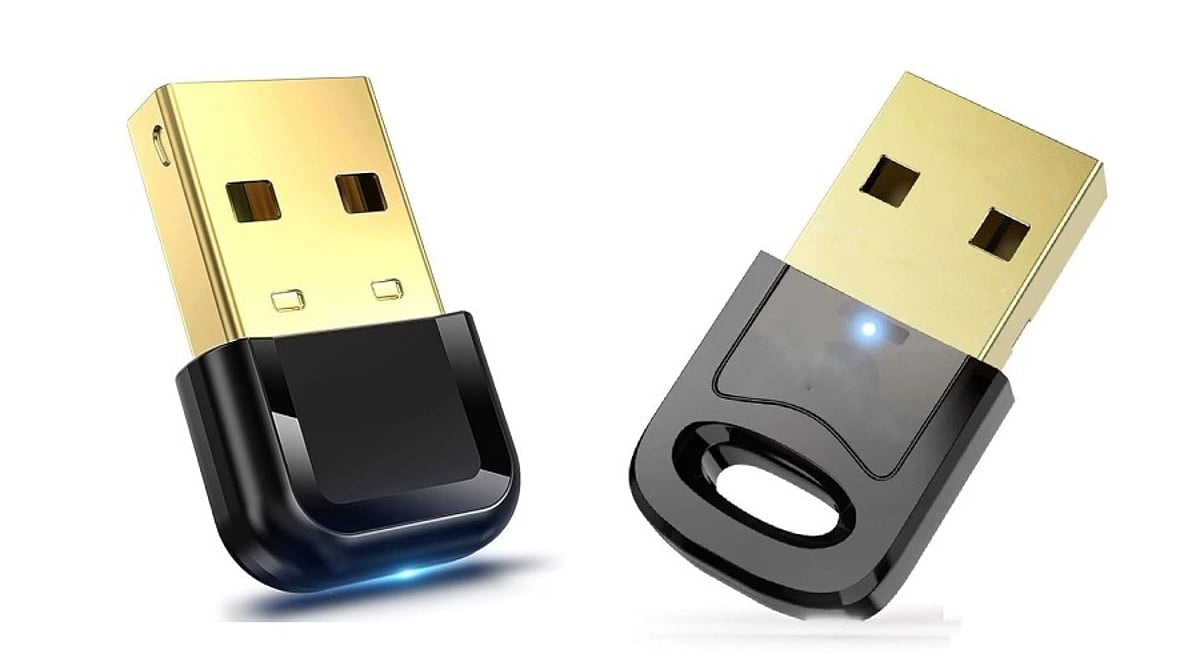
A Bluetooth dongle is a small hardware device that plugs into a USB port, containing a radio chip (from brands like CSR, Realtek, or Broadcom) and an antenna. It allows your computer to communicate wirelessly with nearby devices, such as:
- Wireless keyboards, mice, and game controllers
- Bluetooth headphones and speakers for audio streaming
- Printers and other peripherals for short-range file transfers
- Smartphones for quick file sharing
The quality of the chipset is crucial, as it directly impacts performance and reliability.
Bluetooth Version: The First Key Decision
Bluetooth versions determine speed, range, and power efficiency. Bluetooth 4.0 offers basic functionality, while 4.2 adds better security. However, for most users, Bluetooth 5.0 or 5.3 is the recommended choice, providing superior speed, range, and energy efficiency. Bluetooth 6.0 is emerging but not yet essential. Avoid older versions below 4.0, as they lack modern performance and power-saving features.
Why Older Versions Fall Short
Adapters below version 4.0 cannot match the range or efficiency of modern devices. Bluetooth 4.0 and above draw less power, which is critical for laptop users on battery. If you only need to connect older peripherals, Bluetooth 4.0 may suffice, but expect shorter range and slower pairing.
Operating System Compatibility: Don’t Overlook It
Compatibility issues are a common frustration. Ensure the dongle supports your operating system. Minimum requirements typically include:
- Windows 10 21H2 or newer (ideally Windows 11 22H2)
- macOS Monterey or later
- Ubuntu 22.04 LTS or similar Linux kernel
Avoid dongles that only support Windows 7. Also, check whether the dongle is plug-and-play or requires a driver download from the manufacturer’s website.
Range and Antenna Design: Real-World Performance
Manufacturers often advertise range under ideal lab conditions, but real-world environments—with walls, Wi-Fi interference, and USB 3.0 cables—can significantly reduce performance. The antenna design is a key factor:
- Nano dongles: These have a hidden antenna, offering a sleek design but limiting range to about 10 meters.
- External stub antenna: These models maintain a stronger connection and can achieve closer to the advertised range.
If you need to connect devices across a large room, choose a dongle with an external antenna.
Multi-Device Support: Be Realistic
While many dongles claim to support multiple devices, most can only maintain two or three active connections simultaneously. If you switch between five or more peripherals daily, test latency and reliability before relying on marketing claims.
Latency for Gaming and Real-Time Use
Bluetooth is not designed for zero-latency performance. In gaming, input lag can range from 40 to 120 milliseconds, which is noticeable in fast-paced games. For competitive gaming, look for adapters specifically built for low-latency audio and controller use, as general-purpose dongles may not meet those requirements.
Physical Port Requirements
Most Bluetooth dongles use a USB-A connector, while USB-C versions are less common. If your laptop only has USB-C ports, verify compatibility or use an adapter. Check reviews to ensure a smooth fit with your device.
Read Verified Reviews: Don’t Trust Star Ratings Alone
Star ratings can be misleading. Look for verified purchase reviews that mention specific issues like disconnecting after a few hours or pairing failures with certain devices. Unbranded dongles often use outdated chips, skip firmware updates, and may fail certification tests. A lower price rarely compensates for these long-term reliability issues.
Final Thoughts
Choosing the right USB Bluetooth adapter involves matching real specifications with your actual needs. Start with Bluetooth 5.0 or higher, verify operating system support, and choose a trusted chipset brand. Pay attention to antenna design and check genuine user feedback. A little research now can save you from years of dropped connections and wasted money.
Frequently Asked Questions
Q1. What is the minimum Bluetooth version worth buying today?
Bluetooth 5.0 or 5.3 is recommended for the best mix of range, speed, and power efficiency. Avoid anything below 4.0, as it lacks modern performance and battery-saving features.
Q2. Do USB Bluetooth adapters need driver installation?
Some adapters are plug-and-play on newer systems, while others require manual driver installation from the manufacturer’s website or included disc.
Q3. How many devices can one dongle connect at once?
Most dongles can pair with several devices but maintain only two or three active connections. If you switch between many peripherals, test real latency before purchasing.
Q4. Does antenna design really change Bluetooth range?
Yes. Nano dongles with hidden antennas typically reach about 10 meters, while external antenna designs maintain closer to the advertised range.
Q5. Are unbranded Bluetooth dongles worth buying?
Unbranded dongles often use older chipsets, lack firmware updates, and may fail certification. Established brands provide better reliability, driver support, and fewer connectivity issues.