Category: Software Development

  • The Quiet Revolution: How AI Is Reshaping Mobile App Development in 2026

    The Quiet Revolution: How AI Is Reshaping Mobile App Development in 2026

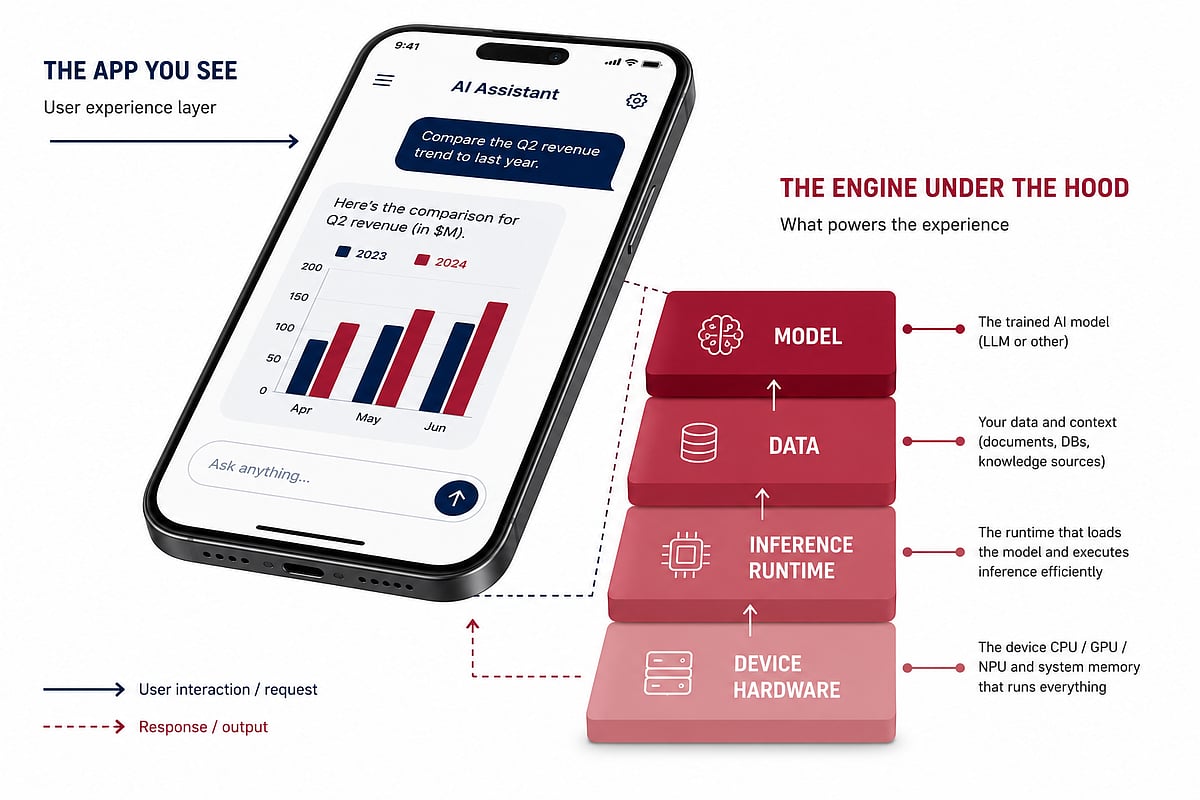
    A year ago, adding AI to a mobile app meant bolting on a chat widget and calling it a feature. That era is over. In 2026, AI has moved from a visible add-on to an infrastructure decision, fundamentally changing what “building an app” means for development teams.

    The shift is evident in usage data. According to Sensor Tower’s year-end report, the total U.S. audience for AI assistants surpassed 200 million by the end of 2025, with more than half accessing those assistants exclusively on mobile devices—up from roughly 13 million mobile-only users the year before. This is no longer a niche behavior; it’s the default way most people interact with AI. The app is no longer a wrapper around the model—the app is the product.

    From Cloud Round-Trips to On-Device Inference

    For years, AI features followed a predictable pattern: capture input, send it to a server, wait for a model response, and render the result. That pattern is breaking down—not because cloud models got worse, but because users now expect AI features to behave like native app features: instant, available offline, and private by default.

    Apple’s Neural Engine, Google’s Tensor chips, and Qualcomm’s on-device AI silicon have matured to the point where running a capable model locally is a realistic option for consumer apps. This changes the engineering conversation from “which API do we call” to “which parts of this feature can run on the device, and which parts genuinely need the cloud.” Getting that split wrong is expensive in ways that don’t surface until the app is already in users’ hands.

    The Unglamorous Engineering Problem Nobody Mentions

    On-device AI is a battery, memory, and fallback-path problem before it’s a model problem. A locally running model that drains a phone’s battery in an afternoon or locks up the UI thread during inference will get uninstalled regardless of output quality. The model is the easy part. The packaging, memory management, graceful fallback for devices without the necessary hardware, and testing across dozens of device and OS combinations are where most AI feature timelines go sideways.

    This pushes product teams toward dedicated mobile app development partners rather than retrofitting AI onto an existing roadmap. Teams that get this right treat AI features as an architecture decision made early, not a plugin added late. Retrofitting almost always costs more because the data flow, caching layer, and offline state all have to be rethought rather than extended.

    Why iOS Has Become Its Own Specialized Lane

    The platform split has also sharpened. Apple’s approach to on-device intelligence—from Apple Intelligence’s privacy-first design to the App Intents framework—is deliberately different from Android’s. A model and pipeline built for one platform’s AI stack rarely transfers cleanly without real rework.

    This has pushed specialized iOS development expertise higher on the priority list for any team shipping AI features on Apple’s platform. Knowing how to call a model API is no longer enough. Teams need to understand Apple’s specific constraints around on-device processing, App Store disclosure requirements for AI-generated content, and the Neural Engine’s actual performance ceiling on the device generations their user base is running. Get that platform-specific layer wrong, and a feature that demoed perfectly in a controlled environment becomes sluggish or inconsistent in the real world.

    What This Means for Decision-Makers

    For product and engineering leaders deciding how to staff an AI-feature build, a few questions separate a smooth rollout from a six-month detour:

    • Does the team have hands-on experience with on-device inference, not just API integration?
    • Is there a clear, tested fallback path for devices that can’t run the model locally?
    • Has the architecture been designed for AI from the outset, rather than adapted after the fact?
    • Does the team understand the platform-specific rules, especially on iOS, where Apple’s review process and hardware constraints are unusually strict?

    A development partner without direct experience answering these questions will end up learning the hard parts on the client’s budget and timeline—an expensive lesson that is avoidable with the right questions asked before a single line of code is written.

    The Bigger Shift

    What’s happening in mobile development right now isn’t really about AI getting smarter. It’s about AI becoming infrastructure—the same way push notifications, offline sync, and biometric auth became infrastructure a decade ago. Once something becomes infrastructure, the teams that win aren’t the ones with the flashiest demo. They’re the ones who treated it as a core architectural decision from day one.

    That’s the quieter story behind every AI feature that feels instant, private, and reliable on a phone in 2026. The visible part is the interface. The real work happened underneath it.

  • Best AI Coding Subscription Plans of 2026: Value Picks for Students, Freelancers, and Professionals

    Best AI Coding Subscription Plans of 2026: Value Picks for Students, Freelancers, and Professionals

    Advanced AI systems have become reliable coding partners that assist with debugging, optimization, and even suggesting architectural frameworks. The challenge for modern developers isn’t whether to adopt AI, but how to choose the most effective paid coding assistant. This guide evaluates top AI coding subscription plans by comparing pricing, features, usage limits, and developer-focused benefits to help you make a smart choice.

    Types of AI Coding Subscription Plans

    Understanding the categories of plans available is essential before selecting one. Here are key considerations:

    • Budget vs Usage: Entry-level plans suit light coding needs, while flat-rate bundles work best for daily heavy usage.
    • Tool Compatibility: Ensure the plan integrates with your IDE, such as VS Code, JetBrains, or Cursor.
    • Model Access: Some subscriptions lock you into one vendor; others like DevPass offer multi-model flexibility.
    • Predictable Billing: Flat-rate plans help avoid surprise token overages.

    Quick Comparison of Leading Plans

    While exact pricing can vary, here’s a snapshot of top contenders:

    Plan Best For Key Strength
    GLM Lite Students and light users Budget-friendly at ~$3/month
    MiniMax Starter Freelancers needing speed and cost balance Mid-range at ~$10/month
    DevPass Lite Professionals requiring multi-model access Premium value at ~$29/month
    Claude Code Pro Developers in Anthropic ecosystem Advanced code reasoning
    GitHub Copilot Developers in GitHub ecosystem Seamless IDE integration

    Recommendations for Indian Developers

    • Best Budget: GLM Lite at $3/month for students and light users.
    • Best Mid-Range: MiniMax Starter at $10/month for freelancers balancing speed and cost.
    • Best Premium Value: DevPass Lite at $29/month for professionals needing multiple models and predictable billing.

    Risks and Trade-Offs

    Consider these factors before committing:

    • Hidden Limits: The definition of a “prompt” varies by platform; a single query can trigger multiple model calls.
    • Vendor Lock-In: Copilot and Claude are not multi-system compatible.
    • Token Inflation: Newer tokenizers like Claude Sonnet 5 can raise effective usage costs by 35%.
    • Budget Overruns: Usage-based billing may cause surprises with runaway agent loops.

    Empowering Developers with Smart Choices

    AI coding subscriptions are essential for staying competitive. A good plan boosts productivity, creativity, and efficiency. Whether you need budget-friendly options for students, optimized speed-cost plans for freelancers, or multi-model flexibility for professionals, the right subscription can transform your workflow. Map your budget, coding style, and tool ecosystem to the available options and choose for predictable value.

    FAQs

    1. Which AI coding subscription offers the best value in 2026?
    Best value depends on needs. GLM Lite for budget, MiniMax Starter for freelancers, DevPass for multi-model access, and Copilot/Claude for ecosystem-specific users.

    2. Is GitHub Copilot better than Claude Code Pro?
    Copilot excels at IDE and GitHub integration; Claude Code Pro is better for advanced code reasoning and complex debugging.

    3. What should developers consider before choosing?
    Pricing, usage limits, supported models, IDE compatibility, billing structure, and vendor lock-in.

    4. Are budget plans suitable for professional development?
    Budget plans work well for students and light tasks; premium plans suit professionals with larger projects and higher demands.

    5. Can AI assistants replace software developers?
    No. AI speeds up coding, debugging, and testing, but humans remain essential for architecture, business logic, and project management.

  • BrowserStack: Revolutionizing Digital Quality Assurance with Cloud and AI

    BrowserStack: Revolutionizing Digital Quality Assurance with Cloud and AI

    BrowserStack has transformed software testing through its cloud-based platform, enabling organizations to test applications across real devices, accelerate releases, enhance quality assurance, and embrace AI-driven automation.

    As businesses strive to provide flawless digital experiences across different devices, web browsers, and operating systems, software quality assurance has become critical. This has led to the rise of BrowserStack as one of the most prominent software testing tools in the cloud.

    The company was co-founded by Indian entrepreneurs Ritesh Arora and Nakul Aggarwal, who founded the firm based on a challenge that had been plaguing the development community: How do you test websites across different browsers and devices? The solution that would make testing more efficient and eliminate the need for costly testing environments led to the creation of what is now a software quality assurance tool for enterprises, startups, and technology firms.

    From Startup Vision to Global Testing Leader

    The main value offered by BrowserStack stems from its provision of access to thousands of actual mobile devices and desktop browsers via cloud technology. Instead of having to acquire and maintain expensive labs for testing, development, and QA engineers gain the opportunity to immediately begin testing on actual environments worldwide.

    The service provides a means of running both manual and automated tests across multiple platforms such as browsers, operating systems, and devices. This has turned out to be particularly useful with more and more channels being used for accessing applications. The absence of bottlenecks related to infrastructure enables companies to develop and deliver their products to market faster and more efficiently.

    Comprehensive Product Portfolio

    BrowserStack has come a long way since its initial offering, evolving into a provider of various software quality solutions. The company now provides cross-browser testing, mobile app testing, automated testing, visual testing, accessibility testing, and test management.

    For instance, tools such as Live and Automate enable companies to test their web applications, whereas products like App Live and App Automate allow users to meet the challenges of mobile app quality assurance. In addition, BrowserStack’s visual testing enables customers to find any unexpected changes to the user interface. It also helps organizations create more inclusive experiences through its accessibility testing tools. In short, BrowserStack provides a wide range of products to enable modern software quality engineering.

    The Next Phase of Testing: Leveraging AI

    As artificial intelligence continues to revolutionize software development, it becomes apparent that BrowserStack is making efforts to incorporate AI functionalities into its application. The company has developed some intelligent testing methods, whose purpose is to limit human effort, maximize efficiency in testing, and discover defects.

    With the help of artificial intelligence, the company is working to make sure that developer innovations are not slowed by manual QA processes. Indeed, efficiency has become a major trend within the software testing industry. The adoption of AI technology reflects BrowserStack’s readiness to adapt to developments in the constantly changing business environment.

    The Roadmap Ahead: Innovation and Strategic Growth

    The journey of BrowserStack has seen constant innovation and expansion. The company has diversified its technology base via acquisitions and enhancements that have sought to make software developers more efficient and productive.

    By acquiring Requestly, a developer tools platform that allows testing and debugging of APIs, BrowserStack made clear its intentions to grow into an ecosystem for software development. On the other hand, BrowserStack has maintained its focus on expanding its workforce while growing sustainably, thereby making it one of the best SaaS startup companies in India.

    A Global Impact on Software Quality

    BrowserStack caters to tens of thousands of clients spread across over 135 nations. Among their clients are startups, digital natives, and even some of the world’s largest corporations. In view of how important digital transformation has become, there is a greater need than ever before for software testing tools, creating a significant growth opportunity for BrowserStack.

    In today’s environment, where user-centric technology companies prioritize experience and reliability, BrowserStack’s importance cannot be overlooked in terms of tech’s value chain. Using its cloud infrastructure and increasing use of artificial intelligence, it has been able to make itself an essential component in enterprise-level software development.

    As software becomes integral to competitive success, BrowserStack’s vision remains clear – to help organizations create and launch superior digital experiences.

  • Top Online Learning Platforms Every Software Engineer Should Explore

    Top Online Learning Platforms Every Software Engineer Should Explore

    Software engineering is a field that demands continuous learning. Whether you are a beginner or an experienced developer, choosing the right online learning platform can accelerate your career growth. Below are some of the best platforms known for their quality content, hands-on projects, and industry-recognized certifications.

    Coursera

    Offers university-backed software engineering courses, professional certificates, cloud computing, AI, cybersecurity, and hands-on projects with recognized industry credentials worldwide.

    Udemy

    Features affordable programming courses covering Python, Java, web development, DevOps, mobile apps, and practical projects for developers of every experience level.

    Pluralsight

    Delivers structured technology learning paths, skill assessments, cloud certifications, cybersecurity training, software architecture, and advanced developer courses for professional growth.

    Educative

    Provides interactive text-based programming courses with built-in coding environments, specializing in system design, interview preparation, algorithms, and backend engineering concepts.

    Codecademy

    Teaches programming through interactive browser-based exercises covering Python, JavaScript, SQL, data science, web development, and computer science fundamentals effectively.

    freeCodeCamp

    Offers completely free coding certifications, responsive web development, JavaScript, Python, machine learning, and real-world projects supporting practical software engineering skills.

    Frontend Masters

    Specializes in advanced frontend development with expert-led courses covering JavaScript, React, TypeScript, performance optimization, accessibility, and modern web engineering practices.

    O’Reilly Learning Platform

    Combines technical books, live training, interactive labs, certification preparation, and expert content across software engineering, cloud computing, AI, and DevOps.

    LeetCode

    Focuses on coding interview preparation through algorithm challenges, data structures, company-specific questions, contests, and problem-solving practice for software engineering careers.

  • OpenAI Set to Launch Dedicated Codex Hardware on July 15 for AI-Assisted Coding

    OpenAI Set to Launch Dedicated Codex Hardware on July 15 for AI-Assisted Coding

    OpenAI is poised to unveil a dedicated hardware device for its Codex AI coding assistant on July 15, signaling a strategic push into developer-focused physical products. The rumored device, teased via a video on X (formerly Twitter) with the caption “Your favorite Codex shortcuts are getting an upgrade,” appears to be a compact macro pad designed to streamline AI-assisted coding workflows.

    The teaser shows a square device covered in buttons, resembling Work Louder’s existing Creator Micro 2—a macro pad featuring 13 mechanical switches, a joystick, and a touch sensor for custom shortcuts. A Codex-branded version would likely offer physical keys for common actions like running commands, accepting suggestions, or switching between coding sessions, reducing reliance on memorized keyboard shortcuts.

    Codex, OpenAI’s AI coding tool, helps developers write, debug, and navigate code using natural language prompts. The dedicated hardware suggests OpenAI sees enough repetitive usage among its developer base to justify a purpose-built product, rather than treating Codex solely as a software feature. The device was also showcased at the AI Engineer World’s Fair in San Francisco, where OpenAI spokesperson Dominik Kundel described it as a keyboard “designed to supercharge people’s Codex usage,” according to The Verge.

    Work Louder’s Creator Micro 2 currently retails for $199 in the US, offering a price benchmark for comparable hardware. OpenAI has not confirmed pricing or full specifications, but further details are expected at the July 15 launch.

    This move comes alongside OpenAI’s separate project with former Apple design chief Jony Ive and his company LoveFrom to develop an AI-focused hardware device, though that initiative remains under wraps with no confirmed timeline. If successful, dedicated AI hardware could reshape developer workflows, offering faster, more integrated interactions with AI tools and expanding OpenAI’s ecosystem beyond cloud-based services.

  • 10 Best Object-Oriented Programming Languages for Startups in 2026

    10 Best Object-Oriented Programming Languages for Startups in 2026

    Choosing the right programming language is a critical decision for any startup. Object-oriented programming (OOP) languages, with their focus on reusable code, modularity, and scalability, are particularly well-suited for building robust applications that can grow with your business. As we look ahead to 2026, here are the top 10 OOP languages that startups should consider.

    1. Java

    Java remains a powerhouse for enterprise-grade applications. Its platform independence (thanks to the JVM), strong security features, mature frameworks like Spring and Hibernate, and exceptional scalability make it ideal for startups handling growing business requirements. Java’s vast ecosystem and community support ensure long-term viability.

    2. Python

    Python is the go-to language for beginners and seasoned developers alike. Its clean syntax supports object-oriented programming, and its extensive libraries (NumPy, Pandas, TensorFlow) accelerate development in AI, data science, and web applications. Python’s rapid prototyping capabilities and strong community support make it a favorite for innovative startups.

    3. C++

    For resource-intensive applications like game engines, real-time systems, and embedded software, C++ delivers unmatched performance. Its low-level memory control and high execution speed are ideal for startups building performance-critical products. Modern C++ (C++17/20) also offers improved safety features.

    4. C#

    Microsoft’s C# is a versatile language that powers cloud applications (Azure), enterprise software, desktop development, and cross-platform solutions via .NET MAUI and Xamarin. Its modern features, strong typing, and integration with the Microsoft ecosystem make it a solid choice for startups targeting Windows or cloud-first architectures.

    5. Kotlin

    Kotlin has become the preferred language for Android development, offering concise syntax, full interoperability with Java, and improved productivity. Its null safety, coroutines for async programming, and modern language features make it a top pick for mobile-first startups. Kotlin also runs on the JVM, enabling backend development.

    6. Swift

    Apple’s Swift is the language for building iOS, macOS, watchOS, and tvOS applications. It delivers a secure, fast, and intuitive development experience with features like optionals, protocol-oriented programming, and automatic memory management. Startups focused on the Apple ecosystem will find Swift indispensable.

    7. Ruby

    Ruby, often paired with the Ruby on Rails framework, is known for its elegant syntax and rapid web development capabilities. Rails’ convention-over-configuration approach accelerates product launches, making Ruby a favorite among early-stage startups that need to iterate quickly. Its strong community and gem ecosystem add to its appeal.

    8. PHP

    PHP powers a large portion of the web, including content management systems like WordPress and Drupal. Its extensive frameworks (Laravel, Symfony), broad hosting compatibility, and ease of deployment make it a practical choice for startups building dynamic websites and scalable web applications. PHP 8.x brings significant performance improvements.

    9. JavaScript

    JavaScript is the universal language of the web, supporting object-oriented programming through prototypes and classes. With Node.js for backend development and frameworks like React, Angular, and Vue.js, JavaScript enables full-stack development with a single language. Startups benefit from its massive ecosystem and versatility.

    10. TypeScript

    While not in the original list, TypeScript deserves an honorable mention as a superset of JavaScript that adds static typing. It improves code quality, scalability, and developer experience for large projects. Many startups are adopting TypeScript for both frontend and backend development, especially with frameworks like Angular and NestJS.

    Each of these languages offers unique strengths. Startups should evaluate their specific needs—performance, ecosystem, talent availability, and scalability—to choose the best fit. The right OOP language can significantly accelerate development and set the foundation for long-term success.

  • Top 10 Microservices Interview Questions Every Java Developer Should Know

    Top 10 Microservices Interview Questions Every Java Developer Should Know

    Microservices have transformed how modern applications are built, offering scalability, resilience, and faster deployment cycles. Java developers, in particular, rely on frameworks like Spring Boot and Spring Cloud to implement microservices architectures. To help you prepare for your next technical interview, here are the ten most frequently asked microservices questions along with concise explanations.

    1. What Are Microservices?

    Microservices break down an application into small, independently deployable services. Each service handles a specific business capability and communicates with others via lightweight protocols. This architecture contrasts with monolithic applications by enabling modular deployment, fault isolation, and independent scalability. Teams can deliver updates more frequently without risking the entire system.

    2. Why Use Spring Boot for Microservices?

    Spring Boot simplifies microservices development by offering auto-configuration, embedded servers (Tomcat, Jetty), and dependency management through starter modules. It provides production-ready features like health checks, metrics, and externalized configuration. Developers can quickly build standalone services without cumbersome XML setup, making Spring Boot a top choice for Java microservices.

    3. What Is Spring Cloud?

    Spring Cloud extends Spring Boot to address common microservices challenges. It provides tools for service discovery (Eureka), centralized configuration (Config Server), distributed tracing (Sleuth), and circuit breakers (Hystrix). With Spring Cloud, developers can build cloud-native applications that integrate seamlessly with platforms like Kubernetes and Netflix OSS.

    4. How Does Service Discovery Work?

    In a microservices environment, service instances come and go, making static IP addresses impractical. A discovery server (e.g., Eureka or Consul) maintains a registry of available services. Each instance registers itself on startup and sends heartbeats. Clients query the registry to find service locations, enabling dynamic communication, load balancing, and resilience without manual configuration.

    5. What Is an API Gateway?

    An API Gateway acts as a single entry point for all client requests. It handles cross-cutting concerns like authentication, rate limiting, request routing, and protocol translation. By centralizing these tasks, the gateway simplifies client communication with multiple backend services and enforces security policies consistently across the microservices landscape.

    6. What Is the Circuit Breaker Pattern?

    The circuit breaker pattern prevents cascading failures when a service becomes unresponsive. It monitors calls and, after a configurable threshold of failures, opens the circuit to stop further requests. Fallback responses are returned to maintain partial functionality. Once the service recovers, the circuit closes again. This pattern improves overall system resilience and stability.

    7. How Do Microservices Communicate?

    Microservices communicate either synchronously via REST APIs or asynchronously through messaging queues (e.g., RabbitMQ, Apache Kafka). Synchronous calls are straightforward but introduce tight coupling and latency. Asynchronous messaging enables event-driven architectures where services react to events, improving decoupling and scalability. Many systems combine both patterns based on use-case requirements.

    8. What Is Distributed Tracing?

    Distributed tracing helps monitor requests as they travel across multiple services. Tools like Zipkin or Jaeger assign a unique trace ID to each transaction, allowing developers to identify bottlenecks, debug latency issues, and optimize performance. Observability is critical in complex microservices environments, and tracing provides deep insight into request flows.

    9. How Do You Secure Microservices?

    Security in microservices involves authentication, authorization, and secure communication. Common approaches include OAuth2 and JWT for token-based access control, HTTPS for encrypted data in transit, and API gateways to enforce policies. Service-to-service communication should also use mutual TLS (mTLS) to verify identities. Following identity management best practices ensures that each service only accesses permitted resources.

    Mastering these topics will give you a strong foundation in microservices architecture and help you succeed in Java developer interviews. Whether you’re building new systems or maintaining existing ones, understanding these concepts is essential for modern software engineering.

  • Cisco Slashes 471 California Jobs in Major Software Engineering Restructuring

    Cisco Slashes 471 California Jobs in Major Software Engineering Restructuring

    Cisco is cutting 471 positions across three California offices as part of a broader restructuring initiative announced in May. The layoffs affect employees in San José, Milpitas and San Francisco, according to notices filed with the California Employment Development Department.

    The networking and cybersecurity giant previously stated it would eliminate fewer than 4,000 jobs worldwide, representing less than 5% of its workforce. The latest filings offer granular detail on the California roles included in that plan.

    Layoffs Spread Across Bay Area Offices

    Cisco will eliminate 236 positions in San José, 154 in Milpitas and 81 in San Francisco. Employees received notice on May 14, with terminations scheduled to begin July 13. Some affected workers may leave within 13 days of that date.

    The reductions are permanent, as stated in the company’s Worker Adjustment and Retraining Notification letters. California law mandates at least 60 days’ notice before a large layoff or facility closure.

    Cisco declined to provide additional information beyond the May restructuring announcement, which the company described as an effort to lower costs in certain areas while reallocating resources toward targeted investments.

    CEO Chuck Robbins told employees that Cisco expects to benefit from AI growth but reaching that goal requires “making hard decisions — about where we invest, how we’re organized, and how our cost structure reflects the opportunity in front of us.”

    Software Engineering Roles Hit Hardest

    The layoffs span departments including software development, product management, design and business operations. Software engineers represent the largest single group, with 56 positions eliminated: 34 in Milpitas, 19 in San José and three in San Francisco. Additionally, 39 software engineering technical leader positions will be cut, with 27 in Milpitas.

    Other affected roles include 17 engineering product managers, 15 software engineering leaders, 12 directors of software engineering, 12 engineering program managers, nine directors of product management and eight business operations managers. Seven site reliability engineers, seven program managers and seven software quality assurance engineers are also included.

    A Cisco business partner executive described the cuts as a familiar pattern, calling it “the regular Cisco cadence” before quarterly earnings announcements. Cisco did not confirm that assessment.

    AI Investment Rises Amid Broader Tech Layoffs

    The layoffs come as Cisco posts stronger financial results: quarterly revenue of $15.8 billion, its highest for a fiscal third quarter, and net income up 35% to $3.4 billion. The company markets its networking products as critical AI infrastructure, with demand for data centers and AI computing systems boosting spending on networking and cybersecurity.

    Nevertheless, many tech firms are cutting staff while increasing AI investment. Meta, Snap, Block, Oracle and Amazon have all announced job cuts this year, with some executives linking workforce changes to automation and AI tools.

    US technology companies announced 123,653 job cuts from January to May, a 66% increase from the same period in 2025, according to Challenger, Gray & Christmas. The firm noted that AI was cited more often than any other reason for layoffs, though it questioned whether AI alone explains the broader trend.

    Cisco reported approximately 86,200 employees as of July 2025. Its planned global reduction of fewer than 4,000 positions would affect less than 5% of that workforce.

  • 10 Essential Figma Tips and Skills Every New Designer Should Master in 2026

    10 Essential Figma Tips and Skills Every New Designer Should Master in 2026

    Overview

    Learn the most important Figma skills every beginner should master, from Auto Layout and components to variables and Dev Mode. Understand how Figma’s latest AI features and Motion tools can improve productivity without replacing core design principles. Build cleaner, more scalable design files that enable faster, more efficient collaboration with developers and design teams.

    Design tools continue to evolve rapidly, but mastering the fundamentals remains essential for every new designer. While recent updates to Figma have introduced AI-powered capabilities such as automated layer organization, motion design tools, intelligent Auto Layout suggestions, and shader generation, these features are designed to enhance workflows rather than replace core design skills. A well-structured file, consistent components, and a solid understanding of layout principles remain the foundation of effective collaboration and scalable design systems. This guide highlights ten essential Figma skills that every new designer should develop, along with practical ways to use the platform’s latest features to work more efficiently.

    Get the Fundamentals Right First

    1. Master Auto Layout

    Auto Layout is still the single most important skill in Figma. A file built on Auto Layout resizes properly, hands off cleanly to developers, and survives content changes without falling apart. Skip it, and every edit becomes manual repair work.

    2. Use Components and Variants Inconsistently

    Building reusable components from your first file, rather than duplicating and tweaking copies, is the difference between a design system and a pile of inconsistent screens that drift further apart with every update. Variants allow you to manage different states and sizes efficiently.

    3. Leverage Variables for Color, Spacing, and Type

    Variables deserve early attention. Change one variable, and every linked instance updates instantly; the alternative is hunting down dozens of hardcoded values by hand and missing at least one.

    Speed Up with Shortcuts, Not Just AI

    4. Learn Keyboard Shortcuts

    Before reaching for AI shortcuts, learn the manual ones. Keyboard-based resizing, alignment, and frame navigation make a real difference once a file has more than a handful of screens; mouse-only workflows get noticeably slower as complexity grows. This is a five-minute habit to build, and it compounds for the rest of your career in the tool.

    Use the New AI Tools with One Rule

    5. Use AI for Tedious Tasks

    Figma’s AI agent genuinely earns its place for specific, narrow tasks: renaming messy layers, generating realistic placeholder content instead of Lorem Ipsum, and suggesting Auto Layout spacing on repetitive elements like cards and list items. Independent testing this year put the auto layout suggestions at roughly 70% accuracy; good enough to be a real time-saver, not good enough to skip checking. AI handles the tedious, repetitive parts. Humans handle the creative and nuanced parts. That’s where the actual productivity gain lives, not in asking AI to design the whole page for you.

    6. Use First Draft for Exploration, Not Final Design

    First Draft, Figma’s text-to-design feature, is genuinely useful for early exploration and mood-boarding, but it generates from Figma’s own component libraries, not yours. Treat its output as a starting point for ideas, never as something ready to ship without rebuilding it inside your actual design system.

    All Ten, at a Glance

    7. Embrace Dev Mode Early

    Dev Mode is worth opening before your first real handoff, not after a frustrated developer asks why your spacing values don’t match anything. Seeing how Figma translates your layers into actual code changes how you structure files going forward; it’s one of the fastest ways to build the instinct for clean, handoff-ready design.

    8. Explore Figma Motion for Micro-Interactions

    Figma Motion, just launched at Configuration, is worth a look too, animating small interactions directly on the canvas, rather than exporting to a separate prototyping tool, saves real time on simple transitions. It won’t replace dedicated motion tools for complex work, but for the kind of micro-interaction most product designers need daily, it’s a genuine addition.

    9. Maintain Consistent Naming Conventions

    Layer and component naming is often overlooked but critical for collaboration. Clear, descriptive names make files searchable and developer-friendly. Use a naming convention from the start to avoid chaos later.

    10. Always Test on Real Devices

    While Figma’s preview features are powerful, nothing replaces testing your designs on actual devices. Use Figma Mirror or export prototypes to mobile and desktop to catch spacing, touch target, and readability issues that the canvas might hide.

    Why This Matters

    Modern product design is no longer just about creating attractive interfaces. Designers are expected to build scalable, developer-friendly files that support collaboration and faster product delivery. Learning Figma’s core features alongside its latest AI capabilities helps new designers improve efficiency, reduce repetitive work, and prepare for real-world design projects.

    Frequently Asked Questions

    Why is Auto Layout considered the most important Figma skill?

    Auto Layout allows designs to resize and adapt automatically as content changes. It helps designers build responsive interfaces, reduces manual adjustments, improves consistency, and creates files that developers can implement more efficiently across different screen sizes.

    What are Figma components, and why should beginners use them?

    Components let designers reuse interface elements such as buttons, cards, and navigation menus throughout a project. Using components from the beginning improves consistency, speeds up design updates, and forms the foundation of a scalable design system.

    How do variables improve a Figma workflow?

    Variables allow designers to define colors, spacing, typography, and other design values in one place. Updating a variable automatically updates every linked element, making large projects easier to maintain and reducing repetitive editing.

    Are Figma’s AI features enough to replace design skills?

    No. Figma’s AI tools can automate repetitive tasks like renaming layers, generating placeholder content, and suggesting layouts. Still, they cannot replace design thinking, creativity, user research, or sound interface design principles.

    What is Dev Mode in Figma?

    Dev Mode helps bridge the gap between designers and developers by displaying measurements, spacing, colors, typography, and code-related information. Learning it early helps designers create cleaner files that are easier to translate into production-ready code.

  • PayU Unveils CLI and Builder MCP: AI-Powered Developer Tools for Lightning-Fast Payment Integration and Operations

    PayU Unveils CLI and Builder MCP: AI-Powered Developer Tools for Lightning-Fast Payment Integration and Operations

    PayU, India’s leading diversified fintech platform, has announced the launch of two innovative developer tools: PayU CLI and Builder MCP. These tools are designed to accelerate payment gateway integrations and streamline daily payment operations, leveraging AI to boost developer productivity.

    PayU Builder MCP: AI-Native Integration Made Simple

    Builder MCP is an AI-native server that connects AI coding assistants—such as Cursor, VS Code, and Claude Desktop—directly to PayU’s APIs. It generates production-ready integration code in seven languages, including PHP, JavaScript, Java, Python, Kotlin, and Swift. The code comes with built-in error handling, webhook verification, and security best practices, allowing developers to complete integrations in hours rather than days. Developers can browse integration catalogs, retrieve platform-specific code, and search documentation semantically without leaving their IDE.

    PayU CLI: Command-Line Payment Management

    PayU CLI brings payment management and operational workflows to a single terminal. Teams can create and send payment links, search transactions, process refunds, review settlements, and generate reports—all without navigating complex web dashboards. The tool supports multi-account management and seamless switching between test and production environments, making it especially useful for DevOps teams handling multiple merchants.

    Complementary Tools for the Full Payment Lifecycle

    While each tool serves a distinct purpose, they work together across the payment lifecycle. Developers can use Builder MCP during implementation to generate code via AI assistants, then switch to PayU CLI for ongoing operations like transaction monitoring and settlement tracking. For instance, a developer using Cursor could ask Builder MCP for PayU checkout integration and receive copy-paste-ready JavaScript with error handling. Meanwhile, the operations team could use PayU CLI to instantly create a ₹5,000 payment link or check yesterday’s settlement—all from the terminal.

    “AI has fundamentally transformed software development, and AI agents are now a nuanced part of everyday developer workflows. Merchants and their tech teams are looking for a payment partner that provides lightning-fast product integrations, operational flexibility, and enhanced developer productivity. Our new CLI and Builder MCP tools solve each of these requirements by bringing PayU’s payment infrastructure to where developers work—in the terminal. This is just the first of our steps in this direction,” said Narendra Babu, CTO of PayU.

    About PayU

    PayU is India’s leading diversified fintech platform, backed by Prosus. Regulated by the Reserve Bank of India, PayU offers advanced digital financial solutions to merchants, banks, and consumers. Its award-winning payment gateway empowers over 450,000 businesses—including top enterprises, e-commerce giants, and SMBs—to accept digital payments across more than 100 online methods, including credit cards, debit cards, net banking, EMIs, pay-later options, QR, UPI, and wallets. PayU is a preferred partner in the affordability ecosystem, offering broad issuer coverage and easy integration for card-based EMIs, pay-later options, and new-age cardless EMIs, while delivering industry-leading success rates and a seamless checkout experience.