Tag: AI agents

  • The COO’s Playbook for Autonomous Operations With AI Agents

    The COO’s Playbook for Autonomous Operations With AI Agents

    Chief Operating Officers have long been responsible for keeping enterprise operations efficient. Today, that mandate is shifting. As AI agents—software systems that can process information, make decisions, and execute actions—become more capable, COOs are moving beyond managing workflows and starting to re-engineer them from the ground up.

    Traditional automation tools followed fixed instructions. AI agents, by contrast, analyze data, decide what to do next, and complete tasks across multiple enterprise systems with minimal human involvement. The result is a transition from using AI to assist employees to using AI as an active participant in daily operations.

    From Automation to Autonomous Workflows

    Consider a supply chain process. An AI agent can monitor inventory levels, forecast demand, detect shortages, place orders, and notify managers only when approval is required. Instead of automating isolated steps, AI agents connect different business processes into a single, continuous stream.

    Where Companies Are Deploying AI Agents

    Organizations are already applying AI agents in areas where manual work slows decision-making:

    • Supply chain: AI agents track stock levels, predict demand, flag supplier risks, and recommend purchases, helping teams respond to disruptions faster and avoid inventory shortages.
    • Finance: Finance teams use AI agents for invoice processing, account reconciliation, anomaly detection, and report generation, reducing manual steps while maintaining control.
    • Customer service: AI agents handle routine inquiries, categorize requests, and route complex cases to human agents, freeing teams to focus on higher-value interactions.
    • IT operations: Technology teams use AI agents to monitor networks, identify potential failures, diagnose root causes, and in some cases take preventive action before outages affect customers.

    The COO’s Priorities Are Evolving

    As AI becomes embedded in daily operations, the COO role is expanding beyond efficiency. The new priority is building an operating model where humans and AI work together effectively. That requires investments in high-quality data, governance, cybersecurity, and employee training—not just AI deployment.

    COOs are increasingly asking not which tasks can be automated, but which business processes can run autonomously with sufficient human control. This is as much an organizational change as a technical one. Applying AI to existing processes in isolation often delivers limited value.

    Building Autonomous Operations

    Most organizations are taking a phased approach rather than trying to automate everything at once. The first step is identifying repetitive, high-volume workflows with clear business value. Next, companies improve data quality, develop governance policies, and define where human intervention is required.

    Interoperability is another critical issue. AI agents need to work within enterprise applications, cloud platforms, and corporate databases—not in standalone systems. Companies that treat AI as an enterprise-wide strategy are more likely to succeed than those that deploy it in departmental silos.

    Why This Matters

    Enterprise operations are undergoing a fundamental shift. The question for COOs is no longer whether to use AI, but how. Organizations that combine autonomous processes with strong governance, reliable data, and human oversight will be better positioned to improve efficiency and adapt quickly to changing market demands.

    The Challenges Ahead

    The move toward autonomous operations also brings risks. Many companies still struggle with poor data quality, outdated IT infrastructure, and siloed enterprise architecture, all of which can undermine even the most sophisticated AI agents.

    Governance is a growing concern, especially when AI systems make financial or customer-related decisions. Companies need transparent methods for explaining AI-driven decisions. Without them, AI can add new problems instead of solving existing ones.

    Key Questions COOs Are Asking About AI Agents

    • What are AI agents? AI agents are intelligent software systems that analyze data, make decisions, and execute multi-step tasks with minimal human intervention.
    • How do AI agents help COOs? They automate routine workflows, improve operational efficiency, support faster decision-making, and free COOs to focus on strategic priorities.
    • Which departments benefit most? Supply chain, finance, customer service, procurement, and IT operations are among the earliest and largest adopters.
    • Can AI agents replace employees? No. They handle repetitive tasks while humans oversee critical decisions, governance, compliance, and complex problem-solving.
    • What is the biggest adoption challenge? Ensuring high-quality data, strong governance, cybersecurity, and seamless integration with existing enterprise systems.

  • Samsung Galaxy AI Roadmap: The End of App-Swapping and the Rise of Intelligent Agents

    Samsung Galaxy AI Roadmap: The End of App-Swapping and the Rise of Intelligent Agents

    Samsung is preparing a major shift for its Galaxy AI platform. The company envisions a future where smartphones no longer require users to open one app after another. Instead, AI agents will autonomously handle tasks across multiple applications, making everyday interactions faster and more seamless.

    In a recent interview, Jay Kim, Corporate EVP and Head of the Customer Experience Office at Samsung’s MX Division, explained that the company is moving toward an era of redesigned user experiences. “Interactions aren’t always typed in a box,” Kim said, emphasizing that Galaxy AI will deliver contextual, cloud-reliant agentic experiences.

    Kim acknowledged that traditional apps are unlikely to disappear entirely. “Will apps go away? Probably not. It will be there. It’s so optimized for mobile devices and the industry. Many players are building their business around it, so there will be a balance between how app usage changes based on the evolution of AI. But definitely, as you have mentioned, the industry is moving into a more agentic area,” he stated.

    Samsung’s approach involves moving beyond the initial “stitching everything to the AI” model, which Kim admitted was not scalable. The company is now adopting the Mobile Context Protocol (MCP), an industry standard that enables different players to collaborate and support the ecosystem.

    Smarter AI Without Sacrificing Privacy

    To make AI more useful, Samsung must balance deep personalization with data protection. The company plans to increase on-device processing, ensuring sensitive information remains on the user’s phone whenever possible.

    Kim also highlighted the challenges of scaling Galaxy AI in linguistically diverse markets like India. “India is a very complex market because you have many different languages. We’ll do our best to make sure that we work with local teams because all R&D centres get a lot of feedback. So, we’ll make sure that we put a lot of effort into addressing the local needs,” he said.

    Samsung’s latest AI roadmap signals a gradual departure from the traditional app-based smartphone experience. In the near future, users may spend less time tapping between apps and more time conversing with AI. If Samsung’s vision becomes reality, Galaxy AI will simplify daily tasks and fundamentally change how people interact with their phones.

  • AppVerticals Unveils AIVerticals: A Comprehensive Enterprise AI Practice for Scalable Production Solutions

    AppVerticals Unveils AIVerticals: A Comprehensive Enterprise AI Practice for Scalable Production Solutions

    AppVerticals has announced the launch of AIVerticals, an expanded enterprise artificial intelligence practice designed to help organizations transform AI opportunities into secure, scalable, and production-ready solutions. The new practice consolidates AI consulting, product engineering, custom development, systems integration, intelligent automation, and governance under a single delivery model.

    Addressing the Enterprise AI Challenge

    Many enterprises struggle to move AI initiatives beyond experimentation. AIVerticals directly tackles this by embedding AI into real products, workflows, and business operations. The practice is built on two core principles: organizations need connected AI capabilities rather than isolated services, and AI systems must reflect industry-specific workflows, data environments, regulatory obligations, and customer expectations.

    What Is AIVerticals?

    AIVerticals is AppVerticals’ end-to-end enterprise AI practice covering AI strategy, product engineering, custom development, system integration, automation, and responsible AI governance. It combines consulting, engineering, integration, and governance to deliver lasting value.

    Why Enterprise AI Initiatives Stall

    While generative AI models have made experimentation easier, production deployment remains complex. Common obstacles include fragmented data, unclear business objectives, legacy-system limitations, unpredictable model behavior, and insufficient governance. AppVerticals defines enterprise AI readiness as the ability to connect a validated business case with usable data, production-grade engineering, integration, governance, and measurable operational ownership.

    The Five-Stage AI Delivery Lifecycle

    1. Advise: Assess readiness, identify valuable use cases, and establish an implementation roadmap.
    2. Engineer: Design product experience, data architecture, system controls, and technical foundation.
    3. Build: Develop AI applications, models, agents, copilots, and automation capabilities.
    4. Integrate: Connect AI with enterprise data, applications, platforms, and workflows.
    5. Govern and Scale: Monitor reliability, control risk, optimize performance, and expand successful implementations.

    This lifecycle ensures AI decisions are evaluated in a broader business and technical context, considering data privacy, integration requirements, expected usage, response accuracy, latency, and operating cost.

    AI Consulting with Implementation Focus

    AIVerticals begins with AI consulting to determine where AI can create meaningful value. Services include AI-readiness assessments, process analysis, use-case discovery, data evaluation, technology selection, risk identification, and implementation planning. The consulting stage distinguishes between use cases that require generative AI, conventional machine learning, rules-based automation, or software modernization.

    AI Product Engineering and Custom Development

    At the core of AIVerticals is AI product engineering—the complete process of designing, developing, evaluating, deploying, monitoring, and improving AI-powered software products. This includes user experience, application architecture, data pipelines, model orchestration, security controls, testing, observability, cost management, and feedback mechanisms. Development capabilities span custom AI applications, machine-learning systems, generative AI products, predictive analytics, NLP, and model-powered workflow solutions.

    AI Agents, Copilots, Chatbots, and Voice Agents

    AIVerticals covers intelligent interfaces and autonomous systems, including AI agents (autonomous task execution), AI copilots (assistive recommendations), chatbots (structured text interactions), and voice agents (conversational AI for phone and voice environments). These solutions are developed around specific workflows rather than as standalone features.

    Enterprise Integration and Intelligent Automation

    AI delivers limited value when operating separately from existing systems. AIVerticals provides AI integration services connecting AI capabilities with CRM, ERP, SaaS products, content platforms, analytics environments, internal databases, and legacy software. Additionally, robotic process automation (RPA) is combined with AI agents to automate both predictable actions and information-intensive decisions.

    AI Governance Built into the Product Lifecycle

    Governance is treated as an engineering requirement, not a final compliance exercise. AIVerticals addresses model evaluation, data privacy, access control, human oversight, output reliability, audit trails, risk classification, and continuous monitoring. The governance framework defines ownership, permitted information access, performance evaluation criteria, human review triggers, change documentation, incident handling, and user transparency.

    Industry-Specific AI Applications

    AIVerticals extends AppVerticals’ experience across healthcare, fintech, logistics, education, e-commerce, real estate, automotive, travel, restaurant, and sports sectors. Each solution accounts for the sector’s terminology, operating processes, users, data, and regulatory environment.

    Repositioning AppVerticals as an AI Engineering Partner

    The launch marks a strategic shift for AppVerticals, moving from a broad digital solutions provider to a focused enterprise AI partner. By combining consulting with product engineering and implementation, the company aims to help organizations navigate the transition from AI experimentation to scalable, governed production systems.

    Frequently Asked Questions

    What is AIVerticals by AppVerticals?

    AIVerticals is AppVerticals’ enterprise AI practice combining AI consulting, product engineering, custom development, system integration, intelligent automation, and AI governance.

    What AI services does AppVerticals provide?

    AppVerticals provides AI consulting, AI product engineering, custom AI development, generative AI consulting and development, machine-learning development, AI integration, chatbot development, RPA development, AI governance, and the development of AI agents, copilots, and voice agents.

    What is AI product engineering?

    AI product engineering is the end-to-end process of designing, building, testing, deploying, monitoring, and improving software products whose core functionality depends on artificial intelligence.

    How is AI product engineering different from AI development?

    AI development typically focuses on creating a specific model or capability. AI product engineering includes the broader product architecture, user experience, data systems, integrations, security controls, governance, monitoring, and continuous improvement required for production deployment.

    How does AppVerticals help enterprises adopt AI?

    AppVerticals supports the AI implementation lifecycle from strategy and use-case discovery through engineering, development, integration, governance, deployment, and ongoing optimization.

    What is the difference between AI agents and AI copilots?

    AI agents perform tasks with a defined level of autonomy, while AI copilots assist users within existing workflows and generally keep a person directly involved in decision-making.

    Why is AI integration important?

    Integration connects AI with the applications, data, permissions, and processes required to perform useful work. Without effective integration, an AI system often remains an isolated experiment rather than becoming part of business operations.

    Why should AI governance begin during development?

    Early governance allows privacy, security, human oversight, accuracy, and auditability requirements to influence the product architecture. Adding these controls after development can create avoidable risk and costly redesign.

  • Cloudflare Unveils Wallets and Digital IDs for AI Agents to Enable Secure Autonomous Commerce

    Cloudflare Unveils Wallets and Digital IDs for AI Agents to Enable Secure Autonomous Commerce

    Cloudflare, Inc. (NYSE: NET), the leading connectivity cloud company, today announced Cloudflare Wallets and cloudflare.pay, a new suite of tools designed to give AI agents a stable identity and the ability to make purchases online safely within limits set by their human creators. This marks a significant step toward enabling agentic commerce—where software programs autonomously browse, query APIs, and transact on behalf of individuals and businesses.

    As AI agents become a normal part of doing business online, the Internet—built for humans—lacks reliable mechanisms to verify whether an agent is a legitimate assistant or a malicious actor. Traditional bot detection tools, designed for search crawlers, are inadequate for agents that conduct transactions. Cloudflare’s solution addresses this by providing a verifiable link between each agent and its human or organizational owner, establishing trust and accountability at every step.

    “The Internet is shifting from human-driven browsing to agent-driven commerce, and the infrastructure needs to keep up,” said Matthew Prince, co-founder and CEO of Cloudflare. “When an agent shows up at your door, you need to know who sent it. Cloudflare can give agents a face—a link to the human or organization that owns them—so that trust, accountability, and real commerce can follow. It’s the identity and payment infrastructure the agentic web needs to function.”

    Cloudflare Wallets and cloudflare.pay work together to solve the identity and payment challenge. Each Cloudflare account will receive a unique web address serving as a stable ID, which users can extend to specific agents. This allows any receiving business to see exactly who authorized the agent. Additionally, a Cloudflare “Account Wallet” acts as a central balance for receiving, holding, and managing stablecoins. Users can then assign “Virtual Wallets” to individual agents, each with built-in guardrails such as spending caps, approved merchant lists, and maximum transaction sizes. Combined with the Monetization Gateway, these tools complete the two-sided agentic payment market.

    Cloudflare Wallet handle reservation opens today. Full wallet access, including onramping and offramping funds and the ability to issue Virtual Wallets, will be available in the coming months. Users can claim a handle at cloudflare.pay and learn more on the Cloudflare blog.

  • Essential AI Browser Permissions: 10 Key Settings to Review for Privacy and Security

    Essential AI Browser Permissions: 10 Key Settings to Review for Privacy and Security

    AI browsers have transformed how we interact with the web, offering features like page summarization, form filling, product comparisons, and task automation. However, these capabilities rely heavily on browser permissions that can expose sensitive data if not managed carefully. With 88% of organizations now using AI regularly—up from 78% in 2024—and the AI browser market projected to grow from $4.5 billion in 2024 to $76.8 billion by 2034, reviewing your browser permissions is more critical than ever.

    1. Site Permissions Need Regular Reviews

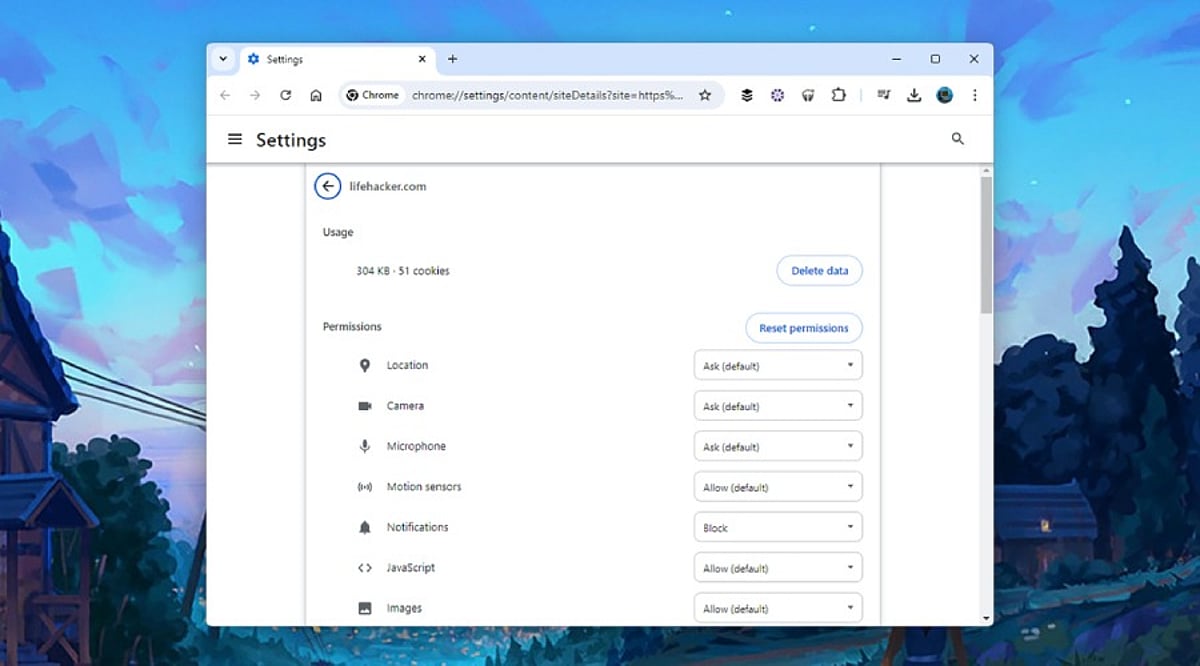
    Every website requests different permissions, from location access for maps to camera and microphone for meetings. AI browsers often combine multiple permissions for a single task, making regular reviews essential. Unused permissions create unnecessary exposure. Camera, microphone, clipboard, notifications, USB devices, Bluetooth, and file access should only be granted to trusted websites. A quick review helps remove permissions that no longer serve a purpose, lowering privacy risks.

    2. AI Extensions Deserve Extra Attention

    AI extensions offer writing assistance, page summaries, and research support but often receive broad access. Security researchers warn that browser agents inherit existing login sessions, meaning an extension could access email, cloud storage, and work platforms. Regularly review and remove unused AI extensions to reduce the number of applications handling sensitive information.

    3. Clipboard Access Can Reveal Sensitive Information

    The clipboard stores everything copied—passwords, payment details, API keys, and more. Modern AI tools may read clipboard content to simplify tasks, creating privacy concerns. Limit clipboard access to trusted websites or extensions that genuinely need it to protect valuable information.

    4. Camera and Microphone Access Should Stay Limited

    Voice assistants and visual AI tools make camera and microphone permissions common for video meetings, voice commands, and live translations. Permanent access is rarely necessary; temporary permission offers a safer option. Grant access only during the session that requires it and revert settings afterward.

    5. Notification Permissions Can Create Security Problems

    Many websites request notification access immediately upon visit. Security experts report notification abuse for phishing and fake alerts. AI assistants can summarize notifications across sites, increasing the value of trusted sources. Regularly review and remove unknown websites from notification access.

    6. Password Manager Access Requires Careful Control

    Browser password managers simplify logins, but AI agents operate within the same authenticated session. Protect password managers with strong authentication and prevent unnecessary extensions from accessing stored credentials to safeguard accounts.

    7. File Access and Data Sharing Matter More Than Ever

    AI browsers can open PDFs, summarize documents, and upload content, requiring local storage access. Grant file access only to trusted websites and verified AI tools. Review settings for chat history, cloud sync, uploaded documents, and stored prompts. Many AI browsers offer controls to limit conversation storage and cloud retention.

    8. Browser Updates Keep Security Strong

    Browser developers introduce new AI features regularly. Google’s WebMCP technology and Chrome Enterprise’s AI management features improve security. Regular updates protect against newly discovered threats and enhance privacy controls for AI services. Current software offers stronger protection against emerging risks like indirect prompt injection and excessive permissions.

    9. Why This Matters

    AI browsers handle personal data, business documents, and online accounts. Permission settings determine how much access these tools receive. Careful management protects sensitive information, reduces security risks, and ensures AI features work safely without exposing valuable data.

    10. Final Thoughts

    AI browsers enable rapid research and automation, but advanced features depend on permission settings. A full permission assessment takes only a few minutes and contributes to enhanced privacy and security. As AI browsers become essential for personal and corporate use, strict permission management is an easy and effective way to ensure safer browsing.

    FAQs

    1. Why are browser permissions important for AI browsers?
    AI browsers use permissions to access device features like camera, microphone, files, and clipboard. Managing these permissions helps protect your privacy and sensitive data.

    2. Which browser permissions should I review first?
    Start with camera, microphone, location, clipboard, notifications, file access, password manager access, Bluetooth, USB devices, and installed AI extensions.

    3. Are AI browser extensions safe to use?
    Trusted extensions can be helpful, but unused or unverified ones may have broad access. Review them regularly.

    4. How often should I check browser permissions?
    A monthly review or checking after installing new AI tools is a good security practice.

    5. Do browser updates improve AI security?
    Yes. Updates include security patches, enhanced privacy controls, and protections against AI-related threats.

  • Canada Launches Public Consultation on AI Transparency Rules for Chatbots and Deepfakes

    Canada Launches Public Consultation on AI Transparency Rules for Chatbots and Deepfakes

    Canada’s federal government has initiated a public consultation on artificial intelligence transparency, seeking input on how AI systems should disclose their identity, capabilities, and limitations. The initiative, announced by AI Minister Evan Solomon, aims to shape future policies and regulations around chatbot disclosures, AI-generated content labeling, incident reporting, and accountability for AI agents.

    Key Areas of the Consultation

    Consultation documents focus on five main areas: content labels for AI-generated material, chatbot disclosure requirements, system documentation, incident reporting protocols, and tracking of AI agents. Minister Solomon emphasized the importance of transparency as AI becomes more integrated into daily life, asking Canadians whether they can identify when they are interacting with machines.

    AI Risks and Incident Reporting

    The government is examining how companies should report serious incidents linked to AI systems, including security breaches like prompt injection attacks. Officials are also considering standard documents explaining intended uses, known risks, and safety controls. The consultation cites examples of AI-generated legal citations that have led to errors in Canadian courts since 2024.

    Other topics include whether developers should disclose training data sources, including copyright-protected material, and technical measures such as digital watermarks. The government is also exploring mandatory incident reporting for security failures, financial losses, or unauthorized system actions.

    AI Agents and Accountability

    Special attention is given to AI agents capable of booking meetings, sending emails, making purchases, and completing forms. The government wants to clarify when agents must identify themselves and how users can track automated actions. An example illustrates responsibility issues when an agent misreads instructions and orders 12 packages instead of one.

    Officials are studying how AI agents interact with other automated systems, considering rules on permissions, human oversight, transaction records, and identity disclosure.

    Broader Policy Context

    This consultation aligns with other Canadian measures: a digital safety bill requiring platforms to label synthetic content, a privacy bill mandating explanations for automated decisions affecting employment or credit, and a law criminalizing non-consensual sexual deepfakes. Proposed rules also address AI-generated election misinformation. The consultation supports Canada’s ‘AI for All’ strategy launched June 4, 2026.

    Canadians can submit feedback until September 23, 2026. The government plans to publish a ‘What We Heard’ report after the consultation closes.

  • Building Always-On AI Agents: A Practical Guide to Apache Kafka and Apache Flink

    Building Always-On AI Agents: A Practical Guide to Apache Kafka and Apache Flink

    Overview

    Learn how Apache Kafka streams real-time events to power scalable, always-on AI applications across enterprise environments. Understand how Apache Flink processes streaming data with stateful computing for intelligent, low-latency AI decision-making. Compare how Kafka and Flink together build resilient, event-driven AI architectures for continuous business automation.

    Introduction

    AI agents are no longer limited to responding to user prompts. Modern businesses require systems that monitor data continuously, identify patterns, and take action without waiting for human input. These always-on AI agents are now deployed in fraud detection, IT monitoring, predictive maintenance, customer support, and supply chain management.

    To build such systems, organizations need a reliable event streaming platform and a real-time processing engine. Apache Kafka and Apache Flink are the most widely used open-source technologies for this purpose. Kafka captures and distributes data streams, while Flink processes them in real time and powers AI-driven decisions. Here is how each platform fits into the workflow.

    Building Always-On AI Agents with Apache Kafka

    Apache Kafka serves as the communication layer that collects and distributes real-time data across applications. Follow these steps to integrate Kafka:

    • Deploy a Kafka Cluster: Set up a Kafka cluster on-premises or in the cloud. Configure multiple brokers for high availability. Create topics for different event types such as user activity, payment transactions, application logs, or IoT sensor data.
    • Connect Data Producers: Applications generate data through producers that continuously publish events to Kafka topics. These include websites, mobile apps, payment gateways, connected devices, and enterprise software.
    • Set Up Consumers: Develop consumer software that subscribes to Kafka topics. The consumer receives every event in real time and passes data to analytics tools, AI software, or stream processing frameworks like Apache Flink.
    • Ensure High Availability: Configure partitions and replication between brokers to guarantee that Kafka continues delivering events even during server failures.
    • Integrate Your AI Application: Kafka does not perform AI processing itself. It provides a continuous data flow to the AI application, which analyzes the events.

    Building Always-On AI Agents with Apache Flink

    Once data flows through Kafka, Apache Flink processes it in real time and enables intelligent decision-making. Here is how to use Flink:

    • Connect Flink to Kafka: Configure Flink to process events from Kafka topics directly. This creates a continuous stream processing pipeline where incoming data is processed immediately rather than waiting for batch processing.
    • Stream Processing Pipelines: Use Flink to filter unwanted events, enrich data, combine multiple streams, calculate metrics, and detect anomalies. These pipelines prepare data before it reaches the AI models.
    • Integrate AI Models: Embed machine learning models or large language models (LLMs) into Flink flows. The AI agent can classify requests, summarize data, identify fraud, suggest recommendations, or trigger automation workflows in real time.
    • Stateful Processing: One of Flink’s main advantages is its ability to maintain state. Instead of processing events in isolation, Flink retains information from previous events, enabling AI agents to make informed decisions.
    • Set Up Checkpointing: Checkpointing allows Flink to regularly save the application state. If a failure occurs, Flink resumes processing from the latest checkpoint, ensuring reliability.

    Apache Kafka vs. Apache Flink: Quick Comparison

    Feature Apache Kafka Apache Flink
    Primary Role Event streaming and distribution Real-time stream processing
    Data Handling Collects and stores event streams Processes events with low latency
    State Management Limited (via Kafka Streams) Full stateful processing
    AI Integration Delivers data to AI applications Executes AI models within pipelines
    Fault Tolerance Replication across brokers Checkpointing and state snapshots

    Best Practices

    • Create separate Kafka topics for different business events.
    • Design Flink jobs as modular and dedicated to one task only.
    • Use checkpoints and replicas to ensure resilience to failures.
    • Monitor latency and throughput to preserve real-time capabilities.
    • Use authentication and encryption to secure data flows.
    • Scale Kafka brokers and Flink clusters independently when workload increases.

    Which One Should You Choose?

    The answer is not Kafka or Flink; it is Kafka and Flink. Kafka provides reliable, continuous data from various applications. Flink consumes that data, processes it with low latency, and enables AI agents to make decisions as events occur. For building an always-on AI agent, Kafka is the data pipeline, and Flink is the intelligence component. Together they form a scalable architecture for continuous processing.

    Final Takeaway

    Always-on AI agents depend on two things: a constant stream of information and the ability to process it instantly. Apache Kafka provides the first, and Apache Flink provides the second through real-time computations and stateful processing. Combining these two systems allows organizations to create applications that observe events, analyze patterns, and react promptly. As companies increasingly adopt real-time AI applications, the Kafka-Flink combination has become a proven solution.

    Frequently Asked Questions

    What are always-on AI agents?

    Always-on AI agents continuously monitor live data, analyze events, and trigger automated actions without waiting for user prompts. They are used in fraud detection, IT monitoring, customer support, and predictive maintenance.

    How does Apache Kafka help in building AI agents?

    Apache Kafka acts as an event streaming platform that collects, stores, and distributes real-time data from multiple sources, ensuring AI agents receive continuous event streams for analysis and decision-making.

    Why is Apache Flink used alongside Apache Kafka?

    Apache Flink processes streaming data from Kafka in real time, enabling stateful processing, anomaly detection, AI model integration, and automated decision-making with minimal latency across enterprise applications.

    Can Apache Kafka and Apache Flink be used independently?

    Yes, both can operate independently. Kafka is designed for event streaming, while Flink focuses on stream processing. However, combining them creates a robust architecture for real-time AI applications.

    What industries benefit most from always-on AI agents?

    Banking, healthcare, manufacturing, retail, logistics, telecommunications, and cybersecurity benefit significantly by enabling real-time monitoring, intelligent automation, predictive insights, and faster operational decisions.

  • 6 Best AI Agents for Data Analytics and Business Intelligence in 2026

    6 Best AI Agents for Data Analytics and Business Intelligence in 2026

    Business intelligence (BI) has evolved far beyond static dashboards and manual reports. In 2026, AI agents are transforming how organizations interact with data—automating reporting, generating insights, and enabling faster, smarter decision-making. These tools can monitor key metrics, write SQL queries, explain trends, detect anomalies, and recommend actions, all through natural language interactions.

    Here are six standout AI agents that leading enterprises and growing startups are adopting this year.

    1. Microsoft Power BI Copilot

    Microsoft Power BI Copilot integrates AI directly into the company’s BI platform. Users can ask questions in plain English, generate reports, create DAX formulas, and summarize dashboards without manual effort. Its tight integration with Microsoft Fabric, Excel, and Teams makes it a practical choice for organizations already using the Microsoft ecosystem.

    2. ThoughtSpot Sage

    ThoughtSpot Sage is built around search-driven analytics. Users simply type business questions and receive charts, explanations, and follow-up insights. The platform identifies unusual trends and suggests additional areas to explore, making it popular with sales, finance, and marketing teams that need quick answers without relying on technical experts.

    3. Databricks AI/BI Genie

    Databricks AI/BI Genie is designed for organizations with large data volumes. The application converts human language into SQL code, enabling users to analyze data without writing any code themselves. Built on the Databricks Lakehouse platform, it provides a seamless experience for data-heavy workflows.

    4. Tableau Agent

    Tableau has extended its visual analytics platform with AI-based assistance. Tableau Agent helps users create dashboards faster, summarize reports, and explain trends using natural language. The visualization process becomes quicker without compromising Tableau’s rich analytical capabilities.

    5. Google Looker AI

    Google Looker AI combines business intelligence with Gemini-powered AI. Users can query enterprise data conversationally while working within a governed semantic model, ensuring consistent metrics across teams. It is especially useful for organizations already relying on Google Cloud for data storage and analytics.

    6. Tellius AI

    Tellius AI focuses on finding answers rather than just displaying data. It investigates changes in business performance, identifies likely causes, and highlights the factors driving results. The platform also delivers predictive insights, helping decision-makers respond to issues before they affect business outcomes.

    Final Thoughts

    The biggest shift in business intelligence in 2026 is the move from AI assistants to AI agents. These platforms do more than generate reports—they analyze data, investigate anomalies, and surface insights with minimal user input. Whether it’s Power BI Copilot for enterprise reporting, ThoughtSpot Sage for self-service analytics, or Tellius AI for automated investigations, businesses now have tools that make data analysis faster, more accessible, and more actionable.

  • Mark Zuckerberg Predicts Billions Will Use Personal AI Agents Within Five Years

    Mark Zuckerberg Predicts Billions Will Use Personal AI Agents Within Five Years

    Meta CEO Mark Zuckerberg has made a bold prediction: within the next five years, billions of people will rely on personal AI agents to manage daily tasks, achieve personal goals, and transform how they interact with technology.

    Speaking during Meta’s second-quarter earnings call on July 29, 2026, Zuckerberg outlined the company’s long-term vision of building AI systems that go far beyond answering questions. These next-generation assistants, he said, will function as “personal agents” that work around the clock on behalf of users.

    “I think that it’s extremely unlikely if you look out five years from now, for example, whatever period of time you want, that you don’t have billions of people with a personal agent that understands your goals and that is just working on your behalf 24/7 to achieve your goals in whatever the domain is that you care about,” Zuckerberg told investors.

    Meta’s approach focuses on making AI accessible to everyday consumers rather than limiting advanced capabilities to developers or enterprise users. Zuckerberg noted that current AI agents often require technical knowledge to set up and use effectively, while Meta aims to deliver an experience that works seamlessly from the start.

    “As we move toward a future where we’re all interacting with multiple agents, I think that WhatsApp and our other messaging surfaces are going to become increasingly important,” he said, adding that WhatsApp is already the leading platform where users interact with Meta AI.

    Massive AI Investments Back the Vision

    Meta is backing its AI ambitions with record spending on infrastructure. The company has increased its capital expenditure forecast for 2026 to between $130 billion and $145 billion, funding new data centers, computing capacity, and AI research. The investment is expected to support increasingly powerful AI models capable of handling more complex tasks and serving billions of users worldwide.

    The company is also expanding its AI ecosystem across Facebook, Instagram, Messenger, and WhatsApp. Meta says more than one million businesses already use its AI-powered business agents each week, providing a foundation for broader consumer-focused AI services.

    Competition in AI Race Intensifies

    Meta’s vision arrives at a time when nearly every major technology company is racing to develop AI agents capable of performing real-world tasks. The Facebook-parent is positioning itself around consumer AI that integrates into daily life.

    The company, however, faces challenges. Analysts have pointed out that rivals such as Google and Microsoft already have deeper integration with productivity tools like email, documents, and calendars. Meta must also overcome ongoing privacy concerns as it encourages users to trust AI systems with increasingly personal information.

    A New Era of Personal AI

    Zuckerberg’s prediction reflects how quickly the AI industry is evolving. If Meta’s vision becomes reality, personal AI agents could shift from optional digital assistants to everyday companions that proactively support work, learning, communication, and personal development.

    Whether billions of users adopt these AI agents within the next five years remains uncertain, but Meta’s continued investment signals that the company sees personalized AI as the next major computing platform — one that could redefine how people interact with technology long after the smartphone era.

  • Microsoft to Launch Unified Copilot Super App Integrating Chat, Coding, and AI Agents by End of Year

    Microsoft to Launch Unified Copilot Super App Integrating Chat, Coding, and AI Agents by End of Year

    Microsoft CEO Satya Nadella confirmed during the company’s July 29, 2026 earnings call that a unified Copilot ‘super app’ will be released by the end of the year. The platform will combine chatbot capabilities, coding tools, and autonomous AI agents into a single interface for both consumers and businesses.

    According to Nadella, the super app is expected to become available in the current quarter, though exact pricing, a launch date, and a complete feature list have not been disclosed. “This quarter, we are bringing these Copilot experiences together, including code, in one super app… This is a major step forward, and I look forward to sharing more soon,” he said.

    The announcement follows earlier reports from Fortune indicating that Microsoft was developing a consolidated application merging Copilot chat, GitHub Copilot, Copilot Cowork, and its Autopilot agent system.

    From Chat to Autonomous Workflows

    Nadella outlined Copilot’s evolution through three stages: chat, Cowork, and Autopilots. The existing chat experience answers questions and generates content; Cowork assists users with collaborative tasks; and Autopilots represent the most advanced layer, enabling AI agents to complete longer, multi-step workflows with minimal human intervention. By placing these capabilities alongside code editing in one interface, Microsoft aims to reduce fragmentation across Windows Copilot, Microsoft 365 Copilot, GitHub Copilot, and Copilot Studio.

    Enterprise Distribution Remains Central

    The super app will target both commercial and consumer users. An integrated app may simplify deployment, licensing, and access for businesses already using Microsoft 365, allowing workers to leverage AI-powered document creation, coding, or workflow automation. This move comes as Microsoft reported $90 billion in quarterly revenue, with cloud computing and AI as strong growth drivers. The company could eventually monetize its vast Microsoft 365 customer base through a single Copilot platform generating subscription-based AI revenue.

    Competition Intensifies

    Microsoft’s strategy also heightens competition with OpenAI and other AI developers offering integrated assistants capable of handling text, coding, research, and agentic tasks. However, key questions remain unanswered, including whether GitHub Copilot will continue as a separate subscription, how existing users will be migrated, and what administrative controls enterprises will receive. The product’s success will ultimately depend on whether Microsoft delivers a genuinely connected experience rather than simply placing several existing tools inside one interface.

    Also Read: Microsoft Introduces MAI-Cyber-1-Flash, Claims to Outperform Gemini, ChatGPT