Tag: Cybersecurity

  • Top Gaming Scams to Watch Out for in 2026: Red Flags You Might Be Missing

    Top Gaming Scams to Watch Out for in 2026: Red Flags You Might Be Missing

    As the gaming industry continues to expand, cybercriminals are refining their tactics to target players. In 2026, scammers are leveraging artificial intelligence, fake giveaways, and fraudulent platforms to steal credentials, money, and personal data. Recognizing these red flags is essential to staying safe while gaming.

    AI-Generated Phishing Messages

    Scammers now use AI to craft convincing emails and messages that mimic official gaming platforms. Never click unsolicited login links or verify accounts through unknown sources. Always navigate directly to the official website.

    Too-Good-to-Be-True Game Deals

    Massive discounts on skins, in-game currency, premium accounts, or collectibles are almost always scams. Purchase digital content only through official stores and trusted marketplaces.

    Fake Giveaways from Popular Creators

    Fraudsters impersonate streamers, esports teams, and developers, promising exclusive rewards. Legitimate giveaways never require passwords, payment details, or account credentials to participate.

    Suspicious Beta Testing Invitations

    Cybercriminals distribute fake beta invites containing malware or phishing links. Download beta versions only after confirming announcements from official game developers.

    Unofficial Trading Platforms

    Private item trading often involves fake buyers, manipulated payment proofs, and fraudulent middlemen. Always use secure, developer-approved trading systems whenever available.

    Malicious Mods and Cheat Software

    Free mods, hacks, cheats, and cracked games may contain hidden malware. Download gaming tools exclusively from reputable creators and verified community platforms.

    Fake Esports Tournament Registrations

    Scammers advertise nonexistent tournaments and collect registration fees or personal information. Verify organizers through official esports websites before entering any competition.

    Impersonated Customer Support Teams

    Fraudsters pretend to resolve hacked accounts while requesting passwords or payments. Authentic support teams never ask for sensitive credentials or cryptocurrency transfers.

    Weak Account Security Practices

    Using simple passwords or skipping multi-factor authentication makes accounts easier to compromise. Strong, unique credentials and MFA provide essential protection against cyberattacks.

  • How Collectors Are Losing Thousands to Facebook Marketplace Scams

    How Collectors Are Losing Thousands to Facebook Marketplace Scams

    Fraudsters are increasingly targeting collectors on Facebook Marketplace with sophisticated scams. Here are the most common tactics to watch out for:

    Fake Listings with Attractive Prices

    Scammers post rare collectibles at unusually low prices to lure buyers. Unrealistic discounts often indicate fraudulent listings designed to steal money quickly.

    Advance Payment Demands

    Fraudsters insist on full or partial payment before shipping valuable items. Avoid transferring money until authenticity and seller credibility are independently verified.

    Counterfeit Collectibles

    Fake coins, trading cards, watches, artwork, and luxury items are sold as originals. Always request proof of authenticity and expert verification before purchasing.

    Seller Impersonation Scams

    Cybercriminals copy trusted seller profiles using stolen photos and descriptions. Verify account history, reviews, and communication before completing any transaction.

    Fake Shipping and Tracking Updates

    Scammers provide fabricated courier receipts or invalid tracking numbers to appear legitimate. Confirm shipment details directly through the official logistics provider.

    Payment Outside Secure Platforms

    Fraudsters encourage direct bank transfers or digital wallets instead of protected payment methods. Secure payment options offer better fraud protection and dispute resolution.

    Pressure to Buy Immediately

    Scammers create urgency by claiming multiple interested buyers or limited availability. Take time to verify every detail before making expensive purchasing decisions.

    Requests for Personal Information

    Fraudsters may ask for unnecessary identity documents or banking details during transactions. Share only essential information required to complete a legitimate purchase safely.

    Ignoring In-Person Verification

    Collectors buying high-value items without physical inspection face greater fraud risks. Meet in safe public locations and inspect collectibles thoroughly before payment.

  • Accenture Acknowledges Security Incident After Hacker Alleges Theft of 35GB of Internal Data

    Accenture Acknowledges Security Incident After Hacker Alleges Theft of 35GB of Internal Data

    Accenture has confirmed that it recently experienced a cybersecurity incident after a hacker claimed to have stolen 35GB of company data. The attacker allegedly offered the data for sale on a cybercrime forum. While the company admitted a breach occurred, it stated the issue was limited and already resolved, with no disruption to its services or business operations.

    The incident came to light following a report from BleepingComputer, which was subsequently picked up by multiple technology news outlets. According to those reports, a hacker using the alias “888” claimed to have accessed a large volume of internal Accenture data in July 2026.

    Hacker Claims Stolen Data Includes Sensitive Credentials

    The hacker alleged that the stolen files include source code, RSA keys, SSH keys, Azure Personal Access Tokens, Azure Storage access keys, and configuration files. These components are critical to a company’s software and cloud infrastructure. If active keys or tokens are compromised, attackers could potentially gain unauthorized access to internal systems. Security experts caution that the claim has not yet been independently verified.

    To support the claim, the hacker shared a screenshot appearing to show an Azure DevOps project associated with an Accenture domain, including a repository named “121123_AtriasTalentAcademy.” While the screenshot makes the claim more credible, no independent verification of the full 35GB dataset has been conducted.

    Accenture’s Response

    Accenture confirmed the security incident and stated that it quickly remediated the source of the breach. The company emphasized that there has been no impact on its operations or service delivery. It did not disclose how the attacker gained entry, nor did it confirm the exact volume of data stolen or whether any customer information was affected.

    This breach underscores that even a rapid response cannot eliminate all risks. If source code or cloud access credentials fall into the wrong hands, attackers may use them to study systems and identify vulnerabilities. Companies typically rotate passwords, keys, and tokens after such incidents to mitigate future threats.

    Accenture has faced cyberattacks before. In 2021, it was hit by a LockBit ransomware attack that drew global attention. In 2024, the same hacker known as “888” claimed to have accessed Accenture employee data following a separate third-party breach. These incidents highlight that large technology and consulting firms remain prime targets for cybercriminals.

    Unanswered Questions

    Several details remain unclear. No independent investigation has confirmed the hacker’s claim regarding the 35GB dataset. Accenture has not disclosed the specific files involved or the attack vector. At this stage, the company has only confirmed that a breach occurred, the issue has been fixed, and services continue without disruption. The rest of the claims rely on the hacker’s assertions.

  • WhatsApp Username Feature Delayed in India as Meta Fails to Meet Government Deadline

    WhatsApp Username Feature Delayed in India as Meta Fails to Meet Government Deadline

    The Ministry of Electronics and Information Technology (MeitY) has not yet received Meta’s formal response regarding WhatsApp’s proposed username feature, even after the extended deadline passed on Wednesday, according to government sources.

    The Centre had granted Meta an additional three days to respond to the notice issued over privacy and security concerns. During earlier discussions, Meta assured that the username feature would not launch in India until consultations with the ministry concluded.

    Government Raises Cybersecurity Concerns

    MeitY’s notice sought clarity on safeguards accompanying WhatsApp usernames, which allow users to connect without sharing phone numbers. Officials fear the change could enable fraudsters to impersonate users, create fake identities, and conduct phishing attacks while hiding their real identities.

    The ministry asked Meta to explain user verification, misuse prevention, and grievance redressal plans. The feature is expected to work like usernames on other platforms.

    Meta Assures No India Rollout for Now

    Meta representatives met MeitY officials and reportedly assured that the feature would not launch in India until regulatory consultations are complete. The extension was meant to give Meta time to detail its user safety measures.

    As of the deadline, the ministry had not received the company’s formal reply.

    Wider Review of Messaging Platforms

    MeitY has also sought explanations from Telegram and Signal, which already support username-based communication. The government is examining whether such features could complicate cybercrime investigations. The review is part of India’s broader push to strengthen digital safety while balancing user privacy and innovation.

  • How to Safely Verify Official Productivity Software Websites Before Installing Office Tools

    How to Safely Verify Official Productivity Software Websites Before Installing Office Tools

    Productivity software has become part of everyday digital work. Students use document tools to prepare assignments, professionals manage reports and spreadsheets, and remote teams depend on office applications to collaborate across devices. Because these tools often handle important files, personal documents, and business information, users should be careful about where they download them.

    Many people still search for office software quickly and click the first download button they find. This habit may seem convenient, but it can expose users to unsafe installers, misleading pages, outdated software versions, or unnecessary bundled programs. Before installing any productivity tool on Windows, Android, or other desktop environments, users should understand how to identify official software websites and verify download sources.

    Why Official Software Sources Matter

    Office and productivity apps are more than just simple utilities. They can access local files, cloud storage, account information, printing systems, templates, fonts, and shared documents. Installing a modified or unreliable version by a user poses a risk not only for one app. It may impact document privacy, system performance, browser settings or future software updates.

    Official software websites typically contain more detailed product information, version details, installation instructions, update channels, and support resources. Also, the risk of downloading repackaged installers with third party software is reduced. If you work or study using productivity tools, downloading from a safer place helps keep your devices and documents safe.

    Common Problems With Unsafe Download Pages

    Unsafe download pages often employ confusing design patterns. A page can have many big buttons, but only one of them actually downloads the intended application. Some of the buttons could be ads, or the links could be to unrelated tools. Users in a hurry can easily click on the wrong option.

    Bundled installers are another common problem. These packages might include browser extensions, search toolbars, system cleaners, or trial software unrelated to the office tool the user intended to download. Even if these additions are optional, they may be selected by default during installation.

    Outdated versions are also a concern. A third-party page may keep old software files available long after the official version has been updated. Older software may lack important security fixes or compatibility improvements. For productivity tools used across Windows, mobile, and cloud environments, version reliability is especially important.

    How to Verify Whether a Website Looks Official

    The first step is to examine the domain name carefully. A trusted source should have a clear and consistent domain that matches the software brand or service. Users should be cautious with websites that imitate official names, add unnecessary words, use unusual spellings, or rely on excessive pop-ups.

    For office software users, verifying the source is especially important before downloading installation files. When checking an official-looking office software page such as wps官网, users should review the page structure, download instructions, HTTPS status, file information, and whether the website provides a clear path for updates or support.

    Users should also look at how the page explains the software. A reliable website usually describes product features, supported platforms, system requirements, and installation steps consistently. A page that only pushes users toward a download button without explaining the software may deserve closer inspection.

    Check HTTPS and Basic Page Signals

    HTTPS is no guarantee of safety, but it is still a basic requirement for modern software websites. Users should not input account information or download important applications from non-secure connection pages. The address bar of your browser can help you confirm that the page uses HTTPS.

    Users should look at basic page signals other than HTTPS. Is the website easy to navigate? Does it offer contact or support information? Are there any obvious spelling errors or suspicious redirects? Does the download page still remain on the same domain or does it take users through a number of unknown websites?

    Multiple redirects are a warning sign. A user should know where a file is coming from before downloading it. If the download path moves through several unrelated domains, it becomes harder to trust the file source.

    Review the Download File Before Installing

    After downloading a file, users should pause before running it. On Windows, the file name should match the application and should not look like a generic installer from an unknown source. Users should also check whether the file extension makes sense. Executable files should be handled carefully, especially when they come from unfamiliar pages.

    For mobile users, APK files require even more attention. Installing an APK outside verified app stores may be necessary in some situations, but it also places more responsibility on the user. The file source, app version, permissions, and update method should all be reviewed before installation.

    If security software warns about a file, users should not ignore the warning. They should verify the source again, scan the file if needed, and consider downloading from a more reliable location.

    Avoid Bundled Installers and Unrelated Add-ons

    During installation, users should read each step instead of clicking through quickly. A safe productivity software installer should not require unrelated browser extensions, search tools, advertising components, or unknown system utilities. If an installer includes extra offers, users should be careful to decline them.

    Bundled software can create long-term inconvenience. It may change browser settings, add startup programs, display unwanted notifications, or slow down the system. For people who use productivity tools daily, these changes can reduce work efficiency and create unnecessary troubleshooting.

    Understand Update Channels

    Safe software installation does not end after the first download. Users should also understand how updates will be delivered. Official websites and verified app stores usually provide more predictable update paths. This helps users receive security patches and compatibility improvements without searching for a new installer every time.

    If an app asks users to download updates from random pop-up messages or unknown pages, they should be cautious. Reliable productivity tools usually provide updates through the application itself, the official website, or a recognized software distribution platform.

    Why Teams Should Standardize Software Sources

    For teams, safe download habits should be part of a broader workflow policy. The more team members download office tools from different sources, the more likely you are to run into compatibility and security issues. One person might be on an old version, another might be on a modified build, and another might be getting updates from a different channel.

    Teams can mitigate these risks by defining approved software sources. They can also record installation steps, rules for account set-up, and update expectations. This is especially beneficial for remote teams that work on a variety of devices and share documents on the cloud.

    Final Checklist Before Installing Productivity Software

    Before installing office or productivity tools, users should confirm several points. The website should have a clear domain, HTTPS protection, useful product information, and a direct download path. The file name should look relevant, the installer should avoid unrelated bundles, and the update channel should be easy to understand.

    Users should also review permissions after installation, especially on mobile devices. If a productivity app requests access that does not match its function, the user should review the settings carefully. Good software habits include downloading from trusted sources, keeping apps updated, and avoiding unnecessary add-ons.

    Productivity software supports everyday work, education, communication, and document management. Because these tools often handle important files, users should not treat installation as a routine click-through. Checking the official software websites helps reduce the risk of downloading unsafe software, outdated versions, installers that bundle other programs, and confusing update processes.

    The safest approach for users installing office software on a personal laptop, work desktop, or mobile device is to slow down and check the source first. A few minutes of checking can help you protect documents, improve device reliability, and make long-term software use safer.


  • Cryptocurrency Trail Leads Police to Pokémon Card Theft Suspect

    Cryptocurrency Trail Leads Police to Pokémon Card Theft Suspect

    The popularity of the Pokémon Trading Card Game (TCG) has turned rare cards into high-value collectibles, attracting both enthusiasts and criminals. A recent case highlights how digital currency transactions can become key evidence in theft investigations.

    Police arrested Christian Elam after tracing cryptocurrency payments linked to a scheme involving stolen Pokémon cards. Investigators said the digital currency trail was one of the most important clues in the case.

    According to reports, Elam attempted to steal a rare Poncho-wearing Pikachu promo card valued at approximately $24,000. The card was listed for $24,200 on Facebook Marketplace. During a meetup on June 14 at the Evesham Township Police Department’s safe exchange zone in Marlton, New Jersey, Elam sent the listed amount using cryptocurrency, which later proved to be fraudulent. Authorities followed the payment records to identify and arrest him.

    This incident serves as a warning for collectors. Experts recommend keeping detailed purchase records, including photos, grading details, receipts, and purchase dates to prove ownership. Valuable cards should be stored securely. When buying or selling, collectors should verify the other party’s identity and use trusted marketplaces whenever possible.

    As Pokémon cards are expected to retain their value, criminal activity around them is likely to increase. The arrest of Christian Elam demonstrates that cryptocurrency transactions are not always anonymous and can serve as evidence in criminal investigations. For collectors, careful record-keeping, secure storage, and verified sales remain the best ways to protect a valuable collection.

  • 7 Essential Privacy Settings to Configure on Your New Smartphone

    7 Essential Privacy Settings to Configure on Your New Smartphone

    When you unbox a new phone, protecting your privacy should be a top priority. By adjusting a few key settings, you can significantly reduce the risk of unauthorized access and data leaks. Here are seven essential steps to secure your device right away.

    1. Enable Screen Lock: Use a strong PIN, password, fingerprint, or facial recognition to prevent unauthorized access if your phone is lost or stolen.
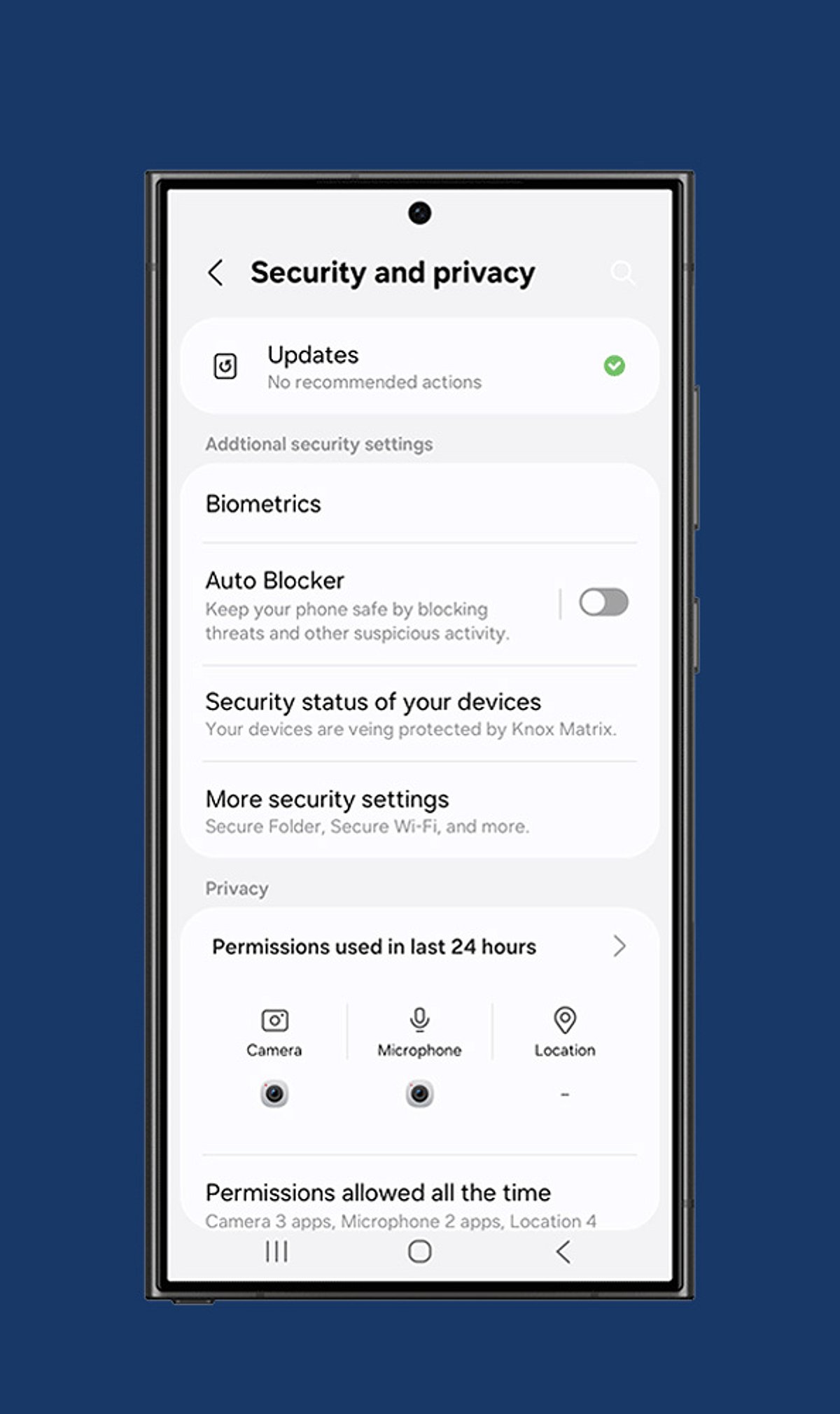
    2. Review App Permissions: Only grant apps access to camera, microphone, contacts, and location when absolutely necessary. Revoke permissions for any app that doesn’t need them.
    3. Turn On Two-Factor Authentication: Add an extra layer of security to your important accounts by requiring a second verification step beyond your password.
    4. Disable Ad Personalization: Limit targeted advertising and reduce tracking by restricting your phone’s advertising identifier.
    5. Manage Location Sharing: Set location access to “While Using the App” instead of “Always” to prevent apps from tracking you in the background.
    6. Activate Device Encryption: Ensure that all sensitive files, messages, and personal information remain encrypted and unreadable even if someone gains physical access to your phone.
    7. Configure Find My Device: Enable remote tracking, locking, and data wiping features before your phone is ever misplaced or stolen.

    Additionally, regularly review your cloud backup settings, install software updates promptly, and keep your operating system patched against the latest security threats.

  • Top AI Fraud Detection Platforms for Business Security in 2026

    Top AI Fraud Detection Platforms for Business Security in 2026

    AI fraud detection platforms help businesses identify suspicious activity, reduce false alerts, protect customer accounts, improve payment security, support compliance, and strengthen overall business protection against modern fraud threats in 2026.

    Key Takeaways

    • AI detects fraud faster through real-time monitoring and behavioral analysis.
    • Modern platforms reduce false positives while improving customer experience.
    • Different platforms serve different industries, from banking and fintech to e-commerce and enterprises.

    Online fraud has become more advanced, faster, and harder to identify. Criminals now use smart tools to create fake identities, steal account details, and bypass traditional security systems. To counter online threats, many businesses now depend on AI-powered fraud detection platforms that identify suspicious activity before major damage occurs. These platforms study customer behavior, examine transactions in real time, and detect unusual patterns that simple rule-based systems often miss. They also reduce false alerts, improve security, and support compliance with financial regulations. The following platforms stand out as some of the best AI fraud detection solutions for businesses in 2026.

    Feedzai

    Feedzai is one of the leading fraud detection platforms for banks, payment providers, and financial institutions. The platform creates detailed profiles of customer behavior rather than relying solely on fixed rules. This approach helps identify suspicious activity with greater accuracy while reducing unnecessary transaction blocks. The platform also offers real-time payment monitoring, anti-money laundering support, and advanced machine learning models that improve after every transaction. Feedzai protects digital payments across multiple channels and helps financial organizations stop fraud without creating delays for genuine customers.

    Featurespace

    Featurespace focuses on adaptive behavioral analytics that change as customer activity changes over time. This ability allows the platform to identify fraud that traditional systems may fail to detect. It performs well in payment protection, card fraud prevention, and authorized push payment fraud detection. Large financial institutions choose Featurespace because it lowers false positives while maintaining strong security. Dynamic risk scoring allows security teams to respond quickly whenever unusual transaction patterns appear.

    Sardine

    Sardine is best for fintech companies, cryptocurrency businesses, and other digital-first organizations. The platform combines fraud detection, identity verification, and compliance tools in one solution, which makes security management much easier. Its AI system studies device details, customer identities, and transaction behavior to calculate fraud risk. Sardine also detects synthetic identities and supports anti-money laundering efforts. Fast-growing financial companies value the platform because it protects customers without adding unnecessary complexity.

    SEON

    SEON is a popular choice for e-commerce businesses and software companies. The platform studies digital information such as email addresses, phone numbers, IP addresses, and device details to identify fraud before transactions receive approval. Real-time fraud scoring helps businesses make quick decisions while reducing payment fraud and account abuse. Since SEON focuses on smooth customer experiences, genuine buyers usually complete purchases without extra security checks.

    ComplyAdvantage

    ComplyAdvantage combines fraud prevention with financial crime compliance. Many regulated financial companies use this platform to fulfill both security and legal requirements at the same time. The platform can track and analyze transactions, perform risk assessments and customer screenings, check sanction lists, and automate anti-money laundering processes. AI models assist security teams in detecting suspicious activities at an early stage.

    Hawk AI

    Hawk AI stands out for its explainable artificial intelligence. Security teams receive clear reasons behind every fraud alert instead of simple risk scores. This transparency supports faster investigations and stronger regulatory compliance. The platform also offers real-time transaction monitoring, customer risk analysis, and case management tools. Banks especially value Hawk AI because security analysts understand why each transaction receives attention.

    Sift

    Sift protects online stores, digital marketplaces, and subscription businesses from several forms of fraud. The platform identifies payment fraud, account takeovers, chargeback fraud, and promotion abuse across the complete customer journey. Its AI filter system examines billions of digital events to recognize suspicious behavior quickly. This large data network helps Sift identify new fraud methods while protecting genuine customers from unnecessary interruptions.

    BioCatch

    BioCatch uses behavioral biometrics instead of passwords alone. The platform studies how people type, move a mouse, swipe a mobile device, and interact with websites. Small behavioral differences often reveal whether a genuine customer or a fraudster controls the account. This continuous identity verification improves account security and reduces identity theft. Many banks rely on BioCatch because behavioral analysis adds another strong layer of protection without creating extra work for customers.

    LexisNexis ThreatMetrix

    LexisNexis ThreatMetrix specializes in digital identity intelligence for large enterprises. The platform studies device information, network activity and identity data to separate trusted customers from potential attackers. Risk-based authentication allows businesses to request extra verification only when suspicious behavior appears. This balanced approach strengthens security while keeping the customer experience simple.

    Fraud.net

    Fraud.net provides a complete platform that combines fraud detection, risk management, and compliance tools. Large organizations often choose this solution because multiple security functions remain available within one platform instead of separate systems. AI-powered analytics monitor transactions, identify unusual behavior, and support faster investigations. Entity intelligence also helps detect hidden connections between suspicious activities that traditional systems may overlook.

    Final Thoughts

    AI-powered fraud detection systems have become critical to modern businesses. The application of advanced technologies such as machine learning algorithms, behavioral analysis technologies, identity information systems and real-time monitoring helps companies discover fraud cases much earlier than traditional fraud-prevention technologies allow them to do. Platforms like Feedzai, Featurespace, Sardine, SEON, ComplyAdvantage, Hawk AI, Sift, BioCatch, LexisNexis ThreatMetrix and Fraud.net offer unique strengths for different industries. Each of the solutions mentioned above has distinct advantages, but companies need to select the right platform for effective fraud detection.

    FAQs

    1. What is an AI fraud detection platform? An AI fraud detection platform uses machine learning and behavioral analysis to identify suspicious activities and prevent fraud in real time.
    2. Which industries benefit the most from these platforms? Banks, fintech companies, e-commerce businesses, marketplaces, insurance providers, and payment companies benefit the most.
    3. Why is behavioral analysis important in fraud detection? Behavioral analysis identifies unusual customer actions that may indicate fraud, even when login details appear correct.
    4. Can AI reduce false fraud alerts? Yes. AI studies normal customer behavior and improves detection accuracy, which helps reduce unnecessary alerts.
    5. Which AI fraud detection platform is best for 2026? The best platform depends on business needs. Feedzai, Featurespace, Sardine, SEON, Sift, BioCatch, Hawk AI, ComplyAdvantage, LexisNexis ThreatMetrix, and Fraud.net are among the top choices.
  • Daily Tech Roundup: India’s Semicon 2.0 Launch, CurifyLabs Funding, and Bitcoin Strategy Shift

    Daily Tech Roundup: India’s Semicon 2.0 Launch, CurifyLabs Funding, and Bitcoin Strategy Shift

    Greetings from the Digital World! Welcome to today’s quick tech roundup. From AI and startups to crypto, careers and digital innovation, here’s what made headlines today.

    What’s New Today

    India has launched Semicon 2.0 to boost its semiconductor industry, while Finnish health tech startup CurifyLabs secured funding to expand its personalized medicines platform. In cryptocurrency news, Grayscale claims that Bitcoin sales by Strategy could make its financial model more credible. Meanwhile, the IT skills shortage continues to challenge new graduates, and experts warn about JADEPUFFER AI agents capable of executing cyber attacks autonomously.

    Quick Insights

    • India’s Semicon 2.0 targets chip manufacturing, design, research, raw materials, equipment, and talent development.
    • CurifyLabs raised $14 million to expand its personalized medicine technology.
    • Grayscale believes Strategy’s Bitcoin sales could strengthen investor confidence.
    • Employers say many tech graduates still lack industry-ready skills despite high demand.
    • Researchers warn that JADEPUFFER AI can autonomously breach systems and deploy ransomware.

    A Quick Rundown

    India Launches Semicon 2.0 to Expand Chip Ecosystem Support

    India has launched Semicon 2.0, broadening its chip ambitions beyond manufacturing to include design, research, raw materials, equipment, and workforce development. The initiative aims to attract international investment and reduce reliance on foreign chips.

    CurifyLabs Raises $14 Million Series A

    CurifyLabs, a Finland-based healthcare technology firm specializing in personalized medicines, closed a $14 million Series A round. The funding will support international expansion, supply chain development, and research, enabling hospitals and pharmacies to produce customized medications.

    Grayscale Backs Strategy’s Bitcoin Sales

    Grayscale has expressed support for Strategy’s recent Bitcoin sales, stating that generating liquidity through cash could make the company’s funding process more sustainable and enhance investor confidence in its financial model.

    The IT Job Market Faces a Growing Skills Gap

    Fresh graduates are finding it harder to land tech jobs. Despite high demand, employers report that many candidates lack practical, industry-ready skills. The disconnect between academic learning and workplace expectations leaves many graduates underemployed while companies continue searching for qualified talent.

    JADEPUFFER AI Can Hack Systems Without Human Help

    Scientists have demonstrated that the experimental AI bot JADEPUFFER can execute cyber attacks with minimal human intervention. The research highlights the emerging threat of autonomous AI systems capable of identifying vulnerabilities, moving across networks, and deploying ransomware.

  • Why Small Businesses Need CMMC: A Practical Guide to Cybersecurity Compliance

    Why Small Businesses Need CMMC: A Practical Guide to Cybersecurity Compliance

    Small businesses face an increasingly dangerous cybersecurity landscape. Data breaches, ransomware, and supply chain vulnerabilities are no longer hypothetical threats, which is why robust security frameworks have become non-negotiable. For companies handling sensitive federal information, the Cybersecurity Maturity Model Certification (CMMC) has evolved into both a compliance requirement and a solid defense strategy.

    CMMC solutions provide small businesses with a structured way to protect controlled unclassified information (CUI) and federal contract data. But the benefits go beyond satisfying regulators. Done right, these frameworks help build a security posture capable of withstanding sophisticated threats. Here’s how CMMC implementation actually strengthens cybersecurity and what business leaders need to know before getting started.

    What CMMC Solutions Actually Do

    At its core, the Cybersecurity Maturity Model Certification establishes a unified set of security standards for defense contractors and everyone in their supply chain. The Department of Defense created it to replace a patchwork of overlapping requirements with a single framework across five maturity levels, each building on the security controls from the level before.

    CMMC solutions pursue three main goals:

    • Standardized Protection: Getting everyone in the defense industrial base on the same security page, replacing the mismatched standards that were previously common.
    • Verified Implementation: Using independent assessors to confirm controls are in place and functioning, not just gathering dust in a binder.
    • Supply Chain Security: Extending protection requirements deeper into contractor networks, precisely where adversaries have been finding entry points.

    The framework heavily relies on NIST cybersecurity standards, especially Special Publication 800-171, which details how to protect CUI on non-federal systems. Because of the overlap, working toward CMMC compliance strengthens a business’s entire cybersecurity posture, not just the parts tied to federal work.

    Why CMMC Compliance Matters Beyond Contracts

    While CMMC certification is required for defense contracts, its value extends much further. The certification process often reveals security gaps that companies didn’t know existed. Small businesses frequently discover weaknesses in access controls, incident response, or data handling that have been unnoticed for years. Fixing those issues lowers risk across the entire business, not just government-contract areas.

    There’s also a trust factor. As commercial clients scrutinize vendors’ cybersecurity practices, CMMC certification becomes verifiable proof that a company takes data protection seriously. This can tip the scales in competitive bidding situations.

    Financially, small businesses face average breach costs exceeding $2.98 million. The controls CMMC requires—multi-factor authentication, encryption, network segmentation, and incident response planning—directly address the vulnerabilities that lead to those breaches.

    Understanding NIST 800-171 Requirements

    NIST Special Publication 800-171 is the technical engine behind CMMC Level 2, the level most defense contractors need to achieve. It outlines 110 security requirements across 14 families, covering access control, awareness and training, audit and accountability, incident response, and system and communications protection.

    Key areas include:

    • Access Control: Ensuring only authorized users and devices can access systems, applying least-privilege principles, and controlling information flow.
    • Awareness and Training: Educating personnel about risks and their role in protecting sensitive information.
    • Audit and Accountability: Maintaining audit records to monitor, investigate, and respond to security events.
    • Incident Response: Building capability to detect, report on, and respond to cybersecurity incidents.
    • System and Communications Protection: Monitoring and controlling communications at system boundaries, plus using cryptographic protections.

    Meeting these requirements typically involves a mix of technical deployment and process change. You’ll deploy tools like endpoint detection and encryption, but also write policies, run training sessions, and set up ongoing monitoring. The upside is that NIST 800-171 doesn’t force a one-size-fits-all approach—it allows businesses to implement controls in ways that fit their operations.

    The Strategic Role of CUI Enclaves

    Controlled unclassified information comes with specific protection requirements, and applying them across an entire IT environment is often impractical for small businesses. That’s where a CUI enclave shines: a separate, hardened environment designed for handling sensitive information.

    Think of it as a secure zone within a larger network. By isolating sensitive data and the systems that touch it, businesses can concentrate their strongest security controls exactly where they’re needed most, instead of spreading resources thin trying to lock down everything. This is often a more cost-effective path than bringing every device and system up to CMMC standards.

    A well-built CUI enclave typically includes:

    • Network Segmentation: Physically or logically isolating the enclave from the rest of the network, with tightly controlled access points and monitored traffic.
    • Enhanced Access Controls: Multi-factor authentication, privileged access management, and detailed logs of user activity.
    • Data Loss Prevention: Controls that prevent unauthorized copying, sending, or removal of CUI from the protected space.
    • Continuous Monitoring: Real-time monitoring with automated alerts to catch anomalies or policy violations.

    For small businesses without a large IT team, managed enclave providers like Cuick Trac, Redspin, and Coalfire offer turnkey setups. They handle the technical work of running a CMMC-compliant environment, allowing businesses to focus on core operations while meeting federal cybersecurity requirements.

    Practical Cybersecurity Solutions for Small Operations

    Small businesses constantly face the tension of needing enterprise-level security without enterprise-level budgets or staff. Fortunately, the controls CMMC requires align well with practical, affordable solutions that guard against common threats.

    Must-haves include:

    • Endpoint Protection: Modern antivirus and anti-malware using behavioral analysis and machine learning to catch threats that signature-based tools miss.
    • Network Security: Next-generation firewalls that inspect traffic at the application layer to catch sophisticated attacks.
    • Email Security: Filtering that catches phishing, malicious attachments, and business email compromise—the number one attack vector for small businesses.
    • Data Encryption: Encrypting data both in transit and at rest, so even if a system is breached, stolen data remains unreadable.
    • Multi-Factor Authentication: Requiring additional verification beyond passwords, which Microsoft research shows blocks 99.9% of automated account attacks.
    • Backup and Recovery: Regular, tested backups kept securely offline or in immutable cloud storage to provide a safety net against ransomware or system failures.

    Many of these are now available as cloud-based subscriptions priced for small business budgets. Security-as-a-service eliminates massive upfront costs, providing enterprise-grade protection and expertise on a manageable monthly plan. The key is not treating these as separate tools—CMMC compliance requires proving that security controls work together as a system, building genuine defense in depth.

    Building Your NIST Compliance Roadmap

    Getting to NIST 800-171 compliance and CMMC certification requires real planning. A structured checklist helps break the 110 requirements into manageable steps:

    1. Scope Definition: Map every system, network, and person that touches CUI. Most businesses are surprised by how large their CUI footprint turns out to be.
    2. Gap Analysis: Compare current security practices against NIST 800-171 honestly. Whatever you miss now will show up during a formal audit.
    3. Risk Assessment: Evaluate how likely each gap is to be exploited and the potential impact, so you can prioritize fixes based on real risk.
    4. Remediation Planning: Create a plan with specific actions, responsible parties, deadlines, and required resources to close each gap.
    5. Implementation: Do the work and document everything: changes, configurations, and new procedures. Documentation proves the work happened.
    6. Validation: Test controls to confirm they genuinely work as intended.
    7. Continuous Monitoring: Maintain an ongoing process to sustain compliance, catch new vulnerabilities, and adapt as threats change.

    Documentation trips up many businesses. CMMC assessments require actual evidence: system security plans, policies and procedures, configuration records, training logs, and audit trails. Companies often underestimate the paperwork involved and scramble before their assessment window. Don’t skip regular check-ins—quarterly reviews help catch small issues before they become real problems. Configurations drift, people leave, new systems appear, and paperwork gets outdated. Catching those changes early is far easier than dealing with a compliance failure after the fact.