Tag: Productivity

  • Top AI-Powered Time Management Tools to Optimize Your Workday

    Top AI-Powered Time Management Tools to Optimize Your Workday

    Managing a busy workday is becoming increasingly difficult for professionals. Meetings, emails, deadlines, and unexpected tasks compete for attention. Traditional to-do lists can show what needs doing, but they do not always show when work should happen.

    Newer time management tools take a different approach. They connect tasks with calendars and available working hours. Some can automatically schedule tasks around existing commitments. Others focus on routines, priorities, and deliberate daily planning. Here are some tools professionals can consider.

    Motion

    Motion combines task management, project planning, and calendar scheduling. Its scheduling system automatically places tasks into available calendar slots. Users can set deadlines, priorities, and estimated task durations. Motion then creates a daily plan around those requirements.

    The platform can also reschedule tasks when meetings or unexpected changes disrupt the day. It can flag tasks that may be at risk of missing deadlines. This approach suits professionals with deadline-heavy workloads. It can reduce the time spent manually rearranging calendars. Motion is particularly useful for users wanting an all-in-one planning system. However, its automation may feel excessive for people who prefer manual planning.

    Reclaim

    Reclaim takes a more calendar-focused approach. It works with existing calendars and scheduling preferences. The platform automatically schedules tasks around meetings and other commitments. It can also protect focus time and recurring routines.

    Reclaim 2.0 introduced an AI assistant and additional scheduling agents. These tools can identify conflicts and suggest changes to overloaded schedules. The service also connects with tools such as Todoist, Asana, ClickUp, Jira, and Slack. This makes it useful for professionals already using project management platforms. Reclaim can suit people with meeting-heavy calendars. It keeps schedules workable as priorities change.

    Sunsama

    Some professionals prefer making deliberate choices each morning. Sunsama follows this more structured planning philosophy. It brings tasks and calendar commitments into one daily planning workflow. Users can decide how much time they want to spend on specific tasks. This encourages realistic planning based on available capacity.

    The platform is less focused on fully automatic scheduling. That can appeal to professionals who want more control over their day. It can also help create a clearer boundary between work and personal time. This approach suits users who find highly automated planners overwhelming.

    Todoist

    Todoist remains a popular choice for managing tasks and priorities. It focuses primarily on organizing work rather than controlling the entire calendar. Professionals can create projects, set deadlines, add recurring tasks, and set priorities. Its AI features can assist with task management and organization.

    Todoist works well for people who already have a preferred calendar. It can also connect with other productivity tools. The main advantage is simplicity. Users can capture tasks quickly without rebuilding their entire workflow. However, it does not provide the same level of automatic calendar control as Motion or Reclaim.

    Notion

    Notion combines task management with documents, databases, and team knowledge. This makes it useful for professionals managing projects and information together. Its AI features can help summarize information and support work planning. Teams can also build customized project and task systems.

    Notion is especially useful when planning depends on project context. A task can sit alongside meeting notes, documents, research, and project information. However, Notion requires more setup than dedicated scheduling applications. Users may need to build their preferred workflow before seeing its full value.

    How to Choose the Right Time Management Tool

    The best tool depends on where your workday usually breaks down. Choose Motion if you want automatic task scheduling and rescheduling. Reclaim makes more sense when protecting calendar time is the priority.

    Sunsama suits professionals who prefer intentional daily planning. Todoist works well for straightforward task management. Notion suits broader project organization and knowledge work.

    Before choosing, check calendar integrations and task management features. Also consider how much automation you actually want. Automation should reduce planning effort, not create another system to maintain. The right tool should make that process easier without taking control away from you.

  • How Generative AI Is Reshaping Employment and Freelance Markets

    How Generative AI Is Reshaping Employment and Freelance Markets

    The New Productivity Landscape

    Generative AI is fundamentally altering the economics of knowledge work. Tasks that once demanded hours of human effort—drafting documents, writing code, designing templates—can now be completed in seconds by a chatbot. This shift is simultaneously affecting wages, hiring strategies, and freelance pricing on a global scale.

    According to a 2025 International Labour Organization study, one in four workers worldwide holds a job with some exposure to generative AI. Only 3.3% fall into the highest exposure category. Most roles combine tasks AI can handle with those requiring human judgment, suggesting transformation rather than mass replacement as the likely outcome.

    Uneven Productivity Gains

    A 2023 NBER study led by economist Erik Brynjolfsson tracked 5,179 customer support agents after introducing an AI assistant. Output per hour rose 14% on average, but gains were concentrated among newer and lower-skilled workers (34% improvement) while experienced agents saw minimal change. This pattern suggests AI acts as a floor-raiser, bringing weaker performers closer to the level of top performers—a dynamic also observed in coding and writing tasks.

    Employment vs. Freelancing: A Tale of Two Markets

    The Entry-Level Squeeze

    Junior workers face the greatest risk. AI now handles many small tasks that traditionally taught new hires their craft—drafting contracts, writing first-pass code, producing marketing copy. If AI absorbs that learning layer, the critical question becomes how junior workers gain the practice needed to grow into senior roles. This is a structural career-path problem, not simply a reduction in job openings.

    Freelance Markets React Faster

    Freelance platforms reveal changes in near real-time. A study covering nearly two million postings across 61 countries found that within eight months of ChatGPT’s launch, writing gigs fell about 30%, software postings dropped about 21%, and design work declined about 17%, with no sign of recovery. A separate paper in the Journal of Economic Behavior and Organization adds nuance: demand for replaceable skills (writing, translation) fell 20–50%, while demand for complementary skills (machine learning support) increased. Total demand on the platform studied did not decline—the mix shifted. Research covered by Wharton also found that freelancers active before ChatGPT cut their job applications by 51–62% as rivals flooded exposed categories.

    More Output Does Not Mean Higher Pay

    Higher productivity from AI does not automatically translate into higher income. Three outcomes are possible: prices fall as more workers compete; workers take on more clients to offset lower per-project rates; or employers need fewer people to meet the same target. Which path prevails depends on demand growth, ease of copying work, and worker leverage. In easily copied categories like writing, price pressure has so far dominated.

    Skills That Retain Value

    Deep expertise in a narrow field remains valuable. So does the ability to check AI output for errors, frame problems clearly for AI tools, and take responsibility for final results rather than just first drafts. Client relationships and clear communication carry more weight now that raw production is cheap. The next phase will likely reward those who direct AI well over those who compete against it on speed.

    The Future Workplace

    Workplaces will increasingly split along a new line: work that AI can copy at near-zero cost versus work that stays valuable because a person stands behind the outcome. Firms that build training paths around this split—rather than simply cutting junior headcount—are likely to retain the deepest talent as tools continue to improve.

  • 5 Best AI-Powered Note-Taking Apps for Research and Knowledge Management in 2026

    5 Best AI-Powered Note-Taking Apps for Research and Knowledge Management in 2026

    Traditional note-taking mainly focused on storing information. AI-powered tools are shifting that experience toward finding, understanding, and using information. Explore AI-powered apps for smarter note-taking, research, and knowledge management in 2026, including Gemini Notebook, Notion AI, Mem, Obsidian, and Capacities.

    Overview

    Gemini Notebook and Notion AI offer powerful research and information-management capabilities. Mem, Obsidian, and Capacities take different approaches to organizing personal knowledge. The best AI note-taking app depends on your workflow, privacy needs, and research habits.

    Gemini Notebook

    Google’s NotebookLM is now called Gemini Notebook. The standalone research tool remains focused on understanding trusted sources. It can work with PDFs, websites, YouTube videos, audio files, and documents. Users can ask questions about their sources and receive cited answers. This makes it useful for research-heavy workflows. Students, analysts, writers, and researchers can keep project materials together. Now, Gemini Notebook has also gained stronger research capabilities. Google added code execution and new output formats. Users can create reports, charts, spreadsheets, and presentations from their sources. For source-based research, few tools are as focused.

    Notion AI

    Notion combines notes, databases, documents, and project management. Its AI features make that workspace more useful. Notion AI can summarize pages and organize information. It can also help users search across their workspace. Its Research Mode goes further for complex questions. It can search Notion content, connected apps, uploaded files, and the web. That makes Notion useful for teams managing large knowledge bases. It also works well for personal project planning. The biggest advantage is flexibility. Users can build their own system instead of following one fixed structure.

    Mem

    Mem takes a different approach to personal knowledge management. It focuses on capturing information without requiring constant organization. Users can save notes, meetings, ideas, and research as they work. Mem then helps connect and retrieve that information later. Its AI can summarize and reorganize existing content. The platform also uses persistent context across notes and projects. That approach suits people who dislike managing folders and complicated tags. Mem is particularly interesting for professionals handling large amounts of information. It can act like a searchable external memory for everyday work.

    Obsidian

    Obsidian remains popular with users who want control over their knowledge base. Notes are stored locally as Markdown files. The platform connects information through links, backlinks, graphs, and properties. It also supports thousands of community plugins. AI capabilities come mainly through plugins rather than one built-in AI system. Users can add tools for summarization, transcription, and AI-assisted writing. That makes Obsidian highly customizable. It can also suit users who care about ownership and flexible workflows. The learning curve is higher than simpler note-taking apps. However, the customization options are difficult to match.

    Capacities

    Capacities takes a structured approach to personal knowledge management. It treats information as connected objects rather than simple documents. Users can organize people, books, projects, ideas, and other information. This structure can make larger knowledge collections easier to navigate. Its AI features help users summarize and work with stored information. The object-based approach is particularly useful for research and long-term learning. Capacities can appeal to users who want more structure than basic notes. It sits between traditional note-taking and a personal knowledge database.

    How to Choose the Right AI Notes App

    The best tool depends on how you work. Researchers may prefer Gemini Notebook for source-heavy projects. Teams may benefit more from Notion’s connected workspace. Mem works well for people who want automatic organization. Obsidian is better suited to users wanting deep customization. Capacities offers a structured approach to connected knowledge. Privacy should also influence the decision. Check how each service stores and processes your information. AI-generated summaries can also contain errors. Important facts should always be checked against sources.

    AI Is Turning Notes Into Working Knowledge

    Modern note-taking apps are becoming more than digital notebooks. They are increasingly becoming systems for finding and using information. The biggest shift is moving from storage to retrieval. Instead of simply saving information, AI can help users understand it later. Research tools are also becoming more capable. Google’s latest Gemini Notebook upgrades show where this category is heading. The right choice ultimately depends on your workflow. A good app should reduce friction rather than create more organizational work. For researchers, students, and professionals, that difference can save hours every week.

    FAQs

    What are the best AI note-taking apps in 2026?

    Several strong options are available in 2026, including Gemini Notebook, Notion AI, Mem, Obsidian, and Capacities. Each takes a different approach. Gemini Notebook focuses heavily on research, while Notion combines notes with workspace management. Obsidian emphasizes customization and local Markdown files.

    What is Gemini Notebook, and how is it different from NotebookLM?

    Gemini Notebook is the new name for Google’s NotebookLM. Google renamed the product in July 2026 while keeping its research-focused purpose. It now connects more closely with Gemini and Google Search. The platform also gained code execution and expanded research capabilities.

    Is Gemini Notebook useful for research?

    Yes, Gemini Notebook is particularly suited to source-based research. Users can organize research materials and ask questions about those sources. Google has also added code execution and new output formats. These capabilities can support deeper analysis, reports, charts, spreadsheets, and presentations.

    Is Notion AI good for knowledge management?

    Notion AI can be useful for both personal and team knowledge management. Its workspace combines documents, databases, projects, and other information. Research Mode can search across connected sources and the web. This makes it useful when information is spread across multiple workplace systems.

    Which AI note-taking app is best for students?

    Students can benefit from several tools depending on their study style. Gemini Notebook is useful for working with course materials and research sources. Notion can organize assignments and notes in one workspace. Obsidian can also work well for students building detailed, connected knowledge systems.

  • 15 Best iPhone Duo Split View App Pairs to Boost Your Productivity

    15 Best iPhone Duo Split View App Pairs to Boost Your Productivity

    Apple’s iPhone Duo, the company’s first foldable iPhone, launched globally on September 9, 2026, with iOS 27. Its 7.6-inch inner display brings Split View multitasking, allowing users to run two apps side by side. This feature is designed to enhance productivity, streamline research, simplify communication, and make shopping and entertainment more efficient.

    Why Split View Multitasking Matters

    The iPhone Duo’s larger screen transforms how you interact with your device. Instead of constantly switching between apps, you can keep two apps visible simultaneously, creating powerful workflows. Apple also supports running two windows of the same app and saving frequently used app pairs for quick access.

    Top 15 App Pairs for iPhone Duo

    1. Safari + Notes

    Perfect for research, this pair lets you browse the web while jotting down key points without losing your place. It’s ideal for students, writers, and anyone gathering information.

    2. Mail + Calendar

    Streamline your professional routine by viewing your schedule while composing emails. This pair helps you manage appointments and correspondence efficiently.

    3. ChatGPT + Claude

    For AI enthusiasts, comparing responses from two leading AI assistants side by side can provide deeper insights, help with brainstorming, and validate information.

    4. Safari + ChatGPT

    Combine web research with AI assistance. Ask ChatGPT to summarize articles, answer questions, or generate ideas while keeping the source page open.

    5. Maps + Apple Music

    Navigate hands-free while controlling your music. This pair is perfect for road trips or daily commutes, keeping both directions and entertainment within reach.

    6. Maps + Messages

    Coordinate meetups without losing your way. Keep directions visible while texting friends or colleagues about arrival times or changes in plans.

    7. Files + Mail

    Attach files directly from the Files app while composing an email. This pair simplifies document sharing and reduces the need to switch between apps.

    8. Slack + Zoom

    Stay connected with your team during video meetings. View chat messages while on a call, ensuring you don’t miss important updates or questions.

    9. Safari + Safari (Two Windows)

    Compare products, prices, and specifications across two websites side by side. This is a game-changer for online shopping and research.

    10. Safari + Shopping App

    Use a shopping app like Amazon or eBay alongside Safari to check reviews, compare prices, and find the best deals without switching tabs.

    11. YouTube + Notes

    Watch tutorials or lectures while taking notes. This pair is excellent for online learning, skill development, and research.

    12. Photos + Messages

    Share photos effortlessly during conversations. View your photo library while chatting, making it easy to send the perfect image.

    13. Calendar + Reminders

    Plan your day by viewing your schedule and task list together. This pair helps you manage time and stay on top of deadlines.

    14. Weather + Maps

    Check the forecast while planning your route. This is especially useful for outdoor activities, travel, and daily commuting.

    15. Podcasts + Notes

    Listen to podcasts while jotting down key takeaways. This pair is great for learning and capturing ideas from audio content.

    Making the Most of App Pairs

    The best app pair depends on your unique workflow. Apple allows you to save your favorite combinations for one-tap access, turning Split View into a repeatable workflow. Whether you’re working, traveling, shopping, or learning, the iPhone Duo’s multitasking capabilities offer a more efficient and enjoyable experience.

    Apple CEO John Ternus called the iPhone Duo “the most transformational change to iPhone since the original,” highlighting its larger display and productivity-boosting potential. With the right app pairs, you can truly unlock the power of this innovative device.

  • Workflow Automation Comparison: Zapier vs Make vs n8n vs Pipedream – Which Tool Is Right for You?

    Workflow Automation Comparison: Zapier vs Make vs n8n vs Pipedream – Which Tool Is Right for You?

    Choosing the right workflow automation tool has become more complex as platforms evolve beyond simple task automation. Zapier, Make, n8n, and Pipedream now offer distinct strengths in AI, API access, code support, and pricing. This guide breaks down each platform to help you decide based on your team’s technical level, workflow complexity, and scale.

    Key Takeaways

    • Zapier: Best for non-technical teams needing simple automation and extensive SaaS integrations.
    • Make: Ideal for complex visual workflows with branching, conditions, and granular control.
    • n8n: Leads for technical and AI automation, offering self-hosting and execution-based pricing.
    • Pipedream: Excels for developer-focused API and code workflows with compute-time billing.

    Zapier: Ease of Use and Ecosystem

    Zapier remains the go-to for teams that want fast setup and a large app ecosystem. Its strength lies in simple business automation across sales, marketing, operations, and support. Recent updates embed AI by Zapier directly into the Zap editor, combining normal actions, AI decisions, tool calls, filters, and branches in one flow.

    Pricing starts at free (100 tasks/month), then $19.99/month (Professional) and $69/month (Team). Tables, Interfaces, and Zapier MCP are now included in these plans. However, costs can rise at higher volumes, and AI actions may consume tasks at 1x, 3x, or 5x multipliers.

    Make: Visual Control for Complex Workflows

    Make shines when workflows require multiple paths, conditions, and data transformations. Its Scenario Builder provides a clear visual map of connections. With over 3,000 apps and a credit-based pricing model, it suits automation specialists and operations teams.

    Free plan: 1,000 credits/month. Core: $12/month for 10,000 credits. Pro: $21/month for 10,000 credits. Teams: $38/month for 10,000 credits. Enterprise custom. Make also places AI agents inside the Scenario Builder, with visibility into decisions and tool calls. Maia offers conversational workflow creation, and agent memory, AI web search, and human approval are supported.

    n8n: Technical and AI-Focused Automation

    n8n has transformed into an automation engineering platform. Its strengths include code, APIs, databases, AI agents, workflow control, and self-hosting via the Community Edition. Cloud pricing uses workflow executions: EUR 20/month for 2,500 executions, offering value for multi-step workflows.

    A major update on September 9, 2026, introduced n8n Assistant, which creates workflows from natural-language instructions, requests credentials, runs workflows, and finds errors. This reduces n8n’s learning curve significantly.

    Pipedream: Developer-First Integration Layer

    Pipedream focuses on APIs, webhooks, code, and events. JavaScript and Python support custom logic, and Pipedream Connect helps SaaS products embed integrations. Pricing is based on compute time and memory: at 256 MB, one credit covers 30 seconds. Higher memory uses credits faster. Best for software engineers and product teams needing direct API control.

    Which Platform Should You Choose?

    • Non-technical business teams: Zapier – safe, simple, broad SaaS coverage.
    • Complex visual automation: Make – superior branching and visual design.
    • Technical and AI-heavy workflows: n8n – strongest mix of AI, code, self-hosting, and execution pricing.
    • API-first development: Pipedream – ideal for custom code, webhooks, and integration layers.

    No single tool wins across all scenarios. The best choice depends on your workflow type: simple SaaS tasks favor Zapier, complex visual flows favor Make, technical/AI workflows favor n8n, and API-heavy products favor Pipedream.

    Frequently Asked Questions

    Which automation tool is easiest to use?

    Zapier is generally the easiest, especially for non-technical teams.

    Is Make better than Zapier for complex workflows?

    Yes, Make excels at workflows with multiple paths, conditions, and advanced visual logic.

    Is n8n good for AI automation?

    Yes. n8n combines AI agents with APIs, code, databases, and self-hosting, making it strong for technical AI workflows.

    Should developers choose Pipedream or n8n?

    Pipedream is better for API-first development and custom code; n8n offers broader workflow orchestration and self-hosting.

    Which automation platform is best overall?

    There is no universal winner, but n8n leads for technical/AI automation, while Make and Zapier excel in visual control and simplicity respectively.

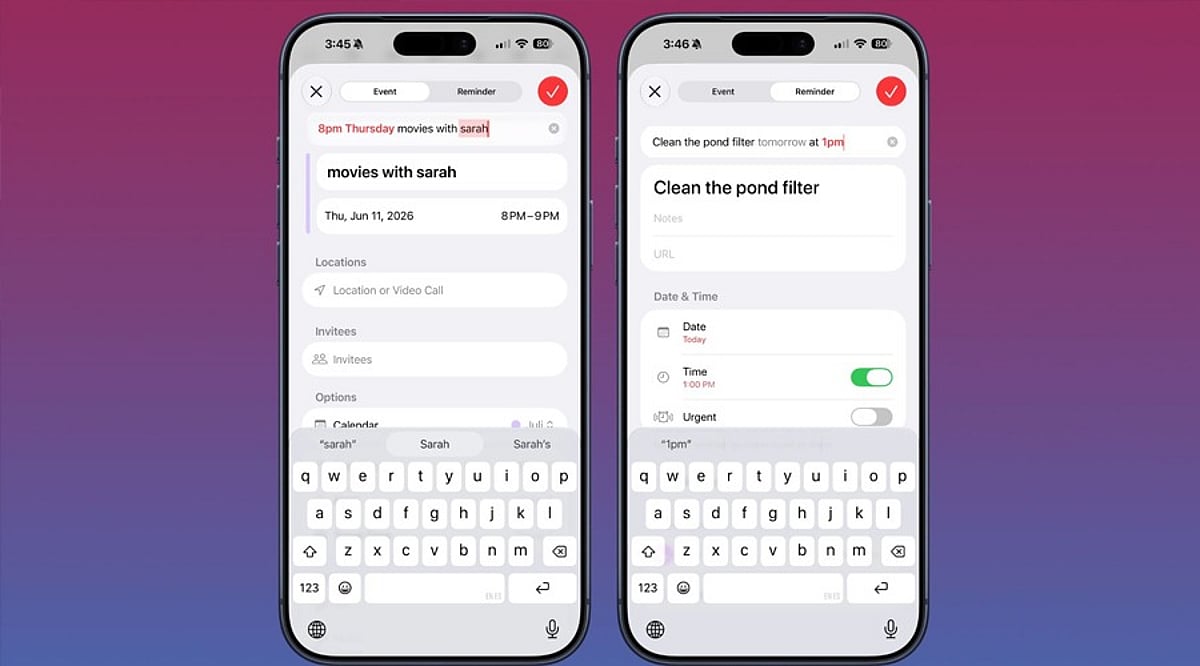
  • Master Siri on iPhone: Create Calendar Events with Voice Commands

    Master Siri on iPhone: Create Calendar Events with Voice Commands

    Apple’s Siri makes it easy to create and manage calendar events on your iPhone without ever opening the Calendar app. Whether you’re driving, cooking, or juggling multiple tasks, voice commands let you schedule meetings, set recurring appointments, and check your availability hands-free.

    Granting Siri Access to Your Calendar

    Before Siri can create events, you need to give it permission to access the Calendar app. Follow these steps:

    1. Open Settings and tap Siri & Search.
    2. Scroll to the Before Asking section and ensure Learn from this App is enabled for Calendar.
    3. Return to the main Settings menu, tap Calendar, then Siri & Search.
    4. Turn on Use Siri with this App and Show App in Search.

    If you use third-party calendars like Google Calendar or Outlook, repeat the same process for those apps.

    What to Say to Siri

    Activate Siri by saying “Hey Siri” or holding the side button. The wording matters—phrases like “Remind me to call John” create a reminder, not a calendar event. To add a calendar entry, use keywords such as event or meeting.

    Try these examples:

    • “Create a calendar event for a dentist appointment tomorrow at 10 AM.”
    • “Schedule a meeting with Sarah on Friday at 2 PM.”
    • “Set a team sync every weekday at 9 AM.” (recurring event)
    • “Create a flight event with a reminder two hours before departure.”
    • “Check tomorrow’s calendar.”

    Fixing Common Siri Mistakes

    If Siri checks the wrong calendar, go to Settings > Calendar > Default Calendar and select the one you use most often.

    When Siri creates a reminder instead of a calendar event, simply say “Actually, put that in my calendar.” Siri will move it to Calendar.

    Using Siri with Google Calendar and Outlook

    Siri works with Google Calendar when you add your Google account to the iOS Calendar app and grant the necessary permissions. Similarly, Outlook calendars sync with the native iOS Calendar app to enable Siri voice commands.

  • Is a Chromebook Ready for Everyday Use? Key Considerations for 2026

    Is a Chromebook Ready for Everyday Use? Key Considerations for 2026

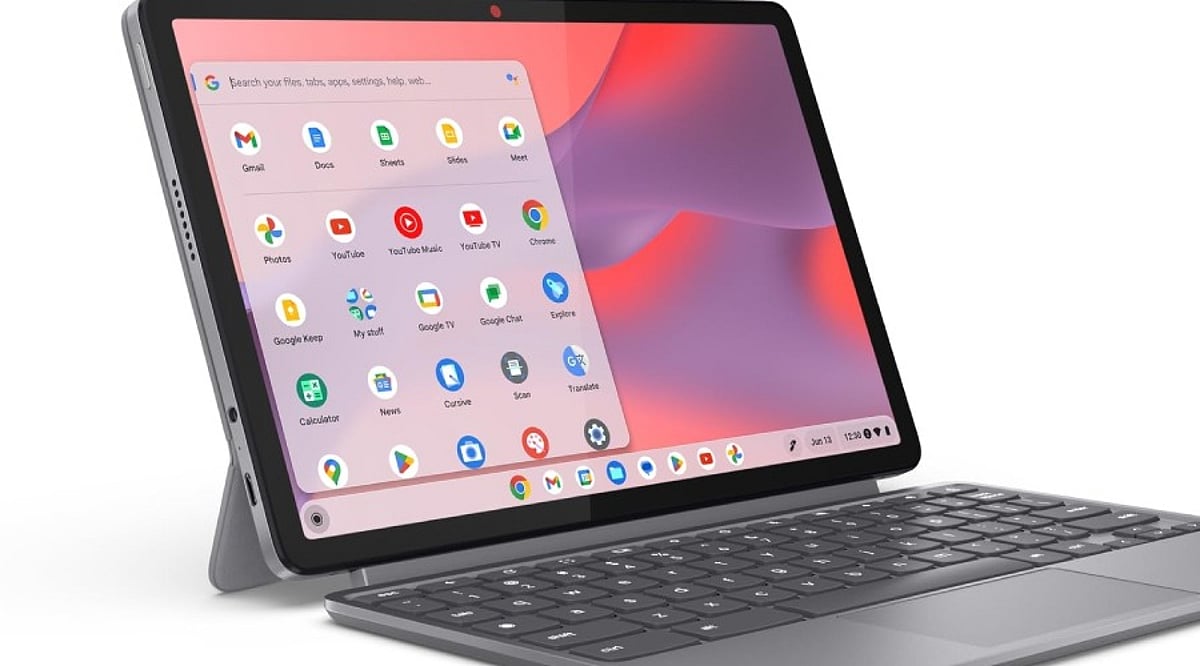
    Chromebooks have evolved far beyond their reputation as simple web-only devices. With the introduction of the Chromebook Plus line, improved hardware, long software support, and integrated AI tools, they now present a compelling option for daily computing. However, software compatibility with Windows and macOS applications remains a critical factor to evaluate before making a purchase.

    ChromeOS has matured into a robust platform for web research, email, document editing, video calls, media consumption, and cloud storage. Google services like Gmail, Drive, Docs, Sheets, and Slides work offline after initial setup—a vital feature for travelers, students, and professionals in areas with unreliable internet. The simplicity of the desktop, centered around the browser, appeals to users who rely primarily on online tools rather than heavy local software.

    The Chromebook Plus category represents a significant step forward. Models such as the Lenovo Chromebook Plus 14, equipped with MediaTek Kompanio Ultra 910 chips, 16GB of RAM, OLED displays, and over 13 hours of battery life, rival premium laptops. These devices handle multitasking with ease and offer a premium experience, making them suitable as a primary computer.

    AI features are now integral to Chromebook Plus. Gemini integration enables complex topic explanations, article summarization, cross-page comparisons, and in-browser task assistance. The “Help me Read” tool can summarize pages, answer questions about content, and simplify selected text. “Help me Write” assists in drafting, rewriting, shortening, or adjusting tone. While not a replacement for a creative workstation, these tools boost productivity in office, academic, and research contexts.

    Long-term value is another strength. Google now offers up to 10 years of automatic updates for eligible Chromebooks. Older models (pre-2021) may receive extended updates at the cost of losing Android app and Google Play Store access, but newer devices avoid this trade-off. Models with update support through 2033, 2035, or 2036 justify a higher initial investment.

    However, software limits persist. ChromeOS excels with web apps, Android apps, Linux tools, and cloud services. Applications built exclusively for Windows or macOS—such as Adobe Photoshop, Premiere, DaVinci Resolve, specialized CAD tools, certain enterprise software, and many local PC games—remain hurdles. Web versions of Microsoft 365 and cloud gaming services can cover some gaps, but they don’t replace every desktop application. A thorough check of essential apps before purchase is essential.

    Hardware recommendations for a primary Chromebook: at least 8GB of RAM and 128GB of storage, a 1080p webcam for quality video calls, a comfortable keyboard and trackpad, USB-C charging, and Wi-Fi 6E or Wi-Fi 7 support. Display quality matters more on a daily driver than on a secondary device. A premium configuration could include 8–16GB RAM, 256GB storage, a 14-inch 16:10 display, and robust build quality. Prices for premium Chromebooks can reach over $800.

    In summary, the Chromebook Plus lineup offers strong hardware, AI capabilities, and long-term support. The decision hinges on software: if all critical applications have viable web, Android, or Linux alternatives, ChromeOS provides a smooth, efficient daily experience. If not, a traditional laptop remains the safer choice.

    Frequently Asked Questions

    Q: Can a Chromebook be used as a main computer?
    A: Yes—it handles browsing, email, documents, video calls, media, cloud storage, and many productivity tasks effectively.

    Q: Is Chromebook Plus better than a regular Chromebook?
    A: Generally yes for demanding daily use; Plus models offer stronger hardware, better multitasking, and additional AI capabilities.

    Q: How long do Chromebooks receive updates?
    A: Google provides eligible ChromeOS devices with up to 10 years of automatic updates, depending on the model.

    Q: Can Chromebooks run Windows applications?
    A: Not all Windows apps have native ChromeOS versions. Web, Android, Linux, and cloud services cover some needs but not every desktop program.

    Q: What should I check before buying a Chromebook?
    A: Verify essential software compatibility first, then consider RAM, storage, display, webcam, keyboard, trackpad, ports, wireless connectivity, battery life, and the device’s update-support period.

  • Why Artificial Intelligence Matters More Than Ever in 2026: Productivity, Science, and Policy Impacts

    Why Artificial Intelligence Matters More Than Ever in 2026: Productivity, Science, and Policy Impacts

    Key Takeaways

    • AI is becoming a major productivity tool, improving performance across software, customer support, advertising, and other structured tasks.
    • AI is reshaping economies and science, driving massive investment while helping researchers solve increasingly complex problems.
    • AI brings greater risks and responsibilities, making human oversight, cybersecurity, regulation, and responsible deployment increasingly important.

    Artificial intelligence now sits at the center of business, science, software, security, and public policy. Stanford’s 2026 AI Index reports that 88% of surveyed organizations use AI, while 70% use generative AI in at least one business function. Generative AI also reached 53% population adoption within three years—a faster path than the personal computer or the internet.

    AI Gives Businesses a New Productivity Tool

    AI has a clear effect on work that has set rules and clear results. Studies cited by Stanford report a 14% to 15% rise in customer support output, a 26% rise in software development output, and a 50% rise in ad output per worker. The gains vary by task, so human review still matters for deep judgment.

    AI agents add another layer to this change. These systems can handle several steps on a computer rather than only a reply. On the OSWorld test, agent accuracy rose from about 12% to 66.3%. That result still leaves a failure rate of about one in three attempts, which shows its limits.

    AI has Become a Major Economic Force

    Money also shows the scale of AI. Global corporate AI investment more than doubled in 2025. Private investment rose 127.5%, while generative AI investment rose more than 200%. The United States led private AI investment with USD 285.9 billion in 2025, compared with USD 12.4 billion in China. Stanford also reports more than USD 150 billion in annual capital outlay by Google in 2025, reflecting the high cost of AI data centers and compute systems.

    The labor market already shows clear effects. Employment for software developers aged 22 to 25 fell nearly 20% from 2024. One-third of surveyed organizations expect AI to reduce their workforce in the next year, although broad job losses have not yet appeared across the whole economy. The pattern points to new task and skill needs.

    AI Expands the Reach of Science

    AI now has a role in science, medicine, mathematics, and technology. The 2026 AI Index added a full science section that covers biology, chemistry, physics, and astronomy. Advanced models can solve difficult science and math tasks, while some models now meet or exceed human results on several expert tests. This gives researchers a new tool for data analysis and complex problem-solving.

    AI still has sharp limits. AI can win a gold medal-level result on the International Mathematical Olympiad yet read an analog clock correctly only 50.6% of the time, compared with 90.1% for humans. Such uneven skill shows why expert review remains essential. AI has great value when a task fits its strengths, but weak results can appear on simple tasks as well.

    AI Shapes National Policy and Security

    Governments now treat AI as a matter of economic power, security, and national policy. Stanford reports that national AI plans have expanded across many countries, while AI sovereignty has become a central policy goal. Countries seek local control over models, data, chips, and compute capacity. This makes AI part of wider competition across trade, technology, and national security.

    Security risks also rise as AI gains more power. Stanford recorded 362 documented AI incidents in 2025, up from 233 in 2024. AI can help security teams find threats, yet advanced models can also help attackers find software flaws and automate cyberattacks. Strong safeguards, human checks, and clear rules therefore matter as much as model capability.

    Regulation Gives AI a New Set of Rules

    AI now faces real legal duties in major markets. Under the European Union AI Act, some enforcement powers started on August 2, 2026. The rules cover prohibited AI practices, transparency duties for certain systems, and rules for general-purpose AI models. Legal compliance now joins product quality and business value in Europe.

    AI matters in 2026 not simply for its ability to produce text, images, or code. Its real importance comes from its effect on productivity, science, jobs, security, investment, and public policy at the same time. The strongest results will come from clear use cases, reliable systems, and careful human judgment. AI has reached a point where its limits still matter, yet its economic and social impact now matters far more.

    FAQs

    1. Why is artificial intelligence important in 2026?

    AI is important since it is influencing productivity, scientific research, employment, cybersecurity, investment, and government policy simultaneously.

    2. How is AI improving business productivity?

    AI can automate repetitive tasks, assist employees with complex workflows, and improve output in areas such as customer support, software development, and advertising.

    3. Is AI affecting employment in 2026?

    Yes. AI is changing the tasks and skills required for many jobs, with some roles experiencing employment declines while new AI-related opportunities emerge.

    4. Why is AI important for science and research?

    AI can analyze large datasets, assist with difficult scientific problems, and support researchers across fields such as biology, chemistry, physics, mathematics, and astronomy.

    5. Why does AI regulation matter?

    Regulation establishes legal requirements for AI systems, helps manage risks, and encourages safer and more transparent development and deployment of AI.

  • 7 Smartphone Tricks to Simplify Your Daily Routine

    7 Smartphone Tricks to Simplify Your Daily Routine

    Your smartphone is more powerful than you think. Beyond calls and apps, it packs hidden features that can save time, reduce clutter, and make everyday tasks effortless. Here are seven clever tricks to get the most out of your device.

    Use Your Phone as a Scanner

    Your smartphone camera can scan documents without needing a separate scanner. Use the built-in document scanning feature in your camera or notes app to capture receipts, forms, and important papers. Many phones automatically straighten edges and improve readability, making digital copies easier to store, share, and access later.

    Turn On One-Handed Mode

    Large smartphone screens can be difficult to use with one hand. One-handed mode moves the screen closer to your thumb, making buttons and menus easier to reach. Look for this option under your phone’s accessibility or display settings. It can be especially useful while commuting or carrying something.

    Set Custom Quick Settings

    You can save time by placing frequently used controls in your phone’s quick settings panel. Add options such as screen recording, hotspot, calculator, flashlight, or screen brightness. Rearranging these shortcuts means you can access useful functions immediately instead of searching through multiple menus or settings.

    Use Voice Commands

    Voice assistants can handle several simple tasks without requiring you to type. You can set reminders, create calendar events, send messages, check the weather, or start navigation using voice commands. This feature is particularly useful when your hands are busy or when you need to complete something quickly.

    Share Your Wi-Fi Easily

    Instead of reading out long Wi-Fi passwords, use your smartphone’s built-in sharing option. On many Android phones and iPhones, you can share network access through a QR code or nearby device. This makes connecting family members, friends, or guests faster while reducing the chance of entering the password incorrectly.

    Use Focus and Do Not Disturb

    Constant notifications can interrupt work, study, or sleep. Use Focus Mode or Do Not Disturb to silence unnecessary alerts during specific times. You can allow important contacts or selected apps to break through. Setting automatic schedules can help reduce distractions without requiring you to change settings every day.

    Find Your Phone Quickly

    If you frequently misplace your phone, enable its built-in device-finding service. These tools can show the phone’s location, play a sound, or help secure the device remotely. Adding an emergency contact and keeping location services enabled can also make recovery easier if your phone is lost.

  • 7 Best AI Presentation Tools to Create Stunning Slides in 2026

    7 Best AI Presentation Tools to Create Stunning Slides in 2026

    Creating compelling presentations no longer requires hours of manual design work. Thanks to artificial intelligence, you can now generate polished slides from simple prompts, rewrite content on the fly, and maintain consistent layouts with minimal effort. Below are seven of the top AI tools that can help you create professional presentations faster.

    1. Gamma

    Gamma allows you to create complete presentations from just a few prompts. Enter a topic, choose a style, and the platform generates a structured deck in minutes. It can rewrite content, adjust layouts, and add visuals, making it ideal when you need a refined presentation without starting from scratch.

    2. Canva

    Canva combines AI features with its extensive library of templates and design tools. Its AI can generate content, suggest layouts, create visuals, and improve existing slides. You can customize fonts, images, colors, and other elements, making it a practical choice for visually appealing presentations with creative flexibility.

    3. Microsoft PowerPoint (Copilot)

    Microsoft PowerPoint integrates AI through Copilot to simplify presentation creation. You can generate slides from prompts or existing documents, create content, and improve layouts. Since PowerPoint is widely used by businesses and students, its AI features speed up familiar workflows without requiring new software.

    4. Beautiful.ai

    Beautiful.ai focuses on automated design through intelligent templates. As you add or change content, the platform adjusts elements automatically, reducing manual formatting. It offers templates for business, marketing, education, and more, helping you create consistent, professional presentations with less effort.

    5. Tome

    Tome turns ideas and written prompts into visual presentations. It helps generate structures, written content, and visuals, which you can then edit to suit your needs. This tool is especially useful when you need to quickly develop a presentation but struggle with the initial structure and storytelling.

    6. SlidesAI

    SlidesAI converts written information into presentation slides, making it useful for students, professionals, and educators. Provide text or describe a topic, and the tool generates structured slides. Its integration with Google Slides lets you continue editing in a familiar environment without switching platforms.

    7. Plus AI

    Plus AI brings AI-powered presentation creation to tools like Google Slides and PowerPoint. It can generate presentations from prompts, rewrite content, and reorganize slides. This makes it a great choice for professionals who want AI assistance without changing their existing workflow, and it helps teams create and refine presentations faster.