Author: vitorcherulli

  • Proven Gaming Laptop Cooling Tips to Prevent Overheating

    Proven Gaming Laptop Cooling Tips to Prevent Overheating

    Gaming laptops are built for speed, but they also generate a lot of heat during long gaming sessions. Excess heat can reduce performance, cause frame drops, and even affect the laptop’s lifespan. These practical cooling tips can help keep temperatures under control and ensure smoother, more reliable gameplay.

    Use a Cooling Pad

    A quality cooling pad improves airflow beneath your laptop and helps remove excess heat. Choose one with large, quiet fans that match your laptop’s size. It is an affordable accessory that can make a noticeable difference during long gaming sessions.

    Keep Air Vents Clear

    Avoid placing your laptop on beds, cushions, or blankets because they block the air vents. Always use a hard, flat surface like a desk or laptop stand. Better airflow allows the cooling system to work efficiently and prevents unnecessary heat buildup.

    Clean Dust Regularly

    Dust collects inside the cooling fans and heatsinks over time, reducing airflow and trapping heat. Use compressed air to clean the vents every few months, or have the laptop professionally cleaned if needed. A clean cooling system helps maintain stable gaming performance.

    Adjust Game Settings

    Playing every game at the highest graphics settings puts extra load on the CPU and GPU. Lowering settings like shadows, ray tracing, or resolution slightly can reduce heat without affecting gameplay too much. Your laptop will stay cooler and perform more consistently.

    Update Drivers and BIOS

    Laptop manufacturers often release updates that improve fan control, power management, and thermal performance. Install the latest graphics drivers and BIOS updates from the official manufacturer. These updates can improve system stability while helping your laptop manage heat more effectively.

    Manage Background Apps

    Before starting a game, close browsers, downloads, and unnecessary software running in the background. These apps use valuable CPU, RAM, and storage resources, creating extra heat. Keeping only essential programs open gives your laptop more power for gaming and better temperature control.

    Replace Thermal Paste When Needed

    If your gaming laptop is several years old, the thermal paste between the processor and cooling system may have dried out. Replacing it with a high-quality thermal paste can improve heat transfer, reduce temperatures, and restore cooling performance during demanding gaming sessions.


  • Essential Steps to Protect Your Home Wi-Fi Network in 2026

    Essential Steps to Protect Your Home Wi-Fi Network in 2026

    With more devices than ever connecting to home networks in 2026, securing your Wi-Fi is crucial to safeguarding your data and privacy. Below are key steps to strengthen your network against evolving threats.

    1. Change default router credentials – Immediately replace the router’s default username and password to prevent unauthorized access.
    2. Use WPA3 encryption – If your router supports it, enable WPA3 for stronger protection than older WPA2 standards.
    3. Create a strong, unique Wi-Fi password – Use a combination of letters, numbers, and special characters to make it difficult to guess.
    4. Keep router firmware updated – Regular updates ensure you receive the latest security patches and performance improvements.
    5. Enable a guest network – Isolate visitors’ devices from your primary network to protect personal files and connected devices.
    6. Review connected devices regularly – Check the list of devices on your network and remove any that are unfamiliar or no longer in use.
    7. Disable unnecessary features – Turn off WPS and remote router management if you don’t need them, as they can introduce security risks.

    With AI-powered cyber threats becoming more common, strong Wi-Fi security is one of the simplest and most effective ways to protect your digital life.

  • How AI Is Transforming Banking in 2026: What It Means for Your Money

    How AI Is Transforming Banking in 2026: What It Means for Your Money

    Artificial intelligence is reshaping the banking industry in 2026, making financial services faster, smarter, and more personalized than ever before. From fraud detection to personalized financial advice, AI is fundamentally changing how we interact with our money.

    Real-Time Fraud Detection and Enhanced Security

    Banks now deploy AI systems that analyze transactions in real time, flagging suspicious activity instantly. This reduces fraud and improves account security, giving customers greater peace of mind.

    24/7 AI-Powered Customer Support

    AI chatbots handle routine banking queries around the clock, offering quicker support and freeing human agents for more complex issues. Customers can get answers to common questions anytime, anywhere.

    Personalized Financial Insights

    Using transaction history, AI tools provide personalized insights into spending, budgeting, and savings. This helps users make more informed financial decisions and achieve their goals faster.

    Faster Loan Approvals

    AI accelerates loan processing by analyzing financial data and credit profiles more efficiently than traditional methods. Borrowers can expect quicker decisions and less paperwork.

    Smarter Investment Recommendations

    Investment platforms increasingly rely on AI to recommend diversified portfolios tailored to individual financial goals and risk tolerance. This makes sophisticated investing accessible to more people.

    Voice Banking and Biometric Authentication

    Voice banking, along with facial and fingerprint recognition, is making digital banking more convenient and secure. Biometric authentication reduces the risk of unauthorized access while simplifying the login process.

    Staying Aware of Privacy and Cybersecurity

    While AI improves efficiency, customers should remain vigilant about privacy and cybersecurity. Always verify sensitive financial communications and use secure channels for banking activities.

    As AI adoption grows across the financial sector, digital banking is set to become even more intelligent, automated, and customer-focused. The future of banking is here—and it’s powered by AI.

  • Quordle July 24: Hints, Answers, and Winning Strategies

    Quordle July 24: Hints, Answers, and Winning Strategies

    Today’s Quordle puzzle features a famous country music icon’s surname, a verb meaning to instruct, a popular beer style, and a word for a practical joke. One of the four answers contains repeated letters, making careful guessing especially useful. The starting letters are D, E, L, and P, offering a helpful starting point before the final reveal.

    Daily word games are a fun way to challenge your vocabulary and pattern recognition. If today’s Quordle has you stuck, don’t rush to the answers just yet. Try these spoiler-free hints first and see if you can solve all four words before scrolling down.

    Today’s Quordle Hints

    Need a gentle nudge? Here are today’s clues:

    • Word 1 (Top Left): The surname of country music legend Dolly Parton.
    • Word 2 (Top Right): To enlighten, instruct, or educate someone.
    • Word 3 (Bottom Left): A light, crisp style of beer.
    • Word 4 (Bottom Right): A practical joke or mischievous trick.

    Extra Clues

    • One of today’s answers contains a pair of repeated letters.
    • The four words begin with the letters D, E, L, and P.

    If you’re trying to protect your winning streak, now is the perfect time to make your final guesses before revealing today’s solutions.

    Today’s Quordle Answers

    Spoiler Warning: The answers are below.

    Today’s Quordle solutions are:

    • DOLLY
    • EDIFY
    • LAGER
    • PRANK

    Quordle Puzzle Analysis

    There is an even mix of common language words and themes in today’s Quordle. DOLLY is easy enough for anyone who remembers Dolly Parton, but EDIFY may be harder for some players, as it is not a commonly used verb and means to educate or enlighten someone. Lager is one of the most well-known types of beer, making the bottom row a piece of cake. DOLLY contains several repeating letters that can easily confuse players and require thoughtful placement in earlier guesses.

    Stay on Track with Your Winning Streak

    Even if you have figured out today’s Quordle on your own or used some hints, any Quordle puzzle is a great way to practice vocabulary skills and logical reasoning. The four-word format is what keeps Quordle among the most interesting daily puzzles.

    Come back tomorrow for new Quordle hints, answers, and tips to continue your winning streak.

  • Step-by-Step Guide to Hiding Your Phone Number on Telegram

    Step-by-Step Guide to Hiding Your Phone Number on Telegram

    Telegram offers robust privacy settings that let you control who can see your phone number. Follow this straightforward guide to keep your number private and communicate securely.

    Open Telegram Settings

    Launch the Telegram app and tap the menu icon (three lines) or the Settings gear icon to access your account preferences.

    Navigate to Privacy and Security

    In Settings, select Privacy and Security. This section contains all controls for your personal information, including your phone number.

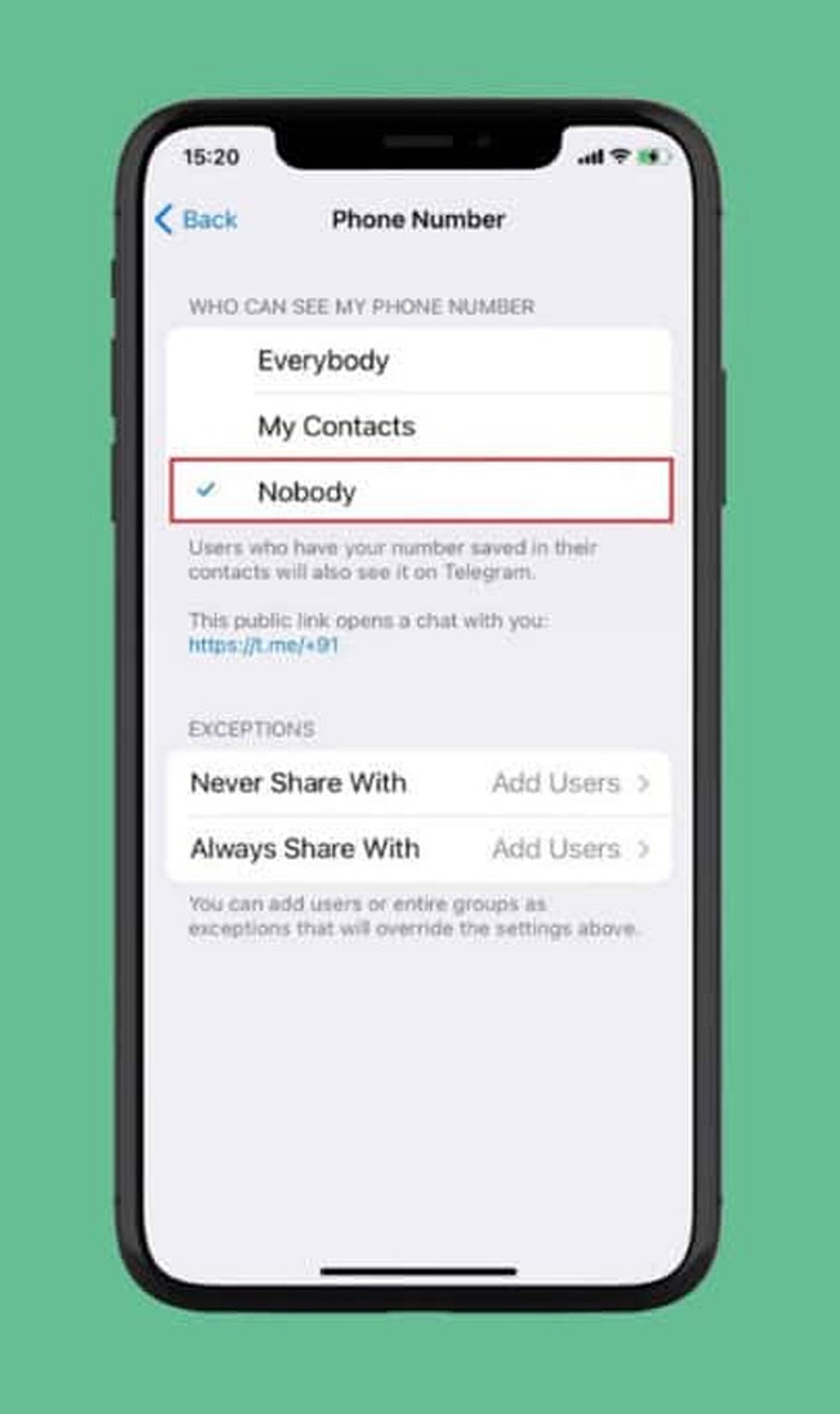
    Select Phone Number

    Under the Privacy section, tap Phone Number. Here you can manage who can view your registered mobile number and who can find you by it.

    Choose Visibility: Nobody

    Set Who can see my phone number to Nobody. This prevents most Telegram users from viewing your number.

    Restrict Number Discovery

    Under Who can find me by my number, select My Contacts. This limits discoverability to people already in your address book, reducing unwanted contact.

    Create a Telegram Username

    Set up a unique username (e.g., @YourName) so others can reach you without needing your phone number. Go to Settings > Username to create one.

    Review Contact-Based Visibility

    People who already have your number saved may still see your account via contact synchronization. Review your contact sync settings and consider deleting synced contacts for tighter control.

    Check Privacy Settings Regularly

    Telegram updates may introduce new privacy options or change existing ones. Periodically revisit your Privacy and Security settings to ensure your preferences remain intact.

    By following these steps, you can significantly enhance your privacy on Telegram and communicate with confidence.

  • How to Refresh Your Instagram Explore Page: Step-by-Step Guide

    How to Refresh Your Instagram Explore Page: Step-by-Step Guide

    Open Instagram Settings

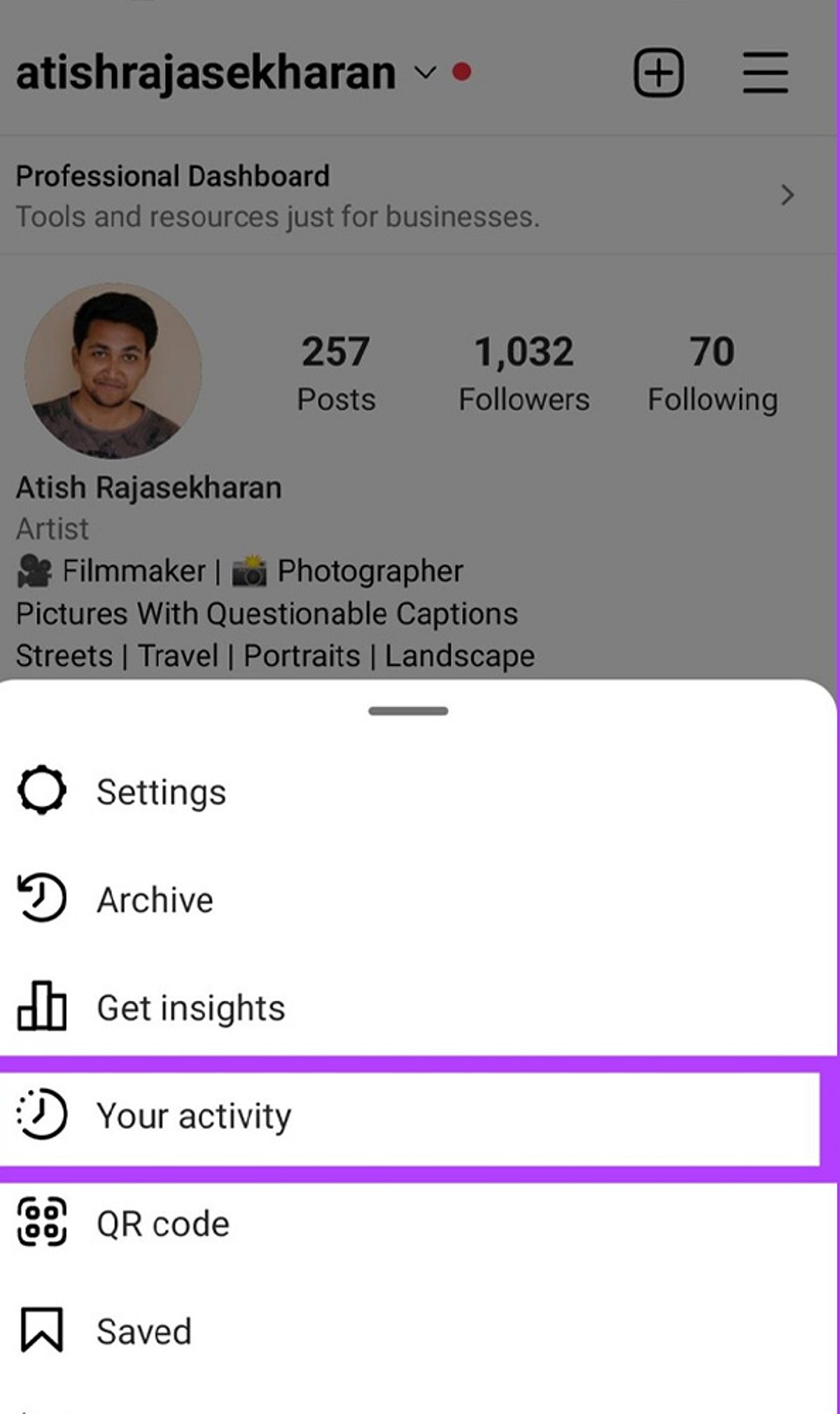
    Launch the Instagram app and tap your profile icon in the bottom right. Then tap the three-line menu (hamburger icon) in the top right and select Settings to begin resetting the content recommendations shown on your Explore page.

    Find Content Preferences

    Within Settings, scroll down and tap Content Preferences. This section houses Instagram’s controls for managing suggested posts and recommendation settings.

    Select Reset Suggested Content

    Tap Reset Suggested Content to refresh recommendations across Explore, Reels, and Feed with a cleaner content profile. Instagram will remove the signals it currently uses to suggest posts.

    Confirm the Reset

    Review the reset information and confirm your choice. This action clears Instagram’s current recommendation signals, giving you a fresh start.

    Refresh Your Explore Page

    After resetting, Instagram gradually rebuilds recommendations based on the content you view and interact with. Be patient—it takes time for the algorithm to learn your new preferences.

    Avoid Unwanted Content

    Use the Not Interested option on posts you dislike to actively tell Instagram what content you want to see less often. This helps refine your Explore page faster.

    Engage With Preferred Content

    Like, save, and share posts matching your interests to help Instagram personalise your Explore recommendations. The more you interact with relevant content, the better the suggestions become.

    Unfollow Irrelevant Accounts

    Unfollow accounts that no longer match your interests to reduce unwanted content influencing your Explore page. A cleaner follow list leads to better recommendations.

    Clear Your Search History

    Clear recent searches to remove old search signals that may continue influencing Instagram’s content recommendations. Go to Settings > Privacy > Search History and tap Clear All.

  • Trump Slaps Fresh Tariffs on India, China, and 60 Nations Over Forced Labor Concerns

    Trump Slaps Fresh Tariffs on India, China, and 60 Nations Over Forced Labor Concerns

    US President Donald Trump has imposed a new round of tariffs on imports from at least 60 trading partners, including India, China, Japan, and the United Kingdom, citing inadequate enforcement of bans on goods produced through forced labor. The duties, ranging from 10% to 12.5%, take effect at 12:01 AM Friday, replacing temporary import taxes that expire the same day.

    The move follows a February Supreme Court ruling that struck down Trump’s earlier ‘Liberation Day’ tariffs imposed in April 2025. The administration frames this action as part of its broader effort to curb forced labor and encourage trading partners to adopt stricter import regulations.

    How the New Tariff Structure Works

    Countries such as China, the United Kingdom, and Japan—which the White House says lack laws prohibiting imports made with forced labor—will face 12.5% tariffs. Meanwhile, economies including India, Sri Lanka, and the European Union will continue to face 10% tariffs after introducing or committing to forced labor import restrictions.

    Some imports, including products covered under the US-Mexico-Canada Agreement (USMCA) and oil and gas shipments, have been exempted from the latest tariff measures.

    US Defends Move as Human Rights Measure

    “The United States has had a forced labor import ban for nearly a century, and rigorously enforces it. It’s well past time for our trading partners to do the same,” said US Trade Representative Jamieson Greer. “Today’s action will begin to correct what is both a human rights abuse and a distortive trade practice to improve the welfare of workers everywhere.”

    India Avoids Higher Tariff

    For India, the latest announcement means exports to the US will continue to attract a 10% tariff, avoiding the additional 12.5% penalty previously threatened. The White House noted that India, along with Cambodia, Guatemala, Honduras, Sri Lanka, and Trinidad and Tobago, had introduced forced labor import prohibitions or made commitments under reciprocal trade agreements, leading to the lower tariff rate.

    More Trade Measures Expected

    According to a Washington Post report, the Trump administration is preparing another round of tariffs targeting countries accused of subsidizing excess manufacturing capacity. The proposed measures are expected to focus on low-cost imports that US officials argue disadvantage American manufacturers, signaling that more trade actions could be announced in the coming weeks.

  • Instagram Bans Harassing Videos Recorded with Meta Smart Glasses to Protect Privacy

    Instagram Bans Harassing Videos Recorded with Meta Smart Glasses to Protect Privacy

    Instagram is tightening its enforcement against secretly recorded videos captured using Meta’s smart glasses. The platform will now remove content that uses wearable cameras to harass individuals, particularly prank and pickup-style videos, following growing criticism over privacy violations.

    The policy change comes after a surge of clips showing creators approaching strangers, service workers, and women in public without their knowledge, then posting the footage as humorous content. This sparked widespread debate about consent and digital privacy.

    Instagram chief Adam Mosseri announced the update during a Q&A session on his Instagram Stories. “If you’re posting content that is taking advantage of people and harassing them, like a lot of these pickup line kind of videos, then we’re going to take the content down,” Mosseri said. He added, “We don’t want people to be surreptitiously taking videos of other people and harassing them and then posting them on our platform. So we’re trying to fight that every way we can.”

    According to a Business Insider report, Instagram has already deleted two popular accounts that frequently posted pickup videos recorded with Meta smart glasses. A Meta spokesperson confirmed that both accounts violated Instagram’s harassment policies.

    Meta has also introduced additional privacy safeguards in its smart glasses software. The company acknowledged that the recording indicator light on older models could be covered or altered, making it difficult for people to know if they were being recorded. A recent software update now automatically turns off the camera when it detects that the recording indicator light is blocked or tampered with.

    Despite these measures, concerns persist about the effectiveness of the recording indicator. The LED light is small and can be easily missed in bright outdoor conditions or large public spaces, leaving people unaware they are being filmed.

    Meta has not yet disclosed how it will determine whether uploaded videos violate the new policy, nor has it revealed how many videos have been removed since the policy took effect. The company has also not detailed how the rules will be applied in practice.

  • OpenAI Launches ChatGPT Health in the US — Here’s Why Global Users Are Still Waiting

    OpenAI Launches ChatGPT Health in the US — Here’s Why Global Users Are Still Waiting

    OpenAI has begun rolling out its dedicated Health experience within ChatGPT to eligible users in the United States. However, the end of the waitlist does not mean the feature is available worldwide. Users in India and many other regions still cannot access the health-focused tool, regardless of their subscription plan.

    Who Can Access ChatGPT Health?

    The feature is currently limited to users who are 18 years or older and based in the US. It is accessible across ChatGPT Free, Go, Plus, and Pro plans on both the web and iOS platforms. Android support has not yet been introduced. This regional restriction means that even users who previously joined the waitlist outside the US will not see the Health option in their ChatGPT sidebar.

    Why the Delay for Other Regions?

    OpenAI has not announced a timeline for expanding ChatGPT Health to other countries. The phased rollout is a deliberate strategy, and the company has not indicated when users in India, Europe, or other regions can expect access. According to OpenAI’s Help Center, “Health is available on a phased basis, while Android support is yet to come.”

    What Does ChatGPT Health Do?

    ChatGPT Health is designed to integrate health-related information into a single platform. Users can link supported medical records and Apple Health data, then access lab results, medication details, sleep patterns, activity data, and ask questions based on their personal health information. The tool can help users understand medical information, prepare questions for appointments, track wellness trends, and identify changes over time.

    Privacy and Safety

    OpenAI has emphasized that ChatGPT Health is meant to support medical care, not replace doctors or professional treatment. The company also stated that health data and conversations using the feature are not used to train the underlying foundational model or for targeted advertising.

    As the rollout continues, users outside the US will have to wait for further announcements from OpenAI. The company has not provided a specific date for global availability.