Tag: buying guide

  • 7 Common Mistakes to Avoid When Buying Your First Gaming Laptop

    7 Common Mistakes to Avoid When Buying Your First Gaming Laptop

    Buying your first gaming laptop is an exciting step, but it’s easy to get sidetracked by flashy features or overlook critical components. To help you make a smart investment, we’ve identified seven common mistakes that first-time buyers often make—and how to avoid them.

    1. Prioritizing RGB Over Performance

    A flashy design, RGB lighting, and futuristic styling may look appealing, but they don’t improve gaming performance. Focus first on the graphics card, processor, RAM, and cooling system. A laptop with balanced hardware will deliver smoother gameplay and better longevity than one that simply looks impressive.

    2. Ignoring the GPU

    The graphics card is the most important component in a gaming laptop. Many first-time buyers focus only on the processor while overlooking GPU performance. Choose a laptop with a modern dedicated graphics card that matches the types of games you play and offers enough performance for future game releases.

    3. Buying Without Checking Cooling Performance

    Powerful hardware generates significant heat during gaming sessions. A laptop with poor thermal management may experience overheating, loud fan noise, and reduced performance due to thermal throttling. Before purchasing, check the cooling design, airflow, and long-term thermal performance to ensure consistent gaming and hardware reliability.

    4. Choosing Too Little RAM or Storage

    Modern games require more memory and storage than ever before. Buying a laptop with insufficient RAM or limited SSD capacity can affect performance and leave little room for new titles. Consider configurations with upgrade options so your laptop remains capable as game sizes and system requirements continue growing.

    5. Overlooking Display Quality

    A powerful GPU deserves a quality display. Many buyers ignore refresh rate, response time, brightness, and color accuracy, even though these directly affect the gaming experience. A higher refresh rate and smoother visuals can make competitive games feel more responsive while also improving everyday productivity and entertainment.

    6. Ignoring Battery and Port Selection

    Gaming laptops aren’t known for exceptional battery life, but connectivity still matters. Check for enough USB ports, HDMI, fast charging support, Wi-Fi standards, and other essential connections. A well-equipped laptop provides greater flexibility for gaming accessories, external displays, and everyday work without requiring multiple adapters.

    7. Not Considering Future Needs

    A gaming laptop is a long-term investment, so avoid buying only for today’s requirements. Consider upcoming game demands, software updates, and potential upgrades. Selecting hardware with extra performance headroom helps extend the laptop’s usable lifespan, providing better value and reducing the need for an early replacement.

  • Ray-Ban Meta Smart Glasses: The Ultimate 2026 Buying Guide for Style, Features, and Value

    Ray-Ban Meta Smart Glasses: The Ultimate 2026 Buying Guide for Style, Features, and Value

    Buying smart glasses involves more than comparing technical specifications. Ray-Ban Meta blends classic eyewear with AI assistance, photography, and open-ear audio in a familiar design. This guide explores the models, practical features, and important considerations to make a well-informed purchase.

    Overview

    • Ray-Ban Meta Gen 2 starts at Rs. 39,900 in India, with Hindi voice support and roughly double the battery life of Gen 1.
    • The glasses depend heavily on the Meta AI companion app, and most features work across both Android and iPhone.
    • Comfort, camera habits, and privacy comfort level shape the buying decision more than the spec sheet does.

    The Daily Experience

    The 12MP ultra-wide camera takes photos and short videos. These sync automatically to the Meta AI app on a paired phone. Open-ear speakers play calls and music while still letting outside sound through. This is a real safety benefit on busy Indian streets, where blocking out all noise can be risky. A simple voice prompt, ‘Hey Meta,’ wakes up the assistant. It runs on Meta’s Llama 4 model in Gen 2 and now speaks fluent Hindi. A touchpad on the temple controls capture and playback, so there is no need to reach for a phone.

    Gen 1 vs Gen 2: The Short Version

    Gen 2 suits buyers who want sharper video, longer battery life, and a more capable assistant. A discounted Gen 1 unit still holds up for casual photos, calls, and music at a lower cost.

    Compatibility and Setup

    Ray-Ban Meta pairs with compatible Android and iPhone devices through the Meta AI app. Camera, audio, and AI functions largely depend on this companion app, and available features can shift with app version, software update, and region. Checking that a phone runs a supported operating system before purchase avoids missing out on newer AI capabilities.

    Battery Life in Practice

    Meta rates Gen 2 at up to 8 hours per charge under light, mixed use. In everyday use, battery life varies depending on photography, music playback, and Meta AI usage. Frequent recording and voice interactions reduce battery life faster than light mixed usage. The charging case adds roughly 48 hours of backup power, and a 20-minute session restores 50 percent charge, useful for anyone recording throughout the day.

    Comfort and Fit

    Both generations come in Wayfarer, Headliner, and Skyler styles. This lets buyers pick a look they would wear even without the tech inside. The extra weight from the camera and battery sits mostly in the temples. This can cause mild pressure behind the ears during long wear, something first-time buyers rarely expect. For larger or smaller face shapes, it helps to try the frames in person or use a virtual fitting tool. The built-in electronics slightly change how the temples fit compared to regular glasses. Prescription lenses, transitions, and polarized options are still available through authorized opticians.

    India-Specific Features

    Gen 2 supports full Hindi voice interaction, letting wearers speak naturally instead of switching to English commands. Meta has also announced a UPI-based payment feature for India, allowing a QR code scan paired with the phrase ‘Hey Meta, scan and pay’ to complete a transaction through a WhatsApp-linked bank account. The feature is being rolled out gradually, so availability may vary by device, software version, and region.

    Trade-Offs Worth Knowing

    • The battery drains faster than the rated figure suggests during continuous recording.
    • Open-ear speakers can lose clarity in loud outdoor settings like traffic or crowded markets.
    • Many AI functions require an active internet connection to operate at all.
    • Camera use also draws scrutiny in certain workplaces, gyms, and private venues, a consideration for anyone planning to wear these glasses daily.

    Privacy Considerations

    A front-facing LED activates during recording, giving people nearby a visible signal. That built-in transparency helps with etiquette but does not substitute for judgment in offices, washrooms, or private meetings. Photos and videos are managed through the Meta AI app, while some AI-powered features rely on Meta’s cloud services. Reviewing privacy settings before enabling these features is recommended.

    Who Gains the Most Value

    Commuters seeking audio without earbuds, travelers wanting quick point-of-view photos, and Hindi-first users looking for a natural AI assistant tend to get the most from Gen 2. Anyone expecting an augmented-reality display should look elsewhere, since these remain camera-and-audio glasses rather than a heads-up display.

    Beyond the specifications, the real appeal of Ray-Ban Meta is how naturally it fits into everyday routines. Buyers who regularly take photos, make calls, or rely on voice assistance are far more likely to benefit from the smart features than those who simply want the latest wearable gadget.

    Why This Matters

    Smart glasses are becoming part of daily life. That makes picking the right model before buying an important step. Looking past the spec sheet helps spot the features that actually matter, leading to better value, more comfort, and a smarter purchase in the long run.

    Final Thoughts

    Smart glasses are getting better at doing a few things well instead of chasing every feature at once. Future models will likely bring longer battery life and features built for local markets. In the end, the best pick is not the one loaded with the newest specs. It is the one that fits daily life.

    Frequently Asked Questions

    1. Are Ray-Ban Meta smart glasses worth buying in 2026?

    Ray-Ban Meta smart glasses are worth considering for users who want hands-free photography, open-ear audio, voice calls, and AI assistance in a stylish pair of everyday glasses. The latest models offer improved camera quality, battery life, and Meta AI features compared to earlier versions.

    2. What can Ray-Ban Meta smart glasses do?

    Ray-Ban Meta smart glasses can capture photos and videos, play music through open-ear speakers, make and receive calls, livestream to supported platforms, and provide hands-free assistance through Meta AI using voice commands.

    3. Can Ray-Ban Meta smart glasses be fitted with prescription lenses?

    Yes. Many Ray-Ban Meta models support prescription lenses through authorized optical retailers, allowing users to combine vision correction with smart features without changing their daily eyewear.

    4. Do Ray-Ban Meta smart glasses work without an internet connection?

    Basic functions like taking photos, recording videos, and listening to downloaded audio can work offline. However, Meta AI features, cloud syncing, and some voice-based capabilities require an internet connection and the companion mobile app.

    5. What should be considered before buying Ray-Ban Meta smart glasses?

    Before buying, consider the frame style, lens type, compatibility with your smartphone, battery life, AI feature availability in your region, privacy considerations, and whether the smart features match your everyday lifestyle and budget.

  • Best Hair Dryers for Women in 2026: Top 10 Picks for Every Hair Type

    Best Hair Dryers for Women in 2026: Top 10 Picks for Every Hair Type

    A quality hair dryer does more than dry your hair. It reduces styling time, minimizes frizz, and helps protect hair from unnecessary heat damage. The right choice depends on your hair type and styling routine. Modern hair dryers offer features such as ionic technology, intelligent heat control, brushless motors, and specialized attachments designed for different hair types.

    This guide compares the top 10 hair dryers for women, highlighting their key features, performance, and value to help you choose the right model for your styling needs.

    Hair Dryer Technologies Explained

    Understanding the technology helps you make a smarter purchase:

    • Ionic dryers break water into smaller droplets, speeding up evaporation while reducing static.
    • Ceramic dryers spread heat evenly — ideal for fine or color-treated hair.
    • Titanium dryers run hotter and work best on thick or coarse hair, though they can cause more damage with daily use.
    • Brushless motors last longer, run quieter, and cut weight — most 2026 premium dryers use them. A growing number of models now add scalp-sensing or smart heat regulation that adjusts temperature automatically.

    How We Selected the Best Hair Dryers for Women in 2026

    Every pick here shows up consistently across independent 2026 testing, not a single viral recommendation. Premium and budget models both earned a spot. The best dryer is the one that fits your hair and your budget, not the most expensive one on the shelf.

    Top 10 Best Hair Dryers for Women in 2026

    1. Dyson Supersonic Nural — Leads in intelligence. Built-in sensors track scalp proximity and adjust heat automatically; the fastest dryer on this list for controlled, low-damage drying. BUY NOW
    2. Shark SpeedStyle Pro — Dyson-adjacent performance at a lower price, with a Scalp Shield mode most rivals skip. BUY NOW
    3. T3 AireLuxe — Built for daily home use. Its wide, ion-rich airflow and 15 heat/speed combinations make it easy to dial in for finer or more sensitive hair. BUY NOW
    4. Bio Ionic Powerlight Pro — Wins on durability. Testers report years of reliable use; at 75 decibels, one of the quietest dryers here. BUY NOW
    5. ghd Helios ($189) — Delivers the glossiest finish through its ionic technology and redesigned nozzle. ghd’s newer Speed model dries faster but trades some shine. BUY NOW
    6. Laifen Swift Special — Undercuts every premium brand on price while running a 110,000 RPM brushless motor; the strongest value pick. BUY NOW
    7. BaBylissPRO Rapido — Pairs a 2,000-watt brushless motor with Ferrari-inspired design for a premium feel. BUY NOW
    8. InfinitiPRO by Conair High-Speed Digital Dryer — Budget standout combining digital motor with ionic and tourmaline ceramic technology at a fraction of premium prices. BUY NOW
    9. Drybar Baby Buttercup (1,875W) — Gentler by design; solid for fine or fragile hair that cannot handle aggressive heat. BUY NOW
    10. Zuvi Halo — Breaks convention with light-based drying instead of pure heat; early but promising for lower heat exposure over raw speed. BUY NOW

    Which Hair Dryer Is Best for Your Hair Type?

    • Fine or thin hair — Lighter dryers with a reliable cool shot, like T3 AireLuxe or Drybar Baby Buttercup.
    • Thick or coarse hair — Stronger airflow, where Dyson Nural or Shark SpeedStyle Pro performs best.
    • Curly or wavy hair — Depends on diffuser quality; Bio Ionic and ghd Helios are strong choices.
    • Frizz-prone or damaged hair — Ionic and ceramic tech paired with lower heat points toward Laifen Swift Special or InfinitiPRO Conair.

    Hair Dryer Buying Checklist

    • Choose a lightweight ionic dryer if daily comfort matters most.
    • Choose a smart premium model if you want the fastest styling with the least heat stress.
    • Choose a budget pick if you need reliable, no-frills drying.

    Final Thoughts

    The right hair dryer is an investment in healthier hair and easier styling. Prioritise features that suit your hair type and daily routine, and you’ll enjoy faster drying, better results, and long-term value beyond the initial purchase.

    Frequently Asked Questions

    1. What is the best hair dryer for women in 2026?

    The best hair dryer depends on your hair type and styling needs. Premium models from Dyson, Shark, T3, and Bio Ionic are widely recommended for their fast drying, heat protection, and frizz control.

    2. Is an ionic hair dryer better for frizzy hair?

    Yes. Ionic hair dryers help reduce static and seal the hair cuticle, making them a great choice for minimizing frizz while leaving hair smoother and shinier.

    3. Which hair dryer is best for curly hair?

    A hair dryer with a diffuser attachment is ideal for curly hair. It distributes airflow evenly, enhances natural curl definition, and helps reduce frizz without disrupting curl patterns.

    4. What features should I look for when buying a hair dryer?

    Look for adjustable heat and speed settings, a cool shot button, ionic or ceramic technology, lightweight design, and attachments like diffusers or concentrators for versatile styling.

    5. Can using a high-quality hair dryer help reduce heat damage?

    Yes. Many modern hair dryers use intelligent heat control, ceramic or ionic technology, and multiple heat settings to dry hair efficiently while reducing the risk of excessive heat exposure.

  • 10 Best Electric Egg Boilers to Buy in 2026: Expert Picks for Every Kitchen

    10 Best Electric Egg Boilers to Buy in 2026: Expert Picks for Every Kitchen

    Electric egg boilers have become a practical addition to modern kitchens. They cook eggs consistently without the guesswork of stovetop boiling. Here are the top 10 electric egg boilers in 2026, selected for performance, convenience, and value.

    Boiling eggs on a stove demands attention. Water levels shift, timing slips, and shells crack more often than expected. An electric egg boiler solves all three problems by automating the process end to end. This guide compares the best electric egg boilers available in India for 2026, across budgets and household sizes, based on verified listings rather than manufacturer claims alone.

    How We Chose the Best Electric Egg Boilers

    Every product on this list was evaluated against eight factors: capacity, build quality, auto-shutoff performance, cooking consistency, additional functions (poaching, steaming), brand reputation, customer feedback, and value for money. Products with strong marketing but weak or inconsistent reviews were excluded, even when they appeared frequently in other roundups.

    What to Look for Before Buying an Electric Egg Boiler

    Capacity should match household size rather than aspiration. A single buyer rarely needs an 8-egg model, while a family of four outgrows a 6-egg one quickly. Power matters less than it appears to. Higher wattage can shorten cooking time, but auto-shutoff calibration determines whether the result is actually edible. Cooking functions vary from basic boiling to poaching and steaming, and paying extra for functions that go unused adds no value.

    Safety features such as dry-boil protection and audible buzzers reduce the chance of a ruined batch or a damaged unit. Cleaning matters more in daily use than most buyers expect, and a non-stick heating plate with removable trays saves real time over months of use. The best egg boiler is not the biggest or the most expensive. It is the one that matches everyday cooking habits.

    Top 10 Electric Egg Boilers in India

    1. AGARO Grand Egg Boiler & Poacher

    Best for: Families and meal prep. Pairs an 8-egg capacity with 500W power and a two-year warranty at under a thousand rupees, making it the strongest value on this list.

    Why Choose It: Fast cooking, high capacity, long warranty for the price, and simple one-touch operation.

    Things to Consider: The poaching function performs less consistently than the boiling function.

    2. KENT Super Egg Boiler

    Best for: Brand trust and service support. Carries the deepest review history in this category, with a stainless steel body built to resist rust over years of use.

    Why Choose It: Wide service network, durable construction, consistent cooking results.

    Things to Consider: 6-egg capacity limits it for larger families.

    3. Borosil Electric Plus Egg Boiler

    Best for: Steaming and poaching. Extends beyond boiling with a genuine steaming function, useful for vegetables and dumplings alongside eggs.

    Why Choose It: Multi-function design, established brand, solid build quality.

    Things to Consider: Some units report auto-shutoff issues after months of use.

    4. Milton 2-in-1 Egg Boiler & Poacher

    Best for: Daily versatility. Matches AGARO on capacity and wattage, backed by Milton’s home-service support network.

    Why Choose It: Reliable daily performance and strong after-sales support.

    Things to Consider: A portion of buyers report base leakage after repeated use.

    5. Lifelong 2-in-1 Egg Boiler & Poacher

    Best for: Budget buyers. Offers 8-egg-plus-poaching capacity at the lowest entry price among comparable models.

    Why Choose It: Strong value, capable feature set for the price.

    Things to Consider: Some units show reduced longevity under heavy daily use.

    6. Wipro Vesta Electric Egg Boiler

    Best for: Compact daily use. A straightforward 7-egg boiler built for one-touch operation in smaller kitchens.

    Why Choose It: Simple to use, compact footprint, and positive reviews on ease of use.

    Things to Consider: Recurring complaints about the heating plate rusting over time.

    7. KENT Instant Egg Boiler

    Best for: Simple daily use. Delivers the same KENT reliability as the Super model with a slightly larger 7-egg capacity and a poaching tray included.

    Why Choose It: Brand consistency, added poaching function, and dependable build.

    Things to Consider: Priced above some 7-egg competitors.

    8. Glen SA3036EBSPLUS Egg Boiler

    Best for: Large households. Stands apart with a 16-egg capacity, the largest on this list, built for shared kitchens.

    Why Choose It: Unmatched capacity, suited to big families or hostels.

    Things to Consider: Glen sells several similarly named SKUs, so confirm the exact model before buying.

    9. Amazon Basics Electric Egg Boiler

    Best for: Lowest price. Strips away extra functions to focus on reliable boiling at the lowest price point in this list.

    Why Choose It: Lowest cost, backed by Amazon’s standard return policy.

    Things to Consider: No poaching or steaming function.

    10. Russell Hobbs REG300 Egg Cooker

    Best for: Longest warranty. Costs more than most entries here but backs that price with a two-year manufacturer’s warranty, the longest on this list.

    Why Choose It: Strongest warranty backing, established international brand.

    Things to Consider: Smaller 6-egg capacity relative to its price.

    Which Egg Boiler Should You Buy?

    Common Mistakes to Avoid

    • Oversized Capacity: Buying more capacity than you need wastes counter space and money.
    • Price-Only Decisions: Choosing solely on price often means sacrificing warranty support or build quality.
    • Service Availability: Ignoring local service access leaves buyers stuck if a unit fails outside the return window.
    • Cleaning Requirements: Overlooking maintenance needs leads to calcium buildup and reduced performance over time.
    • Wattage Myth: Assuming higher wattage always means better results ignores auto-shutoff calibration, which affects the final result more directly.

    Final Thoughts

    Most Indian households do best with an 8-egg, 500W model like AGARO Grand, since it balances speed, price, and everyday practicality. Bachelors and students can go smaller with Wipro Vesta or KENT Instant. Large families should skip the debate entirely and go straight for Glen’s 16-egg capacity, which earns its higher price through convenience.

    FAQs

    1. What is the best electric egg boiler in 2026? The best electric egg boiler depends on your needs, but models like the Dash Rapid Egg Cooker are popular for their consistent performance, auto shutoff, and ease of use. For Indian buyers, brands such as Borosil and AGARO also offer reliable options.
    2. How does an electric egg boiler work? An electric egg boiler uses a heated plate to convert a measured amount of water into steam. As the water evaporates, the appliance cooks the eggs and automatically shuts off or alerts the user when the cooking cycle is complete.
    3. Can an electric egg boiler cook more than just boiled eggs? Yes. Many modern electric egg boilers include poaching trays, omelet trays, or steaming accessories, allowing them to prepare poached eggs, omelets, vegetables, and other light foods.
    4. What capacity egg boiler should I buy? A 6–7 egg capacity model is suitable for individuals, couples, or students, while families may benefit from 9–14 egg models that can prepare larger batches in a single cycle.
    5. Are electric egg boilers worth buying? If you cook eggs regularly, an electric egg boiler can save time and deliver consistent soft-, medium-, or hard-boiled eggs with minimal effort. Features like one-touch operation, auto shutoff, and easy cleaning also make them a convenient addition to everyday kitchens.

  • Emergency Light Buying Guide 2026: How to Pick the Best Home Backup Lighting

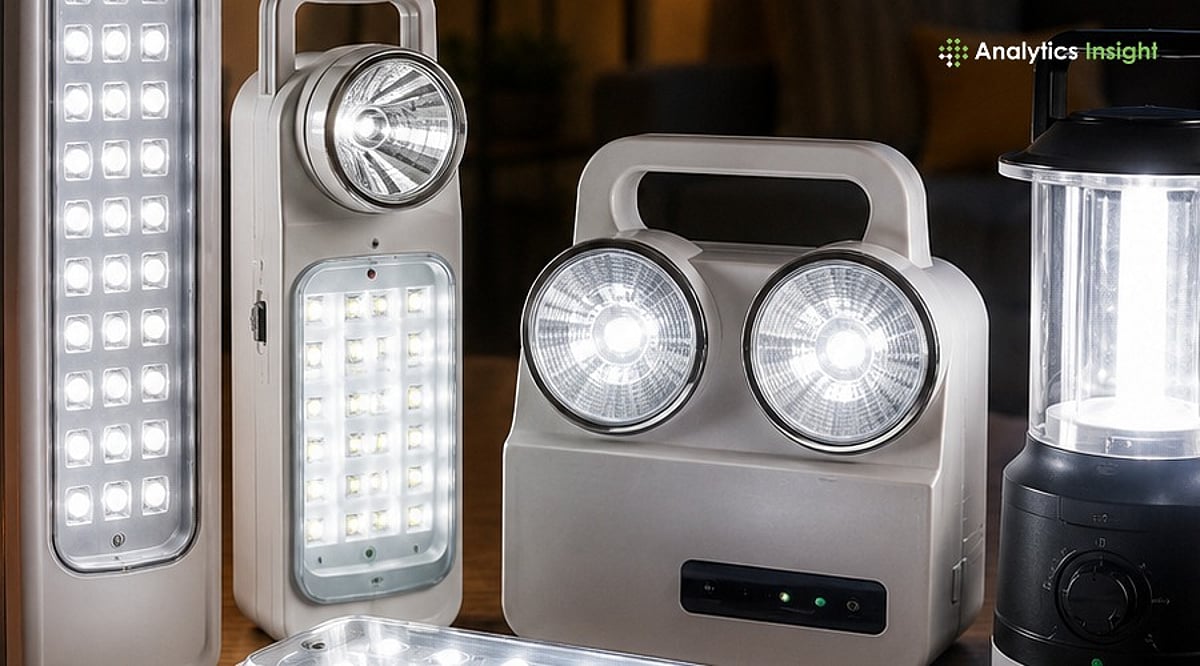
    Emergency Light Buying Guide 2026: How to Pick the Best Home Backup Lighting

    Power outages can strike without warning, disrupting daily life and creating safety hazards. A reliable emergency light ensures visibility and security during blackouts. This comprehensive guide walks you through the essential factors to consider when choosing the right emergency light for your home.

    Why Every Home Needs an Emergency Light

    An emergency light does more than illuminate a room—it helps family members navigate safely during power failures, especially on stairs or in dark corners. Children and elderly relatives benefit greatly from consistent lighting instead of relying on phone flashlights. A dedicated light also proves invaluable during minor emergencies, such as locating a first-aid kit or finding a charger. For students studying at night or remote workers, a dependable light ensures productivity continues uninterrupted. Remember, the brightest light isn’t always the best; what truly matters is its runtime relative to your area’s typical outage duration.

    Types of Emergency Lights

    Understanding the different designs helps narrow down your options before comparing specific models:

    • Rechargeable LED Lanterns: Ideal for whole-room illumination, these sit on a table or shelf and work well in living rooms and kitchens.
    • Emergency LED Bulbs: Replace standard bulbs and automatically switch to battery power during outages, perfect for rooms with fixed lighting.
    • Portable Rechargeable Lights: Compact and easy to carry, these suit those who move around the house during a blackout.
    • Solar Emergency Lights: Useful in areas with unreliable mains charging, as they recharge via sunlight.
    • Multi-purpose Lanterns: Designed for both camping and home emergencies, offering higher capacity and rugged build.

    Key Features to Consider Before Buying

    Battery Type: Lithium-ion batteries hold charge longer, weigh less, and endure more cycles than lead-acid batteries. While lead-acid options are cheaper upfront, they degrade faster, making them less suitable for frequent outages.

    Backup Time: Entry-level lights offer 2–4 hours, sufficient for short cuts. Mid-range models provide 6–8 hours, covering most evening outages. Long-duration units exceed 8 hours for areas with extended blackouts. Match backup time to your local outage patterns to avoid overpaying or running short.

    Brightness: Lumens indicate raw output, but multiple brightness modes are crucial—lower settings conserve battery during long cuts, while brighter modes assist with detailed tasks. Area coverage depends on design, not just lumens. Study rooms may need higher brightness, while bedrooms and hallways benefit from adjustable settings to extend battery life.

    Charging Time: Fast charging minimizes the risk of an empty battery when an outage strikes unexpectedly. Overcharge protection prevents damage from continuous plug-in, a common household practice.

    Build Quality: ABS plastic housing withstands drops better than thinner materials. A carry handle or wall-mounting option adds flexibility, and water resistance is important for kitchens or bathrooms.

    Safety Features: Auto-charging restarts the charge cycle upon power return. Battery protection, overcharge protection, and deep-discharge protection extend the unit’s life and reduce failure risks.

    Common Buying Mistakes

    • Going by Wattage Alone: Battery type determines runtime, not wattage.
    • Skipping Battery Type Check: Cheap batteries fade quickly after a year of regular charging.
    • Not Checking Charging Time: A slow-charging light often sits half-dead when needed.
    • Picking the Brightest Option: More brightness drains the battery faster; most rooms don’t need floodlights.
    • Overlooking Warranty and Service: Lack of support turns a small issue into a wasted purchase.
    • Forgetting Portability: A light stuck in one room is useless elsewhere during an outage.

    Quick Comparison Checklist

    Before purchasing, verify: battery type (lithium-ion preferred), backup time (minimum 4 hours for most homes), brightness modes (at least two), charging time (under 6 hours), build quality (ABS plastic, carry handle), and warranty (minimum 1 year).

    Best Emergency Light Brands in India

    Philips offers solid build quality and wide availability with straightforward warranty support. Wipro provides similar reliability at competitive prices. Eveready has proven battery expertise, reflected in durable cells. Syska stands out with modern designs at mid-range prices. Bajaj maintains long-term performance and service centers in smaller towns. Havells sits at a higher price point but delivers extended battery life and better warranty terms. Established brands generally offer superior warranties, batteries, and service compared to lesser-known names.

    Final Thoughts

    Small apartments are well-served by compact rechargeable lanterns that save space. Larger families need longer backup times and higher brightness to avoid rationing light between rooms. In areas with frequent outages, look for a lithium-ion battery with at least 6 hours of backup. For rural homes, solar-compatible models are more practical due to unreliable mains charging. The right choice ultimately depends on matching the light to local outage duration, storage space, and actual usage patterns. Prioritizing real-world usefulness over flashy marketing always pays off in the long run.

  • 2026 Portable Charger Buying Guide: Expert Tips on Capacity, Wattage, and Airline Rules

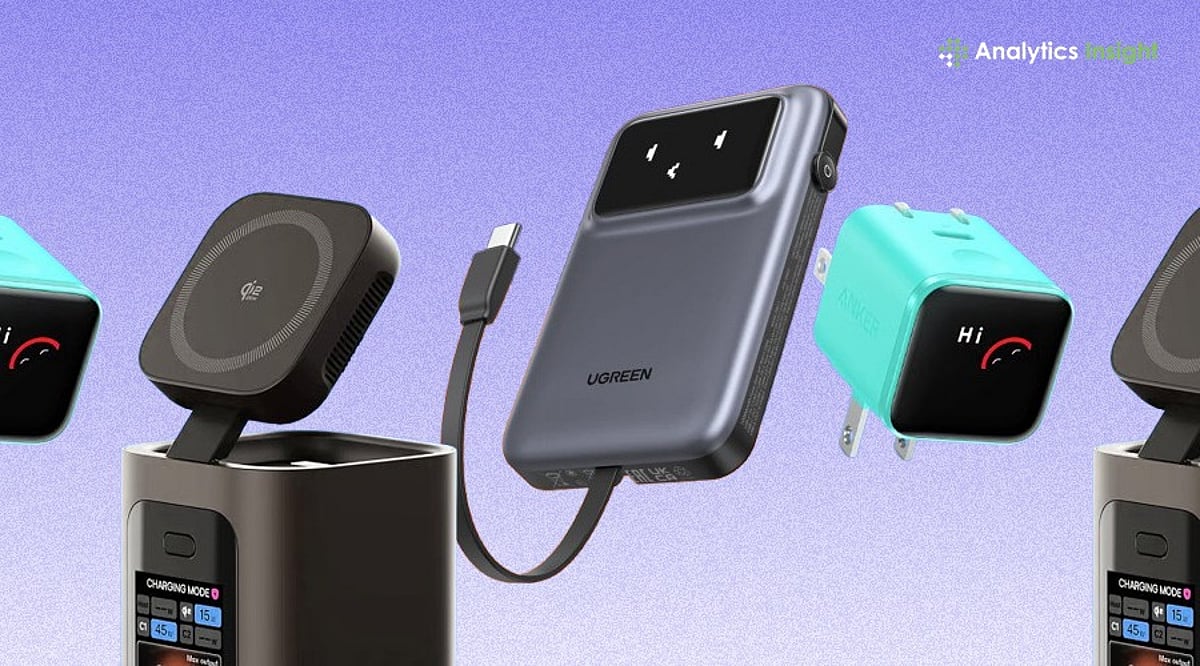
    2026 Portable Charger Buying Guide: Expert Tips on Capacity, Wattage, and Airline Rules

    Choosing the best portable charger in 2026 involves more than just looking at battery capacity. Charging speed, safety features, port compatibility, and airline regulations all play a role in selecting a reliable power bank. This expert guide breaks down everything you need to know to pick a portable charger that works for your devices and lifestyle.

    Step 1: Match the Charger to Your Use Case

    Start by identifying how you’ll use the charger. A daily commuter needs a slim, lightweight model. A traveler juggling a phone, earbuds, and a tablet needs higher capacity and multiple ports. Laptop users require high wattage output, not just a big battery. Outdoor enthusiasts need rugged builds. Matching your scenario first eliminates most of the market and prevents overpaying for unnecessary capacity.

    Step 2: Understand Capacity — mAh vs. Wh

    Manufacturers often list capacity in mAh, but watt-hours (Wh) give a truer picture, especially since airlines now calculate limits in Wh. A 20,000mAh power bank at 3.7V equals roughly 74Wh, well within travel limits. A 30,000mAh bank often exceeds 100Wh, requiring airline approval. For everyday phone use, 5,000–10,000mAh is enough. Travelers should look at 10,000–20,000mAh. Laptop charging usually needs 20,000mAh or more. Real-world output is lower due to voltage conversion and heat loss, so buy above your calculated need.

    Step 3: Check Charging Speed and USB-C PD Support

    Wattage determines how fast capacity reaches your device. A large battery with a 10W output will still charge slowly. Modern phones fast-charge between 20W and 30W. Laptops often need 60W to 100W or more via USB-C Power Delivery (PD). For simultaneous charging of a laptop and phone, a power bank with dual USB-C PD outputs and separate wattage ratings is ideal. USB-C PD is now the standard to prioritize over older proprietary formats.

    Step 4: Examine Ports, Cables, and Ecosystem Fit

    Look for at least one USB-C PD port and a USB-A port for older devices. Some power banks now include fold-out cables, eliminating the need for separate cords. Wireless options like MagSafe and Qi2 have become genuinely convenient in 2026, especially for iPhone users. If you’re deep in one ecosystem, consider accessories that integrate stands or charging docks for multiple devices.

    Step 5: Know 2026 Safety and Airline Rules

    Safety is where many buyers overlook crucial details. Since early 2026, major carriers including American, Delta, Southwest, and Lufthansa have tightened rules after a power bank fire on a runway in South Korea. New ICAO guidelines limit passengers to two power banks, ban storing them in overhead bins, and prohibit mid-flight recharging. Banks under 100Wh (about 27,000mAh) travel without approval. Those between 100Wh and 160Wh need airline sign-off; anything above 160Wh is banned. India’s aviation authority further restricts in-flight charging entirely. Frequent flyers should buy under 100Wh and keep the battery in the seat pocket. Also look for built-in protections against overheating and overcharging. Higher-quality battery cells maintain performance over more cycles. Replace any swollen or damaged battery immediately.

    Why This Matters

    The wrong charger can get flagged at airport security or fail to power your laptop. Understanding these basics upfront saves money, hassle, and the frustration of buying again.

    Quick Selection Framework

    For Apple users, weigh MagSafe or Qi2 convenience against slightly slower wireless speeds. For others, prioritize USB-C PD and multiple ports. Always check Wh for air travel.

    Final Thoughts

    The best portable charger isn’t the one with the biggest mAh number. It’s the one matched to your real use case, with enough wattage to charge fast and a Wh rating that clears airline limits. Buy for how you travel and charge, not for the spec sheet.

    Frequently Asked Questions

    1. What capacity portable charger should I buy in 2026?

    For everyday smartphone use, 5,000mAh to 10,000mAh is enough. Frequent travelers charging multiple devices should consider 10,000mAh to 20,000mAh. Laptops typically require 20,000mAh or higher with sufficient power output.

    2. Why is wattage as important as battery capacity?

    Battery capacity stores charge; wattage determines how quickly it delivers. A high-capacity charger with low output can still charge modern phones and laptops slowly.

    3. Can I carry a portable charger on a flight?

    Yes, but most airlines require portable chargers in cabin baggage, not checked luggage. Check your airline’s rules regarding Wh limits and the number of power banks allowed.

    4. Is USB-C Power Delivery necessary?

    USB-C PD is the preferred standard for most modern smartphones, tablets, and laptops. It enables faster, more efficient charging and offers broader compatibility than older technologies.

    5. How do I choose the best portable charger for my needs?

    Start by identifying your primary use case (commuting, travel, laptop charging). Then compare capacity, wattage, ports, safety features, and compatibility to select the right model.

  • Apple Watch Buying Guide 2026: Series 11 vs Ultra 3 vs SE 3 – Which One Should You Choose?

    Apple Watch Buying Guide 2026: Series 11 vs Ultra 3 vs SE 3 – Which One Should You Choose?

    Overview

    Apple Watch has evolved from a simple wrist accessory into a comprehensive health monitor, fitness guardian, productivity hub, and fashion statement. With the 2026 lineup featuring the Series 11, Ultra 3, and SE 3, choosing the right model can be overwhelming. This guide compares these three models across performance, battery life, durability, pricing, and everyday usability to help you find the perfect smartwatch for your lifestyle and budget.

    Key Factors to Consider

    Before investing, understand these critical features:

    • Battery Life: Ultra models last up to 72 hours; standard models typically 18–24 hours.
    • Durability: Premium titanium build in Ultra models; aluminum in standard versions.
    • Connectivity: Seamless integration with the Apple ecosystem.
    • Budget: SE models are budget-friendly; Ultra offers a premium experience.

    Apple Watch Models in 2026

    Apple Watch Series 11

    Ideal for everyday users focused on health and fitness. Features advanced health sensors, a bright display, and reliable battery life. Perfect for those who want a balance of features and affordability.

    Apple Watch Ultra 3

    Designed for adventurers and athletes. Built with titanium for extreme durability, 72-hour battery life, precise GPS, and water resistance. The ultimate companion for outdoor and sports enthusiasts.

    Apple Watch SE 3 (2026 Edition)

    Best for first-time smartwatch buyers. Lightweight, affordable, and packed with essential health-tracking features. A stylish entry point into the Apple Watch ecosystem.

    Quick Comparison

    Feature Series 11 Ultra 3 SE 3
    Battery Life 18–24 hours Up to 72 hours ~18 hours
    Build Material Aluminum Titanium Aluminum
    Target User Everyday health & fitness Adventure & sports Budget-conscious / beginners
    Price Range Mid High Low

    When to Buy for the Best Price

    Plan your purchase around these discount windows:

    • September: New model launches drive price drops on older models.
    • Black Friday (November): Save $50–$100 on select models.
    • January: Secondary discount period with limited-time deals.

    Final Thoughts

    Your choice depends on your lifestyle. For a versatile, all-around wearable, choose the Series 11. If you’re an adventurer or athlete, the Ultra 3 is worth the investment. Beginners and budget shoppers will find the SE 3 ideal. The best Apple Watch is the one that fits your daily needs and budget.

    FAQs

    Does any Apple Watch monitor blood glucose?

    No. Non-invasive blood glucose monitoring is not available on any current Apple Watch and isn’t expected in 2026.

    Is the Apple Watch Ultra 3 overkill for casual use?

    For most people, yes. The extra battery life and ruggedness are built for outdoor athletes. Casual users are better served by the Series 11.

    Can I still buy an older Apple Watch, like the Series 10?

    Yes, if discounted significantly. Check watchOS support longevity.

    What should I check when buying a used Apple Watch?

    Confirm Activation Lock is removed, check battery health, and buy from a seller with a return window.

    Does the Apple Watch work without an iPhone?

    Setup and full functionality require an iPhone. No Android support is available.

  • 2026 Foldable Phone Buyer’s Guide: What to Look For Before You Buy

    2026 Foldable Phone Buyer’s Guide: What to Look For Before You Buy

    Foldable phones have come a long way in 2026. Better displays, stronger hinges, and longer battery life have made them a practical choice for everyday users who want a phone that offers both portability and a larger screen.

    A few years back, foldable phones felt like expensive gadgets for a premium group of buyers. However, the picture has changed. These foldable devices have become part of the mainstream smartphone market. With better screens, stronger hinges, and longer battery life, models are now much more practical than before.

    Modern smartphone users prefer a device that functions as both a phone and a small tablet. A foldable phone gives them that option without carrying two devices. It is useful for watching videos, reading, gaming, and even working while traveling.

    Still, not every foldable phone is worth buying. Some focus on style, while others are built for people who need a larger screen every day. Before spending a large amount of money, it is worth knowing what really matters.

    How to Choose the Right Foldable Phone

    Foldable phones look impressive, but looks alone aren’t enough. Before you decide to purchase a model, you must cross-check some important aspects.

    1. Hinge Quality

    The hinge is the first thing to evaluate. Since you will open the phone multiple times a day, the hinge should feel smooth. A good hinge also helps the phone last longer.

    2. Display Quality

    The inner screen should be bright enough to read in scorching sunlight. Additionally, the latest models have a small external screen that allows you to reply to messages or check notifications without unfolding the phone.

    3. Battery Life

    If the screen is large, it will use more power. Thus, a bigger battery is always helpful. Fast charging is also worth looking for if you stay away from a charger for long hours.

    4. Performance

    Most users neglect this, but performance matters as much as others. A modern processor with enough RAM keeps apps running smoothly. This becomes even more important if you play games, edit photos, or use multiple apps at once.

    5. Software Support

    Do not ignore software support. Brands that promise several years of Android updates and security patches usually offer better value over time.

    6. Storage

    Photos, videos, and games continue to grow in size every year. Buying a model with enough storage now can save you trouble later.

    7. Budget

    Premium foldable phones offer the best experience, but several mid-range models now provide solid features at a much lower price.

    Foldable vs Flip vs Flat Phones

    The easiest way to understand the difference is to compare them side by side. A quick comparison reveals that foldable models offer the highest flexibility. Their biggest strength is larger screens, which make reading documents, editing photos, and using multiple apps simultaneously easier than ever.

    Flip phones are a good option for those who want a compact device that fits into a pocket. They save space but do not provide the same work experience as larger foldables. Flat phones remain the most popular option—they are affordable and reliable.

    For users who spend several hours on their phones every day, a foldable model often feels like a meaningful upgrade rather than just another smartphone.

    Are Foldable Phones Finally Worth Buying?

    If it were a few years back, most experts would tell people to wait. Early foldable phones were expensive, and many buyers worried about durability. Things look very different now. Newer models feel stronger, faster, and far more polished. The hinge has improved, the crease is less noticeable, and battery life is no longer a major concern. Software has also caught up, making better use of the larger screen.

    This does not mean everyone should rush to buy one. If you mainly use your phone for calls, messaging, and social media, a regular smartphone still does the job well. However, if your priority is watching videos, reading documents, or working while traveling, a foldable phone offers obvious advantages. It removes the need for a second screen in many cases.

    In the end, the best phone is the one that matches your daily routine. Foldable phones are no longer new. For many users, they have become a useful option that streamlines daily tasks.

    FAQs

    1. Which type of foldable phone is better for work?
    Book-style foldable phones are usually the better choice. Their larger internal display makes it easier to edit documents, attend video meetings, and use two apps simultaneously.

    2. How long do foldable phones usually last?
    Most modern foldable phones are built for years of regular use. Improved hinges, stronger screens, and better protection have made them much more reliable than older models.

    3. Are foldable phones good for gaming and streaming?
    Yes. The larger display gives games more room, and watching movies or sports feels much more enjoyable than on a standard phone.

    4. Should I buy a foldable phone or a regular smartphone?
    If you mainly use your phone for basic tasks, a flat phone is enough. If you want a bigger screen for work, entertainment, or multitasking, a foldable phone is the better option.

    5. What should I check before buying a foldable phone?
    Look at the hinge quality, display, battery life, processor, software update policy, storage, and price. These features have the biggest impact on long-term use.

  • Smart Tracker vs GPS Tracker: Key Differences, Pros, Cons, and Buying Guide (2026)

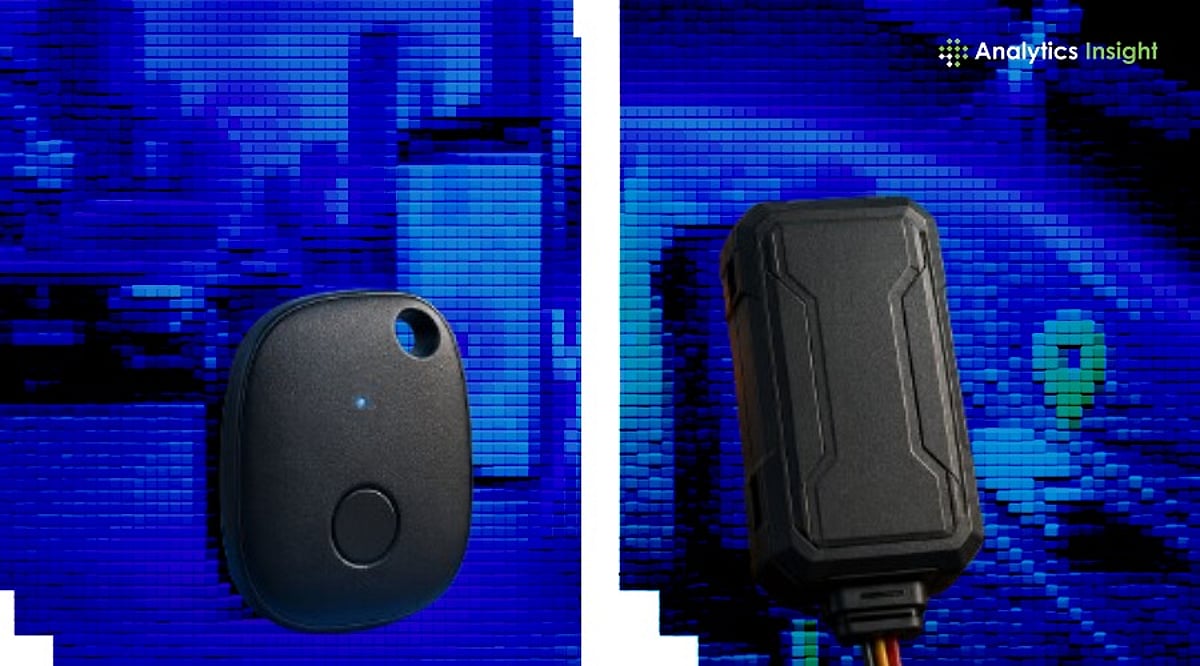
    Smart Tracker vs GPS Tracker: Key Differences, Pros, Cons, and Buying Guide (2026)

    Tracking devices have become an essential part of everyday life. People rely on them to locate lost items, protect vehicles, monitor valuable assets, and enhance security. Two popular options dominate the market: smart trackers and GPS trackers. While both help you find things, their underlying technology, functionality, and ideal use cases differ significantly. This guide breaks down everything you need to know before making a purchase.

    What Is a Smart Tracker?

    A smart tracker is a compact device that uses Bluetooth or Ultra-Wideband (UWB) technology to help locate personal belongings. Instead of relying on satellites, it communicates with nearby smartphones or connected devices to share location data. Popular examples include Apple AirTag, Samsung Galaxy SmartTag2, and Tile trackers. Attach one to your keys, wallet, backpack, or luggage, and a companion app shows you where your item is. The global smart tracker market is projected to reach nearly $4.02 billion in 2026, with annual growth exceeding 10% as connected device usage expands.

    What Is a GPS Tracker?

    A GPS tracker uses the Global Positioning System (GPS) to determine an object’s precise location via satellites. It does not depend on nearby phones; instead, it sends location data through cellular networks. GPS trackers are commonly used in cars, trucks, motorcycles, delivery fleets, security systems, child safety devices, and pet monitoring. The GPS tracking market is even larger, expected to hit approximately $6.13 billion in 2026, with annual growth of over 13% through 2033, fueled by demand from transportation and security sectors.

    Key Differences Between Smart Trackers and GPS Trackers

    Tracking Range

    Smart trackers are limited to short ranges, typically 30 to 120 meters for Bluetooth. If an item moves beyond that range, the tracker only updates when another connected device comes near. GPS trackers, by contrast, work over any distance since they connect directly to satellites. Whether your vehicle is in another city or country, you can still see its location.

    Accuracy

    Smart trackers with UWB technology can pinpoint a lost item with great precision, guiding you directly to it. GPS trackers typically offer accuracy between 3 and 10 meters outdoors, but performance may degrade inside buildings, underground garages, or dense urban areas. For indoor searches, smart trackers excel; for outdoor movement tracking, GPS trackers are superior.

    Battery Life

    Smart trackers are low-power devices. Bluetooth uses minimal energy, so many last between six months and two years before needing a battery replacement. GPS trackers consume much more power due to constant satellite and cellular communication; battery life ranges from a few days to a few months, depending on usage. If low maintenance is a priority, smart trackers are the easier choice.

    Cost Considerations

    Smart trackers generally require a single upfront payment with no monthly fees. GPS trackers often need a SIM card, data plan, cloud storage, or subscription services, adding recurring expenses. Over time, GPS trackers can be significantly more costly.

    Best Use Cases

    • Smart trackers are ideal for everyday personal items: wallets, keys, luggage, bags, and other small objects that stay within a limited range.
    • GPS trackers suit larger security needs: cars, motorcycles, fleet vehicles, expensive equipment, children’s safety devices, and pets that roam over long distances.

    Your choice depends entirely on what you need to protect and how far it may travel.

    Latest Updates in 2026

    Tracking technology continues to advance rapidly. Invoxia recently launched the GPS Tracker Pro Max, offering live location updates every second with 4G LTE-M, Wi-Fi, Bluetooth, and a nearly six-month battery life. In the smart tracker space, Urban Armor Gear released the Metropolis Tracker Card, which supports MagSafe wireless charging, reducing battery waste. Industry experts anticipate future trackers will integrate 5G, AI-driven security alerts, geofencing, and deeper smart home connectivity.

    Final Thoughts

    Both smart trackers and GPS trackers solve distinct problems. Smart trackers are affordable, long-lasting, and perfect for everyday items and short-range recovery. GPS trackers provide robust long-distance tracking, real-time updates, and advanced security but come with higher upfront and ongoing costs. As technology evolves, both categories are becoming smarter and more capable. Base your decision on budget, range needs, security requirements, and the type of item you want to track.

    Frequently Asked Questions

    1. What is the main difference between a smart tracker and a GPS tracker? Smart trackers use Bluetooth or nearby devices; GPS trackers use satellites for real-time location.
    2. Which tracker has better battery life? Smart trackers last from six months to two years; GPS trackers last from days to months.
    3. Does a GPS tracker require a monthly payment? Most GPS trackers need a SIM card or subscription, leading to monthly charges.
    4. Can a smart tracker track a car? Smart trackers are not ideal for cars due to limited range and reliance on nearby devices.
    5. Which tracker is better for daily personal items? Smart trackers are better for wallets, keys, bags, and luggage.
  • SSD Buying Guide 2026: How to Pick the Best Solid-State Drive for Speed, Storage, and Value

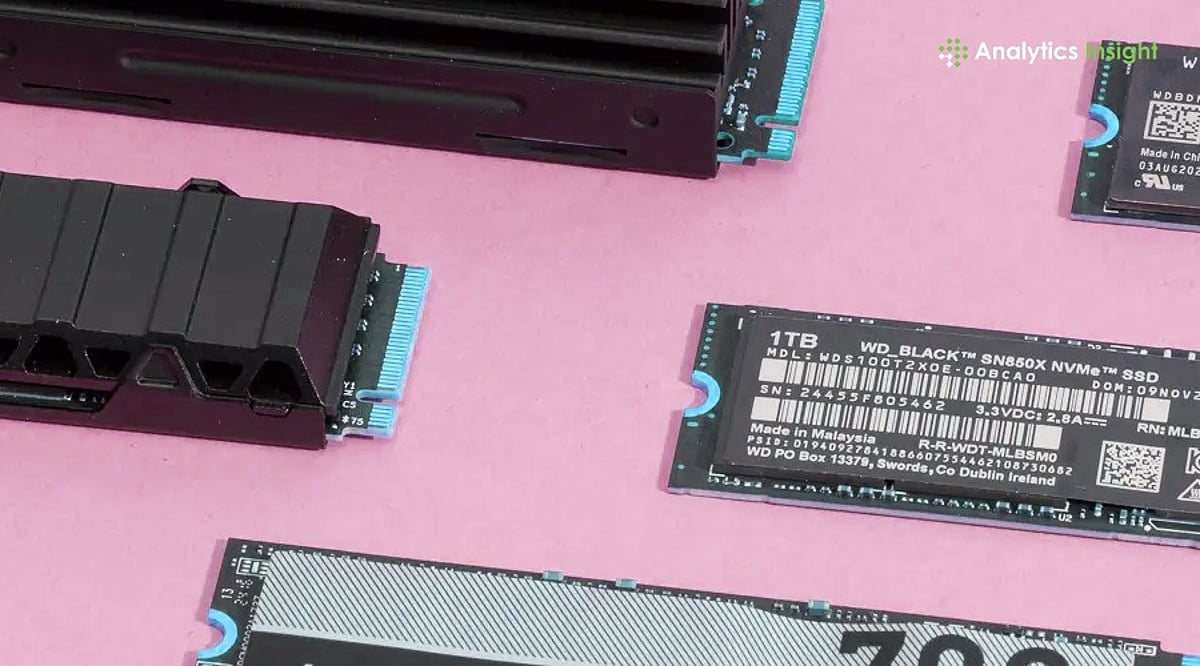
    SSD Buying Guide 2026: How to Pick the Best Solid-State Drive for Speed, Storage, and Value

    Solid State Drives (SSDs) have become the default storage option for most modern computers, offering dramatically faster performance than traditional hard drives. However, with the rapid evolution of storage technology—including PCIe 5.0 drives, rising NAND flash prices, and growing capacity demands—choosing the right SSD requires careful consideration of speed, durability, compatibility, and long-term value. This guide will help you navigate the key factors and make an informed purchase in 2026.

    Understanding Different Types of SSDs

    Three major categories dominate the market today:

    • SATA SSDs: The most affordable option, delivering speeds up to 550 MB/s. Ideal for basic office work, web browsing, video playback, and older systems. While much faster than HDDs, they are now considered entry-level.
    • NVMe PCIe 4.0 SSDs: The mainstream choice, offering speeds between 5,000 MB/s and 7,500 MB/s. Perfect for gamers, students, professionals, and content creators who need fast file transfers and responsive system performance.
    • PCIe 5.0 SSDs: Premium drives like the WD Black SN8100 that reach read speeds up to 14,900 MB/s. Targeted at power users, video editors, AI workloads, and advanced workstations where maximum throughput is critical.

    Choosing the Right Storage Capacity

    Your capacity needs depend on your workload:

    • 500GB: Suitable for basic tasks, school projects, light software use, and web browsing.
    • 1TB: The most balanced option for average users, offering ample room for applications, files, and the operating system.
    • 2TB: Increasingly popular among gamers, as modern AAA titles regularly exceed 150GB per installation.
    • 4TB and 8TB: Best for professional creators, video editors, AI developers, and users handling huge daily file transfers. Larger SSDs often perform better due to more memory chips enabling faster internal data movement.

    Why PCIe Generation Matters

    SSD speed is limited by the motherboard’s PCIe connection. PCIe 3.0 maxes out at about 3,500 MB/s, PCIe 4.0 reaches nearly 7,500 MB/s, and PCIe 5.0 pushes toward 15,000 MB/s. However, PCIe 4.0 remains the best value for most users—PCIe 5.0 drives still command high prices, and the real-world difference for typical tasks is minimal. Consumer PCIe 6.0 SSDs aren’t expected before 2030.

    Checking the Type of NAND Memory

    The memory chips inside an SSD significantly affect speed and lifespan:

    • TLC NAND (Triple-Level Cell): The preferred choice for durability, consistent speed, and long-term reliability. Most premium SSDs use TLC memory.
    • QLC NAND (Quad-Level Cell): Focused on lowering cost. These drives are cheaper but can slow down during large file transfers and sustained heavy workloads. For long-term performance, TLC is the stronger option.

    Understanding SSD Lifespan Through TBW

    Drive endurance is measured in Terabytes Written (TBW). A budget 1TB SSD typically offers around 300 TBW, mid-range drives approach 600 TBW, and premium 2TB models often exceed 1,200 TBW. Higher endurance is important for professionals who constantly transfer large files—developers, video editors, and designers will benefit from drives with stronger ratings.

    Heat Management Has Become Important

    As SSD speeds increase, so does heat output, especially with PCIe 5.0 drives. Many premium SSDs now include built-in heatsinks or graphene cooling layers, and some motherboards offer dedicated SSD cooling. Without proper thermal management, the drive will throttle performance to protect itself. Always consider cooling when purchasing a high-speed SSD.

    SSD Prices Are Rising in 2026

    Global NAND flash shortages driven by AI infrastructure demand have pushed SSD prices sharply higher. Several high-capacity NVMe drives now cost nearly twice what they did in 2025. Analysts expect this pricing pressure to continue into 2027, making timing an important factor for buyers planning upgrades.

    Final Buying Advice for 2026

    For the majority of users, a PCIe 4.0 NVMe SSD offers the best balance of price and performance. SATA SSDs remain viable for older or low-end systems. PCIe 5.0 drives are reserved for professionals and enthusiasts who need the absolute fastest throughput. The global NVMe SSD market is projected to grow at a CAGR of about 18.9% over the next several years, driven by cloud computing, AI applications, and enterprise storage needs. Rather than waiting for the next technology leap, make your purchase decision based on required capacity, motherboard compatibility, endurance needs, and your long-term usage commitment.

    Frequently Asked Questions

    1. Which SSD is best for most buyers in 2026? A PCIe 4.0 NVMe SSD remains the best option because it delivers strong performance at a reasonable price.
    2. Is PCIe 5.0 worth buying in 2026? PCIe 5.0 is best for professionals and advanced users; high prices make it unnecessary for regular use.
    3. What SSD capacity should be chosen for gaming? A 2TB SSD works best for gaming because many modern games now exceed 150GB.
    4. Why are SSD prices increasing in 2026? Global NAND flash shortages and rising demand from AI infrastructure have pushed storage prices much higher.
    5. Does SSD cooling really matter? Yes. High-speed SSDs, especially PCIe 5.0 models, produce more heat and may slow down without proper cooling.