Tag: ChatGPT

  • OpenAI Unveils ChatGPT for Financial Institutions Powered by GPT-6 Astra

    OpenAI Unveils ChatGPT for Financial Institutions Powered by GPT-6 Astra

    OpenAI Launches ChatGPT for Financial Services

    OpenAI has launched a specialized version of ChatGPT designed specifically for banks and financial institutions. The new offering integrates financial data from multiple providers with the reasoning capabilities of GPT-6 Astra to support financial research, modeling, and client work.

    What ChatGPT for Financial Services Offers

    The service includes built-in financial data from providers such as Daloopa, PitchBook, LSEG News, and Crunchbase. This data covers earnings transcripts, financial statements, company information, and private companies. OpenAI hosts and indexes this data on its infrastructure, allowing financial teams to access the datasets without negotiating separate contracts or setting up individual connectors.

    Detailed citations are provided, helping users trace figures and claims back to their sources during analysis. For example, bankers can use the tool to examine a company’s adjusted EBITDA, identify the costs removed during the calculation, and understand how the figure could affect a valuation.

    GPT-6 Astra at the Core

    GPT-6 Astra powers ChatGPT for Financial Services. According to OpenAI, the model can work with financial documents, tables, figures, and supporting notes. It can analyze financial information, draw conclusions, and turn the results into documents, spreadsheets, and presentations.

    “GPT-6 Astra is state of the art across three of the core capabilities required for financial services work: information retrieval, financial reasoning, and artifact generation,” OpenAI said.

    Templates and Security

    The service allows administrators to upload and manage Excel, Word, and PowerPoint templates. This helps teams create research notes, valuation models, and pitchbooks that follow their firm’s existing format and style.

    OpenAI developed the product with input from financial firms including Morgan Stanley. ChatGPT for Financial Services is currently available to eligible financial institutions.

    OpenAI stated that it will not use company data to train its models by default. Data is encrypted during transfer and storage, adding security measures for financial organizations handling sensitive information.

  • OpenAI’s ChatGPT Images 2.5 Boosts Speed, Adds Sketch and Precision Editing Tools

    OpenAI’s ChatGPT Images 2.5 Boosts Speed, Adds Sketch and Precision Editing Tools

    OpenAI has launched ChatGPT Images 2.5, the latest version of its image-generation model, bringing faster generation, sharper editing controls, and creative features designed to make visual creation more intuitive and precise. Available across ChatGPT, ChatGPT Work, and Codex on desktop, mobile, and web, the update is rolling out to all subscribers at no extra cost.

    What’s New in Images 2.5?

    Three major improvements define this release: enhanced image quality, more accurate editing, and significantly faster generation. OpenAI reports that images now render up to 50% faster than the previous Images 2.0 model. Lighting appears more natural, textures are sharper, and reference photos retain their detail—even when the subject is placed in a completely different scene.

    Beyond the core model, new tools have been integrated into the ChatGPT interface:

    • Sketch Feature: Users can draw rough ideas on a canvas, then add a short description. ChatGPT transforms the sketch into a polished, finished image. This is ideal for concepts that are easier to draw than describe.
    • Editing Toolbar: Opens when an image is selected, offering five options: Markup, Comment, Remove Background, Erase, and Resize. Remove Background isolates the subject with a transparent background. Erase removes unwanted objects with a simple brush stroke.
    • Comment-Based Editing: Click directly on part of an image and type instructions like “remove this” or “make it blue.” The AI acts on only that area, leaving the rest untouched.
    • Templates: Pre-built guides for posters, merchandise, product photography, and more. Users answer a few questions and ChatGPT generates the image.
    • Prompt Sharing: Finished images can now include the exact prompt used, allowing others to reuse and adapt the concept.

    Consistency Across Multiple Edits

    Earlier versions often degraded quality after repeated edits in the same conversation. Images 2.5 addresses this by preserving important visual details and composition through multiple rounds of changes. This reliability is especially valuable for marketing teams creating campaign assets or social media batches that need to look cohesive.

    New API Models for Developers

    Developers gain access to two new API models: Flare (default, optimized for speed and lower cost, suitable for everyday tasks) and Sunburst (slower but offers tighter control for polished campaign work). Companies like Adobe, Runway, and Manus have already integrated these models into their products.

    Competitive Edge

    Early reviews place Images 2.5 ahead of Google’s Nano Banana 2 in editing accuracy and speed. Critics note that the biggest improvement is not just raw output quality but how the new editing tools transform the daily workflow of image creation.

    Overall, ChatGPT Images 2.5 refines a system that already worked well, putting more control in users’ hands. For casual users, it simplifies quick photo touch-ups, poster design, or product shots. For businesses, the choice between Flare and Sunburst offers a practical trade-off between speed and precision. The result is steady, sensible progress that makes AI image generation more practical and accessible.

  • 2026 Guide to Measuring Crypto AI Visibility: Essential Metrics and Tracking Tools

    2026 Guide to Measuring Crypto AI Visibility: Essential Metrics and Tracking Tools

    A crypto AI visibility tracker measures how often an answer engine names an exchange, wallet, or protocol when someone asks a buying question, and which sources it cites when it does. Collecting that number is the easy part. Knowing whether it means anything is harder, because the same prompt run twice can return a different answer.

    This is what to measure, where crypto answers actually come from, and how to tell a tracking figure that survives scrutiny from one that does not.

    What Does Crypto AI Visibility Tracking Actually Measure?

    Three different things, and they get reported interchangeably, which is where most of the confusion in this category starts.

    • Mention rate is how often a brand is named in the answer text.
    • Citation share is how often a page the brand controls, or a page that talks about it, appears in the engine’s source list.
    • Position is where the brand sits against competitors when the engine returns a ranked set.

    These move independently. A large exchange can be named in most answers and cited almost never, which happens when engines know the brand from training but reach for third-party pages when they need a source. The reverse happens to smaller protocols carrying one strong write-up.

    When a tool reports a single visibility score, the question to ask is which of the three it is built from and how they are weighted. The weights behind the citeOS score are published at citeos.io/methodology. Most vendors do not publish theirs, which is not disqualifying, but it does mean two scores are not comparable.

    Where Do AI Engines Actually Get Their Crypto Answers?

    Almost entirely from pages the brand does not own, and the mix is specific to this category.

    Across a corpus of 39,948 citation events covering 72 crypto brands between April and August 2026, spanning 17,276 pages and 4,395 source domains, 92.22% of citations pointed at pages the brand does not control. Its own domain accounted for 7.78%.

    The rest of the map, as a share of all citations recorded:

    • Long tail of independent sites: 79.09%
    • The brand’s own domain: 7.78%
    • YouTube: 4.49% (appears for all 72 brands)
    • Mid-tier crypto press: 2.27%
    • Aggregators such as CoinGecko and CoinMarketCap: 2.26%
    • Reddit: 2.19%
    • Other community sources: 1.34%
    • Top-tier crypto press: 0.36%
    • X: 0.29%

    This is what a horizontal tool built for B2B software cannot supply. It can report that a brand is invisible. It cannot say where to go, because it holds no map of which sources answer crypto buying questions.

    What Is Crypto Press Actually Worth for AI Visibility?

    Far less at the top than the rate cards imply, and this is the most checkable claim in the dataset.

    The four outlets crypto teams pay most for — CoinDesk, Cointelegraph, The Block and Decrypt — returned 143 citations between them across the entire corpus, which is 0.36%. A basket of 21 mid-tier outlets returned 907, or 2.27%, cited 6.34 times more often at a fraction of the placement cost. CryptoSlate on its own returned 312, more than double all four top-tier outlets combined.

    That basket is a judgement call and it is published on request.

    The mechanism looks like format rather than prestige. Mid-tier outlets publish more roundups, comparisons and “best X for Y” pages, and those are the pages engines quote. A single announcement piece, however good the masthead, is rarely the page that answers a buying question.

    None of this makes top-tier placement worthless. It buys trust transfer and human readers, and both are real. It is simply not what moves citations.

    Why Do Two Trackers Report Different Numbers for the Same Exchange?

    Because answer engines are non-deterministic. The same prompt, same engine, same day, can return a different answer and a different source list.

    On top of that sits personalisation. Account history, geography and logged-in state all shape what an individual sees. There is no single correct number for how visible a brand is in ChatGPT, only a distribution.

    Two tools can both be honest and still disagree, because they sampled different draws from the same distribution.

    What this rules out is spot-checking. Asking ChatGPT about an exchange, seeing a competitor named instead, and concluding there is a visibility problem is not measurement. It is one draw.

    How Many Samples Does a Crypto Tracking Number Need?

    Enough that the noise averages out, and the tool should say what it used.

    For reference, a single citeOS audit is 20 buyer-style prompts across 5 engines, which is 100 observation points per brand. The corpus behind the figures above is 39,948 events across 72 crypto brands.

    Evidence that sampling noise averaged out sits inside the data rather than in a claim about it. Citations scale with the number of pages that mention a brand at a rate of 1.48 per page, with a correlation of 0.80 and a coefficient of variation of 9.5% across brands of very different sizes. A constant that stable does not appear if per-answer randomness is driving the result.

    The practical test for any tracker is to ask how many times it probes each prompt per engine per cycle. If the answer is once, the output is a trend line drawn through noise. If the vendor cannot answer, that is also an answer.

    Appearance Rate Is Not Share of Citations

    This is the most common error in published AI visibility research, and it inflates numbers by an order of magnitude.

    Appearance rate asks: in what percentage of prompts did this source show up at all? Share of citations asks: of all citations recorded, what percentage went to this source?

    Reddit is the standard example. In this corpus Reddit appears for 71 of the 72 brands, which is close to universal, while accounting for 2.19% of citation volume. Both numbers are real and they describe different things. Published figures putting Reddit at 40% or more of AI citations are almost always appearance rates reported as volume shares.

    When a tracker reports a percentage, the only question that matters is which denominator it used. If the documentation does not say, treat the number as directional.

    What Should a Crypto Project Track That a General Tool Will Not?

    Three things, and they are why crypto teams usually outgrow a horizontal tool.

    • The category source map. Covered above. Without it, a low score is a diagnosis with no treatment.
    • Vertical-correct prompts. “Best crypto exchange” and “safest crypto wallet” are different buyer questions drawing on different source pools. A tracker that accepts typed prompts but holds no view on which prompts matter in a given vertical is a spreadsheet with an API attached.
    • Page treatment, not just page count. Being the subject of a page earned 6.22 citations in the data. Being one name inside someone else’s ranked list earned 3.78. Being mentioned nearby without making the list earned 3.39. Dedicated coverage converts better per page, while lists still carry more total volume because there are far more of them and one list serves many brands at once. A tracker that counts mentions without distinguishing these is measuring the wrong unit.

    Which AI Visibility Trackers Are Worth Looking At for Crypto?

    The category has a long tail of thin products. These are the ones with either real adoption or a published method behind them. citeOS publishes this page and appears in the list, placed where the same criteria put it rather than at the top.

    • Profound is the enterprise default and the most widely adopted tool in the category. Deep prompt coverage and reporting built for a team where this is somebody’s actual job. Overkill, and overpriced, for a five-person crypto marketing team.
    • Otterly.AI is the practical choice for small teams that want tracking running the same day. Less depth than Profound, materially cheaper, and enough to answer the basic question of whether a brand is being named.
    • Peec AI is built around competitive benchmarking, so it suits a team whose real question is not “are we visible” but “why is that exchange being recommended instead of us”.
    • Crawlux is the strongest crypto-native option. It covers ChatGPT with browsing, Perplexity and Claude, maps categories across DeFi, exchange, NFT, wallet and L1, and ships a token schema validator for FinancialProduct and CryptoExchange markup that no general platform offers. Free first audit, Pro at $25, Team at $49 for five seats.
    • citeOS runs 20 buyer prompts across 5 engines for 100 observation points per audit, scored against a database of 500+ ranked crypto outlets across 10 verticals, with the weights published. It has no schema validator, and it covers fewer engines than several tools in this list. What it holds that the others do not is the ranked crypto source database, which is what turns “you are invisible” into a named list of places to go.

    The wider general-purpose comparison is at best AI visibility tools, and the crypto-specific one at crypto AI visibility.

    What No Crypto Visibility Tracker Can Tell You Yet

    Citation counts are not traffic and they are not revenue. No tool in this category can currently connect a cited page to a deposit or a swap.

    Personalisation is unmeasured. Every figure above describes a clean baseline. A logged-in user with history in a different jurisdiction sees something else, and no published study yet quantifies how far that moves it.

    Five months is a short window in a retrieval landscape that keeps changing, and this source map is crypto only. It does not transfer to other categories.

    Frequently Asked Questions

    What is a crypto AI visibility tracker?

    A tool that runs buyer-style crypto prompts against answer engines on a schedule and records whether a brand is named, which sources are cited, and where it sits against competitors.

    How often should a crypto project track AI visibility?

    Weekly is enough for most teams. Daily tracking mostly buys noise unless the tool takes many samples per prompt.

    Can I check crypto AI visibility for free?

    Yes. Crawlux and citeOS both offer a free first scan, and DABLOCK publishes a free public index.

    Why does my exchange appear when I ask ChatGPT but not in the tracker?

    Non-determinism and personalisation. A logged-in session with history is not the same draw as a clean probe, which is why a single self-check is not measurement.

    Is AI visibility tracking different for crypto?

    The mechanics are the same. The source pool is not. Crypto answers lean on aggregators, mid-tier crypto press and YouTube in proportions that do not match other categories, and top-tier crypto press returns far less than its price implies.

    Does crypto PR improve AI visibility?

    Mid-tier placement does, measurably more than top-tier. In this corpus the four most expensive outlets returned 0.36% of citations against 2.27% for a basket of 21 mid-tier outlets.

  • OpenAI Launches ChatGPT Images 2.5 with Sketch Tool for Enhanced Editing Control

    OpenAI Launches ChatGPT Images 2.5 with Sketch Tool for Enhanced Editing Control

    OpenAI has officially launched ChatGPT Images 2.5, a major update to its image generation platform, introducing a new Sketch tool that allows users to draw directly inside a chat to guide the final image. The update, released on September 8, 2026, promises faster editing, stronger consistency across edits, and two new API models for developers.

    The Sketch tool is the headline feature of this release. Users can type “@Sketch” to open a canvas and rough out ideas—whether it’s a room layout, a clothing concept, or something easier to draw than describe. OpenAI also added new templates for common formats like flyers and product photos, along with the option to leave comments directly on an image for more targeted edits.

    According to OpenAI, editing control matters more than raw output quality in this version. Earlier versions of ChatGPT Images often lost track of a subject’s likeness after a few rounds of edits. Images 2.5 does a better job preserving people, pets, and key details, even as users apply changes to a specific part of an image without disturbing the rest. That consistency carries across longer conversations, so earlier edits stay intact instead of degrading with each new instruction.

    The new engine claims up to 50 percent lower generation latency than Images 2.0. The update rolled out to ChatGPT, ChatGPT Work, and Codex users across desktop, mobile, and web on all tiers. OpenAI shared the news first with Axios.

    Alongside the ChatGPT update, OpenAI introduced two API models: GPT-Image-2.5 Flare and GPT-Image-2.5 Sunburst. Flare serves as the default option for most use cases, offering higher image quality than GPT-Image-2 at half the latency. Sunburst targets premium workflows like campaign creative and polished product imagery, where tighter editing control matters more than speed.

    OpenAI said people generate more than 3 billion images every week across ChatGPT Images and the GPT-Image API models combined. Adobe has already added the new models to Firefly, its creative AI platform, according to comments the company shared at launch. Pricing for both new API models comes in at twice the rate of GPT-Image-2.

  • AI Photo Trend Brings Back 1950s Bollywood Glamour with Vintage Prompts

    AI Photo Trend Brings Back 1950s Bollywood Glamour with Vintage Prompts

    The latest AI photo trend is turning ordinary snapshots into retro Bollywood classics, inspired by the golden era of Hindi cinema. Social media users are now using AI image tools like ChatGPT and Gemini to transform their portraits into vintage movie stills reminiscent of iconic films and stars from the 1950s.

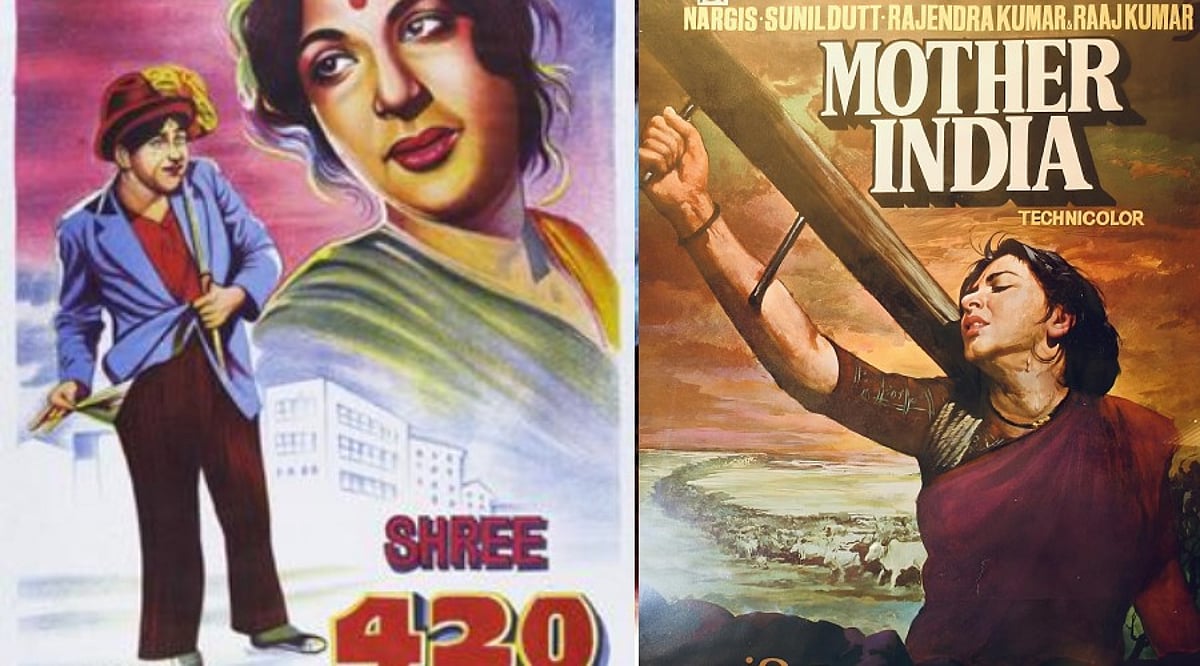
    This trend captures the visual essence of classic Indian cinema—grainy black-and-white photography, studio lighting, dramatic expressions, vintage costumes, and hand-tinted colors. By uploading a clean, well-lit photo and using detailed prompts, anyone can recreate the nostalgic look of films like Shree 420, Mother India, and Pyaasa, or channel the charm of stars like Madhubala, Guru Dutt, and Dev Anand.

    From Shree 420 to Classic Black-and-White Portraits

    One popular prompt draws from the Raj Kapoor-Nargis era, especially the visual treatment of Shree 420. This style features soft studio lighting, film grain, a silver-gelatin-print effect, period clothing, and a classic Bombay studio backdrop.

    For a more glamorous look, another prompt is inspired by Madhubala’s Technicolor cinema, using saturated colors, vintage grain, bridal styling, soft lighting, and the appearance of a classic Bollywood poster.

    A third option takes a serious turn, recreating the mood of a Guru Dutt-style scene from Pyaasa. Deep shadows, a monochrome palette, close-up framing, and a smoky studio atmosphere combine to evoke the melancholic feel of classic Hindi cinema.

    Mother India and Dev Anand-Inspired Looks

    The trend also includes a rustic Mother India-inspired treatment, placing the subject against a village backdrop with traditional Indian clothing, dramatic natural lighting, hand-painted color effects, and the texture of an old film poster.

    For a romantic hero aesthetic, a fifth prompt takes cues from Dev Anand, featuring a black-and-white, soft-focus finish, a 1950s suit and scarf, a vintage Bombay street or studio setting, and classic film-grain effects.

    These varied approaches let users choose between glamour, romance, drama, or rural-period imagery while keeping the same basic photograph.

    How to Create Your Own Vintage Bollywood Picture

    To try the trend, start with a clean, well-lit picture where your face is clearly visible. Upload the photo to an AI image editor, copy the prompt, and adjust elements like clothes, hairstyle, lighting, or background. For better consistency, you can instruct the AI model to preserve your facial features and pose.

    This viral trend not only celebrates the timeless allure of 1950s Bollywood but also showcases the creative potential of AI in photography and digital art.

  • OpenAI vs Anthropic: Divergent Paths in the AI Race

    OpenAI vs Anthropic: Divergent Paths in the AI Race

    Two AI Giants, Divergent Visions

    OpenAI and Anthropic have emerged as two of the most influential forces in generative AI. Both develop cutting-edge language models and AI assistants, yet they pursue fundamentally different philosophies, product strategies, and commercial goals. While OpenAI has built a broad ecosystem spanning consumers and developers, Anthropic has carved a niche around safety, reliability, and controllable AI.

    OpenAI: Broad Adoption and Ecosystem Depth

    OpenAI’s approach centers on creating a comprehensive AI ecosystem that includes conversational assistants, developer tools, multimodal systems, and enterprise solutions. ChatGPT remains its flagship product, powering applications in writing, coding, research, and automation. The company’s strategy prioritizes widespread adoption, continuous model advancement, and deep integration across computing platforms.

    Anthropic: Safety-First with Claude

    Anthropic focuses on developing Claude, its primary AI assistant and model family, with a strong emphasis on safety, reliability, and controllability. Its Constitutional AI framework guides model behavior through explicit principles, making Claude particularly popular for writing, analysis, coding, and enterprise tasks that demand dependable AI interactions.

    Model Capabilities: A Moving Target

    Both companies compete on advanced capabilities including reasoning, coding, multimodal understanding, and long-context handling. Their model lineups evolve rapidly, meaning direct comparisons are fleeting. Performance varies by task, model version, and evaluation methodology, so the competition is less about a single winner and more about specialized strengths and practical utility.

    Safety Philosophies: Shared Goals, Different Emphases

    Safety is central to both organizations, but their approaches differ. Anthropic has prominently championed Constitutional AI and alignment research, while OpenAI invests heavily in safety, preparedness, and alignment. Both recognize the need for safeguards, evaluation, and monitoring as systems grow more powerful, though their organizational philosophies and implementation strategies diverge.

    Business Models and Ecosystems

    OpenAI has achieved significant reach through ChatGPT, developer APIs, and partnerships, spanning consumer and enterprise markets. Anthropic has concentrated on Claude, APIs, and business deployments, with partnerships with major tech companies strengthening its infrastructure and distribution. OpenAI’s ecosystem provides a broad platform, while Anthropic focuses on reliability and enterprise trust.

    The Broader AI Race

    The rivalry between OpenAI and Anthropic encapsulates a larger contest over AI’s future. It’s no longer just about chatbot performance—model efficiency, reasoning, safety, enterprise adoption, developer ecosystems, computing infrastructure, and product integration increasingly define leadership. This competition accelerates both innovation and scrutiny across the industry, shaping the trajectory of artificial intelligence for years to come.

  • OpenAI’s ChatGPT Work Now Mimics Your Writing Style Automatically

    OpenAI’s ChatGPT Work Now Mimics Your Writing Style Automatically

    OpenAI has rolled out a new capability for ChatGPT Work that lets the AI learn a user’s personal writing style and apply it in future interactions. This means less time spent explaining how you want your emails or documents to sound.

    Previously, users had to provide explicit instructions about tone and style. Now, ChatGPT can analyze your past writing—including frequently used phrases, email sign-offs, and subtle habits—to generate drafts that feel more like you.

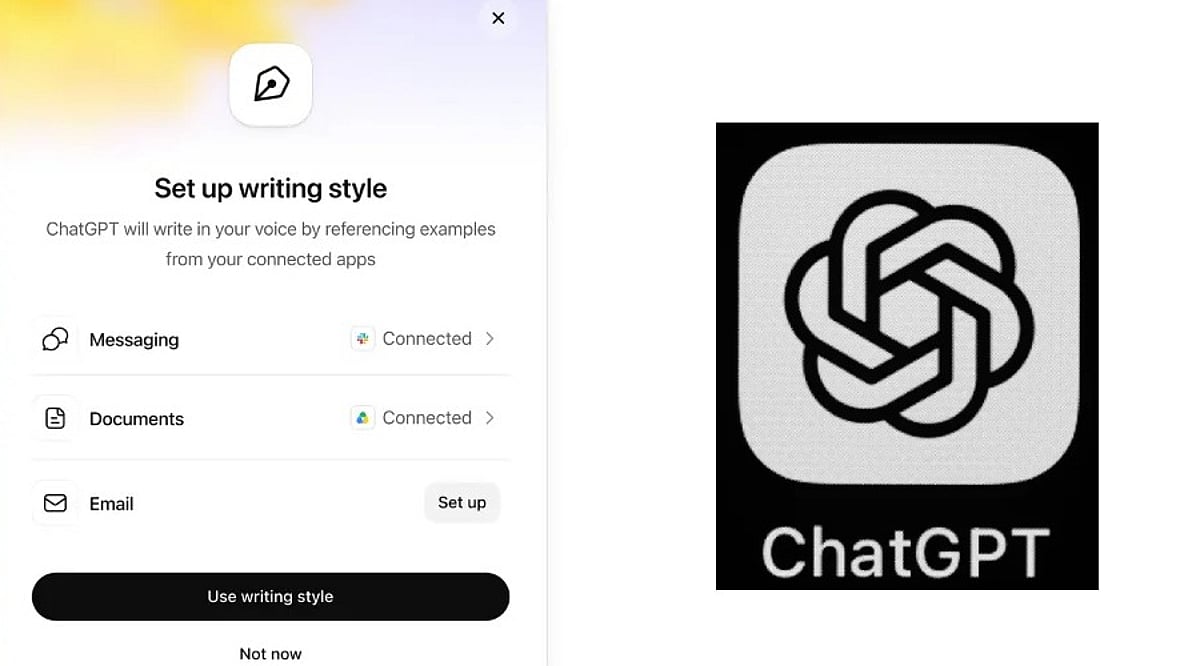
    The feature can tap into connected applications such as Gmail, Google Drive, Slack, and SharePoint to better understand your writing patterns.

    How to Set It Up

    Enabling this is straightforward. Go to Settings > Personalization > Writing style. From there, you can link your work apps and allow ChatGPT to study your old messages and documents. Once activated, it works across both the web version and mobile apps, but only for ChatGPT Work subscribers on paid plans.

    The more ChatGPT sees of your writing, the more natural its drafts will become. Over time, you might not need to provide detailed instructions at all.

    Higher Productivity Meets Corporate Data Privacy

    This update is particularly useful for professionals who draft many work emails, messages, or reports with the help of AI. However, there’s a catch: because the tool reads through emails and files, it also processes sensitive business information. Companies should weigh the benefits against potential privacy risks, especially regarding who can access or use that data.

    Overall, this change signals where AI writing tools are headed—moving from simple instruction-following to truly understanding individual users. The ultimate goal is fewer edits and drafts that already sound like you.

  • How to Create AI-Generated 80s Photos with ChatGPT: The Viral Instagram Trend Explained

    How to Create AI-Generated 80s Photos with ChatGPT: The Viral Instagram Trend Explained

    Instagram users are turning back the clock with a new viral trend that uses ChatGPT to transform modern photographs into 1980s-style images. The AI-generated photos feature period-appropriate hairstyles, clothing, accessories, and backgrounds, giving users a nostalgic glimpse of how they might have looked in the era of big hair and neon colors.

    What Is the 80s Photo Trend?

    The trend relies on artificial intelligence to reimagine an existing photograph in the visual style of the 1980s while preserving the person’s recognizable facial features. Users upload a photo to ChatGPT and ask the chatbot to adapt their hair, clothes, accessories, surroundings, and overall aesthetic to the decade. The trend has spread rapidly through Instagram Stories, where people share the prompt “Chat, how would I look in the ’80s” and use the “Add Yours” sticker to encourage friends to participate.

    How to Create Your Own 80s Photo with ChatGPT

    Getting your own retro image is straightforward. You need a personal photograph and access to ChatGPT. Follow these steps:

    1. Open ChatGPT and tap the “+” button to upload your photograph.
    2. Enter the following prompt: “Create an image of how I would look in the 1980s, keeping my recognizable characteristics and appearance, but adapting my hair, clothes, accessories, setting and aesthetics to the era.”
    3. ChatGPT will generate a preliminary image using your photo as a reference.
    4. You can refine the result by requesting changes to specific elements such as hairstyle, moustache, or background details.

    For example, you might ask for a “brick” mobile phone, vintage cars in the background, or a setting like a disco, arcade, 80s gym, beach, or birthday party. Once you are satisfied, save the final image and share it on Instagram.

    Customization Options

    The first image does not have to be final. Users can continue the conversation with ChatGPT, tweaking details until the look is perfect. The tool allows adjustments to hair length, color, accessories, and even background elements, giving users full creative control.

    AI Photo Trends Continue to Grow

    The 80s trend is not the first social-media craze built on AI-generated photographs. Earlier trends included creating caricatures based on a person’s profession and generating images of people hugging their favorite celebrity. AI tools are also increasingly used for appearance-related edits, such as experimenting with different hair colors and lengths. This latest trend adds a nostalgic layer, allowing users to reimagine themselves through the visual style of a bygone decade.

    If you want to join the fun, grab a selfie, open ChatGPT, and let the AI take you back to the 1980s.

  • 10 Free AI Tools That Can Save You Hours Every Week

    10 Free AI Tools That Can Save You Hours Every Week

    Artificial intelligence tools have become indispensable for boosting productivity and streamlining workflows. Whether you need to generate content, research a topic, organize documents, or automate meeting notes, there is a free AI tool that can help. Here is a curated list of 10 powerful free AI tools that can save you hours every week.

    1. ChatGPT

    ChatGPT is one of the most versatile AI assistants available. Use it to generate content, brainstorm ideas, summarize documents, answer questions, and automate everyday writing tasks. Its conversational interface makes it easy to get started.

    2. Google Gemini

    Google Gemini integrates seamlessly with Google Workspace to help you research topics, summarize lengthy files, analyze images, and streamline both personal and professional workflows. It’s a great choice for anyone already using Google’s ecosystem.

    3. Microsoft Copilot

    Microsoft Copilot works directly inside Microsoft 365 applications and Windows. Draft emails, create presentations, analyze spreadsheets, and even get assistance with coding—all without leaving your workflow.

    4. Perplexity AI

    Perplexity AI provides accurate, source-backed answers instantly with real-time web search. It makes research, fact-checking, and learning significantly faster than traditional search engines.

    5. Canva AI

    Canva’s AI-powered design tools let you create social media graphics, presentations, videos, and marketing visuals without needing professional design experience. It’s a time-saver for content creators and marketers.

    6. Grammarly

    Grammarly helps improve grammar, clarity, tone, and writing quality across emails, documents, and websites. Its instant suggestions make writing more efficient and polished.

    7. NotebookLM

    NotebookLM by Google is an AI-powered research assistant that helps you organize research materials, summarize documents, generate study guides, and ask questions using your uploaded sources. It’s ideal for students and professionals.

    8. Claude

    Claude is an AI assistant capable of summarizing long reports, writing polished content, analyzing documents, and handling complex reasoning tasks. Its natural, conversational responses make it easy to work with.

    9. Otter.ai

    Otter.ai automatically records meetings, transcribes conversations, generates summaries, and captures action items. It reduces manual note-taking and improves collaboration efficiency for teams.

    10. Additional Bonus Tools

    While the list includes nine core tools, many other free AI applications can further boost your productivity. Experiment with different tools to find the ones that best fit your needs.

    Start using these free AI tools today to reclaim hours of your week and focus on what matters most.

  • OpenAI Removes Text Chat Limits for Free Users, Introduces GPT-5.6 Luna and Think Button

    OpenAI Removes Text Chat Limits for Free Users, Introduces GPT-5.6 Luna and Think Button

    OpenAI has announced a significant update for ChatGPT, removing text chat limits for free users and introducing a new default model, GPT-5.6 Luna, along with a Think button for complex questions. The changes also include an upgraded GPT-5.6 Sol for Plus and Pro subscribers, rolling out next week.

    Unlimited Text Chats for Free and Go Users

    The most notable change is the removal of message caps for text conversations on the free tier. Users can now chat without interruption throughout the day. However, this unlimited access applies only to text chats; file uploads, image uploads, voice conversations, and AI image generation still have separate usage limits. This is especially beneficial for users who rely on ChatGPT for writing, brainstorming, learning, or asking questions.

    GPT-5.6 Luna: Default Model for Free and Go

    Free and Go users will automatically get GPT-5.6 Luna as the default AI model, replacing GPT-5.5. According to OpenAI, GPT-5.6 Luna produces 62% fewer factual errors than its predecessor while maintaining a natural and fast conversational experience. It handles routine tasks like answering straightforward questions, explaining concepts, and helping with writing.

    Think Button for Deeper Reasoning

    A new Think button will be available for free and Go users. When selected, ChatGPT takes additional time to reason through multi-step problems, complex concepts, or questions requiring detailed analysis before providing an answer. Users can activate it whenever they need more thoughtful responses.

    Upgraded GPT-5.6 Sol for Plus and Pro Subscribers

    Plus and Pro users receive an upgraded version of GPT-5.6 Sol, which improves performance for daily productivity tasks like answering questions, web research, project planning, content writing, advice, and decision-making. The model aims to produce more concise and unambiguous responses without sacrificing accuracy. OpenAI reports that GPT-5.6 Sol makes 68% fewer factual mistakes than GPT-5.5 Instant. These subscribers also gain a thinking slider to control the level of reasoning before responses—lower for simple queries, higher for complex requests.

    Rollout Timeline

    GPT-5.6 Sol is already available to Plus and Pro users. The remaining updates for free and Go users will begin rolling out next week.