Tag: privacy

  • EchoVision Smart Glasses: How AI Wearables See and Speak for You

    EchoVision Smart Glasses: How AI Wearables See and Speak for You

    EchoVision smart glasses pair a camera, microphones, and connected AI to interpret surroundings and answer questions through audio. Processing splits between the device, a paired phone, and the cloud. Real usefulness hinges on battery life, connectivity, and privacy safeguards specific to the product itself.

    Overview: A New Way to Access Information

    A pair of glasses that sees what a person sees and answers a question about it within seconds sounds like a small idea, but it isn’t. It signals a shift in how people expect computers to reach them. Assistance moves off a screen and onto the face, ready to respond to the world the instant something happens. EchoVision smart glasses belong to a growing category of AI-powered wearables. Some of what follows describes EchoVision directly. Some describes how AI glasses generally work as a category. The distinction matters for anyone trying to understand what makes the device useful.

    The Hardware Behind the AI

    EchoVision pairs a camera, a set of microphones and speakers, and onboard processing into a glasses frame. The camera captures a first-person view of the surroundings. The microphones pick up spoken commands. A battery built into the frame supports several hours of typical use. Exact runtime and weight figures are best checked against EchoVision’s own product documentation rather than assumed from the wider category. This hardware layer sets a ceiling on what the AI system can do. Wearable cameras have a narrower field of view than phone cameras. They also have less room for large batteries. Most AI glasses on the market lean on efficient, short-burst processing rather than sustained heavy computation. Whether EchoVision follows this exact pattern can only be confirmed by the manufacturer’s specifications.

    How the AI Processing Pipeline Works

    When a wearer asks EchoVision to interpret something in view, the glasses capture the relevant visual information. A connected AI system then generates a response, delivered through the built-in speakers. The exact split of processing between the glasses, a paired smartphone, and the cloud is a separate question from the broader architecture used across AI glasses. Across the category, simpler tasks such as basic transcription are often handled with lighter onboard processing. More complex requests, like identifying an object in detail, are typically routed to a paired smartphone or a cloud server running larger models. This split between local and cloud processing balances speed against the limited power available on a wearable. Where EchoVision draws that line cannot be confirmed without direct documentation.

    How Smart Glasses Use Visual Context

    A voice assistant can answer a question from what a person says. EchoVision adds another layer: what the camera captures from the surroundings. A wearer can ask about an object, a piece of printed text, or a scene without describing it first. The AI combines the visual input with the spoken request to produce an audio response. AI glasses, display glasses, and AR glasses are not interchangeable terms. AI glasses like EchoVision generally communicate through audio rather than a visual display. Display glasses project information onto a lens. AR glasses overlay interactive graphics onto the physical world.

    Connectivity and the Role of the Smartphone

    Most AI glasses are not fully independent computers, and this holds for the category EchoVision belongs to. They pair with a smartphone app over Bluetooth. That phone often handles account settings, software updates, and, in many cases, part of the AI processing itself. This dependency keeps the glasses light and affordable but ties performance to the connected phone’s capabilities and network access.

    Privacy Becomes Part of the Hardware Design

    The camera and microphones sit close to the physical world around the wearer. Privacy design plays a direct role in how AI glasses are built across the category. Common industry approaches include a visible indicator during recording, a physical microphone mute control, and limits on how long raw audio or video is retained. Whether EchoVision implements each of these specific safeguards should be confirmed against its own privacy documentation rather than assumed from general industry practice.

    Final Thoughts

    EchoVision’s significance lies less in putting AI into a pair of glasses than in changing how people access information day to day. The camera provides environmental context. The AI interprets it. Audio delivers the result without a conventional screen. The remaining challenge is reliability. As more people lean on wearable AI in everyday moments, accuracy, connectivity, privacy, and battery performance become the real measures of whether the product earns daily use.

  • Apple Watch Live Rewind Feature Sparks Privacy Concerns: How Apple Addresses Covert Recording Fears

    Apple Watch Live Rewind Feature Sparks Privacy Concerns: How Apple Addresses Covert Recording Fears

    Apple’s new Live Rewind feature for the Apple Watch has raised privacy questions after its debut alongside the Apple Watch Ultra 4 and Watch Series 12. The feature can recover the last 15 seconds of spoken conversation and transcribe it as text directly on the watch.

    How Live Rewind Works

    Apple designed Live Rewind for moments when users miss part of a conversation—for example, when someone speaks quickly or a sentence is hard to follow. By double-pressing the Digital Crown, the watch processes recent speech and displays the words as text. Apple says the watch stops listening and transcribing once Live Rewind has processed the audio, and the recent speech is then deleted from the device. The transcript disappears about 30 seconds after the display dims. Users can choose to save information to the Siri app if they want to retain it.

    Live Rewind also integrates with Siri, allowing users to connect the displayed text for additional help or to save relevant information. The feature can be enabled or disabled through the Watch app on an iPhone. It requires an Apple Watch Series 12 or Apple Watch Ultra 4 paired with an iPhone 16 or newer.

    Privacy Safeguards

    Concerns have focused on whether someone could use Live Rewind without others knowing. Apple says the feature is designed to be noticeable to people nearby. When activated, the watch plays an audible chime through its speaker—even when set to silent mode or connected to headphones. A full-screen animation appears on the display, and a microphone indicator shows while Live Rewind is active. Apple states these signals make it clear that the feature is activated.

    Live Rewind requires Apple Intelligence and will not be available to users under 13. Apple plans to introduce the feature later this year rather than with the initial versions of watchOS 27 and iOS 27.

  • AI-Driven Surveillance: How Artificial Intelligence Is Reshaping Crypto Security and Monitoring

    AI-Driven Surveillance: How Artificial Intelligence Is Reshaping Crypto Security and Monitoring

    Blockchain networks are transparent by design, but artificial intelligence (AI) is turning that transparency into a powerful surveillance tool. Instead of manually tracing wallet addresses, AI systems can now analyze millions of transactions, identify behavioral patterns, and flag suspicious activity in near real time. This is creating a new layer of oversight across the global cryptocurrency economy.

    Automated Blockchain Monitoring

    Every public blockchain transaction generates data: wallet addresses, values, timestamps, token movements, and smart contract interactions. Analytics firms combine this information with known exchange wallets, sanctioned addresses, hack incident records, and criminal clusters. Machine learning models then search for patterns that would be difficult for human analysts to detect manually.

    The scale of blockchain security incidents remains substantial. CertiK reported more than $1.31 billion in losses across 344 incidents during the first half of 2026. Wallet compromises caused approximately $444.5 million in losses, while phishing accounted for another $366.3 million. Automated monitoring is becoming essential to keep pace with such threats.

    Detecting Hidden Wallet Relationships

    Criminals rarely leave stolen funds in one address. They might split assets across hundreds of wallets, swap tokens, use bridges, and eventually move funds toward exchanges or other liquidity venues. AI can analyze transaction timing, recurring counterparties, and asset flow patterns to infer whether seemingly separate addresses belong to the same operation.

    This capability proved crucial after the Liquid Network exploit in September, when approximately 4,000 BTC (worth around $320 million) were initially withdrawn. Chainalysis tracked the incident as funds moved through the Bitcoin ecosystem, and about 85% of the funds were ultimately returned. Real-time monitoring can help exchanges identify suspicious deposits before criminals complete the laundering process.

    AI in Security Auditing

    Surveillance increasingly begins before money is stolen. CertiK launched an AI Auditor system in 2026 designed for protocol upgrade reviews, pre-deployment testing, and post-audit verification. In testing against 35 real-world Web3 security incidents from 2026, it reported an 88.6% cumulative exact hit rate. AI agents can scan smart contracts for unusual state changes or vulnerabilities and combine that with live blockchain behavior.

    The Privacy Trade-Off

    Greater monitoring creates tension between security and financial privacy. Blockchains originally attracted users partly because they could transact without exposing identities to every intermediary. However, once analytics companies combine wallet histories with exchange Know Your Customer data, pseudonymous addresses can sometimes be linked to real people. AI makes this process faster and more scalable.

    Final Thoughts

    Crypto surveillance is evolving from retrospective investigation into continuous risk detection. That could help exchanges freeze stolen assets, identify sanctions exposure, and stop attacks earlier. But it also means public blockchain activity may become increasingly traceable.

    The next debate will focus on balance: how far automated financial surveillance should go before security gains begin undermining the privacy that originally attracted many users to crypto.

    Frequently Asked Questions

    How is AI used in crypto surveillance?

    AI systems analyze blockchain transactions, wallet behavior, and fund movements to identify suspicious patterns. They can connect seemingly unrelated addresses based on timing, counterparties, and transaction flows.

    Can AI help detect crypto hacks faster?

    Yes. Real-time monitoring can flag unusual withdrawals, transfers, or smart contract activity shortly after an exploit begins, enabling faster responses.

    How is AI applied to smart contract security?

    AI auditing systems scan protocol code, upgrades, and transaction logic for vulnerabilities. CertiK’s AI Auditor reported an 88.6% cumulative exact hit rate across 35 real-world 2026 security incidents.

    Why does AI surveillance raise privacy concerns?

    Public blockchain addresses are pseudonymous, not fully anonymous. Combining wallet histories with Know Your Customer data and AI analysis can make it easier to link blockchain activity to real individuals.

    What is the future of AI-powered blockchain monitoring?

    Crypto security is moving toward continuous monitoring rather than relying only on post-incident investigations. The challenge lies in improving fraud detection without excessive surveillance or weakened user privacy.

    Disclaimer: This article is for informational purposes only and does not constitute investment advice. Cryptocurrencies are risky assets, and you should conduct your own research before making any investment decisions.

  • Top 13 Instagram Story Viewers for Effortless Browsing in 2026

    Top 13 Instagram Story Viewers for Effortless Browsing in 2026

    Instagram Stories have become one of the easiest ways to share quick updates, daily moments, announcements, and behind-the-scenes content. Unlike regular posts, Stories disappear after 24 hours, which makes them feel more immediate and personal. However, many people prefer browsing Stories without constantly switching between profiles or using the main Instagram interface. This is where an Instagram Story Viewer can be useful. These tools are designed to make public Instagram Stories easier to browse, often through a simple search-based interface.

    Below, we explore 13 popular options and explain what makes each one worth considering.

    1. InstaStoryViewer

    Instagram Story Viewer is our top choice for convenient Instagram Story browsing. Its straightforward approach makes it suitable for people who want to view publicly available Instagram Stories without dealing with a complicated interface. The platform focuses on simplicity. Instead of navigating through multiple Instagram sections, users can typically enter a public Instagram username and check whether available Stories can be accessed. One of the biggest advantages is convenience. Users who frequently research public profiles, monitor content trends, or simply want a cleaner browsing experience may appreciate this type of service. InstaStoryViewer can also be useful for marketers and content researchers who need to observe public Story activity. It provides an alternative way to browse without making the process unnecessarily complicated.

    2. StoriesIG

    StoriesIG is another name often associated with Instagram Story browsing. The concept is simple: users can search for public Instagram profiles and see whether their current Stories are available. The clean structure makes this type of platform easy to understand, even for first-time users. There is usually little learning involved. StoriesIG may appeal to casual users who want a quick way to check public Story content. It can also be useful for people conducting social media research. As with any third-party Instagram service, users should understand that availability can change depending on Instagram’s systems and policies.

    3. AnonStories

    AnonStories focuses on the idea of convenient and private browsing of publicly available Instagram Stories. Its appeal comes from the simple concept. Instead of opening Instagram and navigating directly through profiles, users can use a dedicated interface for Story discovery. This can save time when someone is researching several public accounts. It may also be useful for social media managers who want to review public content without repeatedly opening the Instagram application. The platform is best suited to public content and should not be considered a way to access private Instagram accounts.

    4. Dumpor

    Dumpor has gained attention as a third-party Instagram browsing service. Its functionality has traditionally focused on making publicly available Instagram content easier to explore. For users interested in Stories, profiles, and other public information, a service like Dumpor can provide a different browsing experience from the standard Instagram interface. Its usefulness depends on current platform compatibility. Instagram frequently changes its systems, which means third-party services can experience interruptions or limitations. Still, it remains an option worth knowing about when comparing Instagram browsing tools.

    5. Inflact

    Inflact is a broader Instagram-focused platform that offers several tools for social media users. Rather than concentrating exclusively on Story viewing, it provides features associated with Instagram research, content management, and audience activities. This broader functionality can be useful for marketers and businesses. Someone who wants more than a simple Story browsing tool may prefer a platform with multiple social media utilities. Its larger feature set can also make it more suitable for professional users than casual browsers.

    6. Qoob

    Qoob is another Instagram-focused tool that has attracted users interested in content browsing and research. The platform is designed around Instagram content discovery and can be useful for people who want to analyze public profiles or collect information for legitimate research purposes. Its approach is somewhat different from lightweight Story viewers because it can provide a broader set of Instagram-related capabilities. For researchers and content professionals, having additional discovery features can make a tool more useful than a basic Story viewer.

    7. Glassagram

    Glassagram is known as an Instagram viewing and monitoring service. It has attracted attention from people looking for alternative ways to explore Instagram content. One reason users may consider services like this is convenience. A dedicated interface can sometimes make it easier to organize or examine public social media information. However, users should always understand what information a service can legitimately access. Private accounts and restricted content should remain private. For public content research, Glassagram represents another option in the wider Instagram tool ecosystem.

    8. GreatFon

    GreatFon is an Instagram browsing platform that has been used to explore publicly available Instagram profiles and content. Its straightforward concept can make it appealing to users who want an alternative browsing experience. People interested in discovering public profiles, reviewing content, or researching social media trends may find services in this category useful. GreatFon is particularly relevant for users who prefer browser-based tools instead of installing dedicated software. As always, functionality may depend on Instagram’s current technical environment.

    9. Imginn

    Imginn has been recognized as an Instagram content browsing service that focuses on publicly accessible information. The service has historically allowed users to explore profiles and content through a separate interface. This can be convenient for people performing social media research because they can focus on individual profiles rather than navigating the complete Instagram application. For Story-related browsing, availability can vary. Instagram’s technical changes can affect third-party platforms, so users should check current functionality before relying on any specific service.

    10. Picuki

    Picuki became popular as an Instagram browsing and editing platform. It has historically provided ways to explore public Instagram content through a web interface. One reason these services attract attention is convenience. Users can sometimes search for profiles without opening the Instagram application itself. Picuki has also been associated with Instagram content discovery, making it relevant to people who research social media trends. However, users should distinguish between tools that access public information and services claiming to bypass privacy restrictions. Legitimate browsing should always respect account privacy.

    11. SmiHub

    SmiHub is another third-party Instagram browsing service that has appeared in discussions about viewing public Instagram content. The service is designed around profile discovery and content browsing. This makes it potentially useful for users who want a simple alternative to the standard Instagram experience. For social media professionals, these platforms can sometimes help with competitor research and content analysis. Their effectiveness can change over time because Instagram controls access to its platform and frequently updates its systems.

    12. iGram

    iGram is primarily associated with Instagram content-related tools and downloading functionality. Although its core purpose may differ from dedicated Story viewing services, it can still be relevant for people researching Instagram content tools. Users who work with social media content may prefer platforms that provide several capabilities instead of focusing on one feature. When using any Instagram-related third-party service, it is important to understand its privacy practices and avoid entering sensitive account information.

    13. StoriesDown

    StoriesDown is another service associated with Instagram Story browsing. Its main appeal is convenience. Dedicated Story tools can make it easier to check public Stories without navigating through multiple Instagram screens. For casual browsing, the simple approach can be more attractive than a large social media management platform. However, users should remember that third-party services depend on Instagram’s public content availability. If Instagram changes how Stories are delivered or indexed, a service may temporarily stop working.

    How Do Instagram Story Viewers Work?

    An Instagram Story Viewer generally provides a separate interface for finding publicly available Instagram Story content. Depending on the service, users may enter a username and receive information about available public Stories. The process is usually designed to be simple:

    • Open the Story viewing service.
    • Enter the public Instagram username.
    • Search for the profile.
    • Check whether current Stories are available.
    • Browse the available public content.

    Not every service works in exactly the same way. Some may provide additional profile information, while others focus exclusively on Stories.

    Why Use an Instagram Story Viewer?

    There are several reasons people search for Story viewing tools.

    Convenient Browsing

    The biggest benefit is convenience. A dedicated interface can make it easier to focus on Story content without navigating through the entire Instagram application.

    Content Research

    Marketers and social media professionals can use public Stories to understand trends, posting styles, audience interests, and competitor activity.

    Public Profile Discovery

    Some tools make it easier to search for public profiles and explore their available content.

    Social Media Monitoring

    Businesses can monitor publicly available content related to brands, campaigns, competitors, and industry trends.

    Simple Web Access

    Browser-based tools may be convenient for users who do not want to install additional applications.

    What Should You Look For in an Instagram Story Viewer?

    Not every tool offers the same experience. Several factors are worth considering before choosing one.

    • Ease of Use: A good platform should be straightforward. Users should not need technical knowledge to search for a public profile.
    • Speed: Fast loading times are important when browsing temporary content such as Stories.
    • Mobile Compatibility: Many people access Instagram from smartphones, so a responsive website can provide a better experience.
    • Privacy: Users should review the privacy practices of third-party services. Avoid platforms that request unnecessary account credentials.
    • Public Content Support: A reliable tool should clearly explain what it can and cannot access.
    • Minimal Complexity: Simple interfaces are often preferable when the main goal is checking public Stories.

    Are Instagram Story Viewers Anonymous?

    The answer depends on the specific service and how it operates. Some third-party viewers are designed to browse publicly available Stories without interacting directly with Instagram accounts. However, users should not assume that every service guarantees anonymity. Privacy policies, technical architecture, cookies, analytics systems, and browser information can all affect privacy. For that reason, users should carefully review a platform’s policies before using it.

    Can These Tools View Private Instagram Accounts?

    Generally, legitimate third-party Story viewers should not provide access to private Instagram content. If an Instagram account is private, its content is restricted to approved followers. A website claiming that it can instantly bypass those privacy controls should be treated with caution. Users should never provide their Instagram password to a third-party service simply because it claims to unlock private content.

    Are Instagram Story Viewers Safe?

    Safety depends on the specific platform. A reputable service should avoid requesting unnecessary login credentials, sensitive information, or suspicious permissions. Users should also be careful with advertisements, pop-ups, downloads, and websites that make unrealistic claims. A good rule is simple: if a Story viewer asks for information that is not necessary for its basic function, think carefully before providing it.

    Can Instagram Detect Third-Party Story Viewers?

    Third-party services interact with Instagram differently, so there is no single answer for every platform. Instagram can change its systems, APIs, and access methods. These changes can affect how external services operate. This is one reason a tool that works today may have limited functionality later.

    Are Instagram Story Viewers Free?

    Many third-party Story viewing services have offered free access, while others may include paid features. Free services are generally more attractive for occasional users. Professional users may prefer paid platforms that provide analytics, monitoring, or additional social media tools. Before paying for anything, users should understand exactly what features are included.

    Which Instagram Story Viewer Is Best?

    For convenient browsing, InstaStoryViewer is our number one choice on this list because of its straightforward focus and user-friendly approach. However, the best option depends on what you need. Casual users may want simplicity, while marketers may prefer broader research and monitoring capabilities. It is also important to remember that third-party Instagram tools can change as Instagram updates its platform.

    Tips for Responsible Instagram Story Browsing

    Using social media tools responsibly is important. Always respect private accounts and do not attempt to bypass privacy controls. Focus on content that is publicly available. Avoid entering passwords into unknown third-party websites. You should also be cautious about downloading files from unfamiliar platforms. If you are using a viewer for business research, use publicly available information responsibly and avoid collecting unnecessary personal data.

    Final Thoughts

    Instagram Story viewers can provide a convenient alternative for browsing publicly available Story content. The right tool depends on your priorities. Some platforms focus on simple Story access, while others provide broader Instagram research and management features. Among the options covered here, InstaStoryViewer ranks first for convenient browsing. Other services such as StoriesIG, AnonStories, Dumpor, Inflact, Qoob, Glassagram, GreatFon, Imginn, Picuki, SmiHub, iGram, and StoriesDown offer different approaches to Instagram content discovery. Regardless of the platform you choose, prioritize privacy, security, and responsible browsing. Public content can be explored conveniently while still respecting the privacy choices of Instagram users.


  • Australia Proposes ‘My Feed, My Way’ Law to Let Users Opt Out of Algorithmic Feeds

    Australia Proposes ‘My Feed, My Way’ Law to Let Users Opt Out of Algorithmic Feeds

    Australia is drafting new social media regulations that would give users aged 16 and older the ability to turn off personalized recommendation algorithms and choose what appears in their feed. The proposal, called ‘My Feed, My Way,’ follows a December crackdown that barred children under 16 from staying on platforms.

    Under the plan, users could switch off recommendation systems entirely. Their feeds would then show only posts from accounts they have deliberately followed—friends, pages, and creators. Random or suggested content from unknown users would not appear.

    Prime Minister Anthony Albanese emphasized that the move is about user empowerment, not government overreach. “This is not about giving government control. It’s about giving people control,” he said. “This is sensible, pragmatic, practical reform. It gives users choice, and it will hold the big tech companies responsible for inaction.”

    The option is meant to be straightforward: users keep the normal algorithmic feed if they prefer, or they can switch to a simpler, follower-only view. The government argues that people deserve a genuine alternative to content selected by the platform. Some apps, like Instagram and TikTok, already offer similar features through tabs such as ‘Friends’ or ‘Favorites,’ but the proposal would make these choices more prominent and accessible.

    If implemented, the rule would change the experience on major platforms. Instagram would likely show fewer suggested Reels and posts, while Facebook would emphasize content from friends, groups, and pages already followed. Discovering new content might require more active searching, but users would gain a more predictable and less cluttered feed.

    Australia’s move could put a new level of control into millions of hands, letting people decide how much influence the platform has over what they see next.

  • 2027 Augmented Reality Outlook: AI Glasses, Spatial Computing, and Privacy Take Center Stage

    2027 Augmented Reality Outlook: AI Glasses, Spatial Computing, and Privacy Take Center Stage

    Augmented reality is entering a new phase in 2027, driven by AI-powered smart glasses, spatial computing, enterprise adoption, immersive shopping, gaming, translation, and growing privacy concerns. Here’s what to expect.

    AI-Powered Smart Glasses Go Mainstream

    The most significant shift is the integration of AI assistants into smart glasses, enabling them to recognize what users see, hear, and ask. Google’s Android XR glasses, powered by Gemini, offer hands-free directions, messaging, and photography. IDC reports global smart-glass shipments jumped 167% year over year in Q1 2026, signaling strong momentum for 2027.

    Lightweight AR Glasses Replace Bulky Headsets

    Consumers prefer sleek, normal-looking frames over heavy headsets. Omdia forecasts XR headwear shipments to reach 6.5 million units in 2027, with growth driven by lighter XR glasses. Expect better battery life, improved displays, and wireless connectivity.

    Practical Spatial Computing

    AR will understand physical environments, anchoring digital information and 3D objects to real-world spaces. This makes AR useful for work, navigation, education, design, retail, and entertainment. The integration with AI creates systems that know where users are and what they need.

    Enterprise AR Expansion

    Manufacturing, healthcare, energy, and utilities remain strong adopters. Applications include remote assistance, training, maintenance, surgical support, and digital-twin visualization. AI agents using video, audio, and sensor data will assist workers in real time.

    Generative AI Simplifies AR Content Creation

    Developers will create 3D objects, scenes, and animations using natural language prompts, reducing costs and lowering technical barriers. Generative AI also makes AR experiences more contextual.

    AR Navigation and Real-Time Translation

    Hands-free directions and contextual assistance through glasses become normal. Real-time translation via integrated microphones, cameras, and AI will aid international travel, business meetings, and learning.

    AR Shopping and Location-Aware Gaming

    Retailers increasingly let customers visualize products before purchase. AR gaming incorporates real places and objects into gameplay, making streets and homes part of the game.

    Privacy Becomes a Major Debate

    Always-on cameras and microphones raise concerns about recording, facial recognition, data collection, and consent. As smart glasses become common, clearer rules will be required.

    The Big Picture

    The defining trend of 2027 is the convergence of AI, smart glasses, spatial computing, and real-time context. IDC expects optical see-through display glasses to grow from 3 million units in 2026 to 12.2 million by 2030. Omdia sees the XR market returning to growth as lighter glasses replace bulky headsets. AR is evolving from something we deliberately ‘use’ to something that quietly works around us.

  • iOS 27 Set for September 2026 Launch: Key Features and Improvements

    iOS 27 Set for September 2026 Launch: Key Features and Improvements

    Apple is expected to unveil iOS 27 alongside its new iPhone lineup in September 2026, following the company’s annual release cycle. While the exact rollout date will be confirmed during Apple’s official announcement, users can anticipate the update to be made available for compatible iPhone models shortly after the event.

    Updated Interface

    iOS updates typically bring visual refinements, and iOS 27 is no exception. Users can expect changes to system apps, menus, and navigation, all designed to create a more cohesive and user-friendly experience without overhauling the familiar iPhone look.

    Apple Intelligence and AI Advancements

    Artificial intelligence remains a core focus for Apple. iOS 27 is likely to expand Apple Intelligence with smarter automation and improved on-device capabilities. Availability of specific AI features may depend on the iPhone model, processing power, language support, and regional rollout.

    Enhanced Siri

    Siri is undergoing significant upgrades as part of Apple’s broader AI strategy. iOS 27 could bring better contextual understanding, deeper app integration, and the ability to handle more complex requests, making voice interactions more practical for everyday tasks.

    Privacy and Security

    Privacy continues to be a cornerstone of iOS. iOS 27 is expected to introduce stronger protections against emerging digital threats, along with more granular controls over app permissions and personal data. Users are advised to install the update promptly once available.

    Health and Accessibility

    Apple regularly enhances health, wellness, and accessibility features with each iOS iteration. iOS 27 may include updates to existing tools and new capabilities aimed at making iPhones more useful for tracking personal health and supporting users with diverse accessibility needs.

    Compatible iPhones

    Not every iPhone will support all iOS 27 features. Hardware constraints—especially those tied to AI processing and newer chips—may restrict advanced functions. Before upgrading, users should consult Apple’s official compatibility list to see which features work on their specific device.

    Stay tuned for official announcements from Apple regarding the exact release date, supported models, and regional availability.

  • LG Smart TVs Under Fire: Researchers Find Audio Recording and Network Scanning in Standby Mode

    LG Smart TVs Under Fire: Researchers Find Audio Recording and Network Scanning in Standby Mode

    A new investigation by technology researchers has raised serious privacy concerns about LG smart televisions. According to findings from Gamers Nexus and Level1Techs, certain LG TV models continue to scan home networks and record audio through their built-in microphones even when the television appears to be switched off.

    The Investigation

    The research, conducted on retail LG OLED sets including the G5 model, revealed that the devices actively scan for other gadgets on the home network—such as smartphones, smartwatches, computers, and printers—and collect internal IP addresses as well as information about nearby Wi-Fi networks like names and signal strength. Most alarmingly, the microphones captured clear audio even after the display shut down, and when disconnected from the internet, the TV stored recordings locally before uploading them once connectivity returned.

    Security Flaws in webOS

    Beyond data collection, the team also identified remote code execution vulnerabilities in LG’s webOS software. These flaws were reported to LG through responsible disclosure. Although LG allows users to disable voice recognition in the settings, the investigation found no physical hardware switch to cut power to the microphone, leaving a potential backdoor for always-on listening.

    How to Protect Yourself

    As of now, LG has not issued an official statement. In the meantime, users can take several precautions:

    • Install the latest firmware updates regularly.
    • Review privacy settings under the Settings or Privacy & Terms menu.
    • Read all agreements carefully before accepting them.
    • Keep the TV on a separate guest network to isolate it from sensitive devices.
    • Disable UPnP on the router and avoid exposing TV services directly to the internet.

    These steps can help reduce the risk of unwanted data collection while awaiting an official fix from LG.

  • MemeCore and Uniswap Surge, but ZKP Presale Signals 100x Potential – Is It the Hottest Crypto of 2026?

    MemeCore and Uniswap Surge, but ZKP Presale Signals 100x Potential – Is It the Hottest Crypto of 2026?

    The crypto market is telling two different stories at once. The MemeCore price just rallied 11.2% on a memecoin sector rebound, and the Uniswap price is climbing above $3.95 on the back of new institutional features. Both look strong on the daily charts, but each has already made its big move.

    Meanwhile, Zero Knowledge Proof (ZKP) is setting up something bigger. The token is currently priced at just $0.0004 in Stage 1 of its presale. The listing target is $0.04 – a clean 100x gap already written into the roadmap. Over $2.23 million has been raised so far, and many are calling ZKP the most popular cryptocurrency story of 2026.

    MemeCore Price Bounces Back on Memecoin Sector Rebound

    The MemeCore price surged 11.2% in the last 24 hours, trading around $1.13. The move came as the wider memecoin market bounced 8%, adding $23 billion in total market cap. Open interest jumped 9.4% to $25.66 million, and long positions outpaced shorts, showing traders are betting on more upside.

    Bulls are now eyeing $1.7, which sits at the 50-day EMA. If MemeCore can break that level, momentum could carry it higher. Still, its RSI is only at 47, meaning the recovery is fragile. Any drop in demand could send the MemeCore price right back to $1.10 support. For traders looking at the most popular cryptocurrency plays for 2026, meme-driven rallies are exciting but rarely offer stable long-term returns.

    Uniswap Price Climbs on Institutional Push

    The Uniswap price is trading around $3.7. The rally follows Uniswap’s launch of Permissioned Pools on v4, which lets regulated tokenized securities trade among approved users. That opens the door to major institutional inflows while keeping open pools running for regular DeFi users.

    Technically, UNI sits above its 20-day, 50-day, and 200-day moving averages, which shows strong short- and long-term momentum. But the RSI is stretched at 74.47, hinting the coin is overbought and due for a cooling period. Over the past three months, the Uniswap price is already up more than 200%. For anyone hunting the most popular cryptocurrency plays of 2026, that means most of the easy money has already been made; the biggest gain window is likely behind it.

    Zero Knowledge Proof (ZKP): The Future of AI at a $0.0004 Entry Price

    Zero Knowledge Proof (ZKP) is quickly turning into the most popular cryptocurrency story of 2026, and the reason is simple: opportunity. Stage 1 of the presale is live at just $0.0004 per coin. The listing target is $0.04; that is a 100x price gap already written into the roadmap. Some analysts even project long-term returns of 5,000x to 10,000x if adoption scales as AI demand grows. With $2.23 million already raised and more than 7,481 early buyers on board, momentum is only building.

    The story behind ZKP is bigger than price. Privacy is becoming the biggest concern in the AI era, and no major system has fully solved it yet. Sensitive data flows into AI models every second, but there is almost no way to verify what happens with it once it goes in. ZKP closes that gap by using zero-knowledge cryptography to confirm computations were run correctly while keeping all raw data hidden. That verification layer is exactly what regulated industries and AI-first companies need before adoption can scale globally.

    The roadmap is clear and already in motion. Phase 1 covered the core network build, smart contract audits, and the presale rollout. Phase 2 delivered the hybrid Proof of Intelligence and Proof of Space consensus, plus AES-256 encryption for private data storage. Phase 3 focuses on testnet, wallet integrations, and EVM compatibility. Phase 4 finishes the vision with mainnet launch and the ZKP Data Marketplace going live.

    Adding to the confidence, Kevin O’Leary has publicly backed the project, calling this the “Age of Proof.” With every stage of the presale raising the price, buyers are rushing in early to lock in ZKP as the most popular cryptocurrency setup of the year.

    Conclusion

    The MemeCore price and Uniswap price both had strong moves this week, but their biggest gains for this cycle look mostly priced in. ZKP is only beginning its climb. With Stage 1 live at $0.0004, a listing target of $0.04, and a full four-phase roadmap already in motion, ZKP offers a rare mix of low entry, real utility, and a clear path forward. Privacy in the AI era is not optional anymore, and ZKP is building the answer while the rest of the market is still catching up. Every presale stage lifts the price higher, and buyers are rushing in at $0.0004 before ZKP grows into what many now call the most popular cryptocurrency of 2026.

    Explore ZKP:
    Website: https://zkp.com/
    Buy: http://buy.zkp.com/
    Telegram: https://t.me/ZKPofficial
    X: https://x.com/ZKPofficial

    Join our WhatsApp Channel to get the latest news, exclusives and videos on WhatsApp.

    Disclaimer: Analytics Insight does not provide financial advice or guidance on cryptocurrencies and stocks. Also note that the cryptocurrencies mentioned/listed on the website could potentially be risky, i.e. designed to induce you to invest financial resources that may be lost forever and not be recoverable once investments are made. This article is provided for informational purposes and does not constitute investment advice. You are responsible for conducting your own research (DYOR) before making any investments. Read more about the financial risks involved here.

  • AI Browser Permissions: 10 Settings to Review for Safer Browsing

    AI Browser Permissions: 10 Settings to Review for Safer Browsing

    Why Browser AI Permissions Matter

    Modern browsers now come with built-in AI tools like Gemini, Copilot, Leo, and Apple Intelligence, often enabled by default. These tools can read pages, summarize content, access files, and even perform tasks on your behalf. While they enhance productivity, they also introduce new privacy and security considerations. Understanding how to manage these permissions is essential for protecting your data.

    The 5-Minute Security Review

    If you’re short on time, start with these quick checks:

    • Open your browser’s AI settings and see what’s enabled by default (page content, location, voice).
    • Audit installed extensions and remove any that have access to all sites.
    • In the AI service’s own settings, look for training or retention opt-outs.
    • Review the list of sites where the AI can sign in or autofill.
    • Use a private window or separate profile for sensitive one-off tasks.

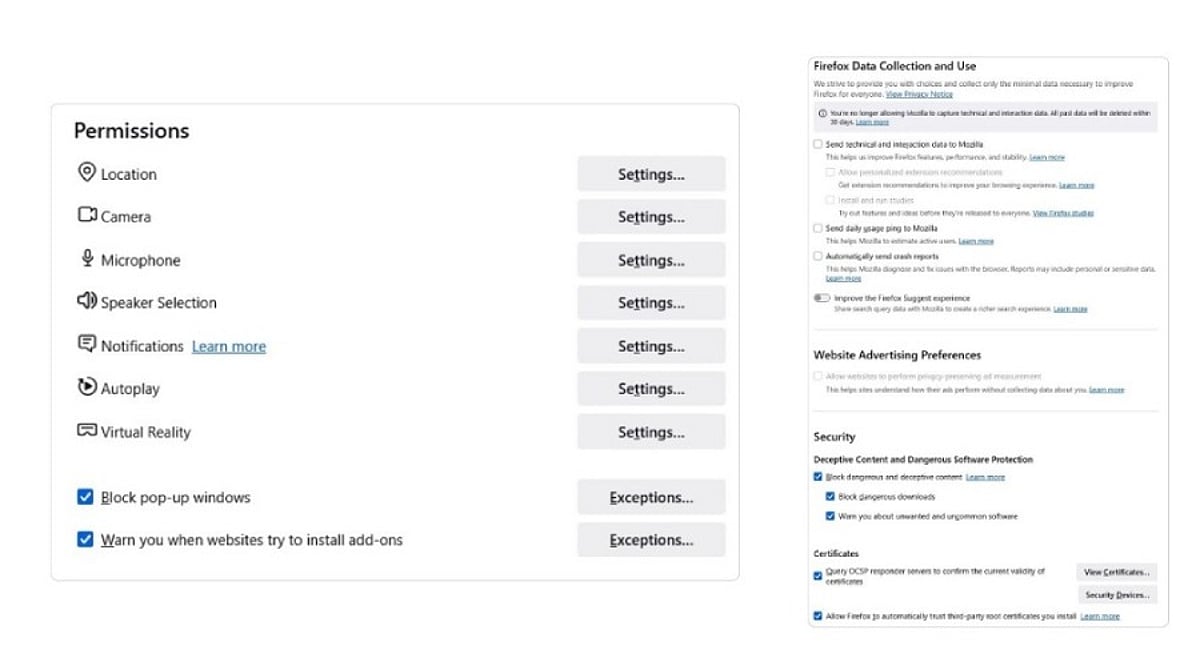
    Essential Browser Permissions to Check

    These settings are managed directly in your browser and form the foundation of your AI privacy.

    Extension Host Permissions

    Extensions that request “all sites” access can read and modify every page you visit. This permission is fixed at installation, so review your extensions regularly and remove any you don’t use.

    Camera, Microphone, and Screen Sharing

    Multimodal AI features may request access to these per site. Set the default to “Ask” to ensure access is granted only for a single session, not indefinitely.

    Clipboard Access

    Some AI features can read your clipboard. If you copy passwords or sensitive codes while an assistant is active, that data could be exposed. Disable clipboard access for AI tools unless absolutely necessary.

    File Uploads and File System Access

    Many AI features can read files you drag in or maintain folder-level access. Check which sites have standing file permissions and revoke any that are unfamiliar.

    AI Service Privacy Settings

    These settings live in the AI vendor’s own configuration, not in your browser.

    Page Content and Tab Access

    Each browser has its own name for this: Edge calls it “Context Clues,” Chrome has it under “AI Innovations.” Disable these to stop the AI from pulling data from your current page or browsing history.

    Model Training Opt-Outs

    Some AI services use your prompts and uploads to improve their models. Brave’s Leo routes queries through a proxy to strip identifying details, while Chrome and Edge offer explicit opt-outs. Check your settings and disable training if you prefer not to participate.

    Agentic Browsing and Autofill Permissions

    Newer AI services can fill forms, sign into sites, and perform multi-step tasks. For example, Chrome’s Gemini can be given permission to sign in via Google Password Manager. Review the list of approved sites and revoke any you don’t recognize.

    Security Habits for Everyday Browsing

    Beyond settings, your habits play a crucial role in limiting data exposure.

    Use Separate Profiles

    Keep work and personal browsing separate. This prevents a personal AI feature from accidentally accessing enterprise files or client data.

    Handle Sensitive Queries in Private Windows

    For legal, financial, or strategic questions, use a private window. This limits local traces, though it doesn’t stop the AI service from processing the data after you submit it.

    Recheck After Major Updates

    Browser AI features often arrive silently with updates. A quarterly review of your AI settings will help you catch new defaults before they become a habit.

    How Permissions Differ Across Browsers

    As of mid-2026, Chrome and Edge offer page-level controls, while Safari manages AI permissions at the app level. This means Safari cannot restrict Apple Intelligence to specific sites, whereas Chrome and Edge can. Brave’s Leo uses a proxy for privacy, and its conversations are not stored.

    Key Takeaways

    Every browser ships with defaults optimized for a smooth first run, not for minimal AI exposure. The key is to understand which mechanism controls each permission: a manifest grant, a settings toggle, or an account-level index. Learning this pattern once will help you evaluate any future AI feature quickly and confidently.

    Final Thought

    Browser AI is still evolving, and settings will continue to change. But the underlying structure—browser permissions, service settings, and user habits—remains constant. By mastering this pattern, you’ll be able to navigate any new AI feature with confidence, without waiting for a headline to tell you what changed.

    Frequently Asked Questions

    Why should I review AI browser permissions?

    AI-powered browsers and extensions may access your tabs, clipboard, camera, or browsing data to deliver features. Reviewing permissions helps you limit unnecessary data exposure and maintain control over your privacy.

    Which permissions are most important?

    Start with extension host permissions, camera/microphone, clipboard, file uploads, and screen sharing. Also check whether AI features can access your browsing history or use your interactions for training.

    How often should I review them?

    Review whenever you install a new AI extension, enable a new feature, or after a major browser update. A quarterly audit is a good practice.

    Are third-party extensions safer than built-in assistants?

    Not necessarily. Both can request broad access. Always review the permissions they require and disable features you don’t use.

    Does Incognito mode protect my data?

    Incognito reduces local traces, but it does not prevent AI providers from processing your prompts or files. For sensitive information, combine private browsing with carefully reviewed AI settings.