Tag: Security

  • Zano Blockchain Restarts After Gateway Address Exploit, Begins Recovery and Reimbursement Process

    Zano Blockchain Restarts After Gateway Address Exploit, Begins Recovery and Reimbursement Process

    Privacy-focused blockchain Zano has successfully restarted its network from block 3,833,000 after a vulnerability in its Gateway Address feature allowed unauthorized ZANO and Freedom Dollar (fUSD) assets to enter circulation. The rollback removes nearly a month of blockchain history, including both the exploit-related activity and legitimate transactions recorded during that period.

    The restart brings the chain back to the point just before Hard Fork 6, which introduced Gateway Addresses on August 26. Zano’s investigation confirmed that wallet spending keys and ordinary transaction privacy were not compromised. The project’s core consensus mechanism also remained unaffected.

    Gateway Address Vulnerability Triggered the Crisis

    Gateway Addresses were designed to simplify integration for exchanges, bridges, and other services by offering an account-style balance while preserving Zano’s privacy features. However, a flaw in the asset issuance process through these addresses enabled unauthorized ZANO and fUSD to enter circulation, prompting the emergency recovery.

    Zano has not yet published a full technical post-mortem but has stated that a detailed explanation of the vulnerability, along with findings from a review of the Gateway Address code, will follow.

    Exchanges and Network Operators Must Update

    The recovery is not a simple software update controlled solely by Zano’s developers. Nodes, miners, stakers, pools, exchanges, and other services must install the emergency release and migrate to the recovered chain. Zano has advised users to verify that third-party wallets, exchanges, and payment services have completed the migration before sending funds. Since transactions confirmed during the affected period are not included on the restarted chain, users should retain transaction IDs and trading records and verify previous transfers before resending payments.

    Reimbursement Process Still Being Prepared

    The rollback has created challenges for users and businesses whose legitimate transactions occurred during the affected month. Zano is working with affected projects and counterparties to assess losses and plans to publish a formal reimbursement and claims process. The team emphasized that the recovery will remove unauthorized activity without creating additional ZANO tokens. Zano has also begun restoring its own services individually as network participants migrate.

    The project stated that Gateway Addresses will remain under review before being reactivated. Technical findings and conditions for safely restoring the feature are expected to provide more detail on the next stage of recovery.

  • OKX Founder Challenges THORChain’s Decentralization Claims After Bitget’s $387.5M Breach

    OKX Founder Challenges THORChain’s Decentralization Claims After Bitget’s $387.5M Breach

    OKX founder Star Xu has publicly questioned THORChain’s claim to true decentralization after funds linked to the Bitget security breach reportedly moved through the cross-chain network. The exchange now estimates the attacker made off with approximately $387.5 million and is asking industry partners to help block the stolen assets.

    Bitget Raises Loss Estimate to $387.5 Million

    On September 24, Bitget detected unauthorized transfers from certain hot wallets at 18:31 UTC. The exchange initially placed the damage at $351.6 million and paused withdrawals, while noting that cold wallets remained secure and its protection fund held more than $464 million.

    After further tracing, Bitget revised the amount sent to attacker-controlled addresses to $387.5 million. The update included Zcash and Tron transfers that were omitted from the initial figure; it did not reflect new transfers after the breach was contained. Mandiant and SlowMist are assisting with the investigation.

    Withdrawal restoration is scheduled in stages: Bitcoin on September 28, Ethereum on September 29, USDT on September 30, and other tokens, fiat withdrawals, and peer-to-peer services on October 2. Bitget stressed these dates are a restoration schedule, not confirmation that withdrawals have resumed.

    Star Xu Questions THORChain’s Validator Model

    Bitget CEO Gracy Chen asked THORChain to refuse transactions from addresses linked to the attacker. That request highlighted the network’s role in moving assets between blockchains and raised questions about whether its operators can act on publicly flagged wallets.

    In response, Xu argued THORChain should not be compared with Bitcoin or Ethereum. He said validators jointly control assets in vaults through a threshold-signing system. “I don’t think THORChain’s TSS + validator model represents true decentralization,” he wrote. “The selected validators set collectively controls the underlying assets in the TSS vaults. Once the signing threshold is reached, those validators can move the funds.”

    Under that model, a required group of validators can authorize transfers. Xu said this makes THORChain an intermediary, even though no single validator controls a vault.

    THORChain’s official account rejected that characterization, describing the network as decentralized and permissionless. It also questioned whether base-layer blockchains should face similar demands when stolen assets pass through them.

    Stablecoin Freezes and Recovery Efforts

    Circle and Tether froze roughly $318,000 in USDC and USDT at a wallet linked to the Bitget attack. The wallet held about 99,990 USDC and 218,023 USDT when the issuers blocked the tokens. Those issuer controls can stop stablecoin movement, but they do not give Circle or Tether control over Ethereum held at the same address.

    Bitget has also launched a recovery bounty program, offering eligible parties 5% of affected funds they help freeze or recover. The exchange published attacker addresses and a live tracing dashboard for firms monitoring the transfers.

    The confirmed freeze represents only a small portion of the $387.5 million estimate. Further recovery depends on where the assets move and whether the services handling them can restrict transfers. Bitget’s September 28 update is expected to provide more details on the investigation and withdrawal restoration.

  • Firewall Fundamentals: How They Work and Why They Matter in Cybersecurity

    A firewall is a fundamental component of network security. It controls traffic moving between networks or devices, restricting unwanted connections and reducing exposure. Security teams rely on firewalls to enforce security policies and protect sensitive systems. Modern networks are more complex than ever, with cloud services, remote workers, mobile devices, and connected systems creating multiple entry points. Firewalls now protect different network segments and workloads while working alongside other security controls. Understanding how a firewall works reveals why proper configuration is as important as the technology itself.

    What Is a Firewall?

    A firewall is a device or software that controls network traffic. It sits between networks with different security requirements—for example, separating an internal network from the internet. The firewall checks traffic against defined security rules and can allow, block, or modify traffic based on those rules. Firewalls can protect entire networks (network firewalls) or individual devices (host-based firewalls), making them a central control point for network access.

    How Does a Firewall Work?

    A firewall examines incoming and outgoing network traffic, comparing it with its configured policy. The policy determines which connections can proceed. Rules can consider addresses, ports, protocols, and other traffic details. More advanced systems can inspect application-level information. For example, an organization may block unnecessary inbound connections while also restricting specific outbound traffic from internal systems. Firewalls can operate in both directions, controlling traffic entering and leaving a network. The goal is controlled connectivity rather than unrestricted access.

    Main Types of Firewalls

    Firewalls come in several forms, each with different capabilities and deployment models:

    • Packet-filtering firewalls examine network traffic using defined packet information, applying rules based on addresses, protocols, and ports.
    • Stateful firewalls track active connections, allowing decisions based on connection state.
    • Proxy firewalls act as intermediaries between users and external services, providing additional inspection and control.
    • Host-based firewalls run directly on individual devices, restricting connections to and from that specific system.

    Modern security environments often combine several firewall technologies. The National Institute of Standards and Technology (NIST) identifies network, host-based, personal, and proxy-related firewall approaches.

    Why Firewalls Matter in Cybersecurity

    A firewall reduces a network’s exposure to unwanted traffic and restricts access to sensitive systems and services. Organizations typically use firewalls between networks with different security requirements—sensitive internal systems may need stricter controls than general office networks. Firewalls also support network segmentation, limiting unnecessary communication between different environments. Logging is another critical capability: centralized firewall logs help security teams review network activity, support investigations, and enable security monitoring. However, a firewall is only one layer of security. It cannot replace endpoint protection, identity controls, monitoring, or secure configurations.

    Firewalls in Modern Network Environments

    Traditional perimeter security is no longer sufficient for many organizations. Employees work remotely, and applications run across cloud environments. Firewalls now appear at multiple points within an architecture—protecting internet gateways, internal segments, servers, and cloud workloads. NIST notes that firewalls can also restrict connectivity between internal networks, which is important when systems process sensitive information. Cloud environments can use virtual or software-based firewall controls to apply policies closer to individual workloads. The exact design depends on the organization’s architecture and risk profile.

    Firewall Limitations and Best Practices

    A firewall cannot stop every cyberattack. Threats may bypass network controls through compromised accounts or trusted connections. Poorly configured rules can create security gaps; excessive permissions may expose services unnecessarily. Security teams should review firewall rules regularly, remove unused rules and services, and enable and monitor logging. Firewalls work best as part of a layered security strategy, alongside access controls, endpoint security, encryption, monitoring, and incident response. The key takeaway: a firewall controls network access, but it does not secure an entire environment on its own.

    Frequently Asked Questions About Firewalls

    What is a firewall in cybersecurity?

    A firewall is hardware, software, or a combination of both that controls network traffic according to defined security policies. It can allow or block connections based on addresses, ports, protocols, and other traffic characteristics.

    How does a firewall work?

    A firewall examines network traffic and compares it with configured rules. The rules determine which connections should be permitted or blocked. Depending on its capabilities, a firewall can inspect different traffic characteristics and apply controls to incoming or outgoing connections.

    What are the main types of firewalls?

    Common firewall types include packet-filtering, stateful, proxy, and host-based firewalls. Each uses different methods for examining or controlling traffic. Organizations often combine firewall technologies across different parts of their network architecture.

    Can a firewall prevent cyberattacks?

    A firewall can reduce exposure to unwanted network traffic, but it cannot prevent every cyberattack. Compromised credentials, malicious insiders, trusted connections, and other attack methods can bypass network controls. Firewalls should therefore form part of a broader security strategy.

    Why are firewall logs important?

    Firewall logs record information about network activity and security decisions. Security teams can review these records to identify unusual traffic patterns or investigate incidents. Centralized logging supports monitoring and security analysis across larger environments.

  • How IoT and Augmented Reality Will Revolutionize Smart Home Living

    How IoT and Augmented Reality Will Revolutionize Smart Home Living

    The next evolution of smart homes is being shaped by two powerful technologies: the Internet of Things (IoT) and Augmented Reality (AR). Together, they promise to make home environments more connected, intuitive, and responsive than ever before.

    IoT as the Backbone of Connectivity

    IoT acts as the nervous system of a smart home, linking devices such as lights, appliances, cameras, locks, and sensors. This network enables seamless data sharing and automated responses—for example, a motion sensor can trigger lights to turn on, or a smart thermostat can adjust temperature based on occupancy.

    AR Brings Controls into Physical Spaces

    Augmented Reality overlays virtual controls onto real-world rooms. Homeowners could adjust lighting, temperature, music, and appliances by interacting with visual interfaces that appear naturally within their field of view. This reduces the need for physical switches or separate apps.

    Smarter Automation Through Context Awareness

    Connected sensors learn daily routines and automate tasks without manual input. Lights can dim in the evening, heating can lower when no one is home, and devices can power down during periods of inactivity. This level of intelligence saves energy and increases convenience.

    AR Simplifies Device Setup

    Setting up smart home devices can be intimidating. AR can guide users step by step, superimposing virtual instructions directly onto the physical device. Connection points, configuration steps, and troubleshooting tips appear in real time, making installation accessible to everyone.

    Energy Management Becomes Visual

    IoT sensors monitor energy consumption throughout the home. AR interfaces can then display this data in easy-to-understand visuals, highlight energy-hungry appliances, and suggest improvements. Homeowners can see exactly where savings are possible.

    Interactive Security Monitoring

    Smart cameras and sensors already detect unusual activity. With AR, security alerts can be displayed within the user’s viewing area—for instance, a bright outline of a detected person or a notification overlaid on a smart lock. This makes security more immediate and actionable.

    Personalized Living Spaces Adapt to You

    The combination of IoT and AR can create rooms that automatically adjust lighting, temperature, entertainment, and decor based on individual preferences. Walk into a room and it knows whether you want a bright work space or a cozy movie setting.

    AI Ties Everything Together

    Artificial Intelligence analyzes data from IoT sensors and AR interactions, enabling the smart home to make faster, smarter decisions. AI identifies patterns, predicts needs, and optimizes device behavior without requiring user input.

    The fusion of IoT, AR, and AI is turning smart homes into truly immersive environments where technology feels natural, responsive, and integrated into everyday life. As these technologies mature, the home of the future will be not just connected, but intuitive.

  • 7 Essential Controls to Protect Crypto Assets from Insider Theft

    7 Essential Controls to Protect Crypto Assets from Insider Theft

    Institutions holding crypto assets face significant risks from insider theft. To mitigate these threats, they implement a range of controls designed to prevent unauthorized access and movement of funds. Below are seven key measures that help safeguard digital assets.

    Multi-Party Approval

    Requiring multiple approvals for sensitive transactions reduces the risk of a single employee moving funds alone. This creates a clear audit trail and makes unauthorized transfers harder to execute.

    Strict Access Controls

    Access to crypto wallets, private keys, and trading systems is limited based on employee roles. Strong authentication, separate accounts, and regular access reviews further minimize the risk of credential theft or misuse.

    Cold Storage

    Storing the majority of crypto assets offline in cold storage reduces exposure to online attacks and internal threats. Only funds needed for daily operations are kept online, with additional checks required for any transfers between storage systems.

    Private Key Management

    Private keys are protected using dedicated management systems, secure storage, and strict recovery procedures. Splitting key control among multiple authorized parties prevents any single employee from gaining enough control to move assets independently.

    Transaction Monitoring

    Continuous monitoring helps detect unusual wallet activity, large transfers, or transactions outside normal patterns. Security teams set alerts for risky actions and maintain detailed logs for investigation.

    Regular Security Audits

    Independent audits assess wallet controls, permissions, key storage, and procedures to identify weaknesses. Regular reviews ensure safeguards remain effective as roles, systems, and threats evolve.

    Separation of Duties

    Dividing responsibilities across custody, approval, security review, and reconciliation prevents any single employee from controlling an entire transaction. This creates multiple checkpoints and improves accountability.

  • Gmail’s ‘Copy Code’ Button Eliminates a Step in Two-Factor Authentication

    Gmail’s ‘Copy Code’ Button Eliminates a Step in Two-Factor Authentication

    Gmail is rolling out a new ‘Copy code’ option for two-factor authentication (2FA) emails. This feature allows users to copy verification codes directly from the inbox without opening the email. Instead of manually selecting numbers, users can tap a button below the subject line to copy the code to their clipboard.

    The change is designed for people who regularly use email-based 2FA when signing into banking, shopping, work, social media, and other online accounts. While it does not alter the security of two-factor authentication, it significantly improves convenience by reducing the number of steps required.

    How Gmail’s 2FA Code Copy Feature Works

    When a user attempts to log into a third-party application using a Gmail ID with 2FA enabled, Google detects the verification email. It then displays a ‘Copy code’ button below the subject line. Users do not need to open the message to find the number. They can tap the button and copy the code to their phone’s clipboard, then paste it into the sign-in page.

    Currently, this feature is available on Android and iOS devices; the web version of Gmail will not receive it during this rollout phase. The whole process takes only a few seconds, saving time compared to the previous method of opening the email, searching for the code, selecting it, copying it, and switching back to the other app.

    What Gmail’s New Feature Means for Users

    The biggest benefit is convenience. For users who perform 2FA tasks multiple times a day, the single extra tap can reduce frustration. This change also demonstrates how email apps are becoming more action-oriented, adding quick actions based on email content. A verification email is a perfect example: most people only need the code, so giving them a direct copy option makes sense.

    The feature may also reduce small mistakes, such as copying an extra space or missing a digit when manually selecting a code. However, security remains important. Users should never share verification codes with anyone, even with the new shortcut. Scammers can still trick users into giving away codes. The feature does not replace stronger login methods like passkeys or security keys, which Google recommends for better phishing protection.

    A Small Change That Makes 2FA Easier

    Gmail’s ‘Copy code’ option is not a major security change; its value comes from streamlining a familiar, repetitive task. Users no longer need to open every 2FA email just to find a number. A single tap copies the code and gets them back to the sign-in screen. This fits into a larger trend of making account protection easier while reducing friction. Until passkeys become more widespread, verification codes remain common, and this shortcut can make them a little less annoying.

    Frequently Asked Questions

    1. What is Gmail’s new 2FA Code Copy feature?

    It is a new Gmail option that lets users copy a verification code directly from the inbox without opening the email.

    2. How does Gmail’s Copy code button work?

    Gmail shows a ‘Copy code’ button below eligible verification emails. Users tap it to copy the code and paste it into the required sign-in field.

    3. Is Gmail’s Copy code feature available on iPhone?

    Yes, it is rolling out on both Android and iPhone, depending on the Gmail app version and account.

    4. Does the feature make 2FA more secure?

    It mainly makes 2FA easier to use. It does not change how verification codes protect an account. Google recommends passkeys and security keys for stronger protection.

    5. Should users share their Gmail verification codes?

    No. Users should never share verification codes with other people, as a scammer could use them to bypass account security.

  • Accenture and AWS Unveil AI and Cloud Solutions for Mid-Market Businesses

    Accenture and AWS Unveil AI and Cloud Solutions for Mid-Market Businesses

    Accenture has partnered with Amazon Web Services (AWS) to introduce a suite of AI and cloud tools specifically designed for mid-sized companies. The offerings, available through AWS Marketplace, cover cloud migration, security, data management, customer service, and AI testing.

    Key solutions include tools for moving virtual machines to AWS, optimizing cloud spending, securing cloud environments, and testing AI systems for potential risks. The collaboration is part of Accenture Edge, a business unit focused on organizations with annual revenues between USD 300 million and USD 3 billion. Accenture Edge aims to deliver tailored technology solutions for mid-market needs.

    Customer service technologies, such as conversational AI and virtual agents, are also included. Additional tools help companies identify data sources and dependencies during cloud migrations.

    Accenture highlighted its work with 407 ETR, an electronic toll highway operator in Toronto. The company used Accenture’s NeuraFlash unit and AWS to build a new customer service system without disrupting existing operations—demonstrating how the collaboration can modernize customer-facing technology smoothly.

    Accenture shares rose 1.6% before the opening bell on Tuesday, extending Monday’s gains. This move follows Anthropic’s partnership with Accenture to test the safety of advanced AI models.

  • Apple’s iOS 27 Introduces Impersonation Risk Detection to Combat iPhone Scams

    Apple’s iOS 27 Introduces Impersonation Risk Detection to Combat iPhone Scams

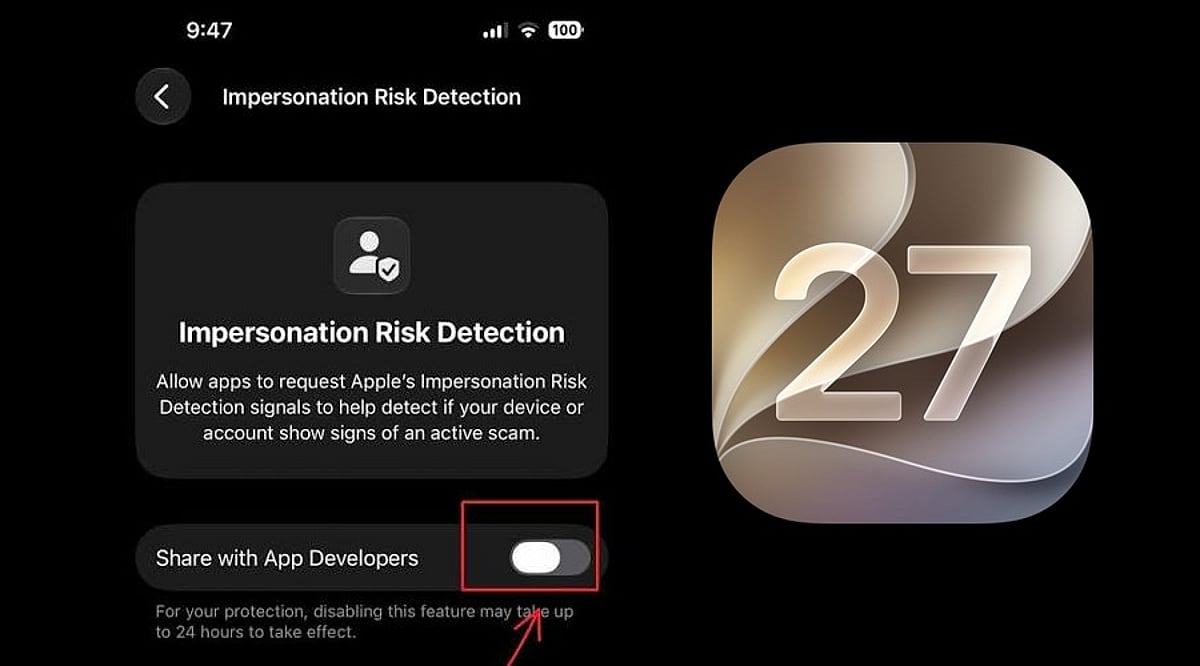
    Apple has unveiled a new security feature in iOS 27 designed to shield iPhone users from impersonation-based scams. Dubbed Impersonation Risk Detection, the tool identifies signs that a user may be caught in an active social engineering attack, particularly when they are about to make a payment or modify sensitive account information.

    Scams involving fake banks, government agencies, delivery services, and even impersonation of known contacts have become increasingly prevalent. Apple says the feature is engineered to detect suspicious activity and alert users before they complete potentially harmful actions.

    How Apple’s Impersonation Risk Detection Works

    According to Apple, the feature protects users from active social engineering scams where an attacker impersonates a trusted entity—such as a bank, government agency, or a familiar person—and pressures the victim into making a payment or altering account details.

    Impersonation Risk Detection analyzes information about the iPhone or iPad and the user’s Apple Account to identify signs of suspicious activity. When a supported app requests an assessment during a potentially risky action, the system generates a risk level that the app can use to determine subsequent steps.

    There are three risk levels: Unknown, Medium, and High. Unknown means no evidence of suspicious activity was detected, though Apple notes this does not confirm an action is safe. Medium indicates some signs of suspicious activity, while High means significant signs were detected.

    Importantly, the app does not receive the underlying information used to generate the assessment. It only receives the resulting risk level and can decide how to respond.

    How to Enable the Feature

    Users can turn on Impersonation Risk Detection by opening Settings, tapping Privacy & Security, scrolling down, and selecting Impersonation Risk Detection. They then need to toggle on Share with App Developers. Users may also need to sign in to the App Store with their Apple Account.

    The feature can be controlled on an app-by-app basis. However, Apple warns that it depends on supported apps and that its risk assessment does not guarantee an action is safe. The company emphasizes that this feature is not designed to replace other security measures or user caution.

  • Master Android App Permissions: What to Allow and What to Deny for Better Privacy

    Master Android App Permissions: What to Allow and What to Deny for Better Privacy

    Every time you install a new app on your Android phone, it asks for permission to access your camera, contacts, location, microphone, or other sensitive data. Most people tap ‘Allow’ without thinking, but that small habit can quietly expose your personal life. Android permissions exist to give you control, and learning how to use them wisely makes a real difference to your daily privacy and security.

    This guide explains what each permission does, which ones are safe to grant, which deserve caution, and how to manage them on any Android device.

    Why Permissions Matter

    Smartphones today hold more personal information than most people realize: photos, messages, banking apps, health data, and location history. Every permission an app receives opens a small door into that information. A weather app asking for location makes sense; a flashlight app asking for contacts does not.

    Google explains that an app sends a notification asking for permission before it can use a feature such as the camera or contacts list, and you get to allow or deny each request. This system puts control back in your hands instead of leaving it entirely to the app developer. Understanding this mechanism helps you make smarter choices instead of clicking through prompts out of habit.

    Types of Permissions on Android

    Android sorts permissions into two main categories that matter most for everyday users:

    • Normal permissions: Cover simple actions such as connecting to the internet or using Bluetooth. The system grants these automatically without asking.
    • Dangerous permissions: Touch personal data directly, so the phone always asks for confirmation first. These include access to the camera, microphone, contacts, location, SMS, calendar, phone log, and storage.

    Once you grant one permission inside a group, the app often receives every related permission in that group without a fresh prompt. This detail matters — a single ‘Allow’ tap can open more access than you expect.

    Permissions That Are Usually Safe to Allow

    Some permissions carry low risk and support the core purpose of an app:

    • Location: For navigation apps
    • Camera and microphone: For video calling apps
    • Contacts: For messaging apps to help find friends
    • Notification access: For apps that need to send alerts
    • Storage access: For photo editors
    • Calendar access: For scheduling tools

    In these cases, the permission matches the job the app is meant to do, so granting it rarely causes harm — as long as the app comes from a trusted developer and a genuine app store listing.

    Permissions That Deserve a Careful Look

    Trouble usually starts when a permission request does not match the app’s purpose. A simple game asking for microphone access, a flashlight app requesting contacts, or a photo editor wanting to read SMS messages should raise immediate questions. These mismatches often point toward data harvesting or, in worse cases, malware designed to read passwords sent through text messages.

    The table below sums up common permissions and how to treat them:

    Permission Safe to Allow? When to Be Cautious
    Location Yes for navigation, maps, weather If a game, calculator, or wallpaper app requests it
    Camera Yes for photo/video apps, video calls If a music player or document reader requests it
    Microphone Yes for voice recorders, calling apps If a simple game or flashlight app requests it
    Contacts Yes for messaging, social media If a game or utility app requests it
    SMS Only for messaging apps that send texts If any app that does not handle SMS requests it
    Calendar Yes for scheduling, productivity apps If a game or entertainment app requests it
    Storage Yes for file managers, photo editors If a simple game or wallpaper app requests it

    The Cybersecurity and Infrastructure Security Agency advises users to review app permissions regularly and remove access that is not supported. Old permissions often sit unused and forgotten on a phone for years.

    How to Check and Change Permissions

    Android gives you a straightforward path to review and adjust these settings whenever you choose. The steps stay almost the same across most modern Android phones:

    1. Open Settings and tap Apps.
    2. Select the app in question, then tap Permissions.
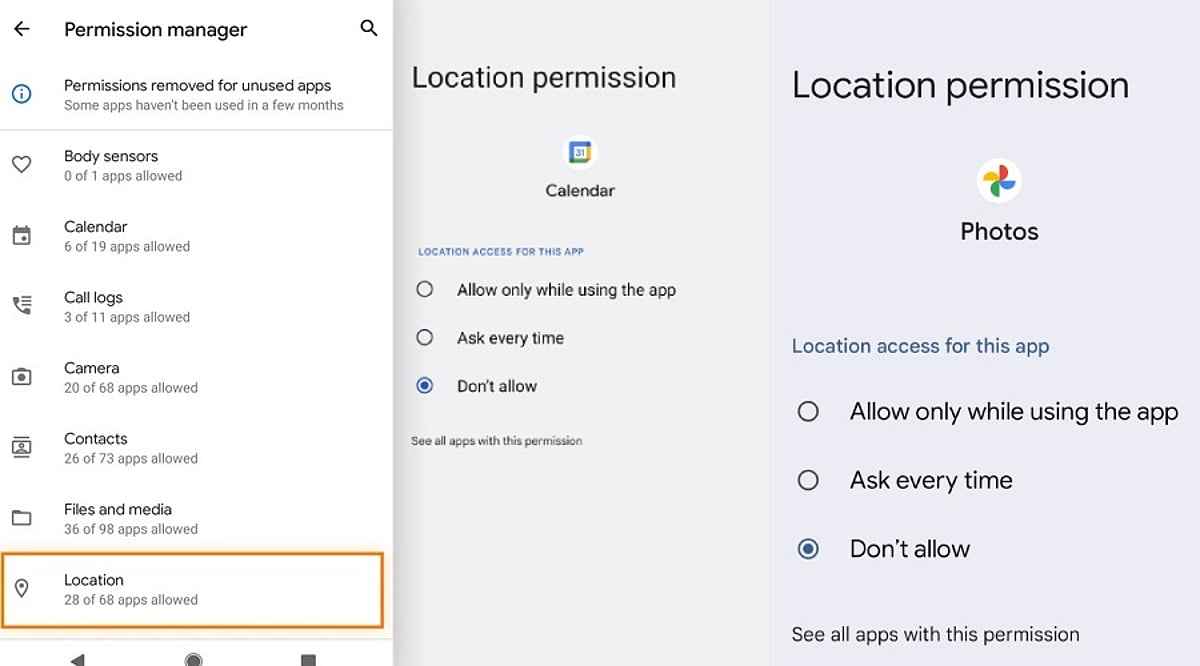
    3. Choose Allow, Allow only while using the app, Ask every time, or Don’t allow, depending on what options the permission offers.
    4. Visit Settings > Security & Privacy > Permission Manager to see every app that holds a specific permission, such as location or camera.
    5. Turn on Pause app activity if unused for apps that sit idle for long stretches, so their permissions get removed automatically.

    This last feature works quietly in the background and trims away access from apps you may have forgotten about, closing gaps before they turn into a problem.

    Signs an App Is Asking for Too Much

    A few warning signs can help you spot a risky request before tapping Allow:

    • A brand-new app with very few reviews asking for administrator-level access
    • An app that repeatedly shows the same permission pop-up after you have denied it (a known trick used by malicious software)
    • A basic mismatch: compare what the app does against what it asks for

    Reading reviews, checking the developer name, and searching the app name alongside the word ‘permissions’ often reveals whether other users have flagged similar concerns.

    Final Thoughts

    Android permissions work as a simple gate between your personal data and outside access. Every tap on Allow or Deny decides how much of that gate stays open. A little patience during setup, a quick permission audit every few months, and a habit of questioning mismatched requests go a long way toward protecting your personal information. Technology moves fast, and apps will keep asking for more access as new features arrive. Staying alert, reading each prompt carefully, and denying anything that does not fit an app’s purpose keeps your phone safer without demanding much extra effort.

    FAQ

    Which Android app permissions should you normally allow?

    Allow permissions that directly support an app’s main function, such as location for navigation, camera and microphone for video calls, or contacts for messaging. Review each request individually rather than granting access automatically during installation.

    Which Android permissions should users be most careful about?

    Location, contacts, SMS, microphone, camera, and accessibility access deserve closer attention since they can expose sensitive information or device capabilities. Check whether the requested permission is genuinely necessary for the application’s stated purpose.

    How can you check app permissions on Android?

    Open Settings, select Apps, choose the relevant application and tap Permissions. Modern Android devices also provide Permission Manager under Security & Privacy, allowing you to review which applications can access specific categories.

    Can Android automatically remove permissions from unused apps?

    Yes. Android includes an option that can pause activity for unused applications and remove permissions they previously received. This feature is useful for limiting forgotten access from apps that have not been opened for extended periods.

    What should you do when an app repeatedly requests denied permissions?

    If an app keeps requesting access after you have denied it, first consider whether that permission is essential. Check the developer, reviews, and app purpose, then keep the permission denied if the request appears unnecessary or suspicious.

  • AI-Driven Surveillance: How Artificial Intelligence Is Reshaping Crypto Security and Monitoring

    AI-Driven Surveillance: How Artificial Intelligence Is Reshaping Crypto Security and Monitoring

    Blockchain networks are transparent by design, but artificial intelligence (AI) is turning that transparency into a powerful surveillance tool. Instead of manually tracing wallet addresses, AI systems can now analyze millions of transactions, identify behavioral patterns, and flag suspicious activity in near real time. This is creating a new layer of oversight across the global cryptocurrency economy.

    Automated Blockchain Monitoring

    Every public blockchain transaction generates data: wallet addresses, values, timestamps, token movements, and smart contract interactions. Analytics firms combine this information with known exchange wallets, sanctioned addresses, hack incident records, and criminal clusters. Machine learning models then search for patterns that would be difficult for human analysts to detect manually.

    The scale of blockchain security incidents remains substantial. CertiK reported more than $1.31 billion in losses across 344 incidents during the first half of 2026. Wallet compromises caused approximately $444.5 million in losses, while phishing accounted for another $366.3 million. Automated monitoring is becoming essential to keep pace with such threats.

    Detecting Hidden Wallet Relationships

    Criminals rarely leave stolen funds in one address. They might split assets across hundreds of wallets, swap tokens, use bridges, and eventually move funds toward exchanges or other liquidity venues. AI can analyze transaction timing, recurring counterparties, and asset flow patterns to infer whether seemingly separate addresses belong to the same operation.

    This capability proved crucial after the Liquid Network exploit in September, when approximately 4,000 BTC (worth around $320 million) were initially withdrawn. Chainalysis tracked the incident as funds moved through the Bitcoin ecosystem, and about 85% of the funds were ultimately returned. Real-time monitoring can help exchanges identify suspicious deposits before criminals complete the laundering process.

    AI in Security Auditing

    Surveillance increasingly begins before money is stolen. CertiK launched an AI Auditor system in 2026 designed for protocol upgrade reviews, pre-deployment testing, and post-audit verification. In testing against 35 real-world Web3 security incidents from 2026, it reported an 88.6% cumulative exact hit rate. AI agents can scan smart contracts for unusual state changes or vulnerabilities and combine that with live blockchain behavior.

    The Privacy Trade-Off

    Greater monitoring creates tension between security and financial privacy. Blockchains originally attracted users partly because they could transact without exposing identities to every intermediary. However, once analytics companies combine wallet histories with exchange Know Your Customer data, pseudonymous addresses can sometimes be linked to real people. AI makes this process faster and more scalable.

    Final Thoughts

    Crypto surveillance is evolving from retrospective investigation into continuous risk detection. That could help exchanges freeze stolen assets, identify sanctions exposure, and stop attacks earlier. But it also means public blockchain activity may become increasingly traceable.

    The next debate will focus on balance: how far automated financial surveillance should go before security gains begin undermining the privacy that originally attracted many users to crypto.

    Frequently Asked Questions

    How is AI used in crypto surveillance?

    AI systems analyze blockchain transactions, wallet behavior, and fund movements to identify suspicious patterns. They can connect seemingly unrelated addresses based on timing, counterparties, and transaction flows.

    Can AI help detect crypto hacks faster?

    Yes. Real-time monitoring can flag unusual withdrawals, transfers, or smart contract activity shortly after an exploit begins, enabling faster responses.

    How is AI applied to smart contract security?

    AI auditing systems scan protocol code, upgrades, and transaction logic for vulnerabilities. CertiK’s AI Auditor reported an 88.6% cumulative exact hit rate across 35 real-world 2026 security incidents.

    Why does AI surveillance raise privacy concerns?

    Public blockchain addresses are pseudonymous, not fully anonymous. Combining wallet histories with Know Your Customer data and AI analysis can make it easier to link blockchain activity to real individuals.

    What is the future of AI-powered blockchain monitoring?

    Crypto security is moving toward continuous monitoring rather than relying only on post-incident investigations. The challenge lies in improving fraud detection without excessive surveillance or weakened user privacy.

    Disclaimer: This article is for informational purposes only and does not constitute investment advice. Cryptocurrencies are risky assets, and you should conduct your own research before making any investment decisions.