Tag: Security

  • The Essential 2026 Crypto App Guide: What to Know Before You Download

    The Essential 2026 Crypto App Guide: What to Know Before You Download

    Choosing the right crypto app can make or break your investment experience. Before you download any app in 2026, take a moment to understand what each platform offers and the common pitfalls to avoid. This guide breaks down the top crypto exchanges and key security practices every investor should follow.

    Top Crypto Apps for 2026

    Coinbase – Ideal for beginners with a simple interface, strong security, and support for hundreds of cryptocurrencies.

    Binance – Perfect for experienced traders offering advanced tools, low fees, and an extensive selection of coins.

    Kraken – One of the most secure crypto exchanges, combining advanced trading features with regulatory compliance.

    Crypto.com – An all-in-one ecosystem for crypto trading, rewards, and Visa cards, designed for comprehensive digital asset management.

    Bybit – Popular among derivatives traders thanks to high liquidity and advanced charting tools.

    Gemini – A security-focused exchange known for regulatory compliance and institutional-grade protection.

    Key Features to Check

    Always compare security protocols, supported coins, transaction fees, customer support quality, and withdrawal options before committing to any app.

    Common Mistakes to Avoid

    Ignoring security settings, using weak passwords, and skipping two-factor authentication are the most frequent errors that lead to serious losses. Take the time to set up proper protections from day one.

    By following this guide, you can avoid costly mistakes and choose the crypto app that best fits your needs in 2026.

  • Top PHP Development Mistakes Businesses Must Avoid for Secure and Scalable Apps

    Top PHP Development Mistakes Businesses Must Avoid for Secure and Scalable Apps

    PHP continues to power millions of websites and business applications, including some of the world’s most popular content management systems and e-commerce platforms. Its flexibility, large developer community, and mature ecosystem make it a practical choice for startups, SMEs, and enterprises alike. However, the success of a PHP project depends less on the language itself and more on the development practices followed during implementation.

    Many businesses focus on launching applications quickly, only to face performance issues, security vulnerabilities, and expensive maintenance later. Understanding the most common PHP development mistakes can help organizations avoid unnecessary costs, improve application reliability, and ensure long-term scalability.

    Why Avoiding PHP Development Mistakes Matters

    An underdeveloped PHP program may result in various problems including security threats, reduced speed, downtime, and an unhappy user base. In addition to increased maintenance costs, these problems can have a bad effect on business reputation. Using up-to-date PHP development methodologies and adhering to coding standards will enable businesses to develop safe and scalable programs.

    Common PHP Development Mistakes

    1. Using Outdated PHP Versions

    Many companies continue to use old versions of PHP because the software is functional. However, unpatched software poses security risks and may contain exploitable flaws. Upgrading to the latest PHP version improves performance, security, and compatibility with modern frameworks like Laravel and Symfony.

    2. Ignoring Secure Coding Practices

    Security should never be an afterthought. Common mistakes include not validating user input or using outdated database functions. Businesses should use prepared statements, parameterized queries, input sanitization, and output escaping to protect against SQL injection and cross-site scripting (XSS) attacks.

    3. Neglecting Code Structure and Maintainability

    As applications grow, unstructured code becomes increasingly difficult to manage. Poor adherence to coding guidelines and lack of separation between business logic and presentation lead to longer development cycles and more bugs. Following MVC design patterns, using Composer, and adhering to PSR guidelines results in better code organization.

    4. Overlooking Performance Optimization

    Application efficiency directly impacts user satisfaction and search engine rankings. Slow page loading increases bounce rates and reduces conversions, especially for e-commerce sites. Developers should optimize database queries, implement caching (e.g., Redis or Memcached), avoid unnecessary API calls, and profile applications regularly.

    5. Skipping Testing and Quality Assurance

    Testing is often compromised to meet short deadlines, but this leads to higher costs later. Issues found in production can disrupt business operations and erode customer trust. A reliable PHP development process includes unit testing, integration testing, regression testing, and continuous integration.

    Choosing the Right PHP Development Approach

    Mistakes can be avoided by hiring experienced programmers who use modern development methods. Companies should focus not only on development cost but also on secure programming, frequent code reviews, documentation, version control, and ongoing maintenance. Whether building a customer portal, enterprise solution, or e-commerce website, investing in quality during development saves money in the long run.

    Final Thoughts

    PHP remains a solid platform for creating dynamic websites, but success depends on a professional development process. By avoiding outdated software, enhancing security, improving code quality, boosting performance, and applying automated testing, businesses can build reliable and scalable applications.

    For companies planning new PHP applications or upgrading existing ones, avoiding these common mistakes is essential for long-term success.

  • Step-by-Step Guide to Hiding Your Phone Number on Telegram

    Step-by-Step Guide to Hiding Your Phone Number on Telegram

    Telegram offers robust privacy settings that let you control who can see your phone number. Follow this straightforward guide to keep your number private and communicate securely.

    Open Telegram Settings

    Launch the Telegram app and tap the menu icon (three lines) or the Settings gear icon to access your account preferences.

    Navigate to Privacy and Security

    In Settings, select Privacy and Security. This section contains all controls for your personal information, including your phone number.

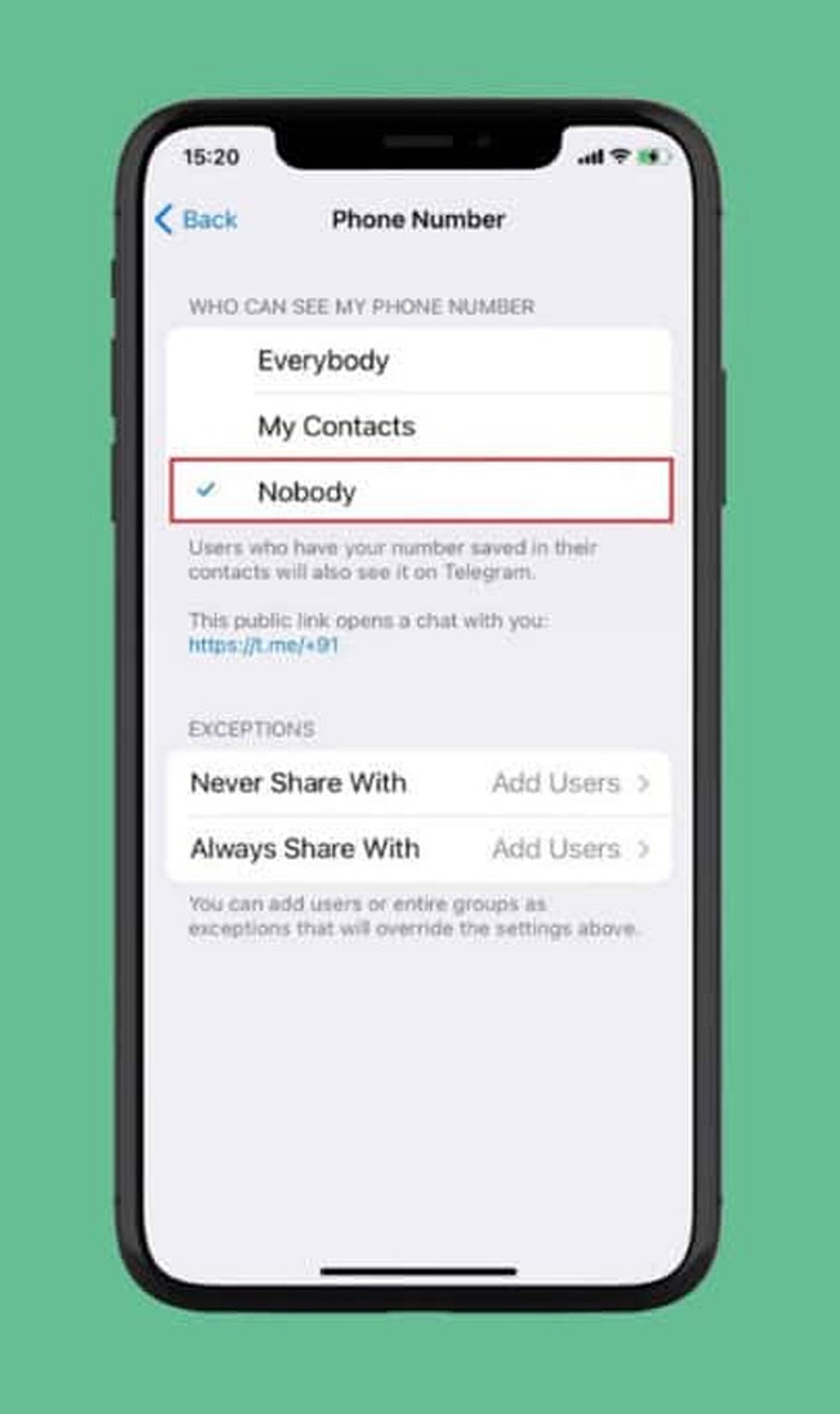
    Select Phone Number

    Under the Privacy section, tap Phone Number. Here you can manage who can view your registered mobile number and who can find you by it.

    Choose Visibility: Nobody

    Set Who can see my phone number to Nobody. This prevents most Telegram users from viewing your number.

    Restrict Number Discovery

    Under Who can find me by my number, select My Contacts. This limits discoverability to people already in your address book, reducing unwanted contact.

    Create a Telegram Username

    Set up a unique username (e.g., @YourName) so others can reach you without needing your phone number. Go to Settings > Username to create one.

    Review Contact-Based Visibility

    People who already have your number saved may still see your account via contact synchronization. Review your contact sync settings and consider deleting synced contacts for tighter control.

    Check Privacy Settings Regularly

    Telegram updates may introduce new privacy options or change existing ones. Periodically revisit your Privacy and Security settings to ensure your preferences remain intact.

    By following these steps, you can significantly enhance your privacy on Telegram and communicate with confidence.

  • A Practical Guide to Evaluating Messaging App Privacy Across Devices

    A Practical Guide to Evaluating Messaging App Privacy Across Devices

    Messaging applications now carry far more than casual conversations. People use them to exchange work documents, personal photographs, payment details, travel information, identity records, and private discussions. As these platforms become embedded in daily life, users are paying closer attention to how their data is handled across phones, tablets, and desktop computers.

    However, a privacy-focused reputation should not be accepted solely on the basis of marketing claims. Security depends on the complete user journey: where the application is downloaded, which permissions it requests, how login sessions are managed, where files are stored, and whether users regularly review account settings.

    A practical assessment therefore begins before installation and continues throughout everyday use. Instead of asking whether one messaging app is universally “safe,” users should examine the specific risks created by their devices, habits, account configuration, and shared content.

    Why Privacy Expectations Are Changing

    The boundary between personal and professional communication has become increasingly difficult to maintain. A single messaging account may contain family conversations, client discussions, project files, appointment details, and account-recovery information.

    This concentration of data increases the consequences of account compromise. An unauthorized user may not only read recent messages but also gain access to shared documents, saved contacts, group information, and active sessions on other devices.

    Multi-device access introduces another layer of exposure. Logging in on a work computer, home laptop, tablet, and mobile phone can improve convenience, but each device becomes another point that requires protection. Older computers may no longer receive updates. A phone may be lost. A browser session may remain active after a user leaves a shared workspace.

    Privacy expectations are changing because users increasingly understand that security is not determined by one feature. It is affected by account behavior, device maintenance, storage choices, and the way information is shared.

    For this reason, users should evaluate messaging platforms as part of a broader digital workflow rather than treating them as isolated communication tools.

    Evaluating the Download Source

    The first security decision occurs before the application is installed. Users should identify where the download comes from and whether the page provides enough information to make an informed choice.

    Recognized app stores generally provide structured details such as the publisher name, supported operating system, update history, permission information, and user feedback. A developer-managed website may provide direct desktop installers, release notes, or links to platform-specific versions.

    Third-party download pages require additional caution. Some are legitimate software directories, while others use misleading buttons, aggressive advertising, or modified installation packages. A page may display several “Download” buttons that lead to unrelated programs.

    Users should compare the domain name carefully, especially when similar spellings, additional hyphens, or unusual subdomains appear. A familiar logo does not confirm that the page is controlled by the application developer.

    The file itself also provides useful clues. Windows installers commonly use extensions such as .exe or .msi, while Android installation files may use .apk. An unexpected archive, script, or executable format should be treated cautiously. Users should also look for consistent version numbers, platform descriptions, release dates, and installation instructions.

    Chinese-speaking users researching 纸飞机下载 resources should therefore evaluate the surrounding page rather than relying on the keyword alone. The page should clearly explain the intended platform, file type, version context, and installation process without forcing unrelated downloads.

    The objective is not simply to find a working installer. It is to understand what is being downloaded, where it originated, and whether the source provides transparent information.

    Reviewing Permissions Before First Use

    After installation, the next step is to review the permissions requested by the application. Messaging apps may need access to certain device functions, but users should understand why each permission is being requested.

    Contact access can simplify the process of finding people who already use the service. However, users who prefer manual contact management may decide not to provide full address-book access.

    Camera and microphone permissions are normally associated with photo capture, voice messages, video calls, and scanning functions. These permissions can often be enabled only when a feature is used rather than granted permanently during setup.

    Storage or photo-library access allows users to send and save images, videos, and documents. Modern operating systems may offer limited access, allowing the user to select individual files rather than exposing an entire library.

    Notification permissions affect whether message previews appear on a locked screen. Users who receive sensitive work or personal messages may prefer to hide message content while still allowing a generic notification.

    Background activity can help messages and calls arrive promptly, but it may also affect battery usage and data consumption. Users should review whether the application needs unrestricted background operation on every device.

    The most practical principle is to grant only the permissions required for features the user actually intends to use. Permission settings can be revisited later through the operating system.

    Managing Desktop and Mobile Sessions

    Multi-device messaging is useful only when users maintain control over their active sessions. An account may remain logged in on devices that are no longer regularly used, including old phones, office computers, tablets, or borrowed laptops.

    Users should periodically open the account’s device or session management area and review the available information. Depending on the platform, this may include the device type, operating system, approximate location, IP information, or the time of recent activity.

    An unfamiliar session should be investigated promptly. It may reflect a forgotten device, a changed network location, or unauthorized access. When there is uncertainty, ending the session and changing relevant security credentials is generally safer than leaving it active.

    Old devices should also be removed after they are sold, recycled, returned to an employer, or given to another person. Logging out from the device itself may not always be sufficient if the user no longer has physical access to it.

    People researching localized resources such as 纸飞机中文版 should also consider whether the available guidance explains session management clearly in their preferred language. Download and interface localization are useful, but users must also understand how to identify devices, terminate sessions, and respond to unusual account activity.

    Public and shared computers present additional risks. Users should avoid saving passwords, allowing automatic login, or leaving desktop sessions open after use. Where possible, temporary access should be followed by a remote session review from a trusted personal device.

    Understanding Cloud Data and Device-Specific Data

    Users should distinguish between information stored in the cloud and information stored locally on a device.

    Cloud-based messages may remain available when a user logs in from another phone or computer. This provides continuity, but it also means that deleting an application from one device may not remove account data stored elsewhere.

    Local data includes cached images, downloaded videos, exported conversations, temporary files, thumbnails, and documents opened through another application. These files may remain on a computer or phone even after the conversation is deleted or the messaging app is uninstalled.

    The exact behavior varies across platforms and operating systems. Users should avoid assuming that every conversation uses the same encryption method, that every deletion is immediately synchronized, or that uninstalling an app closes the account.

    Instead, they should review the application’s privacy documentation, deletion controls, storage settings, and account-removal process. When the difference between “delete app,” “clear cache,” “delete chat,” and “delete account” is unclear, users should treat them as separate actions.

    Controlling Shared Media and Local Storage

    Photos, videos, voice messages, and documents can consume significant storage space and create privacy risks when automatically saved to a device.

    Automatic media downloads should be configured according to the network and content type. Users may allow images on Wi-Fi while requiring manual approval for large videos or documents. This reduces both storage usage and exposure to unwanted files.

    Desktop users should identify the default download directory. Sensitive files should not remain indefinitely in a general Downloads folder that other applications or users can access.

    Mobile users should check whether received images are automatically copied into the device’s photo gallery. A file intended for a private conversation may become visible to gallery apps, backup services, or other people using the device.

    Cache clearing can remove temporary copies and reduce storage use, but it should not be treated as a substitute for account deletion or secure file management. Important documents should be intentionally backed up to a controlled location before temporary files are removed.

    A useful routine is to review large files, clear outdated media, remove duplicate documents, and separate important records from casual chat attachments.

    Protecting Verification Codes and Recovery Information

    Verification codes are designed to confirm a login or account change. They should be entered only into the relevant application or trusted login screen.

    Users should never send a verification code through chat, even when the request appears to come from a friend, administrator, technical-support agent, or community moderator. Attackers may impersonate trusted contacts and claim that the code is required to restore a group, confirm an account, or solve a technical problem.

    Unexpected login codes are also warning signs. They may indicate that another person is attempting to access the account. Users should review active sessions and account-security settings when unexplained codes arrive.

    Recovery information deserves the same attention. A recovery email address should be current, independently secured, and protected by a strong password. Where additional account-security options are available, users should understand how they work before enabling them.

    Support communication should be verified carefully. Genuine support processes should not require users to disclose passwords, verification codes, or complete recovery credentials through an ordinary chat conversation.

    A Practical Messaging App Evaluation Framework

    Privacy-conscious users can apply a simple framework before committing to a messaging platform.

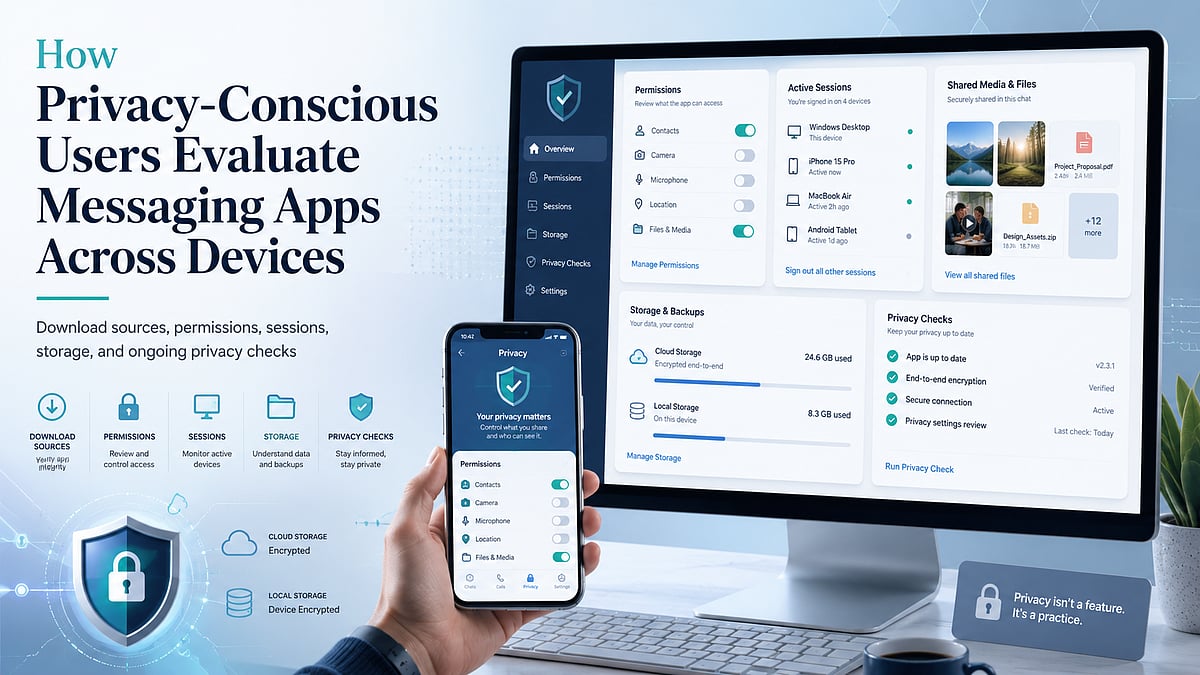
    • Download source: Determine whether platform versions, file types, publisher details, and update information are clearly presented.
    • Permissions: Review access to contacts, camera, microphone, storage, notifications, and background activity. Grant only what is needed.
    • Login devices: Check whether active sessions can be viewed and ended remotely. Review the list regularly.
    • Privacy settings: Examine message previews, contact visibility, group invitations, blocked users, and account-discovery options.
    • File storage: Understand where images, videos, documents, exports, and cached data are saved on each device.
    • Update mechanism: Confirm whether updates arrive through an app store, built-in updater, or manual installer. Outdated versions may miss important security improvements.
    • Help and support: Look for accessible documentation covering account recovery, session management, privacy controls, and deletion procedures.

    This framework does not require advanced technical knowledge. It encourages users to ask practical questions that reveal how the application behaves across the entire account lifecycle.

    Conclusion

    Messaging app security is not a one-time setup task. It requires continuing attention to devices, permissions, login sessions, recovery information, and shared files.

    Users who review only promotional privacy claims may overlook risks introduced by unofficial downloads, excessive permissions, forgotten desktop sessions, automatic media storage, or exposed verification codes.

    A stronger approach is to evaluate each stage of use: installation, account setup, device access, file management, updates, and recovery. By repeating these checks periodically, users can reduce avoidable exposure while maintaining the convenience of cross-device communication.

    Six recurring checks help users evaluate messaging apps throughout the account lifecycle.

  • ImVivo Review: A Deep Dive into the Technology-First Multi-Asset Trading Platform

    ImVivo Review: A Deep Dive into the Technology-First Multi-Asset Trading Platform

    Most platform reviews lead with adjectives. A more useful ImVivo review starts with a harder question: when you strip away the framing, does the technology, the security, and the structure actually stand up? ImVivo describes itself as a home for informed, structured multi-asset trading, and for an analytics-minded reader, the framing only matters if the engineering underneath earns it. What follows works through the stack, the trust signals, and the way the platform is organized.

    Reading the Technology, Not the Tagline

    The engine here is branded “The Edge,” and it is where live pricing, charting, technical indicators, and configurable dashboards converge into one workspace. The number of features isn’t the thing to fixate on. The sharper test is how efficiently a platform turns a noisy stream of market data into a picture a person can act on. On that measure, ImVivo reads as competent rather than gimmicky.

    Reporting is where that shows. Rather than leaving users to assemble their own summaries, the platform produces rolling portfolio breakdowns and performance analytics, with adaptive models tightening the output as conditions change. For a reader who cares about method, that adaptive layer is more interesting than any static indicator, because it means the analysis keeps responding to the market rather than sitting still.

    Orders clear on low-latency infrastructure, and the interface stays coherent across laptop, tablet, and phone—so nothing breaks when a session moves from desk to pocket. None of these pieces is rare in isolation. The part worth noting is the integration, with data, analysis, and reporting living together instead of being welded from separate tools. As individual participation in markets keeps climbing, that consolidation has moved from a nicety to something users simply expect.

    Where Legitimacy Is Won

    For a discerning audience, an honest ImVivo review lives or dies on the trust signals, because that is the part marketing cannot fake for long. On paper, the stack is solid: 256-bit encryption, two-factor authentication, and cold storage, with ongoing monitoring and tightened transaction controls sitting underneath. These are not exotic selling points—they are the defaults a serious operator is expected to build in. The reassuring thing is that ImVivo presents them as defaults rather than dressing them up as innovations. The tiered account model and the steady reporting cadence add a second kind of credibility: transparency. Users can see exactly where they stand rather than being asked to trust a sealed box.

    Structure That Signals Intent

    The asset menu is genuinely wide. Digital assets sit in the same environment as currencies, commodities, public companies, market benchmarks, and store-of-value holdings, which lets a user read several markets side by side rather than in scattered fragments across apps. The account ladder climbs from Bronze to VIP, with education, analyst contact, and monitoring deepening at each step. Help is reachable through several channels, and the deliberate pairing of human guidance with the technology is one of the platform’s more telling design decisions. For readers who treat structure and support as evidence of intent, that combination says as much about seriousness as any single tool on the dashboard.

    Funding sits alongside all of this, and for a legitimacy-minded reader, it is the quiet part that matters most. Deposits and withdrawals are laid out as a defined, repeatable process, and a platform that makes retrieving money as clear as depositing it earns a kind of trust no feature list can substitute for.

    The Verdict

    Weighed on its engineering rather than its language, ImVivo reads as a professional, technology-forward multi-asset platform—not a thin skin stretched over a price chart. The real-time data layer, the security posture, and the tiered structure all point to something designed for users who prize order over noise. The caveats are honest ones: the entry tiers can feel light until you build up, and the fullest conditions live higher on the ladder. Even so, this ImVivo review lands on a favorable read: an environment that holds up to scrutiny rather than one that only sounds good in a pitch deck.

  • 10 .NET Pitfalls Every Beginner Developer Should Steer Clear Of

    10 .NET Pitfalls Every Beginner Developer Should Steer Clear Of

    Learning .NET goes far beyond writing C# code. To build robust, scalable, and secure applications, developers must adopt modern practices from the start. This guide highlights the ten most frequent mistakes beginners make in .NET development and offers actionable advice to avoid them, covering ASP.NET Core, database management, testing, and security.

    Build a Strong Foundation Before Writing Complex Code

    Many beginners jump into coding without a solid grasp of C# fundamentals. Core concepts such as object-oriented programming, interfaces, inheritance, exception handling, async programming, and dependency injection are the bedrock of .NET. Without them, building enterprise-level ASP.NET Core applications becomes unnecessarily difficult. Invest time in mastering these basics before moving to advanced frameworks.

    Common Coding Mistakes to Avoid

    The following errors frequently appear in novice projects and can compromise performance, security, and maintainability:

    • Ignoring dependency injection – ASP.NET Core has built-in DI support; using it promotes loose coupling and easier testing.
    • Blocking asynchronous calls – Always use async/await for I/O operations to avoid thread pool starvation.
    • Poor exception handling – Catch specific exceptions, log them, and avoid swallowing errors silently.
    • Hardcoding configuration – Use appsettings.json and secret managers instead of embedding connection strings or API keys.

    Embrace Modern ASP.NET Core Practices

    A common mistake is treating ASP.NET Core like the old .NET Framework. Modern development relies on modular architecture, middleware pipelines, minimal APIs, and configuration via appsettings.json. Avoid placing business logic inside controllers — keep controllers lean and move logic to service layers. Also, learn to manage secrets properly without hardcoding sensitive data.

    Database and Performance Pitfalls

    Applications that perform well during development often slow down under real-world data loads. Inefficient Entity Framework Core queries are a primary culprit. Beginners frequently retrieve too much data, make non-asynchronous database calls, or run queries inside loops. To mitigate these issues, adopt caching, pagination, efficient LINQ queries, proper indexing, and monitor performance from day one.

    Testing, Logging, and Security – Don’t Delay

    Many developers postpone unit testing until the end — or skip it entirely. Tests (using xUnit, NUnit, or MSTest) catch bugs early and make refactoring safer. Logging with ASP.NET Core’s built-in provider simplifies troubleshooting in production. Security must be integrated from the start: validate all user input, use HTTPS, implement authentication and authorization, guard against SQL injection and XSS, and store secrets securely.

    Commit to Continuous Learning

    The .NET ecosystem evolves rapidly. Keeping up with official Microsoft documentation, engaging in open-source projects, and experimenting with new architectural patterns ensures your skills stay relevant. Mistakes are part of the learning journey — the key is to recognize them early and adopt practices that lead to maintainable, high-quality code.

    Frequently Asked Questions

    What are the most common beginner mistakes in .NET?

    Common mistakes include skipping C# fundamentals, ignoring dependency injection, putting business logic in controllers, blocking async calls, writing inefficient database queries, poor error handling, hardcoding values, neglecting unit tests, and overlooking security best practices.

    Why is dependency injection important?

    DI promotes loose coupling, making code easier to maintain, test, and extend. ASP.NET Core provides built-in DI, and proper use simplifies dependency management across services.

    How can beginners improve Entity Framework Core performance?

    Select only needed data, use async queries, implement pagination, avoid loops with database calls, optimize LINQ, apply proper indexing, and use eager loading judiciously.

    What security practices should every .NET developer follow?

    Validate all input, use secure authentication/authorization, enforce HTTPS, protect against SQL injection and XSS, store secrets with configuration providers or secret managers, and keep dependencies updated.

    Is unit testing necessary for beginner projects?

    Yes. Unit tests detect bugs early, verify behavior, and enable confident code changes. xUnit, NUnit, and MSTest are popular choices and valuable professional skills.

  • Top AI-Powered Home Features That Simplify Daily Life

    Top AI-Powered Home Features That Simplify Daily Life

    Artificial intelligence is no longer just about chatbots and digital assistants. Some of the most impactful AI applications are quietly transforming everyday homes, making them safer, more energy-efficient, and easier to manage. Instead of answering questions or generating content, these systems observe patterns, understand surroundings, and help residents control their living spaces with minimal effort.

    Key AI Home Features at a Glance

    Package Recognition for Better Delivery Security

    Smart cameras and video doorbells now include package detection capabilities. They can identify when a package is delivered, picked up, or if suspicious activity occurs. Many security brands offer this as a standard feature, while others require a paid subscription. With online shopping continuing to grow, package recognition has become an essential tool for protecting deliveries.

    AI That Listens for Important Sounds

    AI technology has advanced beyond voice recognition to detect critical sounds like fire alarms, breaking glass, or other unusual noises. Smart speakers and security equipment can alert homeowners via their phones, even when they’re away. Some security cameras are now sophisticated enough to identify the sound of smoke or fire, providing an extra layer of safety without constant monitoring.

    Smart Thermostats That Learn Household Patterns

    Modern smart thermostats go beyond remote temperature control. Using AI, they learn your daily routines — when you leave for work, return home, or go to sleep — and adjust heating and cooling accordingly. This optimizes comfort while reducing energy waste. Users can also manage privacy settings to control the data collected by these devices.

    AI for Understanding Pet Behavior

    Pet technology has been enhanced with AI capabilities. Cameras, feeders, and trackers can detect specific behaviors such as walking, playing, or entering off-limits areas. More advanced products even identify abnormal patterns that might indicate health issues, sending alerts to owners for early intervention.

    More Natural Smart Home Conversations

    Voice assistants are becoming more conversational. Instead of requiring rigid commands, users can speak naturally — for example, “Turn down the lights and set the thermostat to 72.” New AI-powered assistants can handle connected requests, manage multiple devices, and create personalized routines, making smart homes more accessible for everyone.

    AI-Based Water Monitoring and Leak Detection

    Smart water systems use AI to monitor usage patterns and detect unusual changes that signal leaks. They provide early alerts before minor issues become major problems and can recommend ways to reduce water consumption based on household habits. This technology supports both cost savings and better resource management.

    AI Video Summaries for Faster Security Updates

    Security cameras traditionally required manual review of footage. AI now generates quick summaries of recorded events, describing what happened — such as a person arriving, a vehicle appearing, or activity near a specific area — rather than just triggering a motion alert. This helps users quickly grasp important events without sifting through hours of footage.

    AI Support During Wildfire Alerts

    AI is also playing a role in emergency response. Smart security networks can detect signs of smoke or fire and send faster alerts. Some platforms integrate cameras with emergency information services, helping residents stay aware during hazardous weather conditions. However, privacy concerns mean user control over settings is crucial.

    Final Thoughts

    The trend in home AI goes beyond simple automation. Devices now recognize needs, enhance security, and save effort. From protecting packages to managing energy, monitoring pets, and detecting dangers, AI is becoming a valuable part of modern living. As technology advances, the best home solutions will not just respond to commands but anticipate needs and provide proactive assistance.

  • Android Productivity Boost: Essential Apps and Hidden Feature Guide

    Android Productivity Boost: Essential Apps and Hidden Feature Guide

    Introduction

    Hidden apps on Android are not always malicious. Many users hide apps for privacy, while manufacturers offer features like Secure Folder or Private Space. However, hidden apps can also indicate unwanted software. Knowing how to locate them helps improve device security, manage storage, and ensure you have complete control over everything installed on your smartphone.

    Search the App Drawer

    Start by opening your phone’s app drawer. Use the search bar to look for the app by name. Then check the menu or Home Screen Settings for options like “Hidden Apps” or “Hide Apps.” Many Android launchers, including Samsung, OnePlus, and Xiaomi, provide built-in tools to hide or reveal applications.

    Check Installed Apps

    Visit Settings > Apps > See All Apps to view every installed application. This list usually includes apps hidden from the launcher. Review unfamiliar apps, recently installed software, and disabled applications. Sorting by installation date or usage can help identify suspicious or forgotten apps occupying storage and system resources.

    Explore Private Spaces

    Modern Android devices offer secure storage for apps. Samsung includes Secure Folder, Google Pixel offers Private Space, while brands like OnePlus and Xiaomi provide Hidden Space or Second Space. These features require authentication, allowing users to keep sensitive apps separate from the main app drawer for enhanced privacy.

    Use Google Play Store

    Open the Google Play Store, tap your profile, and select Manage Apps & Device. Under the Installed section, you’ll find all apps currently linked to your device. This method helps verify whether an app is installed even if it doesn’t appear on the home screen or app drawer.

    Look for Suspicious Apps

    Watch for apps with generic names, blank icons, excessive permissions, or unusually high battery and data usage. Also, review Device Administrator apps in your security settings. These indicators may reveal hidden spyware or unwanted software that deserves further investigation or removal to protect your privacy.

    Final Tips

    Regularly review installed apps, update Android, and uninstall software you no longer need. If you suspect malware, restart in Safe Mode or scan your device with a trusted security app. By routinely checking hidden and installed apps, you can maintain better security, performance, and privacy on your Android smartphone.

  • Crypto Phishing Scams: How to Spot Fake Apps, Websites, and Address Poisoning

    Crypto Phishing Scams: How to Spot Fake Apps, Websites, and Address Poisoning

    Crypto phishing scams have become one of the biggest threats to digital asset users. With more investors using wallets, exchanges, DeFi platforms, and NFT marketplaces, scammers are increasingly deploying fake websites, wallet-draining links, and AI-generated messages to raid crypto wallets.

    According to the FBI’s latest internet crime data reported by The Wall Street Journal, cryptocurrency crime is now the most costly type of internet crime, totaling $7.2 billion. The report also noted a rise in AI-powered scams, with over 22,000 complaints and losses of nearly $893 million.

    What is a Crypto Phishing Attack?

    A crypto phishing scam is a fraud attempt designed to steal wallet credentials, seed phrases, exchange passwords, or transaction approvals. Unlike traditional bank fraud, scammers don’t always need your login information. In some cases, all they need is for you to sign a malicious wallet transaction.

    These scams often appear as fake airdrops, token claim pages, NFT mint links, customer support messages, or urgent wallet verification requests. Once a user connects their wallet and confirms the request, the attacker can drain the tokens.

    How to Identify Fake Crypto Websites

    Fake crypto sites typically copy the design of popular exchanges, wallets, or DeFi platforms. The domain may look similar but with slight differences: misspellings, extra hyphens, strange extensions, or fake login pages.

    Watch for warning phrases like:

    • “Verify Your Wallet Now”
    • “Claim Reward Before Expiry”
    • “Urgent Account Suspension”
    • “Connect Wallet to Unlock Funds”

    A legitimate exchange will never ask for your seed phrase. Always type the official URL directly or use a bookmark. Avoid clicking links from Telegram, Discord, X, WhatsApp groups, or sponsored search results without verification.

    How to Identify Fake Crypto Apps

    Research on cryptocurrency exchange scams uncovered over 1,500 fraudulent domains and more than 300 fake apps, some of which made it to major app marketplaces. Before downloading, verify the app’s history, reviews, and developer name. Check how long it has been available, the official website link, and the app’s reputation. Never download APKs from unknown sources.

    During setup, a fake app may request your recovery phrase under the guise of security verification or customer support. That’s a major red flag.

    Watch Out for Address Poisoning

    Address poisoning is a phishing attack where scammers send small transactions from lookalike wallet addresses. The goal is to trick users into copying the wrong address from their transaction history. A 2025 study found approximately 270 million on-chain address poisoning attempts targeting 17 million victims, resulting in at least $83.8 million in losses.

    Why This Matters

    The escalation of AI-driven phishing and address poisoning matters because scammers no longer need to hack blockchains. By weaponizing urgency and lookalike addresses, they trick users into authorizing irreversible transactions that drain wallets instantly — turning user error into crypto’s costliest threat.

    Final Thoughts

    • Never share your seed phrase.
    • Only download apps from official sources.
    • Store larger amounts on a hardware wallet.
    • Check URLs carefully.
    • Revoke suspicious wallet approvals.
    • Test large transfers with a small amount first.

    Remember the three elements of crypto scams: urgency, fear, and greed. If a message feels urgent, secret, or too good to be true, pause, verify, and proceed only if you’re certain.

    Frequently Asked Questions

    1. What is a crypto phishing scam?

    A crypto phishing scam is a fraud attempt designed to steal wallet credentials, seed phrases, exchange passwords, or transaction approvals. Scammers often use fake websites, airdrops, NFT mint links, or support messages to trick users.

    2. How can I identify a fake crypto website?

    Fake crypto websites often copy real platforms but use slightly changed domains, misspellings, extra hyphens, or unusual extensions. Any site asking for a seed phrase or urgent wallet verification should be treated as suspicious.

    3. Are fake crypto apps dangerous?

    Yes, fake crypto apps can steal recovery phrases, login details, or wallet permissions. Always check the developer name, app history, reviews, and official website before downloading any crypto wallet or exchange app.

    4. What is address poisoning in crypto?

    Address poisoning is a scam where attackers send small transactions from lookalike wallet addresses. The goal is to make users accidentally copy the wrong address from their transaction history and send funds to the scammer.

    5. How can crypto users stay safe from phishing scams?

    Users should never share seed phrases, avoid unknown links, use official app stores, bookmark trusted websites, and test large transfers with small amounts first. Hardware wallets can also improve security for larger holdings.

  • Solana Price Jumps 11% as Institutional Adoption and Network Milestones Drive Momentum

    Solana Price Jumps 11% as Institutional Adoption and Network Milestones Drive Momentum

    Solana extended its recovery this week, climbing approximately 11% to trade near $81 after briefly spiking above $82. The rally was fueled by a combination of network upgrades, surging on-chain activity, institutional capital inflows, and new governance initiatives that reignited investor enthusiasm.

    Institutional Adoption Accelerates

    Institutional interest gained significant traction after Securitize tokenized $295 million worth of NYSE-listed common stock on Solana following its SPAC debut. Concurrently, the Solana Foundation introduced its Governance Proposals framework, establishing a formal on-chain validator voting system that expands the network’s governance capabilities.

    Network Activity Reaches New Highs

    Network usage hit unprecedented levels: Solana processed over one billion weekly non-vote transactions for the first time, while tokenized asset spot trading volume soared to a quarterly record of $5.77 billion. These metrics underscore Solana’s expanding role in real-world asset tokenization.

    Investor demand remained robust, with spot Solana ETFs attracting roughly $5.75 million in net inflows, even as other cryptocurrency investment products continued to see capital outflows.

    Technical Indicators Point to Key Resistance

    From a technical perspective, Solana has recovered from its June decline after buyers defended the long-term support zone near $73, aligning with the 0.786 Fibonacci retracement level. The price has reclaimed the previous breakdown area around $80.14 and is attempting to establish it as a new support level.

    Momentum indicators have strengthened alongside the recovery. The daily Relative Strength Index (RSI) has climbed above 62 after rebounding from oversold conditions, while the Supertrend indicator continues to signal bullish momentum with dynamic support near $69.60.

    A sustained move above the $83 resistance level could open the path toward $90. However, if SOL fails to hold above $80, the price may revisit support around $75.40.

    Shorter-term indicators also remain constructive. On the four-hour chart, Solana continues trading above its 20-, 50-, 100- and 200-period moving averages, with the 20-period simple moving average near $81.40 providing immediate support. Although the Aroon indicator continues to favor buyers, a slight decline in Aroon Up suggests bullish momentum has moderated as the market awaits another catalyst.

    Solana Foundation Appoints New Security Chief

    Michael Coates announced on X that he has joined the Solana Foundation as its Chief Information Security Officer (CISO). He will oversee security initiatives as institutional adoption continues to expand.

    Coates explained that Solana now processes tens of billions of dollars in daily stablecoin volume while handling more transactions each day than much of the broader cryptocurrency industry combined. He also highlighted the network’s growing tokenization activity, including the launch of tokenized SpaceX shares.

    Coates brings extensive cybersecurity experience to the role. He previously served as Head of Security at Mozilla during the browser competition era and later became Twitter’s first CISO as the platform expanded globally. He subsequently founded enterprise security company Altitude Networks, which entered the digital asset sector after its acquisition by CoinList.

    At the Solana Foundation, Coates said his priorities include strengthening operational security, improving application security practices, and addressing risks unique to digital assets. He also plans to work with policymakers and industry standards organizations on cybersecurity regulations affecting the crypto sector.

    Discussing the evolving threat landscape, Coates noted that attackers remain highly motivated to target digital assets while the misuse of artificial intelligence continues to introduce new security challenges. At the same time, he said AI can significantly improve defensive capabilities when deployed effectively, referencing his congressional testimony on the subject earlier this year.

    This hiring is part of a larger pattern where crypto firms snap up veterans from tech, cybersecurity, and regulatory bodies to match the influx of Wall Street capital. A similar move occurred last year when Sygnum brought on former CFTC Chairman Christopher Giancarlo as a senior policy advisor.

    What’s Next?

    Solana price strengthened as institutional adoption expanded, network activity reached record levels, and technical indicators turned more bullish. The appointment of a new security chief also reflects the ecosystem’s growing maturity. Investors will closely watch whether SOL can sustain support above $80 and break the $83 resistance.