
Blog

  • Beyond Clean Code: What Today’s Mobile Engineers Need to Succeed, According to Tomasz Kubiak

    Beyond Clean Code: What Today’s Mobile Engineers Need to Succeed, According to Tomasz Kubiak

    As mobile engineering expands beyond writing and shipping code, esteemed software engineer Tomasz Kubiak draws on his experience building an app used by millions to explain why reliability, judgment, and product thinking are raising the bar for mobile engineers.

    Writing good code in mobile software engineering is no longer enough. A recent Forbes Technology Council article reports that median crash-free sessions have reached 99.95%, while 82% of users consider stability extremely important and 63% will uninstall an app after three crashes or fewer. As automation takes over more routine work, engineers have to bring more to the table. In this interview, Tomasz Kubiak, with 10+ years of experience, discusses the skills that increasingly separate strong mobile engineers from the rest and shares approaches that helped him grow and succeed in the field.

    Tomasz is currently a Senior iOS Software Developer at Welltech, where he works on WalkFit, a wellbeing app with more than 10 million downloads. His product work includes A/B-tested changes that delivered a double-digit lift in early goal activation and a measurable gain in first-week retention. A nutrition module he developed was also associated with higher customer lifetime value among purchasers. Before joining Welltech, Tomasz developed iOS apps at Talixo and introduced CI improvements that halved build times. His broader engineering career includes three patent records, with patents granted in the United States and Europe, peer-reviewed research, and IEEE Senior Member status.

    Q: The job of a mobile engineer looks very different today than it did even a few years ago. With more than a decade in engineering, what is expected from a strong mobile engineer today that wasn’t expected before?

    I think the biggest shift is toward broader ownership. Mobile engineering has become much more connected to how a product performs in the real world. Technical decisions affect stability, delivery, user experience, and how a product evolves over time. Strong engineers need to understand the context around the code and think several steps ahead. The ability to see those connections and make sound decisions as complexity grows has become a much bigger part of the job.

    Q: Your own path into mobile development was unusual: you started in mechanical and product engineering before moving into software. What did that experience teach you that later proved useful in mobile engineering?

    I studied Mechatronics at Lodz University of Technology in Poland, which gave me an early understanding of how different parts of a system affect one another. After university, I joined Corning and later moved from Poland to its engineering organization in the U.S. Working on product development there taught me to pay close attention to failure modes and to understand the cause of an issue before making changes. When I moved into software, I brought that mindset with me. It has been especially useful in mobile engineering, where an application has to perform reliably across releases and real-world conditions. That background also shaped how I approach testing and stability today: I tend to think about the whole application’s behavior and the consequences an engineering decision may have beyond the feature being developed.

    Q: At Talixo, you developed driver and customer iOS apps and nearly halved CI times while also working on modularization and release automation. When a mobile team needs to ship faster, where should it look for workflow improvements before asking engineers to code faster?

    I would start with the development workflow itself. A major improvement came from introducing a more advanced CI/CD caching strategy, which reduced CI times. That meant less time waiting for builds and faster feedback during development. We also worked on modularization and release automation, which made the applications easier to maintain and reduced the risk of manual releases. For me, the broader lesson was that delivery speed depends heavily on the systems around the code. Improving that infrastructure gives engineers more time to focus on the product and makes releases more predictable.

    Q: Today, you work on WalkFit, an app with more than 10 million downloads. Does building for an audience of that size change the way you think about engineering decisions, risk, and what happens after a feature is released?

    The product’s main goal is to help people make walking a regular part of their daily routine. It combines activity tracking with walking plans and other features that support long-term consistency. At this scale, even a small engineering decision can affect a large, diverse group of users. A feature may work perfectly in isolation and still affect the broader experience in unexpected ways. That has made me pay much more attention to what happens after release and to treating real-world behavior as part of the engineering process.

    Q: After resolving more than 50 production issues across eight iOS releases, what do you think separates strong engineers when something goes wrong in production?

    In my view, what separates strong engineers is the willingness to look beyond the immediate bug. A production issue can point to a deeper weakness in how a feature or part of the system was designed, so the goal is to understand what made that failure possible and whether the same conditions exist elsewhere. This way of thinking also shaped my research on mobile architecture. In a recent paper, “A Local-First Architecture for Privacy-Preserving Personalization in iOS Health and Fitness Applications,” published in American Impact Review, I proposed an approach to iOS personalization that keeps sensitive health data on the device whenever possible. The work identifies potential failure points before implementation and places safeguards as close to the source as possible. The context is privacy, but the engineering principle is broader. A strong solution should address the underlying weakness and make the system more resilient, instead of simply making the visible problem disappear.

    Q: The nutrition module you developed achieved a high-single-digit conversion rate and was associated with customer lifetime value increasing by well over half among purchasers. How much should mobile engineers understand about product and business performance, and how should that understanding influence technical decisions?

    Understanding product and business metrics helps an engineer see the impact of technical work beyond the release itself. With the nutrition module, the conversion rate and customer lifetime value gave us a much clearer picture of its value after launch. That perspective also changes engineering priorities. We can direct time and complexity toward features that genuinely improve the product, and technical decisions become easier to tie to measurable outcomes. For me, that connection between engineering and product impact is central to senior-level work.

    Q: Technical correctness alone does not make a mobile product successful. One of your A/B-tested improvements produced a double-digit lift in early goal activation and a mid-single-digit gain in first-week retention. How do you use experimentation and user behavior to determine whether a feature succeeds?

    Experimentation helps connect engineering decisions with what people actually do with a product. Before releasing a change, I want to be clear about what behavior we expect it to influence and how we will know whether it worked. A/B testing gives us evidence from real usage, but I also look beyond the primary metric because improving one part of the experience can affect another. I brought that habit of considering both the intended result and the wider impact to my role as an invited judge at the recent AITEX Summit Summer 2026. The same principle applies when evaluating technology more broadly. A technically impressive solution is only part of the picture; it also needs to address a real need and create value in practice.

    Q: Given these changes in the profession and your experience, what should mobile engineers invest in beyond coding if they want to stay valuable and keep growing over the next several years?

    I would invest in judgment. Coding tools will keep changing, but engineers still need to understand the consequences of their decisions. That comes from seeing how systems behave in production, how users respond to a product, and how technical choices affect the business over time. I would also stay curious beyond the immediate mobile stack. Some of the most useful ideas in my own career came from moving between different areas of engineering and bringing those perspectives into software. I believe the ability to connect those pieces and make good decisions when the answer isn’t obvious will keep engineers valuable as the profession continues to change.


  • Top Career Development Platforms for US Professionals in 2026

    Top Career Development Platforms for US Professionals in 2026

    Career growth now requires more than a polished resume. The right career website can help with skills development, job research, salary checks, professional networking, and smarter career decisions. Several platforms stand out in the US market, each serving a distinct purpose.

    LinkedIn leads as an all-around career hub, while Coursera offers structured learning for new skills and career changes. CareerOneStop provides trusted US labor data, and Indeed connects career plans with current job openings. Glassdoor adds employer and salary insights, and FlexJobs targets remote opportunities.

    LinkedIn Covers the Full Career Journey

    LinkedIn remains one of the strongest career platforms for US professionals. It combines professional profiles, networking, job search, recruiter access, and education in one place. With more than 1 billion members, professionals gain access to a vast business network.

    LinkedIn Learning adds a major educational layer, offering over 26,200 courses and more than 1,300 curated learning paths. Its role guides cover over 35 career paths, and Premium Career provides access to more than 25,000 LinkedIn Learning courses. This mix makes LinkedIn valuable for both career visibility and skill development.

    Coursera Supports Career Change and New Skills

    Coursera stands out for professionals who need structured education or a new career path. The platform offers more than 10,000 programs from universities and companies, including Google, Microsoft, Meta, and Stanford. Recent updates show a stronger focus on practical technology skills. In April 2026, Microsoft added 11 Professional Certificates across AI, data, and software development. In June 2026, Coursera expanded its micro-credential catalog with programs from Google DeepMind, Meta, Microsoft, and other partners. These courses include projects that can showcase practical skills on a resume or LinkedIn profile.

    CareerOneStop Brings US Labor Data

    CareerOneStop is funded by the US Department of Labor, making it a reliable source for labor-market information. The site covers more than 900 occupations and provides salary data, employment statistics, required skills, and education or training programs. Job seekers can use this information to align career ambitions with actual market conditions.

    Indeed Connects Skills with Job Demand

    Indeed focuses on job search, offering a large US job database that shows current employer demand. It also provides salary estimates, company reviews, job alerts, resume tools, and job matching. Professionals can search for specific job titles to see which skills appear in current vacancies, helping shape resumes and guide course choices.

    Glassdoor Helps with Salary and Employer Research

    Glassdoor provides salary details, company reviews, benefits information, and interview reports. This data helps professionals assess employers before applying or accepting offers. Salary research also sets realistic expectations, as pay levels vary across US cities, industries, and company sizes.

    FlexJobs Targets Remote Career Options

    FlexJobs is ideal for professionals seeking remote or flexible work. Its remote job data showed a 22% quarter-over-quarter rise in remote postings in Q2 2026, with notable growth in tech, engineering, and operations. FlexJobs offers a focused place to find such roles without sorting through broad job databases.

    A Strong Career Website Mix

    No single platform covers every career need equally. LinkedIn works best as an all-around career hub. Coursera suits structured skill growth and career changes. CareerOneStop offers US labor data for smarter decisions. Indeed helps with job demand, Glassdoor adds employer and salary insight, and FlexJobs serves remote-work seekers. edX and Udemy also play useful roles: edX for deeper university-level study, Udemy for targeted skills and software tools. The Muse provides career advice and company culture research.

    The strongest career strategy uses each platform for a clear purpose. Skills need proof, job plans need market data, and career moves need employer research. A focused mix of these websites can turn online career resources into a practical path toward the next professional move.

    FAQs

    1. Which is the best career development website for professionals? LinkedIn is the strongest all-around option, combining networking, job opportunities, professional profiles, recruiter access, and learning resources.
    2. Which website is best for learning new career skills? Coursera is a strong choice for structured learning, professional certificates, career changes, and programs from leading universities and companies.
    3. Where can I research US salaries and occupations? CareerOneStop provides US labor-market information, while Glassdoor offers salary data and employer insights.
    4. Which website is best for finding jobs? Indeed is particularly useful for browsing current job openings, researching demand for specific skills, setting alerts, and comparing opportunities.
    5. What is the best website for remote jobs? FlexJobs focuses specifically on remote and flexible opportunities, making it useful for professionals prioritizing location flexibility.
  • EV Industry Outlook 2026: Key Trends Driving Growth in Europe, China, and Beyond

    EV Industry Outlook 2026: Key Trends Driving Growth in Europe, China, and Beyond

    The electric vehicle market is entering a new phase, marked by shifting regional dynamics, falling prices, and rapid technological advances. Global sales of battery-electric and plug-in hybrid vehicles reached 1.85 million units in July 2026, a 9% year-over-year increase, with total sales for the first seven months hitting approximately 11.5 million. Europe is emerging as the fastest-growing market, while China faces a saturated domestic market and North America shows mixed signals. The next wave of EV adoption will hinge on price, battery innovation, charging infrastructure, software capabilities, and trade policies.

    Europe Gains Momentum

    In 16 major European markets, battery-electric vehicles accounted for 25.7% of new car sales in July 2026. BEV sales rose 13.6% year-over-year to 224,266 units. France achieved a 35% BEV share, Germany 29.3%, and Denmark an impressive 80.1%. However, Italy saw its share drop to 5.9% after ending purchase subsidies. Stable regulations and more affordable models will be critical for Europe to maintain its lead.

    China Shifts Focus to Exports

    China’s domestic EV market is under pressure, with passenger vehicle exports rising 77.5% year-over-year in August 2026, while domestic sales fell for the 11th consecutive month. Electric and plug-in hybrid exports surged 154.7%, even as domestic sales of these vehicles declined 10.1%. Major automakers like BYD and Geely are increasingly looking overseas for growth as the home market becomes saturated.

    Price and Battery Costs Are Key

    Price remains the central factor in EV adoption. According to the International Energy Agency, nearly 70% of battery-electric cars sold in China in 2025 cost less than the average petrol or diesel car, and about 30% of electric models had an entry price below USD 20,000. In Europe, fewer than 10% of BEV models were priced below USD 30,000 in 2025. Low-cost Chinese models hold a strong advantage, but trade barriers could shift the balance.

    Global EV battery use reached 1.2 terawatt-hours in 2025, up nearly 30% from 2024. Average battery prices fell 8% in 2025, though lithium prices at the start of 2026 were more than double their level from the same period in 2025. Battery makers must balance lower pack costs with volatile mineral prices. Smaller, cheaper models could attract more buyers if range and safety remain acceptable.

    Charging Infrastructure and Software

    The world had over 43 million private light-duty vehicle charge points in 2025, with roughly one-third each in China and Europe and one-sixth in the United States. Public fast-charging rates can be up to 240% higher than residential tariffs, making home charging a key value driver. The average electric car range is now around 380 km and has largely plateaued. New 1,000-volt models and ultra-fast charging systems can cut charge times to under 10 minutes.

    Software is playing an increasingly important role. Modern EVs support remote updates, advanced driver assistance, battery management, and new digital features. Driverless taxis are already operating in more than 20 cities, primarily in China and the United States.

    India’s Unique Path

    India presents a different growth story. Alternative-fuel passenger vehicles accounted for 41.95% of retail sales in August 2026, ahead of petrol and ethanol at 40.85%. CNG and LPG held 25.28%, hybrids 9.04%, and EVs 7.63%. India recorded 297,820 EV registrations in August, with Uttar Pradesh alone contributing 42,007. The country shows strong potential across small cars, two-wheelers, three-wheelers, buses, and fleet vehicles.

    What Lies Ahead

    The next phase of the EV industry will not be defined by a single technology or market. Europe needs stable policies and lower prices. China must secure overseas access. Battery manufacturers require lower costs and stable mineral supply. Automakers need better software and faster charging. India offers room for diverse growth. The winners will be those that can deliver the right combination of price, range, software, and charging access.

    FAQs

    • What is driving the next phase of EV growth? Lower prices, battery innovation, faster charging, improved software, and supportive trade and policy frameworks.
    • Why is Europe becoming an important EV market? Europe is seeing faster BEV adoption, with several major markets recording strong growth and higher electric-car sales shares.
    • What challenge is China’s EV industry facing? A saturated domestic market is pressuring sales, encouraging Chinese automakers to expand exports and enter overseas markets.
    • Will EV prices continue to fall? Lower battery costs and increased competition could support more affordable EVs, although mineral prices and trade barriers may affect pricing.
    • What role will India play in the EV transition? India has significant growth potential across EVs, two-wheelers, three-wheelers, buses, and fleet vehicles, supported by broader growth in alternative-fuel mobility.
  • How Solo Entrepreneurs and Small Partnerships Are Driving India’s Record Business Registrations in 2026

    How Solo Entrepreneurs and Small Partnerships Are Driving India’s Record Business Registrations in 2026

    India’s business registration data for 2026 reveals a clear shift in who is starting companies. One Person Companies (OPCs) and Limited Liability Partnerships (LLPs) have seen dramatic growth, and this surge is not coming from the typical venture-funded startup ecosystem. Instead, solo founders and small professional partnerships are formalizing their operations at an unprecedented rate.

    Two Structures, Two Different Audiences

    OPCs and LLPs serve distinct purposes. An OPC is designed for a single founder—a consultant, freelancer, or product builder who wants limited liability and a corporate identity without needing a co-founder to meet minimum shareholder rules. An LLP, on the other hand, suits two or more partners—often professionals like chartered accountants, lawyers, or small consultancies—who seek liability protection without issuing equity or reporting to a board.

    Both structures are now rising rapidly, driven by the same underlying trend: more entrepreneurs are choosing to formalize early rather than operating informally as proprietorships. According to Ministry of Corporate Affairs (MCA) data, roughly 6,281 OPCs were incorporated by mid-2025, a 26% increase year-on-year. LLP registrations jumped even more, from 61,769 to 86,476—a 40% rise in the 2025-26 period.

    Between January and April 2026 alone, India logged 1.31 lakh new business registrations across all entity types. Private limited companies still led with 85,560, but LLPs followed closely at 39,774, accounting for nearly 30% of all filings during that window. OPC numbers are smaller in absolute terms but are growing at a similar pace.

    Why OPC Registration Became More Attractive

    OPCs used to carry a major limitation: crossing ₹50 lakh in paid-up capital or ₹2 crore in turnover forced automatic conversion into a private limited company within six months. The 2021 amendment to the Companies (Incorporation) Rules removed that trigger. Now an OPC can scale its capital and revenue without being forced to change structure.

    The residency requirement also eased. Any Indian citizen can incorporate an OPC directly, and the minimum days spent in India dropped from 182 to 120. Combined with the fully online SPICe+ process—typically completed in 7 to 10 working days—OPC registration is no longer a niche option. Many solo founders now choose it as their first choice.

    Why LLPs Are Growing Even Faster

    LLPs appeal because of lower compliance costs. A private limited company must undergo a statutory audit every year regardless of turnover, plus hold board meetings and file detailed ROC reports. An LLP only needs an audit once turnover exceeds ₹40 lakh or partner contribution surpasses ₹25 lakh. Below those thresholds, annual filings are mostly limited to Form 8 and Form 11.

    For a two- or three-partner professional firm not seeking institutional funding, that compliance gap adds up significantly over time. This is a major reason LLP filings have outpaced overall registration growth this year.

    What Neither Structure Can Do

    Both OPCs and LLPs share a critical limitation: they cannot issue equity shares. That means no stock for investors and no ESOP pool. Founders chasing venture capital still default to private limited registration regardless of team size. Converting an OPC or LLP into a private limited company later is possible but requires NCLT approval, time, and expense. Founders who expect to need outside funding within a few years typically skip the detour entirely.

    The Bigger Picture

    India’s overall company registration numbers are running well above historical norms in 2026. The rise in OPC and LLP registrations reflects a specific shift: more solo founders and small professional partnerships are formalizing early instead of waiting until they outgrow a proprietorship. Neither structure is replacing private limited registration at the top of the funnel; they are filling a gap that private limited was never designed to address.

  • Vivo X300 Ultra vs OPPO Find X9 Ultra: Value Flagship vs Zoom King

    Vivo X300 Ultra vs OPPO Find X9 Ultra: Value Flagship vs Zoom King

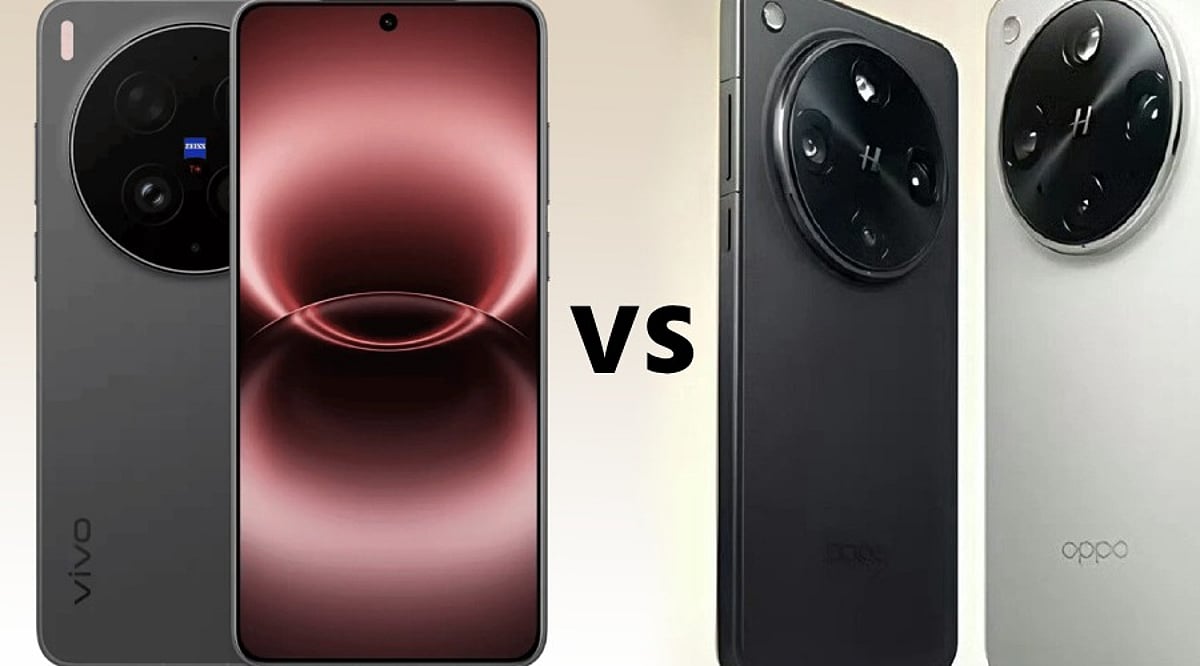
    The Vivo X300 Ultra and OPPO Find X9 Ultra are two of the most advanced Android flagships of 2026, each with a distinct focus. While both phones share the same Snapdragon 8 Elite Gen 5 processor, they diverge sharply in camera strategy, display brightness, battery capacity, and pricing. Here’s a breakdown of how they compare and which one suits different user priorities.

    Vivo X300 Ultra: Better Value and Brighter Display

    The Vivo X300 Ultra is priced at Rs. 1,59,999 in India for the 16GB RAM and 512GB storage variant. That’s Rs. 10,000 less than the OPPO Find X9 Ultra, which costs Rs. 1,69,999 for its 12GB/512GB model. Vivo also offers 4GB more RAM, making it a stronger choice for multitaskers and power users.

    Vivo’s 6.82-inch 2K AMOLED display reaches a peak brightness of 4,500 nits, significantly higher than OPPO’s 3,600 nits. Both screens feature a 144Hz refresh rate, ensuring smooth scrolling and gaming, but Vivo’s panel is better for outdoor visibility and HDR content.

    OPPO Find X9 Ultra: Superior Zoom and Bigger Battery

    OPPO’s main camera is a 200MP sensor with an f/1.5 aperture, while Vivo uses a similar 200MP sensor with an f/1.85 aperture. The real difference lies in the telephoto cameras. OPPO equips the Find X9 Ultra with a 200MP 3x telephoto and a 50MP 10x optical telephoto lens, offering up to 120x digital zoom. This makes it ideal for wildlife, sports, and distant subjects. Vivo’s 200MP telephoto offers 3.7x optical zoom with a 85mm focal length, which is better suited for portraits and close-up work.

    Battery capacity is another clear win for OPPO: 7,050mAh versus Vivo’s 6,600mAh. Both support 100W wired charging, but OPPO also offers faster 50W wireless charging versus Vivo’s 40W.

    Video and Software Features

    Vivo counters with superior video capabilities: 4K 120fps Dolby Vision, Log video support, and 60fps autofocus tracking. Its ZEISS camera system covers 35mm, 14mm, and 85mm focal lengths, giving creative users more flexibility. OPPO focuses more on still photography and zoom reach.

    Which One Should You Buy?

    If you prioritize value, display brightness, RAM, and video tools, the Vivo X300 Ultra is the better all-rounder. If you need extreme zoom range and longer battery life, the OPPO Find X9 Ultra is the clear winner. Both are flagship devices, but your choice depends on which features matter most.

    FAQs

    Which phone is better overall?

    The Vivo X300 Ultra offers better value with more RAM, a brighter display, and advanced video features at a lower price.

    Which phone has the best camera?

    OPPO wins for long-range zoom with its 10x optical telephoto; Vivo is better for portraits and video recording.

    Which has the bigger battery?

    OPPO Find X9 Ultra has a 7,050mAh battery, versus Vivo’s 6,600mAh.

    Which phone is more affordable?

    Vivo X300 Ultra is priced at Rs. 1,59,999, making it Rs. 10,000 cheaper than OPPO’s model.

  • Top USB-C 60W Charging Cables: Expert Picks for 2026

    Top USB-C 60W Charging Cables: Expert Picks for 2026

    USB-C has become the universal connector for modern gadgets, powering everything from smartphones and tablets to laptops and power banks. While many cables support fast charging, not all deliver the same performance. For everyday devices, a 60W USB-C cable often provides the perfect balance of power and affordability. Here are five top-rated 60W USB-C cables from leading brands, along with key factors to consider before making a purchase.

    Anker New Nylon USB-C Cable

    Anker is a trusted name in charging accessories, and its New Nylon USB-C cable delivers reliable 60W Power Delivery. The braided nylon exterior enhances durability, with Anker claiming it can withstand up to 12,000 bends. It supports USB 2.0 data transfer speeds up to 480Mbps, sufficient for everyday syncing and file transfers. Available in 3-foot and 6-foot lengths, and in a two-pack, it’s a solid choice for phones and tablets.

    Belkin BoostCharge USB-C Cable

    Belkin’s BoostCharge USB-C to USB-C cable supports 60W charging and features a braided nylon design rated for over 25,000 bends and 10,000 plug-ins. It is USB-IF certified for compatibility and comes with a two-year warranty. This cable works seamlessly with a wide range of USB-C devices, including iPhones, Galaxy phones, iPads, and MacBooks, making it a durable and dependable option.

    UGREEN USB-C Charging Cable

    UGREEN offers a variety of USB-C cables at different power levels. For a 60W setup, verify the exact model specifications before buying, as UGREEN also sells 100W and higher-rated cables. A 60W cable is sufficient for many phones, tablets, power banks, and compatible laptops. UGREEN cables are a great fit for multi-device charging stations, and braided versions are available for extra durability.

    Baseus USB-C 60W Cable

    Baseus is another well-known accessory brand with a broad range of USB-C cables. Their 60W model is ideal for users who primarily charge phones and tablets, and it can also support lightweight laptops that require 60W or less. As with UGREEN, double-check the power rating before purchasing, as Baseus offers higher-wattage cables in similar product lines. Baseus is a strong contender for value-conscious shoppers.

    Spigen USB-C Charging Cable

    Spigen, famous for smartphone cases, also produces USB-C charging cables for everyday devices. Some models support up to 60W charging with compatible USB-C Power Delivery chargers. Spigen cables are a practical choice for users already within the Spigen ecosystem. As always, confirm the exact model’s power and data specifications before buying.

    What to Check Before Buying a 60W Cable

    • Power Delivery Rating: Ensure the cable’s wattage matches your charger and device needs.
    • Data Transfer Speed: Many affordable cables still use USB 2.0 (480Mbps), which may be slow for large files.
    • Cable Length: A 6-foot cable is convenient for desk or bedside use; shorter cables are better for travel.
    • Build Quality: Look for braided nylon and reputable brands to ensure longevity.
    • Certification: USB-IF certification guarantees compatibility and safety.

    Which 60W USB-C Cable Should You Buy?

    The best cable depends on your devices and usage habits. Anker is a reliable everyday choice with proven durability. Belkin appeals to those who prioritize certification and warranty support. UGREEN and Baseus offer extensive accessory ecosystems and multiple cable configurations. Spigen is a practical option for mobile-device users. Remember, 60W is sufficient for most smartphones, tablets, and lightweight laptops. If you own a high-performance laptop, consider a 100W, 140W, or 240W cable instead. The smartest purchase matches your specific device, charger, and daily routine.

    Frequently Asked Questions

    Is a 60W USB-C cable enough for everyday charging?

    Yes, for most users. A 60W cable can charge smartphones, tablets, power banks, and many lightweight laptops. Actual charging speed depends on your device and charger. Check your laptop’s power requirements if you own a high-performance model.

    What is the difference between a 60W and 100W USB-C cable?

    The maximum power rating. A 100W cable can deliver more power when paired with compatible hardware, but it won’t automatically charge your device faster unless the device and charger also support higher power.

    Is Anker a good brand for USB-C charging cables?

    Anker is a well-known and reliable brand for charging accessories. Its New Nylon series includes durable 60W options. Always check the exact model’s specifications for power and data capabilities.

    Do all USB-C cables support fast charging?

    No. USB-C is a connector shape, not a guarantee of speed. Cables have different power ratings, data speeds, and features. Always verify the cable’s specifications before assuming it supports your device’s maximum charging speed.

    Does a 60W cable charge a laptop faster than a phone?

    Not necessarily. Charging speed depends on the device’s power requirements and supported protocols. A laptop may draw more power than a phone, but both will charge within the cable’s 60W limit if compatible.

  • Why Agile Testing Quadrants Need a Third Axis for AI-Generated Tests

    Why Agile Testing Quadrants Need a Third Axis for AI-Generated Tests

    The classic Agile Testing Quadrants model, introduced by Brian Marick and later refined by Lisa Crispin and Janet Gregory, has served the software testing community for over two decades. It organizes tests along two axes: business-facing versus technology-facing, and tests that support the team versus tests that critique the product. This framework has aged well because it focuses on why a test is run rather than what tool executes it. However, the model was built on a critical assumption: that a human wrote the test, understood its purpose, and could explain why it exists. In today’s AI-native development pipelines, that assumption no longer holds for a significant portion of tests.

    The Missing Dimension: Test Provenance

    When a feature is scaffolded by an AI coding assistant, tested by an AI test generator, and merged after a quick skim review, the resulting test suite may pass hundreds of tests—yet no one on the team can articulate what many of them actually assert. The quadrants treat all tests within a given quadrant identically, but the trustworthiness of those tests varies dramatically. A Q1 unit test written by a senior engineer after a production incident is fundamentally different from a Q1 unit test generated by a large language model from a docstring and approved without meaningful review.

    According to a survey by quality assurance practitioners, 65% of development teams actively use AI to generate code, and 16% do so occasionally. Respondents rated their trust in AI-generated code at 3.16 out of 5, and 58% reported that their testing workload has grown as a direct result. The gap between adoption and trust is exactly what the original quadrants were never designed to express.

    Introducing a Third Axis: Provenance

    A natural evolution of the model is to add a third dimension: provenance. This axis captures where a test originated and how much unsupervised trust it carries. Rather than adding another box to the existing grid, think of it as a Z-axis that transforms the flat model into a cube. Every quadrant can now be evaluated through an additional trust dimension based on three states of test provenance:

    • Human-authored and reviewed: The traditional case the original model assumed.
    • AI-authored, human-verified: A developer or tester used an AI test generator, reviewed the output, and signed off before merging.
    • AI-authored, unverified: The test passed continuous integration (CI), but no one meaningfully reviewed its assertion logic.

    The third bucket is where flaky test root-cause analysis becomes expensive. A Q4 performance test scaffolded by an autonomous agent against staging, with load parameters never validated against real production traffic, is no longer a technology-facing test in the way Marick intended—it’s an unverified hypothesis wearing the shape of a test.

    Why Provenance Changes Coverage Metrics

    Coverage percentage has always been a blunt instrument, but it becomes actively misleading when test authorship is mixed. A suite reporting 85% coverage tells you nothing about whether that coverage reflects deliberate risk-based testing or an AI test generator filling gaps to satisfy a coverage gate.

    Consider a payments team that asks an AI test generator to bring a checkout module from 60% to 85% coverage before a release freeze. The tool delivers, every new branch has a corresponding test, the build goes green, and the coverage dashboard reports success. Three weeks later, a currency-rounding edge case reaches production because eleven of those new tests asserted that a function returned a value—not that the value was correct. Coverage went up; risk did not go down. The dashboard never had a field for “asserted with intent” versus “present to satisfy a gate.”

    Mean time to detect (MTTD) suffers the same distortion. An AI-authored test that passes without asserting anything meaningful doesn’t reduce MTTD; it merely delays discovery until a customer reports the issue.

    Applying the Updated Model Today

    You don’t need to rebuild your test management tooling to start using this extension. Three practical moves deliver most of the value:

    1. Tag provenance, not just category. Add a field in your test management system for authorship: human, AI-generated-verified, or AI-generated-unverified. This alone surfaces where actual risk is concentrated, quadrant by quadrant.
    2. Route unverified AI tests through a human-facing quadrant. A Q1 unit test that no human has verified behaves, from a trust standpoint, more like an unreviewed Q3 exploratory finding than a reliable technology-facing check. Treat it accordingly until someone signs off.
    3. Build verification into the pipeline, not just generation. Generating tests faster without a matching investment in verification simply moves the bottleneck downstream. Self-healing automation can reduce maintenance burden, but maintenance and verification are different challenges—solving only one still leaves the trust gap open.

    The Final Argument

    The four quadrants still answer why a test exists. The missing question in an AI-native pipeline is whether that test deserves trust. Adding provenance does not replace the Agile Testing Quadrants; it extends the model for a world where humans and AI systems increasingly collaborate to build, test, and maintain software. By acknowledging the provenance of each test, teams can make smarter decisions about where to invest verification effort and how to interpret coverage and quality metrics.

  • Why AI Coding Assistants Aren’t Speeding Up Mobile Projects (and What Will)

    Why AI Coding Assistants Aren’t Speeding Up Mobile Projects (and What Will)

    Ask a mobile team how much of their code an assistant drafts today, and the honest answer is a large share of it. Ask whether the last project shipped in half the time, and the tone changes. Both things are true at once: code appears faster than ever, but delivery dates have barely moved. That gap is not a failure of the tools, nor a reason to ignore them. It is a signal that typing was never the constraint.

    Writing Code Was Never the Bottleneck

    Break a mobile project into where the calendar actually goes, and code generation turns out to be a modest slice. There is deciding what to build, design iterations, integration with external systems, testing across a device matrix, the store submission cycle, and review—which has quietly become the busiest station on the line. Speeding up one step only shortens the chain if that step was the bottleneck. Generation was not. The saving is real but small, and it pushes the pressure elsewhere.

    The Bottleneck Moved to Review

    Reading code you did not write is slower than reading code you did. An assistant can produce a plausible 300-line change in the time it takes to describe the requirement. Understanding that change well enough to approve it takes what it always has. Output rose; review capacity did not. Pull requests get bigger, review gets shallower, and defects surface later, when they are more expensive. Teams that get real value impose three rules: keep diffs small, require an author who can explain every line, and never merge on a green test run alone.

    Platform Knowledge Gaps

    Suggestions are shaped by the code a model has seen, and public mobile code skews old. The assistant reaches for a deprecated API, an outdated permission flow, a threading pattern from before structured concurrency, or a library whose last release predates the current toolchain. All of it compiles. Some will not pass store review. Dependencies add further risk: Apple now requires privacy manifests and signatures for common SDKs, and every dependency carries a license, data collection disclosure, and maintenance risk. A model that suggests a package is not weighing any of that. None of these problems announce themselves; a compiler will not catch them.

    Where AI Genuinely Excels

    Assistants are excellent at boilerplate: data classes, serialization, wiring between layers. They are good at tests, especially edge cases people skip when tired. They excel at mechanical migrations (Java to Kotlin, Objective-C to Swift) and shorten the time to get oriented in an unfamiliar API. Throwaway code becomes almost free, changing what is worth prototyping. The gain is largest where work is mechanical, verifiable, and cheap to be wrong about. It shrinks to nothing where work depends on something the model has no access to: your data model, users, regulatory constraints, or historical decisions.

    What This Changes About Buying Mobile Development

    If the constraint has moved from production to verification, then the thing worth buying has moved too. Useful questions for a prospective partner now sound different: What is the review policy? Who is accountable for a line nobody wrote by hand? How does a new dependency get approved? What runs automatically on every commit, and on how many real devices? Those questions say more about the outcome than headcount or day rate. The mobile development teams that succeed today look less like typing and more like reviewing: fewer hands, more judgment, and a process that assumes code needs to be defended rather than merely delivered.

    The Real Lever: Feedback Loops

    If generation is fast and verification is slow, invest in verification. Continuous integration on every commit, an automated device matrix, static analysis and dependency scanning in the pipeline, builds that reach testers in minutes. The teams that actually got faster over the last two years are the ones that shortened the distance between writing something and finding out whether it works. The assistant is one input into that loop. It was never going to be the loop itself.

  • 5 Best AI-Powered Note-Taking Apps for Research and Knowledge Management in 2026

    5 Best AI-Powered Note-Taking Apps for Research and Knowledge Management in 2026

    Traditional note-taking mainly focused on storing information. AI-powered tools are shifting that experience toward finding, understanding, and using information. Explore AI-powered apps for smarter note-taking, research, and knowledge management in 2026, including Gemini Notebook, Notion AI, Mem, Obsidian, and Capacities.

    Overview

    Gemini Notebook and Notion AI offer powerful research and information-management capabilities. Mem, Obsidian, and Capacities take different approaches to organizing personal knowledge. The best AI note-taking app depends on your workflow, privacy needs, and research habits.

    Gemini Notebook

    Google’s NotebookLM is now called Gemini Notebook. The standalone research tool remains focused on understanding trusted sources. It can work with PDFs, websites, YouTube videos, audio files, and documents. Users can ask questions about their sources and receive cited answers. This makes it useful for research-heavy workflows. Students, analysts, writers, and researchers can keep project materials together. Now, Gemini Notebook has also gained stronger research capabilities. Google added code execution and new output formats. Users can create reports, charts, spreadsheets, and presentations from their sources. For source-based research, few tools are as focused.

    Notion AI

    Notion combines notes, databases, documents, and project management. Its AI features make that workspace more useful. Notion AI can summarize pages and organize information. It can also help users search across their workspace. Its Research Mode goes further for complex questions. It can search Notion content, connected apps, uploaded files, and the web. That makes Notion useful for teams managing large knowledge bases. It also works well for personal project planning. The biggest advantage is flexibility. Users can build their own system instead of following one fixed structure.

    Mem

    Mem takes a different approach to personal knowledge management. It focuses on capturing information without requiring constant organization. Users can save notes, meetings, ideas, and research as they work. Mem then helps connect and retrieve that information later. Its AI can summarize and reorganize existing content. The platform also uses persistent context across notes and projects. That approach suits people who dislike managing folders and complicated tags. Mem is particularly interesting for professionals handling large amounts of information. It can act like a searchable external memory for everyday work.

    Obsidian

    Obsidian remains popular with users who want control over their knowledge base. Notes are stored locally as Markdown files. The platform connects information through links, backlinks, graphs, and properties. It also supports thousands of community plugins. AI capabilities come mainly through plugins rather than one built-in AI system. Users can add tools for summarization, transcription, and AI-assisted writing. That makes Obsidian highly customizable. It can also suit users who care about ownership and flexible workflows. The learning curve is higher than simpler note-taking apps. However, the customization options are difficult to match.

    Capacities

    Capacities takes a structured approach to personal knowledge management. It treats information as connected objects rather than simple documents. Users can organize people, books, projects, ideas, and other information. This structure can make larger knowledge collections easier to navigate. Its AI features help users summarize and work with stored information. The object-based approach is particularly useful for research and long-term learning. Capacities can appeal to users who want more structure than basic notes. It sits between traditional note-taking and a personal knowledge database.

    How to Choose the Right AI Notes App

    The best tool depends on how you work. Researchers may prefer Gemini Notebook for source-heavy projects. Teams may benefit more from Notion’s connected workspace. Mem works well for people who want automatic organization. Obsidian is better suited to users wanting deep customization. Capacities offers a structured approach to connected knowledge. Privacy should also influence the decision. Check how each service stores and processes your information. AI-generated summaries can also contain errors. Important facts should always be checked against sources.

    AI Is Turning Notes Into Working Knowledge

    Modern note-taking apps are becoming more than digital notebooks. They are increasingly becoming systems for finding and using information. The biggest shift is moving from storage to retrieval. Instead of simply saving information, AI can help users understand it later. Research tools are also becoming more capable. Google’s latest Gemini Notebook upgrades show where this category is heading. The right choice ultimately depends on your workflow. A good app should reduce friction rather than create more organizational work. For researchers, students, and professionals, that difference can save hours every week.

    FAQs

    What are the best AI note-taking apps in 2026?

    Several strong options are available in 2026, including Gemini Notebook, Notion AI, Mem, Obsidian, and Capacities. Each takes a different approach. Gemini Notebook focuses heavily on research, while Notion combines notes with workspace management. Obsidian emphasizes customization and local Markdown files.

    What is Gemini Notebook, and how is it different from NotebookLM?

    Gemini Notebook is the new name for Google’s NotebookLM. Google renamed the product in July 2026 while keeping its research-focused purpose. It now connects more closely with Gemini and Google Search. The platform also gained code execution and expanded research capabilities.

    Is Gemini Notebook useful for research?

    Yes, Gemini Notebook is particularly suited to source-based research. Users can organize research materials and ask questions about those sources. Google has also added code execution and new output formats. These capabilities can support deeper analysis, reports, charts, spreadsheets, and presentations.

    Is Notion AI good for knowledge management?

    Notion AI can be useful for both personal and team knowledge management. Its workspace combines documents, databases, projects, and other information. Research Mode can search across connected sources and the web. This makes it useful when information is spread across multiple workplace systems.

    Which AI note-taking app is best for students?

    Students can benefit from several tools depending on their study style. Gemini Notebook is useful for working with course materials and research sources. Notion can organize assignments and notes in one workspace. Obsidian can also work well for students building detailed, connected knowledge systems.

  • How Your Smartphone Apps Track You: A Deep Dive into 2026’s Biggest Data Collectors

    How Your Smartphone Apps Track You: A Deep Dive into 2026’s Biggest Data Collectors

    Your smartphone can reveal significant details about your habits—location, purchases, searches, contacts, identifiers, and usage data can create a detailed digital profile. However, data collection is not automatically the same as harmful tracking. Some information is necessary for app functionality, security, personalization, or analytics. Learn what app tracking means and how to reduce your personal data exposure.

    Meta Apps Lead in Data Collection

    A 2026 Surfshark analysis highlighted Meta apps among the biggest data collectors. The study examined 171 iOS apps from major technology companies. Meta apps disclosed an average of 25 data types. This does not mean every user shares every data type; it shows what developers disclose through Apple’s privacy system. Seven of the study’s most data-hungry apps belonged to Meta. Meta AI reportedly listed 33 of 35 possible data types. Meta Horizon, Messenger, Facebook, and other apps followed closely. The categories can include identifiers, location, product interactions, and browsing information. Some Meta apps also declare data linked directly to users. Meta says information from businesses can help personalize content and AI experiences. Its June 2026 update expanded how this activity can influence personalization. The important point is context: data collection does not automatically mean misuse.

    Google Apps Also Gather Broad Data

    Google apps ranked below Meta on average in the same study. However, Google’s enormous app portfolio makes the picture more complicated. The research examined 44 Google apps. Twenty-nine Google apps appeared among those declaring the broadest data collection. Different Google apps can collect different types of data, including search history, purchases, photos, email addresses, and identifiers. Some collection directly supports useful features like search personalization, account synchronization, and security. Users should examine individual app disclosures rather than relying on a company’s overall reputation.

    Amazon and Other Popular Apps

    Amazon’s apps also collect several categories of user information. The study found an average of 12 data types across Amazon’s apps. Amazon apps commonly declared names, email addresses, device identifiers, and product interactions. Some also declared precise location information. Fitness apps deserve separate attention. Health and fitness applications can access particularly sensitive information. The Surfshark analysis found Fitbit, Strava, and Nike Training Club among data-heavy fitness apps. Fitbit declared 24 data types in that analysis. Fitness data can reveal routines, locations, activities, and other personal details, making permission choices especially important.

    What Does ‘Tracking’ Actually Mean?

    Data collection and tracking are not the same thing. Apple’s privacy system separates these concepts. ‘Data linked to you’ means collected information connects with your identity. ‘Data used to track you’ involves linking information with third-party data. That distinction matters when reading privacy labels. An app can collect information without necessarily using it for cross-service tracking. Apple’s App Store labels show declared data categories and their purposes. Developers provide this information themselves, so privacy labels should be treated as a starting point—not a complete technical audit of an application.

    How to Reduce Your Data Exposure

    You do not need to delete every app to improve privacy. Start by reviewing permissions you rarely use. Location access deserves particular attention. Consider whether an app really needs precise location access. Review microphone, camera, contacts, photos, and Bluetooth permissions too. Disable access when those features are unnecessary. On iPhone, the App Privacy Report can show network activity and accessed domains, providing visibility into connections made by apps and websites. Android users can similarly review permissions through system privacy controls. App-store privacy information can provide another useful reference. Users should also review advertising and personalization settings regularly, as these controls can change as platforms update their privacy systems.

    The Goal Is Smarter Privacy, Not Zero Data

    Modern apps need some information to function properly. Navigation apps need location, while shopping apps need account and purchase details. The bigger issue is understanding what information leaves your device and why companies collect it. The data-hungry app rankings offer a useful warning: popular services can collect far more categories than users expect. That does not make every data-heavy app dangerous, but it does make privacy settings worth reviewing. A few minutes spent checking permissions can significantly improve your digital privacy. The best approach is informed use, not fear of every app.

    FAQs

    What are data-hungry apps?
    Data-hungry apps are applications that report collecting many categories of user information. These categories can include location, identifiers, browsing history, purchases, contacts, and usage data. Collection levels vary between apps, and gathering more data does not automatically mean an app is unsafe or malicious.

    Which apps collect the most personal data in 2026?
    Surfshark’s August 2026 analysis found Meta had the highest average data collection among five major technology companies. Meta apps collected an average of 25 out of 35 possible data types. Meta AI ranked highest individually, declaring 33 data types.

    Does data collection mean an app is tracking me?
    Not necessarily. Data collection and tracking have different meanings. Apple defines tracking as linking app or device data with information from other companies for targeted advertising or measurement. An app can collect information without necessarily using it for cross-service tracking.

    What personal information can mobile apps collect?
    Depending on the app, collected information can include location, email addresses, names, device identifiers, purchase history, browsing history, photos, and usage information. Health and fitness apps can also handle sensitive activity-related information. The exact categories depend on the app and its disclosed practices.

    Are Meta apps the most data-hungry apps?
    According to Surfshark’s 2026 study, Meta had the highest average among the five Big Tech companies analyzed. Its apps averaged 25 of 35 possible data types. The study found that Meta’s seven highest-collection apps occupied the top seven positions.