Tag: privacy

  • Instagram Bans Harassing Videos Recorded with Meta Smart Glasses to Protect Privacy

    Instagram Bans Harassing Videos Recorded with Meta Smart Glasses to Protect Privacy

    Instagram is tightening its enforcement against secretly recorded videos captured using Meta’s smart glasses. The platform will now remove content that uses wearable cameras to harass individuals, particularly prank and pickup-style videos, following growing criticism over privacy violations.

    The policy change comes after a surge of clips showing creators approaching strangers, service workers, and women in public without their knowledge, then posting the footage as humorous content. This sparked widespread debate about consent and digital privacy.

    Instagram chief Adam Mosseri announced the update during a Q&A session on his Instagram Stories. “If you’re posting content that is taking advantage of people and harassing them, like a lot of these pickup line kind of videos, then we’re going to take the content down,” Mosseri said. He added, “We don’t want people to be surreptitiously taking videos of other people and harassing them and then posting them on our platform. So we’re trying to fight that every way we can.”

    According to a Business Insider report, Instagram has already deleted two popular accounts that frequently posted pickup videos recorded with Meta smart glasses. A Meta spokesperson confirmed that both accounts violated Instagram’s harassment policies.

    Meta has also introduced additional privacy safeguards in its smart glasses software. The company acknowledged that the recording indicator light on older models could be covered or altered, making it difficult for people to know if they were being recorded. A recent software update now automatically turns off the camera when it detects that the recording indicator light is blocked or tampered with.

    Despite these measures, concerns persist about the effectiveness of the recording indicator. The LED light is small and can be easily missed in bright outdoor conditions or large public spaces, leaving people unaware they are being filmed.

    Meta has not yet disclosed how it will determine whether uploaded videos violate the new policy, nor has it revealed how many videos have been removed since the policy took effect. The company has also not detailed how the rules will be applied in practice.

  • OpenAI Launches ChatGPT Health in the US — Here’s Why Global Users Are Still Waiting

    OpenAI Launches ChatGPT Health in the US — Here’s Why Global Users Are Still Waiting

    OpenAI has begun rolling out its dedicated Health experience within ChatGPT to eligible users in the United States. However, the end of the waitlist does not mean the feature is available worldwide. Users in India and many other regions still cannot access the health-focused tool, regardless of their subscription plan.

    Who Can Access ChatGPT Health?

    The feature is currently limited to users who are 18 years or older and based in the US. It is accessible across ChatGPT Free, Go, Plus, and Pro plans on both the web and iOS platforms. Android support has not yet been introduced. This regional restriction means that even users who previously joined the waitlist outside the US will not see the Health option in their ChatGPT sidebar.

    Why the Delay for Other Regions?

    OpenAI has not announced a timeline for expanding ChatGPT Health to other countries. The phased rollout is a deliberate strategy, and the company has not indicated when users in India, Europe, or other regions can expect access. According to OpenAI’s Help Center, “Health is available on a phased basis, while Android support is yet to come.”

    What Does ChatGPT Health Do?

    ChatGPT Health is designed to integrate health-related information into a single platform. Users can link supported medical records and Apple Health data, then access lab results, medication details, sleep patterns, activity data, and ask questions based on their personal health information. The tool can help users understand medical information, prepare questions for appointments, track wellness trends, and identify changes over time.

    Privacy and Safety

    OpenAI has emphasized that ChatGPT Health is meant to support medical care, not replace doctors or professional treatment. The company also stated that health data and conversations using the feature are not used to train the underlying foundational model or for targeted advertising.

    As the rollout continues, users outside the US will have to wait for further announcements from OpenAI. The company has not provided a specific date for global availability.

  • Galaxy AI vs Apple Intelligence: Key Differences in Smartphone AI Approaches

    Galaxy AI vs Apple Intelligence: Key Differences in Smartphone AI Approaches

    Samsung and Apple are pursuing distinct strategies for integrating artificial intelligence into smartphones. Galaxy AI emphasizes practical, user-accessible tools like translation, photo editing, and productivity enhancements. Apple Intelligence, by contrast, takes a more personalized route, embedding AI deeply into the operating system and apps to create a seamless, context-aware experience. Both aim to make smartphones smarter and more useful, but their methods differ significantly.

    Galaxy AI Is Built for Action

    Galaxy AI functions as a broad toolkit of practical features. Users can translate calls in real time, summarize content, edit photos with generative tools, and rewrite text. Samsung also leverages AI to improve search and overall productivity. This approach gives users visible, direct-access features, making Galaxy AI particularly appealing to those who want control and flexibility.

    Apple Intelligence Thinks Contextually

    Apple Intelligence is designed to understand the user’s personal context. Apple integrates AI into Siri, Messages, Mail, and other system-level features. The goal is to make AI feel less like a separate tool and more like an intelligent layer that works across the entire Apple ecosystem.

    AI Assistants Take Different Paths

    Galaxy users benefit from Samsung’s AI features alongside Google’s Gemini ecosystem, giving Android users access to a wide range of AI capabilities. Meanwhile, Apple is upgrading Siri to better understand context and perform more complex tasks. Apple’s long-term vision centers on a more capable assistant deeply integrated with Apple devices.

    Photo and Writing Tools

    Both platforms offer AI-powered writing and image-editing tools. Galaxy AI provides features such as Generative Edit, object removal, summarization, and writing assistance. Apple Intelligence offers tools including Rewrite, proofreading, Clean Up, and AI-generated images. Currently, Samsung feels more feature-heavy, while Apple focuses on seamless system integration.

    Privacy Remains a Key Difference

    Apple has placed privacy at the center of its AI strategy. Apple Intelligence processes many tasks on-device and uses Private Cloud Compute for more complex requests. Galaxy AI also combines on-device and cloud processing, depending on the feature. The key difference lies in how each company positions privacy within its AI ecosystem.

    Which AI Approach Is Better?

    Galaxy AI is better suited to users who want a wide range of practical tools and greater flexibility. Apple Intelligence may appeal more to users invested in Apple’s ecosystem who seek contextual, personalized assistance. The real competition is not simply about features—it is about which company can make AI feel most useful in everyday life.

  • Everyday Digital Footprints: How Your Online Activities Reveal Personal Data

    Everyday Digital Footprints: How Your Online Activities Reveal Personal Data

    Every time you search, like, shop, or stream, you leave behind a digital footprint that companies and platforms use to build detailed profiles of your behavior. Understanding these traces is the first step toward protecting your privacy.

    Search History

    Each search query helps search engines compile a comprehensive profile of your interests, habits, preferences, and future purchasing intentions.

    Social Media Activity

    Every like, comment, share, and follow reveals personal interests, relationships, opinions, and behavioral patterns to platforms and advertisers.

    Location Services

    Smartphone GPS continuously records your movements, creating location histories used for navigation, targeted advertising, analytics, and personalized recommendations.

    Online Shopping

    Every purchase, wishlist item, and browsing session provides retailers with valuable insights into your spending habits, product preferences, and future buying behavior.

    Streaming Platforms

    The movies you watch, songs you play, and viewing duration help streaming services personalize recommendations while tracking your entertainment preferences over time.

    Fitness Apps

    Health trackers collect information about steps, sleep, workouts, heart rate, and wellness routines, generating highly detailed personal health profiles.

    Smart Home Devices

    Connected speakers, cameras, and appliances gather usage patterns, voice commands, and automation preferences to improve personalized home experiences.

    Email Activity

    Email providers analyze communication patterns, subscriptions, and interactions to filter spam, personalize services, and improve user engagement.

    Public Wi-Fi Usage

    Connecting to public networks may expose your browsing habits and device information, highlighting the importance of secure internet practices.

  • A Practical Guide to Evaluating Messaging App Privacy Across Devices

    A Practical Guide to Evaluating Messaging App Privacy Across Devices

    Messaging applications now carry far more than casual conversations. People use them to exchange work documents, personal photographs, payment details, travel information, identity records, and private discussions. As these platforms become embedded in daily life, users are paying closer attention to how their data is handled across phones, tablets, and desktop computers.

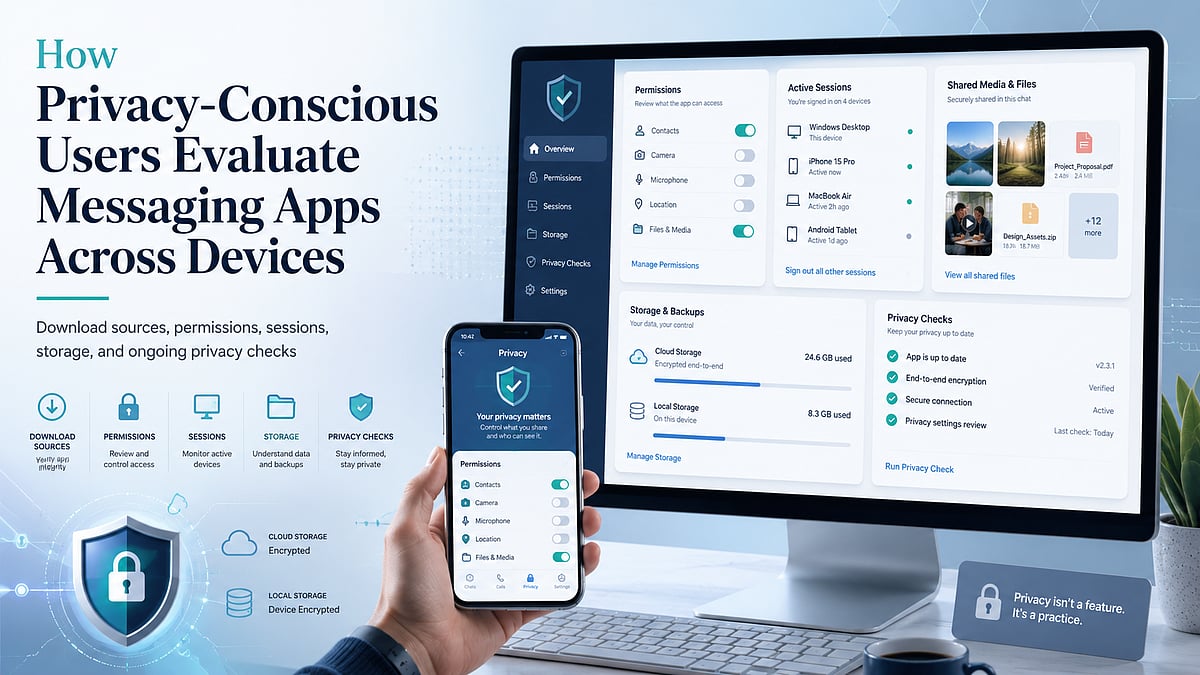
    However, a privacy-focused reputation should not be accepted solely on the basis of marketing claims. Security depends on the complete user journey: where the application is downloaded, which permissions it requests, how login sessions are managed, where files are stored, and whether users regularly review account settings.

    A practical assessment therefore begins before installation and continues throughout everyday use. Instead of asking whether one messaging app is universally “safe,” users should examine the specific risks created by their devices, habits, account configuration, and shared content.

    Why Privacy Expectations Are Changing

    The boundary between personal and professional communication has become increasingly difficult to maintain. A single messaging account may contain family conversations, client discussions, project files, appointment details, and account-recovery information.

    This concentration of data increases the consequences of account compromise. An unauthorized user may not only read recent messages but also gain access to shared documents, saved contacts, group information, and active sessions on other devices.

    Multi-device access introduces another layer of exposure. Logging in on a work computer, home laptop, tablet, and mobile phone can improve convenience, but each device becomes another point that requires protection. Older computers may no longer receive updates. A phone may be lost. A browser session may remain active after a user leaves a shared workspace.

    Privacy expectations are changing because users increasingly understand that security is not determined by one feature. It is affected by account behavior, device maintenance, storage choices, and the way information is shared.

    For this reason, users should evaluate messaging platforms as part of a broader digital workflow rather than treating them as isolated communication tools.

    Evaluating the Download Source

    The first security decision occurs before the application is installed. Users should identify where the download comes from and whether the page provides enough information to make an informed choice.

    Recognized app stores generally provide structured details such as the publisher name, supported operating system, update history, permission information, and user feedback. A developer-managed website may provide direct desktop installers, release notes, or links to platform-specific versions.

    Third-party download pages require additional caution. Some are legitimate software directories, while others use misleading buttons, aggressive advertising, or modified installation packages. A page may display several “Download” buttons that lead to unrelated programs.

    Users should compare the domain name carefully, especially when similar spellings, additional hyphens, or unusual subdomains appear. A familiar logo does not confirm that the page is controlled by the application developer.

    The file itself also provides useful clues. Windows installers commonly use extensions such as .exe or .msi, while Android installation files may use .apk. An unexpected archive, script, or executable format should be treated cautiously. Users should also look for consistent version numbers, platform descriptions, release dates, and installation instructions.

    Chinese-speaking users researching 纸飞机下载 resources should therefore evaluate the surrounding page rather than relying on the keyword alone. The page should clearly explain the intended platform, file type, version context, and installation process without forcing unrelated downloads.

    The objective is not simply to find a working installer. It is to understand what is being downloaded, where it originated, and whether the source provides transparent information.

    Reviewing Permissions Before First Use

    After installation, the next step is to review the permissions requested by the application. Messaging apps may need access to certain device functions, but users should understand why each permission is being requested.

    Contact access can simplify the process of finding people who already use the service. However, users who prefer manual contact management may decide not to provide full address-book access.

    Camera and microphone permissions are normally associated with photo capture, voice messages, video calls, and scanning functions. These permissions can often be enabled only when a feature is used rather than granted permanently during setup.

    Storage or photo-library access allows users to send and save images, videos, and documents. Modern operating systems may offer limited access, allowing the user to select individual files rather than exposing an entire library.

    Notification permissions affect whether message previews appear on a locked screen. Users who receive sensitive work or personal messages may prefer to hide message content while still allowing a generic notification.

    Background activity can help messages and calls arrive promptly, but it may also affect battery usage and data consumption. Users should review whether the application needs unrestricted background operation on every device.

    The most practical principle is to grant only the permissions required for features the user actually intends to use. Permission settings can be revisited later through the operating system.

    Managing Desktop and Mobile Sessions

    Multi-device messaging is useful only when users maintain control over their active sessions. An account may remain logged in on devices that are no longer regularly used, including old phones, office computers, tablets, or borrowed laptops.

    Users should periodically open the account’s device or session management area and review the available information. Depending on the platform, this may include the device type, operating system, approximate location, IP information, or the time of recent activity.

    An unfamiliar session should be investigated promptly. It may reflect a forgotten device, a changed network location, or unauthorized access. When there is uncertainty, ending the session and changing relevant security credentials is generally safer than leaving it active.

    Old devices should also be removed after they are sold, recycled, returned to an employer, or given to another person. Logging out from the device itself may not always be sufficient if the user no longer has physical access to it.

    People researching localized resources such as 纸飞机中文版 should also consider whether the available guidance explains session management clearly in their preferred language. Download and interface localization are useful, but users must also understand how to identify devices, terminate sessions, and respond to unusual account activity.

    Public and shared computers present additional risks. Users should avoid saving passwords, allowing automatic login, or leaving desktop sessions open after use. Where possible, temporary access should be followed by a remote session review from a trusted personal device.

    Understanding Cloud Data and Device-Specific Data

    Users should distinguish between information stored in the cloud and information stored locally on a device.

    Cloud-based messages may remain available when a user logs in from another phone or computer. This provides continuity, but it also means that deleting an application from one device may not remove account data stored elsewhere.

    Local data includes cached images, downloaded videos, exported conversations, temporary files, thumbnails, and documents opened through another application. These files may remain on a computer or phone even after the conversation is deleted or the messaging app is uninstalled.

    The exact behavior varies across platforms and operating systems. Users should avoid assuming that every conversation uses the same encryption method, that every deletion is immediately synchronized, or that uninstalling an app closes the account.

    Instead, they should review the application’s privacy documentation, deletion controls, storage settings, and account-removal process. When the difference between “delete app,” “clear cache,” “delete chat,” and “delete account” is unclear, users should treat them as separate actions.

    Controlling Shared Media and Local Storage

    Photos, videos, voice messages, and documents can consume significant storage space and create privacy risks when automatically saved to a device.

    Automatic media downloads should be configured according to the network and content type. Users may allow images on Wi-Fi while requiring manual approval for large videos or documents. This reduces both storage usage and exposure to unwanted files.

    Desktop users should identify the default download directory. Sensitive files should not remain indefinitely in a general Downloads folder that other applications or users can access.

    Mobile users should check whether received images are automatically copied into the device’s photo gallery. A file intended for a private conversation may become visible to gallery apps, backup services, or other people using the device.

    Cache clearing can remove temporary copies and reduce storage use, but it should not be treated as a substitute for account deletion or secure file management. Important documents should be intentionally backed up to a controlled location before temporary files are removed.

    A useful routine is to review large files, clear outdated media, remove duplicate documents, and separate important records from casual chat attachments.

    Protecting Verification Codes and Recovery Information

    Verification codes are designed to confirm a login or account change. They should be entered only into the relevant application or trusted login screen.

    Users should never send a verification code through chat, even when the request appears to come from a friend, administrator, technical-support agent, or community moderator. Attackers may impersonate trusted contacts and claim that the code is required to restore a group, confirm an account, or solve a technical problem.

    Unexpected login codes are also warning signs. They may indicate that another person is attempting to access the account. Users should review active sessions and account-security settings when unexplained codes arrive.

    Recovery information deserves the same attention. A recovery email address should be current, independently secured, and protected by a strong password. Where additional account-security options are available, users should understand how they work before enabling them.

    Support communication should be verified carefully. Genuine support processes should not require users to disclose passwords, verification codes, or complete recovery credentials through an ordinary chat conversation.

    A Practical Messaging App Evaluation Framework

    Privacy-conscious users can apply a simple framework before committing to a messaging platform.

    • Download source: Determine whether platform versions, file types, publisher details, and update information are clearly presented.
    • Permissions: Review access to contacts, camera, microphone, storage, notifications, and background activity. Grant only what is needed.
    • Login devices: Check whether active sessions can be viewed and ended remotely. Review the list regularly.
    • Privacy settings: Examine message previews, contact visibility, group invitations, blocked users, and account-discovery options.
    • File storage: Understand where images, videos, documents, exports, and cached data are saved on each device.
    • Update mechanism: Confirm whether updates arrive through an app store, built-in updater, or manual installer. Outdated versions may miss important security improvements.
    • Help and support: Look for accessible documentation covering account recovery, session management, privacy controls, and deletion procedures.

    This framework does not require advanced technical knowledge. It encourages users to ask practical questions that reveal how the application behaves across the entire account lifecycle.

    Conclusion

    Messaging app security is not a one-time setup task. It requires continuing attention to devices, permissions, login sessions, recovery information, and shared files.

    Users who review only promotional privacy claims may overlook risks introduced by unofficial downloads, excessive permissions, forgotten desktop sessions, automatic media storage, or exposed verification codes.

    A stronger approach is to evaluate each stage of use: installation, account setup, device access, file management, updates, and recovery. By repeating these checks periodically, users can reduce avoidable exposure while maintaining the convenience of cross-device communication.

    Six recurring checks help users evaluate messaging apps throughout the account lifecycle.

  • Pi Network Revamps Mining App and Prepares for Protocol V25 Launch Amid Token Price Weakness

    Pi Network Revamps Mining App and Prepares for Protocol V25 Launch Amid Token Price Weakness

    Pi Network has rolled out a redesigned mining app interface, improving navigation and user experience, while confirming that Protocol V25 will go live on July 22. The update introduces long-awaited features like dark mode and reorganizes key ecosystem tools into a single, streamlined menu. However, the PI token continues to face selling pressure as large token unlocks loom.

    Pi Network Mining App Redesign

    The Core Team announced that the redesign is the first phase of a broader refresh for the mining application. Users can now access the new menu via the hamburger icon at the top-left corner of the app. The consolidated menu groups the Mainnet Checklist, mining information, featured Pi Apps, and other ecosystem services, eliminating the need to navigate through multiple screens. A dark mode option has also been added, a feature frequently requested by the community.

    According to the team, the redesign was driven by extensive feedback from the over 60 million engaged Pioneers. To ensure stability, the changes are being rolled out gradually, with future updates planned to refine the interface further while preserving existing functionality. The developers intend to collect additional community feedback before expanding the redesign.

    Protocol V25 Privacy Upgrades

    Pi Network has confirmed that Protocol V25 will activate on July 22, focusing on network stability, reliability, and privacy-preserving smart contracts. The upgrade introduces BN254 cryptography and Poseidon hashing, enabling developers to build zero-knowledge applications that protect sensitive information while keeping private data off the public blockchain.

    The Core Team emphasized that the upgrade should improve smart contract efficiency as more decentralized applications join the ecosystem. This could give developers greater flexibility in building privacy-focused services on Pi Network. However, the long-term impact will depend on developer adoption, ecosystem growth, and network performance after deployment.

    PI Token Under Pressure

    Despite the technical progress, the PI token remains under pressure. The token recently lost the crucial $0.10 support level, falling to a record low slightly above $0.07. A brief recovery pushed the price toward $0.085, but sellers quickly regained control, sending PI back to around $0.073 before a modest recovery to $0.078.

    Data from PiScan indicates that nearly 130 million PI tokens are set to unlock over the next month. This additional supply could intensify short-term selling pressure if more holders decide to move their tokens to the market.

    What Lies Ahead

    Pi Network is combining product development with infrastructure upgrades as it prepares for Protocol V25. While the redesigned app and forthcoming privacy features are positive steps, the market will likely await stronger ecosystem growth and sustained developer activity before confirming any lasting recovery in the PI token. Participants will closely monitor the upgrade’s impact on adoption and network activity.

  • Android Productivity Boost: Essential Apps and Hidden Feature Guide

    Android Productivity Boost: Essential Apps and Hidden Feature Guide

    Introduction

    Hidden apps on Android are not always malicious. Many users hide apps for privacy, while manufacturers offer features like Secure Folder or Private Space. However, hidden apps can also indicate unwanted software. Knowing how to locate them helps improve device security, manage storage, and ensure you have complete control over everything installed on your smartphone.

    Search the App Drawer

    Start by opening your phone’s app drawer. Use the search bar to look for the app by name. Then check the menu or Home Screen Settings for options like “Hidden Apps” or “Hide Apps.” Many Android launchers, including Samsung, OnePlus, and Xiaomi, provide built-in tools to hide or reveal applications.

    Check Installed Apps

    Visit Settings > Apps > See All Apps to view every installed application. This list usually includes apps hidden from the launcher. Review unfamiliar apps, recently installed software, and disabled applications. Sorting by installation date or usage can help identify suspicious or forgotten apps occupying storage and system resources.

    Explore Private Spaces

    Modern Android devices offer secure storage for apps. Samsung includes Secure Folder, Google Pixel offers Private Space, while brands like OnePlus and Xiaomi provide Hidden Space or Second Space. These features require authentication, allowing users to keep sensitive apps separate from the main app drawer for enhanced privacy.

    Use Google Play Store

    Open the Google Play Store, tap your profile, and select Manage Apps & Device. Under the Installed section, you’ll find all apps currently linked to your device. This method helps verify whether an app is installed even if it doesn’t appear on the home screen or app drawer.

    Look for Suspicious Apps

    Watch for apps with generic names, blank icons, excessive permissions, or unusually high battery and data usage. Also, review Device Administrator apps in your security settings. These indicators may reveal hidden spyware or unwanted software that deserves further investigation or removal to protect your privacy.

    Final Tips

    Regularly review installed apps, update Android, and uninstall software you no longer need. If you suspect malware, restart in Safe Mode or scan your device with a trusted security app. By routinely checking hidden and installed apps, you can maintain better security, performance, and privacy on your Android smartphone.

  • Top 6 Telegram Hacks to Boost Privacy and Productivity

    Top 6 Telegram Hacks to Boost Privacy and Productivity

    Boost Your Telegram Experience with These Simple Hacks

    Telegram is one of the most popular messaging apps, but many users don’t tap into its full potential. Here are six easy hacks every Telegram user should know, from organizing chats to protecting your privacy.

    1. Use Saved Messages as Your Personal Notebook

    Treat the Saved Messages chat as your digital filing cabinet. Store important documents, links, photos, voice notes, and reminders—all synced across devices. This eliminates the need for third-party note apps or cloud storage for quick access.

    2. Organize with Chat Folders

    Reduce clutter by creating custom Chat Folders for work, family, friends, and channels. This keeps conversations separate, improves productivity, and helps you instantly find what matters most—especially if you manage many groups or business conversations daily.

    3. Automate Cleanup with Auto-Delete Messages

    Enable Auto-Delete for specific chats to remove messages after a set period. It boosts privacy, clears history, and saves storage. Perfect for sensitive discussions or temporary chats that don’t need to stay forever.

    4. Hide Your Phone Number

    Enhance privacy by limiting who can see your phone number. Choose from Everyone, My Contacts, or Nobody. Communicate through your Telegram username to stay connected without sharing personal contact info.

    5. Pin Important Chats

    Keep priority conversations at the top of your list by pinning them. Whether family, work, or frequently used groups, pinned chats ensure you never miss critical messages and can respond faster.

    6. Manage Storage

    Go to Telegram’s Storage settings to clear cached media, set auto-cache limits, and handle downloads. Regular cleanups free up space without deleting chats, keeping the app running smoothly.

  • WhatsApp Communities Update Hides Numbers from Strangers but Not Admins

    WhatsApp Communities Update Hides Numbers from Strangers but Not Admins

    WhatsApp’s latest update for Communities introduces a privacy feature that allows users to hide their phone numbers from strangers in large groups. However, the feature does not offer complete anonymity. Community admins, saved contacts, and anyone with a previous chat history can still view members’ phone numbers.

    Meta launched this privacy update in July 2023, aiming to protect users during large community discussions. The feature works exclusively within Communities, which can support thousands of members. In standard WhatsApp groups, all participants can still see each other’s phone numbers unless separate privacy settings are applied.

    Meta designed the update to reduce unnecessary exposure while maintaining moderation tools for administrators. Every community admin retains full access to member phone numbers, enabling them to moderate, manage, and communicate as needed. Saved contacts and individuals who have had direct conversations with a member also continue to see phone numbers without restrictions.

    The privacy feature has important limitations that users should consider before joining a Community. If a user joins a standard WhatsApp group, these protections are removed. Additionally, Community privacy never hides numbers from administrators or existing contacts. Members cannot choose specific people who should or should not view their numbers; the system operates under fixed visibility rules rather than custom controls.

    Privacy experts have raised concerns as WhatsApp expands identity protection features. Reporting indicates that username-based messaging, currently under development, could further reduce phone number sharing. However, Indian regulators have expressed concerns about potential impersonation and online fraud risks before a wider rollout.

    WhatsApp’s Community-based privacy rules offer stronger protection than traditional group chats, but the feature should not be viewed as complete anonymity. Members still share phone numbers with admins, trusted contacts, and previous chat connections. This update represents a practical privacy improvement rather than a full identity shield.

  • Apple’s Biggest AI Upgrade Yet: Smarter Siri Arrives Across 5 Platforms

    Apple’s Biggest AI Upgrade Yet: Smarter Siri Arrives Across 5 Platforms

    Apple Intelligence is getting its most significant update to date, with a smarter Siri now spanning iPhone, iPad, Mac, Apple Watch, and Vision Pro. The upgrade brings enhanced conversational abilities, deeper app integration, and new features like Visual Intelligence, Live Translation, and stronger privacy protections.

    Originally introduced alongside iOS 18 in 2024, Apple Intelligence has evolved to deliver on its promise of an AI-powered personal assistant. The latest software cycle—iOS 27, iPadOS 27, macOS 27, watchOS 27, and visionOS 27—finally rolls out the previously delayed Siri improvements. Apple now positions Siri as a digital companion that understands personal context, moving beyond simple voice commands.

    Siri Gets Smarter

    The redesigned Siri can search across messages, emails, calendars, photos, and supported apps, then perform actions spanning multiple apps simultaneously. For example, it can pull restaurant recommendations from old texts, retrieve hotel confirmations from email, and locate travel photos without manual searching. For broader questions, Siri now pulls current information from the web.

    Apple Intelligence also integrates intelligent tools throughout the operating system. Writing tools offer proofreading, rewriting, summarizing, and content generation, alongside faster dictation. Image Playground generates original artwork in various styles, while Genmoji creates custom emoji from text prompts. The Photos app now includes object removal, natural language search, and AI-assisted memory creation.

    New Features Across Devices

    Visual Intelligence lets users interact with whatever appears on screen—screenshots, photos, and webpages all become searchable through plain-language prompts. Apple is also adding receipt recognition, aimed at simplifying bill-splitting in future updates. Live Translation adds real-time translation to Messages, FaceTime, and Phone calls. Shortcuts now builds automations from plain-English descriptions. Accessibility tools gain richer image descriptions, smarter Voice Control, and instant reading summaries.

    Hardware limitations remain, as the underlying models require significant processing power. Support covers iPhone 15 Pro and newer, iPad models with A17 Pro or M-series chips, and Apple Silicon Macs. Apple’s most capable on-device model is reserved for select premium hardware with higher memory.

    Privacy and Availability

    Rollout timing varies by region. Siri’s upgraded features won’t launch immediately in the European Union, citing privacy considerations, and China remains outside the initial rollout. Apple says it continues expanding language support elsewhere. Privacy remains a central focus: most requests are processed on-device, while heavier tasks route through Private Cloud Compute without retaining personal data.